bittersecurity/decepticon
自主LLM红队代理,在隔离的Kali沙箱内规划并执行完整攻击链——侦察、利用、权限提升、横向移动和C2。
[](README.md)
[](README_KO.md)
<div align="center">
<img src="https://assets.kitploit.com/production/public/readmes/57385/c84f728f1380ceaf71e5368f94ae06af131fc7a6572dea112f43e7a0664b4439/ca68f6c32104ce0283c07aa0dc15516e8ce9b814807ca9a5b658185c0be24ed8-display-v1.webp" alt="Decepticon Logo">
</div>
<h1 align="center">Decepticon — 自主红队智能体</h1>
<p align="center"><i>"又一个 AI 黑客?让我们猜猜——它运行 nmap 然后写一份报告。"</i></p>
<div align="center">
<a href="https://trendshift.io/repositories/15987?utm_source=repository-badge&utm_medium=badge&utm_campaign=badge-repository-15987" target="_blank" rel="noopener noreferrer"><img src="https://trendshift.io/api/badge/repositories/15987" alt="BitterSecurity%2FDecepticon | Trendshift" width="250" height="55"/></a>
<a href="https://trendshift.io/repositories/15987?utm_source=trendshift-badge&utm_medium=badge&utm_campaign=badge-trendshift-15987" target="_blank" rel="noopener noreferrer"><img src="https://trendshift.io/api/badge/trendshift/repositories/15987/daily?language=Python" alt="BitterSecurity%2FDecepticon | Trendshift" width="250" height="55"/></a>
<br/>
<a href="https://github.com/BitterSecurity/Decepticon/blob/main/LICENSE">
<img src="https://img.shields.io/github/license/BitterSecurity/Decepticon?style=for-the-badge&color=blue" alt="License: Apache 2.0">
</a>
<a href="https://github.com/BitterSecurity/Decepticon/stargazers">
<img src="https://img.shields.io/github/stars/BitterSecurity/Decepticon?style=for-the-badge&color=yellow" alt="Stargazers">
</a>
<a href="https://github.com/BitterSecurity/Decepticon/graphs/contributors">
<img src="https://img.shields.io/github/contributors/BitterSecurity/Decepticon?style=for-the-badge&color=orange" alt="Contributors">
</a>
<br/>
<a href="https://discord.gg/TZUYsZgrRG">
<img src="https://img.shields.io/badge/Discord-Join%20Us-7289DA?logo=discord&logoColor=white&style=for-the-badge" alt="Join us on Discord">
</a>
<a href="https://decepticon.red">
<img src="https://img.shields.io/badge/Website-decepticon.red-brightgreen?logo=vercel&logoColor=white&style=for-the-badge" alt="Website">
</a>
<a href="https://docs.decepticon.red">
<img src="https://img.shields.io/badge/Docs-docs.decepticon.red-8B5CF6?logo=bookstack&logoColor=white&style=for-the-badge" alt="Documentation">
</a>
<a href="https://app.decepticon.red">
<img src="https://img.shields.io/badge/Live%20App-app.decepticon.red-FF2D55?logo=rocket&logoColor=white&style=for-the-badge" alt="Live hosted app">
</a>
</div>
<br/>
<div align="center">
<p><strong>商业产品演示</strong></p>
<video src="https://github.com/user-attachments/assets/7a9b233c-fd72-4633-a408-03953c345a15" width="800" controls></video>
</div>
<div align="center">
### ☁️ 不想自托管?**Decepticon 已在云端上线。**
跳过 Docker 配置——直接在浏览器中运行自主红队演练。
<a href="https://app.decepticon.red">
<img src="https://img.shields.io/badge/Launch%20the%20Live%20App-app.decepticon.red-FF2D55?logo=rocket&logoColor=white&style=for-the-badge" alt="Launch the live app at app.decepticon.red">
</a>
</div>
<div align="center">
<p><strong>开源 CLI 演示</strong></p>
<video src="https://github.com/user-attachments/assets/b3fd40d8-e859-4a39-97f4-bd825694ad96" width="800" controls></video>
</div>
---
## 安装
**前置要求**:[Docker](https://docs.docker.com/get-docker/) 和 Docker Compose v2。
支持 macOS(Apple Silicon + Intel)、Linux(amd64 + arm64)和 Windows(amd64 + arm64)——可通过 PowerShell 原生运行,或通过 WSL2(Ubuntu / Kali)运行。
**macOS / Linux / WSL2**
```bash
curl -fsSL https://decepticon.red/install | bash
decepticon onboard # Interactive setup wizard (provider, API key, model profile)
decepticon # Start the core stack and drop into the terminal CLI
```
默认启动会拉起核心管理平面(LiteLLM、PostgreSQL、Neo4j、Skillogy、LangGraph、sandbox)并启动终端 CLI。专用工作负载(BloodHound CE、Sliver C2、REA/Ghidra 等)和 Web 仪表盘按需启动——编排器通过 `ops_start("ad")` 等命令生成专用组件,你可以在 CLI 内使用 `/web` 启动仪表盘(参见 [Web Dashboard](https://github.com/bittersecurity/decepticon/blob/main/docs/web-dashboard.md))。
**Windows(PowerShell,原生)**
```powershell
irm https://decepticon.red/install.ps1 | iex
decepticon onboard
decepticon
```
→ **[快速开始](https://github.com/bittersecurity/decepticon/blob/main/docs/getting-started.md)** · **[完整安装指南](https://github.com/bittersecurity/decepticon/blob/main/docs/setup-guide.md)**
### 在交互式 CLI 中
输入 `/` 浏览命令,用上/下方向键选择,然后按 Enter。Tab 补全
选中的命令;别名也会出现在帮助和自动补全中。
| 命令 | 用途 |
|---------|-----|
| `/help`、`/shortcuts` | 查看命令或键盘快捷键 |
| `/model`、`/status` | 选择已配置的模型或查看会话连接 |
| `/plan` | 进入可选的 Plan 模式,然后发送你的规划消息 |
| `/mode red`、`/mode blue` | 返回 Red 模式或选择 Blue 调查 |
| `/new` | 空闲时在同一任务和模式下开始新对话 |
| `/sessions`、`/resume` | 浏览已保存的对话或继续暂停的工作 |
| `/version`(`/about`)、`/pwd`(`/cwd`) | 查看运行版本和工作区路径 |
| `/quit`、`/exit` | 退出聊天;服务和服务器工作继续运行 |
Enter 发送;Shift+Enter、Alt+Enter 或 Ctrl+J 添加一行。上/下方向键在输入区
首行/末行调出输入历史;Ctrl+R 搜索历史。Esc 先关闭聚焦的 UI,
然后暂停活动工作;`/resume` 继续该工作。Ctrl+A 移动到当前行
开头。在 `/new` 之前使用 `/queue` 查看等待中的消息。
`/new` 保留已保存的对话和终端回滚缓冲区;它不会创建
另一个任务或更改目标授权。`/plan` 和 `/new` 不接受
参数。在 Web 终端中,使用仪表板的模式控件。
上述新快捷键和斜杠命令便捷功能描述的是当前 `main`,包括
未发布的更改。源代码合并不会更新已安装的镜像。参见
[版本历史](https://github.com/bittersecurity/decepticon/blob/main/CHAGELOG.md)、[完整 CLI 参考](https://github.com/bittersecurity/decepticon/blob/main/docs/cli-reference.md#slash-commands)
和[升级行为](https://github.com/bittersecurity/decepticon/blob/main/docs/cli-experience.md#upgrade-behavior)。
### 从 Claude Code 或 Codex 使用
启动 Decepticon 后,在你的编码代理中注册其 MCP 服务器:
```bash
claude mcp add --scope user decepticon -- decepticon mcp serve
codex mcp add decepticon -- decepticon mcp serve
```
使用你已安装的编码代理对应的命令,然后运行
`decepticon skill install`,将操作指南添加到两个代理中。有关 Agent Skill、
工具工作流和源码安装路径,请参阅
[外部代理指南](https://github.com/bittersecurity/decepticon/blob/main/docs/integrations/external-agents.md)。
### 作为库使用(pip)
要在这些代理之上构建——无论是产品、研究集成,还是自定义编排器?从 PyPI 安装 SDK:
```bash
pip install decepticon # core SDK
pip install "decepticon[neo4j]" # + the knowledge-graph attack-chain tools
```
`decepticon` 是一个**客户端 SDK**:它提供 agent 工厂、中间件、工具和技能,并通过 HTTP 将 LLM 调用和沙箱执行路由到运行时服务(`DECEPTICON_LLM__PROXY_URL`、`SANDBOX_URL`)。运行 agent 仍然需要这些服务——请使用上方的 Docker 栈,或将 URL 指向你自己的等效服务。有关工厂覆盖接口、声明式 `PluginBundle` 插件和安全门控,请参阅 **[Decepticon 作为库使用](https://github.com/bittersecurity/decepticon/blob/main/docs/library-usage.md)**。
---
## 💖 支持 Decepticon
[](https://github.com/sponsors/PurpleCHOIms)
我们正在将 Decepticon 打造为面向 AI 驱动威胁格局的**进攻性疫苗**。如果你相信自主红队演练是通往更强防御的路径,请考虑支持本项目。
---
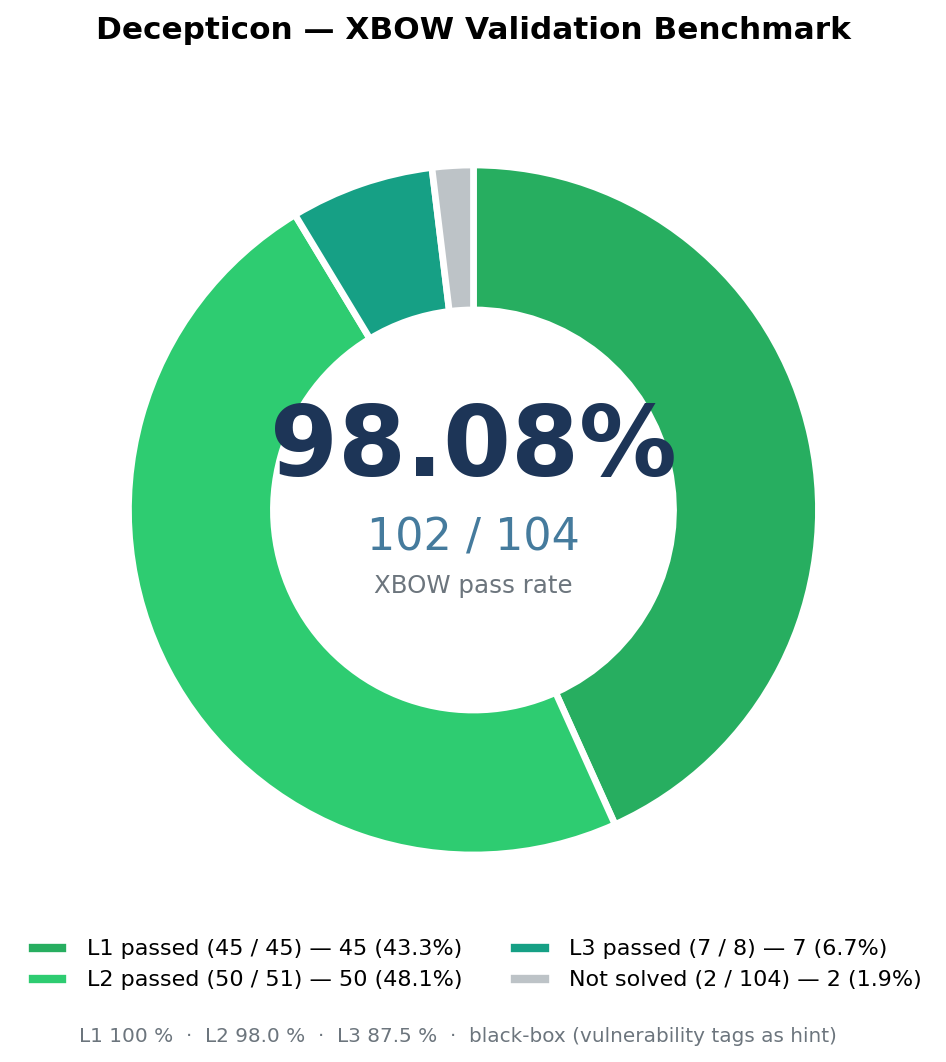
## 基准测试
<div align="center">
<img src="https://assets.kitploit.com/production/public/readmes/57385/79abf1929da418d23947d8b49eb683ca3e052901d3ef0bec96b4a80628bd3618/d442be9566c8c2582382241af1924ecd058fb5b963074d7150d86b4b2c10e57d-display-v1.webp" alt="Decepticon — XBOW 通过率 102/104 (98.08%)" width="560">
</div>
| 基准测试 | 难度 | 通过率 |
|-----------|------------|-----------|
| [XBOW validation-benchmarks](https://github.com/BitterSecurity/xbow-validation-benchmarks) | 简单(Level 1) | **45 / 45**(100 %) |
| [XBOW validation-benchmarks](https://github.com/BitterSecurity/xbow-validation-benchmarks) | 中等(Level 2) | **50 / 51**(98.0 %) |
| [XBOW validation-benchmarks](https://github.com/BitterSecurity/xbow-validation-benchmarks) | 困难(Level 3) | **7 / 8**(87.5 %) |
| [XBOW validation-benchmarks](https://github.com/BitterSecurity/xbow-validation-benchmarks) | **所有级别** | **102 / 104**(98.08 %) |
- **[完整的逐挑战索引、攻击类别矩阵和 LangSmith 追踪](https://github.com/bittersecurity/decepticon/blob/main/benchmark/results/README.md)**
- **[与其他 AI 渗透测试 agent 的对比(Strix、PentestGPT、MAPTA、Cyber-AutoAgent、XBOW 商业版等)](https://github.com/bittersecurity/decepticon/blob/main/docs/benchmark-comparison.md)**
---
## 什么是 Decepticon?
“AI + 黑客”领域充斥着运行 nmap 并打印报告的演示。这不是那种东西。
**Decepticon 是一个专业的自主红队 agent。** 它执行真实的攻击链——侦察、利用、权限提升、横向移动、C2——以真实对手的方式,而不是扫描器的方式。
每次红队演练都从操作员批准的目标和 RoE 开始。可选的 Plan 模式会在只读 RoE 之外增加 Soundwave 的讨论和七份规划文档。执行编排器负责 OPPLAN;红队演练并不需要 Plan。
→ **[演练工作流深入解析](https://github.com/bittersecurity/decepticon/blob/main/docs/engagement-workflow.md)**
---
## 为什么选择 Decepticon?
**真实的杀伤链,而非勾选式扫描。** Decepticon 读取 OPPLAN,并通过任何打开的路径追求目标——转向、适应、串联技术。
**真正可交互的 shell。** 真实的进攻工具是交互式的(`msfconsole`、`sliver-client`、`evil-winrm`)。Decepticon 在持久化 tmux 会话中运行每条命令,并自动检测提示符——因此当工具进入交互式提示符时,agent 会直接发送后续命令,无需变通方案。
**强化的沙箱隔离。** 所有命令都在专用作战网络(`sandbox-net`)上的 Kali Linux 沙箱内运行,与管理平面(`decepticon-net`)分离。LangGraph 通过 Docker socket 驱动沙箱。→ **[架构](https://github.com/bittersecurity/decepticon/blob/main/docs/architecture.md)**
**进攻服务于防御。** 计划中的[进攻性疫苗](https://github.com/bittersecurity/decepticon/blob/main/docs/offensive-vaccine.md)循环将通过攻击 → 防御 → 验证的周期,将发现转化为防御改进。
---
## 架构
<div align="center">
<img src="https://raw.githubusercontent.com/bittersecurity/decepticon/main/assets/decepticon_infra.svg" alt="Decepticon 基础设施" width="680">
</div>
双网络设计。**常驻**管理平面(LiteLLM、PostgreSQL、Skillogy、LangGraph)和常驻沙箱平面在整个交战期间保持运行;其他所有内容均为**动态生成**——Web 仪表盘通过 CLI 在 `/web` 上启动,专业工作负载(BloodHound CE、Sliver C2、REA/Ghidra 等)仅在编排器调用 `ops_start(...)` 时启动(参见 [ADR-0006](https://github.com/bittersecurity/decepticon/blob/main/docs/adr/0006-agent-driven-container-lifecycle.md))。网络:管理平面位于 `decepticon-net`;沙箱 + C2 服务器 + 目标位于 `sandbox-net`。Neo4j 采用双宿主,因此(位于管理平面上的)智能体可以持久化从沙箱内部写入的发现结果。
→ **[架构深入解析](https://github.com/bittersecurity/decepticon/blob/main/docs/architecture.md)** · **[知识图谱](https://github.com/bittersecurity/decepticon/blob/main/docs/knowledge-graph.md)**
---
## 智能体
16 个专业智能体按杀伤链阶段组织,每个目标都使用全新的上下文窗口——不会累积噪声。
编排 · 侦察 · 利用 · 后利用 · 漏洞研究 · 领域专家(AD、云、智能合约、逆向、分析师)。
→ **[完整智能体名册与中间件栈](https://github.com/bittersecurity/decepticon/blob/main/docs/agents.md)**
---
## 模型与提供商
基于层级、感知凭据的回退链。你按优先级顺序声明自己拥有哪些凭据;Decepticon 据此在每个层级构建主用→回退链。
| 配置档 | 每个智能体的层级 | 使用场景 |
|---------|----------------|----------|
| **eco**(默认) | 按智能体(编排器/利用器/修补器/分析师为 HIGH,执行为 MID,侦察/soundwave 为 LOW) | 生产 |
| **max** | 每个智能体均为 HIGH | 高价值目标 |
| **test** | 每个智能体均为 LOW | 开发 / CI |
**层级映射提供商**:Anthropic、OpenAI、Google Gemini、MiniMax、DeepSeek、xAI、Mistral、OpenRouter、Nvidia NIM、Ollama(本地)。
**订阅 OAuth**:Claude Max/Pro/Team、ChatGPT Pro/Plus/Team、Gemini Advanced、Copilot Pro、SuperGrok、Perplexity Pro。
通过 `decepticon onboard` 进行配置。 → **[完整模型参考与回退示例](https://github.com/bittersecurity/decepticon/blob/main/docs/models.md)**
---
## 文档
| 主题 | 文档 |
|-------|-----|
| 安装与首次交战 | [快速入门](https://github.com/bittersecurity/decepticon/blob/main/docs/getting-started.md) |
| 完整设置、OAuth、提供商、仪表盘 | [设置指南](https://github.com/bittersecurity/decepticon/blob/main/docs/setup-guide.md) |
| 编码智能体 CLI 封装器 | [Decepticon 技能](https://github.com/bittersecurity/decepticon/blob/main/skills/decepticon/SKILL.md) |
| 文档与仓库地图 | [文档索引](https://github.com/bittersecurity/decepticon/blob/main/docs/README.md) |
| 所有 CLI 命令与键盘快捷键 | [CLI 参考](https://github.com/bittersecurity/decepticon/blob/main/docs/cli-reference.md) |
| 所有 `make` 目标 | [Makefile 参考](https://github.com/bittersecurity/decepticon/blob/main/docs/makefile-reference.md) |
| 智能体名册与中间件 | [智能体](https://github.com/bittersecurity/decepticon/blob/main/docs/agents.md) |
| REA/Ghidra 逆向工程 | [REA 逆向](https://github.com/bittersecurity/decepticon/blob/main/docs/features/rea-reversing.md) |
| 本地防御监控 | [蓝队单元](https://github.com/bittersecurity/decepticon/blob/main/docs/features/blue-cell.md) |
| 模型配置档与回退链 | [模型](https://github.com/bittersecurity/decepticon/blob/main/docs/models.md) |
| 技能系统与格式规范 | [技能](https://github.com/bittersecurity/decepticon/blob/main/docs/skills.md) |
| Web 仪表盘功能与设置 | [Web 仪表盘](https://github.com/bittersecurity/decepticon/blob/main/docs/web-dashboard.md) |
| 扩展能力、技能、工作流与客户端 | [扩展契约](https://github.com/bittersecurity/decepticon/blob/main/docs/design/extension-contract.md) |
| 系统架构与网络隔离 | [架构](https://github.com/bittersecurity/decepticon/blob/main/docs/architecture.md) |
| Neo4j 知识图谱 | [知识图谱](https://github.com/bittersecurity/decepticon/blob/main/docs/knowledge-graph.md) |
| 端到端交战工作流 | [交战工作流](https://github.com/bittersecurity/decepticon/blob/main/docs/engagement-workflow.md) |
| 攻击性疫苗循环 | [攻击性疫苗](https://github.com/bittersecurity/decepticon/blob/main/docs/offensive-vaccine.md) |
| 发布历史 | [变更日志](https://github.com/bittersecurity/decepticon/blob/main/CHAGELOG.md) |
| 为 Decepticon 做贡献 | [贡献](https://github.com/bittersecurity/decepticon/blob/main/docs/contributing.md) |
---
## 贡献
```bash
git clone https://github.com/BitterSecurity/Decepticon.git
cd Decepticon
make dogfood # Full OSS UX (launcher → onboard → CLI) on local code
make dev # Backend hot-reload (compose watch) — daily dev loop
```
→ **[贡献指南](https://github.com/bittersecurity/decepticon/blob/main/docs/contributing.md)**
---
## 社区
加入 [Discord](https://discord.gg/TZUYsZgrRG) —— 提问、分享交战日志、讨论技术。
---
## 免责声明
未经系统所有者明确书面授权,请勿在任何系统或网络上使用本项目。未经授权访问计算机系统属于违法行为。您需对自己的行为承担全部责任。作者和贡献者对任何滥用行为不承担任何责任。
---
## 许可证
[Apache-2.0](https://github.com/bittersecurity/decepticon/blob/main/LICENSE)
---
## 致谢
感谢 Decepticon 所基于、集成并从中学习的各个项目的维护者和贡献者。
| 项目 | 在 Decepticon 中的作用 |
|---------|--------------------|
| [REA](https://github.com/morluto/rea) 和 [Ghidra](https://github.com/NationalSecurityAgency/ghidra) | 可选的逆向工程工作负载和基于证据的二进制分析。[集成详情](https://github.com/bittersecurity/decepticon/blob/main/docs/features/rea-reversing.md)。 |
| [Deep Agents](https://github.com/langchain-ai/deepagents) 和 [LangGraph](https://github.com/langchain-ai/langgraph) | 智能体框架、编排、流式传输和持久化执行状态。 |
| [LiteLLM](https://github.com/BerriAI/litellm) | 模型网关和提供商路由。 |
| [insane-search](https://github.com/fivetaku/insane-search) | 为沙箱 Web 访问而改编的上游引擎。[改编说明](https://github.com/bittersecurity/decepticon/blob/main/packages/decepticon/decepticon/sandbox_web/NOTICE.md)。 |
| [Playwright](https://github.com/microsoft/playwright) | 用于 Web 调查的浏览器自动化。 |
| [Caddy](https://github.com/caddyserver/caddy) 和 [Fluent Bit](https://github.com/fluent/fluent-bit) | 本地 Blue 传感器入口和日志收集。[Blue Cell 架构](https://github.com/bittersecurity/decepticon/blob/main/docs/features/blue-cell.md)。 |
| [Ink](https://github.com/vadimdemedes/ink)、[Bubble Tea](https://github.com/charmbracelet/bubbletea) 和 [Huh](https://github.com/charmbracelet/huh) | 交互式 CLI 渲染和启动器表单。 |
| [PayloadsAllTheThings](https://github.com/swisskyrepo/PayloadsAllTheThings)、[h4cker](https://github.com/The-Art-of-Hacking/h4cker) 和 [Awesome-Hacking](https://github.com/Hack-with-Github/Awesome-Hacking) | 安全知识和学习参考资料。[署名详情](https://github.com/bittersecurity/decepticon/blob/main/THIRD_PARTY_LICENSES.md)。 |
| [XBOW 验证基准](https://github.com/XBOW-engineering/validation-benchmarks) | 基准集成所使用的评估任务。[结果与方法](https://github.com/bittersecurity/decepticon/blob/main/benchmark/results/README.md)。 |
在 CLI 交互设计方面,我们还研究了
[Claude Code](https://code.claude.com/docs/en/interactive-mode)、
[Codex CLI](https://github.com/openai/codex) 和
[Gemini CLI](https://github.com/google-gemini/gemini-cli)。
[CLI 参考评审](https://github.com/bittersecurity/decepticon/blob/main/docs/cli-experience.md)记录了由此产生的选择。
上游许可证和署名声明仍然适用;请参阅
[第三方许可证](https://github.com/bittersecurity/decepticon/blob/main/THIRD_PARTY_LICENSES.md)以及改编代码旁的声明。