<p align="center">
  <picture>
    <source media="(prefers-color-scheme: dark)" srcset="docs/assets/banner-dark.svg">
    <img alt="deadair - SIEM 检测覆盖率健康" src="https://raw.githubusercontent.com/big-comfy/deadair/HEAD/docs/assets/banner-light.svg" width="760">
  </picture>
</p>

<p align="center">
  <a href="https://github.com/alephnull-sh/deadair/actions/workflows/ci.yml"><img alt="CI" src="https://github.com/alephnull-sh/deadair/actions/workflows/ci.yml/badge.svg"></a>
  <a href="https://github.com/alephnull-sh/deadair/releases"><img alt="Release" src="https://img.shields.io/github/v/release/alephnull-sh/deadair"></a>
  <img alt="Go 1.26" src="https://img.shields.io/badge/go-1.26-00ADD8">
  <a href="https://github.com/big-comfy/deadair/blob/main/LICENSE"><img alt="License: Apache-2.0" src="https://img.shields.io/badge/license-Apache--2.0-blue"></a>
</p>

<p align="center">
  <strong>deadair 检查已启用的 SIEM 检测是否仍具备所需的遥测数据。</strong><br>
  它会报告缺失或过期的数据、摄取延迟以及模式不匹配。
</p>

<p align="center">
  本地运行 · 只读 · 无代理 · 不上传遥测数据
</p>

<p align="center">
  <a href="https://alephnull-sh.github.io/deadair/">阅读技术文章</a> ·
  <a href="https://www.detectionengineering.net/i/208193682/detection-engineering-gem">入选 Detection Engineering Weekly</a> ·
  <a href="https://tldrsec.com/p/tldr-sec-341">入选 tl;dr sec #341</a>
</p>

<p align="center">
  <a href="https://alephnull-sh.github.io/deadair/#elastic-demo"><img alt="一次 Elastic 扫描,显示缺失和过期的输入、缺失字段以及延迟事件" src="https://assets.kitploit.com/production/public/readmes/791/fc36f93c2d5fcaceffd370452b89b908a930eb10e810c0187fb3bba59cb156dd.png" width="860"></a>
</p>

<p align="center">
  <sub>一次性 Elastic 实验环境中的缺失字段和延迟事件。打开图片可查看带播放控件的简短录屏,或使用 <code>make record-scan-lab</code> 复现。</sub>
</p>

## 为什么选择 deadair

一条规则可能在所需数据消失后仍处于启用、已调度且无错误的状态。deadair
读取实时规则清单,使用后端原生语义解析每条规则的输入,并
检查其背后的具体数据源。

它能发现:

- 索引、别名或数据流选择器解析不到任何内容的规则;
- 混合选择器规则,其中一个声明的输入已消失,而另一个仍能解析;
- 匹配的数据源全部过期或为空的规则;
- 在 Elastic 上,运行时缺失已声明字段的规则;
- 在 Elastic 和符合条件的 Sentinel Scheduled 规则上,存在摄取滞后的盲区窗口;
- 在 Sentinel 上,已知数据源使用不兼容的 Basic 或 Auxiliary 表计划的规则;
- 在 Elastic 和 OpenSearch 上,健康的遥测数据没有被任何已启用的检测读取。

deadair 支持 Elastic Security、OpenSearch Security Analytics 和 Microsoft Sentinel。

## 快速开始

从 [GitHub Releases](https://github.com/alephnull-sh/deadair/releases) 下载适用于 macOS、Linux 或 Windows 的二进制文件,或使用 Go 安装:

```sh
go install github.com/alephnull-sh/deadair/cmd/deadair@latest
```

打印针对你的 SIEM 的只读设置:

```sh
deadair setup elastic      # Elastic Security
deadair setup opensearch   # OpenSearch Security Analytics
deadair setup sentinel     # Microsoft Sentinel
```

运行一次设置,然后验证并扫描:

```sh
deadair check   # 验证凭据可以扫描
deadair scan    # 评估实时规则和遥测数据
```

退出码是稳定的:`0` 表示通过配置的门禁,`1` 表示有门禁发现,`2` 表示扫描失败。

要调查某个数据源及其消费检测:

```sh
deadair scan --json-out report.json --html-out report.html
deadair inspect --source CommonSecurityLog report.json
```

使用报告中的数据源名称。[调查指南](https://github.com/big-comfy/deadair/blob/main/docs/investigate.md)还涵盖了
单个 Sentinel 数据源、维护和恢复跟踪。

## 工作原理

| 阶段 | deadair 做什么 |
|---|---|
| 清单 | 读取已启用的检测及其声明的输入 |
| 解析 | 在 Elastic 和 OpenSearch 上使用原生索引解析;在 Sentinel 上,结合 KQL 分析与表、监视列表、已保存函数、ASIM 以及映射的跨工作区证据 |
| 测量 | 检查数据源的新鲜度和时序,以及后端支持的模式和存储 |
| 报告 | 输出终端、JSON、HTML、队列汇总和 Prometheus 指标,并附上每个判定背后的证据 |

Sentinel 遵循相同的规则到数据源模型,并增加了字面监视列表、已保存函数、ASIM
解析器、映射工作区和摘要表血缘。它还会显示共享表的某个过滤切片何时变得安静,或摘要管道何时落后。

[使用指南](https://github.com/big-comfy/deadair/blob/main/docs/usage.md#microsoft-sentinel)描述了证据规则,
[验证记录](https://github.com/big-comfy/deadair/blob/main/docs/validation.md#sentinel-live-conformance)记录了实时测试覆盖情况。

<p align="center">
  <a href="https://alephnull-sh.github.io/deadair/#sentinel-demo"><img alt="Sentinel CommonSecurityLog 中一个安静的伦敦防火墙数据源及其依赖的检测" src="https://raw.githubusercontent.com/big-comfy/deadair/main/docs/assets/sentinel-lab.png" width="860"></a>
</p>

<p align="center">
  <sub>两个防火墙数据源共享 <code>CommonSecurityLog</code>。一个停止;另一个继续报告。录屏展示了保存的失败和恢复扫描。实验条件见<a href="https://github.com/big-comfy/deadair/blob/main/docs/validation.md#sentinel-live-conformance">验证记录</a>。</sub>
</p>

deadair 检查检测的遥测数据是否存在且健康。它不验证规则
逻辑,也不证明模拟攻击会触发告警。这些工作请使用静态规则验证和端到端
检测测试。

## 发现

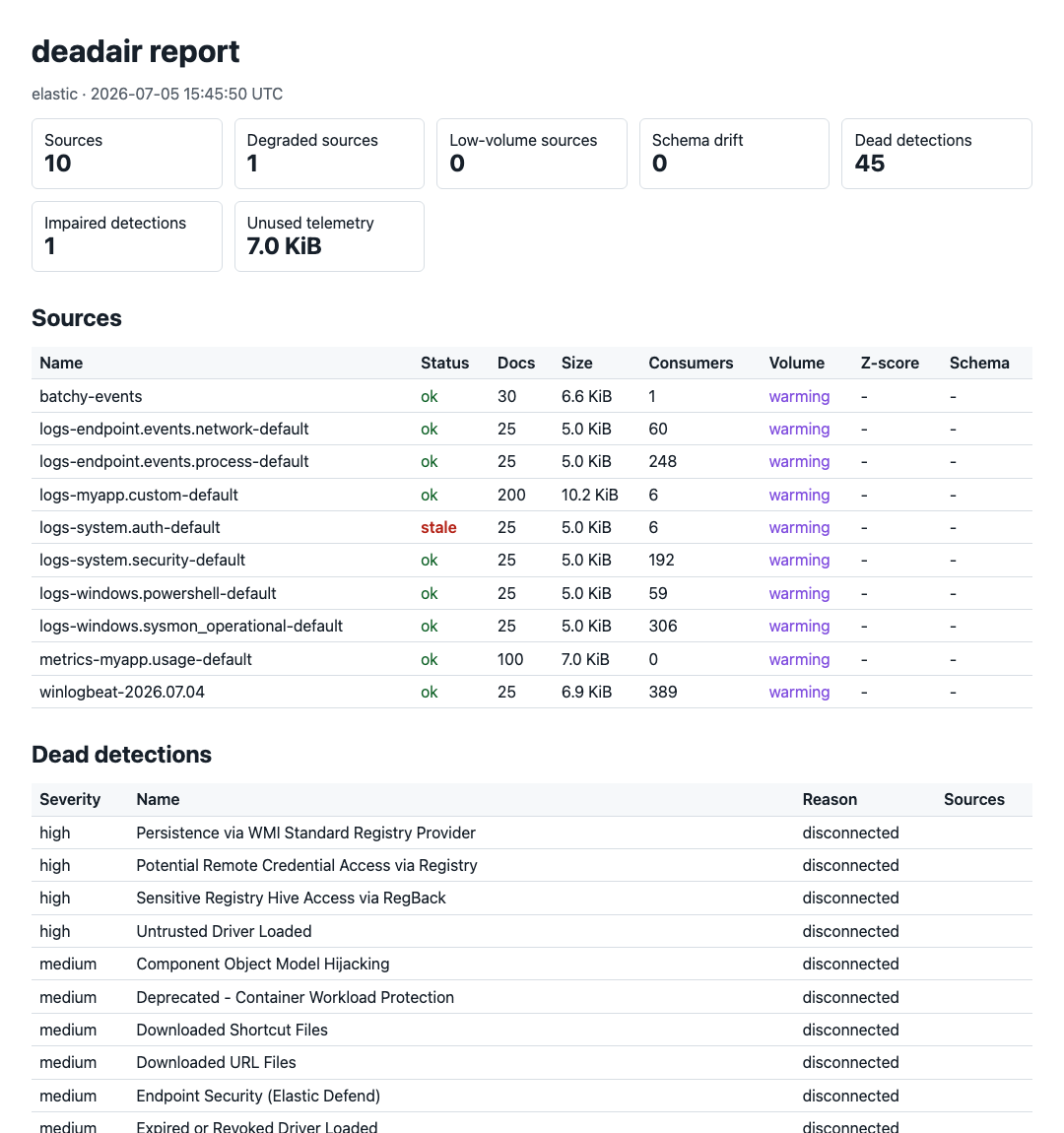
| 发现 | 含义 | 首先检查 |
|---|---|---|
| 无匹配数据源 | 规则的输入均未解析到可见的索引、数据流或 Sentinel 表 | 模式变更、缺失的集成和凭据范围 |
| 所有数据源过期或为空 | 每个已解析的数据源当前都不可用 | 数据源节奏和摄取路径 |
| 缺失字段 | 在读取所有数据源映射后,一个或多个已解析数据源中缺少 Elastic 规则声明的字段或该字段不可搜索 | 解析器、包和映射变更 |
| 滞后盲区窗口 | 成对事件 p95 摄取延迟超过规则的回溯余量 | 规则间隔、回溯、时间戳覆盖和管道延迟 |
| 部分输入覆盖 | 完整表达式可以解析,但其中的一个正向选择器解析为空 | 迁移、回退选择器和预期替代项;除非策略将其纳入门禁,否则仅供参考 |
| 数据源计划不兼容 | Sentinel 规则依赖的 Basic 或 Auxiliary 表不符合分析规则证据路径的条件 | 表计划和规则类型 |
| 数据源退化 | 数据源过期、为空、低流量或模式漂移 | 数据源历史和预期维护 |
| 未使用的遥测数据 | 在 Elastic 或 OpenSearch 上,数据正在被存储,但没有已启用的本地检测解析到它 | 已禁用的规则和有意的收集 |
| 预期生产者安静 | 配置的 Sentinel 供应商、产品或设备数据源未在其阈值内报告 | 该数据源的发送方和收集器 |
| 摘要管道不健康 | 相关的 Sentinel 摘要作业失败或其上次成功已逾期 | 原生执行记录和摘要查询 |

当策略中选择了相应类别时,生产者和摘要管道发现会影响退出状态。安静的设备数据源会与其共享表的其他消费者分开报告。

每个判定都限于配置的凭据所能看到的内容。JSON 报告包含
配置的表达式、已解析的数据源、解析方法、评估状态、后端元数据
和能力证据。工作示例和分类见[使用指南](https://github.com/big-comfy/deadair/blob/main/docs/usage.md)。

## 连接 SIEM

Elastic:

```sh
export DEADAIR_ES_URL=https://es.example.internal:9200
export DEADAIR_KIBANA_URL=https://kibana.example.internal:5601
export DEADAIR_API_KEY=<read-only-api-key>

deadair check
deadair scan --json-out report.json --html-out report.html
```

OpenSearch:

```sh
export DEADAIR_BACKEND=opensearch
export DEADAIR_OPENSEARCH_URL=https://opensearch.example.internal:9200
export DEADAIR_OPENSEARCH_USERNAME=deadair
export DEADAIR_OPENSEARCH_PASSWORD=<password>

deadair check
deadair scan
```

Microsoft Sentinel:

```sh
az login --tenant <tenant-id>

export DEADAIR_BACKEND=sentinel
export DEADAIR_AZURE_SUBSCRIPTION_ID=<subscription-id>
export DEADAIR_AZURE_RESOURCE_GROUP=<resource-group>
export DEADAIR_SENTINEL_WORKSPACE=<workspace-resource-name>
# Optional: JSON allowlist for literal workspace() targets.
# export DEADAIR_SENTINEL_REMOTES=/restricted/path/sentinel-remotes.json

deadair check
deadair scan
```

在 deadair 评估规则映射的远程工作区之前,该工作区必须已部署 Sentinel。
同一订阅的映射可以证明数据源可用性。跨订阅规则需要
与确切规则身份绑定的运行时证据。证据规则、工作区和
区域限制以及 Microsoft 的性能指南见
[Sentinel 使用详情](https://github.com/big-comfy/deadair/blob/main/docs/usage.md#microsoft-sentinel)。

使用文档中记录的只读角色:
[Elastic](https://github.com/big-comfy/deadair/blob/main/docs/credentials/elastic.md)、[OpenSearch](https://github.com/big-comfy/deadair/blob/main/docs/credentials/opensearch.md) 或
[Microsoft Sentinel](https://github.com/big-comfy/deadair/blob/main/docs/credentials/sentinel.md)。

## CI、队列和监控

```sh
# Gate a candidate rule against live source availability.
deadair scan --rule new-rule.json

# Fail only on new regressions between reports.
deadair diff yesterday.json today.json

# Scan multiple SIEM instances from one process.
deadair scan --fleet fleet.json

# Export cached scan results as Prometheus metrics.
deadair serve --interval 5m
```

`scan --rule` 将后端原生的候选规则或检测器与无关积压隔离开来。`diff`
适用于使用同一调用方持有的密钥创建的脱敏报告。队列配置通过
环境变量引用密钥,而不是存储密钥值。

[官方 GitHub Action](https://github.com/big-comfy/deadair/blob/main/docs/usage.md#gate-detection-changes) 封装了针对 Elastic、OpenSearch 和 Sentinel 的单实例候选
门禁。它会写入作业摘要、上传脱敏 JSON
报告,并可在不安装规则的情况下应用 deadair 策略。Sentinel 工作流首先
对运行器进行 Azure 身份验证;该 Action 不定义 Azure 凭据输入。

有关可在你自己的环境中测试的配置,请参阅 [CI 门禁行为](https://github.com/big-comfy/deadair/blob/main/docs/usage.md#gate-detection-changes)、
[队列和 MSSP 部署](https://github.com/big-comfy/deadair/blob/main/docs/mssp.md) 以及 [Prometheus 示例](https://github.com/big-comfy/deadair/blob/main/contrib)。

## 已测试的后端

| 后端 | 实时验证 |
|---|---|
| Elastic Security | 在 8.19.19 和 9.4.4 上的可信 CI |
| OpenSearch Security Analytics | 在 2.19.6 和 3.7.0 上的可信 CI |
| Microsoft Sentinel | 在一次性 UK South 工作区中记录的选入式一致性验证;见[验证状态](https://github.com/big-comfy/deadair/blob/main/docs/validation.md#sentinel-live-conformance) |

Sentinel 一致性运行是手动的,不是计划 CI。

## 安全模型

- 所有适配器调用均为只读。可信的 Elastic 和 OpenSearch 测试以及单独的 Sentinel 实验
  探针验证文档中记录的扫描身份无法执行代表性写入。
- 报告、HTML、状态文件和队列输出在 POSIX 系统上以 `0600` 写入。
- 凭据可以来自环境变量或文件,避免密钥出现在进程参数中。
- `--redact` 将租户、规则、数据源、模式、字段、依赖、血缘、来源、
  工作区、监视列表、模板和包标识符替换为带密钥的 HMAC 假名。已验证的
  依赖探针表达式及其 KQL 参数永远不会被序列化。由随机字节生成的
  `--redact-key-file` 也会启用脱敏,并在不同运行之间保持名称稳定。
- 导出器默认绑定到回环地址。
- deadair 没有回传行为或使用遥测。

将报告视为敏感的 SOC 工件:它们会识别盲检测、数据源名称、模式缺口
和未使用的收集。

## 文档

- [使用指南](https://github.com/big-comfy/deadair/blob/main/docs/usage.md) — 首次扫描、报告证据、发现、CI 门禁、状态和队列
- [调查遥测缺口](https://github.com/big-comfy/deadair/blob/main/docs/investigate.md) — 数据源消费者、预期数据源和恢复
- [验证状态](https://github.com/big-comfy/deadair/blob/main/docs/validation.md) — 已测试路径和当前限制
- [架构](https://github.com/big-comfy/deadair/blob/main/docs/architecture.md) — 后端契约、数据模型、安全属性和限制
- [最佳实践](https://github.com/big-comfy/deadair/blob/main/docs/best-practices.md) — 推出顺序、告警上下文和路由
- [MSSP 指南](https://github.com/big-comfy/deadair/blob/main/docs/mssp.md) — 密钥、脱敏、调度和租户故障处理
- [运行但看不见的检测](https://alephnull-sh.github.io/deadair/) — 问题及可复现的模拟

## 贡献

对于错误、建议或经过清理的复现,请提交 issue。维护者处理代码更改。
详情见 [CONTRIBUTING.md](https://github.com/big-comfy/deadair/blob/main/CONTRIBUTING.md)。

## 许可证

Apache-2.0。