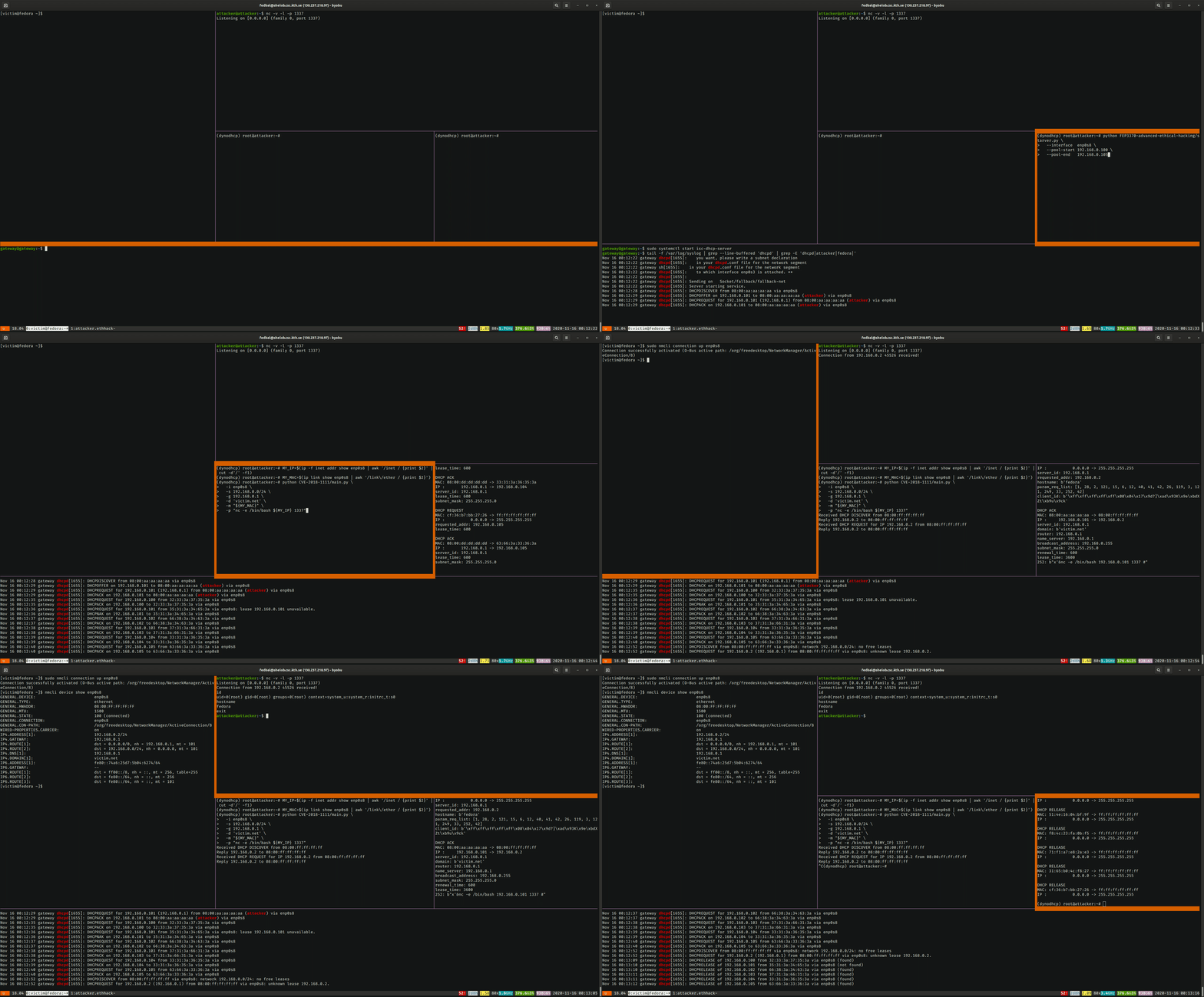
This project demonstrates a known vulnerability of Fedora and RedHat machines related to an unsafe client-side implementation of the Dynamic Host Configuration Protocol (DHCP). A rogue DHCP server can craft DHCP offers with a malicious payload that gets executed in a root shell on the victim machine.
The vulnerability is credited to Felix Wilhelm and is known as CVE-2018-1111 or "DynoRoot".
The Dynamic Host Configuration Protocol (DHCP) is an often-overlooked component in networked systems. Its role is to allow the dynamic configuration of hosts machines that connect to an existing network. The most common use case is to assign an IP address to newly-connected hosts and to inform it of existing routes to access other networks. Additional options can be specified, for example the address of a local DNS server and the zone it serves, or the location of a boot file.
Let's analyze the 4-way protocol that is followed when a new host wants to join a network after connecting to it physically by means of an ethernet or wireless connection.
DISCOVER message to the network.OFFER, containing: IP address, network
submask, router address, and other options.REQUEST, officially requesting to lease the IP address that was
offeredACK, indicating that the client is allowed to use the
IP address for a specified amount of time.After the initial exchange, the client can renew the lease by simply sending another REQUEST message. The server will check the existence of a lease with the client's IP and MAC address and reply with an ACK.
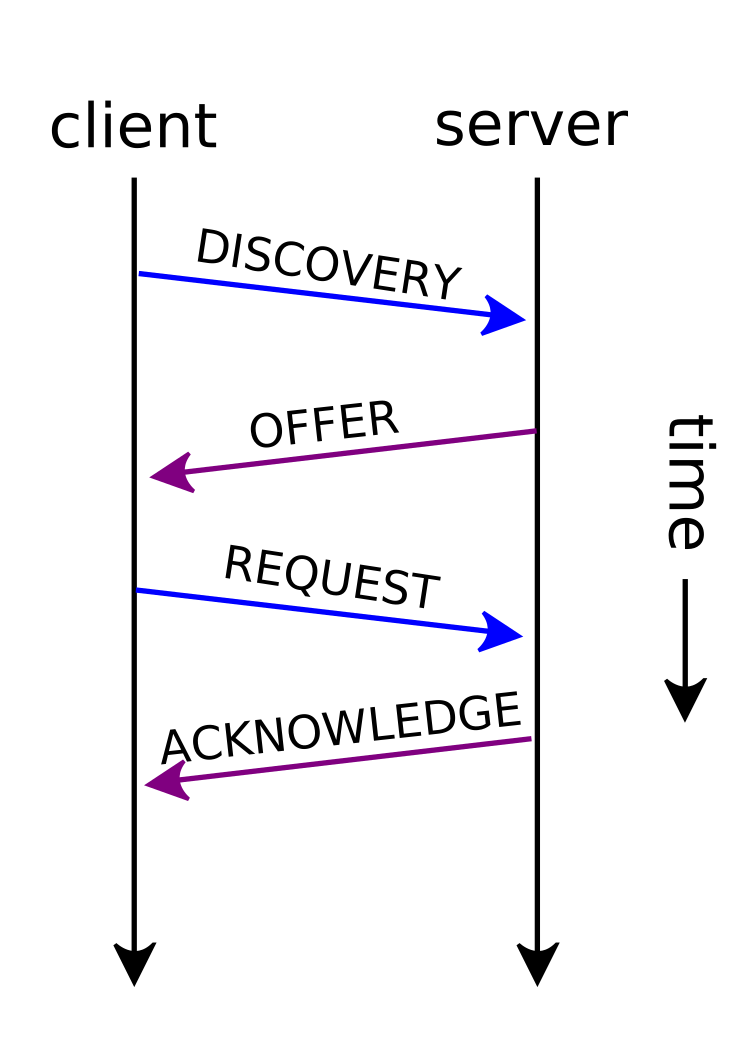 DHCP Session (figure from Wikimedia Commons, under CC BY-SA 4.0 license).
Some things to note:
DISCOVER phase and immediately REQUEST an address. This is common
in scenarios in which the client already connected to the network in the past and remembers the
previous address. In this case, the server verifies the availability of the address and ACKs the request, or, in case the lease is not available, sends a NACK.RELEASE message to inform the server that the address is
now available. However, this is not mandated by the protocol and the server will periodically
recollect expired leases.OFFER leases to new clientsOFFERs it
will only accept one, the other servers will observe the broadcasted REQUEST and invalidate the
offer.The vulnerability is located in /etc/NetworkManager/dispatcher.d/11-dhclient, which is executed
by the client to parse and set the options received over DHCP.
declare is a bash builtin that when used without arguments lists all declared variablesgrep filters all DHCP-related variableswhile read opt iterated over the DHCP variables one by one, performs some parsing and
prints a line like export new_optionname=value for each option<!-- omit in toc -->
#### 常规操作
在正常情况下,代码可以正常工作并解析新的 DHCP 选项。
例如,以下代码:```bash
DHCP4_OPTION_ONE=42
DHCP4_OPTION_TWO="bla bla"
declare | LC_ALL=C grep '^DHCP4_[A-Z_]*=' | while read opt; do
optname=${opt%%=*}
optname=${optname,,}
optname=new_${optname#dhcp4_}
optvalue=${opt#*=}
echo "export $optname=$optvalue"
done
将打印这两个 export 语句,供 eval 评估:```bash
export new_option_one=42
export new_option_two='bla bla'
<!-- omit in toc -->
#### 代码注入
然而,由于不安全的 `eval`,可以注入 bash 命令:```bash
DHCP4_OPTION_ONE="x'& echo Hacked! #"
DHCP4_OPTION_TWO='bla bla'

eval "$(
  declare | LC_ALL=C grep '^DHCP4_[A-Z_]*=' | while read opt; do
    optname=${opt%%=*}
    optname=${optname,,}
    optname=new_${optname#dhcp4_}
    optvalue=${opt#*=}
    echo "export $optname=$optvalue"
  done
)"
将导致执行 echo Hacked!:```text
[1] 1541
Hacked!
### Sources
- [Exploit 数据库条目](https://www.exploit-db.com/exploits/44890)
- [RedHat 公告](https://access.redhat.com/security/vulnerabilities/3442151)
- [Tenable 博客文章](https://www.tenable.com/blog/advisory-red-hat-dhcp-client-command-injection-trouble)
- [GitHub 仓库](https://github.com/kkirsche/CVE-2018-1111)
- [Twitter 公告](https://twitter.com/_fel1x/status/996388421273882626?lang=en)

## 环境搭建
演示该漏洞所需的最简环境仅需两台机器:一台运行 Fedora 28 的 `victim` 机器,以及一台 `attacker` 机器。在此环境中,攻击者只需提供 DHCP 服务并等待受害者连接即可。

<figure style="text-align:center">
  <img src="https://raw.githubusercontent.com/baldassarrefe/fep3370-advanced-ethical-hacking/HEAD/media/network_simple.svg" style="max-width:400px;" width="90%"/>
  <figcaption>最简漏洞利用环境。</figcaption>
</figure>

更接近实际的场景是将这些机器放在一个私有网络中,其中第三台机器 `gateway` 被配置为良性 DHCP 服务器,同时充当通往外部互联网的网关。在此场景下,攻击者必须先阻止受害者连接到合法的 DHCP 服务器,然后才有机会实施攻击。

<figure style="text-align:center">
  <img src="https://raw.githubusercontent.com/baldassarrefe/fep3370-advanced-ethical-hacking/HEAD/media/network.svg" style="max-width:800px;" width="90%"/>
  <figcaption>私有网络场景:一台网关机器同时充当 DHCP、路由器和防火墙。</figcaption>
</figure>

在以下章节中,我们将:
1. 安装 VirtualBox
2. 创建 3 台虚拟机:`gateway`、`attacker` 和 `victim`
3. 在机器上安装操作系统(用户、网络和 SSH 访问)
4. 配置网关,使其为 VirtualBox 提供的虚拟内部网络托管良性 DHCP 服务器
5. 安装攻击所需的 Python 依赖

若要[直接开始操作](#performing-the-attack)并跳过手动设置,可以运行 `ansible` 文件夹中的 [`setup.sh`](https://github.com/baldassarrefe/fep3370-advanced-ethical-hacking/blob/main/ansible/setup.sh) 脚本,它将(几乎)自动创建虚拟机并使用 [Ansible Roles](https://docs.ansible.com/ansible/latest/user_guide/playbooks_reuse_roles.html) 对其进行配置。只需确保在运行 `setup.sh` 之前已安装 Ansible 和 VirtualBox。

### 准备工作

#### 安装 VirtualBox
以下说明来自[官方安装指南](https://www.virtualbox.org/wiki/Downloads)。