## 自助安全评估解决方案 (v2.0)<!-- omit from toc -->
网络安全仍然是许多 CIO、CISO 及其客户非常关注的重要议题和关切点。为了应对这些重要关切,AWS 开发了一套客户应使用的主要服务,以帮助保护其账户。[Amazon GuardDuty](https://aws.amazon.com/guardduty/)、[AWS Security Hub](https://aws.amazon.com/security-hub/)、[AWS Config](https://aws.amazon.com/config/) 和 [AWS Well-Architected](https://aws.amazon.com/architecture/well-architected/?wa-lens-whitepapers.sort-by=item.additionalFields.sortDate&wa-lens-whitepapers.sort-order=desc&wa-guidance-whitepapers.sort-by=item.additionalFields.sortDate&wa-guidance-whitepapers.sort-order=desc) 审查可帮助客户在其 AWS 账户上维持强大的安全态势。随着越来越多的组织部署到云端,尤其是在快速部署的情况下,如果他们尚未实施推荐的 AWS 服务,可能需要对云环境进行快速安全评估。
我们开发了一种低成本、易于部署、安全且快速的解决方案,为客户提供安全评估报告。这些报告使用开源项目 [Prowler](https://github.com/prowler-cloud/prowler) 生成。Prowler 基于 AWS 最佳实践执行时间点安全评估,可帮助快速识别客户已部署环境中的任何潜在风险领域。如果您有兴趣持续进行这些评估,AWS 建议启用 Security Hub 的[基础安全最佳实践标准](https://docs.aws.amazon.com/securityhub/latest/userguide/securityhub-standards-fsbp.html)。如果您有兴趣将 Prowler 评估结果与 Security Hub 集成,可以按照 [Prowler 文档](https://docs.prowler.cloud/en/latest/tutorials/aws/securityhub/)中的说明进行操作。
>注意:Prowler 不是 AWS 拥有的解决方案。客户应在运行此解决方案之前独立审查 Prowler。与 Prowler 相关的任何依赖项都应保持最新。此解决方案从 pip 包安装程序安装固定版本的 Prowler(当前为 5.41.0),这样 Prowler 输出格式的更改就不会在无预警的情况下破坏扫描。要迁移到更新的版本,请编辑 `2-sat2-codebuild-prowler.yaml` 中的 `pip3 install prowler==` 行。
📕 如需更深入的逐步说明,请访问 [SHIP Workshop](https://catalog.us-east-1.prod.workshops.aws/workshops/3bd6e4da-265a-4c79-ab47-639b7ef23c9d/en-US/20-satv2) 中的模块 2。
## 目录<!-- omit from toc -->
- [概述](#overview)
- [参数](#parameters)
- [部署](#deployment)
- [单账户扫描](#single-account-scan)
- [AWS CloudShell](#aws-cloudshell)
- [部署解决方案](#deploy-the-solution)
- [AWS 控制台](#aws-console)
- [部署解决方案](#deploy-the-solution-1)
- [多账户扫描](#multi-account-scan)
- [AWS CloudShell](#aws-cloudshell-1)
- [步骤 1:部署先决条件角色](#step-1-deploy-prerequisite-role)
- [步骤 2:部署 SATv2 解决方案](#step-2-deploy-the-satv2-solution)
- [AWS 控制台](#aws-console-1)
- [步骤 1:部署先决条件角色](#step-1-deploy-prerequisite-role-1)
- [步骤 2:为 AWS Organizations 启用委派管理员](#step-2-enable-delegated-administrator-for-aws-organizations)
- [步骤 3:部署 SATv2 解决方案](#step-3-deploy-the-satv2-solution)
- [查看结果](#review-the-results)
- [SATv2 仪表板(推荐)](#satv2-dashboard-recommended)
- [Prowler 仪表板](#prowler-dashboard)
- [扫描类型](#scan-types)
- [基本扫描](#basic-scan)
- [中级扫描](#intermediate-scan)
- [完整扫描](#full-scan)
- [密钥检查](#secrets-checks)
- [通知](#notifications)
- [报告摘要](#reporting-summary)
- [Athena 表是如何构建的](#how-the-athena-table-is-built)
- [扫描历史与重复项](#scan-history-and-duplicates)
- [常见问题解答 (FAQ)](#frequently-asked-questions-faq)
- [清理](#clean-up)
- [安全性](#security)
- [许可证](#license)
## 概述
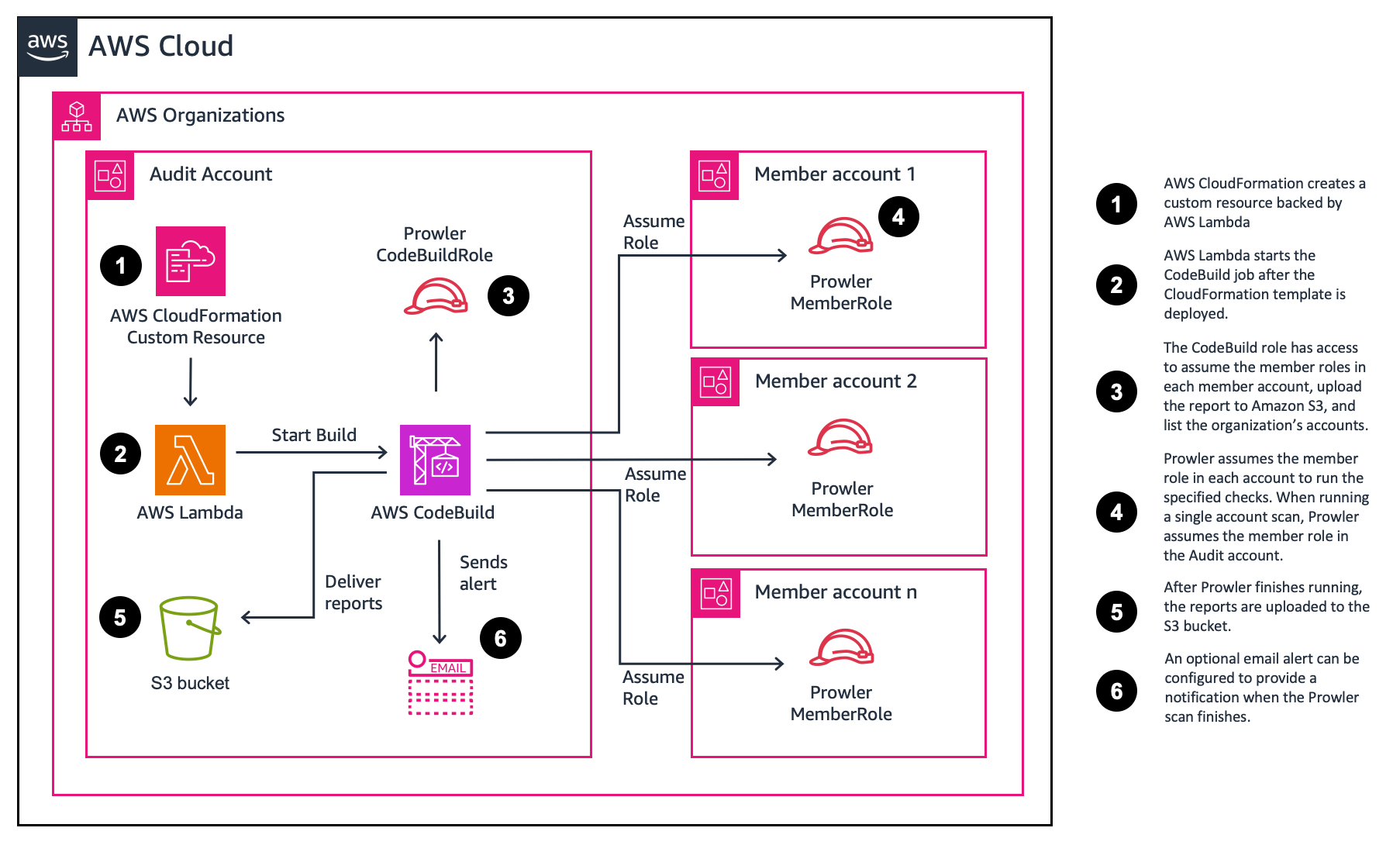
该解决方案通过 [AWS CloudFormation](https://aws.amazon.com/cloudformation/) 部署。部署时会创建一个 [AWS CodeBuild](https://aws.amazon.com/codebuild/) 项目和一个用于存储 Prowler 生成报告的 [Amazon S3](https://aws.amazon.com/s3/) 存储桶。然后使用 [AWS Lambda](https://aws.amazon.com/lambda/) 函数来启动 AWS CodeBuild 项目。
参数(用户输入)默认值将在单个账户中运行基本扫描。但是,您可以选择不同的参数来运行更广泛的扫描或扫描多个账户。部署过程不到 5 分钟即可完成。该解决方案的 AWS CloudFormation 模板在此 Github 仓库中提供以供审查。
模板部署后,CodeBuild 项目将运行。默认评估大约需要 5 分钟完成。完成安全评估的时间将因资源数量和所选扫描选项而异。评估结束时,报告将交付到创建的 S3 存储桶。
## 参数
SATv2 可以通过更新 CloudFormation 参数进行自定义。本节总结了可用选项,并提供了指向包含更多信息的部分的链接。
| 参数 | 描述 | 更多信息 |
| ------------------------ | ----------------------------------------------------------------------------------------------------------------------------------------------------------------------------------------------------------------------------------------------------------------------------------------------------------------------------------------- | ----------------------------------------- |
| ProwlerScanType | 指定要执行的扫描类型。选择 full 而不指定不同的 ProwlerOptions 将执行完整扫描。要执行特定检查,请选择 Full 并在 ProwlerOptions 后附加 -c <check>。 | [扫描类型](#scan-types) |
| ExcludeSecretsChecks | 默认为 true,这会跳过 Prowler 搜索资源内容中硬编码密钥的检查。设置为 false 以运行它们。 | [密钥检查](#secrets-checks) |
| MultiAccountScan | 如果要扫描组织中的所有账户,请将此设置为 true。您必须已部署先决条件模板以配置角色,或指定具有适当权限的其他 ProwlerRole。 | [多账户扫描](#multi-account-scan) |
| Reporting | 如果要将 Prowler 报告汇总为单个 csv,请将此设置为 true。这在扫描多个账户时很有帮助。 | [报告摘要](#reporting-summary) |
| EmailAddress | 如果希望在评估完成时收到电子邮件,请指定一个地址。 | [通知](#notifications) |
| **高级参数** |
| ConcurrentAccountScans | 对于多账户扫描,指定要并发扫描的账户数量。这对于拥有许多账户的大型组织很有用。选择超过三个会更改 CodeBuild 实例的大小,并可能产生额外费用。 |
| CodeBuildTimeout | 设置 CodeBuild 作业的超时时间。默认值为 300 分钟(5 小时)。 |
| MultiAccountListOverride | 指定要扫描的账户的空格分隔列表。留空将扫描组织中的所有账户。如果要扫描特定账户,请确保已将上面的 `MultiAccountScan` 参数设置为 true。如果您无法提供委派的 ListAccount 访问权限,可以提供 MultiAccountListOverride 参数。 | [多账户扫描](#multi-account-scan) |
| ProwlerOptions | 指定 Prowler 的参数。--role 和 ARN 将自动添加到您指定的参数末尾。这也可用于指定单个检查。 | [完整扫描](#full-scan) |
| ProwlerRole | Prowler 应代入以执行扫描的角色。如果您想指定具有不同权限的自定义角色,请更改此项。 |
## 部署
您可以使用此项目在 AWS Organization 中的多个账户或单个账户中运行 Prowler。我们提供了使用 AWS CloudShell 或 AWS 控制台的说明。选择一种方式开始。
| 部署类型 | AWS CloudShell | AWS 控制台 |
| --------------- | ------------------------- | ---------------------- |
| 单账户 | [链接](#aws-cloudshell) | [链接](#aws-console) |
| 多账户 | [链接](#aws-cloudshell-1) | [链接](#aws-console-1) |
## 单账户扫描
要对单个账户运行自助安全评估解决方案 (SATv2),请按照以下说明操作。您可以选择使用 AWS CLI 或 AWS 控制台。
### AWS CloudShell
<details>
<summary>显示步骤</summary>
#### 部署解决方案
1. 登录您的 AWS 账户。
2. 在导航栏中,选择 [AWS CloudShell](https://console.aws.amazon.com/cloudshell/home)。
3. 要下载 CloudFormation 模板,请输入以下命令。
```bash
wget https://raw.githubusercontent.com/awslabs/aws-security-assessment-solution/main/2-sat2-codebuild-prowler.yaml
```
4. 要创建一个 S3 存储桶来暂存模板,请输入以下命令。模板大于 51,200 字节,因此 CloudFormation 要求将其上传到 S3,而不是内联传递。
```bash
TEMPLATE_BUCKET=sat2-cfn-templates-$(aws sts get-caller-identity --query Account --output text)-$AWS_REGION
aws s3 mb s3://$TEMPLATE_BUCKET --region $AWS_REGION
```
5. 要部署 CloudFormation 模板,请输入以下命令。`--s3-bucket` 选项会在创建堆栈之前将模板上传到存储桶。
```bash
aws cloudformation deploy --template-file 2-sat2-codebuild-prowler.yaml \
--stack-name sat2 \
--capabilities CAPABILITY_NAMED_IAM \
--s3-bucket $TEMPLATE_BUCKET
```
6. 堆栈创建后,您可以删除暂存存储桶。它仅用于将模板传递给 CloudFormation。
```bash
aws s3 rb s3://$TEMPLATE_BUCKET --force
```
</details>
### AWS 控制台
<details>
<summary>显示步骤</summary>
#### 部署解决方案
1. 下载 [2-sat2-codebuild-prowler.yaml](https://github.com/awslabs/aws-security-assessment-solution/blob/main/2-sat2-codebuild-prowler.yaml) CloudFormation 模板。
2. 导航到 [AWS CloudFormation 控制台](https://console.aws.amazon.com/cloudformation)。
3. 在导航窗格中,选择 **Stacks**。
4. 选择 **Create stack**。
5. 在 Specify template 下,选择 **Upload a template file**。
6. 选择您在步骤 1 中下载的 **2-sat2-codebuild-prowler.yaml**。
7. 选择 **Next**。
8. 对于 Stack name,输入 **sat2**。
9. 选择 **Next**。
10. 在 Configure stack options 页面上,选择 **Next**。
11. 在 Review SAS 页面上,选中 **I acknowledge that AWS CloudFormation might create IAM resources.** 复选框,然后选择 **Submit**。
</details>
## 多账户扫描
自助安全评估解决方案 (SAT) 也支持多账户扫描。您必须为要执行扫描的每个账户部署先决条件角色。要为多个账户运行 SATv2,请按照以下说明操作。您可以选择使用 AWS CLI 或 AWS 控制台。
这些说明假设您已具备堆栈集操作的先决条件。有关更多信息,请访问 [AWS CloudFormation 用户指南](https://docs.aws.amazon.com/AWSCloudFormation/latest/UserGuide/stacksets-prereqs.html)。
>注意:StackSets 不适用于管理账户。要评估管理账户,请将 1-sat2-member-role 作为 CloudFormation 堆栈部署。
### AWS CloudShell
<details>
<summary>显示步骤</summary>
#### 步骤 1:部署先决条件角色
1. 登录您的 AWS 管理账户。
2. 在导航栏中,选择 [AWS CloudShell](https://console.aws.amazon.com/cloudshell/home)。
3. 确定您将从哪个账户运行 Prowler 扫描。客户通常使用安全工具账户或审计账户。记下账户 ID 以用于 **ProwlerAccountID** 参数。
4. 要下载 CloudFormation 模板,请输入以下命令。
```bash
wget https://raw.githubusercontent.com/awslabs/aws-security-assessment-solution/main/1-sat2-member-roles.yaml
```
5. 通过 CloudFormation StackSets 部署 CloudFormation 模板。更新以下参数:
- 将 **\<aws-account-id\>** 替换为您将从中运行 Prowler 的账户 ID。
- 将 **\<region\>** 替换为您要部署模板的区域。
```bash
aws cloudformation create-stack-set --template-body file://1-sat2-member-roles.yaml \
--stack-set-name sat2-member-roles \
--permission-model SERVICE_MANAGED \
--auto-deployment Enabled=true,RetainStacksOnAccountRemoval=false \
--capabilities CAPABILITY_NAMED_IAM \
--parameters ParameterKey=ProwlerAccountID,ParameterValue=<aws-account-id> \
--region <region>
```
6. 使用以下命令为组织中的每个账户创建堆栈实例。您可以针对特定的 OU 或根 OU。更新以下参数:
- 将 **\<root-ou\>** 替换为[组织根 ID](https://docs.aws.amazon.com/organizations/latest/userguide/orgs_manage_org_details.html#orgs_view_root)。
- 将 **\<region\>** 替换为您要部署模板的区域。
```bash
aws cloudformation create-stack-instances --stack-set-name sat2-member-roles \
--deployment-targets OrganizationalUnitIds='["<root-ou>"]' \
--regions '["<region>"]' \
--operation-preferences FailureTolerancePercentage=100,MaxConcurrentPercentage=100 \
--region <region>
```
7. 确定您的 Prowler 账户是否已有委派管理员或已存在的资源策略。只需要一种选项,并且鼓励使用资源策略,因为它更精细。
>注意:GovCloud 中不提供资源策略,因此您需要使用委派管理员。
7a. 您的 Prowler 账户可能已有委派。您可以使用以下命令进行检查:
```bash
aws organizations list-delegated-administrators
```
7b. 您的 Prowler 账户可能已有资源策略。您可以使用以下命令进行检查:
```bash
aws organizations describe-resource-policy
```
8. 如果您没有委派管理员或资源策略,可以使用以下命令添加适当的访问权限。
>注意:如果您无法提供委派的 ListAccount 访问权限,可以在 `2-sat2-codebuild-prowler template` 中提供 MultiAccountListOverride 参数。
>注意:如果您使用的是 GovCloud,请使用步骤 8a 创建委派管理员。如果您使用的是商业区域,请使用步骤 8b 为 ListAccounts 提供最小权限访问。
8a. 如果您还没有委派管理员,请使用以下命令进行委派。将 **\<aws-account-id\>** 替换为您将从中运行 Prowler 的账户 ID。
```bash
aws organizations register-delegated-administrator <aws-account-id>
```
8b. 使用以下命令添加资源策略。
- 将 **\<aws-account-id\>** 替换为您将从中运行 Prowler 的账户 ID。
```bash
aws organizations put-resource-policy --content \
'{
"Version": "2012-10-17",
"Statement": [
{
"Sid": "Statement",
"Effect": "Allow",
"Principal": {
"AWS": "arn:aws:iam::<aws-account-id>:root"
},
"Action": [
"organizations:ListAccounts",
"organizations:DescribeAccount",
"organizations:ListTagsForResource",
"organizations:ListParents",
"organizations:DescribeOrganizationalUnit"
],
"Resource": "*"
}
]
}'
```
>注意:`ListParents` 和 `DescribeOrganizationalUnit` 是填充发现结果中 `account_ou_uid` 和 `account_ou_name` 列的内容。省略它们,扫描的其余部分仍然有效,但这两列将返回为空。
#### 步骤 2:部署 SATv2 解决方案
>注意:请确保您已切换到您指定将运行 Prowler 的账户。
1. 要下载模板,请在 **Prowler 账户**中打开 AWS CloudShell 并输入以下命令。
```bash
wget https://raw.githubusercontent.com/awslabs/aws-security-assessment-solution/main/2-sat2-codebuild-prowler.yaml
```
2. 要创建一个 S3 存储桶来暂存模板,请输入以下命令。模板大于 51,200 字节,因此 CloudFormation 要求将其上传到 S3,而不是内联传递。
```bash
TEMPLATE_BUCKET=sat2-cfn-templates-$(aws sts get-caller-identity --query Account --output text)-$AWS_REGION
aws s3 mb s3://$TEMPLATE_BUCKET --region $AWS_REGION
```
3. 要在 Prowler 账户中部署模板。将 **MultiAccountScan** 设置为 **true** 以扫描组织中的所有账户。`--s3-bucket` 选项会在创建堆栈之前将模板上传到存储桶。
```bash
aws cloudformation deploy --template-file 2-sat2-codebuild-prowler.yaml \
--stack-name sat2-prowler \
--capabilities CAPABILITY_NAMED_IAM \
--s3-bucket $TEMPLATE_BUCKET \
--parameter-overrides MultiAccountScan=true
```
4. 堆栈创建后,您可以删除暂存存储桶。它仅用于将模板传递给 CloudFormation。
```bash
aws s3 rb s3://$TEMPLATE_BUCKET --force
```
</details>
### AWS 控制台
<details>
<summary>显示步骤</summary>#### 步骤 1:部署前置角色
1. 下载 **1-sat2-member-roles.yaml** 和 **2-sat2-codebuild-prowler.yaml** 文件。
2. 通过 CloudFormation StackSets 部署 CloudFormation 模板。更新以下参数:
- 将 \<aws-account-id\> 替换为您将运行 Prowler 的账户 ID。
- 将 \<region\> 替换为您要部署模板的区域。
3. 导航到 [AWS CloudFormation 控制台](https://console.aws.amazon.com/cloudformation)。
4. 在导航窗格中,选择 **StackSets**。
5. 选择 **Create StackSet**。
6. 对于 Permissions,保留 **Service-managed permissions** 处于选中状态。
7. 在 Specify template 下,选择 **Upload a template file**。
8. 选择您在步骤 1-1 中下载的 **1-sat2-member-roles.yaml**。
9. 选择 **Next**。
10. 对于 Stack name,输入 **sat2-member-role**。
11. 对于 Parameters,输入以下内容:
- ProwlerAccountID - 您将运行 Prowler 的账户 ID。
12. 选择 **Next**。
13. 在 Configure StackSet options 页面上,选择 **Next**。
14. 在 Set deployment options 上,输入以下内容:
1. 对于 **Deployment targets**,保留 **Deploy to organization** 处于选中状态。
2. 对于 **Specify regions**,选择 **us-east-1**。
3. 对于 **Region Concurrency**,选择 **Parallel**。
15. 选择 **Next**。
16. 在 **Review** 页面上,选中 **I acknowledge that AWS CloudFormation might create IAM resources.** 复选框,然后选择 **Submit**。
#### 步骤 2:为 AWS Organizations 启用委托管理员
确定您是否已有委托管理员,或者您希望部署 Prowler 的账户是否已存在资源策略。建议您从安全工具(Audit)账户运行 Prowler。要更新或验证审计账户是否具有 ListAccounts 权限,请按照以下步骤操作。
1. 导航到 [AWS Organization 控制台](https://console.aws.amazon.com/organizations)。
2. 在导航窗格中,选择 **Settings**。
3. 对于 Delegated administrator for AWS Organizations,包含以下语句。
```json
{
"Version": "2012-10-17",
"Statement": [
{
"Sid": "Statement",
"Effect": "Allow",
"Principal": {
"AWS": "arn:aws:iam::<aws-account-id>:root"
},
"Action": [
"organizations:ListAccounts",
"organizations:DescribeAccount",
"organizations:ListTagsForResource",
"organizations:ListParents",
"organizations:DescribeOrganizationalUnit"
],
"Resource": "*"
}
]
}
```
>注意:`ListParents` 和 `DescribeOrganizationalUnit` 用于填充发现结果中的 `account_ou_uid` 和 `account_ou_name` 列。省略它们后,其余扫描仍可正常工作,但这两列将返回空值。
#### 步骤 3:部署 SATv2 解决方案
1. 在您将运行该工具的账户(ProwlerAccountID)中,导航到 [AWS CloudFormation 控制台](https://console.aws.amazon.com/cloudformation)。
2. 在导航窗格中,选择 **Stacks**。
3. 选择 **Create stack**。
4. 在 Specify template 下,选择 **Upload a template file**。
5. 选择您在步骤 1-1 中下载的 **2-sat2-codebuild-prowler.yaml**。
6. 选择 **Next**。
7. 对于 Stack name,输入 **sat2-prowler**。
8. 在 Parameters 部分,对于 **MultiAccountScan**,选择 **true**。
9. 您可以选择性地启用报告功能,以在单个 csv 文件中获取所有账户的摘要。对于 **Reporting**,选择 **true**。
10. 选择 **Next**。
11. 在 Configure stack options 页面上,选择 **Next**。
12. 在 Review SAS 页面上,选中 **I acknowledge that AWS CloudFormation might create IAM resources.** 复选框,然后选择 **Submit**。
</details>
## 查看结果
解决方案部署后,Lambda 函数会启动 CodeBuild 项目。CodeBuild 项目构建完成后,Prowler 结果将上传到创建的 Amazon S3 存储桶。如果您配置了[通知](#notifications),Prowler 扫描完成后您将收到一封电子邮件。如果您配置了[报告](#reporting-summary),您将在 /reports 文件夹中获得一个合并的 csv 文件。
如果您未配置电子邮件警报,可以从 [CodeBuild 控制台](https://console.aws.amazon.com/codesuite/codebuild/projects)监控进度。
要查看结果,请按照以下步骤操作。
1. 在您部署 Prowler 的账户中,导航到 Amazon S3 控制台。
2. 选择以 **sat2-prowler-prowlerfindingsbucket-** 开头的存储桶。
3. 选择您想要的输出格式的文件夹,然后选择您要查看的运行的 `scan_date=` 和 `scan_time=` 文件夹。
每种输出格式都有自己的顶层文件夹,每次运行都会在其下写入一个 `scan_date=YYYY-MM-DD/scan_time=HHMMSS` 子文件夹。时间为扫描启动时的 UTC 时间:
```
csv/scan_date=2026-09-01/scan_time=204955/ Prowler 的 CSV 发现结果,按原样写入
html/scan_date=2026-09-01/scan_time=204955/ 各账户的 HTML 报告
json/scan_date=2026-09-01/scan_time=204955/ 各账户的 JSON
ocsf-json/scan_date=2026-09-01/scan_time=204955/ 各账户的 OCSF JSON
parquet/scan_date=2026-09-01/scan_time=204955/ Athena 查询的副本
compliance/scan_date=2026-09-01/scan_time=204955/ 合规性 CSV,在生成时提供
reports/ 合并的 CSV 和仪表板
```
每次运行都有自己的文件夹,因此再次运行该解决方案绝不会将新发现结果与旧结果混在一起,包括在同一天多次运行的情况。之前的运行会被保留,以便您进行比较。
4. 对于每个账户,将有 4 种文件类型(csv、html、json、json-ocsf),格式为 `prowler-output-<aws-account-id>-<datetime>`。
5. 选择其中一个 html 对象。
6. 选择 **Open**。

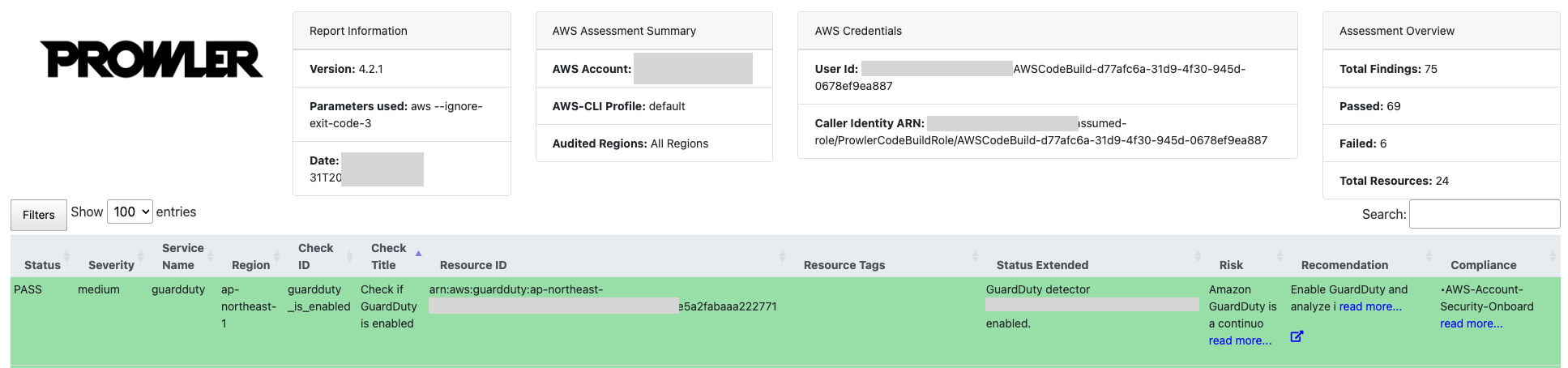
7. 将打开一个新窗口并显示您的报告。您可以使用筛选器来识别发现结果并确定其优先级。
### SATv2 仪表板(推荐)
如果您启用了报告功能,报告文件夹中将有一个静态 html 仪表板。
1. 选择 **satv2-dashboard.html** 对象,选择 **Open**。
2. 选择合并的 csv,选择 **Actions**、**Share with a presigned URL**。
>注意:请勿与任何人共享您的预签名 URL。预签名 URL 使用安全凭证授予下载对象的限时权限。该 URL 可以在浏览器中输入,也可以由程序用来下载对象。预签名 URL 使用的凭证是生成该 URL 的 AWS 用户的凭证。有关更多信息,请查看 Sharing objects with presigned URLs。
3. 对于 **number of minutes**,输入 **1**。
4. 将 URL 粘贴到 satv2-dashboard.html 页面中。
5. 在 [img/satv2-dashboard.png](https://github.com/awslabs/aws-security-assessment-solution/blob/main/img/satv2-dashboard.png) 中查看示例仪表板输出。
### Prowler 仪表板
Prowler 内置了一个用于查看结果的仪表板。要使用 Prowler 仪表板,必须在本地安装 Prowler,并且必须在本地下载 Prowler 的结果。
您必须拥有 AWS Command Line Interface (CLI) 和有效凭证。有关更多信息,请查看 [AWS Command Line interface 用户指南](https://docs.aws.amazon.com/cli/latest/userguide/cli-chap-welcome.html)。
1. 安装 Prowler。有关更多信息,请查看 [Prowler 安装说明](https://docs.prowler.com/projects/prowler-open-source/en/latest/#installation)。
```
pip install prowler
```
2. 获取 Amazon S3 存储桶的名称。存储桶的名称位于 CloudFormation 控制台中,作为 ProwlerFindingsBucket 资源。或者,导航到 S3 控制台,查找格式为 `{stack_name}-prowlerfindingsbucket-{ID}` 的存储桶。
3. 从 S3 下载 CSV 和合规性数据。如果您未运行完整扫描,则可能没有合规性数据。将 `{bucket_name}` 替换为您的存储桶名称,并将 `{scan_date}` 和 `{scan_time}` 替换为您要加载的运行,例如 `2026-09-01` 和 `204955`。要列出可用的运行,请使用 `aws s3 ls s3://{bucket_name}/csv/scan_date={scan_date}/`。
```
aws s3 sync s3://{bucket_name}/compliance/scan_date={scan_date}/scan_time={scan_time}/ output/compliance/
aws s3 sync s3://{bucket_name}/csv/scan_date={scan_date}/scan_time={scan_time}/ output/
```
>注意:一次同步一次运行。Prowler 仪表板读取 `output/*.csv`,不会搜索子文件夹,因此将 `scan_date=` 文件夹本身复制到 `output/` 中会产生空仪表板。一次加载两次运行会导致每个发现结果显示两次。
4. 运行仪表板。使用以下命令运行仪表板。默认情况下,它将在 http://127.0.0.1:11666/ 上启动。
```
prowler dashboard
```
## 扫描类型
默认情况下,SAT2 将运行中间扫描,该扫描会运行所有严重和高严重性检查。您可以通过选择不同的 ProwlerScanType 参数值来选择运行基本扫描或完整扫描。
例如,使用中间扫描选项的单账户扫描将使用以下命令:```bash
aws cloudformation deploy --template-file 2-sat2-codebuild-prowler.yaml \
--stack-name sat2-prowler \
--capabilities CAPABILITY_NAMED_IAM \
--s3-bucket $TEMPLATE_BUCKET \
--parameter-overrides ProwlerScanType=Intermediate
```
>注意:`--s3-bucket` 选项是必需的,因为模板大于 51,200 字节,这是 CloudFormation 接受内联模板的最大值。`$TEMPLATE_BUCKET` 是上述 CloudShell 部署步骤中创建的暂存存储桶。它适用于本 README 中每个 `aws cloudformation deploy` 示例。
检查项会频繁添加,要查看最新的检查项,请运行 `prowler aws --list-checks` 命令。下面为每个检查级别提供了一个示例。
### 基本扫描
要查看检查项列表,请查阅[基本检查](https://github.com/awslabs/aws-security-assessment-solution/blob/main/checks/basic_checks.txt)。
- 手动检查 - 维护当前联系方式。
- 查找过时的 Lambda 运行时。
- 确保在所有区域启用 CloudTrail
- 确保在所有区域启用 AWS Config。
- 确保没有安全组允许从 0.0.0.0/0 或 ::/0 到任何端口的入站流量。
- 检查是否启用了 GuardDuty
- 确保 IAM 密码策略要求至少一个小写字母
- 确保 IAM 密码策略要求至少一个数字
- 确保 IAM 密码策略要求至少一个符号
- 确保 IAM 密码策略要求至少一个大写字母
- 确保为根账户启用 MFA
- 确保访问密钥每 90 天或更短时间轮换一次
- 确保没有对所有人或任何 AWS 用户开放的 S3 存储桶。
### 中级扫描
要查看检查项列表,请查阅[中级检查](https://github.com/awslabs/aws-security-assessment-solution/blob/main/checks/intermediate_checks.txt)。
此扫描会将 `--severity critical high` 添加到 Prowler 扫描选项中。选择此项后,Prowler 将运行所有导致严重或高严重性的安全检查。
### 完整扫描
要查看检查项列表,请查阅[完整检查](https://github.com/awslabs/aws-security-assessment-solution/blob/main/checks/full_checks.txt)。
此选项不会向 Prowler 扫描添加任何额外参数。它将导致 Prowler 运行 650 多项检查。
您还可以使用完整扫描以任意方式自定义扫描。
对于 **ProwlerScanType**,选择 **Full**。
对于 **ProwlerOptions**,追加检查项。例如,要仅检查是否启用了 GuardDuty,请输入:
`aws --ignore-exit-code-3 -c guardduty_is_enabled`
### 密钥检查
默认情况下,SATv2 会跳过 23 项 Prowler 检查,这些检查会搜索资源内容中的硬编码密钥。它们涵盖 Lambda 代码、层和环境变量、ECR 镜像、CodeCommit 仓库、CloudWatch 日志事件、EC2 用户数据和启动模板、CloudFormation 输出,以及 Amplify、API Gateway、Batch、CodeBuild、Data Pipeline、ECS、Elastic Beanstalk、Glue、SageMaker、SSM 文档和 Step Functions 的配置。完整列表是模板中的 `ProwlerExclusions` 映射。
这些检查会将资源内容(例如函数代码和容器镜像层)下载到 CodeBuild 环境中。它们的发现结果可能包含所匹配内容的片段。跳过它们可使这些内容不进入扫描和报告,并缩短扫描时间。
该排除适用于每种扫描类型,并通过 `-e` 添加到 Prowler 命令中。[checks](https://github.com/awslabs/aws-security-assessment-solution/blob/main/checks) 文件夹中的检查列表仍包含这些检查,因为当 ExcludeSecretsChecks 为 false 时它们会运行。Prowler 的 `secrets` 类别中的其他检查,例如 IMDSv2、访问密钥轮换和 Secrets Manager 轮换,检查的是配置而非内容,仍会运行。
要运行密钥检查,请将 ExcludeSecretsChecks 设置为 false:```bash
aws cloudformation deploy --template-file 2-sat2-codebuild-prowler.yaml \
--stack-name sat2-prowler \
--capabilities CAPABILITY_NAMED_IAM \
--s3-bucket $TEMPLATE_BUCKET \
--parameter-overrides ExcludeSecretsChecks=false
```
## 通知
在部署 CloudFormation 模板时,您可以选择在 EmailAddress 参数中指定一个电子邮件地址。这将创建一个 SNS 主题,并在 CodeBuild 作业完成时发送电子邮件。
在运行较长时间的扫描或跨多个账户扫描时,这可能很有帮助。
例如,带有电子邮件通知的单账户扫描将使用以下命令:```bash
aws cloudformation deploy --template-file 2-sat2-codebuild-prowler.yaml \
--stack-name sat2-prowler \
--capabilities CAPABILITY_NAMED_IAM \
--s3-bucket $TEMPLATE_BUCKET \
--parameter-overrides [email protected]
```
```
---
[Read more](https://github.com/awslabs/aws-security-assessment-solution)