log4shell.tools 是一个工具,允许你运行测试来检查你的某个应用程序是否受到 log4j 中近期漏洞的影响:CVE-2021-44228 和 CVE-2021-45046。
这是运行 https://log4shell.alexbakker.me 的代码。如果你想查看代码或在自有环境中运行一个实例,那你来对地方了。
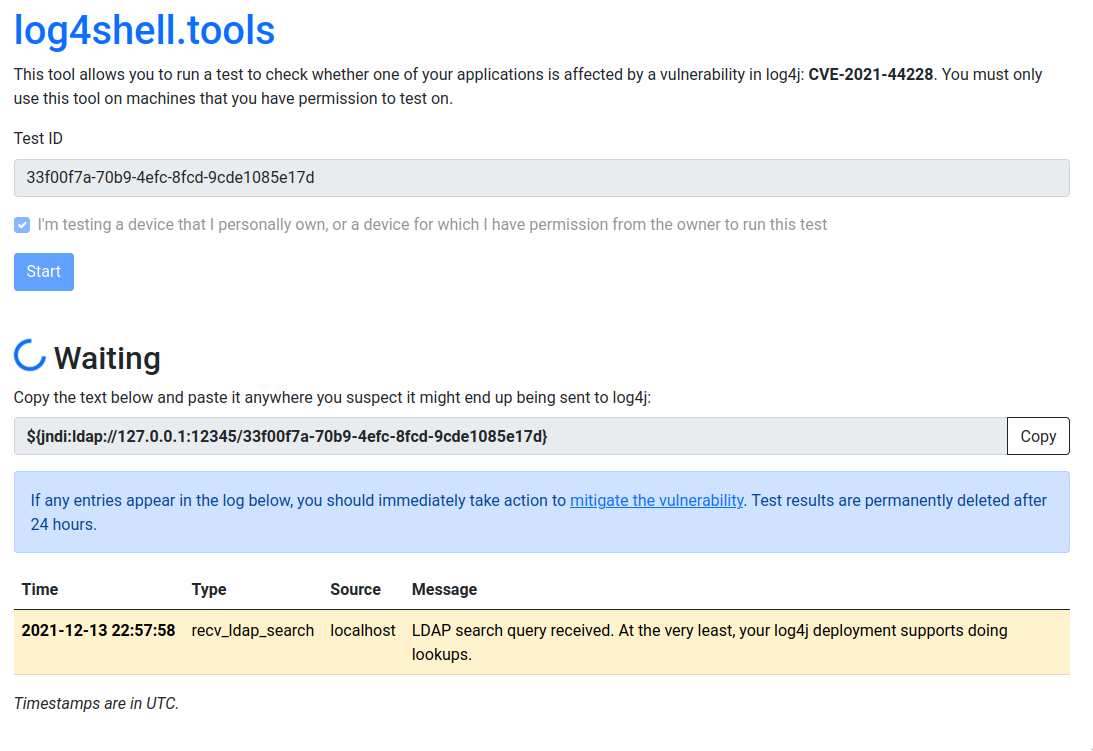
该工具会生成一个唯一 ID 供你测试使用。点击开始后,我们会为你生成一段类似这样的文本:${jndi:ldap://*.dns.log4shell.tools:12345/*}。将其复制并粘贴到任何你怀疑最终可能会被传给 log4j 的地方,例如:搜索框、表单字段或 HTTP 头。
一旦旧版本的 log4j 看到这个字符串,它就会执行 DNS 查询以获取 *.dns.log4shell.tools 的 IP 地址。如果发生这种情况,则被视为信息泄露漏洞的第一个迹象。接下来,它会尝试向 log4shell.tools:12345 发起 LDAP 搜索请求。该工具会响应一个 Java 类描述,以及一个用于获取该类的 URL。log4j 甚至可能尝试获取这个类文件。该工具将返回 404 并结束测试。
该工具已在 Go 1.16 下测试通过。请确保已安装它(或更新版本的 Go),然后运行以下命令:
go install github.com/alexbakker/log4shell-tools/cmd/log4shell-tools-server
编译后的二进制文件将位于 $GOPATH/bin 中。
由于该工具编译为单个二进制文件,你只需运行它即可开始自托管一个 log4shell.tools 实例。若要使其可供网络中的其他机器访问,你需要传递几个标志,以防止该工具仅监听回环接口。如果你要将此服务暴露到互联网,可能还需要在 HTTP 服务器前面放置一个反向代理。暂时忽略 DNS 选项,简单的内部部署不需要它们。
要查看所有可用标志的完整列表,请运行 log4shell-tools-server -h:
Usage of ./log4shell-tools-server:

This tool only listens on 127.0.0.1 by default. Pass the flags below to customize for your environment.

  -dns-a string
    	the IPv4 address to respond with to any A record queries for 'dns-zone' (default "127.0.0.1")
  -dns-aaaa string
    	the IPv6 address to respond with to any AAAA record queries for 'dns-zone' (default "::1")
  -dns-addr string
    	listening address for the DNS server (default "127.0.0.1:12346")
  -dns-enable
    	enable the DNS server
  -dns-zone string
    	DNS zone that is forwarded to the tool's DNS server (example: "dns.log4shell.tools")
  -http-addr string
    	listening address for the HTTP server (default "127.0.0.1:8001")
  -http-addr-external string
    	address where the HTTP server can be reached externally (default "127.0.0.1:8001")
  -ldap-addr string
    	listening address for the LDAP server (default "127.0.0.1:12345")
  -ldap-addr-external string
    	address where the LDAP server can be reached externally (default "127.0.0.1:12345")
  -ldap-http-proto string
    	the HTTP protocol to use in the payload URL that the LDAP server responds with (default "http")
  -storage string
    	storage connection URI (either memory:// or a postgres:// URI (default "memory://")
  -test-timeout int
    	test timeout in minutes (default 30)
默认情况下,该工具使用内存存储后端。如果你需要测试结果在重启后仍然保留,则可能需要改用 Postgres 后端。
DNS 服务器默认处于禁用状态,因为其配置选项目前非常特定于 https://log4shell.alexbakker.me 上的部署环境。如果你愿意帮助将这些选项变得更通用,请告诉我。