该 C++ 库可解析 Windows 内核完整转储(WinDbg 中的 .dump /f)、BMP转储(WinDbg 中的 .dump /ka),以及 ~2022 年引入的更新转储类型。
该库支持加载 64 位转储,并提供对以下内容的读取访问:
编译好的二进制文件可在 releases 部分获取。
特别感谢:
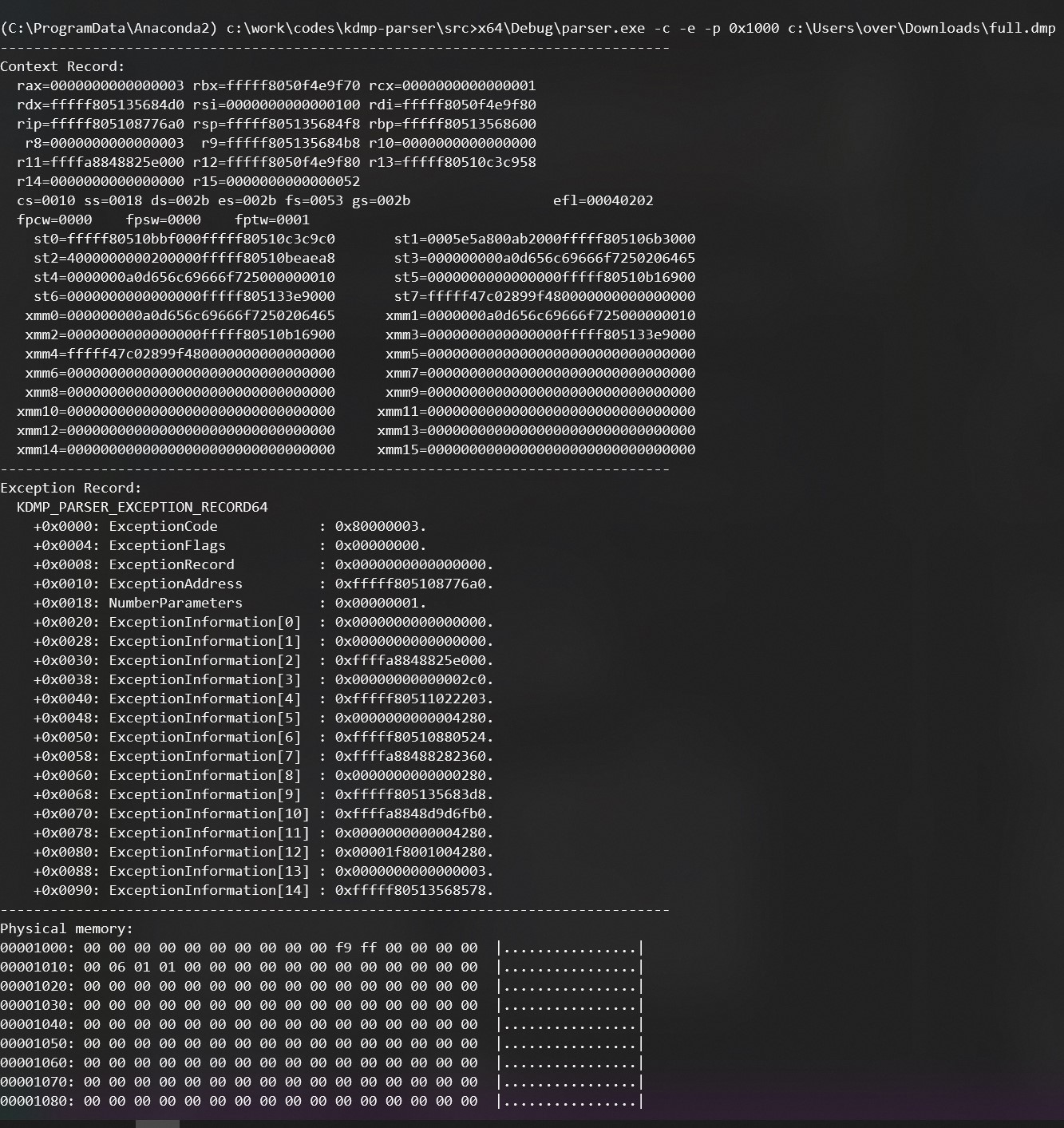
parser.exe 应用程序能够导出转储文件中的各种信息:异常记录、上下文记录等。
>parser.exe -c -e -p 0x1000 full.dmp
--------------------------------------------------------------------------------
Context Record:
  rax=0000000000000003 rbx=fffff8050f4e9f70 rcx=0000000000000001
  rdx=fffff805135684d0 rsi=0000000000000100 rdi=fffff8050f4e9f80
  rip=fffff805108776a0 rsp=fffff805135684f8 rbp=fffff80513568600
   r8=0000000000000003  r9=fffff805135684b8 r10=0000000000000000
  r11=ffffa8848825e000 r12=fffff8050f4e9f80 r13=fffff80510c3c958
  r14=0000000000000000 r15=0000000000000052
  cs=0010 ss=0018 ds=002b es=002b fs=0053 gs=002b                 efl=00040202
  fpcw=0000    fpsw=0000    fptw=0001
    st0=fffff80510bbf000fffff80510c3c9c0       st1=0005e5a800ab2000fffff805106b3000
    st2=4000000000200000fffff80510beaea8       st3=000000000a0d656c69666f7250206465
    st4=0000000a0d656c69666f725000000010       st5=0000000000000000fffff80510b16900
    st6=0000000000000000fffff805133e9000       st7=fffff47c02899f480000000000000000
   xmm0=000000000a0d656c69666f7250206465      xmm1=0000000a0d656c69666f725000000010
   xmm2=0000000000000000fffff80510b16900      xmm3=0000000000000000fffff805133e9000
   xmm4=fffff47c02899f480000000000000000      xmm5=00000000000000000000000000000000
   xmm6=00000000000000000000000000000000      xmm7=00000000000000000000000000000000
   xmm8=00000000000000000000000000000000      xmm9=00000000000000000000000000000000
  xmm10=00000000000000000000000000000000     xmm11=00000000000000000000000000000000
  xmm12=00000000000000000000000000000000     xmm13=00000000000000000000000000000000
  xmm14=00000000000000000000000000000000     xmm15=00000000000000000000000000000000
--------------------------------------------------------------------------------
Exception Record:
  KDMP_PARSER_EXCEPTION_RECORD64
    +0x0000: ExceptionCode            : 0x80000003.
    +0x0004: ExceptionFlags           : 0x00000000.
    +0x0008: ExceptionRecord          : 0x0000000000000000.
    +0x0010: ExceptionAddress         : 0xfffff805108776a0.
    +0x0018: NumberParameters         : 0x00000001.
    +0x0020: ExceptionInformation[0]  : 0x0000000000000000.
    +0x0028: ExceptionInformation[1]  : 0x0000000000000000.
    +0x0030: ExceptionInformation[2]  : 0xffffa8848825e000.
    +0x0038: ExceptionInformation[3]  : 0x00000000000002c0.
    +0x0040: ExceptionInformation[4]  : 0xfffff80511022203.
    +0x0048: ExceptionInformation[5]  : 0x0000000000004280.
    +0x0050: ExceptionInformation[6]  : 0xfffff80510880524.
    +0x0058: ExceptionInformation[7]  : 0xffffa88488282360.
    +0x0060: ExceptionInformation[8]  : 0x0000000000000280.
    +0x0068: ExceptionInformation[9]  : 0xfffff805135683d8.
    +0x0070: ExceptionInformation[10] : 0xffffa8848d9d6fb0.
    +0x0078: ExceptionInformation[11] : 0x0000000000004280.
    +0x0080: ExceptionInformation[12] : 0x00001f8001004280.
    +0x0088: ExceptionInformation[13] : 0x0000000000000003.
    +0x0090: ExceptionInformation[14] : 0xfffff80513568578.
--------------------------------------------------------------------------------
Physical memory:
00001000: 00 00 00 00 00 00 00 00 00 00 f9 ff 00 00 00 00  |................|
00001010: 00 06 01 01 00 00 00 00 00 00 00 00 00 00 00 00  |................|
00001020: 00 00 00 00 00 00 00 00 00 00 00 00 00 00 00 00  |................|
00001030: 00 00 00 00 00 00 00 00 00 00 00 00 00 00 00 00  |................|
00001040: 00 00 00 00 00 00 00 00 00 00 00 00 00 00 00 00  |................|
00001050: 00 00 00 00 00 00 00 00 00 00 00 00 00 00 00 00  |................|
00001060: 00 00 00 00 00 00 00 00 00 00 00 00 00 00 00 00  |................|
00001070: 00 00 00 00 00 00 00 00 00 00 00 00 00 00 00 00  |................|
00001080: 00 00 00 00 00 00 00 00 00 00 00 00 00 00 00 00  |................|
00001090: 00 00 00 00 00 00 00 00 00 00 00 00 00 00 00 00  |................|
000010a0: 00 00 00 00 00 00 00 00 00 a0 87 00 00 00 00 00  |................|
000010b0: ff ff ff ff ff ff ff ff 00 00 60 11 05 f8 ff ff  |..........`.....|
000010c0: 00 90 2f 00 00 00 00 00 ff ff ff ff 03 80 ff ff  |../.............|
000010d0: f8 00 00 c0 c1 f7 ff ff 00 00 00 00 03 00 00 00  |................|
000010e0: f8 00 00 c0 c1 f7 ff ff 00 00 00 00 03 00 00 00  |................|
000010f0: 00 00 00 00 00 00 00 00 70 37 01 c0 c1 f7 ff ff  |........p7......|
...
您可以使用 CMake 自行构建,它可在 Linux、Windows、OSX 上使用 Microsoft、LLVM Clang 和 GNU 编译器构建。
以下是在 Windows 上的示例:
> mkdir build
> cd build
> cmake ..
-- Building for: Visual Studio 17 2022
...

> cmake --build . --config RelWithDebInfo
MSBuild version 17.8.3+195e7f5a3 for .NET Framework
...

> src\parser\RelWithDebInfo\parser.exe
You didn't provide the path to the dump file.

parser.exe [-p [<physical address>]] [-c] [-e] [-h] <kdump path>

Examples:
  Show every structures of the dump:
    parser.exe -a full.dmp

  Show the context record:
    parser.exe -c full.dmp

  Show the exception record:
    parser.exe -e full.dmp

  Show all the physical memory (first 16 bytes of every pages):
    parser.exe -p full.dmp

  Show the context record as well as the page at physical address 0x1000:
    parser.exe -c -p 0x1000 full.dmp
以下是在 Linux 上的另一个示例(使用 Python 绑定):
$ mkdir build
$ cd build
$ cmake .. -DBUILD_PYTHON_BINDING=ON
...

$ cmake --build . --config RelWithDebInfo
...

$ ./src/parser/parser
You didn't provide the path to the dump file.

parser.exe [-p [<physical address>]] [-c] [-e] [-h] <kdump path>

Examples:
  Show every structures of the dump:
    parser.exe -a full.dmp

  Show the context record:
    parser.exe -c full.dmp

  Show the exception record:
    parser.exe -e full.dmp

  Show all the physical memory (first 16 bytes of every pages):
    parser.exe -p full.dmp

  Show the context record as well as the page at physical address 0x1000:
    parser.exe -c -p 0x1000 full.dmp
最简单的方式是直接:
pip install kdmp_parser
在安装 CMake 和 Python 3.8+ / pip 后,运行以下命令:
cd src/python
pip install requirements.txt
pip install .
要创建 wheel 包:
cd src/python
pip wheel .
import kdmp_parser
dmp = kdmp_parser.KernelDumpParser("full.dmp")
assert dmp.type == kdmp_parser.DumpType.FullDump
print(f"Dump RIP={dmp.context.Rip:#x}")
import kdmp_parser
dmp = kdmp_parser.KernelDumpParser("full.dmp")
dmp.read_virtual_page(dmp.context.Rip)
import kdmp_parser
dmp = kdmp_parser.KernelDumpParser("full.dmp")
pml4 = dmp.directory_table_base
print(f"{pml4=:#x}")
dmp.read_physical_page(pml4)