secretlint v13.0.4
可插拔的 linting 工具,用于防止提交凭据。
Secretlint 

Secretlint 是一个可插拔的代码检查工具,用于防止提交凭证。
功能
- 扫描器:在项目中查找凭证并报告这些凭证
- 项目友好:轻松设置项目并集成 CI 服务
- 预提交钩子:防止提交凭证文件
- 可插拔:允许创建自定义规则和灵活配置
- 文档:描述规则将其检测为秘密的原因
快速演示
您可以在 https://secretlint.github.io/ 上查看 secretlint 的检查结果。
快速开始
您可以一键在项目上尝试使用 Secretlint。
如果您已经安装了 Docker:
docker run -v `pwd`:`pwd` -w `pwd` --rm -it secretlint/secretlint secretlint "**/*"
如果您已经安装了 Node.js:
npx @secretlint/quick-start "**/*"
运行后,如果结果为空且退出状态为 0,则您的项目是安全的。否则,如果您收到一些错误报告,则您的项目中包含原始凭证数据。

如果您希望获得持续的安全性,请参阅以下安装指南并设置预提交钩子和 CI。
安装
使用 Docker
前提条件: 需要 Docker
使用我们的 Docker 容器,您可以快速获得包含 Node.js 和 secretlint 的环境,下载速度与您的网络速度相当。
您可以通过以下命令使用 secretlint 检查当前目录下的所有文件:
docker run -v `pwd`:`pwd` -w `pwd` --rm -it secretlint/secretlint secretlint "**/*"
设计上,secretlint/secretlint Docker 容器 无需配置即可工作。
此 Docker 镜像内置了以下包:
- @secretlint/secretlint-rule-preset-recommend
- @secretlint/secretlint-rule-pattern
- @secretlint/secretlint-formatter-sarif
更多详情,请参阅 secretlint 的 Dockerfile。
使用 Node.js
前提条件: 需要 Node.js 22+。
Secretlint 由 JavaScript 编写。
您可以使用 npm 安装 Secretlint:``` npm install secretlint @secretlint/secretlint-rule-preset-recommend --save-dev
然后您应该设置一个配置文件:```
npx secretlint --init
最后,你可以像这样在任意文件或目录上运行 Secretlint:``` npx secretlint "**/*"
:memo: Secretlint 支持 [glob 模式](https://github.com/mrmlnc/fast-glob#basic-syntax),glob 模式需用双引号包裹。
也可以使用 `npm install --global` 全局安装 Secretlint。但**不推荐**,因为某些规则可能在全局环境中失效。
### 使用独立可执行二进制文件
**前提条件:** 无
你可以通过独立可执行二进制文件在无需 Node.js 的情况下使用 `secretlint` 命令。
1. 从 [Releases 页面](https://github.com/secretlint/secretlint/releases) 下载最新二进制文件
2. 修改文件权限为可执行:`chmod +x ./secretlint`
3. 运行 `./secretlint --init` 创建配置文件
4. 运行 `./secretlint "**/*"` 对项目进行 lint
更多详情请参考 [publish/binary-compiler](https://github.com/secretlint/secretlint/blob/HEAD/publish/binary-compiler) 的 README。
## 使用方法
`secretlint --help` 显示用法信息。
Secretlint CLI that scan secret/credential data.
用法
$ secretlint [file|glob*]
注意
支持的 glob 语法基于 picomatch(micromatch 使用的引擎)
https://github.com/micromatch/picomatch#globbing-features
https://github.com/micromatch/micromatch#matching-features
选项
--init 设置配置文件。根据你的 package.json 创建 .secretlintrc.json 文件
--format [字符串] 格式化工具名称。默认:"stylish"。可用格式:checkstyle, compact, github, jslint-xml, junit, pretty-error, stylish, tap, unix, json, mask-result, table
--output [路径:字符串] 输出文件路径,用于写入报告结果。
--secretlintrc [路径:字符串] .secretlintrc 配置文件的路径。默认为 .secretlintrc.*
--secretlintignore [路径:字符串] .secretlintignore 文件的路径。默认为 .secretlintignore
--stdinFileName [字符串] 处理 STDIN 内容时使用的文件名。某些规则依赖于文件名来检查内容。
--no-color 禁用输出的 ANSI 颜色。
--no-terminalLink 禁用输出的终端链接。
--no-maskSecrets 禁用秘密值的遮蔽;默认情况下秘密会被遮蔽。
--no-glob 禁用 glob 模式解释;将所有输入视为字面文件路径。
--no-gitignore 禁用 .gitignore 级联遵守;默认(从 v13 开始)会遵守 .gitignore 文件。
开发者选项
--profile 启用性能分析。
--secretlintrcJSON [字符串] .secretlintrc 的 JSON 字符串。使用 JSON 字符串替代 rc 文件。
实验性选项
--locale [字符串] 消息翻译的语言标签。默认:en
示例
# 扫描单个文件
$ secretlint ./README.md
# 扫描所有文件(将 glob 用双引号包裹以避免 shell 展开)
$ secretlint "**/*"
$ secretlint "source/**/*.ini"
# 将输入视为字面路径(适用于 SvelteKit (group) / Next.js [param] 等)
$ secretlint --no-glob "src/(auth)/login.ts"
# 对 STDIN 内容进行 lint(文件名提示会影响哪些规则生效)
$ echo "SECRET" | secretlint --stdinFileName=secret.txt
# 使用自定义配置文件
$ secretlint "**/*" --secretlintrc=.secretlintrc.custom.json
# 扫描被 .gitignore 忽略的文件(例如验证构建产物)
$ secretlint --no-gitignore "dist/**/*"
# 原地遮蔽文件中的秘密
$ secretlint .zsh_history --format=mask-result --output=.zsh_history
# 输出 JSON 以供编程解析
$ secretlint "**/*" --format=json --output=secretlint-report.json
# 在 CI 中输出 GitHub Actions 注解
$ secretlint "**/*" --format=github
退出状态
Secretlint 退出时返回以下值:
- 0:
- Lint 成功,未发现错误。
- 发现 lint 错误但指定了 --output。
- 1:
- Lint 失败,发现错误。
- 2:
- 发生意外错误,致命错误。
## 配置
Secretlint 使用配置文件 `.secretlintrc.{json,yml,js}`。
- 文档:[配置 Secretlint](https://github.com/secretlint/secretlint/blob/HEAD/docs/configuration.md)
运行 `secretlint --init` 后,你会在目录中得到一个 `.secretlintrc.json` 文件。
其中会配置一些规则,如下所示:```json
{
"rules": [
{
"id": "@secretlint/secretlint-rule-preset-recommend"
}
]
}
id 属性是 secretlint 规则包的名称。
Secretlint 没有内置规则。您需要添加一些规则,因此应当安装对应的包,并将该规则添加到 .secretlintrc 文件中。
每条规则具有相同的配置模式:
options:规则的选项定义。更多详情请参阅各规则的文档。disabled:如果disabled为true,则禁用该规则。allowMessageIds:allowMessageIds是一个消息 ID 数组,用于抑制不希望报告的错误。- 消息 ID 在各规则中定义,请参阅规则文档。
示例:options
例如,@secretlint/secretlint-rule-example 在其 options 中具有 allows 选项。
此 allows 选项定义了一个类似 RegExp 的字符串 列表,用于指定您希望忽略的内容。```json
{
"rules": [
{
"id": "@secretlint/secretlint-rule-example",
"options": {
"allows": [
"/dummy_secret/i"
]
}
}
]
}
当您使用像 `@secretlint/secretlint-rule-preset-recommend` 这样的预设时,需要将选项放在 `rules` 中。例如,`@secretlint/secretlint-rule-preset-recommend > @secretlint/secretlint-rule-aws` 的选项。```json5
{
"rules": [
{
"id": "@secretlint/secretlint-rule-preset-recommend",
"rules": [
{
"id": "@secretlint/secretlint-rule-aws",
"options": {
"allows": [
// it will be ignored
"xxxx-xxxx-xxxx-xxxx-xxxx"
]
}
}
]
}
]
}
示例:allowMessageIds
例如,您运行 secretlint 后得到以下错误报告:```
$ secretlint "**/*"
SECRET.txt 1:8 error [EXAMPLE_MESSAGE] found secret: SECRET @secretlint/secretlint-rule-example
✖ 1 problem (1 error, 0 warnings)
这个错误的 message id 是 `EXAMPLE_MESSAGE`,位于 `@secretlint/secretlint-rule-example`。
如果你想要忽略此错误,请使用 `allowMessageIds`。```json
{
"rules": [
{
"id": "@secretlint/secretlint-rule-example",
"allowMessageIds": ["EXAMPLE_MESSAGE"]
}
]
}
当你使用类似 @secretlint/secretlint-rule-preset-recommend 这样的预设时,你需要将选项放在 rules 中。
例如,如果你想忽略 "@secretlint/secretlint-rule-aws" 中的 "AWSAccountID" 和 "AWSAccessKeyID",你可以编写如下内容。```json5 { "rules": [ { "id": "@secretlint/secretlint-rule-preset-recommend", "rules": [ { "id": "@secretlint/secretlint-rule-aws", "allowMessageIds": ["AWSAccountID", "AWSAccessKeyID"] } ] } ] }
### 通过 `.gitignore` 和 `.secretlintignore` 忽略文件
Secretlint 以与 Git 相同的方式遍历文件系统,遵循嵌套的 `.gitignore` 文件。任何从工作目录到文件的路径中被某个 `.gitignore` 匹配的文件或目录都会被跳过。
`.secretlintignore` 的工作方式与 `.gitignore` 相同,并且会额外被考虑。解析顺序如下:
1. 内置忽略项:`.git`、`node_modules` 和 `.secretlintrc*` 系列。
2. 由 `--secretlintignore` 指向的文件(默认:`.secretlintignore`)。
3. 每个目录的 `.gitignore`(级联)。
要扫描被 gitignore 忽略的文件——例如,在项目中的 `.env` 文件被 gitignore 忽略——请传递 `--no-gitignore`:```
secretlint --no-gitignore "**/*"
迁移至 v13:
- 现在默认遵循
.gitignore文件。之前,secretlint 无论.gitignore如何都会扫描所有匹配的文件。传递--no-gitignore参数可恢复之前的行为。- 包含模式遵循 picomatch 的 glob 语法(大括号展开、
**、字符类等)。级联忽略栈(.gitignore、.secretlintignore以及内置忽略列表)遵循标准.gitignore语义,该语义不支持大括号展开——编写忽略模式时应使用**/.cache而非**/{cache,tmp}。- 默认情况下,模式被解释为 glob。当某个模式解析为磁盘上已存在的路径时,walker 会将其视为字面路径,即使该名称包含 glob 元字符(
[、(、{、?),这与 globby 旧的convertPathToPattern行为一致。传递--no-glob参数可对磁盘上尚不存在的路径强制使用字面处理。- 搜索时会跟随目录符号链接(与之前基于 globby 的行为一致),但
.gitignore和.secretlintignore规则看到的是符号链接路径本身,而非解析后的目标路径。通过realpath检测循环,确保每个唯一目标最多只进入一次。
通过注释忽略
@secretlint/secretlint-rule-filter-comments 支持类似 secretlint-disable 的忽略注释。```
// secretlint-disable
THIS IS SECRET, BUT IT WILL BE IGNORED
// secretlint-enable
更多详情,请参见 [配置 Secretlint](https://github.com/secretlint/secretlint/blob/HEAD/docs/configuration.md)。
## 使用场景
### 在 lint 错误消息中屏蔽密钥(默认行为)
Secretlint 默认会在 lint 错误消息中屏蔽密钥。这有助于防止在 CI 日志、终端输出或使用 AI 代理工具时意外泄露密钥。```bash
# Secrets are masked by default
$ secretlint "**/*"
要在输出中显示实际的秘密值,请使用 --no-maskSecrets:```bash
$ secretlint --no-maskSecrets "**/*"
### 修复密钥
Secretlint 无法自动修复密钥。
然而,`--format=mask-result` 选项可以遮蔽输入文件中的密钥,这非常有用。
例如,你可以遮蔽 `.zsh_history` 文件中的密钥并覆盖它。```bash
$ secretlint .zsh_history --format=mask-result --output=.zsh_history
规则包
Secretlint 规则已作为独立模块实现。
- @secretlint/secretlint-rule-npm
- @secretlint/secretlint-rule-aws
- @secretlint/secretlint-rule-gcp
- @secretlint/secretlint-rule-github
- @secretlint/secretlint-rule-gitlab
- @secretlint/secretlint-rule-privatekey
- @secretlint/secretlint-rule-basicauth
- @secretlint/secretlint-rule-slack
- @secretlint/secretlint-rule-sendgrid
- @secretlint/secretlint-rule-shopify
- @secretlint/secretlint-rule-stripe
- @secretlint/secretlint-rule-openai
- @secretlint/secretlint-rule-anthropic
- @secretlint/secretlint-rule-grafana
- @secretlint/secretlint-rule-groq
- @secretlint/secretlint-rule-linear
- @secretlint/secretlint-rule-1password
- @secretlint/secretlint-rule-database-connection-string
- @secretlint/secretlint-rule-databricks
- @secretlint/secretlint-rule-hashicorp-vault
- @secretlint/secretlint-rule-vercel
- @secretlint/secretlint-rule-azure
- @secretlint/secretlint-rule-docker
- @secretlint/secretlint-rule-figma
- @secretlint/secretlint-rule-cloudflare
- @secretlint/secretlint-rule-tailscale
- @secretlint/secretlint-rule-huggingface
- @secretlint/secretlint-rule-notion
- @secretlint/secretlint-rule-secp256k1-privatekey
- @secretlint/secretlint-rule-no-k8s-kind-secret
- @secretlint/secretlint-rule-pattern
- @secretlint/secretlint-rule-no-homedir
- @secretlint/secretlint-rule-no-dotenv
- @secretlint/secretlint-rule-filter-comments
此外,Secretlint 还提供了包含推荐规则集的规则预设。
自定义规则
您可以创建自己的 secretlint 规则。
您希望获得适合项目的 secretlint 规则,并且可以自行创建! secretlint 规则就是一个 npm 包。
如果您想了解如何创建 secretlint 规则,请参阅 docs/secretlint-rule.md。
集成
每个项目的预提交钩子
您可以将 Secretlint 与某些预提交工具结合使用。 这可以通过 Secretlint 进行 lint 检查,防止提交秘密数据。 将 secretlint 应用于项目,提升团队开发的安全性。
Husky + lint-staged
使用场景: 如果您想在 Node.js 项目中引入 secretlint,这种组合非常有用。
安装 Husky 和 lint-staged:``` npx husky-init && npm install lint-staged --save-dev
添加钩子到 `.husky/pre-commit`:```
npx husky add .husky/pre-commit "npx --no-install lint-staged"
编辑 package.json:```json5
{
// add "lint-staged" field
"lint-staged": {
"*": [
"secretlint --no-glob"
]
}
}
> **注意:** 需要使用 `--no-glob` 标志,因为 lint-staged 会传递包含 glob 特殊字符(例如 Next.js、SvelteKit 等使用的 `(group)` 或 `[param]` 路由模式)的字面文件路径。
这意味着在提交前由 Secretlint 检查每个暂存的文件。
#### [pre-commit](https://github.com/pre-commit/pre-commit)
**用例:** 你有一个正在使用 Docker 开发的项目。易于集成到 Secretlint。
安装 [pre-commit](https://pre-commit.com/#install)
# macOS. see also https://pre-commit.com/#install
brew install pre-commit
创建 `.pre-commit-config.yaml`:```
- repo: local
hooks:
- id: secretlint
name: secretlint
language: docker_image
entry: secretlint/secretlint:latest secretlint
示例设置仓库:
Bash 脚本
或者,你可以将此脚本保存为 .git/hooks/pre-commit 并赋予执行权限(chmod +x .git/hooks/pre-commit):```bash
#!/bin/sh
FILES=$(git diff --cached --name-only --diff-filter=ACMR | sed 's| |\ |g')
[ -z "$FILES" ] && exit 0
Secretlint all selected files
echo "$FILES" | xargs ./node_modules/.bin/secretlint --no-glob
If you using docker
echo "$FILES" | xargs docker run -v pwd:pwd -w pwd --rm secretlint/secretlint secretlint
RET=$? if [ $RET -eq 0 ] ;then exit 0 else exit 1 fi
### 全局的 Pre-commit 钩子
**使用场景:** 如果你想使用 secretlint 检查任何项目,你可以使用全局的 git 钩子。
[Git 2.9+](https://github.blog/2016-06-13-git-2-9-has-been-released/) 支持 [`core.hooksPath`](https://git-scm.com/docs/githooks)。
它允许全局集成 secretlint。
我们创建了一个使用 secretlint + Docker 的 git 钩子示例项目。
- [secretlint/git-hooks](https://github.com/secretlint/git-hooks)
- 要求:Docker
你可以通过以下步骤进行设置:```shell script
# clone this repository
git clone https://github.com/secretlint/git-hooks git-hooks
cd git-hooks
# integrate secretlint to git hook globally
git config --global core.hooksPath $(pwd)/hooks
设置 core.hooksPath 后,secretlint 会在你提交之前检查任何文件。
更多详情,请参阅 secretlint/git-hooks 项目。
Node.js 版本也可用于全局 git 钩子。 如果你感兴趣,请参阅 @azu/git-hooks。
持续集成
GitHub Actions
如果你已经设置 secretlint 使用 Node.js,你可以在 GitHub Actions 上使用你的配置运行 secretlint。
将 .github/workflows/secretlint.yml 放入你的仓库。```yaml
name: Secretlint
on: [push, pull_request]
permissions:
contents: read
jobs:
test:
name: "Secretlint"
runs-on: ubuntu-latest
steps:
- name: checkout
uses: actions/checkout@v3
- name: setup Node.js
uses: actions/setup-node@v3
with:
node-version: 22
- name: Install
run: npm ci
- name: Lint with Secretlint
run: npx secretlint "**/*"
##### `--format github` 用于 Pull Request 注释
您可以使用 `--format github` 在 Pull Request 文件上显示 lint 错误注释。
此格式化程序输出 [GitHub Actions 工作流命令](https://docs.github.com/en/actions/using-workflows/workflow-commands-for-github-actions),这些命令直接在 Pull Request 中已更改的文件上显示错误注释。```yaml
- name: Lint with Secretlint
run: npx secretlint --format github "**/*"
此配置集成了拉取请求审查注释。

- 示例仓库: https://github.com/secretlint/secretlint-github-actions-example
- 示例拉取请求: https://github.com/secretlint/secretlint-github-actions-example/pull/1/files
如果您只想检查差异文件,请参考以下示例:```yaml name: test-diff on: push: pull_request: jobs: test-diff: permissions: contents: read name: "Run secretlint to diff files" runs-on: ubuntu-latest steps: - name: checkout uses: actions/checkout@v4 with: # fetch history to get all changed files on push or pull_request event fetch-depth: 0 - name: Get changed files id: changed-files uses: tj-actions/changed-files@v44 with: quotepath: "false" - name: setup Node ${{ matrix.node-version }} uses: actions/setup-node@v4 with: node-version: 22 - name: Show changed files run: echo "${{ steps.changed-files.outputs.all_changed_files }}" - name: Install if: steps.changed-files.outputs.any_changed == 'true' run: npm ci - name: Run secretlint if: steps.changed-files.outputs.any_changed == 'true' run: npx secretlint --no-glob ${{ steps.changed-files.outputs.all_changed_files }}
#### Mega-Linter
[Mega-Linter](https://nvuillam.github.io/mega-linter/) 是一个本地化兼容任何 CI 工具的 linters 聚合器,内置 [80 多个 linting 应用](https://nvuillam.github.io/mega-linter/supported-linters/),默认包含 [**secretlint**](https://nvuillam.github.io/mega-linter/descriptors/credentials_secretlint/)。
你可以使用以下命令在任意仓库项目中[安装](https://nvuillam.github.io/mega-linter/installation/)它(需预先安装 Node.js):
```shell
$ npx mega-linter-runner --install
``````shell
npx mega-linter-runner --install

浏览器
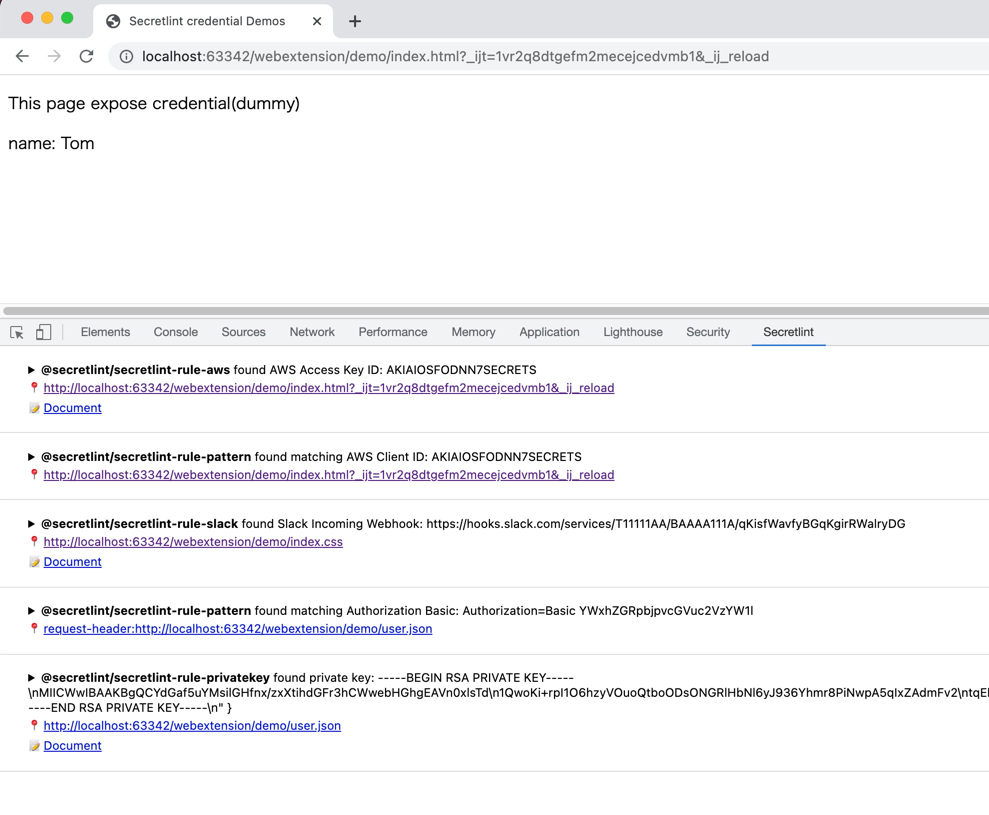
Secretlint WebExtension 可在您的浏览器中使用。
- Firefox:https://addons.mozilla.org/ja/firefox/addon/secretlint/
- Chrome:https://chrome.google.com/webstore/detail/secretlint/hidpojbnemkajlnibhmeilpgoddkjjkf
该浏览器扩展旨在检测请求/响应中包含的凭据。

Secretlint WebExtension 集成到 Chrome/Firefox 的 DevTools 中。 该扩展帮助 Web 开发者注意到暴露的凭据。
macOS
SecureClipboard 是一款 macOS 菜单栏应用程序,它使用 Secretlint 在粘贴之前检测并屏蔽剪贴板中的秘密信息。
其他
SARIF 格式支持
请使用 @secretlint/secretlint-formatter-sarif。``` npm install @secretlint/secretlint-formatter-sarif --dev secretlint --format @secretlint/secretlint-formatter-sarif "**/*"
## 语义版本控制策略
Secretlint 项目遵循[语义化版本控制](https://semver.org/ "Semantic Versioning")([secretlint-rule-preset-canary](https://github.com/secretlint/secretlint/blob/HEAD/packages/@secretlint/secretlint-rule-preset-canary) 是个例外)。
- 补丁版本(预期不会破坏你的 lint 构建)
- CLI 或核心(包括格式化程序)中的错误修复。
- 文档改进。
- 非面向用户的更改,例如重构。
- 在失败的版本发布后重新发布(即,发布一个对任何人都无法正常工作的版本)。
- 次要版本(可能会破坏你的 lint 构建)
- 新增选项。
- 某个现有规则被弃用。
- 创建了新的 CLI 功能。
- 添加了新的公共 API(新类、新方法、现有方法的新参数等)。
- 这可能会破坏 TypeScript 定义
- 创建了新的格式化程序。
- 主要版本(会破坏你的 lint 构建)
- 为现有规则添加新选项,导致 secretlint 默认报告更多错误。
- 移除了某个现有格式化程序。
- 向规则预设添加新的默认规则。
- 移除了部分公共 API,或以不兼容的方式进行了更改。
## 动机
- [git-secrets](https://github.com/awslabs/git-secrets) 很有用,但它在每个项目中的设置很麻烦。
- 其主要用例是全局安装。
- Secretlint 希望为项目安装,并允许为每个项目自定义设置。
- [repo-security-scanner](https://github.com/UKHomeOffice/repo-security-scanner)、[Gitleaks](https://github.com/zricethezav/gitleaks) 和 [truffleHog](https://github.com/dxa4481/truffleHog) 是不错的扫描工具。
- Secretlint 需要灵活的自定义功能,包括忽略定义和自定义规则。
- [detect-secrets](https://github.com/Yelp/detect-secrets) 是类似的工具,但它采用 opt-out 方法。
- Secretlint 采用 opt-in 方法。
- 我们还需要用户自定义规则。
- 参见 [Bring-your own-plugins (BYOP), via --custom-plugins option by KevinHock · Pull Request #255 · Yelp/detect-secrets](https://github.com/Yelp/detect-secrets/pull/255)
- GitHub 支持[秘密扫描](https://docs.github.com/en/code-security/secret-security/about-secret-scanning),但它仅在提交后生效[~~推送~~](https://docs.github.com/en/code-security/secret-scanning/push-protection-for-users)。
- Secretlint 在你的本地机器上运行,可以阻止提交。
## 哲学
- 减少 lint 的误报
- 集成到开发工作流
- 赋能用户贡献
### Opt-in 而非 Opt-out
Secretlint 采用 opt-in 方法。
根据我们的经验,默认报告各种错误的 lint 工具很难使用。
Opt-in 方法有助于逐步引入 Secretlint。
这将有助于通过配置减少误报。
### 规则即文档
我们认为每条规则本身就是一份文档。
因此,每条规则都应该有合理的文档。
我们需要描述为什么这个文件会报错。
没有文档的规则只是主观意见。
描述错误的原因将有助于减少误报。
此外,Secretlint CLI 支持终端中的超链接。
这意味着你可以从 lint 错误消息直接跳转到规则文档。

> 在 iTerm 2 上的示例:Cmd + 点击错误消息的 messageId,在浏览器中打开 [AWSSecretAccessKey](https://github.com/secretlint/secretlint/blob/master/packages/%40secretlint/secretlint-rule-aws/README.md#awssecretaccesskey)。
如果你想了解支持超链接的终端,请参见[终端模拟器中的超链接](https://gist.github.com/egmontkob/eb114294efbcd5adb1944c9f3cb5feda)。
同时,欢迎为 secretlint 文档做出贡献!
### 为什么选择 Node.js?
- 包管理器
- 需要包管理器来实现灵活的插件系统
- Node.js 有 npm 和 pnpm 作为包管理器
- 包管理器帮助用户安装自定义插件/规则
- 现有参考实现
- Node.js 已经拥有可插拔的 lint 工具,如 ESLint、textlint、stylelint 等
- 因此 Node.js 用户熟悉可插拔的 lint 工具
- 我之前使用相同的思路创建了 textlint,因此我对 Node.js 很熟悉
- 用户
- JavaScript 是一种流行的语言
- 它让用户能够贡献
- 用户可以亲手创建自己的规则
当然,secretlint 也支持 [Docker](https://hub.docker.com/r/secretlint/secretlint)。
## 更新日志
请参见 [Releases 页面](https://github.com/secretlint/secretlint/releases)。
## 贡献
随时欢迎拉取请求和收藏。
如有错误和功能请求,请[创建一个 issue](https://github.com/secretlint/secretlint/issues)。
另请参阅 [CONTRIBUTING.md](https://github.com/secretlint/secretlint/blob/HEAD/CONTRIBUTING.md) 和 [CODE_OF_CONDUCT.md](https://github.com/secretlint/secretlint/blob/HEAD/CODE_OF_CONDUCT.md)。
### 添加新规则
你可以使用 `pnpm run gen:rule` 命令来创建新规则。```shell script
pnpm run gen:rule
有关更多详情,请参阅 CONTRIBUTING.md
基准测试
每次提交都会运行基准测试工作流程。
作者
许可证
MIT © azu