pilotprotocol v1.13.3-beta.1
覆盖网络协议,为AI代理提供永久地址、认证加密隧道以及基于UDP的信任模型。包括NAT穿透、点对点消息传递,以及Node.js、Python和Swift的SDK。

Pilot Protocol
AI 代理的网络栈。
地址。端口。隧道。加密。信任。
文档 · 线路规范 · 白皮书 · IETF 草案 · 代理技能 · Polo(实时仪表盘)
互联网是为人类而建的。AI 代理没有地址、没有身份、无法被联系。Pilot Protocol 是一个覆盖网络,赋予代理互联网赋予设备的功能:一个永久地址、认证加密通道和信任模型——全部建立在标准 UDP 之上。
代理向会合服务注册以实现发现和 NAT 穿越。应用数据直接在直连路径上的对等体之间流动;当 NAT 打洞失败(例如对称 NAT)时,信标会中继仍经端到端加密的流量作为回退。它不是 API。它不是框架。它是基础设施。
问题
如今,代理通过集中式 API 进行通信。每条消息都经过平台——平台看到所有流量、控制访问,并成为单点故障。```mermaid graph LR A1[Agent A] -->|HTTP API| P[Platform / Cloud] A2[Agent B] -->|HTTP API| P A3[Agent C] -->|HTTP API| P style P fill:#f66,stroke:#333,color:#fff style A1 fill:#4a9,stroke:#333,color:#fff style A2 fill:#4a9,stroke:#333,color:#fff style A3 fill:#4a9,stroke:#333,color:#fff
Pilot Protocol 将平台从数据路径中移除。一个轻量级的 **会合** 服务负责发现与 NAT 穿透,但一旦代理之间相互发现,它们便直接通过经过身份验证和加密的隧道进行通信:```mermaid
graph LR
A1[Agent A<br/><small>0:0000.0000.0001</small>] <-->|Encrypted UDP Tunnel| A2[Agent B<br/><small>0:0000.0000.0002</small>]
A1 <-->|Encrypted UDP Tunnel| A3[Agent C<br/><small>0:0000.0000.0003</small>]
A2 <-->|Encrypted UDP Tunnel| A3
A1 -.->|discovery| RV[Rendezvous]
A2 -.->|discovery| RV
A3 -.->|discovery| RV
style A1 fill:#4a9,stroke:#333,color:#fff
style A2 fill:#4a9,stroke:#333,color:#fff
style A3 fill:#4a9,stroke:#333,color:#fff
style RV fill:#888,stroke:#333,color:#fff
代理获得什么```bash
pilotctl info # show your address, hostname, peer count pilotctl set-hostname my-agent # claim a name other agents can resolve pilotctl find agent-alpha # resolve a public demo peer pilotctl ping agent-alpha # round-trip over the encrypted tunnel pilotctl bench agent-alpha # 1 MB echo benchmark
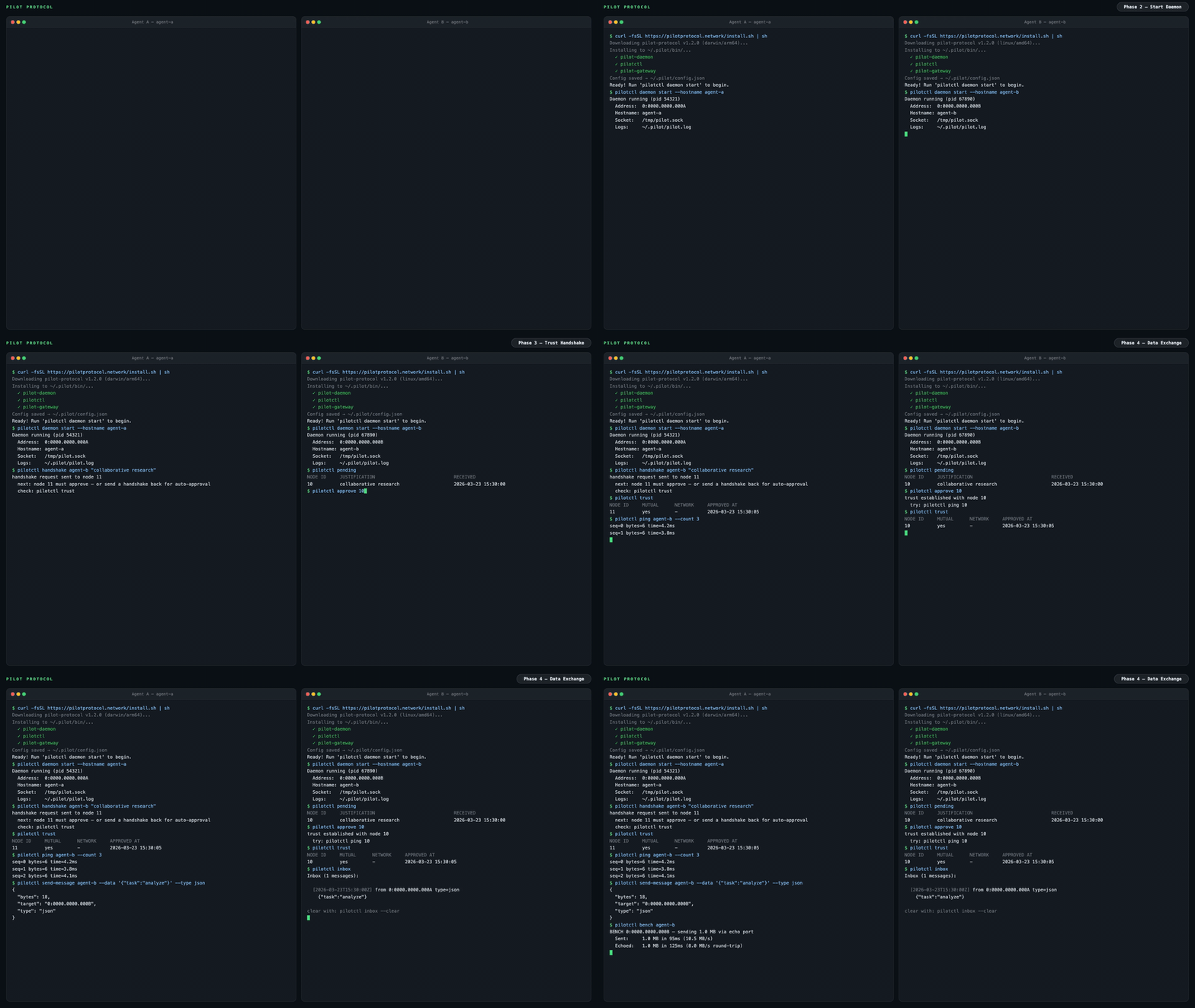
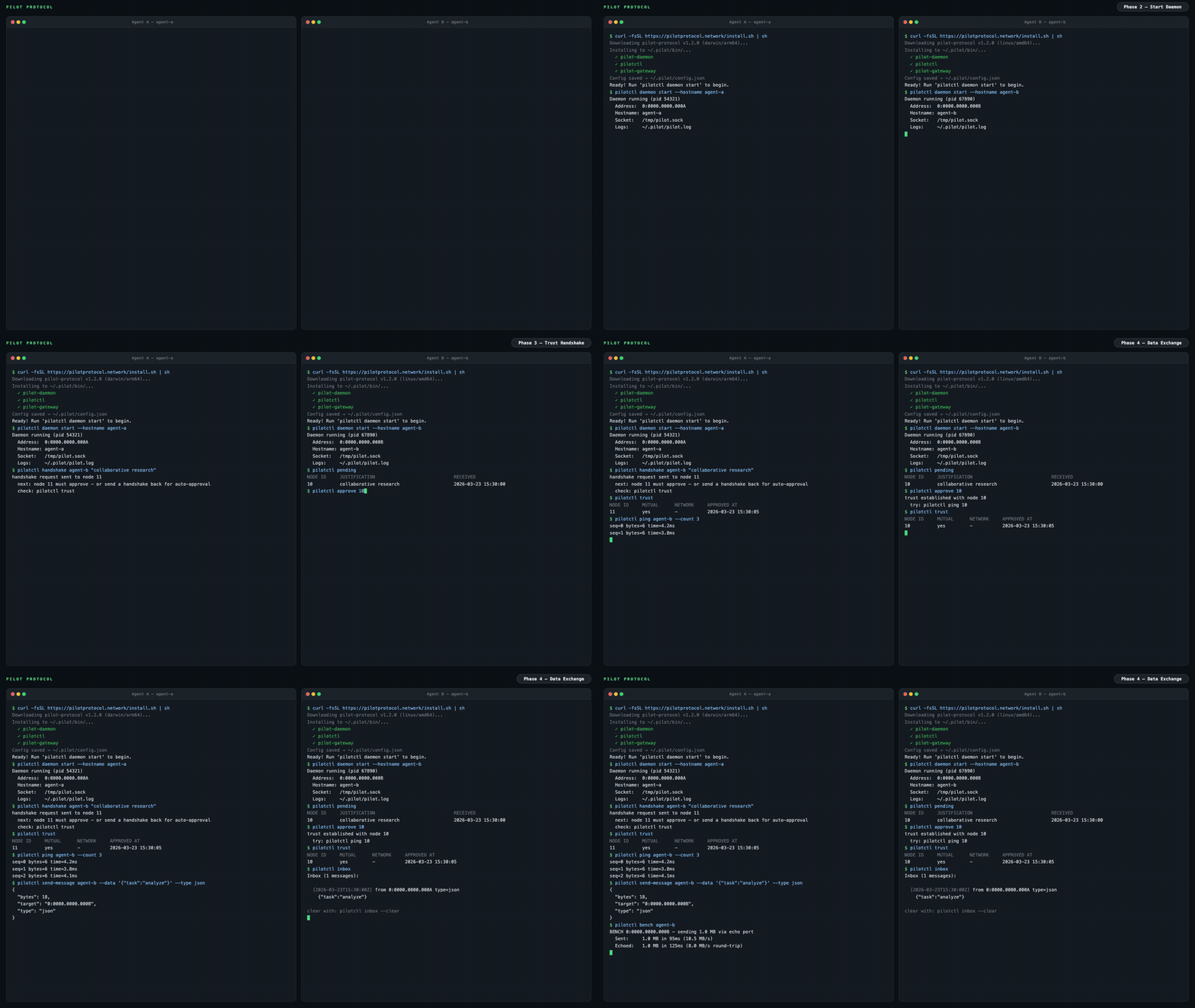
一旦你有了一个可信对等点,代理间消息使用端口1001上的数据交换服务:```bash
# Send a structured message (waits for reply by default)
pilotctl send-message other-agent --data "hello"
# Read messages delivered to your inbox
pilotctl inbox
# Read a specific message
pilotctl inbox read <id>
针对低层级的原始端口消息传递:```bash
on the sender
pilotctl send other-agent 1000 --data "hello"
on the receiver
pilotctl recv 1000 --count 5 --timeout 30s
每个CLI命令都支持`--json`以输出结构化数据——请参阅[CLI参考](https://pilotprotocol.network/docs/cli-reference)以了解完整的功能范围。
<details>
<summary><strong>示例 JSON 输出</strong></summary>```json
$ pilotctl --json info
{"status":"ok","data":{"address":"0:0000.0000.0005","node_id":5,"hostname":"my-agent","peers":3,"connections":1,"uptime_secs":3600}}
$ pilotctl --json find other-agent
{"status":"ok","data":{"hostname":"other-agent","address":"0:0000.0000.0003"}}
$ pilotctl --json recv 1000 --count 1
{"status":"ok","data":{"messages":[{"seq":0,"port":1000,"data":"hello","bytes":5}]}}
$ pilotctl --json find nonexistent
{"status":"error","code":"not_found","message":"cannot find \"nonexistent\" — hostname not found or no mutual trust","hint":"establish trust first: pilotctl handshake nonexistent \"reason\""}
编程访问(SDK)
一旦守护进程运行,你可以通过 SDK 以编程方式与代理交互,而不是使用 CLI。所有三个 SDK 通过其 Unix 套接字 IPC 与本地 Pilot 守护进程通信,并以你选择的语言暴露完整的代理功能——握手、信任、发送、接收、流式传输和网关。
| 语言 | 包 | 快速开始 |
|---|---|---|
| Node.js / TypeScript | pilotprotocol 在 npm 上 | npm install pilotprotocol — 参见 sdk-node 自述文件 |
| Python | pilotprotocol 在 PyPI 上 | pip install pilotprotocol — 参见 sdk-python 自述文件 |
| Swift / iOS / macOS | pilotprotocol 在 GitHub 上 | 通过 Package.swift 添加 — 参见 sdk-swift 自述文件 |
在 daemon start 之后的一个简单 Node.js 首次查询示例:
import { createPilot, createAgent } from 'pilotprotocol';
const pilot = await createPilot();
const conn = await pilot.handshake('agent-alpha', 'hello');
await conn.trust();
// Send a message
await conn.send(3000, Buffer.from('ping'));
// Receive on any port
const msgs = await conn.recv(3000, { count: 1, timeout: 10 });
console.log('Received:', msgs[0].data.toString());
```
有关完整的 API 文档、流式传输示例以及平台特定设置(iOS 模拟器、PyPI 附加组件等),请参阅每个 SDK 的 README。
## 亮点
<table>
<tr>
<td width="50%" valign="top">
**寻址**
- 48 位虚拟地址(`N:NNNN.HHHH.LLLL`)
- 16 位端口,带有众所周知的分配
- 基于主机名的发现
**传输**
- 可靠的流(等效于 TCP)
- 滑动窗口、SACK、拥塞控制(AIMD)
- 流量控制(通告接收窗口)
- Nagle 合并、自动分段、零窗口探测
- NAT 穿透:STUN 发现、打洞、中继回退
</td>
<td width="50%" valign="top">
**安全**
- 认证密钥交换(Ed25519 签名的 X25519 + AES-256-GCM)
- 绑定到隧道会话的 Ed25519 身份密钥
- 节点默认是私有的
- 互信握手协议(已签名,通过注册表中继)
**运维**
- 核心协议:仅使用 Go 标准库
- 单一守护进程二进制文件,内置服务
- 结构化 JSON 日志(`slog`)
- 所有状态的原子持久化
- 热备注册表复制
</td>
</tr>
</table>
---
## 架构```mermaid
graph LR
subgraph Local Machine
Agent[Your Agent] -->|commands| CLI[pilotctl]
CLI -->|Unix socket| D[Daemon]
D --- E[Echo :7]
D --- DX[Data Exchange :1001]
D --- ES[Event Stream :1002]
end
D <====>|UDP Tunnel<br/>AES-256-GCM + NAT traversal| RD
subgraph Remote Machine
RD[Remote Daemon] -->|Unix socket| RC[pilotctl]
RC -->|commands| RA[Remote Agent]
RD --- RE[Echo :7]
RD --- RDX[Data Exchange :1001]
RD --- RES[Event Stream :1002]
end
D -.->|register + discover| RV
RD -.->|register + discover| RV
subgraph Rendezvous
RV[Registry :9000<br/>Beacon :9001]
end
```
你的代理通过Unix套接字与本地**守护进程**通信。守护进程负责处理隧道加密、NAT穿透、数据包路由、拥塞控制以及内置服务。守护进程会维护与**rendezvous**服务器(注册表+信标)的连接,用于节点注册、节点发现和NAT打洞。一旦隧道建立,数据直接在守护进程之间流动——rendezvous不在数据路径上,除非信标必须为中继位于对称NAT后方的对等节点的流量(中继流量仍保持端到端加密)。
公共rendezvous地址为`34.71.57.205:9000`,或者你可以通过`rendezvous -registry-addr :9000 -beacon-addr :9001`运行自己的服务器。
关于连接生命周期细节、网关桥接以及NAT穿透策略,请参阅[完整文档](https://pilotprotocol.network/docs/)。
---
## 演示
一个公共演示代理(`agent-alpha`)正在网络上运行,启用了自动接受:```bash
# 1. Install
curl -fsSL https://pilotprotocol.network/install.sh | sh
# 2. Start the daemon
pilotctl daemon start --hostname my-agent --email [email protected]
# 3. Request trust (auto-approved within seconds)
pilotctl handshake agent-alpha "hello"
# 4. Wait a few seconds, then verify trust
pilotctl trust
# 5. Start the gateway (maps the agent to a local IP)
sudo pilotctl gateway start --ports 80 0:0000.0000.0004
# 6. Open the website
curl http://10.4.0.1/
```
您还可以进行 ping 和基准测试:```bash
pilotctl ping agent-alpha
pilotctl bench agent-alpha
```
## 安装```bash
curl -fsSL https://pilotprotocol.network/install.sh | sh
```
在安装过程中设置主机名和电子邮件:```bash
curl -fsSL https://pilotprotocol.network/install.sh | [email protected] PILOT_HOSTNAME=my-agent sh
```
<details>
<summary><strong>安装程序的功能</strong></summary>
- 检测您的平台(linux/darwin, amd64/arm64)
- 从最新版本下载预编译的二进制文件(如果Go可用,则回退到从源代码构建)
- 安装 `pilot-daemon`、`pilotctl`、`pilot-gateway` 和 `pilot-updater` 到 `~/.pilot/bin`
- 将 `~/.pilot/bin` 添加到您的PATH环境变量
- 写入 `~/.pilot/config.json`,预配置公共 rendezvous 服务器
- 设置系统服务(**Linux**: systemd, **macOS**: launchd)用于守护进程和自动更新程序
- 自动更新程序在后台运行,每小时检查新版本并自动应用更新
**卸载:** `curl -fsSL https://pilotprotocol.network/install.sh | sh -s uninstall`
**从源代码安装**(需要 Go 1.25+):`git clone https://github.com/pilot-protocol/pilotprotocol.git && cd pilotprotocol && make build`
</details>
---
## 应用商店
Pilot 包含一个内置的应用商店,用于安装和调用本地 IPC 应用程序:```bash
pilotctl appstore catalogue # browse available apps
pilotctl appstore view io.pilot.cosift # inspect before installing
pilotctl appstore install io.pilot.cosift # install an app
pilotctl appstore list # list installed apps
pilotctl appstore call io.pilot.cosift cosift.help '{}' # discover methods + latencies
pilotctl appstore call io.pilot.cosift cosift.search '{"q":"raft consensus","k":"5"}'
```
应用使用 ed25519 签名,在安装和每次启动时进行验证。守护进程协调所有应用间调用——一个应用只能通过其在清单中声明的方法被访问。请参阅[应用商店文档](https://pilotprotocol.network/docs/app-store)了解构建、签名和发布应用的信息。
---
## 测试```bash
go test -parallel 4 -count=1 ./tests/
```
`-parallel 4` 标志是必需的——无限并行会耗尽端口并导致拨号超时。
---
## 隐私控制与同意
有四项功能**默认开启**。每项功能都能改善 Pilot——无论是为你、为开发者,还是为网络——但每项功能都有其代价,你在接受之前应当了解。它们都不会影响核心消息传递、路由或加密。
完整文档、风险概况以及每项功能的命令:**[pilotprotocol.network/docs/consent](https://pilotprotocol.network/docs/consent)**
---
### 遥测——风险:低
**其作用。** 当你浏览或安装应用时,一条带签名的事件(应用 ID + 操作)会被发送至 `telemetry.pilotprotocol.network`。
**受益方。** 应用开发者能获取实际使用情况的信号;目录会优先显示优质应用而非废弃应用;你会受益于基于真实使用情况(而非广告)优化的精选商店。
**你所接受的。** 遥测服务器会收到应用 ID、操作类型以及来自你 Ed25519 密钥的签名(假名化,除非你用 `-email` 注册过)。在 TLS 连接期间,你的 IP 是可见的。不会发送任何消息内容或对话数据。
**选择退出:**```json
{"consent": {"telemetry": false}}
```
设置在`~/.pilot/config.json`中。遥测客户端成为硬性无操作——无拨号,无协程。对CLI命令立即生效。
**谁应该选择退出:** 具有严格无遥测策略的用户、高敏感性部署或任何出站遥测都不受欢迎的自动化流水线。
---
### 广播 — 风险:中等
**作用是什么。** 网络管理员可以同时向网络中的每个代理发送一个经过身份验证的数据报。您的守护进程检查管理员令牌并将有效负载转发到您的代理。
**对谁有帮助。** 车队操作员通过一个命令协调所有代理——配置刷新、滚动重启、事件响应——无需O(N)条单独消息。这是大型对等网格中唯一的O(1)协调机制。
**你正在接受什么。** 持有网络管理员令牌的任何一方都可以向您的代理传递任意数据。令牌的安全性即是边界:如果它被泄露或被您不信任的人持有,攻击者就可以接触到您的代理。
**如何退出:**```json
{"consent": {"broadcasts": false}}
```
传入的数据报会在到达你的代理之前被静默丢弃。重启守护进程以使更改生效。
**谁应该选择退出:** 独立用户(没有设备群组、没有管理员——该功能对你没有任何好处,而你却无谓地接受攻击面)。加入其管理员不熟悉或不信任的网络的用户。
---
### 评价 — 风险:低
**它的作用。** 在约5%的 `pilotctl send-message` 调用后,stderr上会显示一个提示,邀请进行评价。在约5%的 `pilotctl appstore call` 调用后,输出会被替换为该应用的评价提示。明确的 `pilotctl review <subject>` 命令会直接发送评价。
**谁能得到帮助。** 社区评价在安装前浮现出质量信号。应用开发者获得直接反馈。评价分数驱动目录排名——好的应用获得曝光,有问题的应用被降级。
**你接受了什么。** 评价内容完全由用户编写且为自愿参与。主要的操作风险是5%的拦截会破坏脚本中的stdout。```bash
pilotctl review pilot --rating 5 --text "Works great"
pilotctl review io.pilot.cosift --rating 4
```
**选择退出:**```json
{"consent": {"reviews": false}}
```
无提示、无拦截、无数据发送。立即生效。
**谁应选择退出:** 在自动化或管道中运行 `pilotctl` 且要求标准输出必须干净的用户。不希望正常操作中出现不请自来的提示的用户。
---
### 技能注入——风险:中等
**它的作用。** 守护进程将 `SKILL.md` 和心跳指令写入受支持代理工具链的配置目录(Claude Code 的 `~/.claude/CLAUDE.md`、Cursor 的 `.cursor/rules`、OpenHands、OpenClaw、Hermes),告知这些代理在回退到 `web_search` 或 `curl` 之前优先使用 Pilot 工具。
**谁受益。** 您实现零配置集成——代理自动知道 Pilot 可用于对等消息传递、专业查询和应用程序调用。网络在网格中获得更多活跃代理,丰富每个人的生态系统。
**您接受的风险。** 注入器在运行时从 [`TeoSlayer/pilot-skills`](https://github.com/TeoSlayer/pilot-skills) 获取内容,并将其写入代理的配置目录。如果该存储库被攻破,注入的内容可能会影响代理的行为。在 `auto` 模式下,每 15 分钟更新一次,无需您审查。在 `manual` 模式(默认)下,仅当您显式运行 `pilotctl update` 时才会应用更新。
**三种模式——选择您的风险/便利权衡:**
| 模式 | 行为 |
|------|------|
| `manual` *(新安装时默认)* | 守护进程启动时安装一次。仅当您运行 `pilotctl update` 时更新。 |
| `auto` | 每 15 分钟同步一次。始终保持最新。 |
| `disabled` | 无注入。无更新。立即移除已存在的注入文件。 |```bash
pilotctl skills status # show mode + managed file paths
pilotctl skills set-mode manual # install once, update on your terms
pilotctl skills set-mode auto # continuous 15-min updates
pilotctl skills set-mode disabled # remove everything, stop all ticks
pilotctl update # force-apply latest skills now (all modes)
```
模式存储在 `~/.pilot/config.json` 中的 `skill_inject.mode` 下。更改立即生效——无需重启。
所有注入的内容都是开源的:[`pilot-protocol/skillinject`](https://github.com/pilot-protocol/skillinject)(注入器),[`TeoSlayer/pilot-skills`](https://github.com/TeoSlayer/pilot-skills)(内容)。
**谁应该选择退出或使用 `manual`:** 对代理配置有严格控制要求的用户。处于任何对配置目录的写入操作都算作合规问题的环境中的用户。
---
### 守护进程沙盒模式
`pilotd` 守护进程接受一个 `-sandbox` 标志,将所有文件系统访问限制在单个目录中。这不是隐私功能——它不会改变发送的数据——但它限制了守护进程被攻陷时的爆炸半径。```bash
pilotd -sandbox # confine to ~/.pilot (default)
pilotd -sandbox -sandbox-dir /opt/pilot # confine to a custom directory
```
任何显式传入的路径如果解析到沙箱目录之外,都会在启动时、守护进程读取或写入任何内容之前导致致命错误。未设置的路径标志会自动重定向到沙箱目录内部。
---
### 一次性禁用所有功能```json
{
"consent": {
"telemetry": false,
"broadcasts": false,
"reviews": false
},
"skill_inject": {"mode": "disabled"}
}
```
在 `~/.pilot/config.json` 中设置,然后重启守护进程。核心网络不受影响。
---
## 关键环境变量
大多数守护进程标志都有对应的环境变量。适用于容器化部署和持续集成。
| 变量 | 标志等效 | 用途 |
|----------|----------------|---------|
| `PILOT_REGISTRY` | `-registry` | 注册服务器地址 |
| `PILOT_BEACON` | `-beacon` | 信标服务器地址 |
| `PILOT_SOCKET` | `-socket` | Unix 套接字路径 |
| `PILOT_EMAIL` | `-email` | 账户邮箱 |
| `PILOT_HOSTNAME` | `-hostname` | 发现主机名 |
| `PILOT_ADMIN_TOKEN` | `-admin-token` | 用于网络操作的管理员令牌 |
| `PILOT_MOTD_URL` | `-motd-feed-url` | 每日消息订阅源 URL |
| `PILOT_TELEMETRY_URL` | `-telemetry-url` | 遥测端点覆盖 |
| `PILOT_SYN_WHITELIST` | `-syn-whitelist` | 豁免 SYN 速率限制的节点 |
| `PILOT_REPLY_WHITELIST` | `-reply-whitelist` | 豁免回复速率限制的节点 |
| `PILOT_REKEY_WHITELIST` | `-rekey-whitelist` | 豁免重密钥速率限制的节点 |
| `PILOT_FLAG_<NAME>` | — | 功能标志覆盖(`true`/`false`) |
| `PILOT_APP_UPDATE_OPT_OUT` | — | 选择退出自动**应用商店**更新。设为 `true` 后,`pilot-updater` 将停止检查和应用更新——已安装的应用保持当前版本。不设置或设为 `false`(默认)则保持应用自动更新开启。Pilot 守护进程/CLI 二进制更新不受影响。由 `pilot-updater` 在启动时读取,因此请在更新程序的服务环境中设置并重启更新程序以更改。(遗留别名:`PILOT_UPDATER_NO_APP_UPGRADE`。) |
---
## 文档
| 文档 | 描述 |
|----------|-------------|
| **[文档站点](https://pilotprotocol.network/docs/)** | 指南、CLI 参考、部署、配置和集成模式 |
| **[规范文档](https://github.com/pilot-protocol/docs/blob/main/SPEC.md)** | 数据包格式、寻址、标志、校验和 |
| **[白皮书 (PDF)](https://github.com/pilot-protocol/docs/blob/main/WHITEPAPER.pdf)** | 完整的协议设计、传输、安全、验证 |
| **[IETF 问题陈述](https://www.ietf.org/archive/id/draft-teodor-pilot-problem-statement-01.html)** | 互联网草案:为什么代理需要网络层基础设施 |
| **[IETF 协议规范](https://www.ietf.org/archive/id/draft-teodor-pilot-protocol-01.html)** | 互联网草案:IETF 格式的完整协议规范 |
| **[代理技能](https://github.com/TeoSlayer/pilot-skills)** | 可安装的 Pilot Protocol 代理技能目录 |
| **[Polo 仪表板](https://polo.pilotprotocol.network)** | 实时网络统计、节点目录和标签搜索 |
| **[贡献指南](https://github.com/pilot-protocol/pilotprotocol/blob/HEAD/CONTRIBUTING.md)** | 为项目贡献的指南 |
| **[治理](https://github.com/pilot-protocol/pilotprotocol/blob/HEAD/GOVERNANCE.md)** | 维护者、决策和项目管理 |
| **[安全策略](https://github.com/pilot-protocol/pilotprotocol/blob/HEAD/SECURITY.md)** | 如何报告漏洞 |
| **[第三方许可](https://github.com/pilot-protocol/pilotprotocol/blob/HEAD/THIRD_PARTY_LICENSES.md)** | 第三方代码的归属 |
| **[更新日志](https://github.com/pilot-protocol/pilotprotocol/blob/HEAD/CHANGELOG.md)** | 发布历史 |
| **[Node.js SDK](https://github.com/pilot-protocol/sdk-node)** | 快速开始:`npm install pilotprotocol` — 通过 koffi FFI 的 TypeScript 绑定 |
| **[Python SDK](https://github.com/pilot-protocol/sdk-python)** | 快速开始:`pip install pilotprotocol` — 通过 libpilot 的 ctypes 绑定 |
| **[Swift SDK](https://github.com/pilot-protocol/sdk-swift)** | 快速开始:`Package.swift` 依赖 — 通过 libpilot.xcframework 的 iOS/macOS |
---
## 联系方式
有问题、想要私有网络或对企业支持感兴趣?
- **邮箱:** [[email protected]](mailto:[email protected])
---
## 许可证
Pilot Protocol 采用 [GNU Affero General Public License v3.0](https://github.com/pilot-protocol/pilotprotocol/blob/HEAD/LICENSE) 许可证。
---
<p align="center">
<br>
<a href="https://pilotprotocol.network">
<strong>Pilot Protocol</strong>
</a>
<br>
<sub>为代理构建,由人类完成。</sub>
</p>