
agentic-threat-hunting-framework v0.18.0
ATHF是一个用于自主威胁狩猎的框架——构建能够记忆、学习并以更高自主性行动的系统。
智能体威胁狩猎框架(ATHF)




为你的威胁狩猎项目赋予记忆与自主能力。
智能体威胁狩猎框架(ATHF) 是你的威胁狩猎项目的记忆与自动化层。它为你的狩猎提供结构、持久性和上下文——让每一次过往调查都能被人类和 AI 访问。
ATHF 可与任何狩猎方法论配合使用(PEAK、TaHiTI 或你自己的流程)。它不是替代品;它是让你的现有流程具备 AI 就绪能力的层。
什么是 ATHF?
ATHF 为威胁狩猎项目提供结构和持久性。它是一个基于 Markdown 的框架,能够:
- 使用 LOCK 模式(Learn → Observe → Check → Keep)记录狩猎过程
- 维护一个可搜索的过往调查仓库
- 使 AI 助手能够引用你的环境和先前工作
- 与任何 SIEM/EDR 平台配合使用
- 新增: 包含 AI 驱动的研究和假设生成智能体(v0.3.0+)
问题所在
大多数威胁狩猎项目在狩猎结束后会丢失宝贵的上下文。笔记散落在 Slack 或工单中,查询写一次就被遗忘,经验教训只存在于分析师的头脑中。
即使是 AI 工具,每次也都从零开始,无法访问你的环境、数据或过往狩猎记录。
ATHF 通过为你的狩猎提供结构、持久性和上下文来改变这一现状。
阅读更多: docs/why-athf.md
LOCK 模式
每一次威胁狩猎都遵循相同的基本循环:Learn → Observe → Check → Keep。
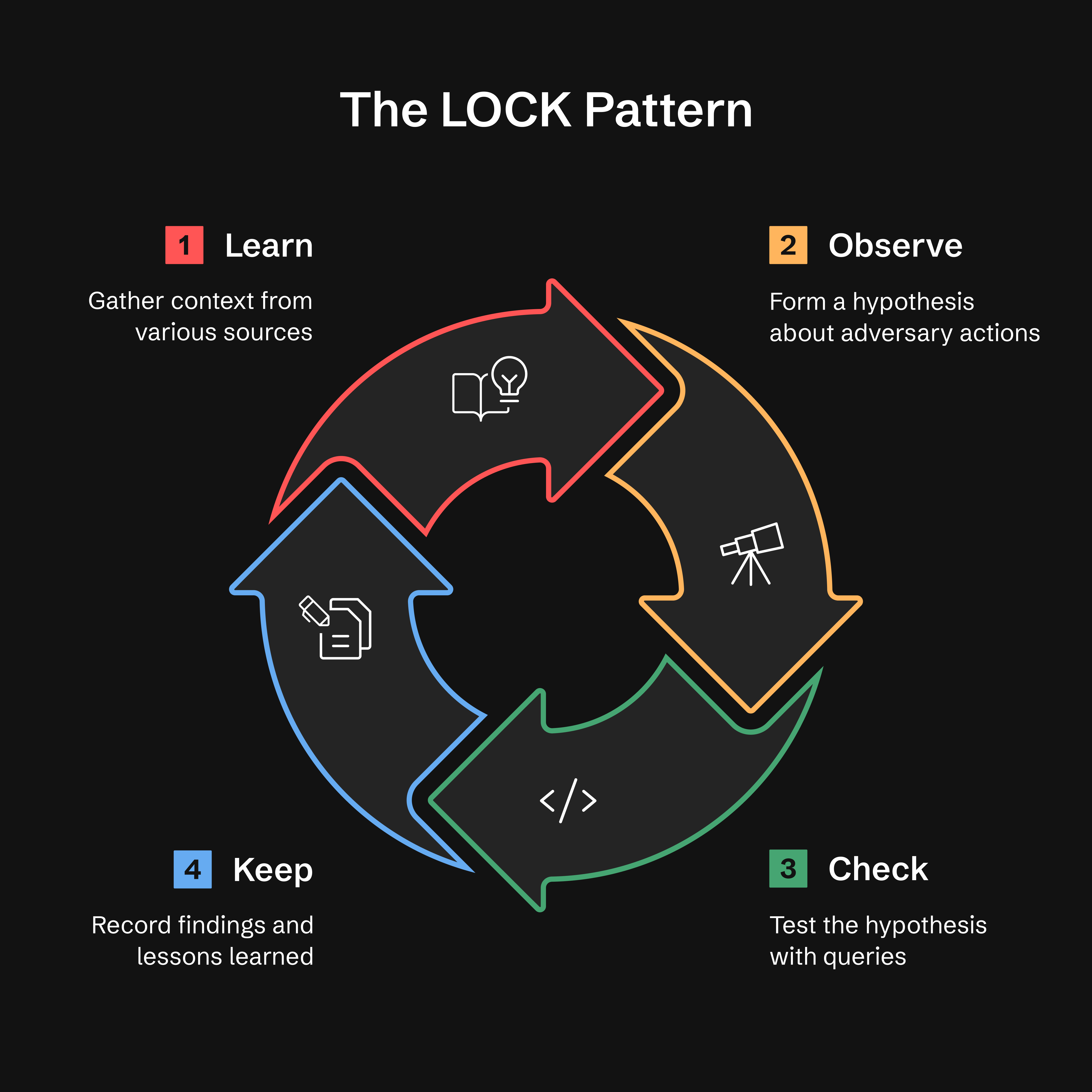
- Learn(学习): 从威胁情报、告警或异常中收集上下文
- Observe(观察): 形成关于对手行为的假设
- Check(检查): 使用针对性查询检验假设
- Keep(保留): 记录发现和经验教训
为什么是 LOCK? 它足够小以便使用,又足够严格以便智能体解读。通过以这种格式记录每一次狩猎,ATHF 使 AI 助手能够回忆先前工作,并基于过往结果建议改进的查询。
阅读更多: docs/lock-pattern.md
GATES 方法:狩猎到检测的晋升验证
在完成狩猎的 KEEP 阶段后,GATES 方法 会验证你的发现是否应晋升为生产检测、周期性狩猎或公告。
Generalizable(可泛化)、Additive(可叠加)、Tunable(可调优)、Exposure-tested(经暴露测试)、Sustainable(可持续)
注意: GATES 设计为与 ATHF 框架配合使用,并已在该上下文中经过广泛测试。虽然该方法论(5 项 BASE 标准、判定类型)在概念上可移植,但我们建议将其作为完整 ATHF 工作流的一部分使用以获得最佳效果。完整集成请参见
.claude/skills/gates/。
安装: GATES 目前仅可通过
git clone获取。通过pip install安装的用户应克隆仓库以访问 GATES。我们正在努力将 GATES 纳入 pip 发行版(跟踪为 Issue #21)。
GATES 使用两层框架评估源自狩猎的检测:5 项 BASE 标准(从狩猎数据评估)识别部署候选,而 5 项 ADVANCED 标准(在生产中验证)确保 具有低误报率和低漏报率的弹性检测:
| 关卡 | 问题 | 捕获内容 |
|---|---|---|
| G - 可泛化 | 这是可重复的吗? | 快速失效的基于 IOC 的规则 |
| A - 可叠加 | 它是否填补了覆盖缺口? | 重复或冗余的检测 |
| T - 可调优 | 我们能区分攻击与正常吗? | 基线噪声不匹配(误报的首要原因) |
| E - 经暴露测试 | 我们覆盖了规避手段吗? | 单维度检测 |
| S - 可持续 | 我们能维护它吗? | 高量、低真阳性的规则 |
判定基于 BASE 分数(/5)。ADVANCED 验证方法请参见 .claude/skills/gates/。
快速开始 — 向你的助手输入以下内容;/gates 是一项技能,而非 shell 命令:
/gates --hunt H-0001
判定类型:
- ✅ PROMOTE(4.0-5.0)- 部署为常驻检测
- ⚠️ CONDITIONAL(3.0-3.9)- 满足前提条件后部署
- ❌ HOLD(0.0-2.9)- 保留逻辑,不部署
- ⏱️ TIME_BOX - 针对特定战役,90 天刷新
- 🔄 RECURRING_HUNT - 每季度执行,而非 24/7
- 🚫 DROP - 不值得检测;记录在案以免被重新提议
门禁 FAIL 会覆盖评分区间,当两个门禁失败时,按以下顺序首个匹配者胜出:A→DROP,G→TIME_BOX,E→HOLD,S→RECURRING_HUNT,T→CONDITIONAL。上述区间仅在无门禁 FAIL 时适用。完整规则:
.claude/skills/gates/SKILL.md 第 4 步。
注意: GATES 的 "PROMOTE" 判定意味着部署检测规则。这与 athf hunt promote 不同,后者在目录之间移动 hunt 文件。
与 ADEF(检测工程框架)的集成:
在 GATES 验证之后,继续进行 ADEF 以进行生产检测工程:
ATHF Workspace                    ADEF Workspace
──────────────                    ──────────────
Hunt (LOCK)
   ↓
GATES Validate
   ↓
H-XXXX_GATES.yaml  ────────────→  FORGE (F-O-R-G-E)
                                     ↓
                                  Production Rule
完整工作流程:
-
在 ATHF 工作区中,验证狩猎——助手输入,而非 shell 命令:
/gates --hunt H-0903→ 写入
hunt-promotion-analysis/H-0903_GATES.yaml(每个 hunt 一个文件,内部包含 N 个候选)。判定为归档(HOLD、DROP、TIME_BOX、RECURRING_HUNT)的 hunt 则改为输出一个.md叙述文件——因为没有规则需要构建, 所以第 2 步仅适用于.yaml输出。 -
将该文档导入 ADEF:
adef hunt-promote --gates ~/athf-workspace/hunt-promotion-analysis/H-0903_GATES.yaml
# --dry-run first to preview what it would mint
可部署的候选对象各自以
D-XXXX、一条目录记录和一份日志进入 Find 阶段;归档对象则报告为已跳过。无需cd—— ADEF 从ADEF_WORKSPACE解析其工作区(默认~/work/adef-workspace/)。使用adef hunt-promote --help确认你的 ADEF 具有此模式。
ADEF 仓库: https://github.com/Nebulock-Inc/agentic-detection-engineering-framework
GATES 确保你以正确的方式部署正确的检测规则,避免告警疲劳和运营摩擦。
阅读更多: .claude/skills/gates/README.md
智能体狩猎的五个级别
ATHF 定义了一个简单的成熟度模型。每个级别都建立在前一个级别之上。
大多数团队将停留在级别 1–2。除此之外的一切都是可选的成熟度。
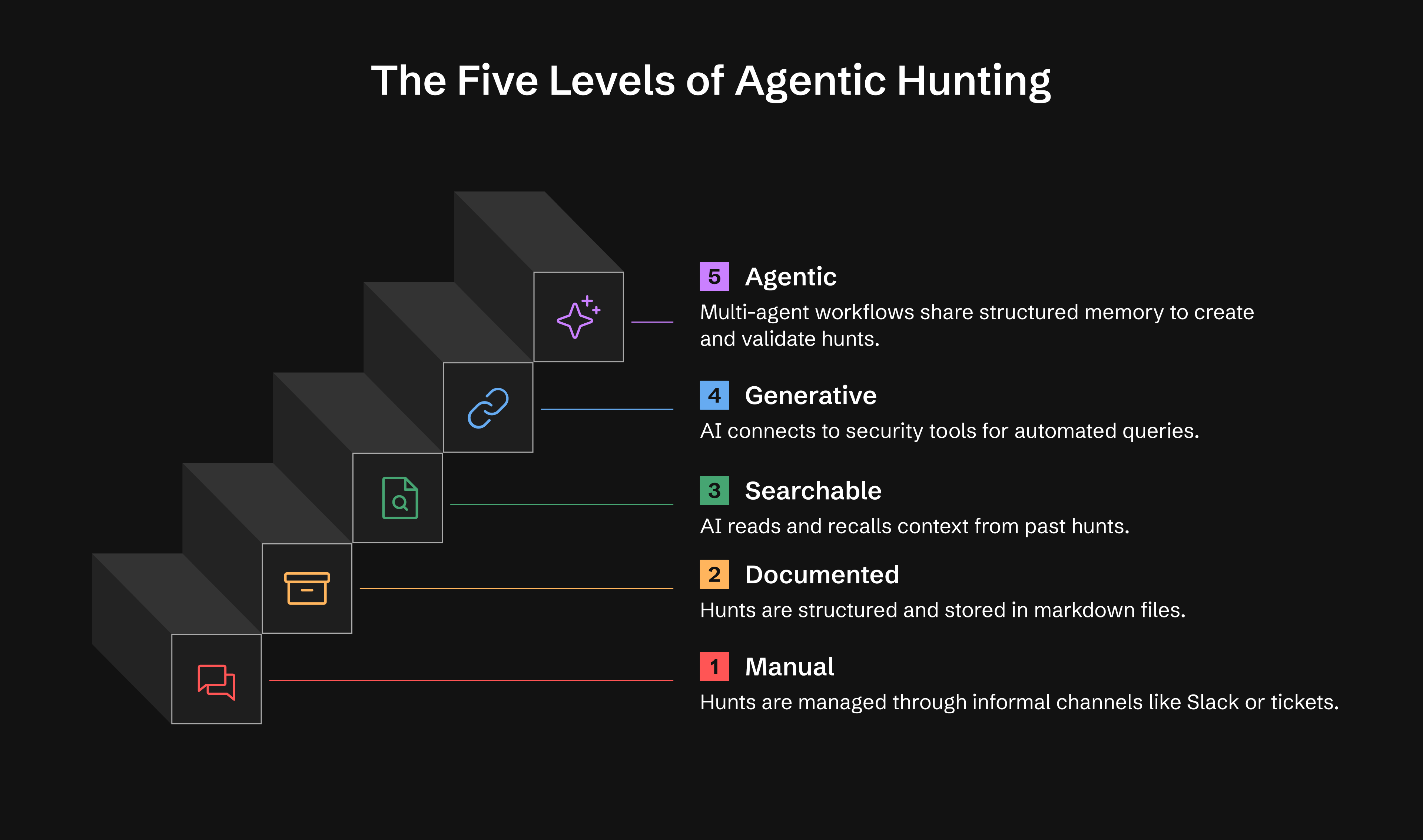
| 级别 | 能力 | 你将获得 |
|---|---|---|
| 0 | 临时性 | 狩猎存在于 Slack、工单或分析师笔记中 |
| 1 | 已记录 | 使用 LOCK 的持久化狩猎记录 |
| 2 | 可搜索 | AI 读取并回忆你的狩猎 |
| 3 | 生成式 | AI 通过 MCP 工具执行查询,开展研究 |
| 4 | 智能体式 | 自主智能体监控并行动,生成假设 |
级别 1: 一天内可投入运行 级别 2: 一周内可投入运行 级别 3: 2-4 周(可选) 级别 4: 1-3 个月(可选)
阅读更多: docs/maturity-model.md
🚀 快速开始
选项 1:从 PyPI 安装(推荐)
# Install ATHF
pip install agentic-threat-hunting-framework

# Initialize your hunt program
athf init

# NEW: Conduct research before hunting (5-skill methodology)
athf research new --topic "LSASS dumping" --technique T1003.001

# Create your first hunt (link to research)
athf hunt new --technique T1003.001 --title "LSASS Credential Dumping" --research R-0001
选项 2:从源码安装(开发)
# Clone and install from source
git clone https://github.com/Nebulock-Inc/agentic-threat-hunting-framework
cd agentic-threat-hunting-framework
pip install -e .

# Initialize and start hunting
athf init
athf hunt new --technique T1003.001
选项 3:纯 Markdown(无需安装)
# Clone the repository
git clone https://github.com/Nebulock-Inc/agentic-threat-hunting-framework
cd agentic-threat-hunting-framework

# Copy a template and start documenting
mkdir -p hunts
cp athf/data/templates/HUNT_LOCK.md hunts/H-0001.md

# Customize AGENTS.md with your environment
# Add your SIEM, EDR, and data sources
选择你的 AI 助手: Claude Code、GitHub Copilot 或 Cursor——任何能够读取你仓库文件的工具。
完整指南: docs/getting-started.md
🔧 CLI 命令
ATHF 包含一个功能齐全的 CLI,用于管理你的狩猎。以下是快速参考:
初始化工作区
athf init                           # Interactive setup
athf init --non-interactive         # Use defaults
研究与假设生成(v0.3.0 新增)
# Conduct thorough pre-hunt research (15-20 min)
athf research new --topic "LSASS dumping" --technique T1003.001

# Quick research for urgent hunts (5 min)
athf research new --topic "Pass-the-Hash" --depth basic

# Generate AI-powered hypothesis from threat intel
athf agent run hypothesis-generator --threat-intel "APT29 targeting SaaS"

# List research and agents
athf research list
athf agent list
创建狩猎
athf hunt new                       # Interactive mode
athf hunt new \
  --technique T1003.001 \
  --title "LSASS Dumping Detection" \
  --platform windows \
  --hunt-type baseline \
  --research R-0001                 # Link to research document
# --hunt-type: hypothesis (default) | baseline | model-assisted