
新发布Aug 12, 2026
kubescape v4.0.12
开源Kubernetes安全平台,扫描集群、清单和镜像,查找错误配置、漏洞,并依据NSA、MITRE和CIS基准进行合规性检查,覆盖整个开发生命周期。









Kubescape

从开发到运行时的全面 Kubernetes 安全
Kubescape 是一个开源的 Kubernetes 安全平台,在整个开发和部署生命周期中提供从左到右的全面安全覆盖。它提供加固、态势管理和运行时安全能力,确保为 Kubernetes 环境提供稳健的保护。
Kubescape 由 ARMO 创建,是 云原生计算基金会(CNCF)孵化项目。
如果您希望我们继续开发和改进 Kubescape,请为仓库加星 ⭐!
📑 目录
✨ 功能特性
| 功能 | 描述 |
|---|---|
| 🔍 配置错误扫描 | 依据 NSA-CISA、MITRE ATT&CK® 和 CIS Benchmarks 扫描集群、YAML 文件和 Helm chart |
| 🐳 镜像漏洞扫描 | 使用 Grype 检测容器镜像中的 CVE |
| 🩹 镜像修补 | 使用 Copacetic 自动修补存在漏洞的镜像 |
| 🔧 自动修复 | 自动修复 Kubernetes 清单中的配置错误 |
| 🛡️ 准入控制 | 通过 Validating Admission Policies (VAP) 强制执行安全策略 |
| 📊 运行时安全 | 通过 Inspektor Gadget 实现基于 eBPF 的运行时监控 |
| 🤖 AI 集成 | 用于 AI 助手集成的 MCP 服务器 |
🎬 演示
🚀 快速开始
1. 安装 Kubescape
curl -s https://raw.githubusercontent.com/kubescape/kubescape/master/install.sh | /bin/bash
💡 更多安装选项(Homebrew、Krew、Windows 等)请参阅安装
2. 运行你的第一次扫描
# Scan your current cluster
kubescape scan

# Scan a specific YAML file or directory
kubescape scan /path/to/manifests/

# Scan a container image for vulnerabilities
kubescape scan image nginx:latest
3. 查看结果
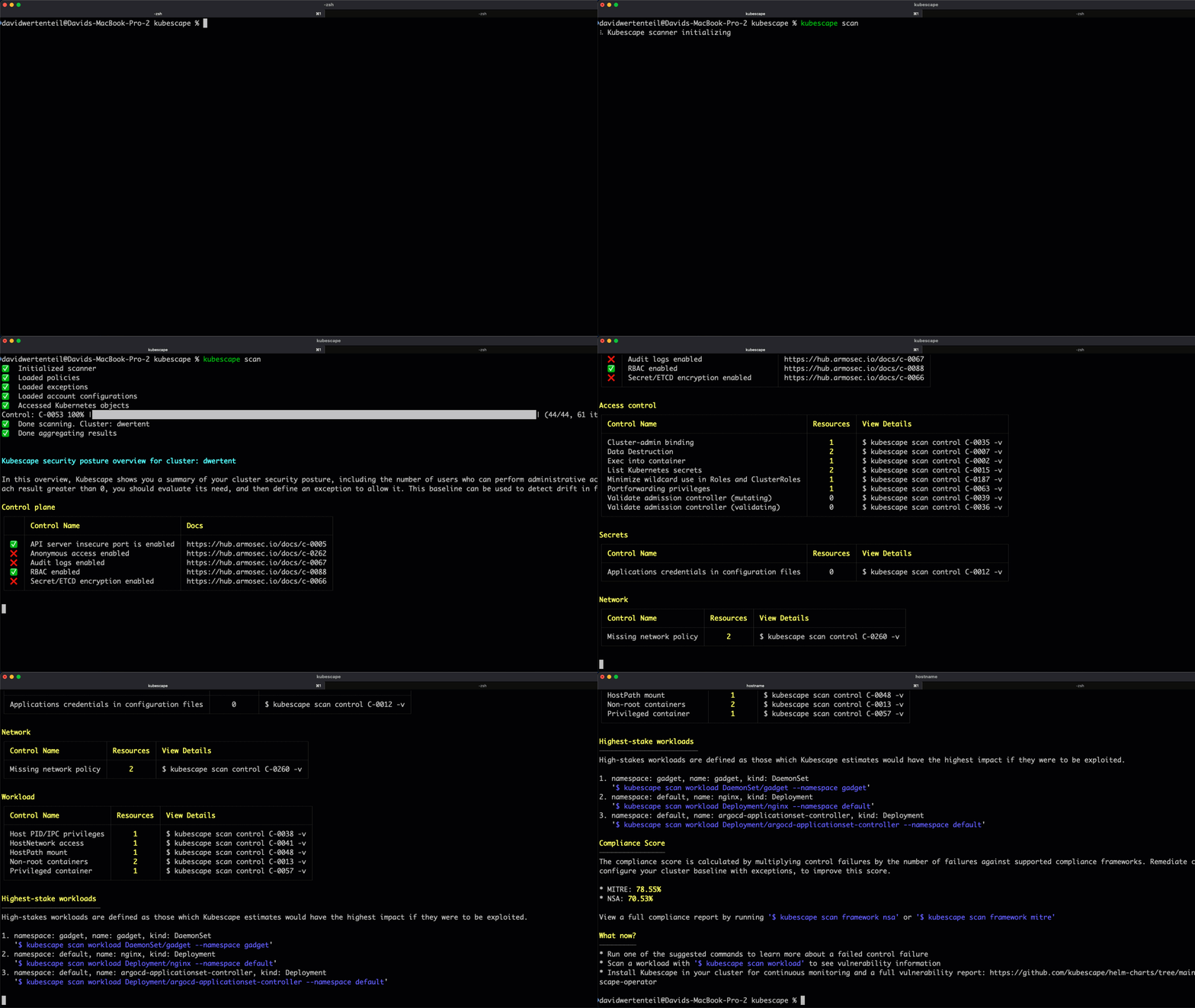
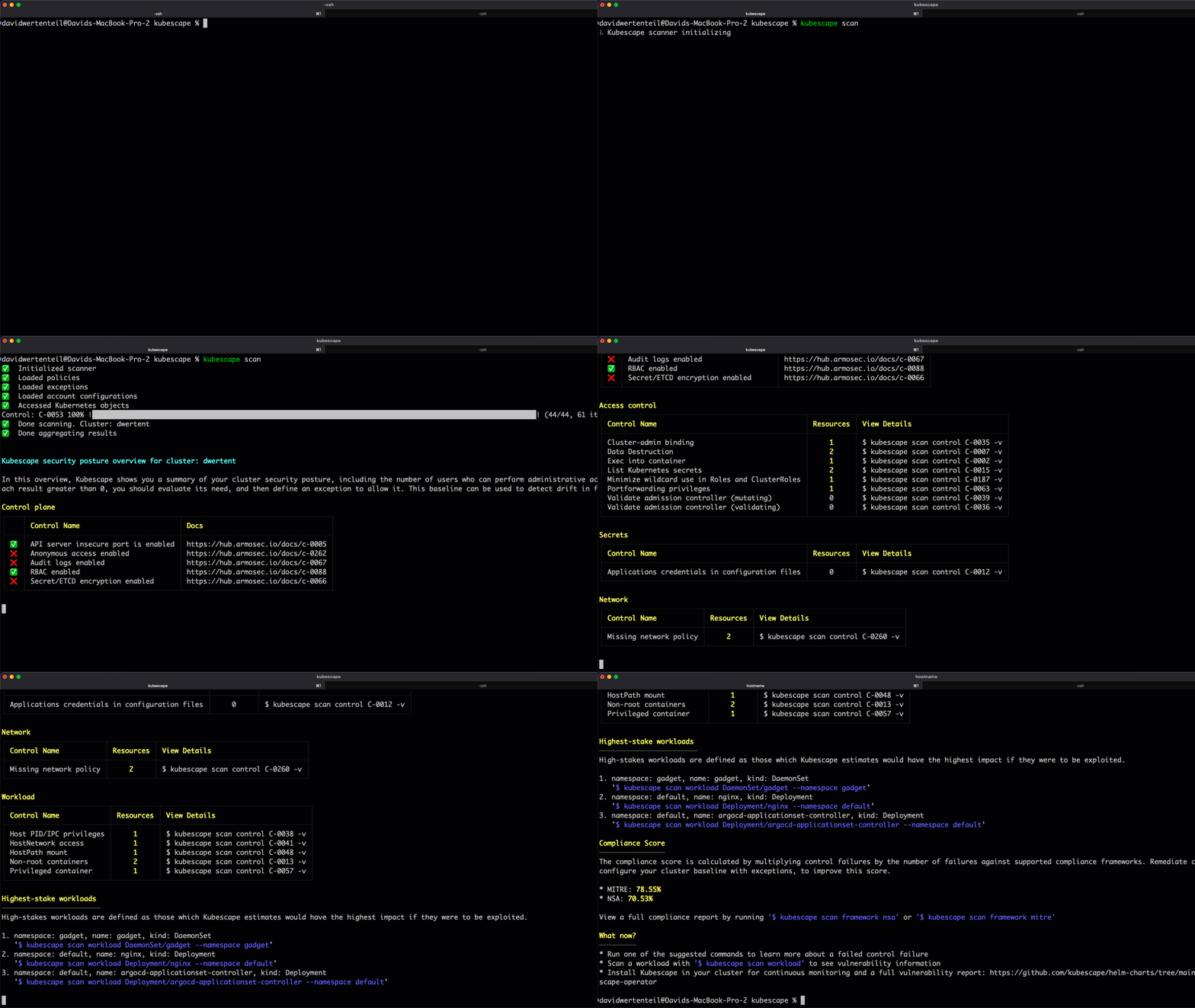
Kubescape 提供详细的安全态势概览,包括:
- 控制平面安全状态
- 访问控制风险
- 工作负载配置错误
- 网络策略缺口
- 合规评分(MITRE、NSA)
📦 安装
一行命令安装(Linux/macOS)
curl -s https://raw.githubusercontent.com/kubescape/kubescape/master/install.sh | /bin/bash
包管理器
| 平台 | 命令 |
|---|---|
| Homebrew | brew install kubescape |
| Krew | kubectl krew install kubescape |
| Arch Linux | yay -S kubescape |
| NixOS | nix-shell -p kubescape |
| Chocolatey | choco install kubescape |
| Scoop | scoop install kubescape |
Windows (PowerShell)
iwr -useb https://raw.githubusercontent.com/kubescape/kubescape/master/install.ps1 | iex
📖 完整安装指南 →
🛠️ CLI 命令
Kubescape 提供了一套全面的 CLI,包含以下命令:
| 命令 | 描述 |
|---|---|
kubescape scan | 扫描集群、文件或镜像以查找安全问题 |
kubescape scan image | 扫描容器镜像以查找漏洞 |
kubescape fix | 自动修复清单文件中的错误配置,或输出集群扫描的修复建议 |
kubescape patch | 修补容器镜像以修复漏洞 |
kubescape list | 列出可用的框架和控制项 |
kubescape download | 下载用于离线/隔离环境的工件 |
kubescape config | 管理缓存的配置 |
kubescape operator | 与集群内的 Kubescape operator 交互 |
kubescape vap | 管理验证准入策略 |
kubescape mcpserver | 启动用于 AI 助手集成的 MCP 服务器 |
kubescape completion | 生成 shell 补全脚本 |
kubescape version | 显示版本信息 |
📖 用法示例
扫描
扫描正在运行的集群
# Default scan (all frameworks)
kubescape scan

# Scan with a specific framework
kubescape scan framework nsa
kubescape scan framework mitre
kubescape scan framework cis-v1.23-t1.0.1

# Scan a specific control
kubescape scan control C-0005 -v
扫描文件和仓库
# Scan local YAML files
kubescape scan /path/to/manifests/

# Scan a Helm chart
kubescape scan /path/to/helm/chart/

# Scan a Git repository
kubescape scan https://github.com/kubescape/kubescape

# Scan with Kustomize
kubescape scan /path/to/kustomize/directory/
Helm 扫描仅使用已 vendored 在 charts/ 中的依赖,不会获取依赖或修改 chart 目录。缺少依赖会产生警告;仍会尝试渲染,但缺少依赖可能导致整个 chart 无法渲染。要包含这些依赖,请在扫描前审查其来源并使用 Helm 显式准备依赖。参见 扫描 Helm charts。
扫描选项
# Include/exclude namespaces
kubescape scan --include-namespaces production,staging
kubescape scan --exclude-namespaces kube-system,kube-public

# Use alternative kubeconfig
kubescape scan --kubeconfig /path/to/kubeconfig

# Set compliance threshold (exit code 1 if below threshold).
# Score thresholds apply to the framework/control subcommands and to
# --view resource|control.
kubescape scan framework nsa --compliance-threshold 80
kubescape scan --view resource --compliance-threshold 80

# Set severity threshold
kubescape scan --severity-threshold high
报告元数据保护
# Hide sensitive metadata using deterministic pseudonymization
kubescape scan --hide

# Set exactly one master key before encrypting and decrypting (at least 16 characters)
export KUBESCAPE_MASTER_KEY="your-secure-passphrase"

# Encrypt sensitive metadata into a JSON report
kubescape scan --encrypt --format json --output encrypted-report.json

# Decrypt the encrypted report
kubescape decrypt encrypted-report.json > decrypted-report.json