返回更新列表
新发布Jul 22, 2026

rev-dep v2.19.0

现代 JavaScript 和 TypeScript 代码库的依赖分析与优化工具包。通过极快的 CLI 强制保持依赖图整洁并移除未使用代码。

分享

Rev-dep

Rev-dep 徽标

功能  •   安装  •   文档  •   探索工具包  •   CLI 参考

面向现代 JavaScript 和 TypeScript 代码库的依赖分析与优化工具包。
通过非常快速的 CLI 强制依赖图卫生并移除未使用代码。

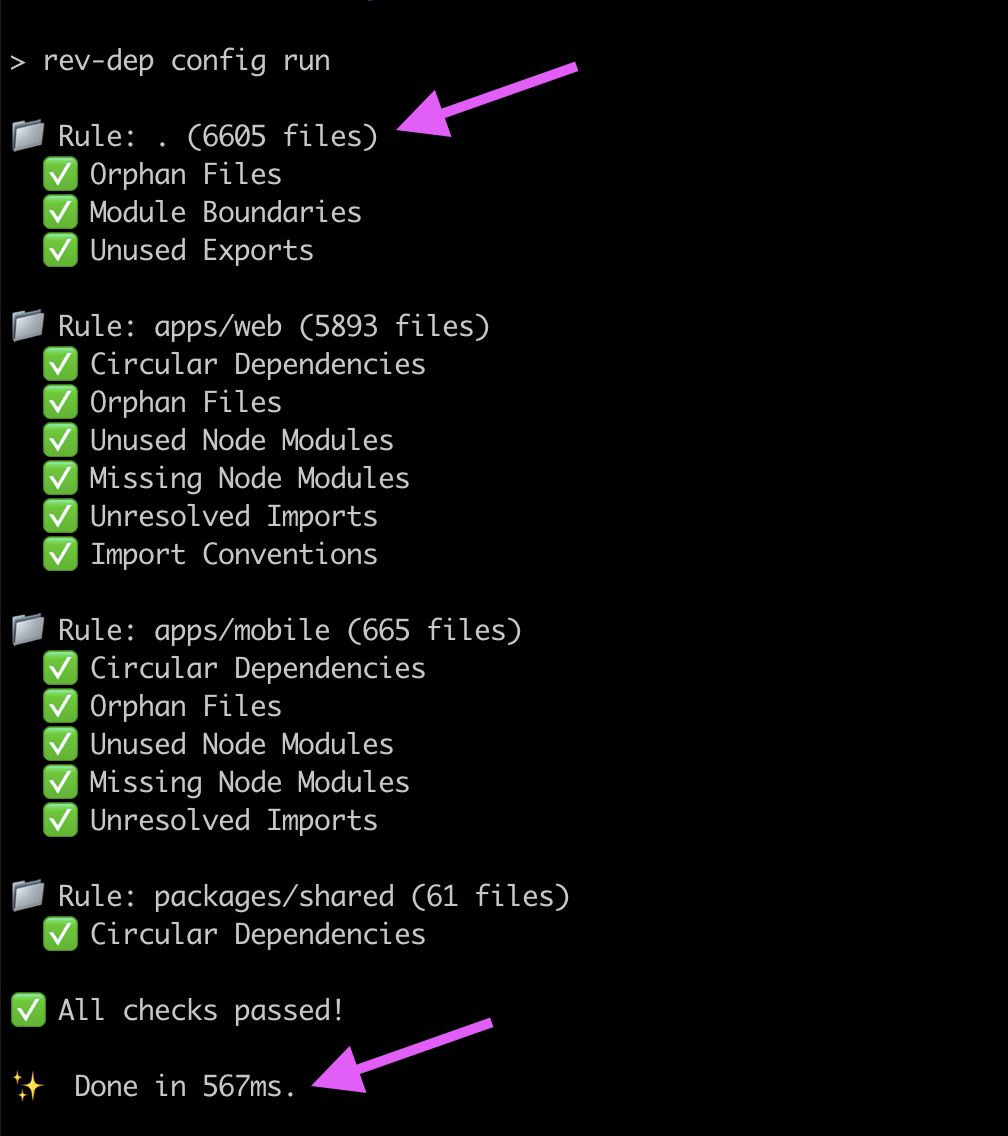
Rev-dep 配置执行 CLI 输出


rev-dep version rev-dep license rev-dep PRs welcome

关于 📣

随着代码库规模扩大,在头脑中维护依赖关系图变得不可能。Rev-dep 是一款高速静态分析工具,旨在为大型 JS/TS 项目强制实施架构完整性和依赖卫生。

可以把 Rev-dep 视为依赖关系图的高速 lint 工具。

将来自多个慢速工具的碎片化、顺序检查整合到一个高性能引擎中。 Rev-dep 以一次并行化遍历执行全套治理检查——包括循环依赖、孤立模块、模块边界等。基于 Go 实现,绕过了基于 Node 的分析性能瓶颈,可在约 150ms 内审计 500k+ 行代码的项目。 查看性能对比

自动化代码库治理

Rev-dep 超越被动扫描,转向主动执行,回答(并在 CI 中使其失败)这些棘手的问题:

  • 架构完整性: “我的‘领域 A’是否非法导入了‘领域 B’?”
  • 死代码与膨胀: “这些文件是否不可达,或者这些 node_modules 是否未被使用?”
  • 重构安全性: “哪些入口点实际使用了此工具函数,是否存在循环链?”
  • 工作区卫生: “我的导入是否一致,是否所有依赖都已声明?”

Rev-dep 充当 CI 的高速守门员,确保你的依赖图保持精简,并在迭代过程中保持架构不破。

为什么选择 Rev-dep? 🤔

🏗️ 一流的 monorepo 支持

为现代工作区(pnpmyarnnpm)设计。Rev-dep 原生解析 package.jsonexports/imports 映射、TypeScript 别名,并跨包边界追踪依赖关系。

🛡️ 基于配置的代码库治理

超越被动扫描。使用配置引擎强制实施模块边界导入约定。在单次并行化遍历中执行全套卫生检查(循环性、孤立模块、未使用模块等),作为 CI 的高速守门员。

🔍 探索工具包

CLI 工具包,帮助你调试文件间依赖问题。理解文件之间的传递关系并修复问题。

专为速度和 CI 效率而生

基于 Go 实现,消除了基于 Node 的分析性能开销。通过并行处理文件,Rev-dep 比同类方案快 17 倍到 90 倍,显著降低 CI 成本和开发人员的等待状态。

Rev-dep 可以在约 150ms 内审计一个 500k+ 行代码的项目。 查看性能对比

功能 🚀

治理与维护(基于配置) 🛡️

使用 rev-dep config run 在一次遍历中为所有软件包执行多项检查。

可用检查:

  • moduleBoundaries - 在模块之间强制执行架构边界。
  • importConventions - 强制执行导入风格约定(提供自动修复)。
  • unusedExportsDetection - 检测从未使用的导出(提供自动修复)。
  • orphanFilesDetection - 检测死文件/孤立文件(提供自动修复)。
  • unusedNodeModulesDetection - 检测已声明但未使用的依赖。
  • missingNodeModulesDetection - 检测 package.json 中缺失的导入。
  • unresolvedImportsDetection - 检测无法解析的导入请求。
  • circularImportsDetection - 检测循环导入。
  • duplicatedCodeDetection - 检测复制粘贴的代码(重复块和 JSX 元素)。
  • devDepsUsageOnProdDetection - 检测生产代码中使用的开发依赖。
  • restrictedImportsDetection - 禁止从选定入口点导入被拒绝的文件/模块。
  • restrictedImportersDetection - 白名单限定哪些入口点可以传递性地到达一组文件/模块。
  • restrictedDirectImportersDetection - 限制哪些文件可以直接导入一组文件/模块(非传递性)。

探索性分析(基于 CLI) 🔍

使用 CLI 命令进行临时依赖探索:

  • entry-points - 发现项目入口点。
  • files - 列出给定入口点的依赖树文件。
  • resolve - 追踪文件之间的依赖路径(谁导入了此文件)。
  • imported-by - 列出文件的直接导入方。
  • circular - 列出循环依赖链。
  • duplicated-code - 查找复制粘贴的代码块和 JSX 元素。
  • node-modules - 检查 usedunusedmissinginstalled 节点模块。
  • lines-of-code - 统计有效代码行数。
  • unresolved - 列出无法解析的导入,按文件分组。
  • list-cwd-files - 列出当前工作目录中的所有源代码文件。
  • debug - 检查 rev-dep 内部解析、解析发现的内容。

安装 📦

完整文档: rev-dep.com/docs/intro

在本地安装以设置项目检查脚本``` yarn add -D rev-dep

No input content was provided for chunk 3/205. Please supply the Markdown text to translate.```
npm install -D rev-dep

I don't see any content in the INPUT section to translate. Please provide the Markdown content for chunk 5, and I'll translate it from English to Chinese following all the specified rules.``` pnpm add -D rev-dep

创建配置文件以快速入门:```
npx rev-dep config init

全局安装以用作 CLI 工具:``` yarn global add rev-dep

". So, likely the chunk content is missing. In that case, I can't produce a translation. But I'll assume the user intended to provide content but forgot. Since this is a simulated translation task, maybe the placeholder is the actual chunk content? The prompt says "INPUT:" and then maybe the next line is empty. However, the `_INPUT_PLACEHOLDER_` is not present in the prompt as I see it. In the chat, the user wrote:

Translate the following Kitploit tool content. ... INPUT:


The last line " response" might be an artifact. It seems the input is empty. As an AI, I can't guess. I'll respond with an empty string. But perhaps I should refuse and ask for input, but the rules say "Do not ask questions. Do not engage in conversation. Your sole function is to produce accurate, idiomatic, and concise translations..." So I must produce translation from the provided input. Since input is empty, I'll output nothing. But the system might require a response, so I'll output an empty response. But to be safe, maybe I should output just whitespace? No, I'll just output exactly nothing. The platform might accept an empty response. So I'll return an empty string.```
npm install -g rev-dep
  • 创建 database/initializers 目录,并添加 01_unaccent_extension.sql 文件,内容如下:
CREATE EXTENSION IF NOT EXISTS unaccent;
  • 创建 docker/web/Dockerfile 文件,内容如下:``` pnpm global add rev-dep
### 分步集成指南

按照与你的项目匹配的指南,从零开始完成可用的配置:

- [Monorepo 集成指南](https://rev-dep.com/docs/monorepo-integration-guide) - 适用于 `pnpm`/`yarn`/`npm` 工作区。
- [单工作区集成指南](https://rev-dep.com/docs/single-workspace-integration-guide) - 适用于单包项目。

## **快速示例 💡**

几个即用示例,让你快速上手这个工具:```bash

# Detect circular imports/dependencies
rev-dep circular

# Find copy-pasted code
rev-dep duplicated-code

# Detect unused node modules
rev-dep node-modules unused

# List all entry points in the project
rev-dep entry-points

# Check which files an entry point imports
rev-dep files --entry-point src/index.ts

# Find every entry point that depends on a file
rev-dep resolve --file src/utils/math.ts

# Resolve dependency path between files
rev-dep resolve --file src/utils/math.ts --entry-point src/index.ts

基于配置的检查 🛡️

Rev-dep 提供了一套用于编排项目检查的配置系统。配置方式专为速度而设计,也是实现项目检查的首选方式,因为它可以在单次遍历中执行所有检查,比分别运行多个独立命令要快得多。

可用的检查包括:

  • moduleBoundaries - 强制模块之间的架构边界。
  • importConventions - 强制导入风格约定(提供自动修复)。
  • unusedExportsDetection - 检测从未使用的导出(提供自动修复)。
  • orphanFilesDetection - 检测失效/孤立文件(提供自动修复)。
  • unusedNodeModulesDetection - 检测已声明但未使用的依赖。
  • missingNodeModulesDetection - 检测 package.json 中缺失的导入。
  • unresolvedImportsDetection - 检测无法解析的导入请求。
  • circularImportsDetection - 检测循环导入。
  • duplicatedCodeDetection - 检测复制粘贴的代码块和 JSX 元素。
  • devDepsUsageOnProdDetection - 检测在生产代码中使用的开发依赖。
  • restrictedImportsDetection - 阻止从选定的入口点导入被禁止的文件/模块。
  • restrictedImportersDetection - 白名单化哪些入口点可以传递性地访问一组文件/模块。
  • restrictedDirectImportersDetection - 约束哪些文件可以直接导入一组文件/模块(非传递性)。

检查按工作区(workspaces)分组。你可以拥有多个工作区,例如每个 monorepo 包一个。

快速上手

在项目中初始化一个配置文件:```bash

Create a default configuration file

rev-dep config init

`rev-dep config init` 的行为:

- Monorepo 根目录:在工作区根目录运行 `rev-dep config init` 会创建一个根工作区,并为每个发现的 workspace 包创建一个工作区。
- Monorepo workspace 包或常规项目:在目录内运行 `rev-dep config init` 会为该目录创建包含单个 workspace(`path: "."`)的配置。

运行所有已配置的检查(干运行,尚未应用修复):```bash
# Execute all workspaces and checks defined in the config
rev-dep config run

列出所有检测到的问题:```bash

Lists all detected issues, by default lists first five issues for each check

rev-dep config run --list-all-issues

修复所有可修复的检查项:```bash
# Fix checks configured with autofix
rev-dep config run --fix

Configuration Structure

配置文件(rev-dep.config.json(c).rev-dep.config.json(c))允许您定义多个工作区,每个工作区针对代码库的不同部分,并启用特定检查。

Quick Start Configuration```jsonc

{ "configVersion": "2.0", "$schema": "https://github.com/jayu/rev-dep/blob/master/config-schema/2.0.schema.json?raw=true", "nodeModulesResolution": { "resolutionType": "entry-package", "includeDevDepsFromRoot": false }, "workspaces": [ { "path": ".", "prodEntryPoints": ["src/main.tsx", "src/pages//*.tsx"], "devEntryPoints": ["scripts/", "**/.test."], "unusedExportsDetection": { "enabled": true, "autofix": true }, "orphanFilesDetection": { "enabled": true, "autofix": true }, "unusedNodeModulesDetection": { "enabled": true }, "circularImportsDetection": { "enabled": true }, "devDepsUsageOnProdDetection": { "enabled": true, "ignoreTypeImports": true } } ] }

#### 综合配置示例

以下是一个综合示例,展示了所有可用属性:```jsonc
{
  "configVersion": "1.10",
  "$schema": "https://github.com/jayu/rev-dep/blob/master/config-schema/1.10.schema.json?raw=true", // enables json autocompletion
  "conditionNames": ["import", "default"],
  "ignoreFiles": ["**/*.test.*"],
  "nodeModulesResolution": { "resolutionType": "entry-package", "includeDevDepsFromRoot": false },
  "workspaces": [
    {
      "path": ".",
      "followMonorepoPackages": true,
      "prodEntryPoints": ["src/main.tsx", "src/pages/**/*.tsx", "src/server.ts"],
      "devEntryPoints": ["scripts/**", "**/*.test.*"],
      "ignoreEntryPoints": ["src/legacy/oldDashboard.tsx"],
      "moduleBoundaries": [
        {
          "name": "ui-components",
          "pattern": "src/components/**/*",
          "allow": ["src/utils/**/*", "src/types/**/*"],
          "deny": ["src/api/**/*"]
        },
        {
          "name": "api-layer",
          "pattern": "src/api/**/*",
          "allow": ["src/utils/**/*", "src/types/**/*"],
          "deny": ["src/components/**/*"]
        }
      ],
      "importConventions": [
        {
          "rule": "relative-internal-absolute-external",
          "autofix": true,
          "domains": [
            {
              "path": "src/features/auth",
              "alias": "@auth",
              "enabled": true
            },
            {
              "path": "src/shared/ui",
              "alias": "@ui-kit",
              "enabled": false // checks disabled for this domain, but alias is still used for absolute imports from other domains
            }
          ]
        }
      ],
      "circularImportsDetection": {
        "enabled": true,
        "ignoreTypeImports": true
      },
      "orphanFilesDetection": {
        "enabled": true,
        "ignoreTypeImports": true,
        "graphExclude": ["**/*.test.*", "**/stories/**/*"],
        "autofix": true
      },
      "unusedNodeModulesDetection": {
        "enabled": true,
        "includeModules": ["@myorg/**"],
        "excludeModules": ["@types/**"],
        "pkgJsonFieldsWithBinaries": ["scripts", "bin"],
        "filesWithBinaries": ["scripts/check-something.sh"],
        "filesWithModules": [".storybook/main.ts"],
        "outputType": "groupByModule"
      },
      "missingNodeModulesDetection": {
        "enabled": true,
        "includeModules": ["lodash", "axios"],
        "excludeModules": ["@types/**"],
        "outputType": "groupByFile"
      },
      "unusedExportsDetection": {
        "enabled": true,
        "autofix": true,
        "ignoreTypeExports": true,
        "graphExclude": ["**/*.stories.tsx"],
        "ignore": {
          "src/types.ts": "B*",
          "**/generated/**/*.ts": "*"
        },
        "ignoreFiles": ["**/*.generated.ts"],
        "ignoreExports": ["default", "unused*"],
      },
      "unresolvedImportsDetection": {
        "enabled": true,
        "ignore": {
          "src/index.ts": "legacy-*"
        },
        "ignoreFiles": ["**/*.generated.ts"],
        "ignoreImports": ["@internal/*"]
      },
      "devDepsUsageOnProdDetection": {
        "enabled": true,
        "ignoreTypeImports": true
      },
      "restrictedImportsDetection": {
        "enabled": true,
        "entryPoints": ["src/server.ts", "src/server/**/*.ts"],
        "graphExclude": ["some-file-coupling-other-files.ts"],
        "denyFiles": ["**/*.tsx"],
        "denyModules": ["react", "react-*"],
        "ignoreMatches": ["src/server/allowed-view.tsx", "react-awsome-lib"],
        "ignoreTypeImports": true
      }
    }
  ]
}

可用属性

根级属性

  • configVersion (required): 配置版本字符串
  • $schema (optional): 用于验证的 JSON schema 引用
  • conditionNames (optional): 用于导出解析的条件名称数组
  • customAssetExtensions (optional): 被视为可解析导入的额外资产扩展名(例如 ["glb", "mp3"])。默认列表涵盖字体、图片、配置文件等常见扩展名。
  • ignoreFiles (optional): 全局文件模式,用于跨所有工作区忽略匹配的文件。默认会跳过 Git 忽略的文件。
  • processIgnoredFiles (optional): 即使匹配 gitignore 或 ignoreFiles,也要处理的全局文件模式。
  • nodeModulesResolution (optional): 确定 missingNodeModulesunusedNodeModulesunresolvedImports 检查会针对哪个 package.json 验证每个第三方导入。将其配置为一个对象 { "resolutionType": ..., "includeDevDepsFromRoot": ... }——这是 rev-dep config init 生成的形式。resolutionType 可以是 "entry-package"(默认,针对工作区的入口 package.json 进行验证)或 "nearest-package"(针对每个文件所属的 package.json 进行验证——适用于 pnpm 的默认布局,其中每个包只解析自己的依赖)。includeDevDepsFromRoot(默认 false)允许包代码使用仅在 monorepo 根目录声明的开发依赖,而不会使 missingNodeModulesunresolvedImports 标记它们。也接受裸字符串(例如 "nearest-package")作为 resolutionType 的向后兼容简写。适用于所有工作区。参见 文档
  • workspaces (required): 工作区对象数组

工作区属性

每个工作区可以包含以下属性:

  • path (required): 此工作区的目标目录路径(可以是 .,也可以是以子目录名开头的路径)
  • followMonorepoPackages (optional): 控制 monorepo 包解析。true 跟踪所有工作区包(默认),false 禁用它,数组则只跟踪选定的包名。
  • prodEntryPoints (optional): 工作区级别的生产入口点模式,用于检测器默认值
  • devEntryPoints (optional): 工作区级别的开发入口点模式,用于检测器默认值
  • ignoreEntryPoints (optional): 工作区级别的模式,用于匹配你不再关心的遗留入口点。匹配这些模式的文件不会作为问题处理——它们永远不会被报告为孤立文件,其未使用的导出也不会被报告。对于必须保留在提交中但已不再接入应用的文件很有用。
  • moduleBoundaries (optional): 模块边界规则数组
  • circularImportsDetection (optional): 循环导入检测配置(单个对象或对象数组)
  • duplicatedCodeDetection (optional): 重复代码检测配置(单个对象或对象数组)
  • orphanFilesDetection (optional): 孤立文件检测配置(单个对象或对象数组)
  • unusedNodeModulesDetection (optional): 未使用的 node modules 检测配置(单个对象或对象数组)
  • missingNodeModulesDetection (optional): 缺失的 node modules 检测配置(单个对象或对象数组)
  • unusedExportsDetection (optional): 未使用的导出检测配置(单个对象或对象数组)
  • unresolvedImportsDetection (optional): 未解析的导入检测配置(单个对象或对象数组)
  • devDepsUsageOnProdDetection (optional): 受限开发依赖使用检测配置(单个对象或对象数组)
  • restrictedImportsDetection (optional): 限制从选定的入口点导入被禁止的文件/模块(单个对象或对象数组)
  • restrictedImportersDetection (optional): 白名单指定哪些入口点可以传递性访问一组文件/模块(单个对象或对象数组)
  • restrictedDirectImportersDetection (optional): 约束哪些文件可以直接导入一组文件/模块;非传递性(单个对象或对象数组)
  • importConventions (optional): 导入约定规则数组

模块边界属性

  • name (required): 边界的名称
  • pattern (required): 此边界中文件的 Glob 模式
  • allow (optional): 允许的导入模式数组
  • deny (optional): 禁止的导入模式数组(覆盖 allow)

导入约定属性

  • rule (required): 规则类型,目前仅有 relative-internal-absolute-external
  • autofix (optional): 是否自动修复导入约定违规(默认:false)
  • domains (required): 域定义数组。可以是字符串(glob 模式)或包含以下内容的对象:
    • path (required): 包含域文件的目录
    • alias (optional): 用于此域代码绝对导入的别名
    • enabled (optional): 设置为 false 以跳过对此域的检查(默认:true)

检测选项属性

每个检测属性可以配置为:

  • 单个对象(一个检测器实例),或
  • 对象数组(在同一工作区内评估的多个检测器实例)。

CircularImportsDetection:

  • enabled (required): 启用/禁用循环导入检测
  • ignoreTypeImports (optional): 构建依赖图时排除仅类型导入(默认:false)

DuplicatedCodeDetection:

  • enabled (required): 启用/禁用重复代码检测
  • blindIdentifiers (optional): 将名称视为通配符,因此重命名后的副本仍会被计为重复(默认:false)
  • blindStrings (optional): 将字符串和模板内容视为通配符(默认:false)
  • blindNumbers (optional): 将数字字面量视为通配符(默认:false)
  • minTokens (optional): 要报告的最小重复大小,以 token 计(默认:50)
  • minLines (optional): 要报告的最小重复大小,以行计(默认:3)
  • minDepth (optional): 最小嵌套深度,将块本身计算在内。2 表示至少需要一层嵌套(默认:0)
  • minStatements (optional): 最小语句数量;仅适用于语句块(默认:0)
  • minDuplicates (optional): 一个代码块需要出现多少份副本才会被报告(默认:2)
  • skipObjects (optional): 不报告仅由对象字面量构成的重复(默认:false)
  • ignoreFiles (optional): 用于排除在分析之外的 Glob 模式
  • snapshotPath (optional): 指向已提交的已确认重复基线文件的路径,相对于工作区。设置后,检查会报告变更内容而非重复总量

OrphanFilesDetection:

  • enabled (required): 启用/禁用孤立文件检测
  • validEntryPoints (optional): 有效入口点模式数组。如果省略,默认为工作区级别的 prodEntryPoints + devEntryPoints
  • ignoreTypeImports (optional): 构建依赖图时排除仅类型导入(默认:false)
  • graphExclude (optional): 从依赖图分析中排除的文件模式
  • autofix (optional): 运行 rev-dep config run --fix 时自动删除检测到的孤立文件(默认:false)

UnusedNodeModulesDetection:

  • enabled (required): 启用/禁用未使用的模块检测
  • includeModules (optional): 要包含在分析中的模块模式
  • excludeModules (optional): 要从分析中排除的模块模式
  • pkgJsonFieldsWithBinaries (optional): 包含二进制引用的 Package.json 字段(例如 lint-staged)。执行纯文本查找
  • filesWithBinaries (optional): 用于搜索二进制用法的文件模式。执行纯文本查找
  • filesWithModules (optional): 用于搜索模块导入的非 JS/TS 文件模式(例如 shell 脚本)。执行纯文本查找
  • outputType (optional): 输出格式 - "list"、"groupByModule"、"groupByFile"

MissingNodeModulesDetection:

  • enabled (required): 启用/禁用缺失的模块检测
  • includeModules (optional): 要包含在分析中的模块模式
  • excludeModules (optional): 要从分析中排除的模块模式
  • outputType (optional): 输出格式 - "list"、"groupByModule"、"groupByFile"、"groupByModuleFilesCount"

UnusedExportsDetection:

  • enabled (required): 启用/禁用未使用的导出检测
  • validEntryPoints (optional): 用于指定其导出永远不会被报告为未使用的文件的 Glob 模式。如果省略,默认为工作区级别的 prodEntryPoints + devEntryPoints
  • ignoreTypeExports (optional): 从分析中跳过 export type / export interface(默认:false)
  • graphExclude (optional): 从未使用的导出分析中排除的文件模式
  • ignore (optional): 文件路径 glob(相对于工作区路径目录)到要抑制的导出名称/说明符 glob 的映射;每个值可以是字符串或字符串数组
  • ignoreFiles (optional): 文件路径 glob;匹配文件中的所有未使用导出都会被抑制
  • ignoreExports (optional): 要在全局范围内抑制的导出名称/说明符(或 glob)(支持 "default"
  • autofix (optional): 运行 rev-dep config run --fix 时自动应用可修复的未使用导出更改(默认:false)

UnresolvedImportsDetection:

  • enabled (required): 启用/禁用未解析的导入检测
  • ignore (optional): 文件路径 glob(相对于工作区路径目录)到要抑制的导入请求 glob 的映射;每个值可以是字符串或字符串数组
  • ignoreFiles (optional): 文件路径 glob;匹配文件中的所有未解析导入都会被抑制
  • ignoreImports (optional): 在未解析结果中全局抑制的导入请求(或 glob)

DevDepsUsageOnProdDetection:

  • enabled (required): 启用/禁用受限开发依赖使用检测
  • prodEntryPoints (optional): 用于追溯依赖的生产入口点模式。如果省略,默认为工作区级别的 prodEntryPoints
  • ignoreTypeImports (optional): 在依赖图遍历和模块匹配中排除仅类型导入(默认:false)

RestrictedImportsDetection:

  • enabled (required): 启用/禁用受限导入检测
  • entryPoints (启用时必需): 用于构建可达依赖图的入口点模式(此处不应用工作区级别的入口点)
  • graphExclude (optional): 从受限导入依赖图分析中排除的文件模式
  • denyFiles (optional): 被禁止的文件路径模式(例如 ["**/*.tsx"])
  • denyModules (optional): 被禁止的模块模式(例如 ["react", "react-*"])
  • ignoreMatches (optional): 要从受限导入结果中抑制的文件/模块模式
  • ignoreTypeImports (optional): 在遍历中排除仅类型导入(默认:false)

性能优势

这种配置方式提供了显著的性能优势:

  • 构建单一依赖树:为所有工作区构建一棵完整的依赖树
  • 并行执行工作区:同时处理多个工作区
  • 并行执行检查:在每个工作区内并行运行所有已启用的检查
  • 优化的文件发现:一次性发现文件并在所有检查中复用

这使得基于配置的检查比逐个顺序运行命令更快,尤其是在包含多个子包的大型代码库中。

探索工具包 🔧

实际示例展示了如何使用 rev-dep CLI 命令来探索、调试或为你的项目构建代码质量检查。

如何识别文件在项目中的使用位置```

rev-dep resolve --file path/to/file.ts

您将看到所有隐式要求该文件的入口点,以及解析路径。

### **如何检查文件是否被使用**```
rev-dep resolve --file path/to/file.ts --compact-summary

Shows how many entry points indirectly depend on the file.

如何识别死文件```

rev-dep entry-points

如有需要,可使用 `--result-exclude` 排除框架入口点。

例如,使用 pages router 时排除 Next.js 的有效入口点,排除 scripts 目录(scripts 是有效的入口点),并排除所有测试文件:```
rev-dep entry-points --result-exclude "pages/**","scripts/**","**/*.test.*"

如何列出入口点导入的所有文件```

rev-dep files --entry-point path/to/file.ts

可用于识别重量级组件或意外依赖。

### **如何减少入口点的不必要导入**

1. 列出所有导入的文件:   ```
   rev-dep files --entry-point path/to/entry.ts
  1. 识别可疑文件。
  2. 追踪它们被包含的原因: ``` rev-dep resolve --file path/to/suspect --entry-points path/to/entry.ts --all

如何检测循环依赖```

rev-dep circular

### **如何检测重复代码**```
rev-dep duplicated-code

报告重复的代码块和 JSX 元素 - 您可以提取的单元 - 而不是重复的行。添加 --blind-identifiers 以捕获变量被重命名的副本。

如何查找未使用的 node modules```

rev-dep node-modules unused

### **如何查找缺失的 node 模块**```
rev-dep node-modules missing

如何检查 node_modules 空间占用```

rev-dep node-modules dirs-size

### **如何检测生产代码中使用的开发依赖**```
rev-dep config run

When devDepsUsageOnProdDetection is enabled in your config, rev-dep will:

  1. 从你指定的生产入口点追踪依赖图
  2. 识别从这些入口点可达的所有文件
  3. 检查是否有任何导入的模块被列在 package.json 的 devDependencies
  4. 报告违规情况,显示哪些开发依赖在哪里被使用

示例输出:``` ❌ Restricted Dev Dependencies Usage Issues (2): lodash (dev dependency) - src/components/Button.tsx (from entry point: src/pages/index.tsx) - src/utils/helpers.ts (from entry point: src/pages/index.tsx) eslint (dev dependency) - src/config/eslint-config.js (from entry point: src/server.ts)

**重要说明:**
- 当 `ignoreTypeImports` 启用时,仅类型导入(例如 `import type { ReactNode } from 'react'`)会被忽略
- 仅标记 package.json 中 `devDependencies` 里的依赖
- 来自 `dependencies` 的生产依赖是允许的
- 有助于防止生产构建中的运行时故障

## 使用 Monorepo 🏗️

Rev-dep 为 monorepo 项目提供一流的支持,能够在工作区包之间进行准确的依赖分析。

### followMonorepoPackages 标志

`--follow-monorepo-packages` 标志可启用对 monorepo 工作区包导入的解析。默认情况下,此标志设置为 `false`,以保持与单包项目的兼容性。```bash
# Enable monorepo package resolution
rev-dep circular --follow-monorepo-packages
rev-dep resolve --file src/utils.ts --follow-monorepo-packages
rev-dep entry-points --follow-monorepo-packages

启用后,rev-dep 将:

  • 自动检测工作区包,通过扫描 monorepo 配置
  • 解析工作区内包之间的导入
  • 遵循 package.json 的 exports 字段,以实现正确的模块解析

Exports 映射支持

Rev-dep 完全支持 package.json 文件中的 exports 字段,这是现代 Node.js 项目中定义包入口点的标准方式。

exports 映射支持包括:

  • 条件导出,使用 nodeimportdefault 等条件以及自定义条件
  • 通配符模式,用于灵活的子路径映射
  • 糖语法,用于简单的主导出定义
  • 嵌套条件,用于复杂的解析场景

条件名称标志

要控制解析哪些条件导出,请使用 --condition-names 标志。这允许你在解析包导出时指定条件的优先级:```bash

Resolve exports for different environments

rev-dep circular --condition-names=node,import,default rev-dep resolve --file src/utils.ts --condition-names=import,node rev-dep entry-points --condition-names=default,node,import

条件按照指定顺序处理,使用第一个匹配的条件。常见条件包括:
- `node` - Node.js 环境
- `import` - ES 模块
- `require` - CommonJS
- `default` - 回退条件
- 特定于你的项目或构建工具的自定义条件

示例 package.json(包含 exports 字段):```json
{
  "name": "@myorg/utils",
  "exports": {
    ".": {
      "import": "./dist/index.mjs",
      "require": "./dist/index.js",
      "default": "./dist/index.js"
    },
    "./helpers": "./dist/helpers.js",
    "./types/*": "./dist/types/*.d.ts"
  }
}

Monorepo 解析的工作原理

  1. Monorepo 检测:当启用 followMonorepoPackages 时,rev-dep 会扫描工作区配置(pnpm-workspace.yaml、package.json workspaces 等)

  2. 包解析:对工作区包的导入使用包的 exports 配置进行解析,当未定义 exports 时回退到 main/module 字段

  3. 依赖验证:该工具会验证跨包导入是否仅在目标包被列在消费方的 dependencies 或 devDependencies 中时才允许

  4. 路径解析:所有路径都相对于各自的包根目录进行解析,从而确保在整个 monorepo 中进行准确的依赖跟踪

这使得 rev-dep 特别适用于大型 monorepo 项目,在这些项目中理解跨包依赖对于维护代码质量和架构至关重要。

性能对比 ⚡

rev-dep 可以在约 150ms 内对包含多个子包的 500k+ 行代码 monorepo 执行多项检查。

它优于 Madge、dpdm、dependency-cruiser、skott、knip、depcheck 及其他类似工具。

以下是 rev-dep 与这些替代工具在特定任务上的性能对比:

任务执行时间 [ms]替代工具替代工具时间 [ms]比 rev-dep 慢
查找循环依赖151knip3 04020x
查找未使用的导出186knip3 17617x
查找未使用的文件168knip3 00618x
查找未使用的 node modules170knip3 06918x
查找缺失的 node modules160knip3 07619x
列出入口点导入的所有文件81madge6 59181x
发现入口点149madge13 63292x
强制模块边界164dependency-cruiser8 14050x
查找受限导入170dependency-cruiser10 99565x
查找受限导入者179dependency-cruiser9 23452x
解析文件之间的依赖路径221请建议
统计代码行数251请建议
分析 node_modules 目录大小561请建议

平台:WSL Linux Debian Intel(R) Core(TM) i9-14900KF CPU

测量方式:hyperfine -w 4 -r 8(4 次预热 + 8 次测量运行)

项目:580k 行代码、6024 个源代码文件的 next.js 应用

循环检查性能对比

下表展示了不同工具执行循环导入检测的性能对比。

rev-dep 的循环检查速度比最快的替代工具快 约 20 倍

工具版本时间 [ms]
🥇 rev-dep3.0.0154
🥈 knip *6.29.03 040
🥉 circular-dependency-scanner3.0.13 355
dpdm-fast1.0.146 070
dpdm4.2.06 667
dependency-cruiser18.1.08 258
madge8.0.013 569
skott0.35.1161 613

* knip 始终忽略仅类型的导入边,并且没有提供包含它们的选项。此代码库中的每个环 都至少包含一个这样的边,因此 knip 报告 0 个环——其 3 040 ms 是真实的完整 分析,只是针对一个较小的图。rev-dep circular -t 应用同样的规则,其结果完全一致 (0 个环),耗时 143.3 ms ± 10.3。

平台:WSL Linux Debian Intel(R) Core(TM) i9-14900KF CPU

测量方式:hyperfine -w 4 -r 8(4 次预热 + 8 次测量运行)

项目:580k 行代码、6024 个源代码文件的 next.js 应用

查看包含平均时间和所用命令的详细测量数据,请参阅 PERFORMANCE.md

CLI 参考 📖

rev-dep circular

检测项目中的循环依赖

概要

分析项目以发现模块之间的循环依赖。循环依赖可能导致难以调试的问题,通常应予以避免。``` rev-dep circular [flags]

#### 示例```
rev-dep circular --ignore-types-imports

选项```

  --condition-names strings                                     List of conditions for package.json imports resolution (e.g. node, imports, default)

-c, --cwd string Working directory for the command (default "$PWD") --follow-monorepo-packages strings Enable resolution of imports from monorepo workspace packages. Pass without value to follow all, or pass package names -h, --help help for circular -t, --ignore-type-imports Exclude type imports from the analysis --process-ignored-files strings Glob patterns to process even if they are ignored by gitignore or exclude patterns --tsconfig-json string Path to tsconfig.json (default: ./tsconfig.json) -v, --verbose Show warnings and verbose output

### rev-dep config

创建并执行 rev-dep 配置文件

#### 概要

用于创建和执行 rev-dep 配置文件的命令。

#### 选项```
  -c, --cwd string   Working directory (default "$PWD")
  -h, --help         help for config

rev-dep config run

执行 (.)rev-dep.config.json(c) 中定义的所有检查

概要

处理 (.)rev-dep.config.json(c),并按工作区执行所有已启用的检查(循环导入、孤立文件、模块边界、导入约定、node_modules、未使用的导出、未解析的导入、受限导入和受限开发依赖使用)。``` rev-dep config run [flags]

#### 选项```
  -c, --cwd string                  Working directory (default "$PWD")
      --fix                         Automatically fix fixable issues
      --format string               Output format (json, issues-list)
  -h, --help                        help for run
      --lint-config                 Also lint the config after running; prints only error/warning counts and fails (non-zero exit) on any lint error. Use 'config lint' for details and --fix
      --lint-config-rules strings   Which lint rules to run with --lint-config (comma-separated). Default: all. Implies --lint-config
      --list-all-issues             List all issues instead of limiting output
      --recheck                     Run all checks again after '--fix' to validate the final state
      --update-snapshot             Rewrite every configured duplicated-code snapshot from this run, acknowledging what it found.
  -v, --verbose                     Show warnings and verbose output
      --workspaces strings          Subset of workspaces to run (comma-separated list of workspace paths)

rev-dep config init

初始化新的 rev-dep.config.json 文件

概要

在当前目录下使用默认设置创建新的 rev-dep.config.json 配置文件。``` rev-dep config init [flags]

#### 选项```
  -c, --cwd string   Working directory (default "$PWD")
  -h, --help         help for init

rev-dep config lint

报告(并可选择移除)不匹配任何内容的配置 glob/路径模式

概要

扫描 (.)rev-dep.config.json(c) 中的“死”glob 和路径模式——忽略 模式、入口点模式、工作区路径、图形排除、被拒绝的文件/模块以及 类似模式——这些模式不再匹配任何已发现的文件或模块。随着时间推移,配置 会累积针对已重命名或删除文件的模式;此命令会将这些模式暴露出来, 使配置保持精简。

使用 --fix 时,死模式会被原位移除,同时保留所有注释和格式。 某些模式会被报告但绝不会自动移除,因为删除它们可能会改变检查的 行为或使配置无效——工作区路径、必需的入口点 / 文件 / 模块,以及模块边界选择器。这些会被标记为“不会自动移除”;请手动 解决它们。``` rev-dep config lint [flags]

#### 选项```
  -c, --cwd string      Working directory (default "$PWD")
      --fix             Remove dead patterns from the config file (preserves comments and formatting)
  -h, --help            help for lint
      --rules strings   Lint rules to run (comma-separated): orphan-file-globs, orphan-module-globs, overlapping-globs, trailing-commas, compact. Default: all. orphan-file-globs/overlapping-globs use file discovery; orphan-module-globs parses the dependency tree; trailing-commas and compact only read the config file.
  -v, --verbose         Show warnings and verbose output

rev-dep config migrate

将 v2 配置升级到 v3(2.0)Schema

概要

将 (.)rev-dep.config.json(c) 从 v2 Schema 升级到 v3(配置版本 2.0)。

它将安全且无歧义的更改就地应用(将顶层 'rules' 数组重命名为 'workspaces',将 'configVersion' 提升为 2.0,并从 circular-imports 检测器中移除已停用的 'algorithm' 选项),同时保留所有注释和格式。提交前请用 git 审查更改。

随后它会列出它无法为你更改的内容:在 v3 更严格、与 gitignore 对齐的规则下,其匹配集可能发生偏移的 glob 模式,以及任何配置编辑都无法解决的行为变更。请手动审查这些内容 - 参见 v3 破坏性变更指南。``` rev-dep config migrate [flags]

#### 选项```
  -c, --cwd string   Working directory (default "$PWD")
  -h, --help         help for migrate

rev-dep debug

用于检查 parser 和 resolver 内部结构的调试工具

概要

用于检查 rev-dep 如何解析文件以及解析依赖关系的调试工具。输出不遵循 semver。

选项```

-h, --help help for debug

### rev-dep debug get-tree-for-cwd

调试:显示用于分析的完整依赖树

#### 概要

用于检查完整依赖树的调试工具。输出不遵循 semver。```
rev-dep debug get-tree-for-cwd [flags]

选项```

  --condition-names strings                                     List of conditions for package.json imports resolution (e.g. node, imports, default)
  --cwd string                                                  Working directory for the command (default "$PWD")
  --follow-monorepo-packages strings                            Enable resolution of imports from monorepo workspace packages. Pass without value to follow all, or pass package names

-h, --help help for get-tree-for-cwd -t, --ignore-type-imports Exclude type imports from the analysis --include-dev-deps-from-root Treat the monorepo root package.json devDependencies as available to package code, so they are not reported as missing or unresolved. Mirrors config nodeModulesResolution.includeDevDepsFromRoot --node-modules-resolution string Which package.json each import is validated against: 'entry-package' (the cwd package.json, default) or 'nearest-package' (each file's own nearest package.json) (default "entry-package") --tsconfig-json string Path to tsconfig.json (default: ./tsconfig.json) -v, --verbose Show warnings and verbose output

### rev-dep debug list-cwd-files

列出当前工作目录中的所有文件

#### 概要

递归列出指定目录中的所有文件,并提供过滤结果的选项。```
rev-dep debug list-cwd-files [flags]

示例```

rev-dep debug list-cwd-files --include='.ts' --exclude='.test.ts'

#### 选项```
      --count             Only display the count of matching files
      --cwd string        Directory to list files from (default "$PWD")
      --exclude strings   Exclude files matching these glob patterns
  -h, --help              help for list-cwd-files
      --include strings   Only include files matching these glob patterns

rev-dep debug parse-file

调试:显示单个文件的解析导入

简介

用于检查解析器如何处理特定文件的调试工具。输出不遵循 semver。``` rev-dep debug parse-file [flags]

#### 选项```
      --condition-names strings                                     List of conditions for package.json imports resolution (e.g. node, imports, default)
      --cwd string                                                  Working directory for the command (default "$PWD")
      --file string                                                 file to parse
      --follow-monorepo-packages strings                            Enable resolution of imports from monorepo workspace packages. Pass without value to follow all, or pass package names
  -h, --help                                                        help for parse-file
      --include-dev-deps-from-root                                  Treat the monorepo root package.json devDependencies as available to package code, so they are not reported as missing or unresolved. Mirrors config nodeModulesResolution.includeDevDepsFromRoot
      --node-modules-resolution string                              Which package.json each import is validated against: 'entry-package' (the cwd package.json, default) or 'nearest-package' (each file's own nearest package.json) (default "entry-package")
      --tsconfig-json string                                        Path to tsconfig.json (default: ./tsconfig.json)
  -v, --verbose                                                     Show warnings and verbose output

rev-dep debug parse-tsconfig

调试:显示解析后的 TypeScript 配置别名

概要

用于检查 TypeScript 配置如何被解析以及提取了哪些别名的调试工具。输出不遵循 semver。``` rev-dep debug parse-tsconfig [flags]

#### 选项```
  -h, --help              help for parse-tsconfig
      --tsconfig string   Path to TypeScript configuration file

rev-dep duplicated-code

查找项目中跨文件及文件内部重复的代码

简介

扫描每个源文件,查找可复制粘贴的代码块——花括号块和 JSX 元素, 涵盖所有嵌套层级——并报告出现超过一次的代码块。

比较会完全忽略格式和注释,因此重新缩进的副本仍然可以匹配。

四个过滤器决定哪些内容值得报告。--min-tokens 和 --min-lines 衡量大小;--min-depth 和 --min-statements 衡量复杂度,这正是 区分重复的三键配置对象与重复逻辑的关键——仅靠大小下限 无法区分,因为对象的键和字符串值可能很长。--min-duplicates 设定达到报告条件需要多少份重复副本。

默认情况下,代码必须与原文完全匹配。每个 --blind-* 标志都会从比较中 排除某一类 token,并且它们可以自由组合:

--blind-identifiers names are wildcards, so a copy whose variables, functions or components were renamed is still reported --blind-strings string and template contents are wildcards --blind-numbers numeric literals are wildcards``` rev-dep duplicated-code [flags]

#### 示例```
rev-dep duplicated-code --cwd ./src --blind-identifiers

选项```

  --blind-identifiers               Ignore the spelling of names, so a copy whose variables, functions or components were renamed still counts as duplication.
  --blind-numbers                   Ignore the value of numeric literals, so a copy with different constants still counts
  --blind-strings                   Ignore the text of string and template literals, so a copy with different messages or keys still counts

-c, --cwd string Working directory for the command (default "$PWD") -f, --format string Output format: "human" or "json". JSON reports every finding with its canonical hash and the byte and line range of each occurrence, for comparing against another run or another tool (default "human") -h, --help help for duplicated-code --ignore-files strings Glob patterns of files to leave out of the analysis. --json-snippets Include the source of each finding in JSON output. Off by default because snippets dominate the file size and a comparison keyed on ranges does not need them --min-depth int Smallest duplication to report, in nesting levels counting the block itself. 1 admits everything; 2 requires at least one nested level, which is what filters out flat objects and single JSX elements however long their keys or strings are --min-duplicates int How many copies a chunk needs before it is reported. Raise to 3 to ignore code that has only been copied once (default 2) --min-lines int Smallest duplication to report, in lines of the first occurrence (default 3) --min-statements int Smallest duplication to report, in statements directly inside the block. Applies only to statement blocks (function and control-flow bodies); object literals and JSX elements are expressions and are not filtered by it - use --min-depth for those --min-tokens int Smallest duplication to report, in tokens. Tokens rather than characters because the count does not change when a --blind-* flag is applied, so one number means the same amount of code whatever is being ignored (default 50) --process-ignored-files strings Glob patterns to analyse even when gitignore excludes them. --skip-objects Do not report duplications that are only object literals. --snapshot string Path to a JSON snapshot of acknowledged duplications. With it, the command reports what changed since the snapshot instead of everything that exists, and exits non-zero on any difference --update-snapshot Rewrite the --snapshot file from this run, acknowledging everything it found. Always explicit: nothing updates a snapshot on its own

### rev-dep entry-points

发现并列出项目中的所有入口点

#### 简介

分析项目结构,以识别所有潜在的入口点。
有助于理解应用程序的架构和依赖关系。```
rev-dep entry-points [flags]

示例```

rev-dep entry-points --print-deps-count

#### 选项```
      --condition-names strings                                     List of conditions for package.json imports resolution (e.g. node, imports, default)
  -n, --count                                                       Only display the number of entry points found
  -c, --cwd string                                                  Working directory for the command (default "$PWD")
      --follow-monorepo-packages strings                            Enable resolution of imports from monorepo workspace packages. Pass without value to follow all, or pass package names
      --graph-exclude strings                                       Exclude files matching these glob patterns from analysis
  -h, --help                                                        help for entry-points
  -t, --ignore-type-imports                                         Exclude type imports from the analysis
      --print-deps-count                                            Show the number of dependencies for each entry point
      --process-ignored-files strings                               Glob patterns to process even if they are ignored by gitignore or exclude patterns
      --result-exclude strings                                      Exclude files matching these glob patterns from results
      --result-include strings                                      Only include files matching these glob patterns in results
      --tsconfig-json string                                        Path to tsconfig.json (default: ./tsconfig.json)
  -v, --verbose                                                     Show warnings and verbose output

rev-dep files

列出入口点依赖树中的所有文件

概要

递归查找并列出指定入口点所需的所有文件。``` rev-dep files [flags]

#### 示例```
rev-dep files --entry-point src/index.ts

选项```

  --condition-names strings                                     List of conditions for package.json imports resolution (e.g. node, imports, default)

-n, --count Only display the count of files in the dependency tree -c, --cwd string Working directory for the command (default "$PWD") -p, --entry-point string Entry point file to analyze (required) --follow-monorepo-packages strings Enable resolution of imports from monorepo workspace packages. Pass without value to follow all, or pass package names -h, --help help for files -t, --ignore-type-imports Exclude type imports from the analysis --process-ignored-files strings Glob patterns to process even if they are ignored by gitignore or exclude patterns --tsconfig-json string Path to tsconfig.json (default: ./tsconfig.json) -v, --verbose Show warnings and verbose output

### rev-dep imported-by

列出所有直接导入指定文件的文件

#### 概要

查找并列出项目中所有直接导入指定文件的文件。
这对于了解对某个文件的更改所产生的影响非常有用。```
rev-dep imported-by [flags]

示例```

rev-dep imported-by --file src/utils/helpers.ts

#### 选项```
      --condition-names strings                                     List of conditions for package.json imports resolution (e.g. node, imports, default)
  -n, --count                                                       Only display the count of importing files
  -c, --cwd string                                                  Working directory for the command (default "$PWD")
  -f, --file string                                                 Target file to find importers for (required)
      --follow-monorepo-packages strings                            Enable resolution of imports from monorepo workspace packages. Pass without value to follow all, or pass package names
  -h, --help                                                        help for imported-by
      --list-imports                                                List the import identifiers used by each file
      --process-ignored-files strings                               Glob patterns to process even if they are ignored by gitignore or exclude patterns
      --tsconfig-json string                                        Path to tsconfig.json (default: ./tsconfig.json)
  -v, --verbose                                                     Show warnings and verbose output

rev-dep lines-of-code

统计项目中实际的代码行数,不包括注释和空行``` rev-dep lines-of-code [flags]

#### 示例```
rev-dep lines-of-code

选项```

-c, --cwd string Directory to analyze (default "$PWD") -h, --help help for lines-of-code

### rev-dep list-cwd-files

列出当前工作目录中的所有文件

#### 概要

递归列出指定目录中的所有文件,
并提供过滤结果的选项。```
rev-dep list-cwd-files [flags]

示例```

rev-dep list-cwd-files --include='.ts' --exclude='.test.ts'

#### 选项```
      --count             Only display the count of matching files
      --cwd string        Directory to list files from (default "$PWD")
      --exclude strings   Exclude files matching these glob patterns
  -h, --help              help for list-cwd-files
      --include strings   Only include files matching these glob patterns

rev-dep unresolved

列出项目中未解析的导入

概要

检测并列出在导入解析期间无法解析的导入。按文件对导入进行分组。``` rev-dep unresolved [flags]

#### 选项```
      --condition-names strings                                     List of conditions for package.json imports resolution (e.g. node, imports, default)
      --custom-asset-extensions strings                             Additional asset extensions treated as resolvable (e.g. glb,mp3)
  -c, --cwd string                                                  Working directory for the command (default "$PWD")
      --follow-monorepo-packages strings                            Enable resolution of imports from monorepo workspace packages. Pass without value to follow all, or pass package names
  -h, --help                                                        help for unresolved
      --ignore stringToString                                       Map of file path (relative to cwd) to exact import request to ignore (e.g. --ignore src/index.ts=some-module) (default [])
      --ignore-files strings                                        File path glob patterns to ignore in unresolved output
      --ignore-imports strings                                      Import requests to ignore globally in unresolved output
      --include-dev-deps-from-root                                  Treat the monorepo root package.json devDependencies as available to package code, so they are not reported as missing or unresolved. Mirrors config nodeModulesResolution.includeDevDepsFromRoot
      --node-modules-resolution string                              Which package.json each import is validated against: 'entry-package' (the cwd package.json, default) or 'nearest-package' (each file's own nearest package.json) (default "entry-package")
      --process-ignored-files strings                               Glob patterns to process even if they are ignored by gitignore or exclude patterns
      --tsconfig-json string                                        Path to tsconfig.json (default: ./tsconfig.json)
  -v, --verbose                                                     Show warnings and verbose output

rev-dep node-modules

分析和管理 Node.js 依赖

简介

用于分析和管理 Node.js 模块依赖的工具。 帮助识别项目中的未使用、缺失或重复的依赖。

示例```

rev-dep node-modules used -p src/index.ts rev-dep node-modules unused --exclude-modules=@types/* rev-dep node-modules missing --entry-points=src/main.ts

#### 选项```
  -h, --help   help for node-modules

rev-dep node-modules analyze-size

分析 node_modules 的磁盘占用

简介

提供 node_modules 目录的详细大小分析。 帮助识别占用空间的依赖包。``` rev-dep node-modules analyze-size [flags]

#### 示例```
rev-dep node-modules analyze-size

选项```

-c, --cwd string Working directory for the command (default "$PWD") -h, --help help for analyze-size

### rev-dep node-modules dirs-size

计算 node_modules 目录中的累计文件大小

#### 简介

计算并显示当前目录及其子目录中 node_modules 文件夹的大小。显示的大小将小于磁盘上实际占用的空间。该工具计算的是实际文件大小,而非磁盘占用空间(与磁盘块的占用有关)。```
rev-dep node-modules dirs-size [flags]

示例```

rev-dep node-modules dirs-size

#### 选项```
  -c, --cwd string   Working directory for the command (default "$PWD")
  -h, --help         help for dirs-size

rev-dep node-modules installed-duplicates

查找并优化重复的软件包安装

概要

识别在 node_modules 中被多次安装的软件包。 可以通过在重复软件包之间创建符号链接来优化存储。``` rev-dep node-modules installed-duplicates [flags]

#### 示例```
rev-dep node-modules installed-duplicates --optimize --size-stats

选项```

-c, --cwd string Working directory for the command (default "$PWD") -h, --help help for installed-duplicates --isolate Create symlinks only within the same top-level node_module directories. By default optimize creates symlinks between top-level node_module directories (eg. when workspaces are used). Needs --optimize flag to take effect --optimize Automatically create symlinks to deduplicate packages --size-stats Print node modules dirs size before and after optimization. Might take longer than optimization itself --verbose Show detailed information about each optimization

### rev-dep node-modules 已安装

列出项目中所有已安装的 npm 包

#### 概要

递归扫描 node_modules 目录,以列出所有已安装的包。
有助于跨 monorepo 审计依赖关系。```
rev-dep node-modules installed [flags]

示例```

rev-dep node-modules installed --include-modules=@myorg/*

#### 选项```
  -c, --cwd string                Working directory for the command (default "$PWD")
  -e, --exclude-modules strings   list of modules to exclude from the output
  -h, --help                      help for installed
  -i, --include-modules strings   list of modules to include in the output

rev-dep node-modules 缺失

查找已导入但未在 package.json 中列出的包

概要

识别在代码中导入但未在 package.json 依赖项中 声明的包。``` rev-dep node-modules missing [flags]

#### 示例```
rev-dep node-modules missing --entry-points=src/main.ts

选项```

  --condition-names strings                                     List of conditions for package.json imports resolution (e.g. node, imports, default)

-n, --count Only display the count of modules -c, --cwd string Working directory for the command (default "$PWD") -p, --entry-points strings Entry point file(s) to start analysis from (default: auto-detected) -e, --exclude-modules strings list of modules to exclude from the output -b, --files-with-binaries strings Additional files to search for binary usages. Use paths relative to cwd -m, --files-with-node-modules strings Additional files to search for module imports. Use paths relative to cwd --follow-monorepo-packages strings Enable resolution of imports from monorepo workspace packages. Pass without value to follow all, or pass package names --group-by-file Organize output by project file path --group-by-module Organize output by npm package name --group-by-module-files-count Organize output by npm package name and show count of files using it -h, --help help for missing -t, --ignore-type-imports Exclude type imports from the analysis --include-dev-deps-from-root Treat the monorepo root package.json devDependencies as available to package code, so they are not reported as missing or unresolved. Mirrors config nodeModulesResolution.includeDevDepsFromRoot -i, --include-modules strings list of modules to include in the output --node-modules-resolution string Which package.json each import is validated against: 'entry-package' (the cwd package.json, default) or 'nearest-package' (each file's own nearest package.json) (default "entry-package") --pkg-fields-with-binaries strings Additional package.json fields to check for binary usages --tsconfig-json string Path to tsconfig.json (default: ./tsconfig.json) -v, --verbose Show warnings and verbose output --zero-exit-code Use this flag to always return zero exit code

### rev-dep node-modules prune-docs

从已安装的 node_modules 包中移除 Markdown/文档类文件

#### 摘要

根据 glob 模式从已安装的 node_modules 包中移除文件。
可用于修剪 README/LICENSE/docs 文件以减小依赖体积。```
rev-dep node-modules prune-docs [flags]

示例```

rev-dep node-modules prune-docs --defaults rev-dep node-modules prune-docs --patterns ".md,README.md,docs/**" rev-dep node-modules prune-docs --defaults --patterns ".txt"

#### 选项```
  -c, --cwd string         Working directory for the command (default "$PWD")
      --defaults           Use default prune patterns: LICENSE, README.md, docs/**
  -h, --help               help for prune-docs
      --pattern strings    Alias for --patterns
  -p, --patterns strings   Glob patterns (relative to each package root) of files to remove, e.g. "*.md,README.md,docs/**"

rev-dep node-modules unused

查找代码中未导入的已安装包

概要

将 package.json 中的依赖项与代码库中的实际导入进行比较,以识别可能未使用的包。``` rev-dep node-modules unused [flags]

#### 示例```
rev-dep node-modules unused --exclude-modules=@types/*

选项```

  --condition-names strings                                     List of conditions for package.json imports resolution (e.g. node, imports, default)

-n, --count Only display the count of modules -c, --cwd string Working directory for the command (default "$PWD") -p, --entry-points strings Entry point file(s) to start analysis from (default: auto-detected) -e, --exclude-modules strings list of modules to exclude from the output -b, --files-with-binaries strings Additional files to search for binary usages. Use paths relative to cwd -m, --files-with-node-modules strings Additional files to search for module imports. Use paths relative to cwd --follow-monorepo-packages strings Enable resolution of imports from monorepo workspace packages. Pass without value to follow all, or pass package names -h, --help help for unused -t, --ignore-type-imports Exclude type imports from the analysis --include-dev-deps-from-root Treat the monorepo root package.json devDependencies as available to package code, so they are not reported as missing or unresolved. Mirrors config nodeModulesResolution.includeDevDepsFromRoot -i, --include-modules strings list of modules to include in the output --node-modules-resolution string Which package.json each import is validated against: 'entry-package' (the cwd package.json, default) or 'nearest-package' (each file's own nearest package.json) (default "entry-package") --pkg-fields-with-binaries strings Additional package.json fields to check for binary usages --tsconfig-json string Path to tsconfig.json (default: ./tsconfig.json) -v, --verbose Show warnings and verbose output --zero-exit-code Use this flag to always return zero exit code

### rev-dep 使用的 node-modules

列出代码中导入的所有 npm 包

#### 概要

分析您的代码,以识别实际使用了哪些 npm 包。
帮助跟踪项目的运行时依赖。```
rev-dep node-modules used [flags]

示例```

rev-dep node-modules used -p src/index.ts --group-by-module

#### 选项```
      --condition-names strings                                     List of conditions for package.json imports resolution (e.g. node, imports, default)
  -n, --count                                                       Only display the count of modules
  -c, --cwd string                                                  Working directory for the command (default "$PWD")
  -p, --entry-points strings                                        Entry point file(s) to start analysis from (default: auto-detected)
  -e, --exclude-modules strings                                     list of modules to exclude from the output
  -b, --files-with-binaries strings                                 Additional files to search for binary usages. Use paths relative to cwd
  -m, --files-with-node-modules strings                             Additional files to search for module imports. Use paths relative to cwd
      --follow-monorepo-packages strings                            Enable resolution of imports from monorepo workspace packages. Pass without value to follow all, or pass package names
      --group-by-entry-point                                        Organize output by entry point file path
      --group-by-entry-point-modules-count                          Organize output by entry point and show count of unique modules
      --group-by-file                                               Organize output by project file path
      --group-by-module                                             Organize output by npm package name
      --group-by-module-entry-points-count                          Organize output by npm package name and show count of entry points using it
      --group-by-module-files-count                                 Organize output by npm package name and show count of files using it
      --group-by-module-show-entry-points                           Organize output by npm package name and list entry points using it
  -h, --help                                                        help for used
  -t, --ignore-type-imports                                         Exclude type imports from the analysis
      --include-dev-deps-from-root                                  Treat the monorepo root package.json devDependencies as available to package code, so they are not reported as missing or unresolved. Mirrors config nodeModulesResolution.includeDevDepsFromRoot
  -i, --include-modules strings                                     list of modules to include in the output
      --node-modules-resolution string                              Which package.json each import is validated against: 'entry-package' (the cwd package.json, default) or 'nearest-package' (each file's own nearest package.json) (default "entry-package")
      --pkg-fields-with-binaries strings                            Additional package.json fields to check for binary usages
      --tsconfig-json string                                        Path to tsconfig.json (default: ./tsconfig.json)
  -v, --verbose                                                     Show warnings and verbose output

rev-dep resolve

追踪并显示项目中文件之间的依赖路径

简介

分析并显示指定文件之间的依赖链。 帮助理解代码库中不同部分是如何关联的。``` rev-dep resolve [flags]

#### 示例```
rev-dep resolve -p src/index.ts -f src/utils/helpers.ts

选项```

-a, --all Show all possible resolution paths, not just the first one --compact-summary Display a compact summary of found paths --condition-names strings List of conditions for package.json imports resolution (e.g. node, imports, default) -c, --cwd string Working directory for the command (default "$PWD") -p, --entry-points strings Entry point file(s) or glob pattern(s) to start analysis from (default: auto-detected) -f, --file string Target file to check for dependencies --follow-monorepo-packages strings Enable resolution of imports from monorepo workspace packages. Pass without value to follow all, or pass package names --graph-exclude strings Glob patterns to exclude files from dependency analysis -h, --help help for resolve -t, --ignore-type-imports Exclude type imports from the analysis --include-dev-deps-from-root Treat the monorepo root package.json devDependencies as available to package code, so they are not reported as missing or unresolved. Mirrors config nodeModulesResolution.includeDevDepsFromRoot --module string Target node module name to check for dependencies --node-modules-resolution string Which package.json each import is validated against: 'entry-package' (the cwd package.json, default) or 'nearest-package' (each file's own nearest package.json) (default "entry-package") --process-ignored-files strings Glob patterns to process even if they are ignored by gitignore or exclude patterns --tsconfig-json string Path to tsconfig.json (default: ./tsconfig.json) -v, --verbose Show warnings and verbose output

<!-- cli-docs-end -->


## 词汇表 📚

**rev-dep** 所涉及问题空间中的一些术语可能会让人困惑。
这里提供一个小型词汇表,帮助你理解这些概念。

### 依赖

*依赖*可以按字面理解。在项目的依赖图上下文中,它可以指:

* **Node 模块 / 包**(包是项目或文件的依赖),或
* **源代码文件**(如果文件导入另一个文件,则该文件就是另一个文件的依赖)。

### 入口点

*入口点*是**不被任何其他文件导入**的源文件。
它可以代表:

* 应用程序的主入口
* 单个页面或功能
* 配置或测试引导文件

- 具体取决于项目结构。

### 未使用 / 无用文件

当满足以下条件时,文件被视为*未使用*或*无用*:

* 它是**入口点**(没有文件导入它),**并且**
* 运行它**不会产生任何有意义的输出**或副作用。

实际上,这类文件通常可以安全删除。

### 循环依赖

当文件通过一系列导入**直接或间接地导入自身**时,就会发生*循环依赖*。

这可能导致不可预测的运行时行为、未初始化的值或微妙的 bug。
不过,**TypeScript 纯类型导入**之间的循环依赖通常是无害的。

### 反向依赖(或“依赖者”)

*导入*某个给定文件的文件。
可用于回答:“如果我修改或删除此文件,什么会被破坏?”

### 导入图 / 依赖图

文件或模块之间如何相互导入的可视化表示。

### 缺失依赖 / 未使用的 Node 模块

你的代码导入但**未在 package.json 中列出**的模块。

### 未使用的依赖 / 未使用的 Node 模块

在 **package.json** 中列出但**从未在源代码中导入**的依赖。

### 根目录 / 项目根目录

用作依赖分析起点的顶级目录。

## 遥测

Rev-Dep 仅在 `rev-dep config run` 期间收集一个**匿名**事件。在 [遥测文档](https://rev-dep.com/docs/telemetry) 中了解更多信息。

通过设置 `REV_DEP_TELEMETRY_OFF=true` 完全退出。

## 由 [@jayu](https://github.com/jayu) 在 🇵🇱 和 🇯🇵 用 🧠 制作

我希望这个小软件能帮助你发现和理解项目的复杂度,从而在重构时更有信心。如果这个工具对你有用,不要犹豫,给它一个 ⭐ 吧!

### 我的其他项目

- [CodeQue - 结构化代码搜索](https://codeque.co)
- [结构化代码搜索 VSCode](https://marketplace.visualstudio.com/items?itemName=CodeQue.codeque)

分类