
返回更新列表
新发布Sep 1, 2026

beelzebub v3.9.1

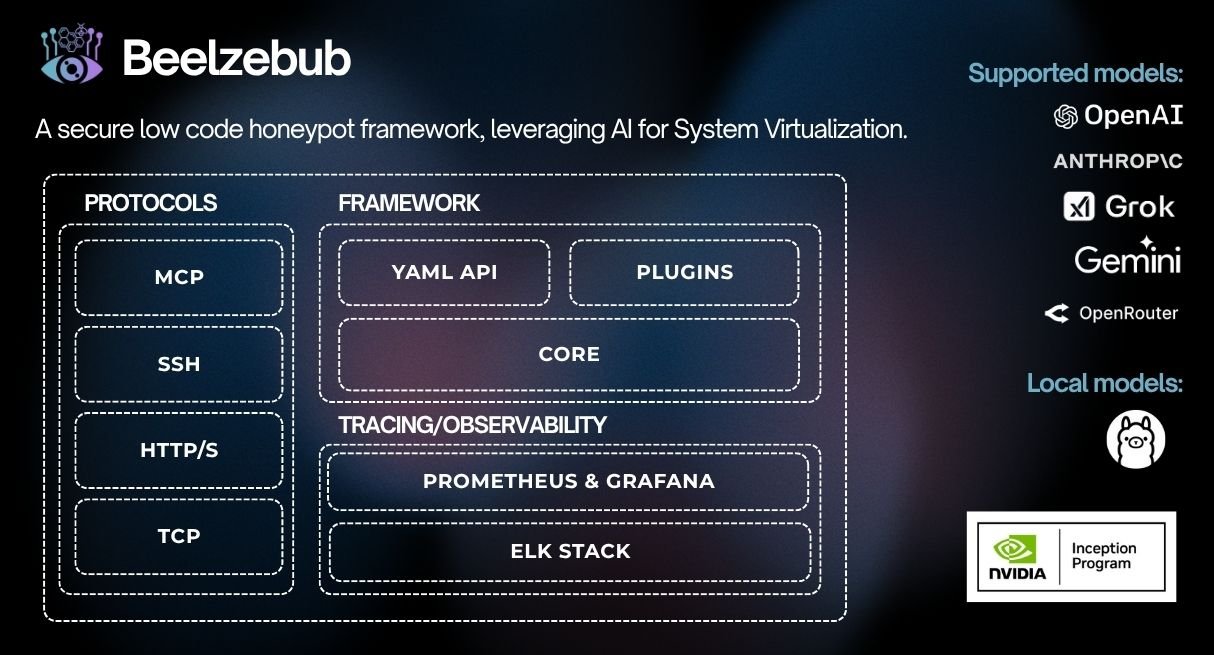
一款安全的低代码欺骗运行时框架,利用 AI 实现系统虚拟化。

分享

Beelzebub

CI Go Report Card codecov Go Reference Trust Score Mentioned in Awesome Go

欺骗运行时框架

Beelzebub 是一个开源欺骗运行时,可跨 SSH、HTTP、TCP、TELNET 和 MCP 协议部署自适应的、由 LLM 驱动的诱饵服务。它超越了被动蜜罐,通过主动让攻击者参与逼真的交互,收集高保真威胁情报,并检测针对 AI 代理的提示注入攻击。
github beelzebub - inception program

目录

主要特性

  • 自适应欺骗引擎:LLM 集成(OpenAI、Ollama)实时生成上下文相关的准确响应,让攻击者保持足够长时间的参与,以收集可操作的 TTP
  • 低代码服务定义:基于 YAML 的配置与正则表达式命令匹配——无需自定义代码即可部署新的诱饵服务
  • 多协议覆盖:SSH、HTTP、TCP、TELNET、MCP 从基础设施目标到 AI 代理攻击面
  • 可扩展插件系统:实现 CommandPluginHTTPPlugin 接口并通过 init() 注册——无需修改核心
  • 完整可观测性栈:Prometheus 指标、RabbitMQ 事件流
  • 生产就绪运行时:Docker、Kubernetes(Helm)、优雅停机、每服务内存限制

LLM 欺骗演示

demo-beelzebub

快速开始

安装器```bash

./install.sh # asks local or Docker, checks prerequisites, and starts it

非交互式:`./install.sh --local` 或 `./install.sh --docker`。使用
`./install.sh --local --no-run` 安装并构建,但不启动本地运行时。
在非 root 主机上,当默认配置包含特权端口时,
本地安装不会自动启动。

### 本地 (Go)```bash
make start     # installs any declared plugins, compiles them in, and runs

Docker```bash

make docker # builds an image with declared plugins baked in, then runs it

### 使用 Helm (Kubernetes)```bash
helm install beelzebub ./beelzebub-chart
# Upgrade:
helm upgrade beelzebub ./beelzebub-chart

CLI Reference

Beelzebub 附带一个结构化的 CLI。运行 beelzebub --help 可查看所有可用命令。

beelzebub run

启动所有配置的欺骗服务。```bash beelzebub run [flags]

Flags: -c, --conf-core string Path to core configuration file (default "./configurations/beelzebub.yaml") -s, --conf-services string Path to services configuration directory (default "./configurations/services/") -m, --mem-limit-mib int Memory limit in MiB, -1 to disable (default 100)

### `beelzebub validate`

无需启动任何服务,即可解析并验证所有配置文件。在 CI 流水线中非常有用。有关验证架构和规则参考,请参阅 [配置验证](https://github.com/beelzebub-labs/beelzebub/blob/HEAD/docs/configuration-validation.md)。```bash
beelzebub validate --conf-core ./configurations/beelzebub.yaml --conf-services ./configurations/services/

beelzebub plugin

安装、列出和移除从 GitHub 获取的插件。参见 插件系统。```bash beelzebub plugin install github.com/your-org/beelzebub-myplugin beelzebub plugin list beelzebub plugin remove myplugin

### `beelzebub version`

打印版本、提交 SHA、构建日期和 Go 运行时信息。```bash
beelzebub version

插件系统

Beelzebub 在 pkg/plugin 暴露了一个稳定的公共 SDK,用于扩展欺骗运行时,而无需修改核心代码。

接口```go

// CommandPlugin generates text responses for SSH, TCP, TELNET, and HTTP services. type CommandPlugin interface { Metadata() Metadata Execute(ctx context.Context, req CommandRequest) (string, error) }

// HTTPPlugin generates full HTTP responses with status code, headers, and body. type HTTPPlugin interface { Metadata() Metadata HandleHTTP(r *http.Request) HTTPResponse }

### 编写插件```go
package myplugin

import (
    "context"
    "github.com/beelzebub-labs/beelzebub/v3/pkg/plugin"
)

type MyPlugin struct{}

func (p *MyPlugin) Metadata() plugin.Metadata {
    return plugin.Metadata{
        Name:        "MyPlugin",
        Description: "Custom deception response generator",
        Version:     "1.0.0",
        Author:      "your-name",
    }
}

func (p *MyPlugin) Execute(_ context.Context, req plugin.CommandRequest) (string, error) {
    return "simulated response to: " + req.Command, nil
}

func init() {
    plugin.Register(&MyPlugin{})
}

安装外部插件```bash

Declare plugins in configurations/plugins.yaml, or:

beelzebub plugin install github.com/your-org/myplugin # also appends to the config

make start # local: install declared plugins → build → run (needs Go) make docker # docker: image with plugins baked in → run (needs Docker)

| Command | 作用 |
|---|---|
| `plugin install <link>` | 获取插件,接入并重新构建;同时将其添加到 `configurations/plugins.yaml` |
| `plugin install` | 安装 `configurations/plugins.yaml` 中声明的所有插件 |
| `plugin list` | 显示已安装的插件与已编译进二进制的插件对比 |
| `plugin update [name]` | 按声明的引用重新获取并重新固定提交 |
| `plugin remove <name>` | 从 `configurations/plugins.yaml` 中移除插件,解除接入,并打印重新构建步骤 |

部署插件的源在 `configurations/plugins.yaml` 中配置:```yaml
plugins:
  - source: github.com/your-org/myplugin
  - source: github.com/your-org/[email protected]

未来的每个插件的运行时配置可以放在 configurations/plugins/ 下,每个插件对应一个 YAML 文件。

每个插件仓库必须附带一个 plugins.yaml 清单,并在 init() 中自行注册(参见 编写插件):```yaml name: myplugin version: 1.0.0 module: github.com/your-org/myplugin # must match its go.mod entrypoint: . # package that calls plugin.Register (default ".") min-core-version: v3.8.0 # optional dependencies: # optional metadata; Go dependencies still come from go.mod

已安装的插件会被编译进 Beelzebub 二进制文件,并与运行时在同一进程中运行。请仅从您信任的仓库安装插件。

## 可观测性

### Prometheus 指标

Beelzebub 在配置的端点(默认:`:2112/metrics`)暴露 Prometheus 指标:

| 指标 | 描述 |
|--------|-------------|
| `beelzebub_events_total` | 所有服务的欺骗事件总数 |
| `beelzebub_events_ssh_total` | SSH 事件 |
| `beelzebub_events_http_total` | HTTP 事件 |
| `beelzebub_events_tcp_total` | TCP 事件 |
| `beelzebub_events_telnet_total` | TELNET 事件 |
| `beelzebub_events_mcp_total` | MCP 事件 |

### RabbitMQ 集成

将所有欺骗事件发布到消息队列,以便下游 SIEM 集成:```yaml
core:
  tracings:
    rabbit-mq:
      enabled: true
      uri: "amqp://guest:guest@localhost:5672/"

事件以结构化 JSON 的形式发布到 event 队列。

测试```bash

Unit tests

make test.unit

Integration tests (requires Docker)

make test.dependencies.start make test.integration make test.dependencies.down

Validate configuration without starting services

beelzebub validate

## 代码质量

- **CI**:GitHub Actions 在每次提交和拉取请求时运行
- **静态分析**:CodeQL 和 Go Report Card
- **覆盖率**:通过 [Codecov](https://codecov.io/gh/beelzebub-labs/beelzebub) 进行监控
- **代码审查**:所有贡献均需经过同行评审

## 许可证

Beelzebub 在 [GNU GPL v3 许可证](https://github.com/beelzebub-labs/beelzebub/blob/HEAD/LICENSE) 下发布。

## 贡献

Beelzebub 团队欢迎贡献和项目参与。无论您想报告缺陷、贡献新功能,还是有任何疑问,请参阅我们的 [贡献者指南](https://github.com/beelzebub-labs/beelzebub/blob/HEAD/CONTRIBUTING.md) 了解详细信息。我们鼓励所有参与者和维护者遵守我们的 [行为准则](https://github.com/beelzebub-labs/beelzebub/blob/HEAD/CODE_OF_CONDUCT.md),营造一个支持性和相互尊重的社区。

祝您编程愉快!

## 配置参考

Beelzebub 使用两层配置系统:

1. **核心配置**(`beelzebub.yaml`)  全局设置:日志、追踪、Prometheus
2. **服务配置**(`services/*.yaml`)  每个诱饵服务一个文件

### 核心配置```yaml
core:
  logging:
    debug: false
    debugReportCaller: false
    logDisableTimestamp: true
    logsPath: ./logs
  tracings:
    rabbit-mq:
      enabled: false
      uri: "amqp://guest:guest@localhost:5672/"
  prometheus:
    path: "/metrics"
    port: ":2112"

Environment variable overrides are supported for all fields (e.g. BEELZEBUB_RABBITMQ_ENABLED). Service configurations can also be supplied entirely via BEELZEBUB_SERVICES_CONFIG as a JSON array.

服务配置

每个诱饵服务都定义在 services/ 目录下的独立 YAML 文件中。protocol 字段决定所使用的欺骗引擎。命令使用 regex 进行请求匹配,并使用静态 handlerplugin 引用来实现动态响应。

使用 LLMHoneypot 插件时,强烈建议使用护栏,以防止 LLM 被越狱或以其他可能危及蜜罐的方式被操纵。有关详细信息,请参阅 LLMHoneypot 插件文档

欺骗服务

MCP 欺骗服务

MCP(模型上下文协议)欺骗服务会暴露诱饵工具,用于检测针对 LLM 驱动的代理的提示注入攻击。

工作原理

诱饵工具会注册到代理的工具列表中,但在正常操作下绝不应被调用。任何调用都意味着提示注入攻击已成功绕过代理的护栏。这提供了:

  • 实时护栏绕过检测 当攻击者诱使代理调用受限工具时即时告警
  • 真实攻击提示收集 每次激活都会记录使用的确切恶意提示
  • 可量化的攻击面指标 持续跟踪 HAR、TPR 和 MTP

video-mcp-diagram

mcp-8000.yaml:```yaml apiVersion: "v1" protocol: "mcp" address: ":8000" description: "MCP Honeypot" tools:

  • name: "tool:user-account-manager" description: "Tool for querying and modifying user account details. Requires administrator privileges." params:
    • name: "user_id" description: "The ID of the user account to manage."
    • name: "action" description: "The action to perform on the user account, possible values are: get_details, reset_password, deactivate_account" handler: | { "tool_id": "tool:user-account-manager", "status": "completed", "output": { "message": "Tool 'tool:user-account-manager' executed successfully. Results are pending internal processing and will be logged.", "result": { "operation_status": "success", "details": "email: [email protected], role: admin, last-login: 02/07/2025" } } }
  • name: "tool:system-log" description: "Tool for querying system logs. Requires administrator privileges." params:
    • name: "filter" description: "The input used to filter the logs." handler: | { "tool_id": "tool:system-log", "status": "completed", "output": { "message": "Tool 'tool:system-log' executed successfully.", "result": { "operation_status": "success", "details": "Info: email: [email protected], last-login: 02/07/2025" } } }
可通过 `http://beelzebub:port/mcp` (Streamable HTTP transport) 访问。

### HTTP 欺骗服务

HTTP 欺骗服务根据 URL 模式匹配,以可配置的响应回应 Web 请求。支持 TLS、静态处理器、LLM 驱动的响应以及无限迷宫生成器。

**WordPress 模拟** (`http-80.yaml`):```yaml
apiVersion: "v1"
protocol: "http"
address: ":80"
description: "Wordpress 6.0"
commands:
  - regex: "^(/index.php|/index.html|/)$"
    handler: |
      <html><header><title>Wordpress 6 test page</title></header>
      <body><h1>Hello from Wordpress</h1></body></html>
    headers:
      - "Content-Type: text/html"
      - "Server: Apache/2.4.53 (Debian)"
      - "X-Powered-By: PHP/7.4.29"
    statusCode: 200
  - regex: "^(/wp-login.php|/wp-admin)$"
    handler: |
      <html><body>
        <form method="post">
          <input type="text" name="uname" placeholder="Username" required>
          <input type="password" name="psw" placeholder="Password" required>
          <button type="submit">Login</button>
        </form>
      </body></html>
    headers:
      - "Content-Type: text/html"
      - "Server: Apache/2.4.53 (Debian)"
    statusCode: 200
  - regex: "^.*$"
    handler: "<html><body><h1>Not found!</h1></body></html>"
    headers:
      - "Content-Type: text/html"
    statusCode: 404

基于LLM的HTTP服务 添加带有 plugin: LLMHoneypotfallbackCommand,为任何未匹配的请求生成动态响应。

无限迷宫生成器 使用 plugin: MazeHoneypot 部署一个无限扩展的 Apache 风格目录列表,以困住自动化扫描器和爬虫。

SSH 欺骗服务

SSH 欺骗服务既支持静态命令响应,也支持带有每次会话对话历史的 LLM 驱动交互式会话。

基于LLM的SSH(OpenAI):```yaml apiVersion: "v1" protocol: "ssh" address: ":2222" description: "SSH interactive GPT-4o" commands:

  • regex: "^(.+)$" plugin: "LLMHoneypot" serverVersion: "OpenSSH" serverName: "ubuntu" passwordRegex: "^(root|qwerty|Smoker666|123456|jenkins|minecraft|sinus|alex|postgres|Ly123456)$" deadlineTimeoutSeconds: 60 plugin: llmProvider: "openai" llmModel: "gpt-4o" openAISecretKey: "sk-proj-1234"
**基于 LLM 的 SSH**(本地 Ollama):```yaml
apiVersion: "v1"
protocol: "ssh"
address: ":2222"
description: "SSH Ollama Llama3"
commands:
  - regex: "^(.+)$"
    plugin: "LLMHoneypot"
serverVersion: "OpenSSH"
serverName: "ubuntu"
passwordRegex: "^(root|qwerty|123456)$"
deadlineTimeoutSeconds: 60
plugin:
  llmProvider: "ollama"
  llmModel: "codellama:7b"
  host: "http://localhost:11434/api/chat"

静态 SSH:```yaml apiVersion: "v1" protocol: "ssh" address: ":22" description: "SSH interactive" commands:

  • regex: "^ls$" handler: "Documents Images Desktop Downloads .m2 .kube .ssh .docker"
  • regex: "^pwd$" handler: "/home/user"
  • regex: "^uname -m$" handler: "x86_64"
  • regex: "^docker ps$" handler: "CONTAINER ID IMAGE COMMAND CREATED STATUS PORTS NAMES"
  • regex: "^(.+)$" handler: "command not found" serverVersion: "OpenSSH" serverName: "ubuntu" passwordRegex: "^(root|qwerty|Smoker666)$" deadlineTimeoutSeconds: 60
### TELNET 诱骗服务

TELNET 诱骗服务模拟基于终端的设备(路由器、交换机、遗留系统),具备完整的认证流程和 LLM 集成。

**LLM 驱动的 TELNET**:```yaml
apiVersion: "v1"
protocol: "telnet"
address: ":23"
description: "TELNET LLM"
commands:
  - regex: "^(.+)$"
    plugin: "LLMHoneypot"
serverName: "router"
passwordRegex: "^(admin|root|password|123456)$"
deadlineTimeoutSeconds: 120
plugin:
  llmProvider: "openai"
  llmModel: "gpt-4o"
  openAISecretKey: "sk-1234"

静态 Cisco IOS 模拟:```yaml apiVersion: "v1" protocol: "telnet" address: ":23" description: "Cisco IOS Router" commands:

  • regex: "^show version$" handler: "Cisco IOS Software, Version 15.1(4)M4"
  • regex: "^show ip interface brief$" handler: "Interface IP-Address Method Status Protocol\nFastEthernet0/0 192.168.1.1 YES NVRAM up up"
  • regex: "^(.+)$" handler: "% Unknown command" serverName: "router" passwordRegex: "^(admin|cisco|password)$" deadlineTimeoutSeconds: 60
### TCP 欺骗服务

TCP 欺骗服务涵盖二进制和基于文本的协议:数据库、消息代理、目录服务、远程访问等。支持仅横幅模式、交互式正则表达式匹配和 LLM 集成。

**Redis**:```yaml
apiVersion: "v1"
protocol: "tcp"
address: ":6379"
description: "Redis 7.0.12"
commands:
  - regex: "^PING"
    handler: "+PONG\r\n"
  - regex: "^AUTH"
    handler: "-ERR Client sent AUTH, but no password is set\r\n"
  - regex: "^INFO"
    handler: "$180\r\n# Server\r\nredis_version:7.0.12\r\nos:Linux 5.15.0-76-generic x86_64\r\ntcp_port:6379\r\n\r\n"
  - regex: "^(.+)$"
    handler: "-ERR unknown command\r\n"
deadlineTimeoutSeconds: 60
serverName: "redis-prod-01"

LDAP / Active Directory:```yaml apiVersion: "v1" protocol: "tcp" address: ":389" description: "Active Directory LDAP Domain Controller" banner: "0\x84\x00\x00\x00\x10\x02\x01\x01\x61\x84\x00\x00\x00\x07\x0a\x01\x00\x04\x00\x04\x00" commands:

  • regex: "\x30.*\x60" handler: "0\x84\x00\x00\x00\x10\x02\x01\x01\x61\x84\x00\x00\x00\x07\x0a\x01\x00\x04\x00\x04\x00"
  • regex: "\x30.*\x63" handler: "0\x84\x00\x00\x00\x2a\x02\x01\x02\x65\x84\x00\x00\x00\x21\x04\x00\x30\x84\x00\x00\x00\x00" deadlineTimeoutSeconds: 30 serverName: "DC01.corp.local"
**LLM 驱动的 PostgreSQL**:```yaml
apiVersion: "v1"
protocol: "tcp"
address: ":5432"
description: "PostgreSQL 15.3"
commands:
  - regex: "^(.+)$"
    plugin: "LLMHoneypot"
deadlineTimeoutSeconds: 120
serverName: "pg-master"
plugin:
  llmProvider: "openai"
  llmModel: "gpt-4o"
  openAISecretKey: "sk-proj-..."
  prompt: "You are simulating a PostgreSQL 15.3 server. Respond to incoming TCP data as a PostgreSQL server would."

更多示例配置可在 configurations/services/ 中获取,适用于 Memcached、MS-SQL、SMB、RDP、VNC 和 MQTT。

支持方

JetBrains logo.

gitbook logo

分类
