 therealdreg/bochs_linux_kernel_debugging
Инструменты для отладки ядра Linux в Bochs (включая символы, встроенный отладчик Bochs и IDA PRO)

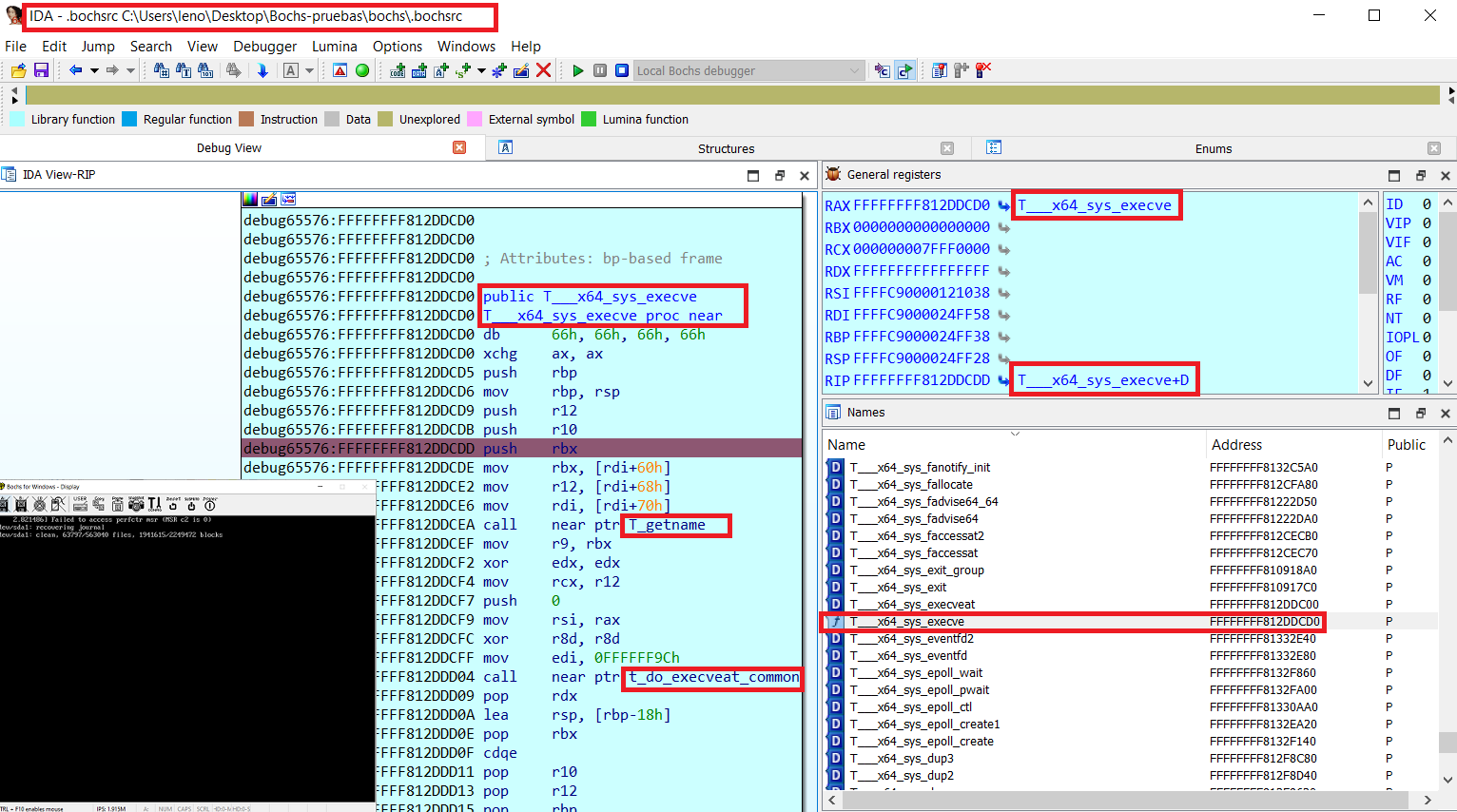
# bochs_linux_kernel_debugging Инструменты для отладки ядра Linux в Bochs (включая символы, нативный отладчик Bochs и IDA PRO) 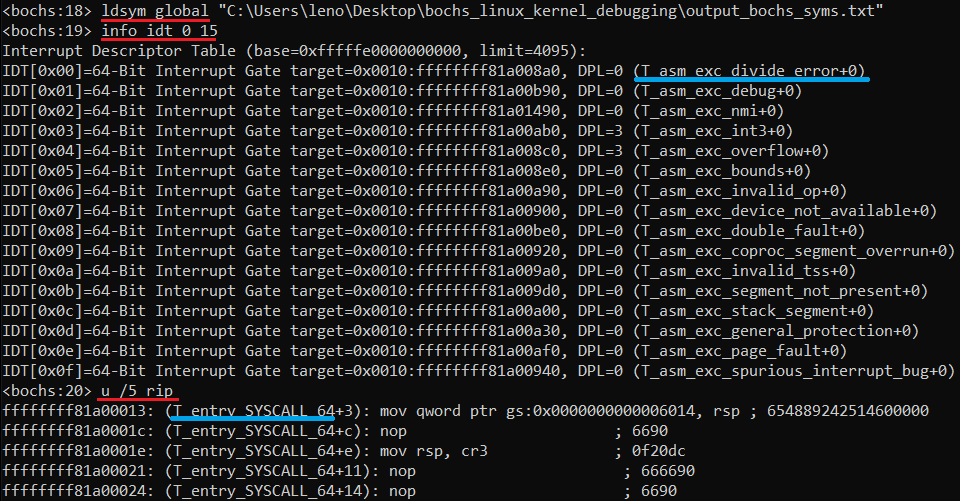 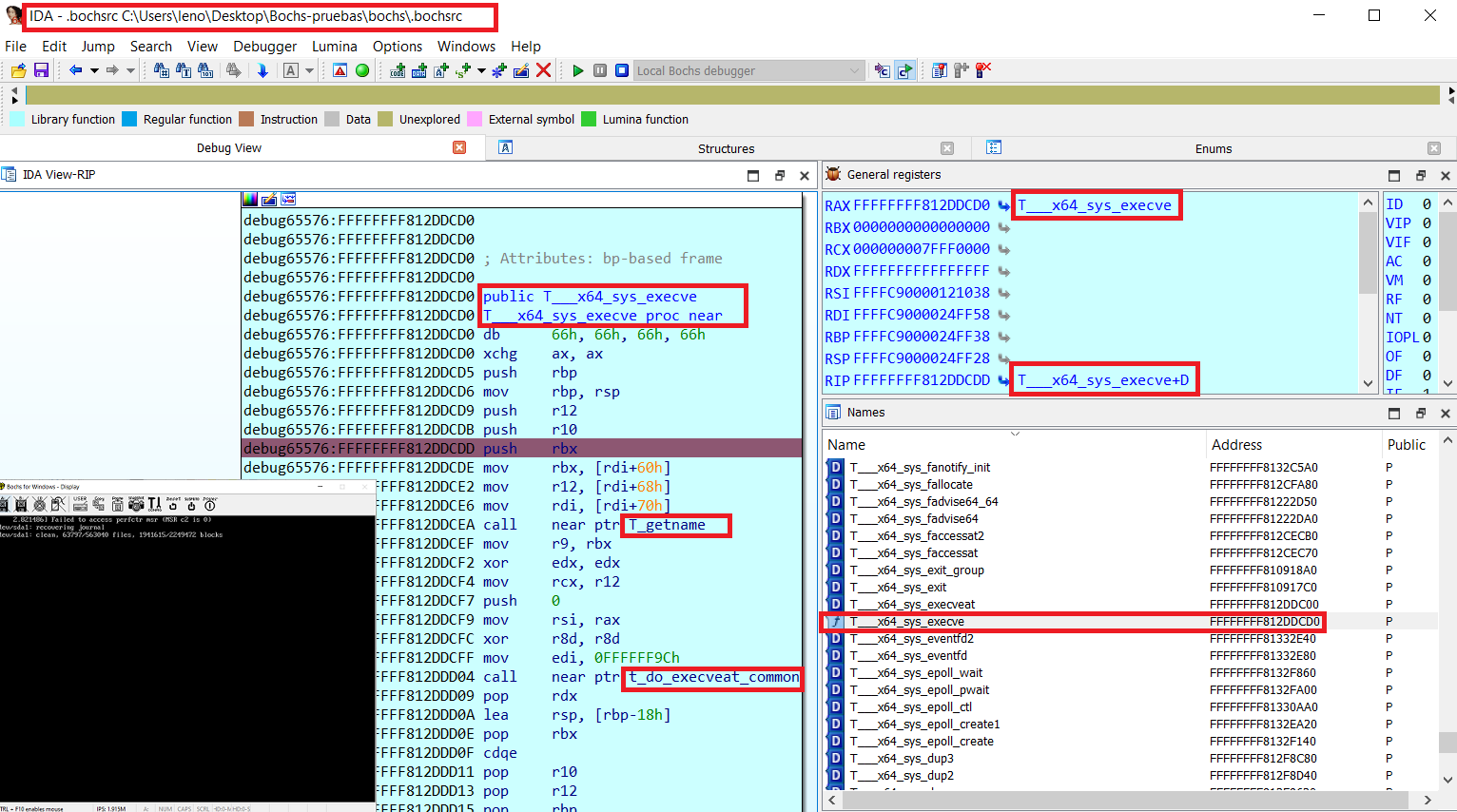 # Генерация файла символов для отладки ядра Linux Выполните следующие шаги: ## 0- Генерация файла отладочной информации в стиле nm Просто используйте команду **nm** на отладочном образе ядра, пример для Debian: 1- Установите отладочный образ ``` root@debian# apt-get install linux-image-$(uname -r)-dbg ``` 2- Проверьте, работает ли nm на отладочном образе: ``` dreg@debian# nm /usr/lib/debug/boot/vmlinux-$(uname -r) | tail ffffffff8207d7c0 d zswap_same_filled_pages_enabled ffffffff8262b54c b zswap_stored_pages ffffffff8262b420 b zswap_trees ffffffff81225df0 t zswap_update_total_size ffffffff81226a50 t zswap_writeback_entry ffffffff8262b538 b zswap_written_back_pages ffffffff81c41fb8 r zswap_zpool_ops ffffffff8207d7e0 d zswap_zpool_param_ops ``` 3- Сгенерируйте корректный выходной файл для linsymtobch.py: ``` dreg@debian# nm /usr/lib/debug/boot/vmlinux-$(uname -r) > nm_output.txt ``` Также вы можете использовать/комбинировать другие виды инструментов. Смотрите этот репозиторий для дополнительных подсказок: https://github.com/therealdreg/linux_kernel_debug_disassemble_ida_vmware * **dump_kallsyms.sh**: дамп символов из /proc/kallsyms * **vmlinuxsystemap.sh**: копирует текущие vmlinuz и system.map ядра в текущий каталог * **lkmsym/dumpsyms.sh**: загружает pattern-finder-ring0-LKM и дампит символы ядра ## 1- Преобразование выходного файла в стиле nm в символы Bochs Используйте linsymtobch.py для преобразования выходного файла в стиле nm в файл символов Bochs: ``` python linsymbtobch.py symbol_file.txt output_bochs_syms.txt [letter 1] [letter 2] [letter 3] .... [--verbose] ``` Пример: ``` ./linsymtobch.py nm_output.txt output_bochs_syms.txt ``` Вывод: ``` https://github.com/therealdreg/bochs_linux_kernel_debugging - MIT LICENSE Copyright <2020> David Reguera Garcia aka Dreg - [email protected] http://www.fr33project.org/ - https://github.com/therealdreg usage: python linsymbtobch.py symbol_file.txt output_bochs_syms.txt [letter 1] [letter 2] [letter 3] .... [--verbose] where letters can be empty for all symbols or a combination: If lowercase, the symbol is local; if uppercase, the symbol is global (external). ------------------------------------ "A" The symbol's value is absolute, and will not be changed by further linking. "B" "b" The symbol is in the uninitialized data section (known as BSS ). "C" The symbol is common. Common symbols are uninitialized data. When linking, multiple common symbols may appear with the same name. If the symbol is defined anywhere, the common symbols are treated as undefined references. "D" "d" The symbol is in the initialized data section. "G" "g" The symbol is in an initialized data section for small objects. Some object file formats permit more efficient access to small data objects, such as a global int variable as opposed to a large global array. "i" For PE format files this indicates that the symbol is in a section specific to the implementation of DLLs. For ELF format files this indicates that the symbol is an indirect function. This is a GNU extension to the standard set of ELF symbol types. It indicates a symbol which if referenced by a relocation does not evaluate to its address, but instead must be invoked at runtime. The runtime execution will then return the value to be used in the relocation. "N" The symbol is a debugging symbol. "p" The symbols is in a stack unwind section. "R" "r" The symbol is in a read only data section. "S" "s" The symbol is in an uninitialized data section for small objects. "T" "t" The symbol is in the text (code) section. "U" The symbol is undefined. "u" The symbol is a unique global symbol. This is a GNU extension to the standard set of ELF symbol bindings. For such a symbol the dynamic linker will make sure that in the entire process there is just one symbol with this name and type in use. "V" "v" The symbol is a weak object. When a weak defined symbol is linked with a normal defined symbol, the normal defined symbol is used with no error. When a weak undefined symbol is linked and the symbol is not defined, the value of the weak symbol becomes zero with no error. On some systems, uppercase indicates that a default value has been specified. "W" "w" The symbol is a weak symbol that has not been specifically tagged as a weak object symbol. When a weak defined symbol is linked with a normal defined symbol, the normal defined symbol is used with no error. When a weak undefined symbol is linked and the symbol is not defined, the value of the symbol is determined in a system-specific manner without error. On some systems, uppercase indicates that a default value has been specified. "-" The symbol is a stabs symbol in an a.out object file. In this case, the next values printed are the stabs other field, the stabs desc field, and the stab type. Stabs symbols are used to hold debugging information. "?" The symbol type is unknown, or object file format specific. ------------------------------------ 0xffffffff81412a30 T_aa_af_perm 0xffffffff813ff4f0 T_aa_alloc_profile 0xffffffff8140c420 T_aa_alloc_proxy 0xffffffff82c71f0d T_aa_alloc_root_ns 0xffffffff81409e20 T_aa_alloc_secid 0xffffffff813f7bc0 T_aa_apply_modes_to_perms 0xffffffff813f6030 T_aa_audit 0xffffffff8140a210 T_aa_audit_file 0xffffffff813f6010 T_aa_audit_msg ... done! total symbols written: 115131 total letters written: A B D R T V W a b d r t total letters found: A B D R T V W a b d r t ``` Пример фильтрации некоторых символов: ``` ./linsymtobch.py nm_output.txt output_bochs_syms.txt T V d ``` ## 2- Загрузка файла символов в отладчик Bochs Загрузите сгенерированный файл в отладчик Bochs с помощью «ldsym global», например: ``` ldsym global "C:\Users\leno\Desktop\bochs_linux_kernel_debugging\output_bochs_syms.txt" ``` Готово! Проверьте, работают ли символы, выполнив несколько команд в отладчике Bochs: * info idt * u /10 * ...  ## Как использовать файл символов Bochs в IDA PRO Local Bochs Debugger Отредактируйте «C:\Program Files\IDA Pro 7.7\cfg\dbg_bochs.cfg» ``` BOCHSDBG = "C:\\Users\\leno\\Desktop\\Bochs-pruebas\\bochs\\bochs.exe"; BOCHSRC = "C:\\Users\\leno\\Desktop\\Bochs-pruebas\\bochs\\.bochsrc"; ``` Перейдите в IDA ..... Debugger -> Run -> Local Bochs Debugger Приложение: ``` C:\Users\leno\Desktop\Bochs-pruebas\bochs\.bochsrc ``` Нажмите Debug Options -> Set specific options -> Select Disk image Скачайте ida_load_names.py из этого репозитория: https://github.com/therealdreg/symseghelper Откройте IDA PRO, запустите сеанс отладки Bochs и перейдите в File -> Script File Выберите ida_load_names.py, этот скрипт запросит у вас сгенерированный файл символов Bochs Готово! После этого вы также можете загрузить символы в нативный отладчик Bochs (он запущен внутри IDA PRO). Просто выберите Bochs в командной строке IDA и выполните «ldsym global» IDA PRO с символами Bochs (ida_load_names.py) + нативный отладчик Bochs с символами (ldsym global) — лучшее из обоих миров: 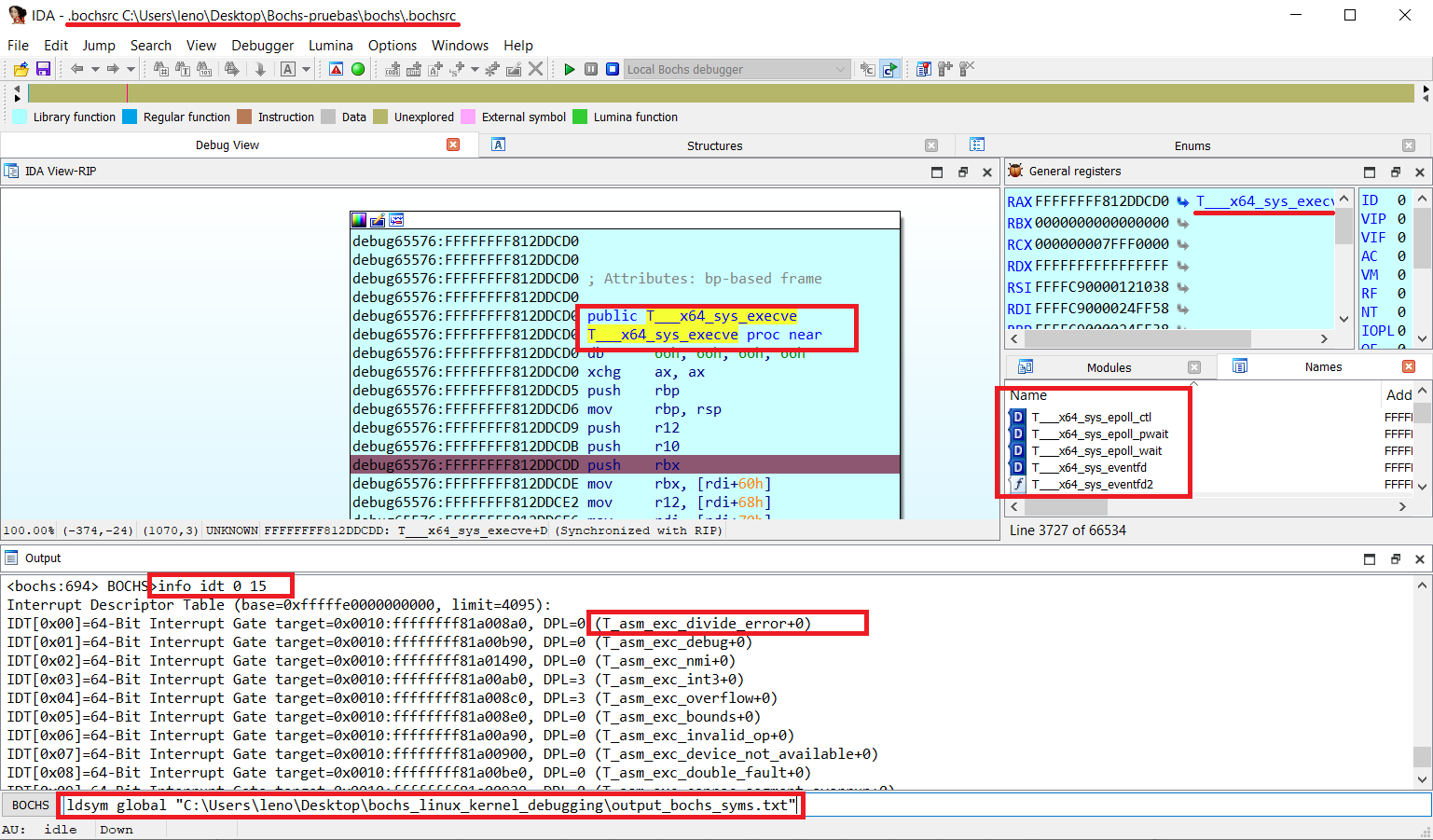 **ВНИМАНИЕ: ваша собственная инструментовка Bochs может вызвать проблемы в IDA PRO Local Bochs** # Связанные проекты Вспомогательные скрипты для отладки Windows с символами для Bochs и IDA Pro (файлы PDB). Очень удобно для перехода user mode <--> kernel mode: - https://github.com/therealdreg/symseghelper Вспомогательный скрипт для отладки ядра Linux с IDA Pro на VMware + GDB stub (включая некоторые помощники по символам): - https://github.com/therealdreg/linux_kernel_debug_disassemble_ida_vmware Дамп PDB-символов с поддержкой формата отладки Bochs (с поддержкой wine): - https://github.com/therealdreg/pdbdump_bochs Вспомогательный скрипт для отладки ядра Windows с IDA Pro в нативном отладчике Bochs: - https://github.com/therealdreg/ida_bochs_windows
