jpillora/chisel
Быстрый TCP/UDP туннель через HTTP с шифрованием SSH, поддерживающий обратное перенаправление портов, прокси SOCKS5 и аутентификацию клиентов для безопасного обхода сети и обхода брандмауэров.
# Chisel
[](https://godoc.org/github.com/jpillora/chisel) [](https://github.com/jpillora/chisel/actions?workflow=CI)
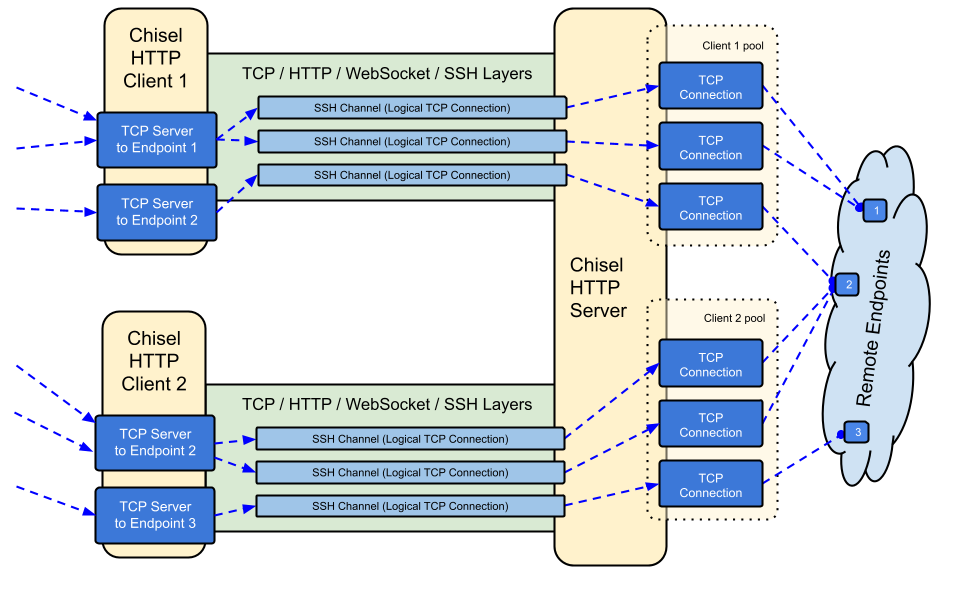
Chisel — это быстрый TCP/UDP-туннель, передаваемый по HTTP и защищённый с помощью SSH. Единый исполняемый файл, включающий как клиент, так и сервер. Написан на Go (golang). Chisel в основном полезен для прохождения через межсетевые экраны, хотя его также можно использовать для создания защищённой точки входа в вашу сеть.
## Содержание
- [Возможности](#features)
- [Установка](#install)
- [Демонстрация](#demo)
- [Использование](#usage)
- [Участие в разработке](#contributing)
- [История изменений](#changelog)
- [Лицензия](#license)
## Возможности
- Простота использования
- [Высокая производительность](https://github.com/jpillora/chisel/blob/master/test/bench/perf.md)\*
- [Зашифрованные соединения](#security) с использованием протокола SSH (через `crypto/ssh`)
- [Аутентифицированные соединения](#authentication); аутентификация клиентских подключений с помощью файла конфигурации пользователей, аутентификация серверных подключений с помощью сопоставления отпечатков.
- Клиент автоматически переподключается с [экспоненциальной задержкой](https://github.com/jpillora/backoff) (настраивается через `--min/max-retry-interval`); пинги keepalive имеют тайм-аут, поэтому молча мёртвые соединения (сон/пробуждение, тайм-ауты NAT, перезапуски сервера) обнаруживаются и восстанавливаются
- Клиенты могут создавать несколько туннельных эндпоинтов через одно TCP-соединение
- Клиенты могут опционально проходить через прокси SOCKS или HTTP CONNECT
- Обратная переадресация портов (соединения проходят через сервер и выходят через клиент)
- Сервер опционально может выступать в роли [обратного прокси](http://golang.org/pkg/net/http/httputil/#NewSingleHostReverseProxy)
- Сервер опционально разрешает [SOCKS5](https://en.wikipedia.org/wiki/SOCKS)-соединения (см. [руководство ниже](#socks5-guide))
- Клиенты опционально разрешают [SOCKS5](https://en.wikipedia.org/wiki/SOCKS)-соединения из обратной переадресации портов
- Клиентские подключения через stdio, что поддерживает `ssh -o ProxyCommand`, обеспечивая SSH поверх HTTP
## Установка
### Бинарные файлы
[](https://github.com/jpillora/chisel/releases) [](https://github.com/jpillora/chisel/releases)
См. [последний релиз](https://github.com/jpillora/chisel/releases/latest) или скачайте и установите его прямо сейчас с помощью `curl https://i.jpillora.com/chisel! | bash`
Бинарные файлы собраны с последней версией Go, что устанавливает минимальные версии ОС: Windows 10 / Server 2016, macOS 12, ядро Linux 3.2, FreeBSD 12.2. Для более старых систем (например, Windows 7) используйте [релиз v1.8.1](https://github.com/jpillora/chisel/releases/tag/v1.8.1) или более ранний.
### Docker
[](https://hub.docker.com/r/jpillora/chisel/) [](https://hub.docker.com/r/jpillora/chisel/tags)
```sh
docker run --rm -it jpillora/chisel --help
```
Образы являются мультиархитектурными и публикуются как в Docker Hub (`jpillora/chisel`), так и в GitHub Container Registry (`ghcr.io/jpillora/chisel`).
### Fedora
Пакет поддерживается сообществом Fedora. Если вы столкнётесь с проблемами, связанными с использованием RPM, пожалуйста, воспользуйтесь этим [трекером задач](https://bugzilla.redhat.com/buglist.cgi?bug_status=NEW&bug_status=ASSIGNED&classification=Fedora&component=chisel&list_id=11614537&product=Fedora&product=Fedora%20EPEL).
```sh
sudo dnf -y install chisel
```
### Источник
```sh
$ go install github.com/jpillora/chisel@latest
```
## Демо
Вы можете запустить собственный демонстрационный сервер за считанные минуты (старое демо на Heroku исчезло вместе с бесплатным тарифом Heroku). [`example/fly.toml`](https://github.com/jpillora/chisel/blob/master/example/fly.toml) разворачивает этот `chisel server` в рамках бесплатного лимита [fly.io](https://fly.io):
```sh
$ chisel server --port $PORT --backend http://example.com
# listens on $PORT, proxies normal web requests to http://example.com
```
Разверните его с помощью `fly launch --copy-config` из каталога `example/`, затем создайте туннель к любому сервису, работающему рядом с сервером, например:
```sh
$ chisel client https://<your-app>.fly.dev 3000
# connects to your chisel server,
# tunnels your localhost:3000 to the server's localhost:3000
```
При открытии URL вашего приложения в браузере запрос попадает на бэкенд-прокси сервера по умолчанию и отображает копию [example.com](http://example.com).
## Использование
<!-- render these help texts by hand,
or use https://github.com/jpillora/md-tmpl
with $ md-tmpl -w README.md -->
<!--tmpl,code=plain:echo "$ chisel --help" && go run main.go --help | sed 's#0.0.0-src (go1\..*)#X.Y.Z#' -->
``` plain
$ chisel --help
Usage: chisel [command] [--help]
Version: X.Y.Z
Commands:
server - runs chisel in server mode
client - runs chisel in client mode
Read more:
https://github.com/jpillora/chisel
```
<!--/tmpl-->
<!--tmpl,code=plain:echo "$ chisel server --help" && go run main.go server --help | cat | sed 's#0.0.0-src (go1\..*)#X.Y.Z#' -->
``` plain
$ chisel server --help
Usage: chisel server [options]
Options:
--host, Defines the HTTP listening host – the network interface
(defaults the environment variable HOST and falls back to 0.0.0.0).
--port, -p, Defines the HTTP listening port (defaults to the environment
variable PORT and falls back to port 8080).
--key, (deprecated use --keygen and --keyfile instead)
An optional string to seed the generation of a ECDSA public
and private key pair. All communications will be secured using this
key pair. Share the subsequent fingerprint with clients to enable detection
of man-in-the-middle attacks (defaults to the CHISEL_KEY environment
variable, otherwise a new key is generate each run).
--keygen, A path to write a newly generated PEM-encoded SSH private key file.
If users depend on your --key fingerprint, you may also include your --key to
output your existing key. Use - (dash) to output the generated key to stdout.
--keyfile, An optional path to a PEM-encoded SSH private key. When
this flag is set, the --key option is ignored, and the provided private key
is used to secure all communications. (defaults to the CHISEL_KEY_FILE
environment variable). Since ECDSA keys are short, you may also set keyfile
to the inline key string itself, exactly as printed by --keygen (a base64
string with a "ck-" prefix); no extra base64 encoding is needed.
--authfile, An optional path to a users.json file. This file should
be an object with users defined like:
{
"<user:pass>": ["<addr-regex>","<addr-regex>"]
}
when <user> connects, their <pass> will be verified and then
each of the remote addresses will be compared against the list
of address regular expressions for a match. Patterns are NOT
anchored by default: "10.0.0.1:80" also matches
"210.0.0.1:8080", and "." matches any character. Anchor your
patterns, e.g. "^10\.0\.0\.1:80$". The empty string ""
matches every address. Addresses will
always come in the form "<remote-host>:<remote-port>" for normal remotes,
"R:<local-interface>:<local-port>" for reverse port forwarding
remotes, and "socks" for SOCKS5 proxy access. Note that SOCKS5
access previously bypassed this list; existing authfiles which
should allow SOCKS5 must add an entry matching "socks" (the
empty wildcard "" matches everything, including "socks"). This
file will be automatically reloaded on change. Reloads apply
to new connections and to new tunnels of connected clients;
established tunnels are not interrupted.
--auth, An optional string representing a single user with full
access, in the form of <user:pass>. It is equivalent to creating an
authfile with {"<user:pass>": [""]}. If unset, it will use the
environment variable AUTH.
--keepalive, An optional keepalive interval. Since the underlying
transport is HTTP, in many instances we'll be traversing through
proxies, often these proxies will close idle connections. You must
specify a time with a unit, for example '5s' or '2m'. Defaults
to '25s' (set to 0s to disable).
--backend, Specifies another HTTP server to proxy requests to when
chisel receives a normal HTTP request. Useful for hiding chisel in
plain sight. --proxy is accepted as an alias for this flag.
--socks5, Allow clients to access the internal SOCKS5 proxy. See
chisel client --help for more information.
--reverse, Allow clients to specify reverse port forwarding remotes
in addition to normal remotes.
--tls-key, Enables TLS and provides optional path to a PEM-encoded
TLS private key. When this flag is set, you must also set --tls-cert,
and you cannot set --tls-domain.
--tls-cert, Enables TLS and provides optional path to a PEM-encoded
TLS certificate. When this flag is set, you must also set --tls-key,
and you cannot set --tls-domain.
--tls-domain, Enables TLS and automatically acquires a TLS key and
certificate using LetsEncrypt. Setting --tls-domain requires port 443.
You may specify multiple --tls-domain flags to serve multiple domains.
The resulting files are cached in the "$HOME/.cache/chisel" directory.
You can modify this path by setting the CHISEL_LE_CACHE variable,
or disable caching by setting this variable to "-". You can optionally
provide a certificate notification email by setting CHISEL_LE_EMAIL.
--tls-ca, a path to a PEM encoded CA certificate bundle or a directory
holding multiple PEM encode CA certificate bundle files, which is used to
validate client connections. The provided CA certificates will be used
instead of the system roots. This is commonly used to implement mutual-TLS.
--pid Generate pid file in current working directory
-v, Enable verbose logging
--help, This help text
Signals:
The chisel process is listening for:
a SIGINT or SIGTERM to begin a graceful shutdown
(a second signal forces an immediate exit),
a SIGUSR2 to print process stats, and
a SIGHUP to short-circuit the client reconnect timer
Version:
X.Y.Z
Read more:
https://github.com/jpillora/chisel
```
<!--/tmpl-->
<!--tmpl,code=plain:echo "$ chisel client --help" && go run main.go client --help | sed 's#0.0.0-src (go1\..*)#X.Y.Z#' -->
``` plain
$ chisel client --help
Usage: chisel client [options] <server> <remote> [remote] [remote] ...
<server> is the URL to the chisel server.
<remote>s are remote connections tunneled through the server, each of
which come in the form:
<local-host>:<local-port>:<remote-host>:<remote-port>/<protocol>
■ local-host defaults to 0.0.0.0 (all interfaces).
■ local-port defaults to remote-port.
■ remote-port is required*.
■ remote-host defaults to 127.0.0.1 (server localhost).
■ protocol defaults to tcp.
which shares <remote-host>:<remote-port> from the server to the client
as <local-host>:<local-port>, or:
R:<local-interface>:<local-port>:<remote-host>:<remote-port>/<protocol>
which does reverse port forwarding, sharing <remote-host>:<remote-port>
from the client to the server's <local-interface>:<local-port>.
example remotes
3000
example.com:3000
3000:google.com:80
192.168.0.5:3000:google.com:80
socks
5000:socks
udpsocks
5000:udpsocks
R:2222:localhost:22
R:socks
R:5000:socks
R:5000:udpsocks
stdio:example.com:22
1.1.1.1:53/udp
When the chisel server has --socks5 enabled, remotes can
specify "socks" or "udpsocks" in place of remote-host and
remote-port. Both default to the local host and port
127.0.0.1:1080. Connections to this remote will terminate
at the server's internal SOCKS5 proxy. When the server also
has --authfile set, SOCKS5 access requires an entry matching
the token "socks" in the user's address list.
When the chisel server has --reverse enabled, remotes can
be prefixed with R to denote that they are reversed. That
is, the server will listen and accept connections, and they
will be proxied through the client which specified the remote.
Reverse remotes specifying "R:socks" will listen on the server's
default socks port (1080) and terminate the connection at the
client's internal SOCKS5 proxy.
The "socks" remote supports TCP CONNECT only. Use "udpsocks"
for TCP CONNECT and UDP ASSOCIATE, including "R:udpsocks".
It binds TCP and UDP on the same configured interface and port;
the UDP relay never uses a randomly allocated listening port.
UDP requires support on both Chisel peers. Destination names are
resolved at the exit node. If UDP cannot bind, TCP remains available
and UDP ASSOCIATE fails; no alternate port is used. Clients using
a zero UDP source port allow one pending association per source IP
until the first valid datagram pins it. BIND, UDP fragmentation,
and udpsocks over stdio are not supported.
When stdio is used as local-host, the tunnel will connect standard
input/output of this program with the remote. This is useful when
combined with ssh ProxyCommand. You can use
ssh -o ProxyCommand='chisel client chiselserver stdio:%h:%p' \
[email protected]
to connect to an SSH server through the tunnel.
Options:
--fingerprint, A *strongly recommended* fingerprint string
to perform host-key validation against the server's public key.
Fingerprint mismatches will close the connection.
Fingerprints are generated by hashing the ECDSA public key using
SHA256 and encoding the result in base64.
Fingerprints must be 44 characters containing a trailing equals (=).
Legacy MD5 colon fingerprints (deprecated) are still accepted,
but only in their full 16-octet form; truncated prefixes are
rejected.
--auth, An optional username and password (client authentication)
in the form: "<user>:<pass>". These credentials are compared to
the credentials inside the server's --authfile. defaults to the
AUTH environment variable.
--keepalive, An optional keepalive interval. Since the underlying
transport is HTTP, in many instances we'll be traversing through
proxies, often these proxies will close idle connections. You must
specify a time with a unit, for example '5s' or '2m'. Defaults
to '25s' (set to 0s to disable).
--max-retry-count, Maximum number of times to retry before exiting.
Defaults to unlimited.
--min-retry-interval, Minimum wait time before retrying after a
disconnection. Defaults to 1 second.
--max-retry-interval, Maximum wait time before retrying after a
disconnection. Defaults to 5 minutes.
--proxy, An optional HTTP CONNECT or SOCKS5 proxy which will be
used to reach the chisel server. Authentication can be specified
inside the URL. Credentials must be URL-encoded; for example a
"#" in the password must be written as "%23".
For example, http://admin:[email protected]:8081
or: socks://admin:[email protected]:1080
The socks://, socks5:// and socks5h:// schemes are equivalent:
DNS is always resolved by the proxy.
--header, Set a custom header in the form "HeaderName: HeaderContent".
Can be used multiple times. (e.g --header "Foo: Bar" --header "Hello: World")
--hostname, Optionally set the 'Host' header (defaults to the host
found in the server url).
--sni, Override the ServerName when using TLS (defaults to the
hostname).
--tls-ca, An optional root certificate bundle used to verify the
chisel server. Only valid when connecting to the server with
"https" or "wss". By default, the operating system CAs will be used.
--tls-skip-verify, Skip server TLS certificate verification of
chain and host name (if TLS is used for transport connections to
server). If set, client accepts any TLS certificate presented by
the server and any host name in that certificate. This only affects
transport https (wss) connection. Chisel server's public key
may be still verified (see --fingerprint) after inner connection
is established.
--tls-key, a path to a PEM encoded private key used for client
authentication (mutual-TLS).
--tls-cert, a path to a PEM encoded certificate matching the provided
private key. The certificate must have client authentication
enabled (mutual-TLS).
--pid Generate pid file in current working directory
-v, Enable verbose logging
--help, This help text
Signals:
The chisel process is listening for:
a SIGINT or SIGTERM to begin a graceful shutdown
(a second signal forces an immediate exit),
a SIGUSR2 to print process stats, and
a SIGHUP to short-circuit the client reconnect timer
Version:
X.Y.Z
Read more:
https://github.com/jpillora/chisel
```
<!--/tmpl-->
### Безопасность
Шифрование всегда включено. При запуске сервера chisel он генерирует пару ключей ECDSA (открытый/закрытый) в памяти. Отпечаток открытого ключа (SHA256 в кодировке base64) отображается при запуске сервера. Вместо генерации случайного ключа сервер может дополнительно указать файл ключа с помощью опции `--keyfile`. При подключении клиенты также отображают отпечаток открытого ключа сервера. Клиент может принудительно задать конкретный отпечаток с помощью опции `--fingerprint`. Устаревшие отпечатки MD5 по-прежнему принимаются, но должны быть в полной 16-октетной форме с двоеточиями — усечённые префиксы отклоняются. Дополнительную информацию см. в `--help` выше.
Сервер также ограничивает размер входящих сообщений websocket до аутентификации (`CHISEL_WS_READ_LIMIT`, по умолчанию 512 КиБ), чтобы неаутентифицированные узлы не могли исчерпать память с помощью сообщений чрезмерного размера. Значение по умолчанию комфортно превышает максимальный транспортный пакет `x/crypto/ssh` в 256 КиБ, поэтому ни один допустимый SSH-пакет никогда не отклоняется. Только `0` отключает ограничение; отрицательные значения возвращаются к безопасному значению по умолчанию.
### Аутентификация
Используя опцию `--authfile`, сервер может дополнительно предоставить файл конфигурации `user.json` для создания списка принимаемых пользователей. Затем клиент аутентифицируется с помощью опции `--auth`. Пример файла конфигурации аутентификации см. в [users.json](https://github.com/jpillora/chisel/blob/master/example/users.json). Дополнительную информацию см. в `--help` выше.
Замечания о поведении authfile:
- Файл отслеживается и **перезагружается на лету** — включая сохранения редактором через переименование (vim) и обновления configmap в kubernetes. Перезагрузки применяются к новым соединениям и к новым туннелям уже подключённых клиентов; удалённые пользователи немедленно теряют доступ к новым туннелям, хотя установленные туннели не прерываются.
- Шаблоны адресов являются регулярными выражениями и **не привязаны** — привяжите их с помощью `^` и `$` (сервер предупреждает о непривязанных шаблонах при загрузке). Пустая строка `""` соответствует всему.
- Доступ к SOCKS5 контролируется записью, соответствующей токену `socks`. **Критическое изменение**: ранее SOCKS5 полностью обходил authfile; серверы, работающие с `--socks5` и `--authfile`, должны предоставить `socks` пользователям, которые должны сохранить доступ к прокси (записи с подстановочным знаком `""` продолжают работать).
- Строки аутентификации без двоеточия (`user:pass`) теперь являются **фатальной ошибкой при запуске** как на сервере, так и на клиенте — ранее они молча отключали аутентификацию.
- Пользователь из `--auth` сохраняется при перезагрузках authfile и выигрывает при совпадении имён с пользователями из файла.
Внутренне это реализовано с использованием метода аутентификации _Password_, предоставляемого SSH. Подробнее о `crypto/ssh` читайте здесь http://blog.gopheracademy.com/go-and-ssh/. Открытия/закрытия сессий (с пользователем, исходным адресом и удалёнными узлами) и неудачные попытки входа регистрируются на уровне info.
### Руководство по TLS
Простейшая безопасная настройка — `--tls-domain`, которая автоматически предоставляет сертификат LetsEncrypt (требуется порт 443 и DNS-запись, указывающая на сервер):
```sh
chisel server --port 443 --tls-domain chisel.example.com --auth user:pass
chisel client --auth user:pass https://chisel.example.com R:2222:localhost:22
```
Чтобы использовать собственный сертификат (самоподписанный или от внутреннего CA), сгенерируйте пару ключ/сертификат и укажите обеим сторонам нужные файлы:
```sh
chisel server --port 443 --tls-key key.pem --tls-cert cert.pem
chisel client --tls-ca ca.pem https://chisel.example.com 3000
```
Для взаимного TLS также передайте `--tls-ca` серверу и `--tls-cert`/`--tls-key` каждому клиенту. Обратите внимание, что TLS оборачивает транспорт chisel снаружи; внутренний слой SSH по-прежнему шифрует и аутентифицирует, поэтому проверка `--fingerprint` работает как с TLS, так и без него.
### Руководство по SOCKS5 с Docker
1. Выведите новый приватный ключ в терминал
```sh
chisel server --keygen -
# или сохраните его на диск --keygen /path/to/mykey
```
1. Запустите ваш chisel-сервер
```sh
jpillora/chisel server --keyfile '<ck-base64 string or file path>' -p 9312 --socks5
```
1. Подключите ваш chisel-клиент (используя отпечаток сервера)
```sh
chisel client --fingerprint '<see server output>' <server-address>:9312 socks
```
1. Направьте ваши SOCKS5-клиенты (например, ОС/браузер) на:
```
<client-address>:1080
```
1. Теперь у вас есть зашифрованное, аутентифицированное SOCKS5-соединение поверх HTTP
Примечание: если сервер также использует `--authfile`, пользователям нужна запись, соответствующая токену `socks`, чтобы использовать прокси (см. [Authentication](#authentication)).
Команды настройки, обратный режим и пример UDP-клиента см. в [руководстве пользователя SOCKS5 UDP](https://github.com/jpillora/chisel/blob/master/example/udpsocks.md).
Обычные `socks`-ремоуты поддерживают только TCP CONNECT и не привязывают UDP-сокет. Чтобы включить одновременно TCP CONNECT и UDP ASSOCIATE, используйте `udpsocks` (или `R:udpsocks` для обратного режима), например `1080:udpsocks`. Оба типа по умолчанию используют `127.0.0.1:1080` и одни и те же права доступа SOCKS. Слушатель `udpsocks` привязывает TCP и UDP на одном и том же настроенном интерфейсе и порту, используя один общий UDP-сокет ретрансляции для всех ассоциаций без выделения случайных портов прослушивания. UDP-клиенты держат своё TCP-соединение управления открытым и отправляют SOCKS-инкапсулированные датаграммы на этот порт. Имена назначения датаграмм разрешаются на выходном узле, а UDP-трафик проходит через зашифрованный SSH-туннель. Обновите оба узла Chisel для поддержки UDP; TCP SOCKS остаётся совместимым со старыми узлами.
При открытии слушателя `udpsocks` через брандмауэр или контейнер разрешите как TCP, так и UDP на его настроенном порту. UDP ASSOCIATE возвращает локальный IP, принимающий TCP-соединение, который должен быть доступен SOCKS-клиенту. Для слушателей Linux Docker используйте `--network host` с ремоутом `0.0.0.0:1080:udpsocks`, чтобы избежать анонсирования изолированного адреса контейнера. Отображения портов контейнера требуют как `-p 1080:1080/tcp`, так и `-p 1080:1080/udp`, а также доступности анонсированного IP ретрансляции. Если UDP-порт занят, Chisel записывает в лог, что UDP недоступен, сохраняет TCP-сервис и отклоняет UDP ASSOCIATE без использования альтернативного порта; перезапустите прокси после освобождения порта.
Ассоциация принимает пакеты с IP своего TCP-пира. Объявленный исходный UDP-порт резервирует эту конечную точку; нулевой исходный порт закрепляется своей первой допустимой датаграммой. Разрешается только одна незакреплённая ассоциация на IP, поэтому клиентам, использующим один IP, следует объявлять свои исходные UDP-порты или отправлять первую датаграмму перед открытием другой ассоциации. Дублирующиеся резервирования исходных портов отклоняются. Закрытие соединения управления или потеря SSH завершает ассоциацию; для повторного подключения требуется новый UDP ASSOCIATE. BIND, фрагментация UDP и `stdio:udpsocks` не поддерживаются.
### Обратный SOCKS с Authfile
Чтобы позволить конкретному клиенту выступать в роли выходного узла SOCKS, предоставьте ему адрес слушателя reverse-socks (`R:socks` слушает на `127.0.0.1:1080` сервера):
```json
{
"exituser:password": ["^R:127\\.0\\.0\\.1:1080$"]
}
```
```sh
chisel server --reverse --authfile users.json
chisel client --auth exituser:password <server-address> R:socks
# server-side consumers point SOCKS5 clients at 127.0.0.1:1080,
# and their traffic exits via the chisel client's network
```
Используйте `R:udpsocks` в команде клиента, чтобы также включить UDP ASSOCIATE на том же порту сервера; разрешение в authfile остаётся тем же.
См. также пошаговый [пример обратного туннелирования](https://github.com/jpillora/chisel/blob/master/example/reverse-tunneling-authenticated.md).
### Работа за CDN (Cloudflare)
---
[Read more](https://github.com/jpillora/chisel)