Túnel rápido TCP/UDP sobre HTTP com criptografia SSH, suportando encaminhamento de porta reverso, proxy SOCKS5 e autenticação de cliente para travessia segura de rede e evasão de firewall.
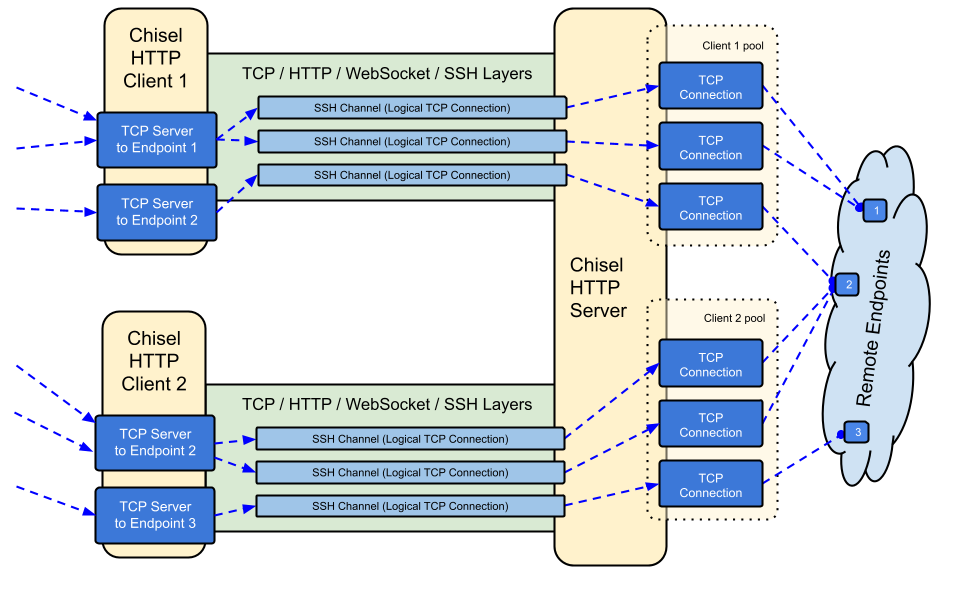
Chisel é um túnel TCP/UDP rápido, transportado sobre HTTP, protegido via SSH. Um único executável incluindo cliente e servidor. Escrito em Go (golang). Chisel é principalmente útil para atravessar firewalls, embora também possa ser usado para fornecer um endpoint seguro na sua rede.

crypto/ssh)--min/max-retry-interval); pings de keepalive expiram, então conexões mortas silenciosamente (suspensão/ativação, timeouts de NAT, reinicializações do servidor) são detectadas e restabelecidasssh -o ProxyCommand, fornecendo SSH sobre HTTPVeja a versão mais recente ou baixe e instale agora com curl https://i.jpillora.com/chisel! | bash
Os binários são compilados com a versão mais recente do Go, que define as versões mínimas de SO: Windows 10 / Server 2016, macOS 12, kernel Linux 3.2, FreeBSD 12.2. Para sistemas mais antigos (ex.: Windows 7), use a versão v1.8.1 ou anterior.
```sh
docker run --rm -it jpillora/chisel --help
As imagens são multi-arquitetura e publicadas tanto no Docker Hub (`jpillora/chisel`) quanto no GitHub Container Registry (`ghcr.io/jpillora/chisel`).
### Fedora
O pacote é mantido pela comunidade Fedora. Se você encontrar problemas relacionados ao uso do RPM, use este [rastreador de problemas](https://bugzilla.redhat.com/buglist.cgi?bug_status=NEW&bug_status=ASSIGNED&classification=Fedora&component=chisel&list_id=11614537&product=Fedora&product=Fedora%20EPEL).```sh
sudo dnf -y install chisel
I'm ready to translate the chunk. However, the source content appears to be empty—I don't see any Markdown text after "### Source".
Please provide the actual content of chunk 5, and I'll translate it from English to Portuguese according to the specified rules.```sh $ go install github.com/jpillora/chisel@latest
## Demonstração
Você pode executar seu próprio servidor de demonstração em minutos (a antiga demonstração do Heroku desapareceu com o plano gratuito do Heroku). [`example/fly.toml`](https://github.com/jpillora/chisel/blob/HEAD/example/fly.toml) implanta este `chisel server` na franquia gratuita do [fly.io](https://fly.io):```sh
$ chisel server --port $PORT --backend http://example.com
# listens on $PORT, proxies normal web requests to http://example.com
Implante-o com fly launch --copy-config a partir do diretório example/ e, em seguida, faça um túnel para qualquer serviço rodando ao lado do servidor, por exemplo:```sh
$ chisel client https://.fly.dev 3000
Visitar o URL da sua aplicação num navegador acede ao proxy de backend padrão do servidor e mostra uma cópia de [example.com](http://example.com).
## Uso
<!-- render these help texts by hand,
or use https://github.com/jpillora/md-tmpl
with $ md-tmpl -w README.md -->
<!--tmpl,code=plain:echo "$ chisel --help" && go run main.go --help | sed 's#0.0.0-src (go1\..*)#X.Y.Z#' -->``` plain
$ chisel --help
Usage: chisel [command] [--help]
Version: X.Y.Z
Commands:
server - runs chisel in server mode
client - runs chisel in client mode
Read more:
https://github.com/jpillora/chisel
$ chisel server --help
Usage: chisel server [options]
Options:
--host, Defines the HTTP listening host – the network interface
(defaults the environment variable HOST and falls back to 0.0.0.0).
--port, -p, Defines the HTTP listening port (defaults to the environment
variable PORT and falls back to port 8080).
--key, (deprecated use --keygen and --keyfile instead)
An optional string to seed the generation of a ECDSA public
and private key pair. All communications will be secured using this
key pair. Share the subsequent fingerprint with clients to enable detection
of man-in-the-middle attacks (defaults to the CHISEL_KEY environment
variable, otherwise a new key is generate each run).
--keygen, A path to write a newly generated PEM-encoded SSH private key file.
If users depend on your --key fingerprint, you may also include your --key to
output your existing key. Use - (dash) to output the generated key to stdout.
--keyfile, An optional path to a PEM-encoded SSH private key. When
this flag is set, the --key option is ignored, and the provided private key
is used to secure all communications. (defaults to the CHISEL_KEY_FILE
environment variable). Since ECDSA keys are short, you may also set keyfile
to the inline key string itself, exactly as printed by --keygen (a base64
string with a "ck-" prefix); no extra base64 encoding is needed.
--authfile, An optional path to a users.json file. This file should
be an object with users defined like:
{
"<user:pass>": ["<addr-regex>","<addr-regex>"]
}
when <user> connects, their <pass> will be verified and then
each of the remote addresses will be compared against the list
of address regular expressions for a match. Patterns are NOT
anchored by default: "10.0.0.1:80" also matches
"210.0.0.1:8080", and "." matches any character. Anchor your
patterns, e.g. "^10\.0\.0\.1:80$". The empty string ""
matches every address. Addresses will
always come in the form "<remote-host>:<remote-port>" for normal remotes,
"R:<local-interface>:<local-port>" for reverse port forwarding
remotes, and "socks" for SOCKS5 proxy access. Note that SOCKS5
access previously bypassed this list; existing authfiles which
should allow SOCKS5 must add an entry matching "socks" (the
empty wildcard "" matches everything, including "socks"). This
file will be automatically reloaded on change. Reloads apply
to new connections and to new tunnels of connected clients;
established tunnels are not interrupted.
--auth, An optional string representing a single user with full
access, in the form of <user:pass>. It is equivalent to creating an
authfile with {"<user:pass>": [""]}. If unset, it will use the
environment variable AUTH.
--keepalive, An optional keepalive interval. Since the underlying
transport is HTTP, in many instances we'll be traversing through
proxies, often these proxies will close idle connections. You must
specify a time with a unit, for example '5s' or '2m'. Defaults
to '25s' (set to 0s to disable).
--backend, Specifies another HTTP server to proxy requests to when
chisel receives a normal HTTP request. Useful for hiding chisel in
plain sight. --proxy is accepted as an alias for this flag.
--socks5, Allow clients to access the internal SOCKS5 proxy. See
chisel client --help for more information.
--reverse, Allow clients to specify reverse port forwarding remotes
in addition to normal remotes.
--tls-key, Enables TLS and provides optional path to a PEM-encoded
TLS private key. When this flag is set, you must also set --tls-cert,
and you cannot set --tls-domain.
--tls-cert, Enables TLS and provides optional path to a PEM-encoded
TLS certificate. When this flag is set, you must also set --tls-key,
and you cannot set --tls-domain.
--tls-domain, Enables TLS and automatically acquires a TLS key and
certificate using LetsEncrypt. Setting --tls-domain requires port 443.
You may specify multiple --tls-domain flags to serve multiple domains.
The resulting files are cached in the "$HOME/.cache/chisel" directory.
You can modify this path by setting the CHISEL_LE_CACHE variable,
or disable caching by setting this variable to "-". You can optionally
provide a certificate notification email by setting CHISEL_LE_EMAIL.
--tls-ca, a path to a PEM encoded CA certificate bundle or a directory
holding multiple PEM encode CA certificate bundle files, which is used to
validate client connections. The provided CA certificates will be used
instead of the system roots. This is commonly used to implement mutual-TLS.
--pid Generate pid file in current working directory
-v, Enable verbose logging
--help, This help text
Signals: The chisel process is listening for: a SIGINT or SIGTERM to begin a graceful shutdown (a second signal forces an immediate exit), a SIGUSR2 to print process stats, and a SIGHUP to short-circuit the client reconnect timer
Version: X.Y.Z
Read more: https://github.com/jpillora/chisel
<!--/tmpl-->
<!--tmpl,code=plain:echo "$ chisel client --help" && go run main.go client --help | sed 's#0.0.0-src (go1\..*)#X.Y.Z#' -->``` plain
$ chisel client --help
Usage: chisel client [options] <server> <remote> [remote] [remote] ...
<server> is the URL to the chisel server.
<remote>s are remote connections tunneled through the server, each of
which come in the form:
<local-host>:<local-port>:<remote-host>:<remote-port>/<protocol>
■ local-host defaults to 0.0.0.0 (all interfaces).
■ local-port defaults to remote-port.
■ remote-port is required*.
■ remote-host defaults to 127.0.0.1 (server localhost).
■ protocol defaults to tcp.
which shares <remote-host>:<remote-port> from the server to the client
as <local-host>:<local-port>, or:
R:<local-interface>:<local-port>:<remote-host>:<remote-port>/<protocol>
which does reverse port forwarding, sharing <remote-host>:<remote-port>
from the client to the server's <local-interface>:<local-port>.
example remotes
3000
example.com:3000
3000:google.com:80
192.168.0.5:3000:google.com:80
socks
5000:socks
R:2222:localhost:22
R:socks
R:5000:socks
stdio:example.com:22
1.1.1.1:53/udp
When the chisel server has --socks5 enabled, remotes can
specify "socks" in place of remote-host and remote-port.
The default local host and port for a "socks" remote is
127.0.0.1:1080. Connections to this remote will terminate
at the server's internal SOCKS5 proxy. When the server also
has --authfile set, SOCKS5 access requires an entry matching
the token "socks" in the user's address list.
When the chisel server has --reverse enabled, remotes can
be prefixed with R to denote that they are reversed. That
is, the server will listen and accept connections, and they
will be proxied through the client which specified the remote.
Reverse remotes specifying "R:socks" will listen on the server's
default socks port (1080) and terminate the connection at the
client's internal SOCKS5 proxy.
When stdio is used as local-host, the tunnel will connect standard
input/output of this program with the remote. This is useful when
combined with ssh ProxyCommand. You can use
ssh -o ProxyCommand='chisel client chiselserver stdio:%h:%p' \
[email protected]
to connect to an SSH server through the tunnel.
Options:
--fingerprint, A *strongly recommended* fingerprint string
to perform host-key validation against the server's public key.
Fingerprint mismatches will close the connection.
Fingerprints are generated by hashing the ECDSA public key using
SHA256 and encoding the result in base64.
Fingerprints must be 44 characters containing a trailing equals (=).
Legacy MD5 colon fingerprints (deprecated) are still accepted,
but only in their full 16-octet form; truncated prefixes are
rejected.
--auth, An optional username and password (client authentication)
in the form: "<user>:<pass>". These credentials are compared to
the credentials inside the server's --authfile. defaults to the
AUTH environment variable.
--keepalive, An optional keepalive interval. Since the underlying
transport is HTTP, in many instances we'll be traversing through
proxies, often these proxies will close idle connections. You must
specify a time with a unit, for example '5s' or '2m'. Defaults
to '25s' (set to 0s to disable).
--max-retry-count, Maximum number of times to retry before exiting.
Defaults to unlimited.
--min-retry-interval, Minimum wait time before retrying after a
disconnection. Defaults to 1 second.
--max-retry-interval, Maximum wait time before retrying after a
disconnection. Defaults to 5 minutes.
--proxy, An optional HTTP CONNECT or SOCKS5 proxy which will be
used to reach the chisel server. Authentication can be specified
inside the URL. Credentials must be URL-encoded; for example a
"#" in the password must be written as "%23".
For example, http://admin:[email protected]:8081
or: socks://admin:[email protected]:1080
The socks://, socks5:// and socks5h:// schemes are equivalent:
DNS is always resolved by the proxy.
--header, Set a custom header in the form "HeaderName: HeaderContent".
Can be used multiple times. (e.g --header "Foo: Bar" --header "Hello: World")
--hostname, Optionally set the 'Host' header (defaults to the host
found in the server url).
--sni, Override the ServerName when using TLS (defaults to the
hostname).
--tls-ca, An optional root certificate bundle used to verify the
chisel server. Only valid when connecting to the server with
"https" or "wss". By default, the operating system CAs will be used.
--tls-skip-verify, Skip server TLS certificate verification of
chain and host name (if TLS is used for transport connections to
server). If set, client accepts any TLS certificate presented by
the server and any host name in that certificate. This only affects
transport https (wss) connection. Chisel server's public key
may be still verified (see --fingerprint) after inner connection
is established.
--tls-key, a path to a PEM encoded private key used for client
authentication (mutual-TLS).
--tls-cert, a path to a PEM encoded certificate matching the provided
private key. The certificate must have client authentication
enabled (mutual-TLS).
--pid Generate pid file in current working directory
-v, Enable verbose logging
--help, This help text
Signals:
The chisel process is listening for:
a SIGINT or SIGTERM to begin a graceful shutdown
(a second signal forces an immediate exit),
a SIGUSR2 to print process stats, and
a SIGHUP to short-circuit the client reconnect timer
Version:
X.Y.Z
Read more:
https://github.com/jpillora/chisel
A criptografia está sempre habilitada. Ao iniciar um servidor chisel, ele gera um par de chaves pública/privada ECDSA em memória. A impressão digital da chave pública (SHA256 codificada em base64) será exibida quando o servidor iniciar. Em vez de gerar uma chave aleatória, o servidor pode opcionalmente especificar um arquivo de chave, usando a opção --keyfile. Quando os clientes se conectam, eles também exibem a impressão digital da chave pública do servidor. O cliente pode forçar uma impressão digital específica usando a opção --fingerprint. Impressões digitais MD5 legadas ainda são aceitas, mas devem estar na forma completa de 16 octetos separados por dois-pontos — prefixos truncados são rejeitados. Consulte o --help acima para mais informações.
O servidor também limita o tamanho das mensagens websocket recebidas antes da autenticação (CHISEL_WS_READ_LIMIT, padrão 512 KiB), para que peers não autenticados não possam esgotar a memória com mensagens excessivamente grandes. O padrão fica confortavelmente acima do pacote máximo de transporte de 256 KiB do x/crypto/ssh, portanto nenhum pacote SSH válido é rejeitado. Somente 0 desativa o limite; valores negativos voltam ao padrão seguro.
Usando a opção --authfile, o servidor pode opcionalmente fornecer um arquivo de configuração user.json para criar uma lista de usuários aceitos. O cliente então autentica usando a opção --auth. Consulte users.json para um exemplo de arquivo de configuração de autenticação. Consulte o --help acima para mais informações.
Notas sobre o comportamento do authfile:
^ e $ (o servidor avisa sobre padrões não ancorados no carregamento). A string vazia "" corresponde a tudo.socks. Quebra de compatibilidade: o SOCKS5 anteriormente ignorava completamente o authfile; servidores executando --socks5 com --authfile devem conceder socks aos usuários que devem manter o acesso de proxy (entradas curinga "" continuam funcionando).user:pass) agora são um erro fatal de inicialização tanto no servidor quanto no cliente — anteriormente elas desabilitavam a autenticação silenciosamente.--auth sobrevive aos recarregamentos do authfile e vence conflitos de nome com usuários do arquivo.Internamente, isso é feito usando o método de autenticação Password fornecido pelo SSH. Saiba mais sobre crypto/ssh aqui http://blog.gopheracademy.com/go-and-ssh/. Aberturas/fechamentos de sessão (com usuário, endereço de origem e remotos) e tentativas de login falhas são registrados no nível info.
A configuração segura mais simples é --tls-domain, que provisiona automaticamente um certificado LetsEncrypt (exige a porta 443 e um registro DNS apontando para o servidor):```sh
chisel server --port 443 --tls-domain chisel.example.com --auth user:pass
chisel client --auth user:pass https://chisel.example.com R:2222:localhost:22
Para usar seu próprio certificado (autoassinado ou CA interna), gere um par de chave/certificado e aponte ambos os lados para os arquivos corretos:```sh
chisel server --port 443 --tls-key key.pem --tls-cert cert.pem
chisel client --tls-ca ca.pem https://chisel.example.com 3000
Para TLS mútuo, passe também --tls-ca para o servidor e --tls-cert/--tls-key para cada cliente. Observe que o TLS envolve o transporte do chisel por fora; a camada SSH interna ainda criptografa e autentica, então a validação de --fingerprint funciona com ou sem TLS.
Imprima uma nova chave privada no terminal
chisel server --keygen -
# or save it to disk --keygen /path/to/mykey
Inicie o seu servidor chisel
jpillora/chisel server --keyfile '<ck-base64 string or file path>' -p 9312 --socks5
Conecte o seu cliente chisel (usando a impressão digital do servidor)
chisel client --fingerprint '<see server output>' <server-address>:9312 socks
Aponte seus clientes SOCKS5 (ex.: SO/Navegador) para:
<client-address>:1080
Agora você tem uma conexão SOCKS5 criptografada e autenticada sobre HTTP
Nota: se o servidor também usar --authfile, os usuários precisam de uma entrada correspondente ao token socks para usar o proxy (veja Autenticação).
Para permitir que um cliente específico atue como um nó de saída SOCKS, conceda a ele o endereço do listener reverse-socks (R:socks escuta em 127.0.0.1:1080 do servidor):```json
{
"exituser:password": ["^R:127\.0\.0\.1:1080$"]
}
The input content is missing — no source text was provided after "INPUT:". Please re-send the chunk so I can translate it into Portuguese.```sh
chisel server --reverse --authfile users.json
chisel client --auth exituser:password <server-address> R:socks
# server-side consumers point SOCKS5 clients at 127.0.0.1:1080,
# and their traffic exits via the chisel client's network
Consulte também o exemplo passo a passo de túnel reverso.
o chisel funciona através de CDNs que suportam WebSockets. Para Cloudflare: ative WebSockets, faça proxy (nuvem laranja) do registro DNS e conecte os clientes com https://. A CDN encerra o TLS, mas a camada SSH interna faz com que a validação de --fingerprint ainda autentique seu servidor chisel de ponta a ponta — a CDN não consegue ler nem modificar o tráfego tunelado. Mantenha --keepalive no padrão de 25s para permanecer abaixo dos timeouts de inatividade da CDN, e observe que proxies que removem cabeçalhos Upgrade não conseguem transportar o chisel de forma alguma.
Opções menos comuns são variáveis de ambiente, todas lidas com um prefixo CHISEL_ (por exemplo, CHISEL_WS_TIMEOUT=10s):
HOST, PORT, AUTH e CHISEL_KEY/CHISEL_KEY_FILE estão documentados nos textos de --help acima.
Como o suporte a WebSockets é necessário:
github.com/jpillora/chisel/share contém o pacote compartilhadogithub.com/jpillora/chisel/server contém o pacote do servidorgithub.com/jpillora/chisel/client contém o pacote do cliente1.0 - Lançamento inicial1.1 - Substituída a criptografia simétrica simples por SSH ECDSA1.2 - Adicionado suporte a SOCKS5 (servidor) e HTTP CONNECT (cliente)1.3 - Adicionado suporte a túnel reverso1.4 - Adicionado suporte a cabeçalhos HTTP arbitrários1.5 - Adicionado suporte a SOCKS reverso (por @aus)1.6 - Adicionado suporte a stdio no cliente (por @BoleynSu)1.7 - Adicionado suporte a UDP1.8 - Migração para uma imagem scratchDocker1.9 - Atualização para Go 1.21. Mudança da semente --key para strings de chave P256 com --key{gen,file} (por @cmenginnz)Quatro alterações podem exigir ação ao atualizar a partir da 1.11.x ou anterior:
--authfile (aplicado desde a v1.11.7): usuários que devem manter o acesso ao proxy precisam de uma entrada no authfile correspondente ao token socks (o curinga "" continua funcionando). Consulte Autenticação. Solicitações negadas são registradas no servidor como Denied connection to socks (ACL).--fingerprint: impressões digitais MD5 legadas truncadas são rejeitadas. Use a impressão digital SHA256 completa impressa pelo servidor e pelo cliente (a forma MD5 completa de 16 octetos com dois-pontos ainda é aceita, mas obsoleta).--auth devem ser <user>:<pass> — strings sem dois-pontos agora falham na inicialização em vez de desabilitarem silenciosamente a autenticação.chisel client com --max-retry-count agora sai com código não zero quando as tentativas de conexão são esgotadas; scripts que verificam $? e unidades systemd Restart=on-failure perceberão.MIT © Jaime Pillora
| Variable | Side | Default | Purpose |
|---|
WS_TIMEOUT | cliente | 45s | tempo limite de handshake websocket |
SSH_TIMEOUT | cliente | 30s | tempo limite de handshake ssh |
CONFIG_TIMEOUT | servidor | 10s | aguarda a solicitação de configuração do cliente |
SSH_WAIT | ambos | 35s | quanto tempo novos túneis aguardam por uma conexão ativa |
PING_TIMEOUT | ambos | intervalo de keepalive | tempo limite para resposta ao ping keepalive (sem pings se --keepalive 0) |
DIAL_TIMEOUT | nó de saída | 30s | tempo limite de dial tcp para alvos do túnel |
WS_READ_LIMIT | ambos | 524288 | máximo de bytes de mensagens websocket recebidas (0 = sem limite; negativo = padrão) |
WS_BUFF_SIZE | ambos | padrão do Go | tamanhos dos buffers de leitura/escrita do websocket |
UDP_MAX_SIZE | ambos | 9012 | máximo de bytes de pacotes udp |
UDP_DEADLINE | nó de saída | 15s | prazo de leitura de fluxo udp e idade de varredura ociosa |
UDP_MAX_CONNS | nó de saída | 100 | máximo de fluxos udp concorrentes por túnel |
SHUTDOWN_GRACE | servidor | 5s | tempo de drenagem de solicitações http no encerramento |
1.10 - Atualização para Go 1.22. Adicionados .rpm, .deb e .apk aos lançamentos. Corrigida comparação incorreta de versões.1.11 - Atualização para Go 1.25.1. Atualizadas todas as dependências.1.12 - (não lançado) Revisão de confiabilidade e segurança:
CHISEL_PING_TIMEOUT), para que conexões mortas se reconectem prontamente após suspensão/retomada, timeouts de NAT e reinicializações do servidor--socks5 + --authfile, o acesso SOCKS5 agora exige uma entrada no authfile correspondente a socks (entradas curinga "" continuam funcionando)--fingerprint deve estar na forma SHA256 completa (ou na forma MD5 completa de 16 octetos com dois-pontos)--auth user) agora são um erro fatal na inicialização em vez de desabilitarem silenciosamente a autenticaçãoCHISEL_DIAL_TIMEOUT, padrão de 30s)CHISEL_SHUTDOWN_GRACE); um segundo sinal força a saídaCHISEL_UDP_MAX_CONNS)CHISEL_WS_READ_LIMIT)--max-retry-count é esgotado; novo --min-retry-interval (padrão 1s); socks5:// aceito em --proxygo install informam sua versão real; sessões e logins com falha são registrados no nível infolatest / X / X.Y do Docker