 cyberark/skywrapper
SkyWrapper ajuda a descobrir formas suspeitas de criação e uso de tokens temporários na AWS




SkyWrapper é um projeto de código aberto que analisa comportamentos de tokens temporários criados em uma determinada conta AWS. A ferramenta visa encontrar formas suspeitas de criação e uso de tokens temporários para detectar atividades maliciosas na conta. A ferramenta analisa a conta AWS e cria uma planilha Excel que inclui todos os tokens temporários atualmente ativos. Um resumo dos resultados é exibido na tela após cada execução.
Demonstração do SkyWrapper:
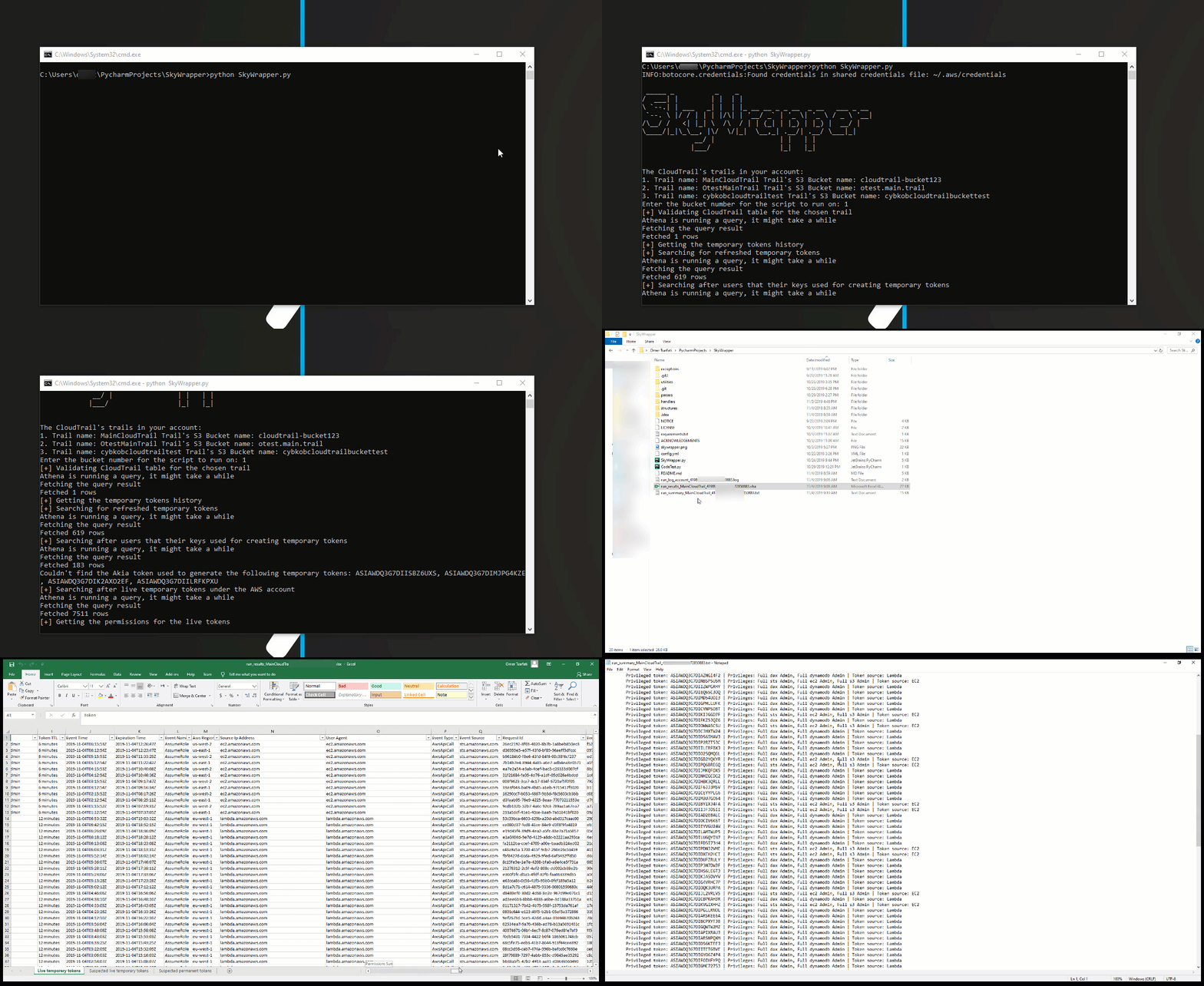
python SkyWrapper.py
Para executar este script, você precisará de pelo menos a seguinte política de permissões:
{
    "Version": "2012-10-17",
    "Statement": [
        {
            "Sid": "S3TrailBucketPermissions",
            "Effect": "Allow",
            "Action": [
                "s3:GetObject",
                "s3:ListBucketMultipartUploads",
                "s3:ListBucket",
                "s3:GetBucketLocation",
                "s3:ListMultipartUploadParts"
            ],
            "Resource": [
                "arn:aws:s3:::{cloudtrail_bucket_name}/*",
                "arn:aws:s3:::{cloudtrail_bucket_name}
            ]
        },
        {
            "Sid": "IAMReadPermissions",
            "Effect": "Allow",
            "Action": [
                "iam:ListAttachedRolePolicies",
                "iam:ListRolePolicies",
                "iam:GetRolePolicy",
                "iam:GetPolicyVersion",
                "iam:GetPolicy",
                "iam:ListRoles"
            ],
            "Resource": [
                "arn:aws:iam::*:policy/*",
                "arn:aws:iam::*:role/*"
            ]
        },
        {
            "Sid": "GLUEReadWritePermissions",
            "Effect": "Allow",
            "Action": [
                "glue:CreateTable",
                "glue:CreateDatabase",
                "glue:GetTable",
                "glue:GetDatabase"
            ],
            "Resource": "*"
        },
        {
            "Sid": "CLOUDTRAILReadPermissions",
            "Effect": "Allow",
            "Action": [
                "cloudtrail:DescribeTrails"
            ],
            "Resource": "*"
        },
        {
            "Sid": "ATHENAReadPermissions",
            "Effect": "Allow",
            "Action": [
                "athena:GetQueryResults",
                "athena:StartQueryExecution",
                "athena:GetQueryExecution"
            ],
            "Resource": "arn:aws:athena:*:*:workgroup/*"
        },
        {
            "Sid": "S3AthenaResultsBucketPermissions",
            "Effect": "Allow",
            "Action": [
                "s3:PutObject",
                "s3:GetObject",
                "s3:ListBucketMultipartUploads",
                "s3:CreateBucket",
                "s3:ListBucket",
                "s3:GetBucketLocation",
                "s3:ListMultipartUploadParts"
            ],
            "Resource": "arn:aws:s3:::aws-athena-query-results-*"
        }
    ]
}
Certifique-se de alterar o "{trail_bucket}" pelo nome do bucket da sua trilha!
Caso você tenha mais de uma trilha e queira que o script também as utilize, você deve adicioná-las também à seção de recursos da política de permissões.
"config.yaml" é o arquivo de configuração. Na maioria dos casos, você pode deixar a configuração como está. Caso precise alterá-la, o arquivo de configuração está documentado.
athena: # Athena configuration
  database_name: default # The name of the database Athena uses for querying the trail bucket.
  table_name: cloudtrail_logs_{table_name} # The table name of the trail bucket name
  output_location: s3://aws-athena-query-results-{account_id}-{region}/ # The default output location bucket for the query results
output:
  excel_output_file: run_results_{trail}_{account_id}-{date}.xlsx # Excel results file
  summary_output_file: run_summary_{trail}_{account_id}-{date}.txt # Summary text results file
verify_https: True # Enable/ Disable verification of SSL certificates for HTTP requests
account:
    account_id: 0 # The account id - Keep it as 0 in case you don't know it
    aws_access_key_id: # If you keep it empty, the script will look after the default AWS credentials stored in ~/.aws/credentials
    aws_secret_access_key: # If you keep it empty, the script will look after the default AWS credentials stored in ~/.aws/credentials
    aws_session_token: # If you keep it empty, the script will look after the default AWS credentials stored in ~/.aws/credentials
Para mais comentários, sugestões ou perguntas, você pode entrar em contato com Omer Tsarfati (@OmerTsarfati) e CyberArk Labs. Você pode encontrar mais projetos desenvolvidos por nós em https://github.com/cyberark/.
