

JADX에 MCP 서버를 통합하기 위한 플러그인
<div align="center">
# JADX-AI-MCP (Zin MCP Suite의 일부)
⚡ LLM과 MCP를 통해 통신하여 Claude와 같은 LLM을 사용해 Android APK를 분석하도록 구축된 완전 자동화 MCP 서버 + JADX 플러그인 — 취약점을 발견하고, APK를 분석하며, 손쉽게 리버스 엔지니어링하세요.






[](http://www.apache.org/licenses/LICENSE-2.0.html)
#### ⭐ 기여자
이 멋진 분들의 기여에 감사드립니다 ⭐
<table>
<tr align="center">
<td>
<a href="https://github.com/ljt270864457">
<img src="https://assets.kitploit.com/production/public/readmes/6657/a21f05ae54dafc25c40b8b86dd848ae6cc62a165c11d1aaa484a2971191c04c0.jpg" width="30px;" alt=""/>
<br /><sub><b>ljt270864457</b></sub>
</a>
</td>
<td>
<a href="https://github.com/p0px">
<img src="https://assets.kitploit.com/production/public/readmes/6657/87812519c4f48c0cb45aa6e7605ed82ba5cb0f0a410c7bec0c031b407330d683.png" width="30px;" alt=""/>
<br /><sub><b>p0px</b></sub>
</a>
</td>
<td>
<a href="https://github.com/bx33661">
<img src="https://assets.kitploit.com/production/public/readmes/6657/cc055bf866f36cc8ba4680bb158f91d2a459559a0ea31ce3525f2024e81d9d1b.png" width="30px;" alt=""/>
<br /><sub><b>bx33661</b></sub>
</a>
</td>
<td>
<a href="https://github.com/Haicaji">
<img src="https://assets.kitploit.com/production/public/readmes/6657/70bd2a092000ef110c6ef9a177ae39889c5fa12af384165218ecdc65ab87cca2.png" width="30px;" alt=""/>
<br /><sub><b>Haicaji</b></sub>
</a>
</td>
<td>
<a href="https://github.com/mostafaNazari702">
<img src="https://assets.kitploit.com/production/public/readmes/6657/c15b7582722221365f89b5900f1e2d53a5de4bfe888f1f4cf3c24a09ca74553b.jpg" width="30px;" alt=""/>
<br /><sub><b>Mostafa Nazari</b></sub>
</a>
</td>
<td>
<a href="https://github.com/ChineseAStar">
<img src="https://assets.kitploit.com/production/public/readmes/6657/69e2a4cd0bbb7228e06fd1ccc32a37c30d1406fc6b06cfce0a6e2d22f5bbf6b0.png" width="30px;" alt=""/>
<br /><sub><b>ChineseAStar</b></sub>
</a>
</td>
<td>
<a href="https://github.com/cyal1r">
<img src="https://assets.kitploit.com/production/public/readmes/6657/f81a8c01f47c36dbf03f4117810d43075e3ca85f2d2d3c5d70cfb6ea20f45290.jpg" width="30px;" alt=""/>
<br /><sub><b>cyal1</b></sub>
</a>
</td>
<td>
<a href="https://github.com/badmonkey7">
<img src="https://assets.kitploit.com/production/public/readmes/6657/07d2eb4e3cd4cc09c5dca57d877c4d816247baab606e7848af7a0ab7d23c040d.jpg" width="30px;" alt=""/>
<br /><sub><b>badmonkey7</b></sub>
</a>
</td>
<td>
<a href="https://github.com/tiann">
<img src="https://assets.kitploit.com/production/public/readmes/6657/73dc97b271331bb2711fc80543636b25ec03cb523b985af1af05ea9ab6f40cfd.jpg" width="30px;" alt=""/>
<br /><sub><b>tiann</b></sub>
</a>
</td>
<td>
<a href="https://github.com/ZERO-A-ONE">
<img src="https://assets.kitploit.com/production/public/readmes/6657/73c55a088226d05d6fbf5ff1d14caee34ef98224c00e463acd07d6f4bb65e655.png" width="30px;" alt=""/>
<br /><sub><b>ZERO-A-ONE</b></sub>
</a>
</td>
<td>
<a href="https://github.com/neoz">
<img src="https://assets.kitploit.com/production/public/readmes/6657/77a4659904d1ba9253e77f8ff592547b305b3a1a9f46e289d1a900c5a7983d68.jpg" width="30px;" alt=""/>
<br /><sub><b>neoz</b></sub>
</a>
</td>
<td>
<a href="https://github.com/SamadiPour">
<img src="https://assets.kitploit.com/production/public/readmes/6657/4a39a74e2cd9e53f1ef326afc4a7d177d8689e7238dce567aa7dede879ce8f9f.jpg" width="30px;" alt=""/>
<br /><sub><b>SamadiPour</b></sub>
</a>
</td>
<td>
<a href="https://github.com/wuseluosi">
<img src="https://assets.kitploit.com/production/public/readmes/6657/3ada2b6e2ed063020ca3b0ce57bd5cd5c1cba2416454d2d038f630a667b88e8c.png" width="30px;" alt=""/>
<br /><sub><b>wuseluosi</b></sub>
</a>
</td>
<td>
<a href="https://github.com/CainYzb">
<img src="https://assets.kitploit.com/production/public/readmes/6657/b6bdcfb4162b1366cb4850ba880ab59e42f705ddd91fbf25dd8912ddfa7dd2bf.png" width="30px;" alt=""/>
<br /><sub><b>CainYzb</b></sub>
</a>
</td>
<td>
<a href="https://github.com/tbodt">
<img src="https://assets.kitploit.com/production/public/readmes/6657/bb6b73635bffe086662106c496032717f4cfeee9d0341799d0afaf5f9d009e92.jpg" width="30px;" alt=""/>
<br /><sub><b>tbodt</b></sub>
</a>
</td>
<td>
<a href="https://github.com/LilNick0101">
<img src="https://assets.kitploit.com/production/public/readmes/6657/628dc1638821f28b99dbfe9a971259713d16e0bcfc5718783f91eb09acebd64f.png" width="30px;" alt=""/>
<br /><sub><b>LilNick0101</b></sub>
</a>
</td>
<td>
<a href="https://github.com/lwsinclair">
<img src="https://assets.kitploit.com/production/public/readmes/6657/e3169690505f7a2b7fd0968057af5807f29830292553cbaa6eaf0ad418521b59.jpg" width="30px;" alt=""/>
<br /><sub><b>lwsinclair</b></sub>
</a>
</td>
</tr>
<tr align="center">
<td>
<a href="https://github.com/LYC-Android">
<img src="https://assets.kitploit.com/production/public/readmes/6657/6f0596bf4a8146f7b79a95baa7704b130d61c0852890ef3e0aa3fc8f898d0a35.jpg" width="30px;" alt=""/>
<br /><sub><b>LYC-Android</b></sub>
</a>
</td>
<td>
<a href="https://github.com/zbhello">
<img src="https://assets.kitploit.com/production/public/readmes/6657/03a9374ed3b190d5b659fd30d28202aeebc237753bced41b02be84efed36a24e.jpg" width="30px;" alt=""/>
<br /><sub><b>zbhello</b></sub>
</a>
</td>
<td>
<a href="https://github.com/1yearning1">
<img src="https://assets.kitploit.com/production/public/readmes/6657/903595003df5d7eab06f7e32897f8e34a15fe9f677485f7c8e3939ddd895bffd.png" width="30px;" alt=""/>
<br /><sub><b>1yearning1</b></sub>
</a>
</td>
<td>
<a href="https://github.com/mhsjzsq">
<img src="https://assets.kitploit.com/production/public/readmes/6657/dadd027e0da3b8c59babf87a66dd50985c6815676c75677523148ea640b1926a.png" width="30px;" alt=""/>
<br /><sub><b>mhsjzsq</b></sub>
</a>
</td>
<td>
<a href="https://github.com/darkblack1234">
<img src="https://assets.kitploit.com/production/public/readmes/6657/02fd1704e19e0fd764f024e440eef0f47afe420baa415e24227a020b3f9f21c8.png" width="30px;" alt=""/>
<br /><sub><b>darkblack1234</b></sub>
</a>
</td>
<td>
<a href="https://github.com/Merrg1n">
<img src="https://assets.kitploit.com/production/public/readmes/6657/43cdc3b100677e85f4e063711c59fe487d994fb66a8e57ba68444f6d9fb0dfd3.png" width="30px;" alt=""/>
<br /><sub><b>Merrg1n</b></sub>
</a>
</td>
</tr>
</table>
</div>
<!-- 아직 개발 초기 단계이므로 버그, 충돌 및 논리 오류가 발생할 수 있습니다.-->
<!-- [JADX](https://github.com/skylot/jadx)용 독립 실행형 플러그인(포크로 시작)으로, Claude를 사용한 AI 기반 정적 코드 분석 및 실시간 코드 리뷰와 리버스 엔지니어링 작업을 위한 MCP(Model Context Protocol) 통합 기능을 제공합니다.-->
<div align="center">
<img alt="banner" height="480px" widht="620px" src="https://assets.kitploit.com/production/public/readmes/6657/54d557a38e17d9886d933b2e480910702f245c4cf62dc720a842cfe40994efe2.png">
</div>
<!--  AI 도구를 사용하여 생성된 이미지입니다. -->
#### 문서 보기
- 문서 보기가 이제 공개되었습니다: https://jadx-ai-mcp.readthedocs.io/en/latest/
---
## 🤖 JADX-AI-MCP란 무엇인가요?
**JADX-AI-MCP**는 [JADX 디컴파일러](https://github.com/skylot/jadx)용 플러그인으로, [MCP(Model Context Protocol)](https://github.com/anthropic/mcp)와 직접 통합되어 **Claude와 같은 LLM을 활용한 실시간 리버스 엔지니어링 지원**을 제공합니다.
즉, "디컴파일 → 컨텍스트 인식 코드 리뷰 → AI 권장 사항"을 모두 실시간으로 수행합니다.
#### 상위 수준 시퀀스 다이어그램
```mermaid
sequenceDiagram
LLM CLIENT->>JADX MCP SERVER: INVOKE MCP TOOL
JADX MCP SERVER->>JADX AI MCP PLUGIN: INVOKE HTTP REQUEST
JADX AI MCP PLUGIN->>REQUEST HANDLERS: INVOKE HTTP REQUEST HANDLER
REQUEST HANDLERS->>JADX GUI: PERFORM ACTION/GATHER DATA
JADX GUI->>REQUEST HANDLERS: ACTION PERFORMED/DATA GATHERED
REQUEST HANDLERS->>JADX AI MCP PLUGIN: CRAFT HTTP RESPONSE
JADX AI MCP PLUGIN->>JADX MCP SERVER:HTTP RESPONSE
JADX MCP SERVER->>LLM CLIENT: MCP TOOL RESULT
```
### 데모 영상 보기!
- **빠른 분석 수행**
https://github.com/user-attachments/assets/b65c3041-fde3-4803-8d99-45ca77dbe30a
- **취약점 빠르게 찾기**
https://github.com/user-attachments/assets/c184afae-3713-4bc0-a1d0-546c1f4eb57f
- **다중 AI 에이전트 지원**
https://github.com/user-attachments/assets/6342ea0f-fa8f-44e6-9b3a-4ceb8919a5b0
- **선호하는 LLM 클라이언트로 실행**
https://github.com/user-attachments/assets/b4a6b280-5aa9-4e76-ac72-a0abec73b809
- **APK 리소스 분석**
https://github.com/user-attachments/assets/f42d8072-0e3e-4f03-93ea-121af4e66eb1
- **JADX를 사용한 APK 디버깅 중 AI 어시스턴트**
https://github.com/user-attachments/assets/2b0bd9b1-95c1-4f32-9b0c-38b864dd6aec
이는 두 가지 도구의 조합입니다:
1. JADX-AI-MCP
2. [JADX MCP SERVER](https://github.com/zinja-coder/jadx-mcp-server)
## 🤖 JADX-MCP-SERVER란?
**JADX MCP Server**는 MCP(Model Context Protocol)를 통해 `JADX-AI-MCP` 플러그인(참조: [jadx-ai-mcp](https://github.com/zinja-coder/jadx-ai-mcp))과 상호작용하는 독립 실행형 Python 서버입니다. 이를 통해 LLM이 디컴파일된 Android 앱 컨텍스트와 실시간으로 통신할 수 있습니다.
---
## Zin MCP Suite의 다른 프로젝트
- **[APKTool-MCP-Server](https://github.com/zinja-coder/apktool-mcp-server)**
- **[JADX-MCP-Server](https://github.com/zinja-coder/jadx-mcp-server)**
- **[ZIN-MCP-Client](https://github.com/zinja-coder/zin-mcp-client)**
## 현재 MCP 도구
다음 MCP 도구를 사용할 수 있습니다:
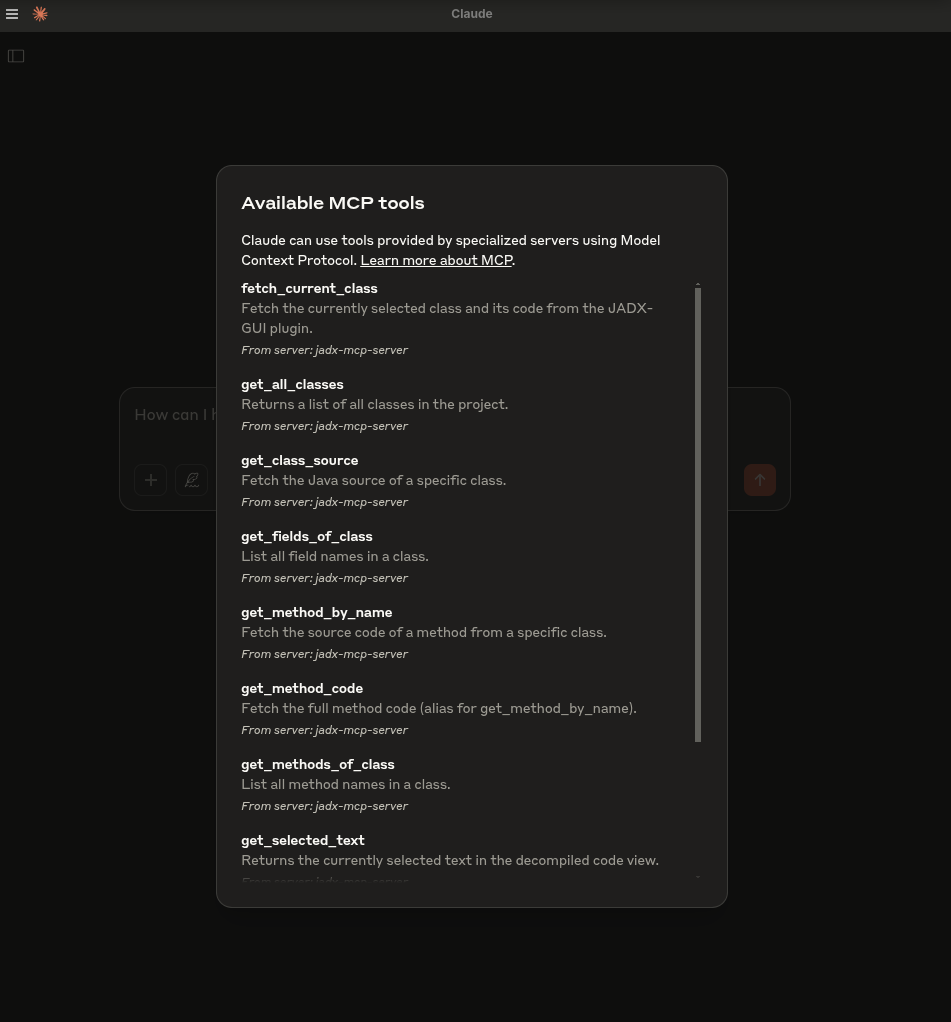
- `fetch_current_class()` — 선택한 클래스의 클래스 이름과 전체 소스 가져오기
- `get_selected_text()` — 현재 선택된 텍스트 가져오기
- `get_all_classes()` — 프로젝트의 모든 클래스 나열
- `get_class_source()` — 지정한 클래스의 전체 소스 가져오기
- `get_method_by_name()` — 메서드의 소스 가져오기
- `search_method_by_name()` — 클래스 전반에서 메서드 검색
- `search_classes_by_keyword()` — 소스 코드에 특정 키워드가 포함된 클래스 검색 (페이지네이션 지원)
- `get_methods_of_class()` — 클래스의 메서드 나열
- `get_fields_of_class()` — 클래스의 필드 나열
- `get_smali_of_class()` — 클래스의 smali 가져오기
- `get_main_activity_class()` — AndroidManifest.xml 파일에 명시된 jadx의 메인 액티비티 가져오기
- `get_main_application_classes_code()` — AndroidManifest.xml에 정의된 패키지 이름을 기준으로 모든 메인 애플리케이션 클래스의 코드 가져오기
- `get_main_application_classes_names()` — AndroidManifest.xml에 정의된 패키지 이름을 기준으로 모든 메인 애플리케이션 클래스의 이름 가져오기
- `get_android_manifest()` — AndroidManifest.xml 콘텐츠 검색 및 반환
- `get_manifest_component` - 전체 매니페스트 파일 대신 특정 매니페스트 컴포넌트 검색
- `get_strings()` : strings.xml 파일 가져오기
- `get_all_resource_file_names()` : 애플리케이션에 존재하는 모든 리소스 파일 이름 검색
- `get_resource_file()` : 리소스 파일 콘텐츠 검색
- `rename_class()` : 클래스 이름 변경
- `rename_method()` : 메서드 이름 변경
- `rename_field()` : 필드 이름 변경
- `rename_package()` : 전체 패키지 이름 변경
- `rename_variable()` : 메서드 내 변수 이름 변경
- `add_comment()` : 클래스, 메서드, 필드 또는 단일 코드 라인(`line=`, 디컴파일된 소스의 1부터 시작하는 라인 번호)에 주석 추가. JADX-GUI에 표시되며 프로젝트와 함께 저장됨 (동일한 대상에 다시 주석을 달면 업데이트되고, 빈 주석은 제거됨)
- `list_comments()` : 프로젝트에 저장된 주석 나열, 선택적으로 하나의 클래스로 필터링 가능
- `debug_get_stack_frames()` : jadx 디버거에서 스택 프레임 가져오기
- `debug_get_threads()` : jadx 디버거에서 스레드 정보 가져오기
- `debug_get_variables()` : jadx 디버거에서 변수 가져오기
- `xrefs_to_class()` : 클래스에 대한 모든 참조 찾기 (메서드 수준 및 클래스 수준 참조 반환, 페이지네이션 지원)
- `xrefs_to_method()` : 메서드에 대한 모든 참조 찾기 (오버라이드 관련 메서드 포함, 페이지네이션 지원)
- `xrefs_to_field()` : 필드에 대한 모든 참조 찾기 (필드에 접근하는 메서드 반환, 페이지네이션 지원)
---
## 🗒️ 샘플 프롬프트
🔍 기본 코드 이해
"이 클래스가 하는 일을 한 문단으로 설명해 줘."
"이 메서드의 역할을 요약해 줘."
"이 클래스에 난독화가 적용되어 있나요?"
"이 클래스가 필요로 할 수 있는 모든 Android 권한을 나열해 줘."
🛡️ 취약점 탐지
"이 메서드에 안전하지 않은 API 사용이 있나요?"
"이 클래스에서 하드코딩된 비밀 정보나 자격 증명을 확인해 줘."
"이 메서드는 사용자 입력을 사용하기 전에 정제하나요?"
"이 코드로 인해 어떤 보안 취약점이 발생할 수 있나요?"
🛠️ 리버스 엔지니어링 도우미
"난독화를 해제하고 클래스와 메서드 이름을 읽을 수 있는 이름으로 바꿔 줘."
"이 smali 메서드의 원래 목적을 추론할 수 있나요?"
"이 클래스가 어떤 라이브러리나 SDK의 일부인 것 같나요?"
"'encryption'과 관련된 코드를 포함한 클래스가 무엇인지 알려 줘."
📦 정적 분석
"이 클래스의 모든 네트워크 관련 API 호출을 나열해 줘."
"파일 I/O 작업과 그 잠재적 위험을 식별해 줘."
"이 메서드가 기기 정보나 개인 식별 정보(PII)를 유출하나요?"
🤖 AI 코드 수정
"가독성을 높이도록 이 메서드를 리팩터링해 줘."
"각 단계를 설명하는 주석을 이 코드에 추가해 줘."
"분석을 위해 이 Java 메서드를 Python으로 다시 작성해 줘."
📄 문서화 및 메타데이터
"모든 메서드에 대해 Javadoc 스타일 주석을 생성해 줘."
"이 클래스는 어떤 패키지나 앱 구성 요소에 속할 가능성이 높나요?"
"Android 구성 요소 유형(Activity, Service 등)을 식별할 수 있나요?"
🐞 디버거 도우미
```
"Fetch stack frames, varirables and threads from debugger and provide summary"
"Based the stack frames from debugger, explain the execution flow of the application"
"Based on the state of variables, is there security threat?"
```
## 🛠️ 시작하기
### 1. 릴리스에서 다운로드: https://github.com/zinja-coder/jadx-ai-mcp/releases
> [!NOTE]
>
> `jadx-ai-mcp-<version>.jar`와 `jadx-mcp-server-<version>.zip` 파일을 모두 다운로드하세요.
```bash
# 0. Download the jadx-ai-mcp-<version>.jar and jadx-mcp-server-<version>.zip
https://github.com/zinja-coder/jadx-ai-mcp/releases
# 1.
unzip jadx-mcp-server-<version>.zip
├jadx-mcp-server/
├── jadx_mcp_server.py
├── requirements.txt
├── README.md
├── LICENSE
├── src/
├── static/
├── examples/
└── test.sh
├jadx-ai-mcp-<version>.jar
# 2. Install the plugin
# For this you can follow two approaches:
## 1. One liner - execute below command in your shell
jadx plugins --install "github:zinja-coder:jadx-ai-mcp"
## The above one line code will install the latest version of the plugin directly into the jadx, no need to download the jadx-ai-mcp's .jar file.
## 2. Or you can use JADX-GUI to install it by following images as shown below:
```
<div align="center">
<img alt="배너" height="480px" widht="620px" src="https://assets.kitploit.com/production/public/readmes/6657/1c2660639daf7352d2bdeafeb7b5e0846e3c0bed45846ee52256b7bf3d316386.png">
</div>
<div align="center">
<img alt="배너" height="480px" widht="620px" src="https://assets.kitploit.com/production/public/readmes/6657/ccc2cc3566566517abad1097711afad3c668a999dc105d82686c4ffb791eba3b.png">
</div>
<div align="center">
<img alt="배너" height="480px" widht="620px" src="https://assets.kitploit.com/production/public/readmes/6657/0f9770bc38f4234826a661e6d37bc205a801ad38380363fd4394a903bd35ff94.png">
</div>
```bash
## 3. GUI method, download the .jar file and follow below steps shown in images
```
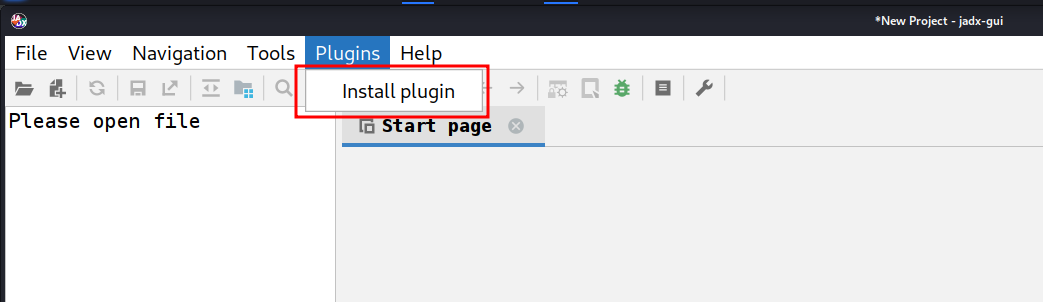
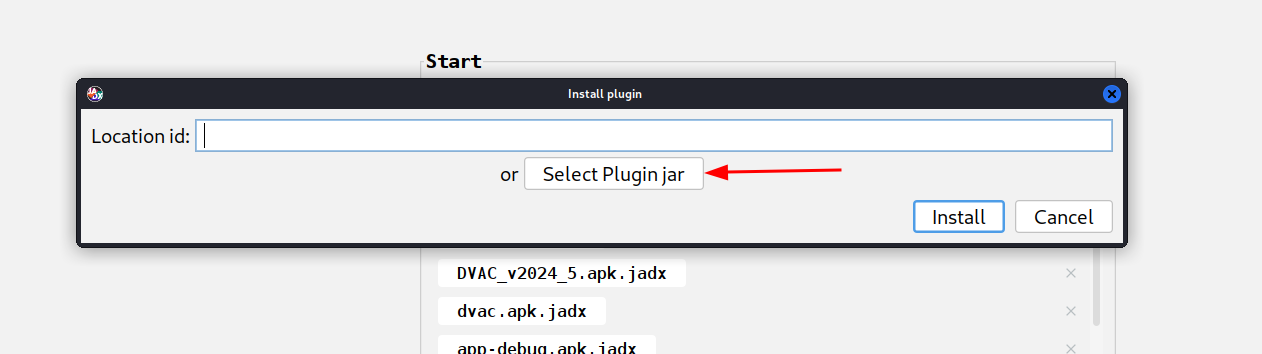
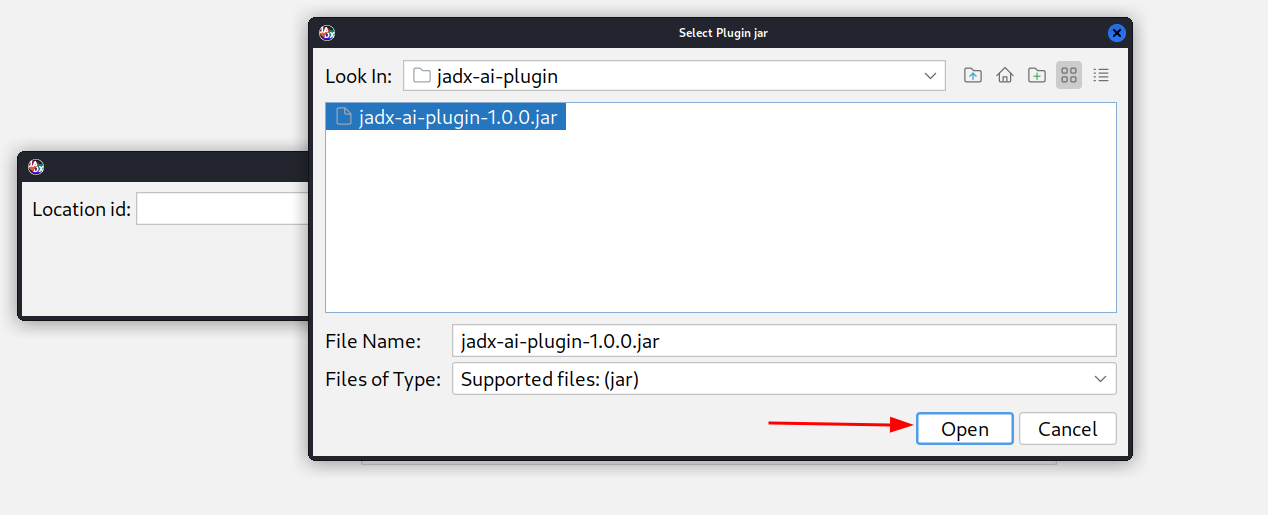
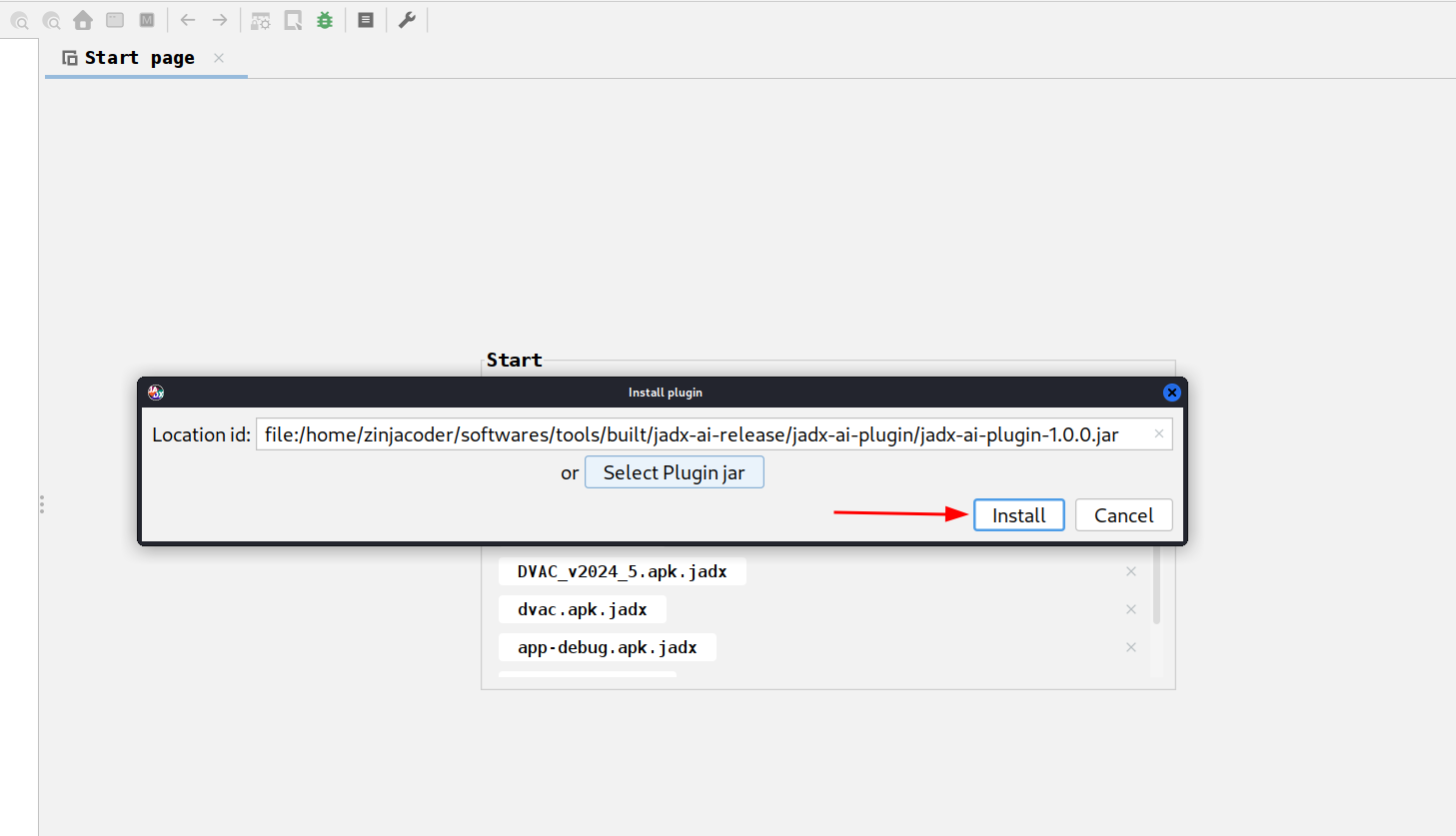
```bash
# 3. Navigate to jadx-mcp-server directory
cd jadx-mcp-server
# 4. This project uses uv - https://github.com/astral-sh/uv instead of pip for dependency management.
## a. Install uv (if you dont have it yet)
curl -LsSf https://astral.sh/uv/install.sh | sh
## b. OPTIONAL, if for any reasons, you get dependecy errors in jadx-mcp-server, Set up the environment
uv venv
source .venv/bin/activate # or .venv\Scripts\activate on Windows
## c. OPTIONAL Install dependencies
uv pip install httpx fastmcp
# The setup for jadx-ai-mcp and jadx_mcp_server is done.
```
## 🤖 2. Claude Desktop 사용
MCP가 활성화된 상태로 Claude Desktop이 실행 중인지 확인하세요.
예를 들어, 저는 Kali Linux에서 다음을 사용했습니다: https://github.com/aaddrick/claude-desktop-debian
LLM 파일에 MCP 서버를 구성하고 추가하세요:
```bash
nano ~/.config/Claude/claude_desktop_config.json
```
대상:
- Windows: `%APPDATA%\Claude\claude_desktop_config.json`
- macOS: `~/Library/Application Support/Claude/claude_desktop_config.json`
그리고 그 안에 다음 내용을 넣습니다:
```json
{
"mcpServers": {
"jadx-mcp-server": {
"command": "/<path>/<to>/uv",
"args": [
"--directory",
"</PATH/TO/>jadx-mcp-server/",
"run",
"jadx_mcp_server.py"
]
}
}
}
```
다음 항목을 교체하세요:
- `path/to/uv`를 실제 `uv` 실행 파일 경로로 교체
- `path/to/jadx-mcp-server`를 이 저장소를 클론한 위치의 절대 경로로 교체
그런 다음, 내장 통합 기능을 사용하여 실시간 코드 리뷰 프롬프트로 코드를 탐색하고 상호작용하세요.
**또는**
또는 아래 명령을 사용하여 jadx_mcp_server를 실행 파일로 직접 설치할 수도 있습니다:
```
uv tool install git+https://github.com/zinja-coder/jadx-mcp-server
```
그런 다음 mcp 구성의 `command` 섹션에 `jadx_mcp_server`를 제공하기만 하면 됩니다.
## 3. Cherry Studio 사용
Cherry Studio에서 MCP 도구를 구성하려면 다음 구성을 참고할 수 있습니다.
- 유형: stdio
- 명령: uv
- 인수:
```bash
--directory
path/to/jadx-mcp-server
run
jadx_mcp_server.py
```
- `path/to/jadx-mcp-server`에 이 저장소를 클론한 절대 경로를 지정합니다
## 4. LMStudio 사용하기
LM Studio의 mcp.json 파일을 구성하여 JADX AI MCP Server를 LM Studio와 함께 사용할 수도 있습니다. 다음은 비디오 가이드입니다.
https://github.com/user-attachments/assets/b4a6b280-5aa9-4e76-ac72-a0abec73b809
## 5. HTTP Stream 모드로 실행하기
다음과 같이 `jadx_mcp_server.py`와 함께 `--http` 옵션을 사용하여 Jadx를 HTTP Stream 모드로 실행할 수도 있습니다:
```bash
uv run jadx_mcp_server.py --http
OR
uv run jadx_mcp_server.py --http --port 9999
```
### 고급 CLI 옵션 — 플래그 이해하기
**두 개의 별도 연결**이 있으며, 각각 자체 호스트/포트를 가집니다:
```
┌─────────────┐ --host / --port ┌──────────────────┐ --jadx-host / --jadx-port ┌──────────────────┐
│ LLM Client │ ◄──────────────────► │ jadx-mcp-server │ ──────────────────────────► │ JADX-GUI Plugin │
│ (Claude, │ Where the MCP server │ │ Where the MCP server looks │ (jadx-ai-mcp) │
│ Codex..) │ LISTENS for clients │ │ for the JADX plugin │ │
└─────────────┘ └──────────────────┘ └──────────────────┘
```
| 플래그 | 기본값 | 제어 대상 |
|------|---------|----------|
| `--http` | 꺼짐 | stdio 대신 HTTP 전송 사용 |
| `--host` | `127.0.0.1` | **MCP 서버가 수신 대기하는 위치** (LLM 클라이언트용 바인드 주소) |
| `--port` | `8651` | **MCP 서버가 수신 대기하는 포트** |
| `--jadx-host` | `127.0.0.1` | **JADX 플러그인을 찾을 위치** (대상 JADX-GUI 머신) |
| `--jadx-port` | `8650` | **JADX 플러그인이 위치한 포트** |
### 사용 예시
**시나리오 1 — 모든 것이 같은 머신에 있는 경우 (가장 일반적):**
```bash
# Default: MCP server on localhost:8651, connects to JADX plugin on localhost:8650
uv run jadx_mcp_server.py --http
```
**시나리오 2 — Docker 컨테이너 또는 WSL (호스트 네트워크에서 MCP 서버에 접근 가능):**
```bash
# MCP server listens on ALL interfaces so the host can reach it
# JADX plugin is still on the same machine
uv run jadx_mcp_server.py --http --host 0.0.0.0
```
**시나리오 3 — 다른 머신(예: 원격 VM)에서 실행 중인 JADX-GUI:**
```bash
# MCP server runs locally, but connects to JADX plugin on a remote machine
uv run jadx_mcp_server.py --http --jadx-host 192.168.1.100
```
**시나리오 4 — 완전한 원격 설정 (모든 것이 서로 다른 머신에 있음):**
```bash
# MCP server listens on all interfaces on port 9999
# JADX plugin is on a different machine at 192.168.1.100:8652
uv run jadx_mcp_server.py --http --host 0.0.0.0 --port 9999 --jadx-host 192.168.1.100 --jadx-port 8652
```
> [!CAUTION]
> ### ⚠️ 보안 경고 — 원격 바인딩
>
> `--host 0.0.0.0`(또는 localhost가 아닌 모든 주소)을 사용하면 MCP 서버가 **인증 없이 일반 HTTP**를 통해 **모든 네트워크 인터페이스**에 바인딩됩니다. 즉:
>
> - **네트워크상의 누구든지** 연결하여 모든 MCP 도구를 호출할 수 있습니다
> - **TLS 암호화가 없으므로** 트래픽을 가로챌 수 있습니다
> - 공격자가 서버를 사용하여 **디컴파일된 코드를 읽고**, **클래스/메서드 이름을 변경**하며, **디버그 정보에 접근**할 수 있습니다
>
> **완화 조치:**
> - **신뢰할 수 있는 격리된 네트워크**(예: Docker 브리지, 로컬 VM)에서만 `0.0.0.0`에 바인딩하십시오
> - **방화벽**을 사용하여 MCP 포트에 대한 접근을 제한하십시오
> - 대신 **SSH 터널** 사용을 고려하십시오: `ssh -L 8651:127.0.0.1:8651 remote-host`
### Stdio 모드 호환성
> [!NOTE]
> **stdio** 모드(기본값, `--http` 없이)로 실행할 때, 모든 사람이 읽을 수 있는 출력(배너, 상태 확인)은 **stderr**에 기록되어 **stdout**이 MCP JSON-RPC 스트림용으로 예약됩니다. 이는 Codex, Claude Desktop 및 기타 stdio 기반 MCP 클라이언트와의 호환성을 보장합니다.
## 6. JADX AI MCP Plugin의 사용자 지정 포트 및 호스트 구성
<img width="800" height="335" alt="image" src="https://assets.kitploit.com/production/public/readmes/6657/34e13964afba1fa722733838892491b2ec9ea2d11f2dfd4e8612aa62817dfa41.png" />
1. 포트 구성: JADX AI MCP Plugin이 수신 대기할 포트를 구성합니다.
2. 기본 포트: 변경 사항을 되돌리고 기본 포트에서 수신 대기합니다.
3. 서버 재시작: JADX AI MCP Plugin 서버를 강제로 재시작합니다.
4. 서버 상태: JADX AI MCP Plugin 서버의 상태를 확인합니다.
사용자 지정 포트에서 실행 중인 JADX AI MCP Plugin에 연결하려면 다음에 표시된 대로 `--jadx-port` 옵션이 사용됩니다:
```
uv run jadx_mcp_server.py --jadx-port 8652
```
JADX AI MCP 플러그인이 **다른 머신**에서 실행 중인 경우(예: JADX는 원격 VM에, MCP 서버는 로컬 호스트에 있는 경우), `--jadx-host` 옵션을 사용하세요:
```bash
# Connect to JADX plugin on a remote host
uv run jadx_mcp_server.py --jadx-host 192.168.1.100 --jadx-port 8650
```
### CLI 레퍼런스 — 플래그 이해하기
**두 개의 별도 연결**이 있으며, 각각 자체적인 호스트/포트를 가집니다:
```
┌─────────────┐ --host / --port ┌──────────────────┐ --jadx-host / --jadx-port ┌──────────────────┐
│ LLM Client │ ◄──────────────────► │ jadx-mcp-server │ ──────────────────────────► │ JADX-GUI Plugin │
│ (Claude, │ Where the MCP server │ │ Where the MCP server looks │ (jadx-ai-mcp) │
│ Codex..) │ LISTENS for clients │ │ for the JADX plugin │ │
└─────────────┘ └──────────────────┘ └──────────────────┘
```
| 플래그 | 기본값 | 제어 대상 |
|------|---------|----------|
| `--http` | 꺼짐 | stdio 대신 HTTP 전송 사용 |
| `--host` | `127.0.0.1` | **MCP 서버가 수신 대기하는 위치** (LLM 클라이언트용 바인드 주소) |
| `--port` | `8651` | **MCP 서버가 수신 대기하는 포트** |
| `--jadx-host` | `127.0.0.1` | **JADX 플러그인을 찾을 위치** (대상 JADX-GUI 머신) |
| `--jadx-port` | `8650` | **JADX 플러그인이 위치한 포트** |
### 사용 예시
**시나리오 1 — 모든 것이 같은 머신에 있는 경우 (가장 일반적):**
```bash
# Default: MCP server on localhost:8651, connects to JADX plugin on localhost:8650
uv run jadx_mcp_server.py --http
```
**시나리오 2 — Docker 컨테이너 또는 WSL (호스트 네트워크에서 MCP 서버에 접근 가능):**
```bash
# MCP server listens on ALL interfaces so the host can reach it
# JADX plugin is still on the same machine
uv run jadx_mcp_server.py --http --host 0.0.0.0
```
**시나리오 3 — 다른 머신(예: 원격 VM)에서 실행 중인 JADX-GUI:**
```bash
# MCP server runs locally, but connects to JADX plugin on a remote machine
uv run jadx_mcp_server.py --http --jadx-host 192.168.1.100
```
**시나리오 4 — 완전한 원격 설정 (모든 것이 서로 다른 머신에 있음):**
```bash
# MCP server listens on all interfaces on port 9999
# JADX plugin is on a different machine at 192.168.1.100:8652
uv run jadx_mcp_server.py --http --host 0.0.0.0 --port 9999 --jadx-host 192.168.1.100 --jadx-port 8652
```
claude용 커스텀 jadx 포트에 대한 MCP 구성은 다음과 같습니다:
```
{
"mcpServers": {
"jadx-mcp-server": {
"command": "/path/to/uv",
"args": [
"--directory",
"/path/to/jadx-mcp-server/",
"run",
"jadx_mcp_server.py",
"--jadx-port",
"8652"
]
}
}
}
```
## 한번 시도해 보세요
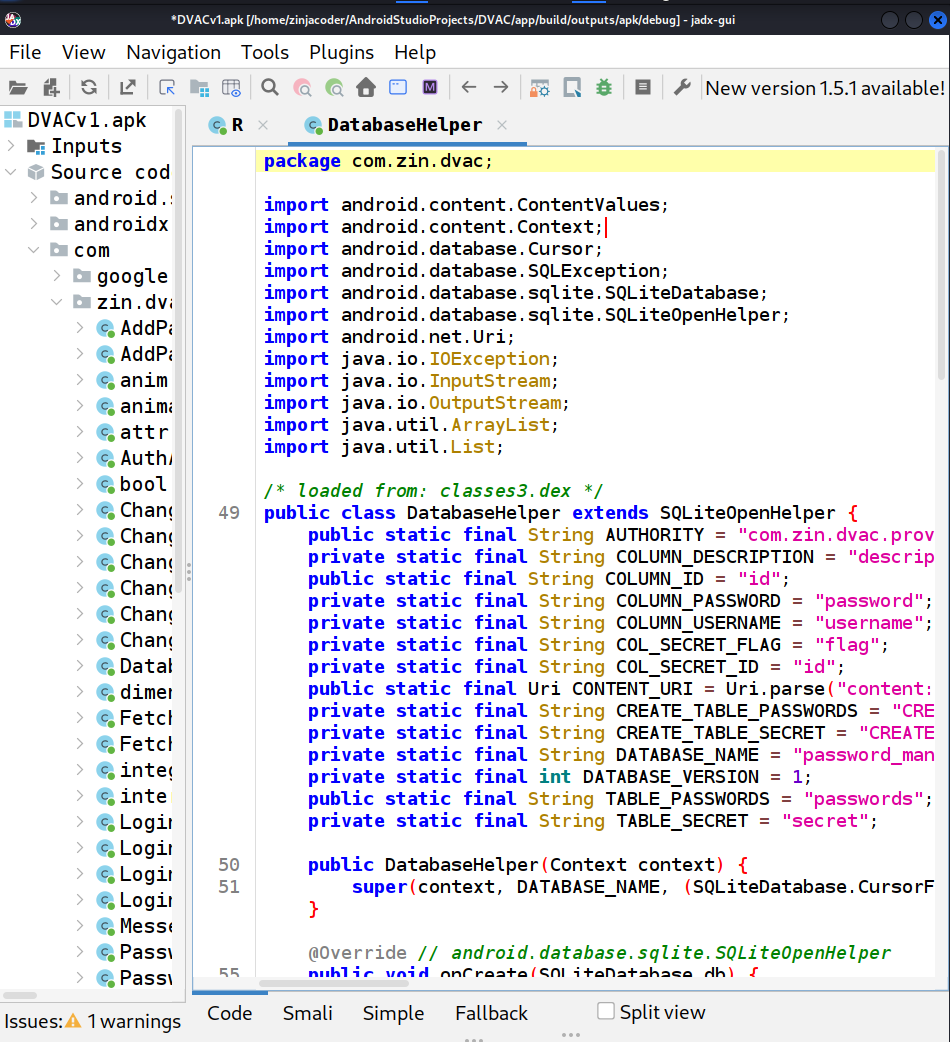
1. jadx-gui를 실행하고 아무 .apk 파일이나 불러오세요
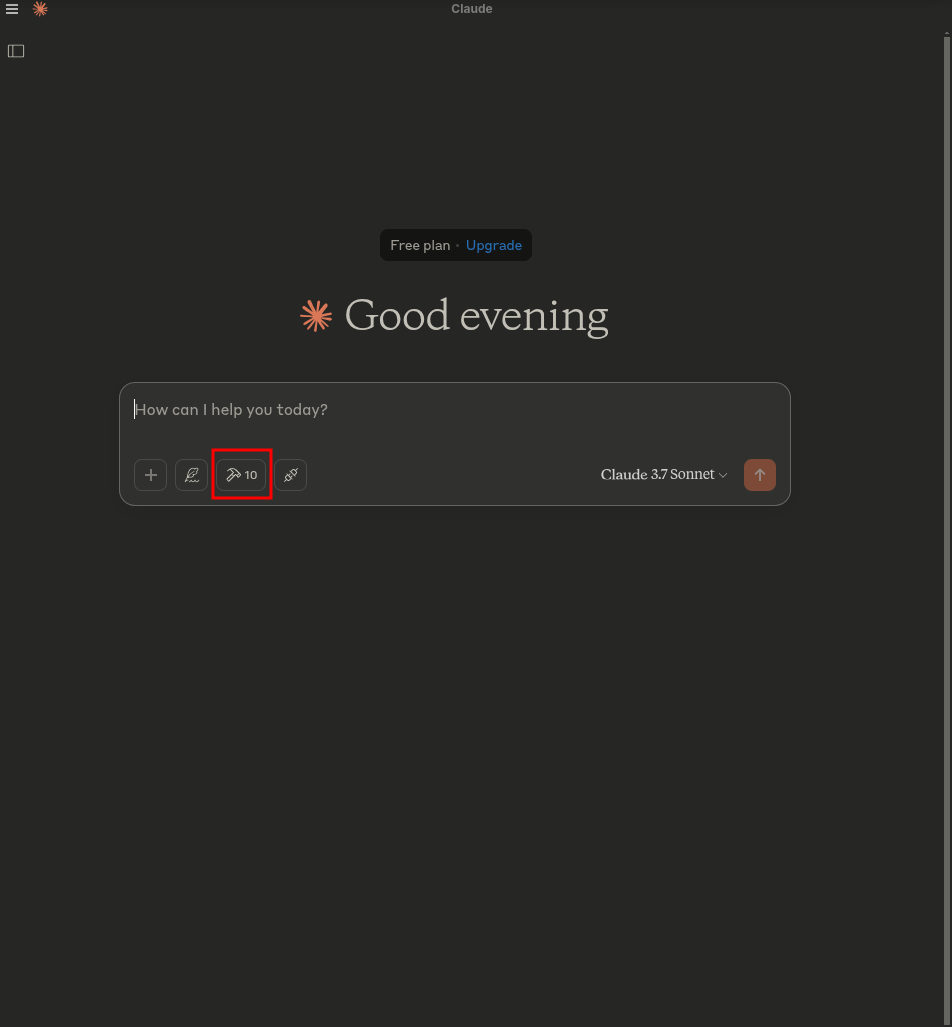
2. claude를 시작하세요 - 망치 기호가 보여야 합니다
3. `hammer` 기호를 클릭하면 다음과 같은 화면이 보일 것입니다:
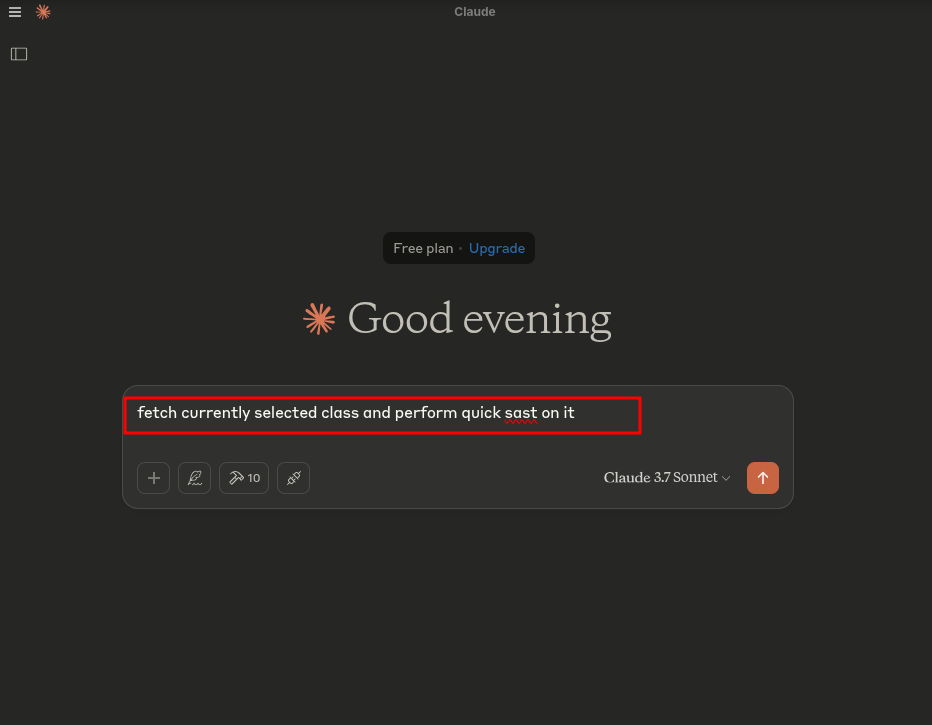
4. 다음 프롬프트를 실행하세요:
```text
fetch currently selected class and perform quick sast on it
```
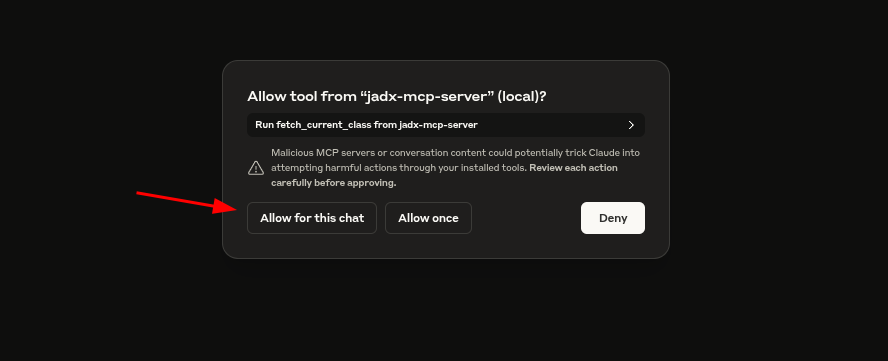
5. 메시지가 표시되면 액세스를 허용합니다:
6. HACK!
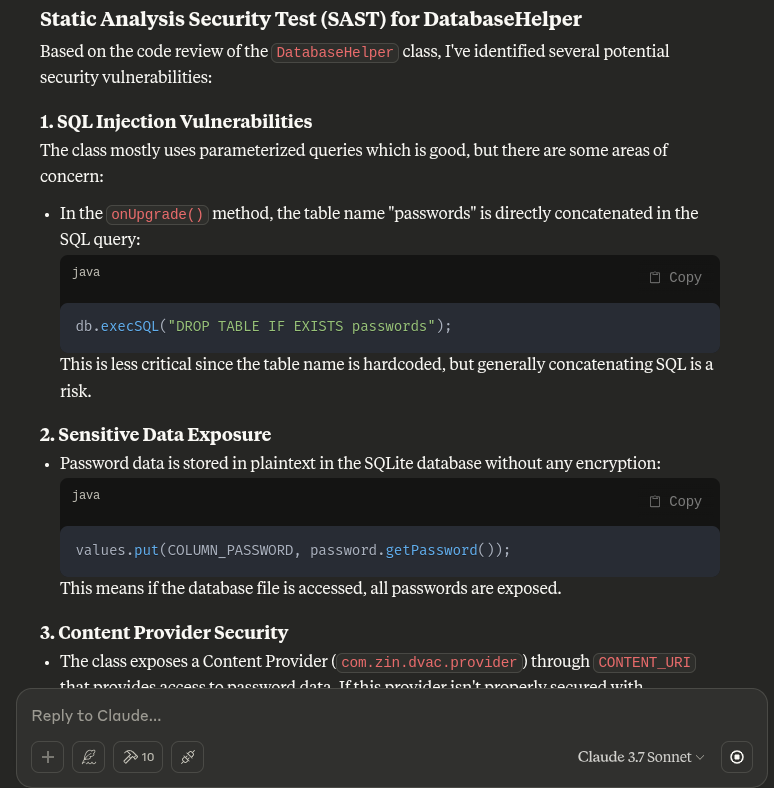
이 플러그인은 GUI와 내부 프로젝트 모델을 완전히 제어하여 더 깊은 LLM 통합을 지원하며, 다음을 포함합니다:
- 선택한 클래스를 MCP로 내보내기
- 자동화된 Claude 분석 실행
- 인라인으로 제안 사항 수신
---
## 문제 해결
[여기에서 확인하세요](https://github.com/zinja-coder/jadx-ai-mcp/edit/jadx-ai/TROUBLESHOOTING.md)
## 기여자를 위한 안내
- JADX-AI-MCP와 관련된 파일은 이 저장소에서 찾을 수 있습니다.
- **jadx-mcp-server**와 관련된 파일은 [여기](https://github.com/zinja-coder/jadx-mcp-server)에서 찾을 수 있습니다.
## 버그, 이슈, 기능 제안, 성능 문제, 일반적인 질문, 문서 문제를 보고하려면
- 해당 템플릿을 사용하여 이슈를 열어 주세요.
- Claude Desktop Client에서 테스트되었으며, 다른 AI에 대한 지원도 곧 테스트될 예정입니다!
## 🙏 크레딧
이 프로젝트는 [@skylot](https://github.com/skylot)이 만들고 유지 관리하는 뛰어난 오픈소스 Android 디컴파일러인 JADX의 플러그인입니다. 모든 핵심 디컴파일 로직은 그분의 것입니다. 저는 단지 AI 기능을 갖춘 제 MCP 서버를 지원하도록 확장했을 뿐입니다.
[📎 원본 README (JADX)](https://github.com/skylot/jadx)
jadx의 원본 README.md는 참조 및 크레딧을 위해 이 저장소에 포함되어 있습니다.
이 MCP 서버는 JADX-GUI의 확장성과 놀라운 Android 리버스 엔지니어링 커뮤니티 덕분에 가능해졌습니다.
---
[Read more](https://github.com/zinja-coder/jadx-ai-mcp)

