 vouch/vouch-proxy
auth_request 모듈을 사용하는 Nginx용 SSO 및 OAuth / OIDC 로그인 솔루션



auth_request 모듈을 사용하는 Nginx용 SSO 솔루션입니다. Vouch Proxy는 모든 웹사이트를 한 번에 보호할 수 있습니다.
Vouch Proxy는 다양한 OAuth 및 OIDC 로그인 제공자를 지원하며 다음에 대한 인증을 강제할 수 있습니다...
선호하는 IdP 또는 라이브러리와 함께 Vouch Proxy를 배포하셨다면 목록을 업데이트할 수 있도록 알려 주시기 바랍니다.
Vouch가 Nginx 리버스 프록시와 동일한 호스트에서 실행되는 경우 /validate 엔드포인트에서 Nginx까지의 응답 시간은 1ms 미만이어야 합니다.
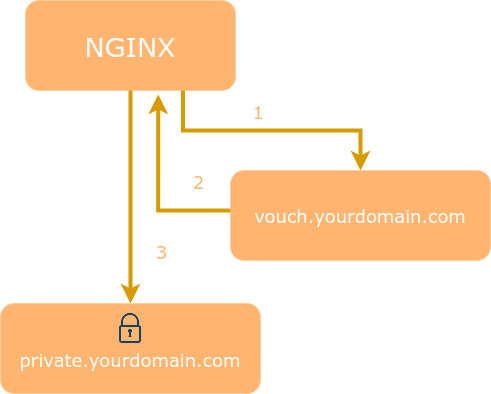
Vouch Proxy(VP)는 방문자가 웹사이트에 접근하기 전에 IdP(위에 나열된 서비스 중 하나 등)로 로그인하고 인증하도록 강제합니다.
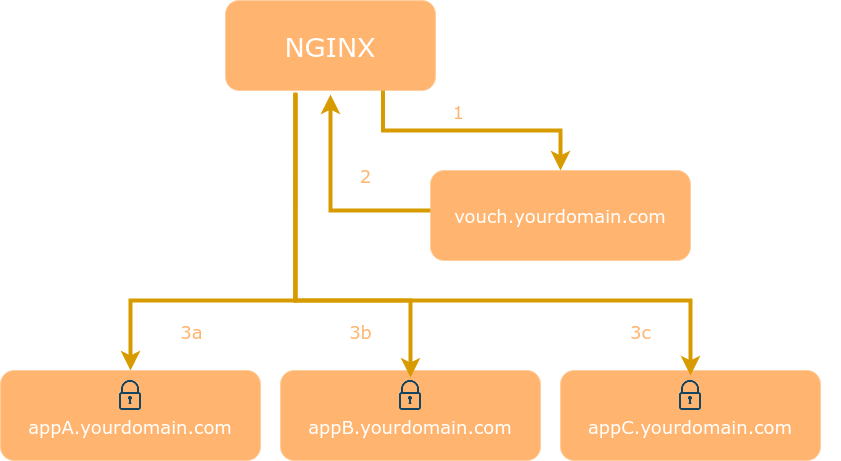
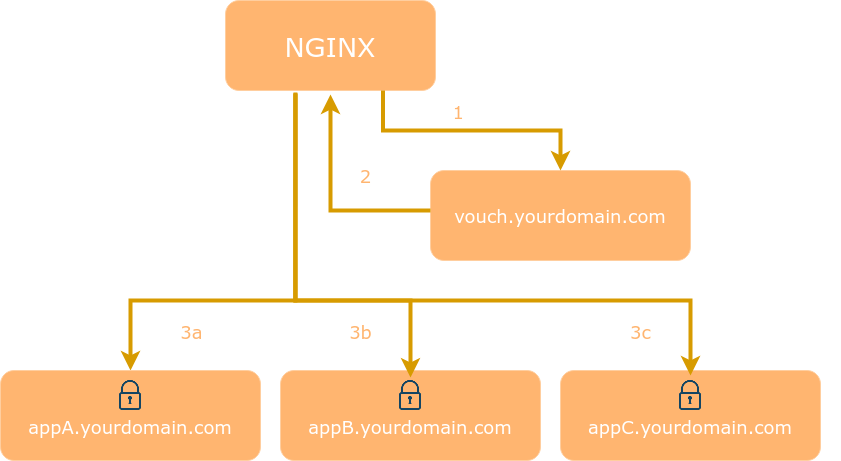
VP는 동일한 도메인의 모든 웹 애플리케이션을 보호하기 위한 SSO(Single Sign On) 솔루션으로도 사용할 수 있습니다.
방문자가 로그인하면 Vouch Proxy는 몇 시간 동안 보호된 웹사이트에 대한 접근을 허용합니다. 모든 요청은 VP에 의해 유효한지 확인됩니다.
VP는 IdP가 제공하는 방문자의 이메일, 이름 및 기타 정보(액세스 토큰 포함)를 HTTP 헤더로 웹 애플리케이션에 전송할 수 있습니다. VP는 애플리케이션의 사용자 관리를 완전히 대체하는 데 사용할 수 있습니다.
Vouch Proxy는 Vouch Proxy 서버와 보호 대상 애플리케이션 간에 쿠키를 공유하는 기능에 의존합니다. 일반적으로 이는 vouch.yourdomain.com과 같은 하위 도메인에서 Vouch를 실행하고 앱은 app1.yourdomain.com 및 app2.yourdomain.com에서 실행하는 방식으로 이루어집니다. 보호되는 도메인은 .yourdomain.com이며, Vouch Proxy 쿠키는 vouch.domains에 yourdomain.com를 포함하도록 설정하거나 때로는 vouch.cookie.domain을 yourdomain.com로 설정하여 이 도메인에 설정해야 합니다.
cp ./config/config.yml_example_$OAUTH_PROVIDER ./config/config.yml/auth 엔드포인트로 지정하세요다음 Nginx 구성은 다음을 가정합니다..
vouch.yourdomain.com 및 protectedapp.yourdomain.com이 동일한 서버에서 실행 중https로 제공되며 유효한 인증서가 있음 (그렇지 않은 경우 listen 80로 변경하고 vouch.cookie.secure를 false로 설정)server {
listen 443 ssl http2;
server_name protectedapp.yourdomain.com;
root /var/www/html/;
ssl_certificate /etc/letsencrypt/live/protectedapp.yourdomain.com/fullchain.pem;
ssl_certificate_key /etc/letsencrypt/live/protectedapp.yourdomain.com/privkey.pem;
# send all requests to the `/validate` endpoint for authorization
auth_request /validate;
location = /validate {
# forward the /validate request to Vouch Proxy
proxy_pass http://127.0.0.1:9090/validate;
# be sure to pass the original host header
proxy_set_header Host $http_host;
# Vouch Proxy only acts on the request headers
proxy_pass_request_body off;
proxy_set_header Content-Length "";
# optionally add X-Vouch-User as returned by Vouch Proxy along with the request
auth_request_set $auth_resp_x_vouch_user $upstream_http_x_vouch_user;
# optionally add X-Vouch-IdP-Claims-* custom claims you are tracking
# auth_request_set $auth_resp_x_vouch_idp_claims_groups $upstream_http_x_vouch_idp_claims_groups;
# auth_request_set $auth_resp_x_vouch_idp_claims_given_name $upstream_http_x_vouch_idp_claims_given_name;
# optinally add X-Vouch-IdP-AccessToken or X-Vouch-IdP-IdToken
# auth_request_set $auth_resp_x_vouch_idp_accesstoken $upstream_http_x_vouch_idp_accesstoken;
# auth_request_set $auth_resp_x_vouch_idp_idtoken $upstream_http_x_vouch_idp_idtoken;
# these return values are used by the @error401 call
auth_request_set $auth_resp_jwt $upstream_http_x_vouch_jwt;
auth_request_set $auth_resp_err $upstream_http_x_vouch_err;
auth_request_set $auth_resp_failcount $upstream_http_x_vouch_failcount;
# Vouch Proxy can run behind the same Nginx reverse proxy
# may need to comply to "upstream" server naming
# proxy_pass http://vouch.yourdomain.com/validate;
# proxy_set_header Host $http_host;
}






