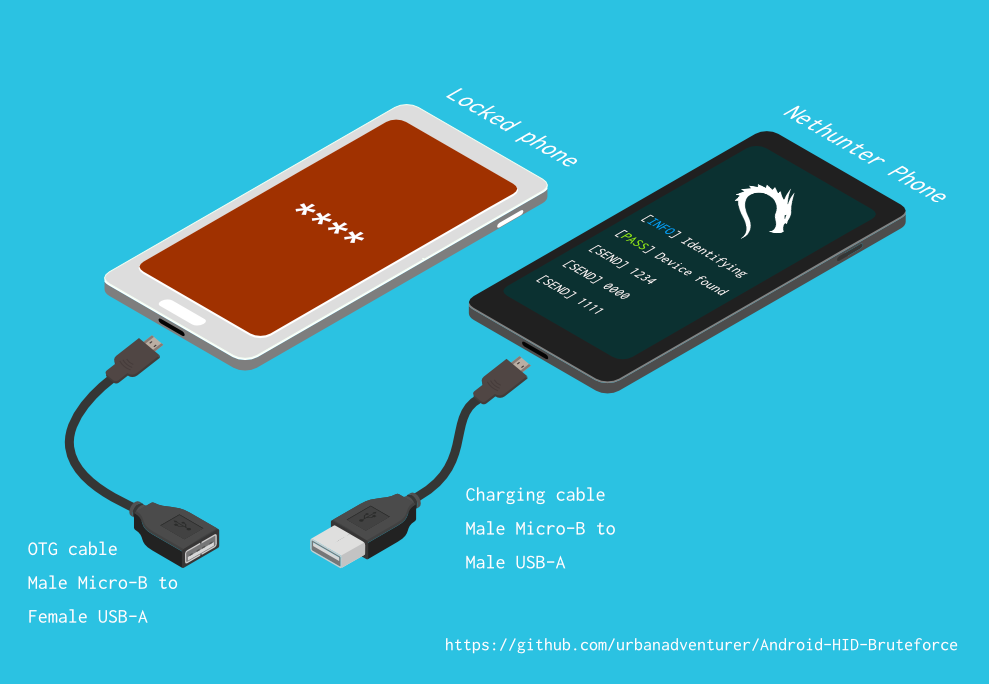

안드로이드 휴대폰(또는 기기)의 잠금 화면 PIN을 무차별 대입(bruteforce)하여 잠금 해제하세요. Kali Nethunter 휴대폰을 안드로이드 기기용 무차별 PIN 크래킹 도구로 변환하세요! (루트 권한 불필요, ADB 불필요)
잠금 화면 PIN을 무차별 대입하여 Android 휴대폰(또는 기기)을 잠금 해제하세요.
Kali Nethunter 휴대폰을 Android 기기용 무차별 PIN 크래커로 바꿔보세요!
USB OTG 케이블을 사용하여 잠긴 휴대폰을 Nethunter 기기에 연결합니다. 키보드를 에뮬레이션하여 자동으로 PIN을 시도하고, 너무 많은 잘못된 추측 후에 대기합니다.
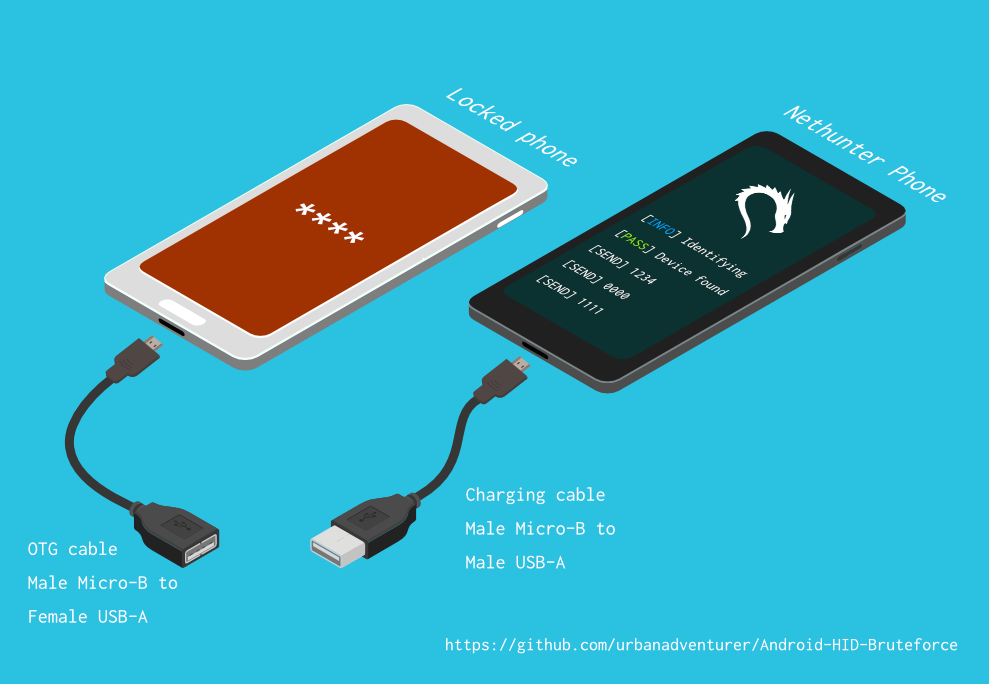
[Nethunter phone] <--> [USB cable] <--> [USB OTG adaptor] <--> [Locked Android phone]
USB HID Gadget 드라이버는 USB 휴먼 인터페이스 장치(HID)의 에뮬레이션을 제공합니다. 이를 통해 Android Nethunter 기기가 잠긴 휴대폰에 키보드 입력을 에뮬레이션할 수 있습니다. 마치 잠긴 휴대폰에 키보드를 연결하고 키를 누르는 것과 같습니다.
⏱ Samsung S5로 4자리 PIN을 모두 시도하는 데 약 16.6시간이 걸리지만, 최적화된 PIN 목록을 사용하면 훨씬 적은 시간이 소요됩니다.
TBC
스크립트를 /sdcard/에 설치한 경우, 다음 명령어로 실행할 수 있습니다.bash ./android-pin-bruteforce
Note that Android mounts /sdcard with the noexec flag. You can verify this with mount.
Android-PIN-Bruteforce (0.2)는 잠금 화면 PIN을 브루트포싱하여 안드로이드 폰(또는 기기)의 잠금을 해제하는 데 사용됩니다.
자세한 정보: https://github.com/urbanadventurer/Android-PIN-Bruteforce
명령어:
crack PIN 크래킹 시작
resume 선택한 PIN부터 재개
rewind 선택한 PIN부터 역순으로 PIN 크래킹
diag 진단 정보 표시
version 버전 정보를 표시하고 종료
옵션:
-f, --from PIN 이 PIN부터 재개
-a, --attempts 잘못된 시도 횟수 NUM부터 시작
-m, --mask REGEX PIN의 알려진 자릿수에 마스크 사용
-t, --type TYPE PIN 또는 패턴 크래킹 선택
-l, --length NUM NUM 길이의 PIN 크래킹
-c, --config FILE 로드할 설정 파일 지정
-p, --pinlist FILE 사용자 정의 PIN 목록 지정
-d, --dry-run 테스트용 시뮬레이션 실행. 키를 전송하지 않음.
-v, --verbose 상세 로그 출력
사용법:
android-pin-bruteforce <명령어> [옵션]```
## Supported Android Phones/Devices
This has been successfully tested with various phones including the Samsung S5, S7, Motorola G4 Plus and G5 Plus.
It can unlock Android versions 6.0.1 through to 10.0. The ability to perform a bruteforce attack doesn't depend on the Android version in use. It depends on how the device vendor developed their own lockscreen.
Check the Phone Database for more details
https://github.com/urbanadventurer/Android-PIN-Bruteforce/wiki/Phone-Database
## 🎳 PIN Lists
Optimised PIN lists are used by default unless the user selects a custom PIN list.
### Cracking PINs of different lengths
Use the `--length` commandline option.
Use this command to crack a 3 digit PIN,
`./android-pin-bruteforce crack --length 3`
Use this command to crack a 6 digit PIN
`./android-pin-bruteforce crack --length 6`
### Where did the optimised PIN lists come from?
The optimised PIN lists were generated by extracting numeric passwords from database leaks then sorting by frequency. All PINs that did not appear in the password leaks were appended to the list.
The optimised PIN lists were generated from *Ga$$Pacc DB Leak* (21GB decompressed, 688M Accounts, 243 Databases, 138920 numeric passwords).
#### The 4 digit PIN list
The reason that the 4 digit PIN list is used from a different source is because it gives better results than the generated list from *Ga$$Pacc DB Leak*.
`optimised-pin-length-4.txt` is an optimised list of all possible 4 digit PINs, sorted by order of likelihood.
It can be found with the filename `pinlist.txt` at https://github.com/mandatoryprogrammer/droidbrute
This list is used with permission from Justin Engler & Paul Vines from Senior Security Engineer, iSEC Partners,
and was used in their Defcon talk, [Electromechanical PIN Cracking with Robotic Reconfigurable Button Basher (and C3BO)](https://www.defcon.org/html/defcon-21/dc-21-speakers.html#Engler)
### Cracking with Masks
Masks use regular expressions with the standard grep extended format.
`./android-pin-bruteforce crack --mask "...[45]" --dry-run`
- To try all years from 1900 to 1999, use a mask of `19..`
- To try PINs that have a 1 in the first digit, and a 1 in the last digit, use a mask of `1..1`
- To try PINs that end in 4 or 5, use `...[45]`
## 📱 Configuration for different phones
Device manufacturers create their own lock screens that are different to the default or stock Android.
To find out what keys your phone needs, plug a keyboard into the phone and try out different combinations.
Load a different configuration file, with the `--config FILE` commandline parameter.
Example:
`./android-pin-bruteforce --config ./config.samsung.s5 crack`
You can also edit the `config` file by customising the timing and keys sent.
The following configuration variables can be used to support a different phone's lockscreen.
DELAY_BETWEEN_KEYS=0.25
PROGRESSIVE_ARRAY_ATTEMPT_COUNT__________=(1 11 41) PROGRESSIVE_ARRAY_ATTEMPTS_UNTIL_COOLDOWN=(5 1 1) PROGRESSIVE_ARRAY_COOLDOWN_IN_SECONDS____=(30 30 60)
SEND_KEYS_DISMISS_POPUPS_N_SECONDS_BEFORE_COOLDOWN_END=5
SEND_KEYS_DISMISS_POPUPS_AT_COOLDOWN_END="enter enter enter"
KEYS_BEFORE_EACH_PIN="escape enter"
KEYS_STAY_AWAKE_DURING_COOLDOWN="enter"
SEND_KEYS_STAY_AWAKE_DURING_COOLDOWN_EVERY_N_SECONDS=5
DELAY_BEFORE_STARTING=2
KEYS_BEFORE_STARTING="enter"```
We send keys before the end of the cooldown period, or optionally during the cooldown period. This is to keep the lockscreen app active and to dismiss any popups about the number of incorrect PIN attempts or a low battery warning.
Use ssh from your laptop to the NetHunter phone, and use this command to test sending keys:
In this example, the enter key is sent.
echo "enter" | /system/xbin/hid-keyboard /dev/hidg0 keyboard
In this example, ctrl-escape is sent.
echo "left-ctrl escape" | /system/xbin/hid-keyboard /dev/hidg0 keyboard
Note: Sending combinations of keys in config file variables is different. Currently only ctrl_escape is supported.
In this example, keys a, b, c are sent.
echo a b c | /system/xbin/hid-keyboard /dev/hidg0 keyboard
This Android app is a virtual USB Keyboard that you can use to test sending keys.
https://store.nethunter.com/en/packages/remote.hid.keyboard.client/
Use this list for the following variables:
To send special keys use the following labels. This list can be found in the hid_gadget_test source code.
To send more than one key at the same time, use the following list:
If you need more key combinations please open a new issue in the GitHub issues list.
The following section of the config file controls the progressive cooldown.
## PROGRESSIVE_COOLDOWN_ARRAY 변수는 점진적 쿨다운을 사용자 지정하기 위한 다차원 배열 역할을 합니다.
## PROGRESSIVE_ARRAY_ATTEMPT_COUNT__________는 시도 번호입니다.
## PROGRESSIVE_ARRAY_ATTEMPTS_UNTIL_COOLDOWN은 쿨다운 전까지 시도할 횟수입니다.
## PROGRESSIVE_ARRAY_COOLDOWN_IN_SECONDS____은 초 단위의 쿨다운입니다.
PROGRESSIVE_ARRAY_ATTEMPT_COUNT__________=(1 11 41)
PROGRESSIVE_ARRAY_ATTEMPTS_UNTIL_COOLDOWN=(5 1 1)
PROGRESSIVE_ARRAY_COOLDOWN_IN_SECONDS____=(30 30 60)```
The array is the same as this table.
| attempt number | attempts until cooldown | cooldown |
| ---------------- | ------------------------ | ---------- |
| 1 | 5 | 30 |
| 11 | 1 | 30 |
| 41 | 1 | 60 |
### Why can't you use a laptop, or is a Windows or Linux version coming soon?
This script works by emulating USB Human Interface Devices (HID), in this case it is keyboard and mouse input. Laptops have uni-directional USB ports and an Android mobile device/ phone has a bi-directional USB port. A bi-directional port is required to emulate a keyboard.
This might change in the future as USB-C is supposed to be uni-directional.
### How Android emulates a keyboard
Keys are sent using `/system/xbin/hid-keyboard`. To test this and send the key 1 you can use `echo 1 | /system/xbin/hid-keyboard dev/hidg0 keyboard`
In Kali Nethunter, `/system/xbin/hid-keyboard` is a compiled copy of `hid_gadget_test.c`. This is a small program for testing the HID gadget driver that is included in the Linux Kernel. The source code for this file can be found at https://www.kernel.org/doc/html/latest/usb/gadget_hid.html and https://github.com/aagallag/hid_gadget_test.
## 🔧 Troubleshooting
### If it is not bruteforcing PINs
#### Check the orientation of the cables
The Nethunter phone should have a regular USB cable attached, while the locked phone should have an OTG adaptor attached.
The OTG cable should be connected to the locked Android phone. The regular USB cable should be connected to the Nethunter phone.
Refer to the graphic on how to connect the phones.
#### Check it is emulating a keyboard
You can verify that the NetHunter phone is succesfully emulating a keyboard by connecting it to a computer using a regular charging/data USB cable. Open a text editor like Notepad while it is cracking and you should see it entering PIN numbers into the text editor.
Note that you will not need an OTG cable for this.
#### Try restarting the phones
Try powering off the phones and even taking out the batteries if that is possible.
#### Try new cables
Try using new cables/adaptors as you may have a faulty cable/adaptor.
### If it doesn't unlock the phone with a correct PIN
You might be sending keys too fast for the phone to process. Increase the DELAY_BETWEEN_KEYS variable in the config file.
💡 If you don't see 4 dots come up on the phone's screen then maybe it is not receiving 4 keys.
### 🔋 Managing Power Consumption
If your phone runs out of power too soon, follow these steps:
- Make sure both phones are fully charged to 100% before you begin
- Reduce the screen brightness on both the victim phone and NetHunter phone if possible
- Place both phones into Airplane mode, however you may want to enable WiFi to access the NetHunter phone via SSH.
- The locked phone will power the NetHunter phone, because it appears as a keyboard accessory
- Use a USB OTG cable with a Y splitter for an external power supply, to allow charging of the NetHunter phone while cracking
- Take breaks to charge your devices. Pause the script with CTRL-Z and resume with the `fg` shell command.
- Avoid the SEND_KEYS_STAY_AWAKE_DURING_COOLDOWN_EVERY_N_SECONDS configuration option. This will cause the locked phone to use more battery to keep the screen powered. Instead use the SEND_KEYS_DISMISS_POPUPS_N_SECONDS_BEFORE_COOLDOWN_END option (Default).
### Check the Diagnostics Report
Use the command `diag` display diagnostic information.
```bash ./android-pin-bruteforce diag```
USB 케이블이 연결되었을 때 이 메시지를 받으면 잠긴 안드로이드 폰에서 배터리를 빼고 전원을 껐다 켜보세요.```[FAIL] HID USB device not ready. Return code from /system/xbin/hid-keyboard was 5.```
### How the usb-devices command works
The diagnostics command uses the `usb-devices` script but it is only necessary as part of determining whether the USB cables are incorrectly connected. This can be downloaded from
https://github.com/gregkh/usbutils/blob/master/usb-devices
### Use verbose output
Use the `--verbose` option to check the configuration is as expected. This is especially useful when you are modifying the configuration.
### Use the dry-run
Use the `--dry-run` option to check how it operates without sending any keys to a device. This is especially useful when you are modifying the configuration or during development.
Dry run will:
- Not send any keys
- Will continue instead of aborting if the `KEYBOARD_DEVICE` or `HID_KEYBOARD` is missing.
### HID USB Mode
Try this command in a shell on the NetHunter phone:
```/system/bin/setprop sys.usb.config hid```
## 💣 알려진 문제점
- 올바른 PIN이 입력되어 휴대폰 잠금이 해제되는 경우를 감지할 수 없습니다.
- 올바른 PIN을 찾기 전에 휴대폰 배터리가 🔋 방전될 수 있습니다.
- 출처를 알 수 없는 휴대폰 설정 파일을 검토 없이 신뢰하지 마십시오. 설정 파일은 셸 스크립트이며 악성 명령을 포함할 수 있습니다.
## 🚀 로드맵
- [완료] 작동함
- [완료] USB HID 오류 감지
- [완료] 사용법 및 명령줄 옵션/설정 파일 개선
- [완료] n자리 PIN에 대한 무차별 대입 추가
- [완료] 알려진 자릿수에 대한 마스크
- [완료] PIN 목록을 역순으로 크랙 (가장 최근에 잠금 해제된 PIN 찾기)
- [완료] 설정 가능한 잠금 화면 프롬프트 구현
- [완료] 10회 시도 후 쿨다운 변경 구현
- [작업 중] 무차별 대입할 더 많은 기기 찾기/테스트
- 진행률 표시줄 추가
- ETA 추가
- ASCII 아트
- NetHunter용 더 나은 GUI
- iPhone용 구현
- 휴대폰 잠금 해제 감지 (NetHunter 카메라를 센서로 사용?)
- Android 패턴 크랙 (일반적인 패턴 먼저 시도)
## 🙋 기여
풀 리퀘스트를 환영합니다. 주요 변경 사항의 경우, 먼저 이슈를 열어 변경하고자 하는 내용을 논의해 주십시오.
테스트를 적절히 업데이트해 주십시오.
## 😎 작성자 및 감사의 말
Andrew Horton (@urbanadventurer)이 개발하였습니다.
👏 다음 분들이 큰 도움을 주셨습니다:
- Vlad Filatov (@v1adf): 위키 휴대폰 데이터베이스를 위해 여러 휴대폰 테스트
### 동기
이 도구를 개발하게 된 원래 동기는 삼성 S5 Android 휴대폰의 잠금을 해제하기 위해서였습니다. 그 휴대폰은 사망한 분의 소유였으며, 가족들이 그 안의 데이터에 접근해야 했습니다. 당시 USB Rubber Ducky나 다른 하드웨어가 없어서 다양한 방법을 시도하다가 결국 새로운 것을 개발해야 한다고 깨달았습니다.
### 크레딧
최적화된 PIN 목록은 Justin Engler (@justinengler)와 Paul Vines (Senior Security Engineer, iSEC Partners)가 작성하였으며, 그들의 Defcon 강연 [Electromechanical PIN Cracking with Robotic Reconfigurable Button Basher (and C3BO)](https://www.defcon.org/html/defcon-21/dc-21-speakers.html#Engler)에서 사용되었습니다.
### 그래픽
Andrew Horton이 디자인하였으며, 다음 무료 벡터 팩을 감사히 사용하였습니다:
- [USB Ports Isometric Free Vector by VisionHeldup](https://www.vecteezy.com/vector-art/159576-usb-ports-isometric-free-vector)
- [HDMI and USB Vector Set by Mary Winkler](https://www.vecteezy.com/vector-art/107006-hdmi-and-usb-vector-set)
- [Isometric Data Security Illustration by Rizal.Medanguide](https://www.vecteezy.com/vector-art/661831-isometric-data-security-illustration)
- Kali NetHunter 로고
## 🗿 잠긴 Android 휴대폰을 잠금 해제하는 다른 프로젝트 및 방법과의 비교
### 이 프로젝트가 독특한 점은 무엇인가요?
다른 오픈소스 Android PIN 크래킹 프로젝트가 있는데도 이 프로젝트가 독특한 이유에 대해 질문을 받았습니다.
Android-PIN-Bruteforce는 NetHunter 휴대폰에서 Android 휴대폰의 PIN을 크랙하며, 잠긴 휴대폰이 사전에 해킹될 필요가 없기 때문에 독특합니다.
작동 방식:
- Rubber Ducky, Celebrite, XPIN Clip과 같은 특수 하드웨어를 구매할 필요 없음.
- ADB나 루트 액세스가 필요 없음 (휴대폰이 사전에 해킹될 필요 없음).
| 프로젝트 | ADB/USB 디버깅 | 루트 필요 | 하드웨어 비용 필요 | 상업용 |
------------------------------------------------------- | ------------------ | ------------- | ------------------- | ----------- |
| ⭐ Android-PIN-Bruteforce | 아니요 | 아니요 | NetHunter 휴대폰 | 아니요 |
| github.com/PentesterES/AndroidPINCrack | 예 | 예 | 아니요 | 아니요 |
| github.com/ByteRockstar1996/Cracking-Android-Pin-Lock | 예 | 예 | 아니요 | 아니요 |
| github.com/sch3m4/androidpatternlock | 예 | 예 | 아니요 | 아니요 |
| github.com/georgenicolaou/androidlockcracker | 예 | 예 | 아니요 | 아니요 |
| github.com/MGF15/P-Decode | 예 | 예 | 아니요 | 아니요 |
| github.com/BitesFor/ABL | 예 | 예 | 아니요 | 아니요 |
| github.com/wuseman/WBRUTER | 예 | 아니요 | 아니요 | 아니요 |
| github.com/Gh005t/Android-BruteForce | 예 | 아니요 | 아니요 | 아니요 |
| github.com/mandatoryprogrammer/droidbrute | 아니요 | 아니요 | Rubber Ducky $ | 아니요 |
| github.com/hak5darren/USB-Rubber-Ducky | 아니요 | 아니요 | Rubber Ducky $ | 예 |
| github.com/bbrother/stm32f4androidbruteforce | 아니요 | 아니요 | STM32F4 개발 보드 $ | 아니요 |
| hdb-team.com/product/hdbox/ | 아니요 | 아니요 | HDBOX $$ | 예 |
| xpinclip.com | 아니요 | 아니요 | XPINClip $$ | 예 |
| cellebrite.com/en/ufed/ | 아니요 | 아니요 | Cellebrite UFED $$$ | 예 |
이 중 일부 프로젝트/제품은 정말 훌륭하지만 Android-PIN-Bruteforce와는 다른 목표를 달성합니다.
프로젝트가 gestures.key 또는 password.key를 요구하는 경우 루트가 필요하다고 표시했습니다.
프로젝트가 커스텀 부트로더를 요구하는 경우 ADB와 루트가 모두 필요하다고 표시했습니다.
이 표에 프로젝트를 추가하고 싶다면 새 이슈를 열어 주십시오.
각 프로젝트에 대한 링크는 📚 관련 프로젝트 및 추가 자료 섹션에 있습니다.
### 😭 일반 휴대폰 사용자
- [DataGenetics PIN 분석](https://datagenetics.com/blog/september32012/index.html)에서 상위 20개 PIN을 시도해 보십시오. 이 PIN은 휴대폰의 26.83%를 잠금 해제한다고 알려져 있습니다.
- SMS 잠금 화면 우회 앱 사용 (휴대폰이 잠기기 전에 앱 설치 필요)
- Samsung Find My Mobile 사용 (휴대폰이 잠기기 전에 설정해야 함)
- 잠금 화면 UI 충돌 (Android 5.0 및 5.1)
- Google 패턴 분실, PIN 분실 또는 비밀번호 분실 기능 사용 (Android 4.4 KitKat 및 이전 버전)
- 공장 초기화 (모든 데이터 손실 😭)
### 🤖 이미 Android ROM을 교체한 사용자
휴대폰이 이미 루팅되었거나, USB 디버깅이 활성화되었거나, adb가 활성화된 경우.
- 커스텀 리커버리(TWRP, CMW, Xrec 등 필요)를 사용하여 `Pattern Password Disable` ZIP을 플래시
- `/data/system/gesture.key` 또는 `password.key` 삭제 (잠긴 기기에서 루트 및 adb 필요)
- `/data/system/gesture.key` 및 `password.key` 크랙 (잠긴 기기에서 루트 및 adb 필요)
- sqlite3 데이터베이스 `settings.db` 업데이트 (잠긴 기기에서 루트 및 adb 필요)
### 🔬 법의학 조사관
이 방법들은 비용이 많이 들 수 있으며, 일반적으로 전문 휴대폰 법의학 조사관만 사용합니다.
난이도 및 비용 순서:
- USB 디버깅이 활성화된 경우 활용 (Oxygen Forensic Suite)
- 키보드 에뮬레이션을 통한 무차별 대입 (⭐ Android-PIN-Bruteforce, RubberDucky 공격, XPIN Clip, HBbox)
- JTAG (기기 보드의 TAP(테스트 액세스 포트)와 인터페이스)
- In-System Programming (ISP) (기기 보드의 플래시 메모리 칩 핀에 직접 연결)
- Chip Off (기기에서 플래시 메모리 칩을 탈착 및 제거)
- Clock Glitching / 전압 결함 주입 (PIN 제한을 우회하기 위한 하드웨어 CPU 타이밍 공격)
- 부트로더 익스플로잇 (부트로더를 공격하는 제로데이 익스플로잇. Grayshift의 GrayKey 및 Cellebrite)
JTAG, ISP, Chip Off 기술은 대부분의 기기가 암호화되어 있기 때문에 현재는 덜 유용합니다.
Clock glitching을 사용하는 휴대폰 PIN에 대한 실용적인 공격을 알지 못합니다. 이 기술을 사용하는 제품을 알고 계시면 알려주시기 바랍니다.
### 🕵 보안 전문가 및 기술 사용자
USB HID 키보드 무차별 대입을 전용 하드웨어와 함께 사용하십시오.
- RubberDucky와 Darren Kitchen의 Hak5 무차별 대입 스크립트
- USB Teensy용 스크립트 작성
- 고가의 법의학 하드웨어 구매
- 또는 NetHunter 휴대폰으로 Android-PIN-Bruteforce를 사용하십시오!
Android PIN 크래킹을 위해 RubberDucky 페이로드를 에뮬레이션하는 훌륭한 프로젝트 Duck Hunter를 사용하려는 시도는 실패했습니다. 페이로드 길이 때문에 휴대폰이 충돌했을 가능성이 있습니다.
## 📚 관련 프로젝트 및 추가 자료
### NetHunter가 없는 USB HID 하드웨어
hak5 12x17: USB Rubber Ducky로 16시간 안에 모든 4자리 Android PIN 해킹
https://archive.org/details/hak5_12x17
Hak5: USB Rubber Ducky
https://shop.hak5.org/products/usb-rubber-ducky-deluxe
USB-Rubber-Ducky 페이로드
https://github.com/hak5darren/USB-Rubber-Ducky/wiki/Payloads
Teensy
https://www.pjrc.com/teensy/
STM32F4Discovery 개발 보드로 Android 휴대폰 무차별 대입
https://github.com/bbrother/stm32f4androidbruteforce
https://hackaday.com/2013/11/10/brute-forcing-an-android-phone/
Mac EFI PIN에 대한 자동화된 무차별 대입 공격 (Teensy 사용)
https://orvtech.com/atacar-efi-pin-macbook-pro-en.html
https://hackaday.io/project/2196-efi-bruteforcer
Droidbrute: 통계적으로 생성된 단어 목록으로 효율성을 높인 Android PIN 크래킹 USB Rubber Ducky 페이로드
https://github.com/mandatoryprogrammer/droidbrute
hak5 에피소드 및 Android 무차별 대입 4자리 PIN에 대한 토론 포럼
https://forums.hak5.org/topic/28165-payload-android-brute-force-4-digit-pin/
### NetHunter HID 키보드 공격
NetHunter HID 키보드 공격
https://www.kali.org/docs/nethunter/nethunter-hid-attacks/
### Linux 커널 HID 지원
휴먼 인터페이스 장치 (HID)
https://www.kernel.org/doc/html/latest/hid/index.html#
Linux USB HID 가젯 드라이버 및 hid-keyboard 프로그램
https://www.kernel.org/doc/html/latest/usb/gadget_hid.html
https://github.com/aagallag/hid_gadget_test
usb-devices 스크립트
https://github.com/gregkh/usbutils/blob/master/usb-devices
### Android PIN 및 패턴 파일 크래킹
AndroidPINCrack - 해시와 솔트를 사용하여 Android 비밀번호 무차별 대입 (휴대폰에서 루트 필요)
https://github.com/PentesterES/AndroidPINCrack
Android Pattern Lock Cracker - SHA1 해시를 사용하여 Android 패턴 무차별 대입 (휴대폰에서 루트 필요)
https://github.com/sch3m4/androidpatternlock
### 일반 복구 방법
[Android][가이드] Android 비밀번호/패턴/얼굴/PIN 해킹 및 우회
https://forum.xda-developers.com/showthread.php?t=2620456
ADB 및 셸 스크립팅을 사용한 Android 무차별 대입
https://github.com/Gh005t/Android-BruteForce
### 법의학 방법 및 하드웨어
PATCtech 디지털 포렌식: Android 비밀번호 우회
http://patc.com/online/a/Portals/965/Android%20Passcode.pdf
XPIN Clip
https://xpinclip.com/
HDB Team의 HDBox
https://hdb-team.com/product/hdbox/
Cellebrite UFED
https://www.cellebrite.com/en/ufed/
Grayshift의 GrayKey
https://www.grayshift.com/graykey/
### PIN 분석
Electromechanical PIN Cracking with Robotic Reconfigurable Button Basher (and C3BO)
https://www.defcon.org/html/defcon-21/dc-21-speakers.html#Engler
DataGenetics PIN 분석 https://datagenetics.com/blog/september32012/index.html
| Key label | Key label |
|---|
| left-ctrl | f6 |
| right-ctrl | f7 |
| left-shift | f8 |
| right-shift | f9 |
| left-alt | f10 |
| right-alt | f11 |
| left-meta | f12 |
| right-meta | insert |
| return | home |
| esc | pageup |
| bckspc | del |
| tab | end |
| spacebar | pagedown |
| caps-lock | right |
| f1 | left |
| f2 | down |
| f3 | kp-enter |
| f4 | up |
| f5 | num-lock |