
Skip to content
KitploitKITPLOIT
도구익스플로잇블로그
Log in
제출
도구익스플로잇블로그
제출

해킹, 침투 테스트 및 사이버 보안 도구를 당신의 보안 무기고에!

Kitploit은 해킹, 사이버 보안 및 침투 테스트 도구 디렉토리입니다. 최신 프로젝트 업데이트를 발견하여 취약점을 찾고, 시스템을 분석하고, 테스트를 자동화하고, 보안을 강화하세요.

피드문의개인정보© 2026 Kitploit

도구 디렉토리

카테고리

모든 카테고리 보기
Loading categories
PortexAnalyzerGUI — Graphical interface for PortEx, a Portable Executable and Malware Analysis Library | Kitploit
도구/GitHubGitHub/struppigel/portexanalyzergui
Static AnalysisHash AnalysisReverse EngineeringForensicsMalware AnalysisBinary Analysis
GitHubstruppigel/portexanalyzergui

PortexAnalyzerGUI

Graphical interface for PortEx, a Portable Executable and Malware Analysis Library
저장소 보기
14911285일 전Kitploit 검토 완료

인기

모두 보기 →

커뮤니티에서 가장 많이 사용되는 도구를 찾아보세요.

모든 도구 탐색

도구 컬렉션을 둘러보세요

모든 도구 보기 →
공유
요청한 언어로 콘텐츠를 사용할 수 없습니다. 영어 버전을 표시합니다.

PortexAnalyzerGUI

Graphical interface for PortEx, a Portable Executable and Malware Analysis Library
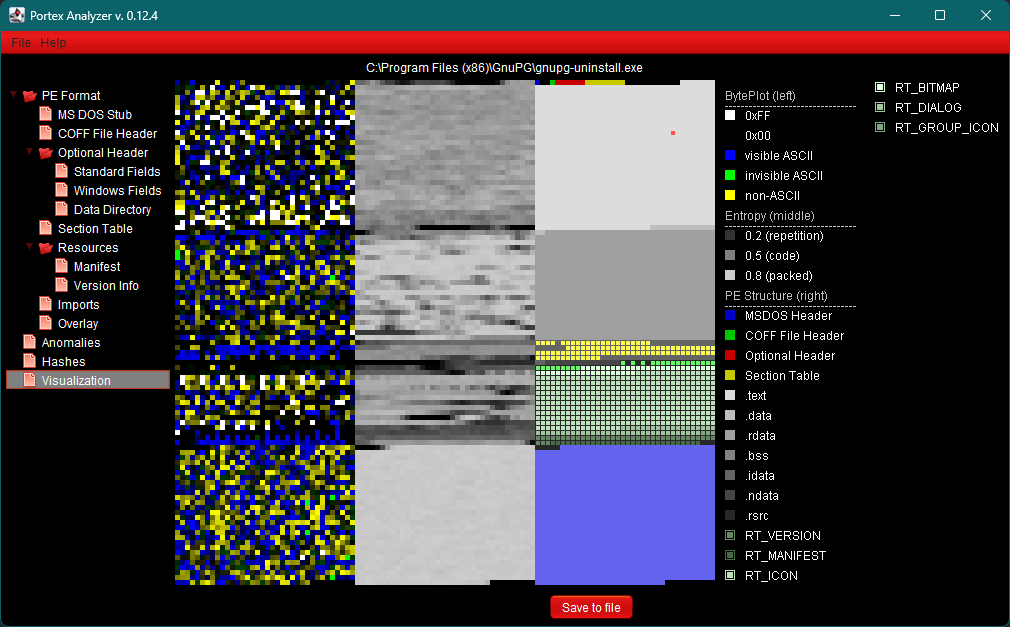
visualizer example

visualizer example

Download

Releases page

Features

  • Header information from: MSDOS Header, Rich Header, COFF File Header, Optional Header, Section Table, .NET Metadata
  • PE Structures: Import Section, Resource Section, Export Section, Debug Section
  • Scanning for file format anomalies and reversing hints for certain combinations
  • Visualize file structure, local entropies and byteplot, and save it as PNG
  • Calculate Shannon Entropy, Imphash, MD5, SHA256, Rich and RichPV hash
  • Overlay and overlay signature scanning, dump or remove overlay
  • Version information and manifest
  • Icon extraction and saving as PNG
  • Internal signature scans using PEiD signatures and an internal filetype scanner.
  • Scans with your own signatures in the signature format of PortEx

Your own signatures

PortexAnalyzerGUI scans every file with your own signatures in addition to the signatures that come with PortEx. Write them in the signature format of PortEx and save them as .sig files in the folder signatures next to the program, e.g.:

[My packer]
pattern = 60 BE ?? ?? ?? ?? 8D BE
at = entrypoint
type = packer
  • All .sig files of the folder are loaded, subfolders are not. Settings > Signatures opens the folder, creates it if necessary, and chooses another folder.
  • When you open a file, changed .sig files are loaded again. Reload signatures in the Signatures view or in the Settings menu loads them again and scans the open file with them.

Supported OS and JRE

I test this program on Linux and Windows. But it should work on any OS with JRE version 17 or higher.

Building

You need a JDK 17 or higher and Maven. PortEx is downloaded from Maven Central.

mvn package
java -jar target/PortexAnalyzerGUI-<version>-jar-with-dependencies.jar
  • Tests that need PE samples read them from ../PortEx/portextestfiles and are skipped if the folder does not exist. -Dportex.testfiles=<folder> reads them from another folder, -DskipTests skips all tests.
  • To build against your own PortEx build, run sbt publishM2 in the PortEx folder and pass its version, e.g. mvn package -Dportex.version=6.0.1-SNAPSHOT.

Future

I will be including more and more features that PortEx already provides.

These features include among others:

  • customized visualization
  • extraction and conversion of icons to .ICO files
  • dumping of sections, resources
  • export reports to txt, json, csv

Some of these features are already provided by PortexAnalyzer CLI version, which you can find here: PortexAnalyzer CLI

Donations

I develop PortEx and PortexAnalyzer as a hobby in my free time. If you like it, please consider buying me a coffee: https://ko-fi.com/struppigel

Author

Karsten Hahn

Twitter: @Struppigel

Mastodon: [email protected]

Youtube: MalwareAnalysisForHedgehogs

License

License

도구 다운로드