 spdx/tools-python
SPDX 문서를 구문 분석하고 검증하며 생성하기 위한 Python 라이브러리입니다.

CI 상태 (Linux, macOS 및 Windows): 
예정된 0.8 릴리스는 곧 출시될 SPDX v3.0 릴리스를 준비하기 위해 대대적인 리팩토링을 거쳤으며, 이로 인해 API에 호환성이 깨지는 변경(breaking changes)이 발생했습니다. 마이그레이션 가이드를 참조하여 기존 코드를 업데이트하세요.
v0.8의 주요 기능은 다음과 같습니다:
v0.8은 SPDX 3.0 문서의 읽기가 아닌 쓰기만 지원합니다. 자세한 내용은 #760을 참조하세요.
이 라이브러리는 Python으로 SPDX 파서, 변환기, 검증기 및 핸들러를 구현합니다.
이 라이브러리에 관한 중요한 업데이트는 SPDX 기술 메일링 리스트 https://lists.spdx.org/g/Spdx-tech를 통해 공유됩니다.
AGraph를 생성하여 SPDX 문서의 구조를 시각화합니다.
참고: 이 기능은 선택 사항이며 추가로 선택적 종속성을 설치해야 합니다.아래의 Quickstart to SPDX 3.0를 참조하세요. 구현은 저장소 https://github.com/spdx/spdx-3-model의 설명용 Markdown 파일 (커밋: a5372a3c145dbdfc1381fc1f791c68889aafc7ff)을 기반으로 합니다. 최신 SPDX 3.0 모델은 https://spdx.github.io/spdx-spec/v3.0/serializations/에서 확인할 수 있습니다.
항상 그렇듯 virtualenv(venv)에서 작업해야 합니다. 이 저장소의 로컬 클론은
yourenv/bin/pip install .로 설치하거나 PyPI에서 설치할 수 있습니다
(최신 릴리스를 확인하고
yourenv/bin/pip install spdx-tools==0.8.3처럼 설치). Windows에서는 bin 대신
Scripts가 된다는 점에 유의하세요.
파싱/검증 (모든 형식 파싱용):
pyspdxtools -i <filename>을 사용하세요. 여기서 <filename>은 파일의 위치입니다. 입력 형식은 파일 확장자에서 자동으로 유추됩니다.
소스 배포판을 사용 중이라면 다음을 실행해 보세요:
pyspdxtools -i tests/spdx/data/SPDXJSONExample-v2.3.spdx.json
변환 (한 형식을 다른 형식으로 변환용):
pyspdxtools -i <input_file> -o <output_file>을 사용하세요. <input_file>은 변환할 파일의 위치이고
<output_file>은 출력 파일의 위치입니다. 입력 및 출력 형식은 파일 확장자에서 자동으로 유추됩니다.
소스 배포판을 사용 중이라면 다음을 실행해 보세요:
pyspdxtools -i tests/spdx/data/SPDXJSONExample-v2.3.spdx.json -o output.tag
검증 과정을 건너뛰려면 --novalidation 플래그를 다음과 같이 제공하세요:
pyspdxtools -i tests/spdx/data/SPDXJSONExample-v2.3.spdx.json -o output.tag --novalidation
(주의해서 사용하세요: 감지되지 않은 잘못된 문서는 도구의 예기치 않은 동작을 초래할 수 있습니다.)
도움말을 보려면 pyspdxtools --help를 사용하세요.
그래프 생성 (선택 기능)
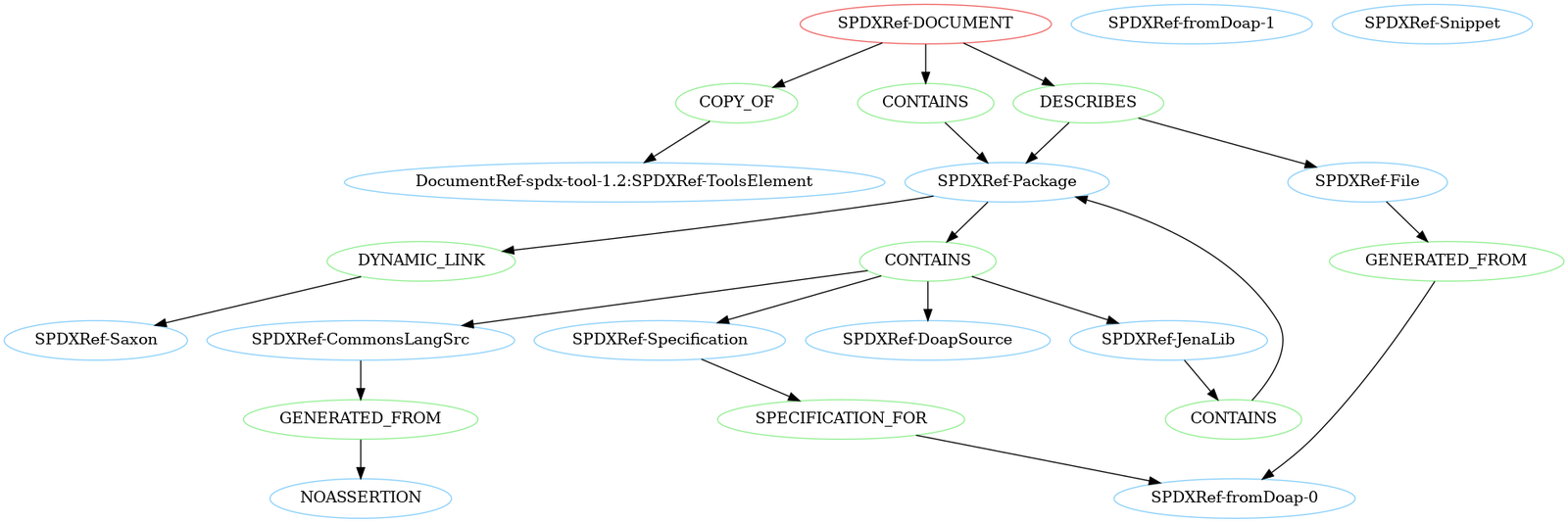
이 기능은 제공된 관계를 기반으로 SPDX 문서의 모든 요소와 그 연결을 나타내는 그래프를 생성합니다.
그래프는 그림으로 렌더링할 수 있습니다. 아래는 tests/spdx/data/SPDXJSONExample-v2.3.spdx.json 파일의 예시입니다:
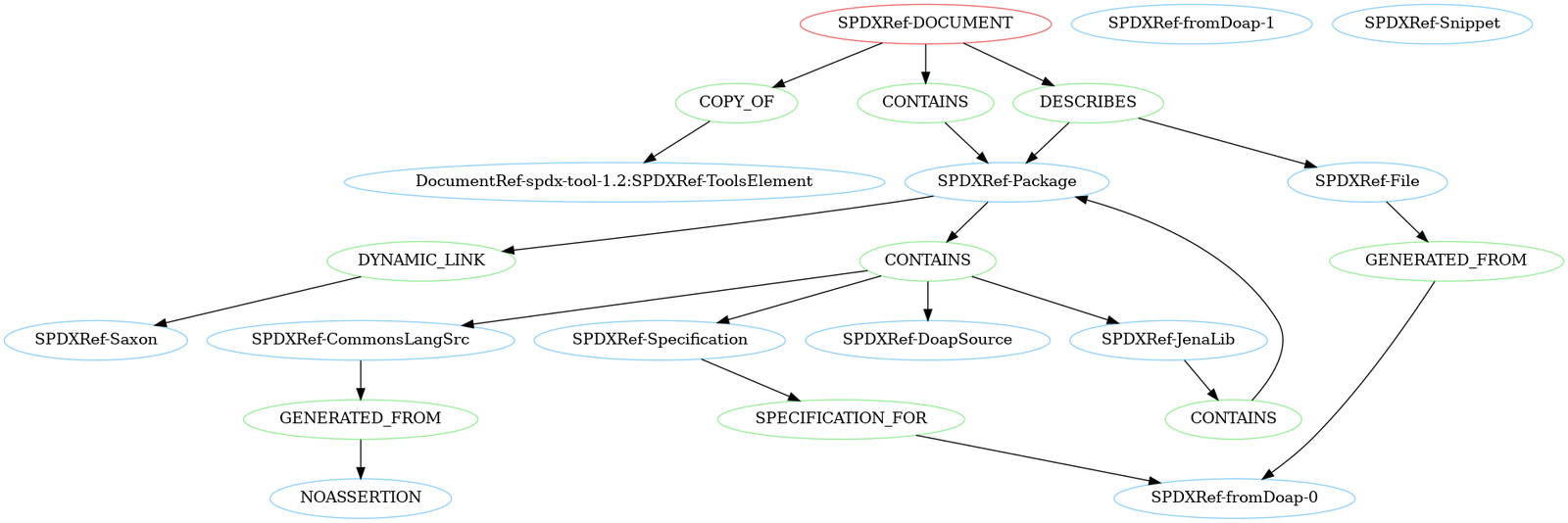
선택적 종속성인 networkx와 pygraphviz를 설치했는지 확인하세요. 설치하려면 pip install ".[graph_generation]"을 실행하세요.
pyspdxtools -i <input_file> --graph -o <output_file>을 사용하세요. <output_file>은 pygraphviz에 유효한 형식의 출력 파일 이름입니다 (문서는
여기에서 확인).
소스 배포판을 사용 중이라면 다음을 실행하여 예제 파일 구조의 개요가 담긴 png를 생성해 보세요:
pyspdxtools -i tests/spdx/data/SPDXJSONExample-v2.3.spdx.json --graph -o SPDXJSONExample-v2.3.spdx.png
데이터 모델
spdx_tools.spdx.model 패키지는 내부 SPDX v2.3 데이터 모델을 구성합니다 (v2.2는 단순히 이의 하위 집합입니다). SPDX 문서 생성에 관련된 모든 클래스는 여기에 있는 __init__.py에 노출되어 있습니다.@dataclass의 사용자 정의 확장인 @dataclass_with_properties를 통해 구현됩니다.ConstructorTypeError 또는 TypeError를 발생시킵니다). 이를 통해 잘못된 속성을 조기에 발견하고 유효한 문서만 쉽게 구성할 수 있습니다.list.append(item)과 같은 제자리(in-place) 조작은 타입 검사를 우회합니다 (그래도 list를 다시 읽을 때 TypeError가 발생합니다). 대신 list = list + [item]을 사용하는 것이 좋습니다.Document 클래스입니다.documentDescribes 및 hasFiles에 대한 참고: 이 필드는 내부 데이터 모델에서 관계로 변환됩니다. 더 이상 사용되지 않으므로 출력에 기록되지 않습니다.파싱
parse_anything.py 모듈의 parse_file(file_name)을 사용하세요.Document 인스턴스가 반환됩니다. 파싱에 실패하면 발생한 모든 문제 목록과 함께 SPDXParsingError가 발생합니다.검증
Document 클래스의 인스턴스를 검증하려면 validate_full_spdx_document(document)를 사용하세요.ValidationContext로 구성된 ValidationMessage 객체 목록을 반환합니다.SPDX-2.2 및 SPDX-2.3 버전만 지원합니다.쓰기
Document 인스턴스를 지정된 파일에 쓰려면 write_anything.py 모듈의 write_file(document, file_name)을 사용하세요.
직렬화 형식은 파일 이름의 확장자에 따라 결정됩니다.
기본적으로 쓰기 과정 전에 검증이 수행되며, 문서가 유효하지 않으면 쓰기가 취소됩니다. write_file(document, file_name, validate=False)를 통해 검증을 건너뛸 수 있습니다.
주의: 유효한 문서만 안정적으로 직렬화할 수 있습니다. 유효하지 않은 문서의 직렬화는 지원되지 않습니다.
다음은 spdx-tools를 빠르게 시작하는 데 도움이 되는 몇 가지 사용 사례 예시입니다. SPDX 문서를 처음부터 만드는 방법과 같은 더 많은 예시를 원한다면 예제 폴더를 살펴보세요.
import logging

from license_expression import get_spdx_licensing

from spdx_tools.spdx.model import (Checksum, ChecksumAlgorithm, File,
                                   FileType, Relationship, RelationshipType)
from spdx_tools.spdx.parser.parse_anything import parse_file
from spdx_tools.spdx.validation.document_validator import validate_full_spdx_document
from spdx_tools.spdx.writer.write_anything import write_file

# read in an SPDX document from a file
document = parse_file("spdx_document.json")

# change the document's name
document.creation_info.name = "new document name"

# define a file and a DESCRIBES relationship between the file and the document
checksum = Checksum(ChecksumAlgorithm.SHA1, "71c4025dd9897b364f3ebbb42c484ff43d00791c")

file = File(name="./fileName.py", spdx_id="SPDXRef-File", checksums=[checksum],
            file_types=[FileType.TEXT],
            license_concluded=get_spdx_licensing().parse("MIT and GPL-2.0"),
            license_comment="licenseComment", copyright_text="copyrightText")

relationship = Relationship("SPDXRef-DOCUMENT", RelationshipType.DESCRIBES, "SPDXRef-File")

# add the file and the relationship to the document
# (note that we do not use "document.files.append(file)" as that would circumvent the type checking)
document.files = document.files + [file]
document.relationships = document.relationships + [relationship]

# validate the edited document and log the validation messages
# (depending on your use case, you might also want to utilize the validation_message.context)
validation_messages = validate_full_spdx_document(document)
for validation_message in validation_messages:
    logging.warning(validation_message.validation_message)

# if there are no validation messages, the document is valid
# and we can safely serialize it without validating again
if not validation_messages:
    write_file(document, "new_spdx_document.rdf", validate=False)
