
 soxoj/maigret
🕵️♂️ 6K개 웹사이트에서 사용자 이름으로 인물에 대한 정보 파일을 수집합니다
# Maigret
<div align="center">
<div>
<a href="https://pypi.org/project/maigret/">
<img alt="PyPI version badge for Maigret" src="https://img.shields.io/pypi/v/maigret?style=flat-square" />
</a>
<a href="https://pepy.tech/project/maigret">
<img alt="Total downloads" src="https://static.pepy.tech/badge/maigret" />
<img alt="Downloads/month" src="https://static.pepy.tech/badge/maigret/month" />
</a>
</div>
<div>
<a href="https://github.com/soxoj/maigret">
<img alt="View count for Maigret project" src="https://komarev.com/ghpvc/?username=maigret&color=brightgreen&label=views&style=flat-square" />
</a>
<a href="https://github.com/soxoj/maigret">
<img alt="Minimum Python version required: 3.10+" src="https://img.shields.io/badge/Python-3.10+-brightgreen?style=flat-square" />
</a>
<a href="https://github.com/soxoj/maigret/blob/main/LICENSE">
<img alt="License badge for Maigret" src="https://img.shields.io/github/license/soxoj/maigret?style=flat-square" />
</a>
<a href="https://maigret.readthedocs.io/">
<img alt="Maigret documentation" src="https://img.shields.io/readthedocs/maigret?style=flat-square&label=docs" />
</a>
</div>
<br>
<div>
<img src="https://assets.kitploit.com/production/public/readmes/216/f4ea992b7e00fe5e906d35323dd806650b89309c635ef77372bc1f8e497950f7.png" height="300" alt="Maigret logo"/>
</div>
<br>
<div>
<a href="https://codewiki.google/github.com/soxoj/maigret">
<img alt="Ask Code Wiki about Maigret" src="https://img.shields.io/badge/Code_Wiki-ask_about_repo-yellow?logo=googlegemini" />
</a>
<a href="https://deepwiki.com/soxoj/maigret">
<img alt="Ask DeepWiki about Maigret" src="https://img.shields.io/badge/DeepWiki-ask_about_repo-yellow" />
</a>
</div>
<br>
<div>
<b>English</b> · <a href="https://github.com/soxoj/maigret/blob/main/README.zh-CN.md">简体中文</a> · <a href="https://github.com/soxoj/maigret/blob/main/README.fr.md">Français</a>
</div>
<br>
<div>
📖 <a href="https://maigret.readthedocs.io/"><b>Documentation</b></a>
</div>
<br>
</div>
**Maigret**는 **사용자 이름만으로** 한 사람에 대한 정보 파일을 수집하며, 수많은 사이트에서 계정을 확인하고 웹 페이지에서 이용 가능한 모든 정보를 수집합니다. API 키가 필요하지 않습니다. **[AI 프로파일링 (데모)](#ai-analysis)**.
## 스폰서
<p align="center">
<a href="https://noimosiny.com/?utm_campaign=maigret&utm_source=github">
<img width="600" alt="Noimosiny" src="https://github.com/user-attachments/assets/cef16613-4337-47a3-9105-2621197b17d1" />
</a>
</p>
<p>
<a href="https://noimosiny.com/?utm_campaign=maigret&utm_source=github"><b>Noimosiny</b></a>는 전문 조사관과 분석가를 위한 종합 OSINT 플랫폼입니다. 250개 이상의 모듈을 통해 이메일, 전화번호, 사용자 이름 역검색을 제공합니다. 강력한 도구로 정보 수집을 자동화하세요.
</p>
<br>
<p align="center">
<a href="https://www.rapidproxy.io/?ref=soxoj">
<img src="https://assets.kitploit.com/production/public/readmes/216/d0d5d0f98e98ee2bae78bf2fc510e47089760ef9ce72121edc7ce6de19295d9f.jpg" width="500" alt="RapidProxy">
</a>
</p>
<p>
<a href="https://www.rapidproxy.io/?ref=soxoj"><b>RapidProxy</b></a>는 Twitter 스크래핑, Selenium 자동화, 웹 데이터 추출을 위한 고성능 주거용 프록시를 제공합니다. 9천만 개 이상의 IP • 스마트 로테이션 • 차단 방지 • 만료되지 않는 트래픽. <br>
<b>특별 혜택</b>: 무료로 사용해 보세요 — 요금제는 $0.65/GB부터. 코드 <b>RAPID10</b>을 사용하면 10% 할인됩니다.
</p>
<p align="center">
<a href="https://mangoproxy.com/?utm_source=soxoj&utm_medium=partner&utm_campaign=soxoj_github">
<img src="https://github.com/user-attachments/assets/146b6b95-06ae-4fda-bff2-d94946cf7c2e" width="300" alt="MangoProxy">
</a>
</p>
<p>
<a href="https://mangoproxy.com/?utm_source=soxoj&utm_medium=partner&utm_campaign=soxoj_github"><b>MangoProxy</b></a>는 안정성, 속도, 익명성이 중요한 전문 작업을 위해 설계된 주거용, ISP, 모바일 및 데이터센터 프록시 서비스입니다. <br>
<b>프로모션 코드</b>: SOXOJ - Static ISP 프록시 8% 할인
</p>
<p align="center">
<a href="https://www.thordata.com/?ls=dmt&lk=dmt">
<img src="https://github.com/user-attachments/assets/6d92bda0-c953-49b5-ab7e-73b0e67f17e2" width="350" alt="Thordata">
</a>
</p>
<p>
<a href="https://www.thordata.com/?ls=dmt&lk=dmt"><b>Thordata</b></a>
</a>는 OSINT 조사, 사용자 이름 조회, 공개 데이터 수집 워크플로를 위한 안정적인 주거용 프록시를 제공합니다.
<b>195개 이상의 국가</b>에 걸쳐 <b>1억 개 이상의 실제 주거용 IP</b>에 액세스하고, 99.99% 가동 시간과 안정적인 연결, 로테이션 + 고정 세션, 높은 성공률을 갖춘 <b>무제한 동시 연결</b>을 제공합니다.
<br>
<b>특별 혜택:</b> 3일 무료 체험 + 코드 <b>SOXOJ10</b>으로 <b>10% 할인</b>.
</p>
## 목차
- [1분 안에](#in-one-minute)
- [주요 기능](#main-features)
- [데모](#demo)
- [설치](#installation)
- [사용법](#usage)
- [기여](#contributing)
- [상업적 사용](#commercial-use)
- [소개](#about)
<a id="one-minute"></a>
## 1분 안에
Python 3.10 이상이 설치되어 있는지 확인하세요.
```bash
pip install maigret
maigret YOUR_USERNAME
```
설치하지 않으시겠습니까? [커뮤니티 Telegram 봇](https://maigret.app/readme-en) 또는 [Cloud Shell](#cloud-shells)을 사용해 보세요.
웹 UI를 원하시나요? [실행 방법](#web-interface)을 참조하세요.
참고: [빠른 시작](https://maigret.readthedocs.io/en/latest/quick-start.html).
## 주요 기능
- 5,900개 사이트를 지원합니다 ([전체 목록 보기](https://github.com/soxoj/maigret/blob/main/sites.md)). 기본 실행은 트래픽 기준 상위 500개 사이트를 확인합니다. `-a`를 전달하면 모든 사이트를 스캔하고, `--tags`로 카테고리/국가별로 좁힐 수 있습니다.
- Python 프로젝트에 임베드 가능 — `maigret`을 임포트하여 프로그래밍 방식으로 검색을 실행할 수 있습니다 ([라이브러리 사용법](https://maigret.readthedocs.io/en/latest/library-usage.html) 참조).
- 프로필 페이지와 사이트 API에서 계정 소유자에 관한 모든 이용 가능한 정보를 [추출](https://github.com/soxoj/socid_extractor)하며, 다른 계정으로의 링크도 포함합니다.
- 발견된 사용자 이름과 기타 ID를 사용하여 재귀 검색을 수행합니다.
- 태그(사이트 카테고리, 국가)로 필터링할 수 있습니다.
- 차단, 검열, CAPTCHA를 감지하고 부분적으로 우회합니다.
- 매 실행 시(24시간에 한 번) GitHub에서 [자동 업데이트되는 사이트 데이터베이스](https://maigret.readthedocs.io/en/latest/settings.html#database-auto-update)를 가져오며, 오프라인일 경우 내장 데이터베이스로 대체합니다.
- Tor 및 I2P 웹사이트와 작동하며, 도메인을 확인할 수 있습니다.
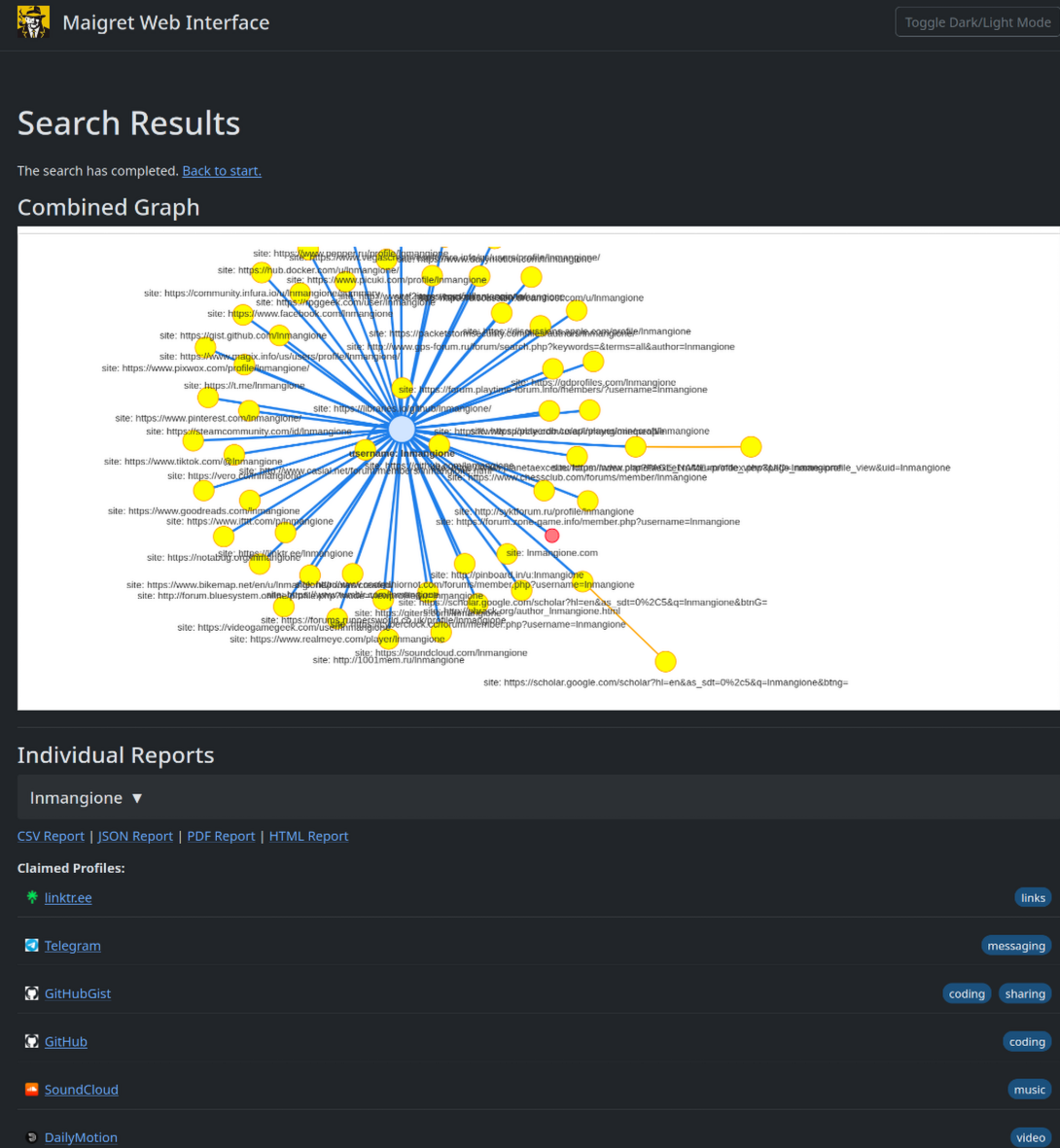
- 결과를 그래프로 탐색하고 한 페이지에서 모든 형식의 보고서를 다운로드할 수 있는 [웹 인터페이스](#web-interface)를 제공합니다.
- OpenAI 호환 API를 사용하여 원시 결과를 짧은 조사 요약으로 변환하는 선택적 [AI 분석 모드](#ai-analysis)(`--ai`)를 제공합니다.
전체 기능 목록은 [기능 문서](https://maigret.readthedocs.io/en/latest/features.html)를 참조하세요.
### 사용 사례
Maigret을 기반으로 구축된 전문 OSINT 및 소셜 미디어 분석 도구:
<a href="https://github.com/SocialLinks-IO/sociallinks-api"><img height="60" alt="Social Links API" src="https://assets.kitploit.com/production/public/readmes/216/e4e6afb8670aa5d3b703f1073907398ff6cc84031b15f4108bf1da37e01ab023.png"></a>
<a href="https://sociallinks.io/products/sl-crimewall"><img height="60" alt="Social Links Crimewall" src="https://assets.kitploit.com/production/public/readmes/216/fc0028a249da7498721b8783b585545203c93a3e51de565f4d27aa9a71882743.png"></a>
<a href="https://usersearch.ai/"><img height="60" alt="UserSearch" src="https://assets.kitploit.com/production/public/readmes/216/e0b60e01a3af3ac089eebc120d9627aeb0cbf3d9ee68c4f62e8d1e46fa5df5ad.png"></a>
## 데모
### 비디오
<a href="https://asciinema.org/a/Ao0y7N0TTxpS0pisoprQJdylZ">
<img src="https://asciinema.org/a/Ao0y7N0TTxpS0pisoprQJdylZ.svg" alt="asciicast" width="600">
</a>
### 보고서
[PDF 보고서](https://raw.githubusercontent.com/soxoj/maigret/main/static/report_alexaimephotographycars.pdf), [HTML 보고서](https://htmlpreview.github.io/?https://raw.githubusercontent.com/soxoj/maigret/main/static/report_alexaimephotographycars.html)
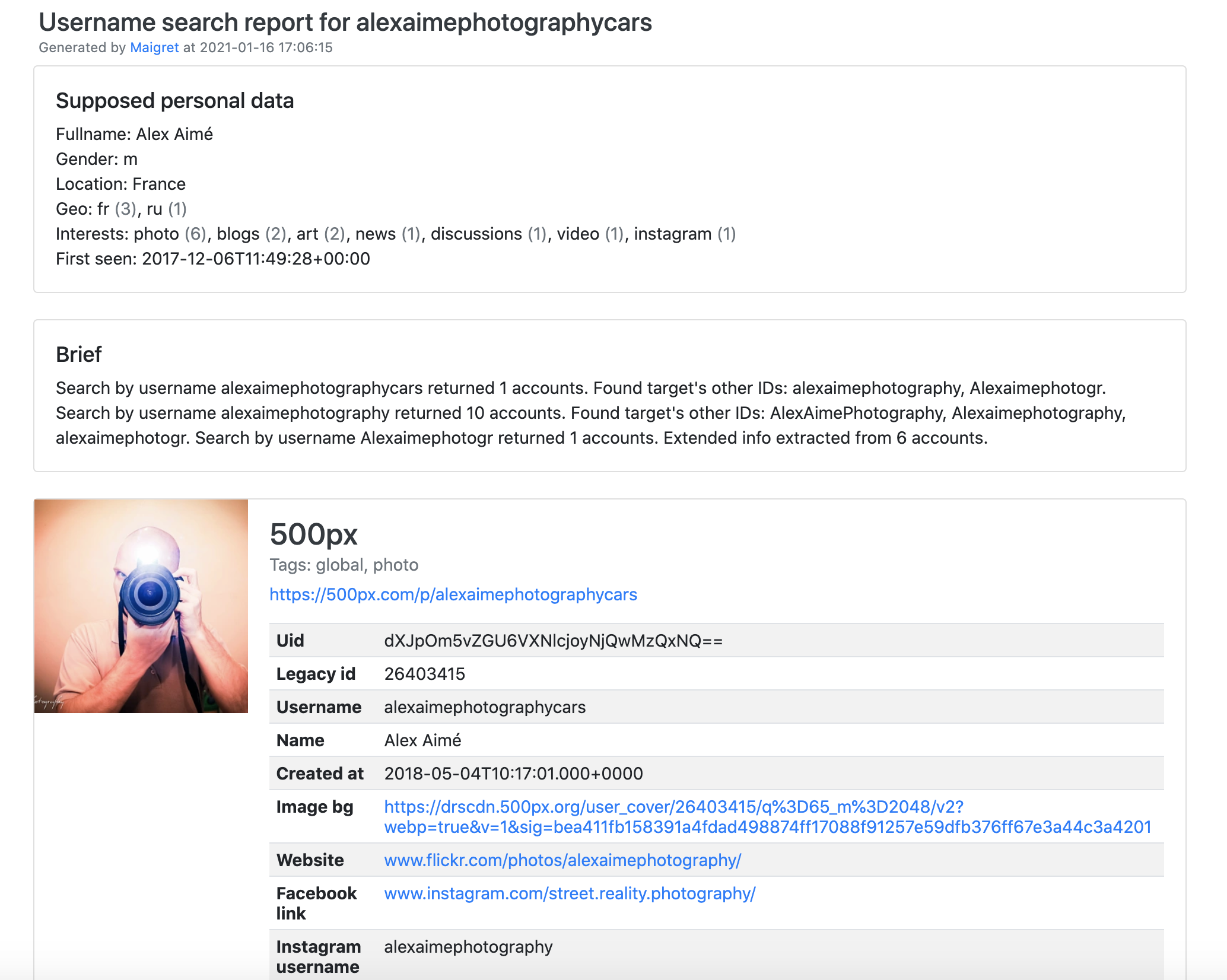
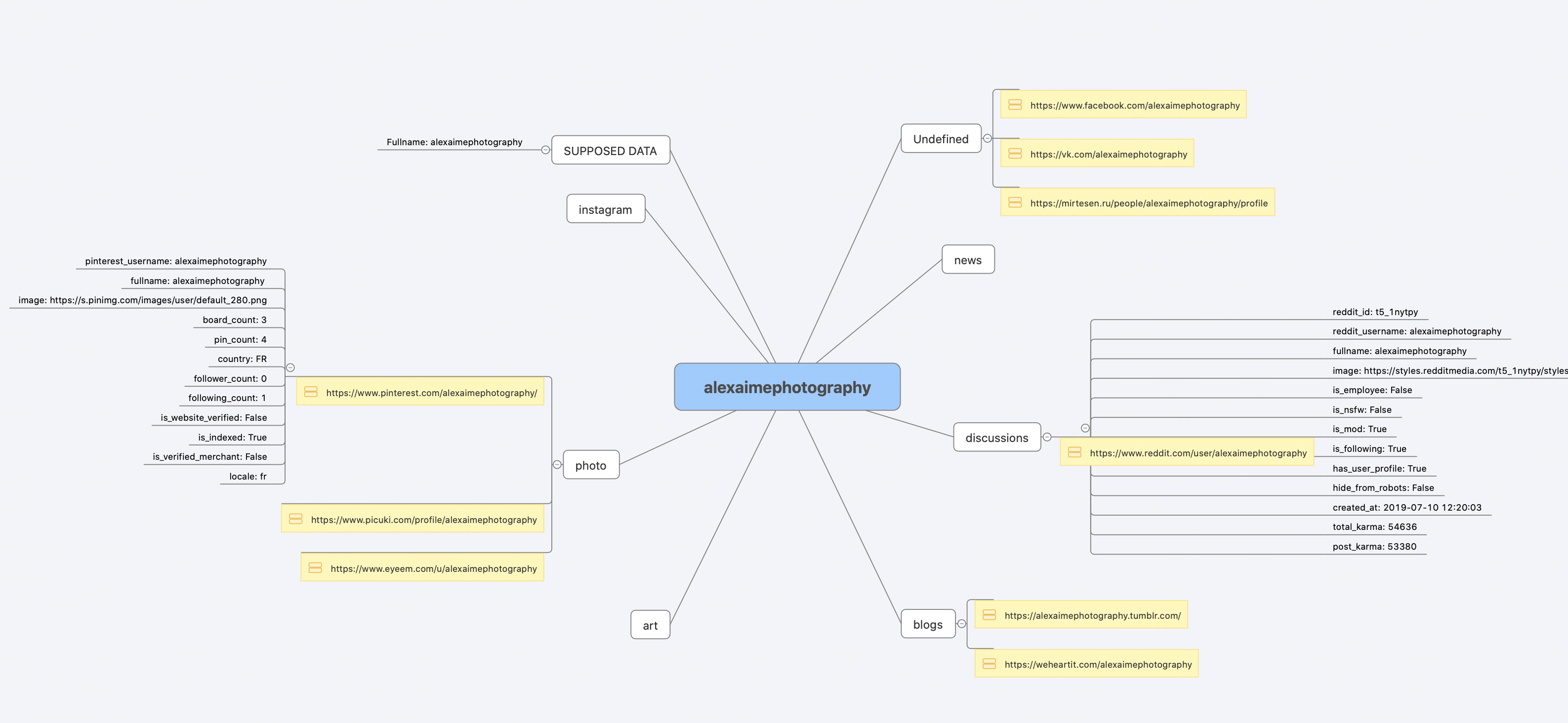
[전체 콘솔 출력](https://raw.githubusercontent.com/soxoj/maigret/main/static/recursive_search.md)
## 설치
이미 [1분 안에](#one-minute) 단계를 실행하셨나요? 준비 완료입니다. 아래는 대체 방법입니다.
아무것도 설치하고 싶지 않으신가요? [커뮤니티 Telegram 봇](https://maigret.app/readme-en)을 사용하세요.
### Windows
[Releases](https://github.com/soxoj/maigret/releases)에서 `maigret_standalone.exe`를 다운로드하세요. 두 가지 방법으로 실행할 수 있습니다:
- **더블클릭** — Maigret이 사용자 이름을 묻고 기본 검색을 실행한 뒤, 보고서 링크가 계속 보이도록 끝에서 대기합니다.
- **터미널에서 실행** — Command Prompt(`Win+R`을 누르고 `cmd`를 입력한 후 Enter) 또는 PowerShell을 열어 추가 옵션을 전달합니다:
```cmd
cd %USERPROFILE%\Downloads
maigret_standalone.exe USERNAME
maigret_standalone.exe USERNAME --html :: also save an HTML report
maigret_standalone.exe --help :: list all options
```
비디오 가이드: https://youtu.be/qIgwTZOmMmM.
<a id="cloud-shells"></a>
### Cloud Shell
클라우드 셸 또는 Jupyter 노트북을 통해 브라우저에서 Maigret을 실행하세요:
<a href="https://console.cloud.google.com/cloudshell/open?git_repo=https://github.com/soxoj/maigret&tutorial=cloudshell-tutorial.md"><img src="https://assets.kitploit.com/production/public/readmes/216/7dc64fe3ed672759aab735389c56e594e597a6700b277aaa44a54b833448ea7a.png" alt="Open in Cloud Shell" height="50"></a>
<a href="https://repl.it/github/soxoj/maigret"><img src="https://replit.com/badge/github/soxoj/maigret" alt="Run on Replit" height="50"></a>
<a href="https://colab.research.google.com/gist/soxoj/879b51bc3b2f8b695abb054090645000/maigret-collab.ipynb"><img src="https://colab.research.google.com/assets/colab-badge.svg" alt="Open In Colab" height="45"></a>
<a href="https://mybinder.org/v2/gist/soxoj/9d65c2f4d3bec5dd25949197ea73cf3a/HEAD"><img src="https://mybinder.org/badge_logo.svg" alt="Open In Binder" height="45"></a>
### Snap (Linux)
<a href="https://snapcraft.io/maigret"><img src="https://snapcraft.io/static/images/badges/en/snap-store-black.svg" alt="Get it from the Snap Store" height="50"></a>
```bash
sudo snap install maigret
# usage
maigret username
```
amd64 및 arm64에서 사용 가능하며 Python이 필요하지 않습니다. snap은 엄격하게 격리되어 있으며 홈 디렉터리 내부에만 쓸 수 있으므로, 홈 디렉터리에서 실행하세요. USB 드라이브의 경우 `sudo snap connect maigret:removable-media`로 인터페이스를 한 번 연결하세요.
### 로컬 설치 (pip)
```bash
# install from pypi
pip3 install maigret
# usage
maigret username
```
### 소스에서 설치
```bash
# or clone and install manually
git clone https://github.com/soxoj/maigret && cd maigret
# build and install
pip3 install .
# usage
maigret username
```
### Docker
두 가지 이미지 변형이 게시됩니다:
- `soxoj/maigret:latest` — CLI 모드 (기본)
- `soxoj/maigret:web` — [웹 인터페이스](#web-interface)를 자동 실행
```bash
# official image (CLI)
docker pull soxoj/maigret
# CLI usage
docker run -v /mydir:/app/reports soxoj/maigret:latest username --html
# Web UI (open http://localhost:5000)
docker run -p 5000:5000 soxoj/maigret:web
# Web UI on a custom port
docker run -e PORT=8080 -p 8080:8080 soxoj/maigret:web
# manual build
docker build -t maigret . # CLI image (default target)
docker build --target web -t maigret-web . # Web UI image
```
### 문제 해결
빌드 오류가 발생하나요? [문제 해결 가이드](https://maigret.readthedocs.io/en/latest/installation.html#troubleshooting)를 참조하세요.
PDF 보고서(`--pdf`)는 선택적 추가 기능입니다 — `pip install 'maigret[pdf]'`로 설치하세요. Linux/macOS에서는 시스템 수준 그래픽 라이브러리가 필요합니다. OS별 설치 단계는 [PDF 보고서 섹션](https://maigret.readthedocs.io/en/latest/installation.html#optional-pdf-reports-maigret-pdf)을 참조하세요.
## 사용법
### 예시
```bash
# make HTML, PDF, and XMind reports
maigret user --html
maigret user --pdf
maigret user --xmind # legacy XML with a manifest for XMind 2022+ readers
# machine-readable exports
maigret user --json ndjson # newline-delimited JSON (also: --json simple)
maigret user --csv
maigret user --txt
maigret user --graph # interactive D3 graph (HTML)
maigret user --neo4j # Neo4j Cypher script (graph database)
# search on sites marked with tags photo & dating
maigret user --tags photo,dating
# search on sites marked with tag us
maigret user --tags us
# highlight sites whose page also mentions specific keywords
maigret user --keywords python rust
# keyword-matched sites are shown with "[++]" in bright green
# search for three usernames on all available sites
maigret user1 user2 user3 -a
# AI-assisted investigation summary (needs OPENAI_API_KEY)
maigret user --ai
```
`--neo4j`는 결과 그래프의 `*_neo4j.cypher` 스크립트를 작성합니다. `cypher-shell -u neo4j -p <password> < report_user_neo4j.cypher`로 임포트하거나 Neo4j Browser에 붙여넣으세요. 재임포트는 멱등적입니다. [Neo4j 내보내기 문서](https://maigret.readthedocs.io/en/latest/command-line-options.html#neo4j-export)를 참조하세요.
모든 옵션은 `maigret --help`를 실행하세요. 문서: [CLI 옵션](https://maigret.readthedocs.io/en/latest/command-line-options.html), [더 많은 예시](https://maigret.readthedocs.io/en/latest/usage-examples.html). 403 또는 타임아웃이 발생하나요? [TROUBLESHOOTING.md](https://github.com/soxoj/maigret/blob/main/TROUBLESHOOTING.md)를 참조하세요.
<a id="web-interface"></a>
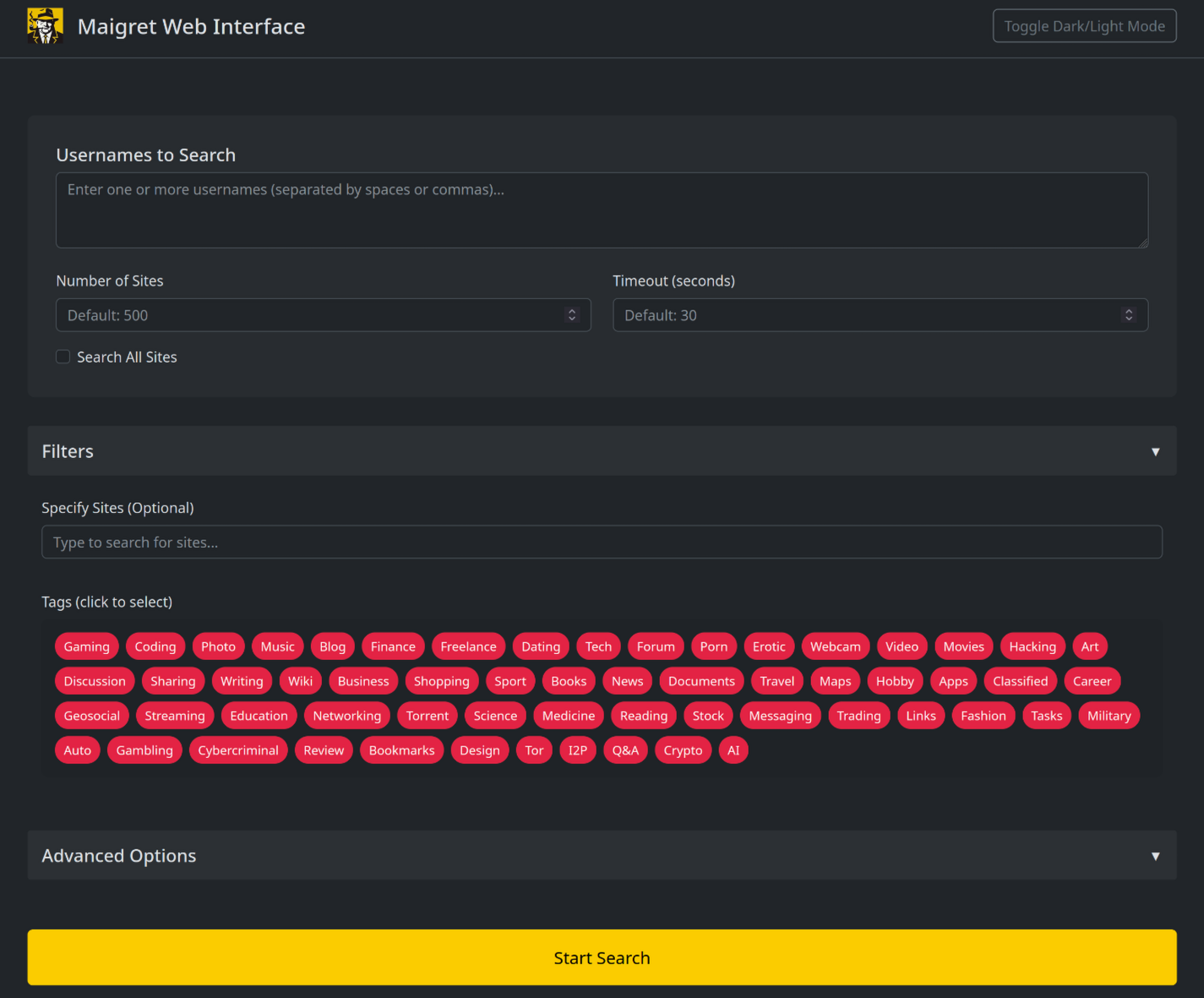
### 웹 인터페이스
Maigret에는 결과 그래프와 다운로드 가능한 보고서가 있는 내장 웹 UI가 있습니다.
직접 실행하고 싶지 않으신가요? 게시된 `soxoj/maigret:web` Docker 이미지를 클릭 한 번으로 호스팅 앱으로 배포하세요:
<a href="https://render.com/deploy?repo=https://github.com/soxoj/maigret&path=utils/render.yaml"><img src="https://render.com/images/deploy-to-render-button.svg" alt="Deploy to Render" height="40"></a>
Render의 무료 티어에서 실행됩니다 (15분 유휴 후 종료되고 다음 요청 시 다시 시작됨). 인스턴스에 로그인이 설정되어 있지 않으므로 URL을 아는 사람은 누구나 사용할 수 있습니다.
<details>
<summary>웹 인터페이스 스크린샷</summary>
</details>
```console
maigret --web 5000
```
http://127.0.0.1:5000을 열고 사용자 이름을 입력한 후 결과를 확인하세요.
### Python 라이브러리
**Maigret은 자체 Python 프로젝트에 임베드할 수 있습니다.** CLI는 직접 호출할 수 있는 비동기 함수를 감싼 얇은 래퍼입니다 — 사용자 정의 파이프라인을 구축하거나, 결과를 자체 도구에 공급하거나, 더 큰 OSINT 워크플로 내에서 실행할 수 있습니다.
작동 예제, 비동기 패턴, 태그별 사이트 필터링 방법은 전체 [라이브러리 사용 가이드](https://maigret.readthedocs.io/en/latest/library-usage.html)를 참조하세요.
### 유용한 CLI 플래그
- `--parse URL` — 프로필 페이지를 파싱하고 ID/사용자 이름을 추출한 뒤, 이를 사용하여 재귀 검색을 시작합니다.
- `--permute` — 두 개 이상의 입력에서 가능성 높은 사용자 이름 변형을 생성하고(예: `john doe` → `johndoe`, `j.doe`, …) 모두 검색합니다.
- `--self-check [--auto-disable]` — 데이터베이스를 감사하는 유지 관리자를 위해 실제 사이트에 대해 `usernameClaimed` / `usernameUnclaimed` 쌍을 검증합니다.
- `--ai` / `--ai-model` — 검색 결과에 대해 [AI 분석](#ai-analysis)을 실행하고 짧은 조사 요약을 터미널로 스트리밍합니다.
<a id="ai-analysis"></a>
### AI 분석
[](https://asciinema.org/a/979404)
`--ai`는 검색 결과를 수집하고 내부 Markdown 보고서를 작성한 뒤, OpenAI 호환 채팅 완료 엔드포인트로 전송하여 짧고 중립적인 조사 요약(추정 실명, 위치, 직업, 관심사, 언어, 신뢰도, 후속 단서)을 생성합니다. 사이트별 진행 상황은 표시되지 않으며 모델의 출력이 stdout으로 스트리밍됩니다.
```bash
export OPENAI_API_KEY=sk-...
maigret user --ai
# pick a different model
maigret user --ai --ai-model gpt-4o-mini
```
키는 `settings.json`의 `openai_api_key`로도 설정할 수 있습니다. 엔드포인트는 기본적으로 `https://api.openai.com/v1`이지만, `settings.json`의 `openai_api_base_url`은 모든 OpenAI 호환 API(Azure OpenAI, OpenRouter, 로컬 서버 등)를 가리킬 수 있습니다. 전체 옵션 목록은 [설정 문서](https://maigret.readthedocs.io/en/latest/settings.html)를 참조하세요.
### Tor / I2P / 프록시
Maigret은 프록시, Tor 또는 I2P를 통해 검사를 라우팅할 수 있습니다 — `.onion` / `.i2p` 사이트와 데이터센터 IP를 차단하는 WAF를 우회하는 데 유용합니다.
```bash
# any HTTP/SOCKS proxy
maigret user --proxy socks5://127.0.0.1:1080
# Tor (default gateway socks5://127.0.0.1:9050)
maigret user --tor-proxy socks5://127.0.0.1:9050
# I2P (default gateway http://127.0.0.1:4444)
maigret user --i2p-proxy http://127.0.0.1:4444
```
명령을 실행하기 전에 Tor / I2P 데몬을 시작하세요 — Maigret은 이러한 게이트웨이를 관리하지 않습니다.
### Cloudflare 우회
> **실험적 기능.** Cloudflare 웹게이트는 활발히 개발 중이며, 구성 스키마, CLI 동작, 라우팅되는 사이트 집합은 하위 호환성 보장 없이 변경될 수 있습니다.
데이터베이스의 일부 사이트는 JavaScript 챌린지를 해결하기 위해 실제 브라우저가 필요합니다. Maigret은 이러한 검사를 로컬 [FlareSolverr](https://github.com/FlareSolverr/FlareSolverr) 인스턴스로 오프로드할 수 있습니다:
```bash
docker run -d -p 8191:8191 --name flaresolverr ghcr.io/flaresolverr/flaresolverr:latest
maigret --cloudflare-bypass <username>
```
우회는 옵트인 방식이며(`--cloudflare-bypass` 또는 `settings.json`의 `cloudflare_bypass.enabled`), `protection` 필드가 일치하는 사이트에만 작동합니다. 백엔드 옵션과 구성은 [기능 문서](https://maigret.readthedocs.io/en/latest/features.html#cloudflare-bypass)를 참조하세요.
## 기여
`data.json`에서 새 사이트를 정밀하게 추가하거나 수정한 후(`json.load`/`json.dump` 사용 금지), `./utils/update_site_data.py`를 실행하여 `sites.md`와 데이터베이스 메타데이터를 재생성하고 풀 리퀘스트를 여세요. 자세한 내용은 [CONTRIBUTING 가이드](https://github.com/soxoj/maigret/blob/main/CONTRIBUTING.md)와 [개발 문서](https://maigret.readthedocs.io/en/latest/development.html)를 참조하세요. 릴리스 기록: [CHANGELOG.md](https://github.com/soxoj/maigret/blob/main/CHANGELOG.md).
## 상업적 사용
오픈 소스 Maigret은 MIT 라이선스이며 제한 없이 상업적으로 무료로 사용할 수 있습니다 — 하지만 사이트 검사는 시간이 지나면 깨지므로 적극적인 유지 관리가 필요합니다.
**매일 업데이트되는 사이트 데이터베이스** 또는 **사용자 이름 확인 API**가 필요한 본격적인 상업적 사용을 원하시면 문의하세요: 📧 [[email protected]](mailto:[email protected])
- 비공개 사이트 데이터베이스 — 5,000개 이상의 사이트, 매일 업데이트 (공개 오픈 소스 데이터베이스와 별도)
- 사용자 이름 확인 API — Maigret을 제품에 통합
## 소개
### 면책 조항
**교육 및 합법적 목적으로만 사용하세요.** 귀하의 관할권에서 적용되는 모든 법률(GDPR, CCPA 등)을 준수할 책임은 귀하에게 있습니다. 저자는 오용에 대해 어떠한 책임도 지지 않습니다.
### 피드백
[이슈 열기](https://github.com/soxoj/maigret/issues) · [GitHub Discussions](https://github.com/soxoj/maigret/discussions) · [Telegram](https://t.me/soxoj)
### SOWEL 분류
사용된 OSINT 기법:
- [SOTL-2.2. 다른 플랫폼에서 계정 검색](https://sowel.soxoj.com/other-platform-accounts)
- [SOTL-6.1. 로그인 재사용을 확인하여 다른 계정 찾기](https://sowel.soxoj.com/logins-reuse)
- [SOTL-6.2. 닉네임 재사용을 확인하여 다른 계정 찾기](https://sowel.soxoj.com/nicknames-reuse)
### 라이선스
MIT © [Maigret](https://github.com/soxoj/maigret)