
iblessing은 iOS 보안 익스플로잇 툴킷으로, 주로 애플리케이션 정보 수집, 정적 분석 및 동적 분석을 포함합니다. 리버스 엔지니어링, 바이너리 분석 및 취약점 마이닝에 사용할 수 있습니다.
☠️ ██╗██████╗ ██╗ ███████╗███████╗███████╗██╗███╗ ██╗ ██████╗ ██║██╔══██╗██║ ██╔════╝██╔════╝██╔════╝██║████╗ ██║██╔════╝ ██║██████╔╝██║ █████╗ ███████╗███████╗██║██╔██╗ ██║██║ ███╗ ██║██╔══██╗██║ ██╔══╝ ╚════██║╚════██║██║██║╚██╗██║██║ ██║ ██║██████╔╝███████╗███████╗███████║███████║██║██║ ╚████║╚██████╔╝ ╚═╝╚═════╝ ╚══════╝╚══════╝╚══════╝╚══════╝╚═╝╚═╝ ╚═══╝ ╚═════╝
iblessing은 iOS 보안 공격 도구 키트로, 주로 애플리케이션 정보 수집, 정적 분석 및 동적 분석을 포함합니다.iblessing은 unicorn engine, capstone engine 및 keystone engine을 기반으로 합니다.🔥 크로스 플랫폼: macOS 및 Ubuntu에서 테스트 완료.
iOS 앱 정적 정보 추출 (메타데이터, 딥링크, URL 등 포함).
Mach-O 파서 및 dyld 심볼 바인드 시뮬레이터
Objective-C 클래스 실현 및 파싱
arm64 어셈블리 코드에 대한 동적 분석을 수행하고 주요 정보나 공격 표면을 찾는 스캐너
unicorn을 사용하여 Mach-O arm64 코드 실행을 부분적으로 시뮬레이션하고 일부 기능을 찾는 스캐너
스캐너 보고서에 대해 2차 처리를 제공하여 쿼리 서버를 시작하거나 IDA용 스크립트를 생성하는 제너레이터
Sluper objc_msgSend xrefs 스캐너 😄
테스트
Android 스캐너 지원
진단 로그
새로운 스캐너 플러그인을 위한 더 유연한 스캐너 인프라
iblessing 또는 관련 문제에 대한 지원이 필요하면 다음 방법을 이용하세요:
⚠️⚠️⚠️ 바이너리 스캐너는 Mach-O 파일을 로드하기 위해 12GB의 가상 메모리 공간이 필요하지만, 그만큼 많이 소비하지는 않습니다. 따라서 작업 머신의 물리 메모리가 12GB보다 큰지 확인하거나, 스왑 파일 메커니즘을 통해 할당 가능한 가상 메모리가 12GB보다 큰지 확인해야 합니다.
iblessing 컴파일을 시작하려면 아래 단계를 따르세요:``` git clone --recursive -j4 https://github.com/Soulghost/iblessing cd iblessing ./compile-cmake.sh
## 바로가기
- [기본 개념](https://github.com/Soulghost/iblessing#basic-concepts)
- 스캐너
- [AppInfos 스캔](https://github.com/Soulghost/iblessing#scan-for-appinfos) ⚠️ 현재 Linux에서는 사용할 수 없음
- [클래스 XREF 스캔](https://github.com/Soulghost/iblessing#scan-for-class-xrefs)
- [모든 objc_msgSend XREF 스캔](https://github.com/Soulghost/iblessing#scan-for-all-objc_msgsend-xrefs)
- [간단한 심볼 래퍼 스캔](https://github.com/Soulghost/iblessing/blob/features/anti_wrapper/README.md#scan-for-symbol-wrappers)
- 생성기
- [objc_msgSend Xrefs 쿼리 서버 생성](https://github.com/Soulghost/iblessing#generate-objc_msgsend-xrefs-query-server)
- [objc_msgSend xrefs용 IDA 스크립트 생성](https://github.com/Soulghost/iblessing#generate-ida-scripts-for-objc_msgsend-xrefs)
- [objc 함수 래퍼 이름 변경 및 프로토타입 수정용 IDA 스크립트 생성](https://github.com/Soulghost/iblessing/blob/features/anti_wrapper/README.md#genereate-ida-script-for-objc-runtime-function-rename-and-prototype-modification)
***오류가 있는 경우, capstone과 unicorn을 수동으로 컴파일한 후 libcapstone.a 및 libunicorn.a를 Xcode 프로젝트의 vendor/libs 폴더로 드래그할 수 있습니다.***
모든 작업이 성공적으로 실행되면, 빌드 디렉토리에서 바이너리를 찾을 수 있습니다:```
> ls ./build
iblessing
> file ./build/iblessing
./build/iblessing: Mach-O 64-bit executable x86_64
$ iblessing -h
☠️
██╗██████╗ ██╗ ███████╗███████╗███████╗██╗███╗ ██╗ ██████╗
██║██╔══██╗██║ ██╔════╝██╔════╝██╔════╝██║████╗ ██║██╔════╝
██║██████╔╝██║ █████╗ ███████╗███████╗██║██╔██╗ ██║██║ ███╗
██║██╔══██╗██║ ██╔══╝ ╚════██║╚════██║██║██║╚██╗██║██║ ██║
██║██████╔╝███████╗███████╗███████║███████║██║██║ ╚████║╚██████╔╝
╚═╝╚═════╝ ╚══════╝╚══════╝╚══════╝╚══════╝╚═╝╚═╝ ╚═══╝ ╚═════╝
[] iblessing iOS Security Exploiting Toolkit Beta 0.1.1 (http://blog.asm.im) [] Author: Soulghost (高级页面仔) @ (https://github.com/Soulghost)
Usage: iblessing [options...] Options: -m, --mode mode selection: * scan: use scanner * generator: use generator -i, --identifier choose module by identifier: * : use specific scanner * : use specific generator -f, --file input file path -o, --output output file path -l, --list list available scanners -d, --data extra data -h, --help Shows this page
## Basic Concepts
### Scanner
스캐너는 바이너리 파일의 정적 및 동적 분석을 통해 분석 보고서를 출력하는 데 사용되는 구성 요소입니다. 예를 들어, objc-msg-xref 스캐너는 대부분의 objc_msgSend 교차 참조를 동적으로 분석할 수 있습니다.```
[*] Scanner List:
- app-info: extract app infos
- objc-class-xref: scan for class xrefs
- objc-msg-xref: generate objc_msgSend xrefs record
- predicate: scan for NSPredicate xrefs and sql injection surfaces
- symbol-wrapper: detect symbol wrappers
생성기는 스캐너가 생성한 보고서에 대해 2차 처리를 수행하는 구성 요소입니다. 예를 들어, objc-msg-xref 스캐너의 크로스 참조 보고서를 기반으로 IDA 스크립트를 생성할 수 있습니다.``` [*] Generator List: - ida-objc-msg-xref: generator ida scripts to add objc_msgSend xrefs from objc-msg-xref scanner's report - objc-msg-xref-server: server to query objc-msg xrefs - objc-msg-xref-statistic: statistics among objc-msg-send reports
## 기본 사용법
### AppInfos 스캔
⚠️ **Cocoa에 대한 일부 종속성이 해제되지 않았기 때문에(예: bplist 파서) 현재 Linux에서는 사용할 수 없습니다.**```
> iblessing -m scan -i app-info -f <path-to-app-bundle>
WeChat을 예로 들어 보겠습니다:```
iblessing -m scan -i app-info -f WeChat.app [] set output path to /opt/one-btn/tmp/apps/WeChat/Payload [] input file is WeChat.app [] start App Info Scanner [+] find default plist file Info.plist! [] find version info: Name: 微信(WeChat) Version: 7.0.14(18E226) ExecutableName: WeChat [] Bundle Identifier: com.tencent.xin [] the app allows HTTP requests without exception domains! [+] find app deeplinks |-- wechat:// |-- weixin:// |-- fb290293790992170:// |-- weixinapp:// |-- prefs:// |-- wexinVideoAPI:// |-- QQ41C152CF:// |-- wx703:// |-- weixinULAPI:// [] find app callout whitelist |-- qqnews:// |-- weixinbeta:// |-- qqnewshd:// |-- qqmail:// |-- whatsapp:// |-- wxwork:// |-- wxworklocal:// |-- wxcphonebook:// |-- mttbrowser:// |-- mqqapi:// |-- mqzonev2:// |-- qqmusic:// |-- tenvideo2:// ... [+] find 507403 string literals in binary [] process with string literals, this maybe take some time [+] find self deeplinks URLs: |-- weixin://opennativeurl/devicerankview |-- weixin://dl/offlinepay/?appid=%@ |-- weixin://opennativeurl/rankmyhomepage ... [+] find other deeplinks URLs: |-- wxpay://f2f/f2fdetail |-- file://%@?lang=%@&fontRatio=%.2f&scene=%u&version=%u&type=%llu&%@=%d&qqFaceFolderPath=%@&platform=iOS&netType=%@&query=%@&searchId=%@&isHomePage=%d&isWeAppMore=%d&subType=%u&extParams=%@&%@=%@&%@=%@ ... [*] write report to path /opt/one-btn/tmp/apps/WeChat/Payload/WeChat.app_info.iblessing.txt
ls -alh -rw-r--r--@ 1 soulghost wheel 29K Jul 23 14:01 WeChat.app_info.iblessing.txt
### 클래스 XREF 검색
***알림: ARM64 바이너리 전용***```
iblessing -m scan -i objc-class-xref -f <path-to-binary> -d 'classes=<classname_to_scan>,<classname_to_scan>,...'
Please provide the Markdown content to translate.```
restore-symbol WeChat -o WeChat.restored iblessing -m scan -i objc-class-xref -f WeChat.restored -d 'classes=NSPredicate' [] set output path to /opt/one-btn/tmp/apps/WeChat/Payload [] input file is WeChat [+] detect mach-o header 64 [+] detect litten-endian [] start Objc Class Xref Scanner [] try to find OBJC_CLASS$_NSPredicate [] Step 1. locate class refs [+] find OBJC_CLASS$_NSPredicate at 0x108eb81d8 [] Step 2. find __TEXT,__text [+] find __TEXT,__text at 0x4000 [] Step 3. scan in __text [] start disassembler at 0x100004000 [] \ 0x1002e1a50/0x1069d9874 (2.71%) [+] find OBJC_CLASS$_NSPredicate ref at 0x1002e1a54 ... [] Step 4. symbolicate ref addresses [+] OBJC_CLASS$_NSPredicate -| [+] find OBJC_CLASS$_NSPredicate ref -[WCWatchNotificationMgr addYoCount:contact:type:] at 0x1002e1a54 [+] find OBJC_CLASS$_NSPredicate ref -[NotificationActionsMgr handleSendMsgResp:] at 0x1003e0e28 [+] find OBJC_CLASS$_NSPredicate ref -[FLEXClassesTableViewController searchBar:textDidChange:] at 0x1004a090c [+] find OBJC_CLASS$_NSPredicate ref +[GameCenterUtil parameterValueForKey:fromQueryItems:] at 0x1005a823c [+] find OBJC_CLASS$_NSPredicate ref +[GameCenterUtil getNavigationBarColorForUrl:defaultColor:] at 0x1005a8cd8 ...
### 모든 objc_msgSend XREF 스캔
***참고: ARM64 바이너리만 해당***
#### 간단 모드```
iblessing -m scan -i objc-msg-xref -f <path-to-binary>
iblessing -m scan -i objc-msg-xref -f WeChat -d 'antiWrapper=1'
The anti-wrapper mode will detect objc_msgSend wrappers and make transforms, such as:```arm
; __int64 __usercall objc_msgSend_X0_X22_X20@<X0>(void *obj@<X0>, const char *sel@<X22>, id anyObj@<X20>, ...)
objc_msgSend_X0_X22_X20:
MOV X1, X22
MOV X2, X20
B objc_msgSend
iblessing -m scan -i objc-msg-xref -f WeChat -d 'antiWrapper=1' [] set output path to /opt/one-btn/tmp/apps/WeChat/Payload [] input file is WeChat [+] detect mach-o header 64 [+] detect litten-endian
[] !!! Notice: enter anti-wrapper mode, start anti-wrapper scanner [] start Symbol Wrapper Scanner [] try to find wrappers for_objc_msgSend [] Step1. find __TEXT,__text [+] find __TEXT,__text at 0x100004000 [+] mapping text segment 0x100000000 ~ 0x107cb0000 to unicorn engine [] Step 2. scan in __text [] start disassembler at 0x100004000 [] / 0x1069d986c/0x1069d9874 (100.00%) [] reach to end of __text, stop [+] anti-wrapper finished
[] start ObjcMethodXrefScanner Exploit Scanner [] Step 1. realize all app classes [] realize classes 14631/14631 (100.00%) [+] get 667318 methods to analyze [] Step 2. dyld load non-lazy symbols [] Step 3. track all calls [] progress: 667318 / 667318 (100.00%) [] Step 4. serialize call chains to file [] saved to /opt/one-btn/tmp/apps/WeChat/Payload/WeChat_method-xrefs.iblessing.txt
ls -alh WeChat_method-xrefs.iblessing.txt -rw-r--r-- 1 soulghost wheel 63M Jul 23 14:46 WeChat_method-xrefs.iblessing.txt
head WeChat_method-xrefs.iblessing.txt iblessing methodchains,ver:0.2; chainId,sel,prefix,className,methodName,prevMethods,nextMethods 182360,0x1008a0ab8,+[A8KeyControl initialize],+,A8KeyControl,initialize,[],[4429#0x1008a1064@4376#0x1008a1050@13769#0x1008a10d0] 182343,0x1008a0ad0,+[A8KeyControl_QueryStringTransferCookie initialize],+,A8KeyControl_QueryStringTransferCookie,initialize,[],[4429#0x1008a1064@4376#0x1008a1050@13769#0x1008a10d0] 145393,0x1008c2220,+[A8KeyResultCookieWriter initWithDomain:weakWebView:andCompleteBlock:],+,A8KeyResultCookieWriter,initWithDomain:weakWebView:andCompleteBlock:,[145386#0x10036367c],[] 145396,0x1008c3df8,+[A8KeyResultCookieWriter setA8KeyCookieExpireTime:],+,A8KeyResultCookieWriter,setA8KeyCookieExpireTime:,[145386#0x1003636e8],[] 145397,0x1008c27e8,+[A8KeyResultCookieWriter writeCompleteMarkerCookieValue:forKey:],+,A8KeyResultCookieWriter,writeCompleteMarkerCookieValue:forKey:,[145386#0x10036380c],[] 253456,0x0,+[AAOperationReq init],+,AAOperationReq,init,[253455#0x1039a9d30],[] 253457,0x0,+[AAOperationReq setBaseRequest:],+,AAOperationReq,setBaseRequest:,[253455#0x1039a9d8c],[] 186847,0x0,+[AAOperationRes length],+,AAOperationRes,length,[186845#0x10342aa54],[]
이 보고서는 제너레이터에서 사용할 수 있습니다. 이제 시작해보겠습니다.
### objc_msgSend Xrefs 쿼리 서버 생성
iblessing의 objc-msg-xref-server 제너레이터를 통해 서버를 시작하여 모든 objc_msgSend xrefs를 쿼리할 수 있습니다.```
iblessing -m generator -i objc-msg-xref-server -f <path-to-report-generated-by-objc-msg-xref-scanner>
기본 수신 주소는 127.0.0.1:2345이며, -d 옵션으로 지정할 수 있습니다.```
iblessing -m generator -i objc-msg-xref-server -f WeChat_method-xrefs.iblessing.txt -d 'host=0.0.0.0;port=12345'
#### 사용 예제
***알림: objc-msg-xref는 unicorn을 기반으로 합니다. 분석 속도를 높이기 위해 어떤 호출도 추적하지 않으므로 결과가 부분적으로 누락됩니다.***```
> iblessing -m generator -i objc-msg-xref-server -f WeChat_method-xrefs.iblessing.txt
[*] set output path to /opt/one-btn/tmp/apps/WeChat/Payload
[*] input file is WeChat_method-xrefs.iblessing.txt
[*] start ObjcMsgXREFServerGenerator
[*] load method-chain db for version iblessing methodchains,ver:0.2;
[*] table keys chainId,sel,prefix,className,methodName,prevMethods,nextMethods
[-] bad line 104467,0x0,+[TPLock P, ],+,TPLock,P, ,[104426#0x1043b9904],[]
[-] bad line 114905,0x0,?[0x108ce1578 (,],?,0x108ce1578,(,,[114900#0x1011e8c68],[]
[-] bad line 104464,0x0,?[? P, ],?,?,P, ,[104426#0x1043b98a8],[]
[-] bad line 139234,0x0,?[? X
[-] bad line ],?,?,X
[-] bad line ,[139205#0x1013c222c],[]
[+] load storage from disk succeeded!
[*] listening on http://127.0.0.1:2345
다음으로 브라우저에서 http://127.0.0.1:2345를 열어 원하는 objc_msgSend xref를 쿼리할 수 있습니다:

objc-msg-xref 스캐너에서 생성된 objc_msgSend xref를 추가하면 리버스 엔지니어링 여정을 더욱 빠르고 편안하게 만들 수 있습니다.``` iblessing -m generator -i ida-objc-msg-xref -f
#### 사용 예시
***참고: objc-msg-xref는 unicorn을 기반으로 하며, 분석 속도를 높이기 위해 호출을 추적하지 않으므로 결과가 일부 누락됩니다.***```
> iblessing -m generator -i ida-objc-msg-xref -f WeChat_method-xrefs.iblessing.txt
[*] set output path to /opt/one-btn/tmp/apps/WeChat/Payload
[*] input file is WeChat_method-xrefs.iblessing.txt
[*] start IDAObjMsgXREFGenerator
[*] load method-chain db for version iblessing methodchains,ver:0.2;
[*] table keys chainId,sel,prefix,className,methodName,prevMethods,nextMethods
[-] bad line 104467,0x0,+[TPLock P, ],+,TPLock,P, ,[104426#0x1043b9904],[]
[-] bad line 114905,0x0,?[0x108ce1578 (,],?,0x108ce1578,(,,[114900#0x1011e8c68],[]
[-] bad line 104464,0x0,?[? P, ],?,?,P, ,[104426#0x1043b98a8],[]
[-] bad line 139234,0x0,?[? X
[-] bad line ],?,?,X
[-] bad line ,[139205#0x1013c222c],[]
[+] load storage from disk succeeded!
[*] Generating XREF Scripts ...
[*] saved to /opt/one-btn/tmp/apps/WeChat/Payload/WeChat_method-xrefs.iblessing.txt_ida_objc_msg_xrefs.iblessing.py
> ls -alh WeChat_method-xrefs.iblessing.txt_ida_objc_msg_xrefs.iblessing.py
-rw-r--r-- 1 soulghost wheel 23M Jul 23 16:16 WeChat_method-xrefs.iblessing.txt_ida_objc_msg_xrefs.iblessing.py
> head WeChat_method-xrefs.iblessing.txt_ida_objc_msg_xrefs.iblessing.py
def add_objc_xrefs():
ida_xref.add_cref(0x10036367c, 0x1008c2220, XREF_USER)
ida_xref.add_cref(0x1003636e8, 0x1008c3df8, XREF_USER)
ida_xref.add_cref(0x10036380c, 0x1008c27e8, XREF_USER)
ida_xref.add_cref(0x103add16c, 0x700006e187a8, XREF_USER)
ida_xref.add_cref(0x102cbee0c, 0x101143ee8, XREF_USER)
ida_xref.add_cref(0x10085c92c, 0x1005e9360, XREF_USER)
ida_xref.add_cref(0x10085c8bc, 0x1005e9274, XREF_USER)
ida_xref.add_cref(0x10085c8dc, 0x1005e92bc, XREF_USER)
ida_xref.add_cref(0x10085c8cc, 0x1005e9298, XREF_USER)
다음 IDA를 열고 File -> Script File로 이동하여 스크립트를 로드하세요. 이 단계는 오래 걸릴 수 있습니다. 작업이 완료되면 objc 메서드에 대한 많은 xref를 찾을 수 있습니다:

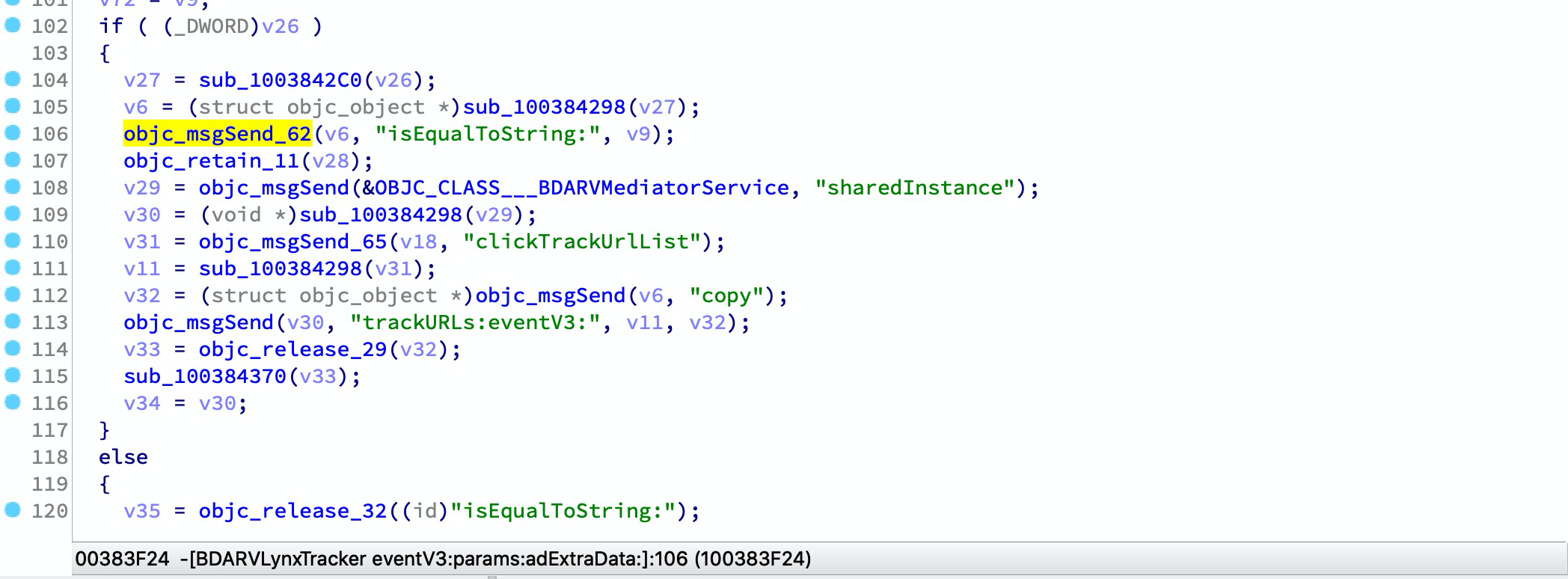
Mach-O 파일에는 일반적으로 사용되는 동적 라이브러리 가져오기 심볼의 여러 래퍼가 포함될 수 있습니다. 예:```arm __text:00000001003842D8 sub_1003842CC ; CODE XREF: -[BDARVLynxTracker eventV3:params:adExtraData:]+168↑p __text:00000001003842D8 ; -[BDARVLynxTracker eventV3:params:adExtraData:]+214↑p ... __text:00000001003842D8 MOV X1, X27 __text:00000001003842DC MOV X2, X19 __text:00000001003842E0 B objc_msgSend
우리는 usercall을 통해 래퍼를 변환할 수 있습니다:```arm
__text:00000001003842CC ; id __usercall objc_msgSend_61@<X0>(id@<X23>, const char *@<X28>, ...)
__text:00000001003842CC _objc_msgSend_61 ; CODE XREF: -[BDARVLynxTracker eventV3:params:adExtraData:]+2CC↑p
__text:00000001003842CC ; -[BDARVLynxTracker eventV3:params:adExtraData:]+320↑p ...
__text:00000001003842CC MOV X0, X23
__text:00000001003842D0 MOV X1, X28
__text:00000001003842D4 B objc_msgSend
스캐너는 모든 래퍼를 기록하는 보고서를 생성할 수 있으며, 그런 다음 ida-symbol-wrapper-naming 생성기를 사용하여 IDA 스크립트를 생성하고 이 래퍼의 이름 변경 및 프로토타입 변경을 구현할 수 있습니다.
iblessing -m scan -i symbol-wrapper -f -d 'symbols=_objc_msgSend,_objc_retain,_objc_release' iblessing -m scan -i symbol-wrapper -f -d 'symbols=*'
#### 사용 예제
TikTok China를 예시로 들어보겠습니다:```
> iblessing -m scan -i symbol-wrapper -f /opt/one-btn/tmp/apps/抖音短视频/Payload/Aweme -d 'symbols=*'
[*] set output path to /Users/soulghost/Desktop/git/iblessing-public/iblessing/build/Debug
[*] input file is /opt/one-btn/tmp/apps/抖音短视频/Payload/Aweme
[+] detect mach-o header 64
[+] detect litten-endian
[*] start Symbol Wrapper Scanner
[*] try to find wrappers for_objc_autoreleaseReturnValue, _objc_msgSend, _objc_release, _objc_releaseAndReturn, _objc_retain, _objc_retainAutorelease, _objc_retainAutoreleaseAndReturn, _objc_retainAutoreleaseReturnValue, _objc_retainAutoreleasedReturnValue
[*] Step1. find __TEXT,__text
[+] find __TEXT,__text at 0x100004000
[+] mapping text segment 0x100000000 ~ 0x106da0000 to unicorn engine
[*] Step 2. scan in __text
[*] start disassembler at 0x100004000
[*] / 0x106b68a54/0x106b68a58 (100.00%)
[*] reach to end of __text, stop
[*] Step 3. serialize wrapper graph to file
[*] saved to /Users/soulghost/Desktop/git/iblessing-public/iblessing/build/Debug/Aweme_wrapper-graph.iblessing.txt
> head Aweme_wrapper-graph.iblessing.txt
iblessing symbol-wrappers,ver:0.1;
wrapperId;address;name;prototype
0;0x100022190;_objc_retainAutoreleasedReturnValue;id __usercall f@<x0>(id@<x0>)
1;0x100022198;_objc_retainAutoreleasedReturnValue;id __usercall f@<x0>(id@<x0>)
2;0x1000221a0;_objc_release;id __usercall f@<x0>(id@<x22>)
3;0x1000221a8;_objc_msgSend;id __usercall f@<x0>(id@<x0>, const char*@<x20>, ...)
4;0x100022448;_objc_release;id __usercall f@<x0>(id@<x21>)
5;0x10009c19c;_objc_autoreleaseReturnValue;id __usercall f@<x0>(id@<x0>)
6;0x1000b6f94;_objc_msgSend;id __usercall f@<x0>(id@<x0>, const char*@<x1>, ...)
7;0x100100248;_objc_autoreleaseReturnValue;id __usercall f@<x0>(id@<x0>)
다음으로, 이 보고서에서 IDA 스크립트를 생성할 수 있습니다.
iblessing -m generator -i ida-symbol-wrapper-naming -f
#### 사용 예시```
> iblessing -m generator -i ida-symbol-wrapper-naming -f Aweme_wrapper-graph.iblessing.txt
[*] set output path to /Users/soulghost/Desktop/git/iblessing-public/iblessing/build/Debug
[*] input file is Aweme_wrapper-graph.iblessing.txt
[*] start IDAObjMsgXREFGenerator
[*] load symbol-wrappers db for version iblessing symbol-wrappers,ver:0.1;
[*] table keys wrapperId;address;name;prototype
[*] Generating Naming Scripts ...
[*] saved to /Users/soulghost/Desktop/git/iblessing-public/iblessing/build/Debug/Aweme_wrapper-graph.iblessing.txt_ida_symbol_wrapper_naming.iblessing.py
> head Aweme_wrapper-graph.iblessing.txt_ida_symbol_wrapper_naming.iblessing.py
def namingWrappers():
idc.set_name(0x100022190, '_objc_retainAutoreleasedReturnValue', ida_name.SN_FORCE)
idc.apply_type(0x100022190, idc.parse_decl('id __usercall f@<x0>(id@<x0>)', idc.PT_SILENT))
idc.set_name(0x100022198, '_objc_retainAutoreleasedReturnValue', ida_name.SN_FORCE)
idc.apply_type(0x100022198, idc.parse_decl('id __usercall f@<x0>(id@<x0>)', idc.PT_SILENT))
idc.set_name(0x1000221a0, '_objc_release', ida_name.SN_FORCE)
idc.apply_type(0x1000221a0, idc.parse_decl('id __usercall f@<x0>(id@<x22>)', idc.PT_SILENT))
idc.set_name(0x1000221a8, '_objc_msgSend', ida_name.SN_FORCE)
idc.apply_type(0x1000221a8, idc.parse_decl('id __usercall f@<x0>(id@<x0>, const char*@<x20>, ...)', idc.PT_SILENT))
idc.set_name(0x100022448, '_objc_release', ida_name.SN_FORCE)
IDA를 열고 -> File -> Script File에서 스크립트를 로드하세요. 이 과정은 시간이 오래 걸릴 수 있습니다. 완료되면 디컴파일된 코드가 변경된 것을 확인할 수 있습니다:

⬇️ ⬇️ ⬇️
