
 sashs/ropper
다양한 파일 형식의 파일에 대한 정보를 표시하고 여러 아키텍처(x86/x86_64, ARM/ARM64, MIPS, PowerPC, SPARC64)용 ROP 체인을 구축하기 위한 가젯을 찾습니다. 디스어셈블리의 경우 ropper는 훌륭한 Capstone Framework를 사용합니다.

로퍼(Ropper)를 사용하여 바이너리 파일의 다양한 파일 형식에 대한 정보를 표시할 수 있으며, 여러 아키텍처(x86/X86_64, ARM/ARM64, MIPS/MIPS64, PowerPC/PowerPC64, SPARC64)에서 ROP 체인을 구축하기 위한 가젯(gadget)을 검색할 수 있습니다. 디스어셈블리에는 멋진 Capstone Framework를 사용합니다.
PyPi로 Capstone 설치:
$ sudo pip install capstone
PyPi로 filebytes 설치:
$ sudo pip install filebytes
선택 사항 (로퍼 실행에는 필요하지 않으며, 가젯 검색에만 필요):
Keystone 설치:
$ sudo pip install keystone-engine
Ropper 설치 및 실행
$ python setup.py install
$ ropper
pip으로 Ropper 설치 가능
$ pip install ropper
설치 없이 Ropper 사용을 원하는 경우
$ ./Ropper.py
filebytes를 설치하고 싶지 않다면, filebytes는 ropper 저장소의 서브모듈입니다. 따라서 filebytes와 ropper를 설치할 필요가 없습니다.
$ git clone https://github.com/sashs/ropper.git
$ cd ropper
$ git submodule init
$ git submodule update
$ ./Ropper.py
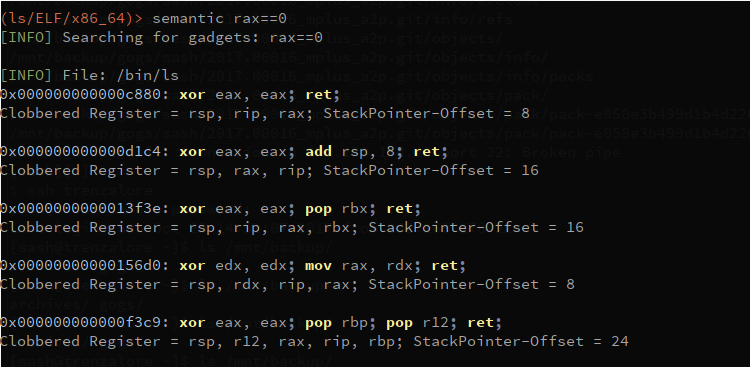
이 기능은 아직 개발 중입니다! Ropper에는 가젯을 검색할 수 있는 시멘틱 검색 명령어가 있습니다.
$ ropper --file <afile> --semantic "<any constraint>"
시멘틱 검색을 사용하려면 다음 선택적 종속성이 필요합니다:
pyvex 설치
$ sudo pip install pyvex
z3py 설치
$ python scripts/mk_make.py
$ cd build
$ make
$ sudo make install
reg == reg     -  레지스터를 다른 레지스터에 할당
reg == number  -  레지스터에 숫자 할당
reg == [reg]   -  레지스터에 메모리 할당
reg += number/reg/[reg]
reg -= number/reg/[reg]
reg *= number/reg/[reg]
reg /= number/reg/[reg]
eax==1 !ebx - eax를 1로 설정하고 ebx를 망가뜨리지 않는 가젯 검색
usage: Ropper.py [-h] [--help-examples] [-v] [--console]
             [-f <file> [<file> ...]] [-r] [-a <arch>]
             [--section <section>] [--string [<string>]] [--hex]
             [--asm [<asm> [H|S|R] ...]] [--disasm <opcode>]
             [--disassemble-address <address:length>] [-i] [-e]
             [--imagebase] [-c] [-s] [-S] [--imports] [--symbols]
             [--set <option>] [--unset <option>] [-I <imagebase>] [-p]
             [-j <reg>] [--stack-pivot] [--inst-count <n bytes>]
             [--search <regex>] [--quality <quality>] [--opcode <opcode>]
             [--instructions <instructions>] [--type <type>] [--detailed]
             [--all] [--cfg-only] [--chain <generator>] [-b <badbytes>]
             [--nocolor] [--clear-cache] [--no-load] [--analyse <quality>]
             [--semantic constraint]
             [--count-of-findings <count of gadgets>] [--single]

로퍼를 사용하여 바이너리 파일의 다양한 파일 형식에 대한 정보를 표시할 수 있으며,
    다양한 아키텍처에 대한 ROP 체인을 구축하기 위한 가젯을 검색할 수 있습니다.

지원되는 파일 형식:
  ELF
  PE
  Mach-O
  Raw

지원되는 아키텍처:
  x86 [x86]
  x86_64 [x86_64]
  MIPS [MIPS, MIPS64]
  ARM/Thumb [ARM, ARMTHUMB]
  ARM64 [ARM64]
  PowerPC [PPC, PPC64]
  SPARC [SPARC64]

사용 가능한 ROP 체인 생성기:
  execve (execve[=<cmd>], 기본값 /bin/sh) [Linux x86, x86_64]
  mprotect  (mprotect=<address>:<size>) [Linux x86, x86_64]
  virtualprotect (virtualprotect=<address iat vp>:<size>) [Windows x86]

옵션:
  -h, --help            이 도움말 메시지를 표시하고 종료
  --help-examples       예제 출력
  -v, --version         버전 출력
  --console             대화형 명령줄 시작
  -f <file> [<file> ...], --file <file> [<file> ...]
                        로드할 파일
  -r, --raw             파일을 원시(raw) 파일로 로드
  -a <arch>, --arch <arch>
                        로드된 파일의 아키텍처
  --section <section>   이 섹션의 데이터를 출력해야 함
  --string [<string>]   모든 데이터 섹션에서 문자열 <string>을 검색
  --hex                 선택한 섹션을 16진수 형식으로 출력
  --asm [<asm> [H|S|R] ...]
                        어셈블할 문자열과 출력 형식
                        (H=HEX, S=STRING, R=RAW, 기본값: H)
  --disasm <opcode>     디스어셈블할 opcode (예: ffe4, 89c8c3, ...)
  --disassemble-address <address:length>
                        주소 <address>에서 명령 디스어셈블
                        (0x12345678:L3). 디스어셈블할 명령 수를 지정할 수 있음
                        (0x....:L...)
  -i, --info            파일 헤더 표시 [ELF/PE/Mach-O]
  -e                    진입점(EntryPoint) 표시
  --imagebase           ImageBase 표시 [ELF/PE/Mach-O]
  -c, --dllcharacteristics
                        DllCharacteristics 표시 [PE]
  -s, --sections        파일 섹션 표시 [ELF/PE/Mach-O]
  -S, --segments        파일 세그먼트 표시 [ELF/Mach-O]
  --imports             임포트 표시 [ELF/PE]
  --symbols             심볼 표시 [ELF]
  --set <option>        옵션 설정. 사용 가능한 옵션: aslr nx
  --unset <option>      옵션 해제. 사용 가능한 옵션: aslr nx
  -I <imagebase>        가젯에 이 imagebase 사용
  -p, --ppr             'pop reg; pop reg; ret' 명령 검색
                        [x86/x86_64 전용]
  -j <reg>, --jmp <reg>
                        'jmp reg' 명령 검색 (-j reg[,reg...])
                        [x86/x86_64 전용]
  --stack-pivot         모든 스택 피벗 가젯 출력
  --inst-count <n bytes>
                        가젯 내 최대 명령 수 지정 (기본값: 6)
  --search <regex>      가젯 검색
  --quality <quality>   검색으로 찾은 가젯의 품질 (1 =
                        최고)
  --opcode <opcode>     opcode 검색 (예: ffe4 또는 ffe? 또는 ff??)
  --instructions <instructions>
                        명령 검색 (예: "jmp esp", "pop eax;
                        ret")
  --type <type>         가젯 유형 설정 [rop, jop, sys, all]
                        (기본값: all)
  --detailed            가젯을 더 자세히 출력
  --all                 중복 가젯 제거 안 함
  --cfg-only            Microsoft CFG 검사에 실패한 가젯 필터링
                        (CFG 검사가 활성화된 PE 파일만 해당) (DllCharachteristics 확인) [PE]
  --chain <generator>   ROP 체인 생성 [생성기 매개변수=값[
                        매개변수=값]]
  -b <badbytes>, --badbytes <badbytes>
                        가젯에 포함되지 않아야 하는 바이트 설정
  --nocolor             색상 출력 비활성화
  --clear-cache         캐시 지우기
  --no-load             콘솔 시작 시 가젯 자동 로드 안 함 (--console)
  --analyse <quality>   시멘틱 검색 구현에만 사용됨
  --semantic constraint
                        가젯에 대한 시멘틱 검색
  --count-of-findings <count of gadgets>
                        시멘틱 검색으로 출력할 최대 가젯 수
                        (0 = 정의되지 않음, 기본값: 5)
  --single              가젯 스캔에 다중 프로세스를 사용하지 않음

사용 예:
  [일반]
  ./Ropper.py
  ./Ropper.py --file /bin/ls --console

  [정보]
  ./Ropper.py --file /bin/ls --info
  ./Ropper.py --file /bin/ls --imports
  ./Ropper.py --file /bin/ls --sections
  ./Ropper.py --file /bin/ls --segments
  ./Ropper.py --file /bin/ls --set nx
  ./Ropper.py --file /bin/ls --unset nx
  ./Ropper.py --file /bin/ls --inst-count 5
  ./Ropper.py --file /bin/ls --search "sub eax" --badbytes 000a0d
  ./Ropper.py --file /bin/ls --search "sub eax" --detail
  ./Ropper.py --file /bin/ls --filter "sub eax"
  ./Ropper.py --file /bin/ls --inst-count 5 --filter "sub eax"
  ./Ropper.py --file /bin/ls --opcode ffe4
  ./Ropper.py --file /bin/ls --opcode ffe?
  ./Ropper.py --file /bin/ls --opcode ??e4
  ./Ropper.py --file /bin/ls --detailed
  ./Ropper.py --file /bin/ls --ppr --nocolor
  ./Ropper.py --file /bin/ls --jmp esp,eax
  ./Ropper.py --file /bin/ls --type jop
  ./Ropper.py --file /bin/ls --chain execve
  ./Ropper.py --file /bin/ls --chain "execve cmd=/bin/sh" --badbytes 000a0d
  ./Ropper.py --file /bin/ls --chain "mprotect address=0xbfdff000 size=0x21000"
  ./Ropper.py --file /bin/ls /lib/libc.so.6 --console
