
Skip to content
KitploitKITPLOIT
도구블로그
제출
도구블로그
제출

해킹, 침투 테스트 및 사이버 보안 도구를 당신의 보안 무기고에!

Kitploit은 해킹, 사이버 보안 및 침투 테스트 도구 디렉토리입니다. 최신 프로젝트 업데이트를 발견하여 취약점을 찾고, 시스템을 분석하고, 테스트를 자동화하고, 보안을 강화하세요.

··피드·문의·개인정보·© 2026 Kitploit

도구 디렉토리

카테고리

모든 카테고리 보기
Loading categories
policy_sentry — 리소스 ARN 및 액세스 수준을 기반으로 최소 권한 AWS IAM 정책을 생성하여 클라우드 인프라를 위한 보안 정책 생성을 자동화합니다. | Kitploit
도구/GitHubGitHub/salesforce/policy_sentry
Cloud Infrastructure SecurityConfiguration AuditingCloud SecurityDevSecOpsIdentity & Access Management (IAM)
GitHubsalesforce/policy_sentry

policy_sentry

리소스 ARN 및 액세스 수준을 기반으로 최소 권한 AWS IAM 정책을 생성하여 클라우드 인프라를 위한 보안 정책 생성을 자동화합니다.

저장소 보기
2.2k157325일 전Kitploit 검토 완료

인기

모두 보기 →

커뮤니티에서 가장 많이 사용되는 도구를 찾아보세요.

모든 도구 탐색

도구 컬렉션을 둘러보세요

모든 도구 보기 →
공유
웹사이트

Policy Sentry

IAM 최소 권한 정책 생성기.

continuous-integration Documentation Status Join the chat at https://gitter.im/salesforce/policy_sentry Twitter PyPI Python Version Downloads

  • 튜토리얼
    • 설치
      • 패키지 관리자
      • 셸 완성
    • 1단계: 템플릿 만들기
    • 2단계: ARN 복사/붙여넣기
    • 3단계: write-policy 명령
  • 치트 시트
    • 정책 작성 치트 시트
    • IAM 데이터베이스 조회 치트 시트
    • 로컬 초기화 (선택 사항)
  • 기타 사용법
    • 명령어
    • Python 라이브러리 사용법
    • Docker
    • Terraform
  • 참고 자료

문서

연습 및 전체 문서는 ReadTheDocs 프로젝트를 방문하세요.

Policy Sentry에 대한 Salesforce Engineering 블로그 게시물을 참조하세요.

개요

IAM 정책을 수동으로 작성하는 일은 매우 지루하고 비효율적일 수 있습니다. 많은 Infrastructure as Code 개발자들은 다음과 같은 경험을 해보았을 것입니다.

  • 사용자와 역할에 최소한의 권한만 부여하려고 최선을 다하지만, AWS IAM 문서(Actions, Resources, and Condition Keys for AWS Services)를 뒤지는 데 너무 많은 시간을 소비합니다.
  • 팀 리더는 제품 품질을 위해 IAM 정책에 보안을 구축하도록 권장하지만, 결국 프로젝트 마감일 때문에 좌절감을 느낍니다.
  • 팀에 IAM 정책을 작성해줄 전담 보안 인력이 없고, 사용자가 수행하는 AWS API 호출을 자동으로 감지하여 리소스 ARN 제약 조건과 함께 정책을 작성해주는 자동화 도구도 없습니다.
  • 그런 자동화 수준을 상상한 후, 자선 활동처럼 최소 권한 IAM 정책을 작성하는 것이 프로젝트 마감일을 맞춰 코드를 완성하는 능력을 위태롭게 한다는 것을 깨닫습니다.
  • 관리형 정책을 사용하거나(어차피 왜 안 되겠어) API 호출 이름을 대충 보고 와일드카드를 사용하여 넘어갑니다.

이러한 과정은 보안이나 Infrastructure as Code 개발자 모두에게 이상적이지 않습니다. IAM 정책을 안전하게 작성하는 것을 더 쉽게 만들고 최소 권한 IAM 정책의 복잡성을 추상화해야 합니다. 그래서 이 도구를 만들었습니다.

Policy Sentry를 사용하면 수동으로 IAM 정책을 작성하는 대신 몇 초 만에 최소 권한 IAM 정책을 만들 수 있습니다. 이러한 정책은 액세스 수준과 리소스에 따라 범위가 좁혀집니다. 침해 사고 발생 시 손상된 자격 증명의 폭발 반경을 제한하여 IAM 주체가 필요한 것에만 액세스할 수 있도록 합니다.

이 도구 이전에는 리소스 ARN 제약 조건이 있는 IAM 정책을 작성하는 데 몇 시간이 걸렸지만, 이제는 몇 초면 됩니다. 이제 개발자는 액세스해야 할 리소스만 결정하면 되며, Policy Sentry가 IAM 정책의 복잡성을 개발 프로세스에서 추상화해 줍니다.

리소스 제약 조건 및 액세스 수준에 기반한 안전한 정책 작성

Policy Sentry의 핵심 기능은 리소스 ARN과 액세스 수준을 기반으로 IAM 정책을 생성할 수 있다는 점입니다. CRUD 기능은 IAC 개발자가 AWS IAM의 복잡성을 이해할 필요가 없다는 의견을 취합니다. 즉, 우리가 그들에게 복잡성을 추상화해야 합니다. 실제로 개발자는 다음과 같이 말할 수 있어야 합니다.

  • "arn:aws:s3:::example-org-sbx-vmimport에 대한 읽기/쓰기/목록 액세스가 필요합니다"
  • "arn:aws:secretsmanager:us-east-1:123456789012:secret:mysecret에 대한 권한 관리 액세스가 필요합니다"
  • "arn:aws:ssm:us-east-1:123456789012:parameter/test에 대한 태깅 액세스가 필요합니다"

...그러면 우리의 자동화가 해당 액세스 수준에 맞는 정책을 생성해야 합니다.

어떻게 이를 달성할까요? Policy Sentry는 AWS 문서(Actions, Resources, and Condition Keys)를 활용하여 Actions, 액세스 수준, 리소스 유형을 조회하고 ARN 및 액세스 수준에 따라 정책을 생성합니다. 아래 표 조각을 살펴보세요.

Policy Sentry는 모든 해당 문서를 단일 데이터베이스에 집계하고 이 데이터베이스를 사용하여 작업, 리소스 및 액세스 수준에 따라 정책을 생성합니다.

튜토리얼

설치

패키지 관리자

  • Homebrew
root@kitploit:~
brew tap salesforce/policy_sentry https://github.com/salesforce/policy_sentry
brew install policy_sentry
  • Pip
root@kitploit:~
pip3 install --user policy_sentry

셸 완성

Bash 완성을 활성화하려면 .bashrc에 다음을 추가하세요.

root@kitploit:~
eval "$(_POLICY_SENTRY_COMPLETE=bash_source policy_sentry)"

ZSH 완성을 활성화하려면 .zshrc에 다음을 추가하세요.

root@kitploit:~
eval "$(_POLICY_SENTRY_COMPLETE=zsh_source policy_sentry)"

1단계: 템플릿 만들기

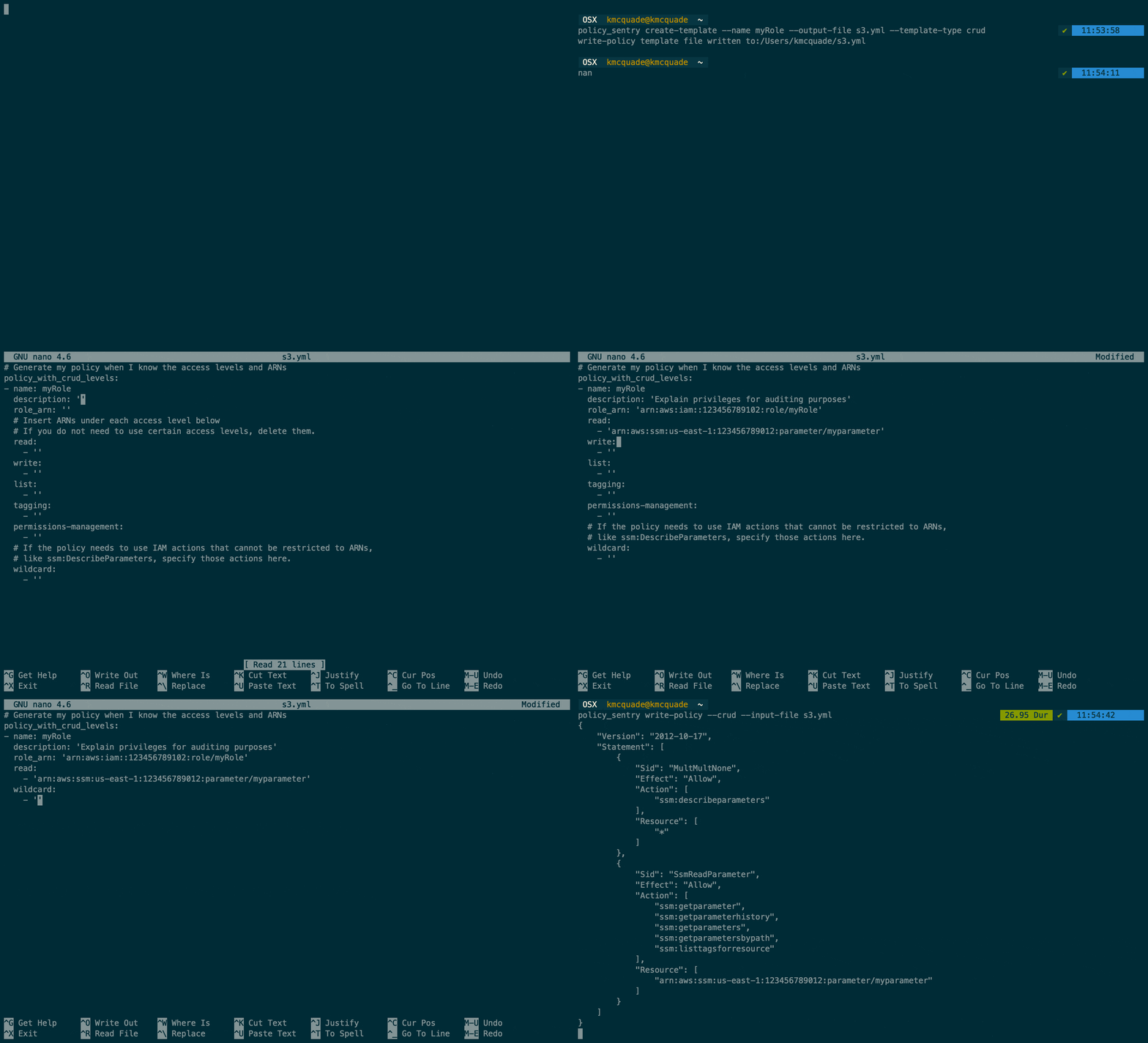
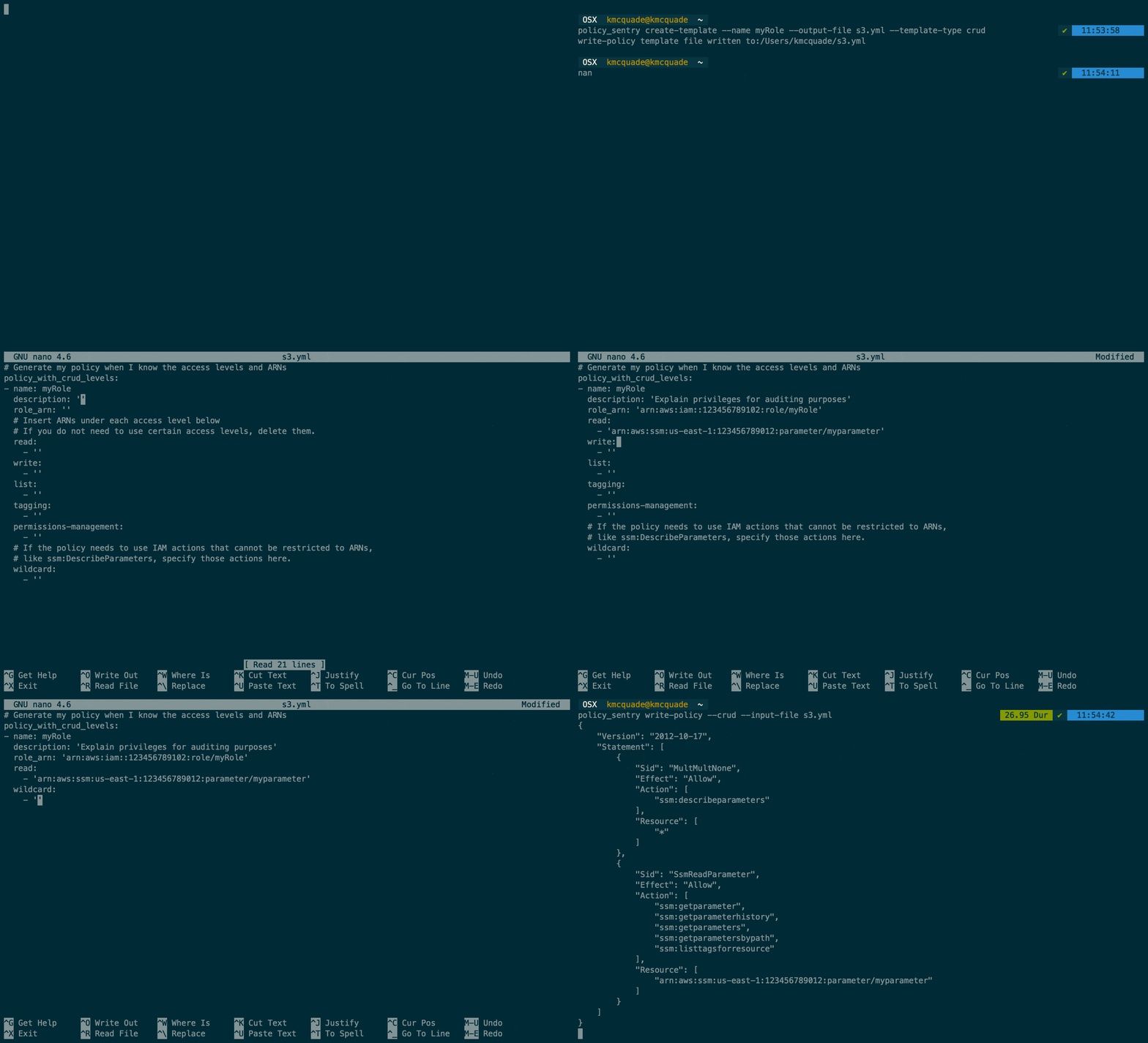
  • 리소스 및 액세스 수준에 따라 정책을 생성하려면 먼저 다음 명령으로 템플릿을 만드세요. 그러면 ARN만 채우면 됩니다.
root@kitploit:~
policy_sentry create-template --output-file crud.yml --template-type crud
  • 그러면 다음과 같은 파일이 생성됩니다.
root@kitploit:~
mode: crud
name: ''
# Specify resource ARNs
read:
- ''
write:
- ''
list:
- ''
tagging:
- ''
permissions-management:
- ''
# Actions that do not support resource constraints
wildcard-only:
  single-actions: # standalone actions
  - ''
  # Service-wide - like 's3' or 'ec2'
  service-read:
  - ''
  service-write:
  - ''
  service-list:
  - ''
  service-tagging:
  - ''
  service-permissions-management:
  - ''
# Skip resource constraint requirements by listing actions here.
skip-resource-constraints:
- ''
# Exclude actions from the output by specifying them here. Accepts wildcards, like kms:Delete*
exclude-actions:
- ''
# If this policy needs to include an AssumeRole action
sts:
  assume-role:
    - ''
  assume-role-with-saml:
    - ''
  assume-role-with-web-identity:
    - ''

2단계: ARN 복사/붙여넣기

  • 정책에 포함할 ARN을 복사/붙여넣기 하세요. 사용하지 않는 줄은 삭제하거나 그대로 두어도 됩니다.
root@kitploit:~
mode: crud
read:
- 'arn:aws:ssm:us-east-1:123456789012:parameter/myparameter'
write:
- 'arn:aws:ssm:us-east-1:123456789012:parameter/myparameter'
list:
- 'arn:aws:ssm:us-east-1:123456789012:parameter/myparameter'
tagging:
- 'arn:aws:secretsmanager:us-east-1:123456789012:secret:mysecret'
permissions-management:
- 'arn:aws:secretsmanager:us-east-1:123456789012:secret:mysecret'

3단계: write-policy 명령

  • 그런 다음 이 명령을 실행하세요.
root@kitploit:~
policy_sentry write-policy --input-file crud.yml
  • 그러면 다음과 같은 결과가 생성됩니다.
root@kitploit:~
{
    "Version": "2012-10-17",
    "Statement": [
        {
            "Sid": "SsmReadParameter",
            "Effect": "Allow",
            "Action": [
                "ssm:GetParameter",
                "ssm:GetParameterHistory",
                "ssm:GetParameters",
                "ssm:GetParametersByPath",
                "ssm:ListTagsForResource"
            ],
            "Resource": [
                "arn:aws:ssm:us-east-1:123456789012:parameter/myparameter"
            ]
        },
        {
            "Sid": "SsmWriteParameter",
            "Effect": "Allow",
            "Action": [
                "ssm:DeleteParameter",
                "ssm:DeleteParameters",
                "ssm:LabelParameterVersion",
                "ssm:PutParameter"
            ],
            "Resource": [
                "arn:aws:ssm:us-east-1:123456789012:parameter/myparameter"
            ]
        },
        {
            "Sid": "SecretsmanagerPermissionsmanagementSecret",
            "Effect": "Allow",
            "Action": [
                "secretsmanager:DeleteResourcePolicy",
                "secretsmanager:PutResourcePolicy"
            ],
            "Resource": [
                "arn:aws:secretsmanager:us-east-1:123456789012:secret:mysecret"
            ]
        },
        {
            "Sid": "SecretsmanagerTaggingSecret",
            "Effect": "Allow",
            "Action": [
                "secretsmanager:TagResource",
                "secretsmanager:UntagResource"
            ],
            "Resource": [
                "arn:aws:secretsmanager:us-east-1:123456789012:secret:mysecret"
            ]
        }
    ]
}

위 정책은 사용자가 제공한 ARN과 요청된 액세스 수준을 인식하고 있음을 알 수 있습니다. 예를 들어 SecretsmanagerTaggingSecret SID는 비밀 리소스 유형에 할당된 태깅 작업만 포함합니다.

이를 통해 IAM 정책 개발 시간이 크게 단축되며, 생성된 모든 정책이 역할에 필요한 액세스로만 제한되도록 보장합니다. 이제 개발자는 액세스해야 할 리소스만 결정하면 되며, IAM 정책의 복잡성은 개발 프로세스에서 추상화됩니다.

치트 시트

정책 작성 치트 시트

root@kitploit:~
# Create templates first!!! This way you can just paste the values you need rather than remembering the YAML format
# CRUD mode
policy_sentry create-template --output-file tmp.yml --template-type crud
# Actions mode
policy_sentry create-template --output-file tmp.yml --template-type actions

# Write policy based on resource-specific access levels
policy_sentry write-policy --input-file examples/yml/crud.yml

# Write policy based on a list of actions
policy_sentry write-policy --input-file examples/yml/actions.yml

IAM 데이터베이스 조회 치트 시트

root@kitploit:~

###############
# Actions Table
###############
# NOTE: Use --fmt yaml or --fmt json to change the output format. Defaults to json for querying

# Get a list of actions that do not support resource constraints
policy_sentry query action-table --service s3 --resource-type "*" --fmt yaml

# Get a list of actions at the "Write" level in S3 that do not support resource constraints
policy_sentry query action-table --service s3 --access-level write --resource-type "*" --fmt yaml

# Get a list of all IAM actions across ALL services that have "Permissions management" access
policy_sentry query action-table --service all --access-level permissions-management

# Get a list of all IAM Actions available to the RAM service
policy_sentry query action-table --service ram

# Get details about the `ram:TagResource` IAM Action
policy_sentry query action-table --service ram --name tagresource

# Get a list of all IAM actions under the RAM service that have the Permissions management access level.
policy_sentry query action-table --service ram --access-level permissions-management

# Get a list of all IAM actions under the SES service that support the `ses:FeedbackAddress` condition key.
policy_sentry query action-table --service ses --condition ses:FeedbackAddress

###########
# ARN Table
###########

# Get a list of all RAW ARN formats available through the SSM service.
policy_sentry query arn-table --service ssm

# Get the raw ARN format for the `cloud9` ARN with the short name `environment`
policy_sentry query arn-table --service cloud9 --name environment

# Get key/value pairs of all RAW ARN formats plus their short names
policy_sentry query arn-table --service cloud9 --list-arn-types

######################
# Condition Keys Table
######################

# Get a list of all condition keys available to the Cloud9 service
policy_sentry query condition-table --service cloud9

# Get details on the condition key titled `cloud9:Permissions`
policy_sentry query condition-table --service cloud9 --name cloud9:Permissions

로컬 초기화 (선택 사항)

root@kitploit:~
# Initialize the policy_sentry config folder and create the IAM database tables.
policy_sentry initialize

# Fetch the most recent version of the AWS documentation so you can experiment with new services.
policy_sentry initialize --fetch

# Override the Access Levels by specifying your own Access Levels (example:, correcting Permissions management levels)
policy_sentry initialize --access-level-overrides-file ~/.policy_sentry/overrides-resource-policies.yml

policy_sentry initialize --access-level-overrides-file ~/.policy_sentry/access-level-overrides.yml

기타 사용법

명령어

  • create-template: write-policy 명령 유형에 사용할 YML 파일 템플릿을 생성합니다.

  • write-policy: YAML 파일을 활용하여 정책을 작성합니다.

    • 옵션 1: CRUD 수준(읽기, 쓰기, 목록, 태깅, 권한 관리)과 리소스 ARN을 지정합니다. 그러면 정책이 자동으로 작성됩니다. 문서 참조.
    • 옵션 2: 작업 목록을 지정합니다. IAM 정책은 작성되지만 ARN은 직접 입력해야 합니다. 문서 참조.
  • query: IAM 데이터베이스 테이블을 조회합니다. Policy Sentry 템플릿을 작성할 때 도움이 되거나 데이터베이스에서 빠른 지식을 얻는 데 유용합니다.

    • 옵션 1: Actions 테이블 조회 (action-table)
    • 옵션 2: ARNs 테이블 조회 (arn-table)
    • 옵션 3: Conditions 테이블 조회 (condition-table)
  • initialize: (선택 사항). Actions, Resources, and Condition Keys 문서를 통해 제공되는 모든 서비스가 포함된 SQLite 데이터베이스를 생성합니다. 문서 참조.

Python 라이브러리 사용법

자체 Python 코드를 개발 중이고 Policy Sentry를 타사 패키지로 가져오려는 경우 초기화를 건너뛰고 Python 패키지 자체에 포함된 로컬 데이터베이스 파일을 활용할 수 있습니다.

이는 IAM 데이터베이스 사용이 필요한 Policy Sentry의 기능(IAM 데이터베이스 테이블 조회 등)을 활용하려는 개발자에게 특히 유용합니다. 이렇게 하면 데이터베이스를 초기화할 필요 없이 즉시 조회할 수 있습니다.

코드 예제는 여기에 있습니다. 아래에도 표시되어 있습니다.

root@kitploit:~
from policy_sentry.querying.actions import get_actions_for_service


def example():
    actions = get_actions_for_service('cloud9')  # Then you can leverage any method that requires access to the database.
    for action in actions:
        print(action)

if __name__ == '__main__':
    example()

결과는 다음과 같습니다.

root@kitploit:~
cloud9:CreateEnvironmentEC2
cloud9:CreateEnvironmentMembership
cloud9:DeleteEnvironment
cloud9:DeleteEnvironmentMembership
cloud9:DescribeEnvironmentMemberships
cloud9:DescribeEnvironmentStatus
cloud9:DescribeEnvironments
cloud9:GetUserSettings
cloud9:ListEnvironments
cloud9:ListTagsForResource
cloud9:TagResource
cloud9:UntagResource
cloud9:UpdateEnvironment
cloud9:UpdateEnvironmentMembership
cloud9:UpdateUserSettings

Docker

Python으로 스크립트를 설치하는 대신 Docker를 사용하는 것을 선호한다면 Docker도 지원합니다. 리포지토리 루트에서 다음을 사용하여 Docker 이미지를 빌드하세요.

root@kitploit:~
docker build -t kmcquade/policy_sentry .

다음을 사용하여 몇 가지 기본 명령을 실행하세요.

root@kitploit:~
# Basic commands with no arguments
docker run -i --rm kmcquade/policy_sentry:latest "--help"
docker run -i --rm kmcquade/policy_sentry:latest "query"

# Query the database
docker run -i --rm kmcquade/policy_sentry:latest "query action-table --service all --access-level permissions-management"

write-policy 명령은 STDIN을 통해 YML 구성을 전달하는 것도 지원합니다. Docker 방법을 사용하는 경우 다음에서 시도해 보세요.

root@kitploit:~
# Write policies by passing in the config via STDIN
cat examples/yml/crud.yml | docker run -i --rm kmcquade/policy_sentry:latest "write-policy"

cat examples/yml/actions.yml | docker run -i --rm kmcquade/policy_sentry:latest "write-policy"

Terraform

Terraform 모듈은 여기에 게시 및 관리되고 있습니다.

참고 자료

  • 문서 스크래핑 프로세스는 유사한 ansible 해킹 스크립트에서 영감을 받아 차용되었습니다.
  • ID 기반 정책과 리소스 기반 정책
  • AWS 서비스에 대한 Actions, Resources 및 Condition Keys
도구 다운로드
Actions액세스 수준리소스 유형
ssm:GetParameter읽기parameter
ssm:DescribeParameters목록parameter
ssm:PutParameter쓰기parameter
secretsmanager:PutResourcePolicy권한 관리secret
secretsmanager:TagResource태깅secret