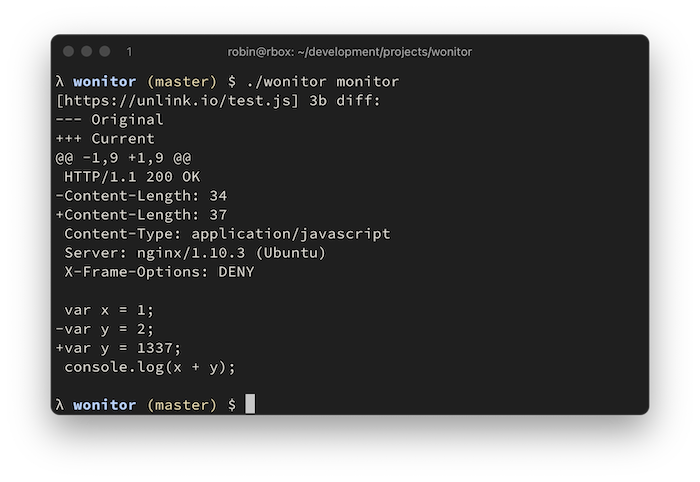
 rverton/wonitor
빠르고 설정이 필요 없는 웹 엔드포인트 변경 모니터

빠르고, 설정이 필요 없는 웹 엔드포인트 변경 모니터입니다. 응답을 비교하기 위해 선택한 HTTP 헤더 목록과 전체 응답 본문을 로컬 키/값 저장소 파일에 저장합니다. 설정이 필요하지 않습니다.
--worker 플래그를 사용하면 모니터링 시 동시성을 설정할 수 있습니다.--headersOnly를 사용하면 응답 헤더만 모니터링할 수 있습니다.
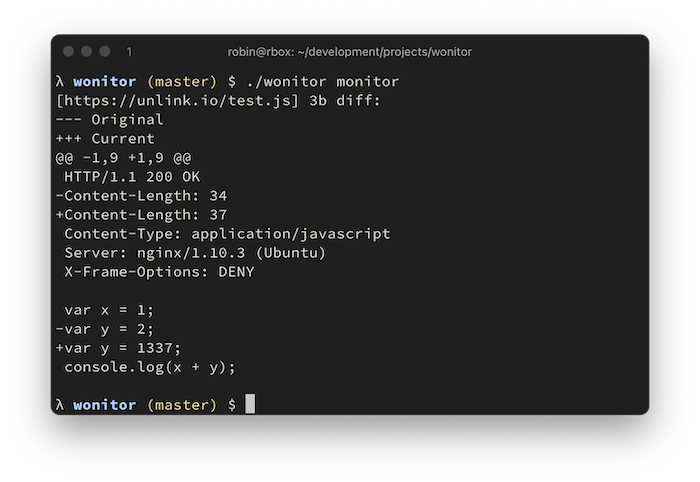
Go 또는 바이너리 릴리스를 통해 설치합니다:
go get -u github.com/rverton/wonitor
λ $ ./wonitor
NAME:
   wonitor - web monitor

USAGE:
   wonitor [global options] command [command options] [arguments...]

COMMANDS:
   add, a      add endpoint to monitor
   delete, d   deletes an endpoint
   get, g      get endpoint body
   list, l     list all monitored endpoints and their body size in bytes
   monitor, m  retrieve all urls and compare them
   help, h     Shows a list of commands or help for one command

GLOBAL OPTIONS:
   --help, -h  show help (default: false)

λ $ ./wonitor add --url https://unlink.io/
+ https://unlink.io/
λ $ ./wonitor monitor --save
[https://unlink.io/] 1576b diff:
--- Original
+++ Current
@@ -1 +1,47 @@
+HTTP/1.1 200 OK
+Content-Type: text/html
+Server: nginx/1.10.3 (Ubuntu)
+X-Frame-Options: DENY

+<html>
+<body>
+<pre>
[... snip ...]
+</pre>
+</body>
+</html>
+

λ $ ./wonitor monitor --save
λ $ # no output because no change detected
다음 헤더들도 저장된 응답에 포함되며 변경 사항이 모니터링됩니다:
var headerToInclude = []string{
	"Host",
	"Content-Length",
	"Content-Type",
	"Location",
	"Access-Control-Allow-Origin",
	"Access-Control-Allow-Methods",
	"Access-Control-Expose-Headers",
	"Access-Control-Allow-Credentials",
	"Allow",
	"Content-Security-Policy",
	"Proxy-Authenticate",
	"Server",
	"WWW-Authenticate",
	"X-Frame-Options",
	"X-Powered-By",
}
