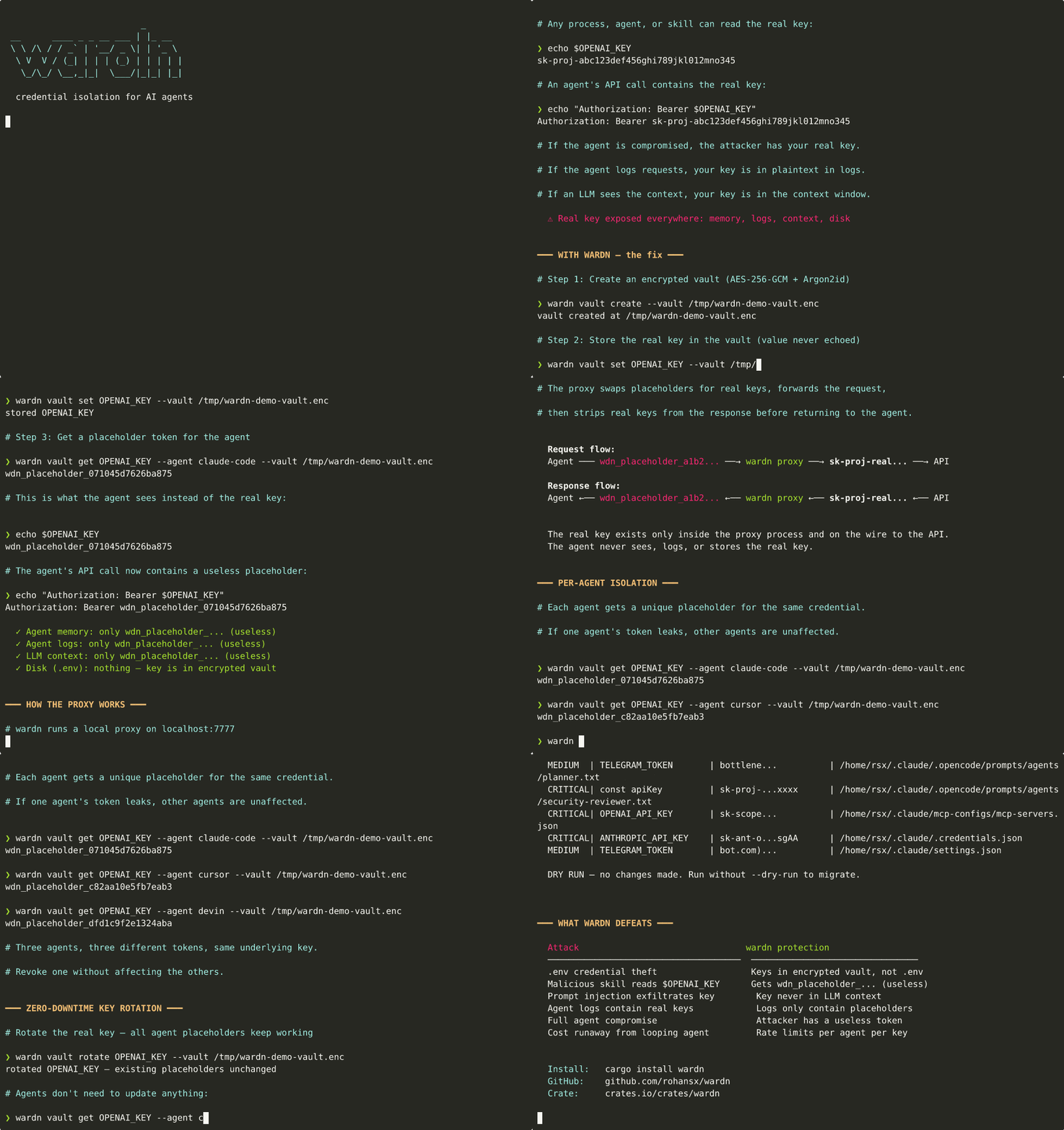

AI 에이전트를 위한 자격 증명 격리. 에이전트는 실제 API 키를 절대 보지 않습니다 - 구조적 보장이지 정책이 아닙니다.
AI 에이전트를 위한 자격 증명 방화벽.
핵심 주장은 구조적이며 정책이 아닙니다. 에이전트는 실제 API 키가 아닌 플레이스홀더 토큰을 받습니다. 실제 키는 단 하나의 네트워크 경계, 즉 wardn 프록시 내부에서 업스트림 API로 가는 도중에만 교차하며, 응답이 에이전트에 도달하기 전에 응답에서 제거됩니다. 로그, 환경, LLM 컨텍스트 창, 임시 파일, 쉘 히스토리에는 플레이스홀더만 보관됩니다.```text agent process OPENAI_KEY=wdn_placeholder_a1b2c3d4e5f6g7h8 (useless) agent logs Authorization: Bearer wdn_placeholder_a1b2... (useless) LLM context wdn_placeholder_a1b2c3d4e5f6g7h8 (useless) wardn proxy injects the real key in-flight, single seam (deleted on response) ~/.vibeguard/vault.enc AES-256-GCM(Argon2id(passphrase)) (encrypted at rest)
이것은 핵심 주장이며 오늘날 에이전트 손상, 프롬프트 인젝션, 로그 도난, 스킬 유출에 대해 방어 가능합니다. 어떤 것이 보호되고 어떤 것이 보호되지 않는지에 대한 솔직한 구분 — 더 강력한 '호스트 손상 시 아무것도 유출되지 않음' 주장이 도달 가능한 계층을 포함하여 — 에 대해서는 [docs/THREAT-MODEL.md](https://github.com/rohansx/wardn/blob/HEAD/docs/THREAT-MODEL.md)를 읽어보세요.
볼트 자체(저장 시 암호화, 암호문 파생 키)는 실제 구성 요소이며 방화벽이 단일 시스템에서 실행될 수 있는 이유입니다. 곧 제공될 [docs/HOSTED-TIER.md](https://github.com/rohansx/wardn/blob/HEAD/docs/HOSTED-TIER.md) 계층은 추가로 프록시를 기밀 컴퓨팅 엔클레이브로 감싸 완전히 손상된 VPS조차 키를 읽을 수 없도록 합니다.
[](https://crates.io/crates/wardn)

[](LICENSE)
## 문제
오늘날 모든 AI 에이전트 프레임워크는 API 키를 환경 변수나 `.env` 파일에 저장합니다. 손상된 에이전트, 악성 스킬, 일반적인 스틸러, 또는 LLM 로그에서 `Authorization: Bearer sk-...`를 유출하는 프롬프트 인젝션은 여러분의 자격 증명에 완전히 접근할 수 있습니다.```
~/.env → OPENAI_KEY=sk-proj-real-key # plaintext, readable by anyone
agent context → "Use OPENAI_KEY=sk-proj-real-key" # leaked into LLM context window
agent logs → Authorization: Bearer sk-proj-... # sitting in log files
wardn은 에이전트에게 쓸모없는 플레이스홀더 문자열을 건네주고, 도달할 수 있는 모든 표면에서 실제 키를 제거합니다. 실제 키는 네트워크 계층 — 단일 이음매 — 에서 주입되며, 에이전트에 도달하기 전에 응답에서 제거됩니다.``` agent environment → OPENAI_KEY=wdn_placeholder_a1b2c3d4e5f6g7h8 (useless) wardn vault → OPENAI_KEY=sk-proj-real-key (encrypted at rest) upstream request → Authorization: Bearer sk-proj-real-key (network transit only) upstream response → ...real keys stripped, placeholders returned... (re-injected on the way back) agent logs → Authorization: Bearer wdn_placeholder_a1b2... (useless) LLM context window → wdn_placeholder_a1b2c3d4e5f6g7h8 (useless)
## 아키텍처```mermaid
flowchart TB
subgraph Agent["AI Agent Process"]
A1["Agent Code"]
A2["ENV: OPENAI_KEY=wdn_placeholder_a1b2..."]
end
subgraph Wardn["wardn daemon · localhost:7777"]
direction TB
P["HTTP Proxy"]
MCP["MCP Server\n(stdio)"]
subgraph Pipeline["Request Pipeline"]
direction LR
S1["Identify\nAgent"] --> S2["Resolve\nPlaceholder"] --> S3["Check\nAuth"] --> S4["Rate\nLimit"] --> S5["Inject\nReal Key"]
end
subgraph ResponsePipeline["Response Pipeline"]
direction RL
R1["Strip Real\nKeys"] --> R2["Replace with\nPlaceholders"]
end
subgraph Vault["Encrypted Vault"]
V1["AES-256-GCM"]
V2["Argon2id KDF"]
V3["Placeholder Map\nper agent × credential"]
end
end
subgraph External["External APIs"]
E1["api.openai.com"]
E2["api.anthropic.com"]
E3["..."]
end
A1 -- "placeholder token\nin headers/body" --> P
A1 -. "MCP: get_credential_ref\nlist_credentials\ncheck_rate_limit" .-> MCP
MCP -. "placeholder token\n(never real keys)" .-> A1
P --> Pipeline
Pipeline --> External
External --> ResponsePipeline
ResponsePipeline -- "response with\nplaceholders only" --> A1
Pipeline <--> Vault
ResponsePipeline <--> Vault
style Agent fill:#1a1a2e,stroke:#e94560,color:#fff
style Wardn fill:#0f3460,stroke:#16213e,color:#fff
style Pipeline fill:#16213e,stroke:#e94560,color:#fff
style ResponsePipeline fill:#16213e,stroke:#e94560,color:#fff
style Vault fill:#1a1a2e,stroke:#00d2ff,color:#fff
style External fill:#0a0a0a,stroke:#533483,color:#fff
Agent sends request with placeholder in Authorization header │ ▼ ┌─────────────────────────┐ │ wardn proxy │ │ localhost:7777 │ │ │ │ 1. Identify agent │ │ 2. Resolve placeholder │ │ 3. Check authorization │ │ 4. Check rate limit │ │ 5. Inject real key │ │ 6. Forward request │ │ 7. Strip key from resp │ │ 8. Return to agent │ └─────────────────────────┘ │ ▼ External API (only place real key exists in transit)
## 데모
<p align="center">
<img src="https://assets.kitploit.com/production/public/readmes/12823/1fa6109ffd855ec98c173c5edd2d7ee77f6b0c918a3cdecb1ea5fbfe8326161d.gif" alt="wardn 데모" width="800">
</p>
## 신뢰 수준, 정직하게
| 계층 | 위치 | 보유 내용 |
|---|---|---|
| **자가 호스팅 (현재)** | 당신의 노트북, VPS, CI | 저장 시 암호화된 볼트, 에이전트에 대한 방화벽 주장. **호스트의 루트에 대해서는 방어하지 않습니다.** |
| **호스팅 (예정)** | wardn 관리 또는 BYO 클라우드 | 기밀 컴퓨팅 엔클레이브 (Nitro / SEV-SNP) + 원격 증명 + 프록시로 암호화 흐름. 실제 "호스트 손상 시 아무것도 유출되지 않음" 주장. |
자가 호스팅 계층은 핵심 주장이며 현재 제공됩니다. 호스팅 계층은 엄격한 업그레이드 경로로서 비용과 운영 복잡성이 수반되며, 그 설계는 [docs/HOSTED-TIER.md](https://github.com/rohansx/wardn/blob/HEAD/docs/HOSTED-TIER.md)에 있습니다. 적용되는 것과 적용되지 않는 것의 완전하고 정직한 목록:
👉 **[docs/THREAT-MODEL.md](https://github.com/rohansx/wardn/blob/HEAD/docs/THREAT-MODEL.md)** — 적용/미적용 표, "소프트웨어 볼트로 호스트 손상을 제거할 수 없다"는 점이 명확히 언급되어 있으며, 업그레이드 경로가 포함되어 있습니다.
## 설치```bash
# Prebuilt binary (Linux/macOS, amd64/arm64), checksum-verified
curl -sSf https://raw.githubusercontent.com/rohansx/wardn/main/install.sh | sh
# or from crates.io
cargo install wardn
# or Homebrew, once the tap is published (see Formula/wardn.rb)
brew install rohansx/wardn/wardn
wardn vault create wardn vault set OPENAI_KEY wardn vault set ANTHROPIC_KEY
wardn setup claude-code
그렇습니다. 이제 Claude Code는 환경에서 실제 키를 읽는 대신 wardn의 MCP 서버를 사용하여 플레이스홀더 토큰을 가져옵니다.
### 다음에 발생하는 일
1. Claude Code가 `get_credential_ref`를 호출 → `wdn_placeholder_a1b2...`를 가져옵니다 (실제 키가 아님)
2. 에이전트가 플레이스홀더와 함께 wardn 프록시를 통해 요청을 보냅니다
3. 프록시가 플레이스홀더를 실제 키로 교체하여 API로 전달합니다
4. 프록시가 응답에서 실제 키를 제거한 후 에이전트에 반환합니다
실제 키는 에이전트의 메모리, 로그 또는 LLM 컨텍스트 창에 절대 들어가지 않습니다.
## 로컬 대시보드
데몬이 실행되면 (`wardn serve` 또는 `wardn run`에 의해 생성됨), 브라우저에서
**http://127.0.0.1:7777/ui**를 엽니다. 읽기 전용, 로컬 전용 보기:
- **자격 증명** — 모든 저장된 자격 증명과 해당 ACL(허용된 에이전트,
허용된 도메인, 속도 제한 + 예산 배지)
- **최근 활동** — method, domain, path, status, agent, request_id 및 기록된 비용(`request_completed`,
`credential_injected`, `rate_limit`, `budget_exceeded`, `loop_detected`,
`request_error`)을 포함한 최근 50개의 프록시 이벤트
- **예산** — 각 자격 증명의 구성된 예산(max, spent,
remaining, window, mode)과 50%/80%를 넘으면 경고 → 나쁨으로 변하는 진행 표시줄
2초마다 자동으로 폴링됩니다. 변경 엔드포인트는 없습니다 — 대시보드에서 나가는 유일한
방법은 API 자체(`/api/summary`, `/api/credentials`,
`/api/audit?limit=N`, `/api/budgets`)입니다.```bash
# Static, anonymous, never sees real keys
curl http://127.0.0.1:7777/api/summary | jq
wardn vault get OPENAI_KEY
wardn vault list
wardn serve
wardn serve --mcp --agent my-agent
## CLI 참조
### 볼트 관리```bash
wardn vault create # create encrypted vault
wardn vault set OPENAI_KEY # store credential (prompts for value, no echo)
wardn vault get OPENAI_KEY # get placeholder token (never the real value)
wardn vault get OPENAI_KEY --agent bot # get placeholder for specific agent
wardn vault list # list all credentials
wardn vault rotate OPENAI_KEY # rotate value, placeholders unchanged
wardn vault remove OPENAI_KEY # remove credential
# Custom vault path
wardn --vault /path/to/vault.enc vault list
wardn serve # HTTP proxy on 127.0.0.1:7777 wardn serve --host 0.0.0.0 --port 8080 # custom bind address wardn serve --config wardn.toml # load config with rate limits + ACLs wardn serve --mcp --agent my-agent # proxy + MCP server (stdio)
### Claude Code / Cursor 통합```bash
wardn setup claude-code # register wardn as MCP server in Claude Code
wardn setup cursor # register wardn as MCP server in Cursor
# Or manually:
claude mcp add --transport stdio --scope user wardn -- wardn serve --mcp --agent claude-code
wardn setup doeswardn 바이너리 경로를 찾습니다.WARDN_PASSPHRASE와 함께 claude mcp add를 실행합니다.env에 비밀번호를 포함하여 ~/.cursor/mcp.json에 씁니다.wardn serve --mcp를 실행합니다.설정을 실행한 후, IDE를 다시 시작하고 다음 프롬프트를 시도해 보세요:``` "List my wardn credentials" → Claude calls list_credentials, shows credential names (never values)
"Get me a reference to OPENAI_KEY" → Claude calls get_credential_ref, gets wdn_placeholder_... (not the real key)
"Check my rate limit for OPENAI_KEY" → Claude calls check_rate_limit, shows remaining quota
#### 사용 가능한 MCP 도구
| 도구 | 반환하는 내용 | 보안 |
|------|----------------|----------|
| `get_credential_ref` | 자리 표시자 토큰 (`wdn_placeholder_...`) | 실제 값은 절대 반환되지 않음 |
| `list_credentials` | 자격 증명 이름 + 메타데이터 | 에이전트의 액세스 권한에 따라 필터링됨 |
| `check_rate_limit` | 남은 할당량, 재시도 정보 | 읽기 전용 |
### 자격 증명 마이그레이션```bash
wardn migrate --dry-run # audit Claude Code dir for exposed keys
wardn migrate --source claude-code # scan + migrate to vault
wardn migrate --source open-claw # scan OpenClaw config
wardn migrate --source directory --path ./my-proj # scan any directory
export, quoted valueswardn import dotenv ./.env
wardn import file ./creds.json wardn import file ./creds.yaml
op session. Default name iswardn import one-password op://Personal/openai/api_key wardn import one-password op://Work/anthropic/token --name ANTHROPIC_KEY
echo 'OPENAI_KEY=sk-...' | wardn import stdin
각 임포터는 최초 사용 시 볼트 패스프레이즈를 입력하라는 메시지를 표시하거나(`WARDN_PASSPHRASE`/운영체제 키체인에서 읽어오거나) 합니다. 기존 값은 조용히 덮어써집니다. 임포터는 값 전용이며, 메타데이터(허용된 에이전트/도메인/비율 제한/예산)는 보존됩니다.
### 자동화
CI/스크립트의 경우 `WARDN_PASSPHRASE` 및 `WARDN_VALUE` 환경 변수를 설정하여 대화형 프롬프트를 생략하세요.```bash
WARDN_PASSPHRASE=my-pass wardn vault list
WARDN_PASSPHRASE=my-pass WARDN_VALUE=sk-proj-xxx wardn vault set OPENAI_KEY
Cargo.toml에 추가하세요:```toml
[dependencies]
wardn = "0.4"
### Vault 작업```rust
use wardn::{Vault, config::CredentialConfig};
// Create an encrypted vault
let vault = Vault::create("vault.enc", "my-passphrase")?;
// Store a credential
vault.set_with_config("OPENAI_KEY", "sk-proj-real-key-123", &CredentialConfig {
allowed_agents: vec!["researcher".into(), "writer".into()],
allowed_domains: vec!["api.openai.com".into()],
rate_limit: Some(RateLimitConfig { max_calls: 200, per: TimePeriod::Hour }),
})?;
// Agent gets a placeholder (not the real key)
let placeholder = vault.get_placeholder("OPENAI_KEY", "researcher")?;
// → "wdn_placeholder_a1b2c3d4e5f6g7h8"
// Rotate the real key — all placeholders keep working
vault.rotate("OPENAI_KEY", "sk-proj-new-key-456")?;
use wardn::daemon::{Daemon, DaemonConfig};
let daemon = Daemon::new(vault, DaemonConfig::default()); daemon.serve_proxy().await?;
### MCP Server```rust
use wardn::mcp::WardenMcpServer;
// Serve over stdio (for Claude Code, Cursor, etc.)
WardenMcpServer::serve_stdio(vault, rate_limiter, "agent-id".into()).await?;
MCP tools exposed (read-only, no credential values ever returned):
| Tool | Description |
|---|---|
get_credential_ref | 자격 증명에 대한 플레이스홀더 토큰 가져오기 |
list_credentials | 액세스 권한이 있는 자격 증명 나열 |
check_rate_limit | 남은 할당량 확인 |
wardn의 가장 가까운 직접적인 피어(Infisical Agent Vault, 1Password for Agents, LiteLLM 가상 키)와의 심층 비교 및 wardn의 보장이 OWASP Agentic Top 10 및 MCP 사양의 보안 지침에 어떻게 매핑되는지 알아보려면 docs/comparison.md를 참조하세요.
Wardn은 신뢰를 모든 플러그인, 도구 및 LLM 컨텍스트 창에 분산시키는 대신 단일 로컬 프로세스(프록시)에 집중합니다. 이는 공격 표면이 더 작다는 의미이지, 공격 표면이 0이라는 의미는 아닙니다.
localhost:7777을 통해서만 작동하며 실제 API에 대해서는 작동하지 않으며, 에이전트별로 속도 제한 및 해지가 가능합니다.모든 자격 증명 액세스는 추적 가능성을 위해 고유한 요청 ID로 기록됩니다.``` INFO request_id=a1b2c3 agent=claude-code method=POST domain=api.openai.com path=/v1/chat/completions proxy request received INFO request_id=a1b2c3 agent=claude-code credential=OPENAI_KEY domain=api.openai.com credential injected INFO request_id=a1b2c3 agent=claude-code upstream_status=200 credentials_injected=1 credentials_stripped=0 proxy request completed
Set `RUST_LOG=wardn=info` (or `debug`/`trace`) to control verbosity. Logs go to stderr, never stdout.
## 구성```toml
[warden]
vault_path = "~/.vibeguard/vault.enc"
[warden.credentials.OPENAI_KEY]
rate_limit = { max_calls = 200, per = "hour" }
allowed_agents = ["researcher", "writer"]
allowed_domains = ["api.openai.com"]
[warden.credentials.ANTHROPIC_KEY]
rate_limit = { max_calls = 100, per = "hour" }
allowed_agents = ["researcher"]
allowed_domains = ["api.anthropic.com"]
wardn/
├── src/
│ ├── main.rs # CLI entry point (clap + tokio)
│ ├── cli/
│ │ ├── mod.rs # Clap argument definitions
│ │ ├── vault_cmd.rs # Vault subcommand handlers
│ │ ├── serve_cmd.rs # Serve subcommand handler
│ │ ├── run_cmd.rs # wardn run — lazy-starts the daemon, wires
│ │ │ # agent env vars, execs the child
│ │ ├── setup_cmd.rs # Claude Code / Cursor MCP setup (+ shell alias)
│ │ └── migrate_cmd.rs # Migrate subcommand handler
│ ├── lib.rs # Public API, WardenError
│ ├── config.rs # TOML configuration parsing, [upstreams] map
│ ├── vault/
│ │ ├── mod.rs # Vault CRUD operations
│ │ ├── encryption.rs # AES-256-GCM + Argon2id + zeroize types
│ │ ├── storage.rs # On-disk format (WDNV), atomic writes
│ │ ├── placeholder.rs # Token generation, per-agent isolation
│ │ └── keyring_store.rs # OS keychain passphrase storage
│ ├── proxy/
│ │ ├── mod.rs # HTTP proxy server (axum)
│ │ ├── route.rs # Provider-prefix vs Host-header upstream routing
│ │ ├── inject.rs # Credential injection into requests
│ │ ├── strip.rs # Credential stripping (shared pair-building)
│ │ ├── stream.rs # Streaming (SSE/chunked) credential stripper
│ │ └── rate_limit.rs # Token bucket rate limiter
│ ├── mcp/
│ │ ├── mod.rs # MCP server (rmcp, stdio transport)
│ │ └── tools.rs # Tool parameter/response types
│ ├── migrate/
│ │ ├── mod.rs # Migration orchestrator + risk scoring
│ │ └── scanners/
│ │ └── credentials.rs # API key pattern scanner
│ └── daemon/
│ └── mod.rs # Daemon (proxy + MCP in single process)
└── tests/
├── cli_tests.rs # CLI integration tests
├── vault_tests.rs # Vault integration tests
├── proxy_tests.rs # Proxy tests without a real upstream
├── proxy_e2e_tests.rs # Real upstream via wiremock (header/body/SSE)
└── run_cmd_tests.rs # Real end-to-end wardn run
## 개발```bash
# Integration tests use a fast (insecure) KDF so the suite runs in
# milliseconds instead of paying the real Argon2id cost per test —
# always pass this feature flag when running tests locally or in CI:
cargo test --features test-fast-kdf
cargo build
cargo clippy --all-targets --features test-fast-kdf
flowchart LR subgraph Input Pass["Passphrase"] Salt["Random Salt\n(16 bytes)"] Creds["Credentials\n(JSON)"] end
subgraph KDF["Key Derivation"]
Argon["Argon2id\nm=19456 t=2 p=1"]
end
subgraph Encrypt["Encryption"]
AES["AES-256-GCM"]
Nonce["Random Nonce\n(12 bytes)"]
end
subgraph Output["WDNV File"]
direction TB
Magic["WDNV (4B)"]
Ver["Version (2B)"]
SaltOut["Salt (16B)"]
Payload["Nonce ‖ Ciphertext ‖ Tag"]
end
Pass --> Argon
Salt --> Argon
Argon -- "256-bit key" --> AES
Creds --> AES
Nonce --> AES
AES --> Payload
style Input fill:#1a1a2e,stroke:#e94560,color:#fff
style KDF fill:#16213e,stroke:#00d2ff,color:#fff
style Encrypt fill:#16213e,stroke:#00d2ff,color:#fff
style Output fill:#0f3460,stroke:#533483,color:#fff
### 파일 형식```
Bytes 0-3: Magic "WDNV"
Bytes 4-5: Version (u16 LE)
Bytes 6-21: Argon2id salt (16 bytes)
Bytes 22+: AES-256-GCM encrypted payload (nonce ‖ ciphertext ‖ tag)
Wardn은 VibeGuard의 자격 증명 격리 계층입니다 — AI 에이전트를 위한 보안 데몬입니다. 계획된 다른 모듈:
MIT
| Property | Guarantee |
|---|
| No credential in agent memory | 에이전트 프로세스는 자리 표시자 문자열만 보유 |
| No credential on disk in plaintext | AES-256-GCM 암호화 볼트 및 Argon2id KDF |
| No credential in logs | 모든 로그 출력에 자리 표시자만 나타남 |
| No credential in LLM context | env에 자리 표시자가 주입되고, 실제 키는 네트워크 계층에 있음 |
| Bounded cost exposure | 자격 증명 및 에이전트별 토큰 버킷 속도 제한 |
| Credential echo protection | 실제 키가 에이전트에 도달하기 전에 API 응답에서 제거됨 |
| Memory safety | SensitiveString/SensitiveBytes가 해제 시 0으로 초기화됨 |
| Atomic persistence | 임시 쓰기 후 이름 변경으로 볼트 손상 방지 |
| Attack | How wardn stops it |
|---|
.env credential theft | .env 파일 없음. 키는 암호화된 볼트에만 있음 |
Malicious skill reads $OPENAI_KEY | wdn_placeholder_...를 얻지만 무용지물 |
| Stealer targets agent config | 자리 표시자 토큰만 찾음 |
| Prompt injection exfiltrates key | 키가 에이전트 컨텍스트 창에 절대 없음 |
| Agent logs contain credentials | 로그에는 자리 표시자 문자열만 포함 |
| Full agent compromise | 공격자는 쓸모없는 자리 표시자를 가짐 |
| Cost runaway from looping agent | 자격 증명 및 에이전트별 속도 제한 |
| Tool | What it does | How wardn differs |
|---|
| Secrets managers (Vault, AWS SM, 1Password) | 안전한 저장 및 검색 | 에이전트가 런타임에 실제 키를 계속 얻습니다. Wardn은 에이전트가 키에 절대 접근하지 못하게 합니다. |
| Varlock | 스키마 기반 .env 검증 및 AI 안전 구성 | 구성 관리 및 누출 검사에 중점을 둡니다. Wardn은 런타임 자격 증명 주입을 수행합니다. 키가 에이전트 프로세스에 절대 들어가지 않습니다. |
| OpenRouter | API 라우팅 및 키 관리 | 클라이언트에 API 키를 신뢰합니다. Wardn은 그렇지 않습니다. 에이전트는 쓸모없는 자리 표시자를 보유합니다. |
| dotenv + .gitignore | 비밀을 git 밖에 보관 | 키가 여전히 메모리, 환경 변수, 로그에 남아 있습니다. Wardn은 세 가지 모두에서 제거합니다. |
| Service meshes (Istio, Linkerd) | 서비스 간 인증 | 인프라 수준 mTLS를 해결합니다. Wardn은 에이전트 자체가 신뢰할 수 없는 에이전트-API 인증을 해결합니다. |