
네트워크 및 도메인 보안 감사 도구로, Windows Active Directory, Linux 시스템 및 네트워크 인프라를 스캔하고 AI 기반의 강화 가이드와 전문 보고서를 제공합니다.
윤리적 네트워크 보안 감사 도구 — SMB, RDP, LDAP, SSH, Kerberos 등 50개 이상의 검사를 수행하며 AI 기반 CVE 분석 및 OWASP/CIS/NIST 규정 준수 매핑을 제공합니다.
빠른 시작 · 문서 · Docker · AI 기능 · GitHub에서 별표
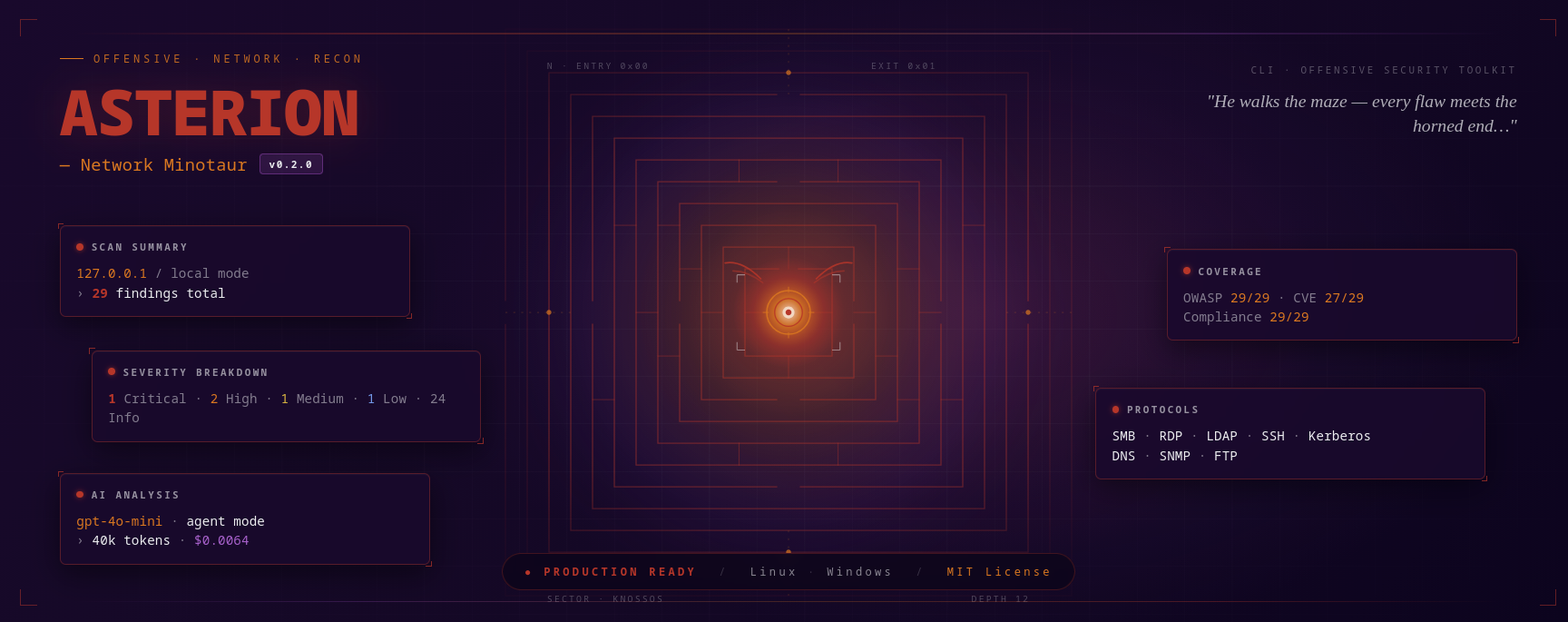
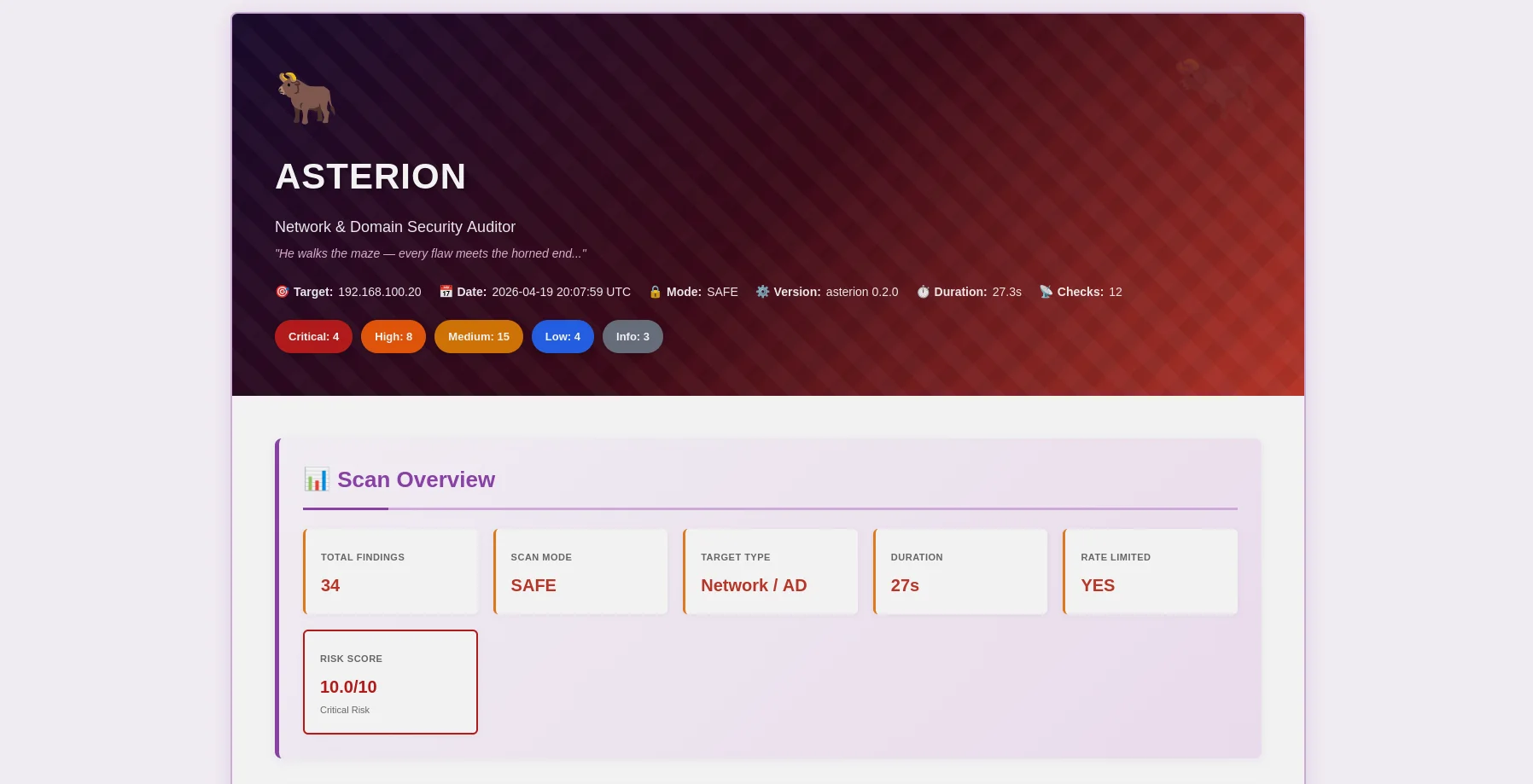
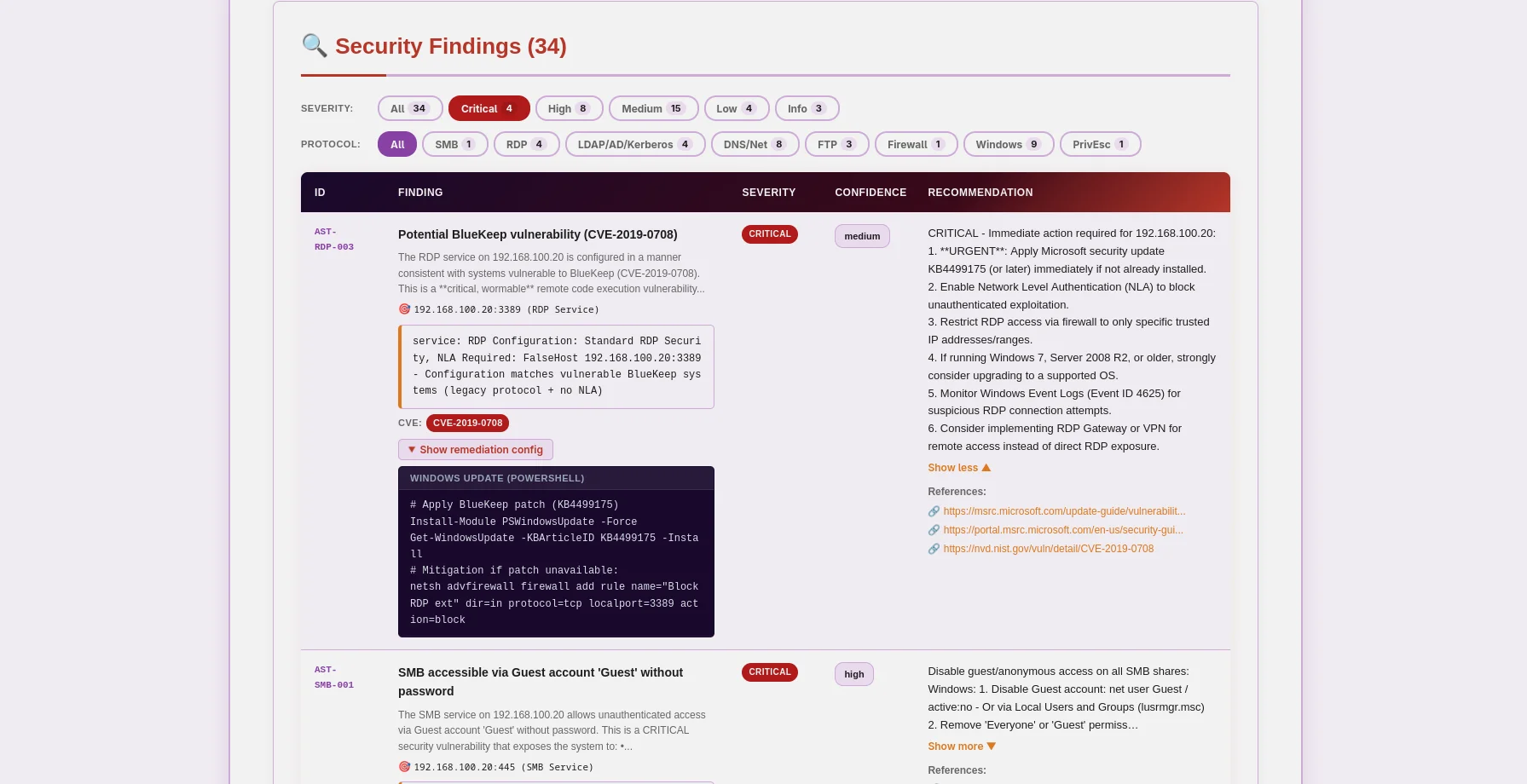
미노타우로스 테마 HTML 보고서 — 심각도 배지, 확장 가능한 증거, AI 수정 권장 |
JSON 보고서 — OWASP/CIS/NIST/PCI 매핑, CVE 데이터, 기계 판독 가능 |
Asterion은 윤리를 최우선으로 하는 프로덕션 수준의 네트워크 및 도메인 보안 감사 도구입니다. 침투 테스터, 보안 연구원 및 기업 보안 팀을 위해 설계되었으며, 전통적인 취약점 스캐닝과 최첨단 AI 분석을 결합하여 Windows Active Directory, Linux 시스템 및 네트워크 인프라에 대한 실행 가능한 인사이트를 제공합니다.
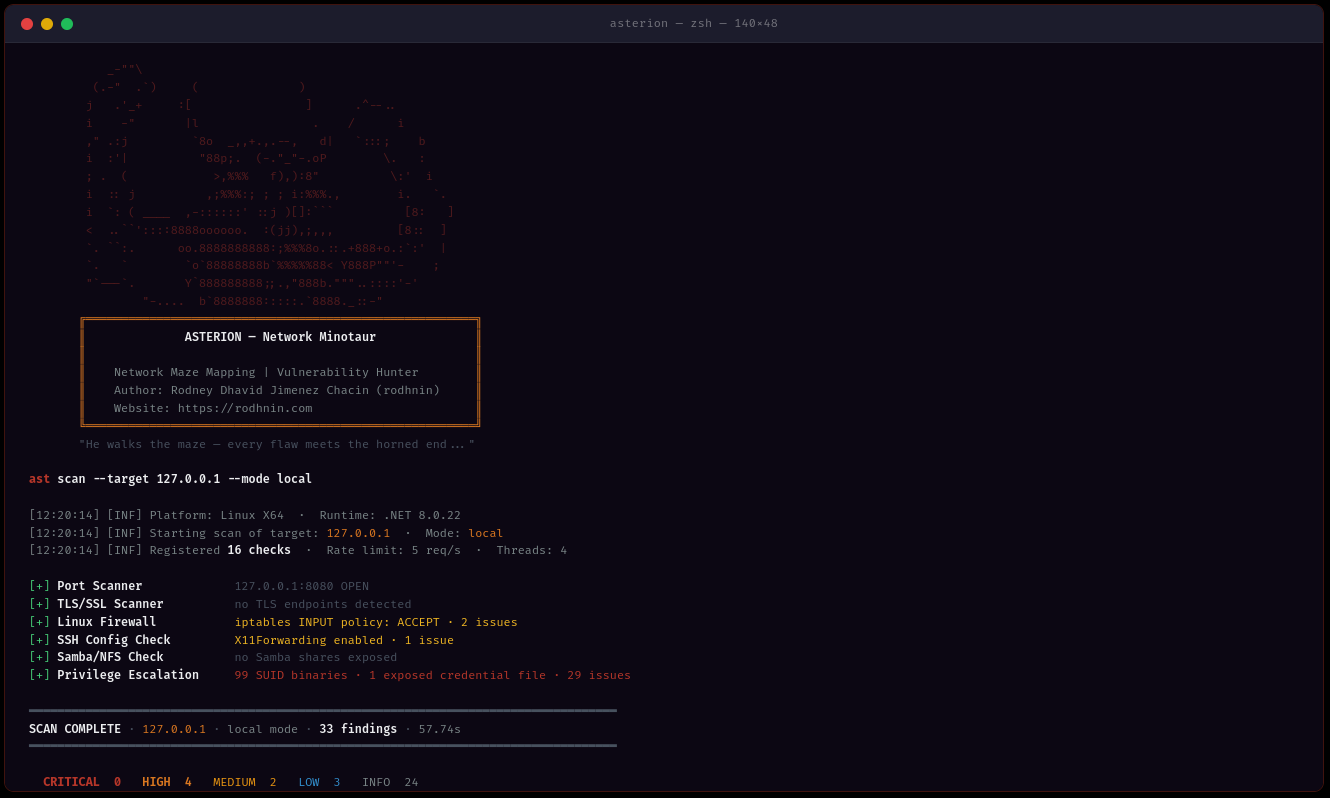
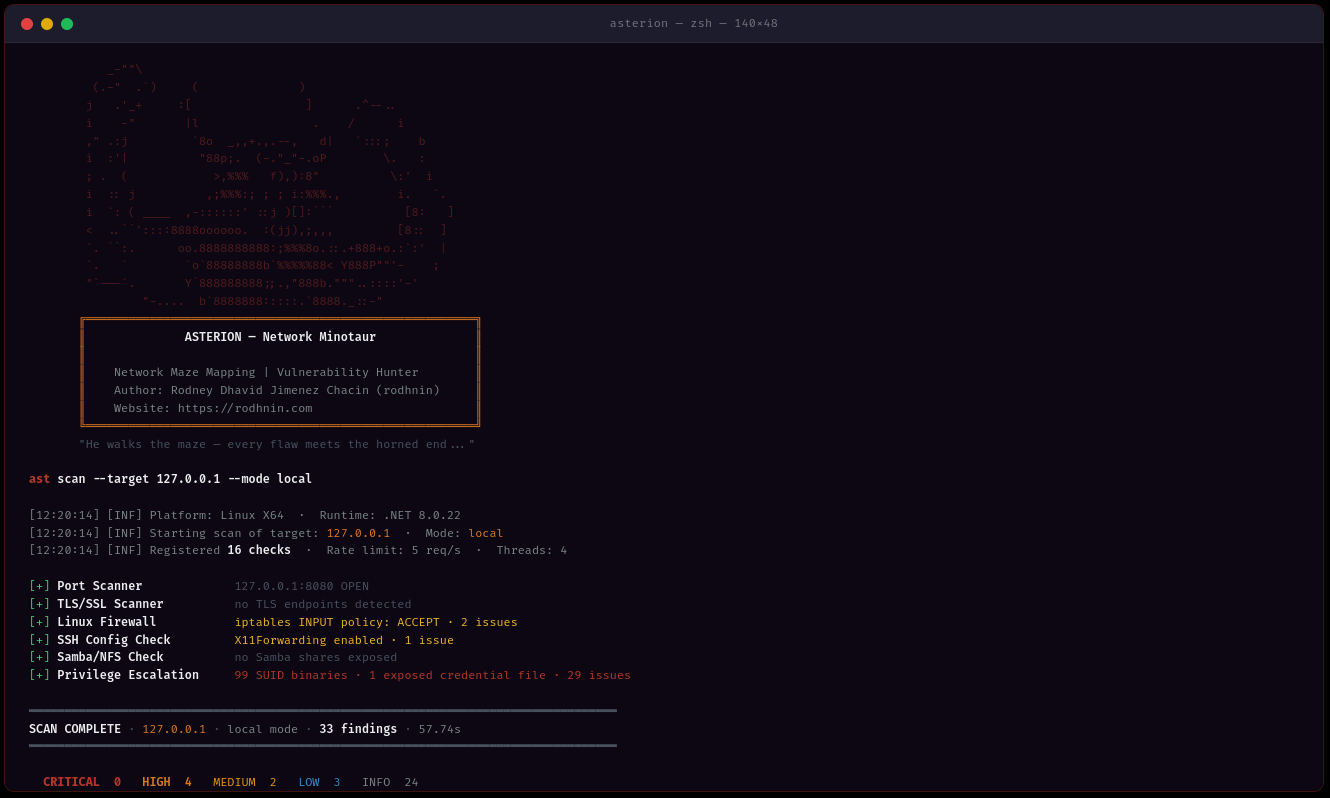
ast scan --target 10.0.0.0/24 --output html
- **다중 방식 탐지**: SMB, RDP, LDAP, Kerberos, SSH, FTP, DNS, SNMP 프로토콜 분석
- **멀티 스레딩**: 1~20개 작업자 스레드로 동시 스캔
- **스마트 속도 제한**: 탐지 회피를 위한 설정 가능한 요청 제한 (1~20 req/s)
- **증거 수집**: SMB 공유, LDAP 쿼리, PowerShell 출력 보존
### 🤖 AI 기반 분석
요구 사항에 따라 AI 제공자를 선택하세요:
| 제공자 | 최적 용도 | 속도 | 비용 | 개인정보 보호 |
| ------------------- | ------------------ | --------------- | ------------- | --------------- |
| **OpenAI GPT-4** | 프로덕션 품질 | ⚡ 빠름 (40초) | 💰 $0.30/스캔 | 🔒 표준 |
| **Anthropic Claude** | 개인정보 보호 중심 | ⚡ 빠름 (50초) | 💰 $0.35/스캔 | 🔒 강화 |
| **Ollama (로컬)** | 완벽한 개인정보 보호 | 🐢 느림 (30분) | 💰 무료 | 🔐 100% 오프라인 |
**두 가지 분석 모드:**
- **기술적**: PowerShell/GPO 명령어와 구성 스니펫을 포함한 단계별 수정 지침
- **경영진용**: 이해관계자와 경영진을 위한 일반 언어 요약
### 📊 전문 보고서
**JSON 보고서** (기계 판독 가능)```json
{
"tool": "asterion",
"version": "0.2.0",
"target": "192.168.1.10",
"riskScore": 10.0,
"summary": {
"critical": 3,
"high": 8,
"medium": 16,
"low": 5,
"info": 2
},
"findings": [
{
"id": "AST-SMB-003",
"title": "SMBv1 protocol enabled (EternalBlue vector)",
"severity": "high",
"owasp": { "id": "A06", "name": "Vulnerable and Outdated Components" },
"vulnerabilities": [
{
"cve_id": "CVE-2017-0143",
"cvss_score": 9.8,
"cwe_id": "CWE-119"
}
],
"cvss": 9.8
}
],
"attackChains": [...],
"diff": { "refScanId": 41, "new": [...], "fixed": [...], "persisting": [...] }
}
HTML 보고서 (사용자 친화적)
Asterion은 기술을 통해 윤리적 해킹을 강화합니다. 적극적인 스캔 및 AI 분석은 소유권 증명이 필요합니다:```bash
ast consent generate --domain corp.local
ast consent verify --method http --domain corp.local --token verify-abc123
ast scan --target corp.local --mode aggressive --use-ai
### 💾 데이터베이스 지속성
Argos Suite와 공유된 SQLite 데이터베이스가 모든 것을 추적합니다:
- **스캔 기록**: 날짜, 소요 시간, 발견 항목 수, 심각도 분류
- **발견 저장소**: 모든 Argos 도구에 걸쳐 검색 가능한 취약점 데이터베이스
- **검증된 도메인**: 만료와 함께 동의 토큰 추적
- **추세 분석**: 시간에 따른 스캔 비교```bash
# Query recent scans (works for all Argos Suite tools)
sqlite3 ~/.argos/argos.db "SELECT * FROM scans WHERE tool='asterion' ORDER BY started_at DESC LIMIT 10"
# Find critical issues
sqlite3 ~/.argos/argos.db "SELECT * FROM v_critical_findings WHERE tool='asterion'"
모든 플랫폼:
선택 사항:
git clone https://github.com/rodhnin/asterion-network-minotaur.git cd asterion-network-minotaur
chmod +x scripts/setup.py python3 scripts/setup.py
**The script will:**
1. ✅ Check prerequisites (.NET, Python)
2. ✅ Install Python dependencies
3. ✅ Setup the shared Argos Suite database
4. ✅ Build Asterion in Release mode
5. ✅ Create directories (~/.asterion, ~/.argos)
6. ✅ Create wrapper script `/usr/local/bin/ast` (optional)
#### Windows (PowerShell)```powershell
# Clone repository
git clone https://github.com/rodhnin/asterion-network-minotaur.git
cd asterion-network-minotaur
# Run setup (right-click PowerShell > Run as Administrator)
.\scripts\setup.ps1
스크립트는 다음을 수행합니다:
자동화된 스크립트가 시스템에서 작동하지 않는 경우 다음 단계를 따르세요:
git clone https://github.com/rodhnin/asterion-network-minotaur.git cd asterion-network-minotaur
#### 2단계: 종속성 설치
**Linux/macOS:**```bash
pip3 install -r scripts/requirements.txt
Windows (명령 프롬프트):```cmd pip install -r scripts\requirements.txt
#### 3단계: 데이터베이스 설정
**Linux/macOS:**```bash
python3 scripts/db_migrate.py
Windows:```cmd python scripts\db_migrate.py
#### 4단계: Asterion 빌드
**모든 플랫폼:**```bash
dotnet build -c Release
Linux/macOS:```bash mkdir -p ~/.asterion/reports mkdir -p ~/.asterion/consent-proofs mkdir -p ~/.argos
**윈도우 (PowerShell):**```powershell
New-Item -ItemType Directory -Force -Path "$env:USERPROFILE\.asterion\reports" | Out-Null
New-Item -ItemType Directory -Force -Path "$env:USERPROFILE\.asterion\consent-proofs" | Out-Null
New-Item -ItemType Directory -Force -Path "$env:USERPROFILE\.argos" | Out-Null
sudo nano /usr/local/bin/ast
#!/bin/bash exec dotnet "$(cd "$(dirname "${BASH_SOURCE[0]}")/.." && pwd)/src/Asterion/bin/Release/net8.0/Asterion.dll" "$@"
sudo chmod +x /usr/local/bin/ast
#### 7단계: API 키 구성 (선택 사항)
단일 환경 변수가 모든 AI 제공업체(OpenAI, Anthropic)에서 작동합니다:
**Linux/macOS:**```bash
export AI_API_KEY="sk-proj-..." # OpenAI key
# or
export AI_API_KEY="sk-ant-..." # Anthropic key
# Add to ~/.bashrc or ~/.zshrc to make permanent
Windows (PowerShell):```powershell $env:AI_API_KEY = "sk-proj-..."
[Environment]::SetEnvironmentVariable("AI_API_KEY", "sk-proj-...", [System.EnvironmentVariableTarget]::User)
#### 8단계: 설치 확인
**Linux/macOS (심볼릭 링크가 생성된 경우):**```bash
ast version
Windows 또는 직접 호출:```cmd .\src\Asterion\bin\Release\net8.0\ast.exe version
dotnet .\src\Asterion\bin\Release\net8.0\Asterion.dll version
### 당신의 첫 번째 스캔
#### 로컬 네트워크 자동 스캔
**Asterion은 로컬 네트워크를 자동으로 발견하고 스캔할 수 있습니다!**
**Windows (PowerShell) — 설정 후 (권장):**```powershell
# Test on localhost (simple)
ast scan --target localhost --output html
# Scan local subnet with AI analysis
ast scan --target 192.168.1.0/24 --output both --threads 10 --rate 5 --use-ai --ai-tone both
# Domain scan with authentication
ast scan --target corp.local --auth "CORP\admin:Password123" --use-ai
Windows (PowerShell) — PATH 설정 없이:```powershell
.\src\Asterion\bin\Release\net8.0\ast.exe scan --target localhost
--output html --use-ai
--ai-tone both
.\src\Asterion\bin\Release\net8.0\ast.exe scan --target 192.168.1.0/24
--output both --threads 10
--rate 5
**Linux/macOS:**```bash
# Scan localhost
ast scan --target localhost \
--output html \
--use-ai \
--ai-tone both
# Scan local subnet (e.g., 192.168.1.0/24)
ast scan --target 192.168.1.0/24 \
--output both \
--threads 10 \
--rate 5
# Scan domain
ast scan --target corp.local \
--auth "CORP\admin:Password123" \
--output html \
--use-ai
Asterion은 --output을 사용하여 세 가지 출력 형식을 지원합니다:
| 형식 |
|---|
--ai-tone을 사용하여 AI 분석의 형식을 제어합니다:
| 어조 | 사용 사례 | 출력 |
|---|---|---|
| technical | 보안 팀 | PowerShell/GPO 명령어를 포함한 단계별 수정 방법 |
간단한 네트워크 스캔 (인증 없음):```bash ast scan --target 10.0.0.0/24
**HTML 보고서 포함:**```bash
ast scan --target 192.168.1.0/24 --output html
인증된 스캔 (Windows 도메인):```bash
ast scan --target dc01.corp.local
--auth "CORP\Administrator:P@ssw0rd"
--output html
**AI 분석 포함 (기술적 + 경영진):**```bash
ast scan --target 10.0.0.0/24 \
--use-ai \
--ai-tone both \
--output html
빠른 스캔 (10개 스레드, 10 req/s):```bash
ast scan --target 10.0.0.0/24
--threads 10
--rate 10
--output json
#### 보고서 위치
**네이티브 설치:**
- 보고서: `~/.asterion/reports/`
- 데이터베이스: `~/.argos/argos.db`
**Windows:**
- 보고서: `%USERPROFILE%\.asterion\reports\`
- 데이터베이스: `%USERPROFILE%\.argos\argos.db`
**Docker 배포:**
- 보고서: `docker/reports/`
- 데이터베이스: `docker/data/argos.db`
**🎉 성공!** 보고서 디렉토리에서 JSON 및 HTML 출력 파일을 확인하세요.
---
### Docker에서 실행하기
**자동 배포:**```bash
cd docker
./deploy.sh # Linux/macOS
.\deploy.ps1 # Windows
수동 Docker 배포:```bash
docker compose up -d
docker compose exec asterion dotnet /app/ast.dll scan
--target 192.168.1.0/24
--output html
docker compose logs -f asterion
docker compose down
---
## 📘 사용 가이드
### 명령 구조```bash
ast <command> [options]
사용 가능한 명령어:
scan — 보안 스캔 실행consent — 동의 토큰 관리version — 버전 정보 표시ast scan --target 192.168.1.0/24
ast scan --target 192.168.1.0/24 --output html
ast scan --target 10.0.0.5 --output both
#### 네트워크 타겟팅```bash
# CIDR notation
ast scan --target 10.0.0.0/24
# IP range
ast scan --target 192.168.1.10-50
# Domain name
ast scan --target corp.local
# Single host
ast scan --target 192.168.1.1
ast scan --target 10.0.0.0/24 --threads 3 --rate 2
ast scan --target 10.0.0.0/24 --threads 15 --rate 15
ast scan --target 10.0.0.0/24 --ports 445,3389,22,139
#### Windows 도메인 스캐닝```bash
# Network + LDAP/Kerberos/AD checks
ast scan --target dc01.corp.local \
--auth "CORP\Administrator:P@ssw0rd"
# WinRM: remote firewall, registry, services, privesc
ast scan --target 192.168.1.10 \
--winrm "CORP\admin:P@ssw0rd"
# Full Windows audit: auth + WinRM + AI + HTML
ast scan --target 192.168.1.10 \
--auth "CORP\admin:P@ssw0rd" \
--winrm "CORP\admin:P@ssw0rd" \
--use-ai --ai-tone technical -o both -v
# With NTLM hash (Pass-the-Hash)
ast scan --target 10.0.0.5 \
--auth-ntlm "admin:aad3b435b51404eeaad3b435b51404ee:8846f7eaee8fb117ad06bdd830b7586c"
# Diff against last scan (track security changes)
ast scan --target 192.168.1.10 --winrm "CORP\admin:P@ssw0rd" --diff last -o both
ast scan --target 10.0.0.25 --ssh "admin:password"
ast scan --target 10.0.0.25 --ssh "admin:password" --sudo-password "sudopass"
ast scan --target 10.0.0.25 --ssh-key "admin:~/.ssh/id_rsa"
ast scan --target internal.corp.local
--bastion "bastion.corp.local:jumpuser:~/.ssh/bastion_key"
--ssh "admin:password"
ast scan --target 10.0.0.25
--ssh "root:toor"
--use-ai --ai-tone technical -o both -v
#### AI 기반 분석```bash
# Technical remediation (default, for security teams)
ast scan --target 10.0.0.5 \
--ssh "root:pass" \
--use-ai --ai-tone technical -o html
# Executive summary (for management)
ast scan --target 10.0.0.5 \
--use-ai --ai-tone non_technical -o html
# Both formats + streaming output
ast scan --target 10.0.0.5 --use-ai --ai-tone both --ai-stream -o both
# Agent mode (NVD CVE lookup tool enabled)
ast scan --target 10.0.0.5 --ssh "root:pass" --use-ai --ai-agent -v
# Compare two models
ast scan --target 10.0.0.5 --use-ai \
--ai-compare "openai/gpt-4o-mini-2024-07-18,anthropic/claude-3-5-haiku-20241022"
# Enforce cost budget
ast scan --target 10.0.0.5 --winrm "admin:pass" --use-ai --ai-budget 0.05
ast scan --target 10.0.0.5 -v
ast scan --target 10.0.0.5 -v --timeout 20
ast scan --target 10.0.0.5 --timeout 5
### 동의 토큰 관리
#### 동의 토큰 생성```bash
ast consent generate --domain corp.local
# Output: Token: verify-a3f9b2c1d8e4f5a6
HTTP 메서드 (웹 서버에 파일 배치):```bash
ast consent verify
--method http
--domain corp.local
--token verify-a3f9b2c1d8e4f5a6
**DNS 방법** (TXT 레코드 추가):```bash
# 1. Add DNS TXT record: corp.local = "asterion-verify=verify-a3f9b2c1d8e4f5a6"
# 2. Verify:
ast consent verify \
--method dns \
--domain corp.local \
--token verify-a3f9b2c1d8e4f5a6
SSH 방식 (시스템에 파일 생성):```bash
ast consent verify
--method ssh
--domain corp.local
--token verify-a3f9b2c1d8e4f5a6
--ssh "user:password"
#### 공격 모드 실행```bash
# After verifying consent token:
ast scan --target corp.local --mode aggressive
ast scan --target 192.168.1.0/24 --output html --threads 10 --rate 10
#### 시나리오 2: 전체 도메인 감사```bash
# Complete Windows AD assessment with AI analysis
ast scan --target corp.local \
--auth "CORP\admin:P@ssw0rd" \
--use-ai \
--ai-tone both \
--output both \
--threads 8 \
--rate 8
ast scan --target 10.0.0.0/24
--threads 2
--rate 1
--timeout 20
--output json
#### 시나리오 4: 침투 테스트```bash
# Generate consent first
ast consent generate --domain internal.corp
# Place token and verify
ast consent verify --method http --domain internal.corp --token <token>
# Run aggressive assessment
ast scan --target internal.corp \
--mode aggressive \
--auth "CORP\pentest:P@ssw0rd" \
--use-ai \
--output both
Asterion은 Python 브릿지를 통해 여러 AI 제공자를 지원하는 LangChain 1.0.0을 사용하여 보안, 개인정보 보호 및 예산 요구 사항에 따라 유연성을 제공합니다.
최적: 프로덕션 사용
#### Anthropic Claude
**최적 용도: 향상된 개인정보 보호**
- ⭐ 품질: 우수 (5/5)
- ⚡ 속도: ~50–70초
- 💰 비용: ~$0.007–0.015 스캔당 (claude-3-5-haiku)
- 🔒 개인정보 보호: 향상됨 (Anthropic의 개인정보 우선 접근 방식)```bash
export AI_API_KEY="sk-ant-..." # Same variable, Anthropic key format
최적 용도: 완벽한 프라이버시
ollama pull llama3.2
### 개인정보 보호 및 보안
**자동 정화**
AI 제공업체에 데이터를 보내기 전에 Asterion이 자동으로 제거합니다:
- ✅ 동의 토큰
- ✅ 도메인 자격 증명(비밀번호, NTLM 해시)
- ✅ 개인 식별 정보(PII)
- ✅ 내부 IP 주소(요청 시)
- ✅ 민감한 데이터가 포함된 SMB 공유 경로
**옵트인 전용**
- AI 분석에는 명시적인 `--use-ai` 플래그가 필요합니다
- 공격적 스캔에는 검증된 동의 토큰이 필요합니다
- 어떤 제공업체가 데이터를 볼지 사용자가 제어합니다
**최대 프라이버시를 위해**
로컬에서 Ollama를 사용하세요. 속도가 느리고 정확도가 떨어질 수 있지만, 스캔 데이터가 기기를 떠나지 않습니다.
### 제공업체 전환
**현재 방법(v0.2.0):** `config/defaults.yaml` 편집```yaml
ai:
langchain:
provider: "ollama" # Changed from "openai"
model: "llama3.2" # Ollama model
ollama_base_url: "http://localhost:11434"
Coming in v0.3.0: 대화형 설정 메뉴 (Metasploit 스타일)```bash
ast --show-options ast --set ai.provider=anthropic ast --save-profile privacy-mode
---
## 🧪 안전한 테스트 실습 환경
**⚠️ 절대 서면 허가 없이 운영 네트워크를 스캔하지 마세요!**
Docker 실습 환경을 사용하여 안전하게 연습하세요:
### 테스트 환경 설정```bash
# Navigate to docker directory
cd docker
# Deploy vulnerable network lab
docker-compose -f compose.testing.yml up -d
# Wait for services to start (~60 seconds)
docker-compose -f compose.testing.yml logs -f
# Create vulnerable conditions
docker-compose -f compose.testing.yml exec windows-target powershell -c "Disable-NetFirewallProfile -All"
cd ..
ast scan --target 172.20.0.0/24 --output html
ast scan --target 172.20.0.2 --auth "LAB\admin:P@ssw0rd123" --output both
ast scan --target 172.20.0.0/24 --use-ai --output html
### 정리```bash
cd docker
docker-compose -f compose.testing.yml down -v # -v removes all data
자세한 테스트 시나리오는 docs/TESTING_GUIDE.md를 참조하세요.
본인이 소유했거나 명시적인 서면 허가를 받은 네트워크와 시스템만 스캔하세요.
Asterion은 오용을 방지하기 위해 기술적 통제 장치를 구현합니다:
대부분의 관할권에서 컴퓨터 시스템에 대한 무단 접근은 불법입니다:
전체 윤리 지침은 docs/ETHICS.md를 참조하세요.
Asterion은 크로스 플랫폼 배포 스크립트를 제공합니다:
Linux/macOS:```bash cd docker ./deploy.sh
**윈도우 (PowerShell):**```powershell
cd docker
.\deploy.ps1
배포 옵션:
Linux/macOS:```bash cd docker docker compose up -d
docker compose exec asterion dotnet /app/ast.dll scan --target 10.0.0.0/24
docker compose logs -f asterion
docker compose down
**Windows (PowerShell):**```powershell
cd docker
docker compose up -d
# Execute scans (note the dotnet wrapper)
docker compose exec asterion dotnet /app/ast.dll scan --target 10.0.0.0/24
# View logs
docker compose logs -f asterion
# Stop service
docker compose down
영구 데이터:
./reports/ → 호스트 디렉토리 docker/reports/./data/argos.db → 호스트 디렉토리 docker/data/argos.db (공유 Argos Suite DB)./logs/asterion.log → 호스트 디렉토리 docker/logs/asterion.log참고: Asterion은 ASTERION_IN_DOCKER 환경 변수를 통해 Docker 환경을 자동으로 감지합니다.
Docker 전체 문서(Linux/Windows)는 다음을 참조하세요: docker/README.md
네이티브 설치:``` ~/.asterion/ ├── reports/ │ ├── asterion_report_10_0_0_0_24_20260419_143000.json # Machine-readable │ └── asterion_report_10_0_0_0_24_20260419_143000.html # Human-friendly (Minotaur-themed) └── consent-proofs/ └── corp_local_verify-abc123_20260419.txt
~/.argos/ ├── argos.db # Shared Argos Suite database └── logs/ └── argos.log # Shared log file
**도커 배포:**```
asterion-network-minotaur/
├── docker/
│ ├── reports/
│ │ ├── asterion_report_10_0_0_0_24_20260419_143000.json
│ │ └── asterion_report_10_0_0_0_24_20260419_143000.html
│ ├── data/
│ │ └── argos.db # Shared Argos Suite database (Docker)
│ ├── logs/
│ │ └── asterion.log
│ └── workspace/
│ └── consent-proofs/
참고: Docker 환경은 ASTERION_IN_DOCKER 환경 변수를 통해 자동으로 감지됩니다.
{ "tool": "asterion", "version": "0.2.0", "target": "10.0.0.0/24", "date": "2026-04-13T14:30:00Z", "mode": "safe", "summary": { "critical": 12, "high": 8, "medium": 15, "low": 5, "info": 20 }, "findings": [ { "id": "AST-SMB-003", "title": "SMBv1 enabled (EternalBlue vulnerability)", "severity": "critical", "confidence": "high", "description": "SMBv1 is enabled on this system. This protocol is vulnerable to EternalBlue (CVE-2017-0143), a critical remote code execution vulnerability exploited by WannaCry ransomware.", "evidence": { "type": "smb", "value": "SMBv1 negotiated successfully", "context": "Port 445/tcp open, SMB signing not required" }, "recommendation": "URGENT - Disable SMBv1 immediately:\n\nPowerShell:\nDisable-WindowsOptionalFeature -Online -FeatureName SMB1Protocol -NoRestart\n\nGroup Policy:\nComputer Configuration → Administrative Templates → MS Security Guide\n→ Configure SMBv1 client driver startup = Disabled\n→ Configure SMBv1 server = Disabled\n\nVerify:\nGet-SmbServerConfiguration | Select EnableSMB1Protocol", "references": [ "https://docs.microsoft.com/en-us/windows-server/storage/file-server/troubleshoot/detect-enable-and-disable-smbv1-v2-v3", "https://nvd.nist.gov/vuln/detail/CVE-2017-0143" ], "affected_component": "SMB Server" }, { "id": "AST-LDAP-001", "title": "LDAP anonymous bind allowed", "severity": "high", "confidence": "high", "description": "LDAP server allows anonymous bind, permitting unauthenticated enumeration of domain users, groups, and configuration.", "evidence": { "type": "ldap", "value": "Anonymous bind successful to port 389/tcp", "context": "Retrieved domain base DN: DC=corp,DC=local" }, "recommendation": "Disable LDAP anonymous bind:\n\nGroup Policy:\nComputer Configuration → Policies → Windows Settings → Security Settings → Local Policies → Security Options\n→ Network access: Allow anonymous SID/Name translation = Disabled\n→ Network access: Do not allow anonymous enumeration of SAM accounts = Enabled\n→ Network access: Do not allow anonymous enumeration of SAM accounts and shares = Enabled\n\nRegistry:\nreg add "HKLM\SYSTEM\CurrentControlSet\Control\Lsa" /v RestrictAnonymous /t REG_DWORD /d 1 /f", "affected_component": "LDAP Server" }, { "id": "AST-RDP-001", "title": "RDP without Network Level Authentication (NLA)", "severity": "high", "confidence": "high", "description": "Remote Desktop Protocol (RDP) is configured without Network Level Authentication (NLA). This allows unauthenticated attackers to reach the login screen and attempt brute-force attacks.", "evidence": { "type": "rdp", "value": "RDP port 3389/tcp open, NLA not required", "context": "Encryption level: High" }, "recommendation": "Enable Network Level Authentication:\n\nPowerShell:\n(Get-WmiObject -class Win32_TSGeneralSetting -Namespace root\cimv2\terminalservices -Filter "TerminalName='RDP-tcp'").SetUserAuthenticationRequired(1)\n\nGroup Policy:\nComputer Configuration → Administrative Templates → Windows Components → Remote Desktop Services → Remote Desktop Session Host → Security\n→ Require user authentication for remote connections by using Network Level Authentication = Enabled", "affected_component": "RDP Server" } ], "notes": { "scan_duration_seconds": 67.5, "targets_scanned": 12, "rate_limit_applied": true, "scope_limitations": "Scan limited to network services. Local system checks require SSH/WinRM credentials.", "false_positive_disclaimer": "Manual verification recommended for all findings before remediation." }, "aiAnalysis": { "executiveSummary": "The network scan identified 12 critical security vulnerabilities requiring immediate attention...", "technicalRemediation": "### Critical Issues\n\n1. \n - Affected systems: 10.0.0.5, 10.0.0.10\n - Remediation: Disable SMBv1...", "generatedAt": "2026-04-19T14:35:00Z", "modelUsed": "gpt-4o-mini-2024-07-18", "provider": "openai" } }
### HTML Report 기능
- **📊 임원 대시보드**: 심각도 수와 미노타우르 브랜딩이 포함된 요약 카드
- **🤖 AI 분석**: 임원 및 기술 인사이트를 위한 확장 가능한 섹션
- **🔍 상세 결과**: 심각도별로 정리된 PowerShell/GPO 수정 명령어
- **📋 증거**: SMB 공유, LDAP 쿼리, RDP 구성, PowerShell 출력
- **🔗 외부 참조**: CVE, Microsoft 문서, OWASP 가이드 링크
- **📱 모바일 반응형**: 모든 기기에서 작동
- **🎨 미노타우르 테마**: 빨강/주황/보라 색 구성표
---
## 📁 프로젝트 구조```
asterion-network-minotaur/
│
├── src/
│ ├── Asterion/ # Main C# application
│ │ ├── Asterion.csproj # .NET project file
│ │ │
│ │ ├── Checks/ # Security check modules
│ │ │ ├── ICheck.cs # Check interface
│ │ │ ├── BaseCheck.cs # Abstract base class (350 lines)
│ │ │ ├── CheckCategory.cs # Check category enum
│ │ │ │
│ │ │ ├── CrossPlatform/ # Network service scanners (work from any OS)
│ │ │ │ ├── PortScanner.cs # TCP port scanning
│ │ │ │ ├── SmbScanner.cs # SMB/CIFS security (42KB)
│ │ │ │ ├── RdpScanner.cs # RDP configuration (24KB)
│ │ │ │ ├── LdapScanner.cs # LDAP/AD security (38KB)
│ │ │ │ ├── KerberosScanner.cs # Kerberos security (22KB)
│ │ │ │ ├── SnmpScanner.cs # SNMP vulnerabilities (21KB)
│ │ │ │ ├── DnsScanner.cs # DNS misconfigurations (14KB)
│ │ │ │ ├── FtpScanner.cs # FTP security (27KB)
│ │ │ │ ├── TlsScanner.cs # TLS/SSL certificate checks
│ │ │ │ ├── SysvolCheck.cs # SYSVOL/GPP password exposure
│ │ │ │ ├── AdAggressiveCheck.cs # AS-REP roasting, delegation, weak ACLs
│ │ │ │ └── WinRmChecks.cs # Remote Windows audit via WS-Man
│ │ │ │
│ │ │ ├── Windows/ # Local Windows system checks
│ │ │ │ ├── WinFirewallCheck.cs # Firewall configuration
│ │ │ │ ├── WinRegistryCheck.cs # Registry security
│ │ │ │ ├── AdPolicyCheck.cs # Active Directory policies
│ │ │ │ ├── WinServicesCheck.cs # Service misconfigurations
│ │ │ │ └── PrivEscCheckWin.cs # Windows privilege escalation
│ │ │ │
│ │ │ └── Linux/ # Local/remote Linux checks (via SSH)
│ │ │ ├── LinuxFirewallCheck.cs # iptables/nftables/ufw
│ │ │ ├── SshConfigCheck.cs # SSH hardening
│ │ │ ├── SambaNfsCheck.cs # Samba/NFS security
│ │ │ └── PrivEscCheckLinux.cs # SUID, sudo misconfig
│ │ │
│ │ ├── Core/ # Core infrastructure
│ │ │ ├── Orchestrator.cs # Main execution engine (1,243 lines)
│ │ │ ├── Config.cs # YAML configuration loader
│ │ │ ├── ScanOptions.cs # Scan configuration
│ │ │ ├── Database.cs # SQLite operations
│ │ │ ├── ConsentValidator.cs # Consent token verification
│ │ │ ├── SshConnectionManager.cs # SSH.NET wrapper (password/key/bastion)
│ │ │ ├── WinRmConnectionManager.cs # WS-Man HTTP/NTLM (Linux → Windows)
│ │ │ ├── AttackChainAnalyzer.cs # Multi-step attack chain correlation
│ │ │ ├── NtlmSpnego.cs # NTLM/SPNEGO auth implementation
│ │ │ ├── NtlmV2Auth.cs # NTLMv2 auth implementation
│ │ │ │
│ │ │ ├── Output/
│ │ │ │ └── ReportBuilder.cs # Report generation (risk score, labels)
│ │ │ │
│ │ │ └── Utils/
│ │ │ ├── NetworkUtils.cs # Network operations
│ │ │ ├── CidrParser.cs # CIDR/IP range parsing
│ │ │ ├── AuthenticationManager.cs # Credential handling
│ │ │ └── OsDetector.cs # Per-target OS detection (SSH/SMB/TTL)
│ │ │
│ │ ├── Models/ # Data models
│ │ │ ├── Report.cs # Main report structure
│ │ │ ├── Finding.cs # Security finding (OWASP/CVE/Compliance)
│ │ │ ├── Evidence.cs # Finding proof
│ │ │ ├── ConsentInfo.cs # Consent verification
│ │ │ └── AiAnalysis.cs # AI-generated content (cost tracking)
│ │ │
│ │ ├── Program.cs # Application entry point
│ │ └── Cli.cs # CLI argument parser (all flags)
│ │
│ └── Asterion.sln # Visual Studio solution
│
├── scripts/ # Python bridge scripts
│ ├── ai_analyzer.py # LangChain AI integration (stream/agent/compare)
│ ├── cve_lookup.py # NVD API v2 CVE enrichment
│ ├── owasp.py # OWASP Top 10 mapping (139 entries)
│ ├── compliance.py # CIS/NIST/PCI mapping (95 entries)
│ ├── db_migrate.py # Database setup
│ ├── render_html.py # HTML report generation (Jinja2)
│ ├── setup.sh # Linux/macOS installation script
│ ├── setup.ps1 # Windows PowerShell setup
│ └── requirements.txt # Python dependencies
│
├── config/ # Configuration files
│ ├── defaults.yaml # Default settings
│ └── prompts/ # AI prompt templates
│ ├── technical.txt # Technical remediation prompts
│ └── non_technical.txt # Executive summary prompts
│
├── db/
│ └── migrate.sql # Database schema (shared with Argos Suite)
│
├── docker/ # Docker deployment
│ ├── Dockerfile # Production image
│ ├── docker-compose.yml # Production deployment
│ ├── compose.testing.yml # Vulnerable lab environment
│ ├── .dockerignore
│ ├── .env.example
│ └── README.md # Docker instructions
│
├── docs/ # Documentation
│ ├── AI_INTEGRATION.md # AI setup guide
│ ├── CONSENT.md # Consent token system
│ ├── DATABASE_GUIDE.md # SQLite schema and queries
│ ├── ETHICS.md # Ethical guidelines
│ ├── NETWORK_CHECKS.md # Complete check catalog (50+ checks)
│ └── ROADMAP.md # Development roadmap
│
├── schema/
│ └── report.schema.json # Argos Suite unified schema
│
├── templates/
│ └── report.html.j2 # HTML report template (35KB, Minotaur-themed)
│
├── assets/
│ └── ascii.txt # Minotaur ASCII art banner
│
├── CHANGELOG.md # Version history
├── README_PATTERN.md # README visual branding guide
├── LICENSE # MIT License
└── README.md # This file
통계:
상태: 🎉 출시됨
--winrm)--ssh-key, --bastion, --sudo-password)--diff last / --diff <id> — 보안 회귀 추적--creds-file credentials.yaml--ai-budget, 비용이 DB + costs.json에 저장됨--ai-stream, --ai-agent, 초점: 사용성, 확장성, 대화형 AI
--show-options, --set)ast db scans list, ast db findings search)초점: 자동 수정, ML 탐지, 분산 스캐닝
자세한 기능 설명은 docs/ROADMAP.md를 참조하세요.
기여를 환영합니다! 다음과 같은 형태로 가능합니다:
git checkout -b feature/amazing-feature)git commit -m 'Add amazing feature')git push origin feature/amazing-feature)git clone https://github.com/YOUR-USERNAME/asterion-network-minotaur.git cd asterion-network-minotaur
pip install -r scripts/requirements.txt dotnet restore
dotnet build
dotnet run --project src/Asterion -- scan --target 192.168.1.1 -v
### 코드 스타일
- **C# 서식**: Microsoft C# 코딩 규칙 준수
- **Python 서식**: [Black](https://github.com/psf/black) 사용 (줄 길이: 88)
- **XML 문서**: 모든 public 클래스/메서드에 필수
- **코드 주석**: 인라인 주석은 `//`, XML 문서는 `///` 사용
### 문제 보고
버그를 발견했거나 기능 요청이 있으신가요?
**이슈 열기**: https://github.com/rodhnin/asterion-network-minotaur/issues
다음을 포함해 주세요:
- Asterion 버전 (`ast version`)
- .NET 버전 (`dotnet --version`)
- Python 버전 (`python --version`)
- 운영 체제
- 재현 단계 (버그의 경우)
- 예상 동작과 실제 동작
---
## 📚 문서
`docs/` 디렉토리에서 종합 문서를 확인할 수 있습니다:
| 문서 | 설명 |
| --------------------------------------------- | -------------------------------------------- |
| [AI_INTEGRATION.md](https://github.com/rodhnin/asterion-network-minotaur/blob/main/docs/AI_INTEGRATION.md) | 전체 AI 설정 가이드 (3개 제공자 모두) |
| [CONSENT.md](https://github.com/rodhnin/asterion-network-minotaur/blob/main/docs/CONSENT.md) | 동의 토큰 시스템 기술 세부사항 |
| [DATABASE_GUIDE.md](https://github.com/rodhnin/asterion-network-minotaur/blob/main/docs/DATABASE_GUIDE.md) | SQLite 스키마, 쿼리, 관리 |
| [ETHICS.md](https://github.com/rodhnin/asterion-network-minotaur/blob/main/docs/ETHICS.md) | 법적 프레임워크 및 윤리 지침 |
| [NETWORK_CHECKS.md](https://github.com/rodhnin/asterion-network-minotaur/blob/main/docs/NETWORK_CHECKS.md) | 50개 이상의 보안 검사 전체 목록 |
| [ROADMAP.md](https://github.com/rodhnin/asterion-network-minotaur/blob/main/docs/ROADMAP.md) | 향후 기능 및 개발 계획 |
### 빠른 링크
- **변경 로그**: [CHANGELOG.md](https://github.com/rodhnin/asterion-network-minotaur/blob/main/CHANGELOG.md)
- **라이선스**: [LICENSE](https://github.com/rodhnin/asterion-network-minotaur/blob/main/LICENSE)
- **ASCII 아트**: [assets/ascii.txt](https://github.com/rodhnin/asterion-network-minotaur/blob/main/assets/ascii.txt)
---
## 🤝 Argos Suite의 일부
Asterion은 **Argos 보안 제품군**의 네 번째 구성 요소입니다:
| 도구 | 언어 | 대상 | 상태 |
| -------------- | ------------ | ------------------------ | ------------ |
| **Argus** | Python | WordPress | ✅ 안정 |
| **Hephaestus** | Python | 서버 (Linux/Windows) | ✅ 안정 |
| **Pythia** | Python | SQL 인젝션 | ✅ 안정 |
| **Asterion** | C# + Python | 네트워크/도메인/AD | 🎉 출시 |
**공유 인프라:**
- SQLite 데이터베이스 (`~/.argos/argos.db`)
- 통합 JSON 보고서 스키마
- 동의 토큰 시스템
- LangChain을 통한 AI 분석
---
## ⚖️ 라이선스
이 프로젝트는 **MIT 라이선스**에 따라 라이선스가 부여됩니다 - 자세한 내용은 [LICENSE](https://github.com/rodhnin/asterion-network-minotaur/blob/main/LICENSE) 파일을 참조하세요.```
MIT License
Copyright (c) 2025-2026 Rodney Dhavid Jimenez Chacin
Permission is hereby granted, free of charge, to any person obtaining a copy
of this software and associated documentation files (the "Software"), to deal
in the Software without restriction, including without limitation the rights
to use, copy, modify, merge, publish, distribute, sublicense, and/or sell
copies of the Software, and to permit persons to whom the Software is
furnished to do so, subject to the following conditions:
The above copyright notice and this permission notice shall be included in all
copies or substantial portions of the Software.
THE SOFTWARE IS PROVIDED "AS IS", WITHOUT WARRANTY OF ANY KIND, EXPRESS OR
IMPLIED, INCLUDING BUT NOT LIMITED TO THE WARRANTIES OF MERCHANTABILITY,
FITNESS FOR A PARTICULAR PURPOSE AND NONINFRINGEMENT.
중요: 이 도구는 인가된 보안 테스트 전용입니다.
Asterion을 사용함으로써 귀하는 다음 사항을 인정하고 동의합니다:
Asterion을 사용하여 취약점을 발견한 경우:
스캔하지 마십시오. 허가가 있는지 확실하지 않다면, 아마 없는 것입니다.
Asterion은 거인들의 어깨 위에 서 있습니다:
윤리적 해킹을 실천하고 장려하는 모든 보안 연구자에게 특별한 감사를 드립니다.
Rodney Dhavid Jimenez Chacin (rodhnin)
질문, 피드백 또는 협업 문의는 rodhnin.com을 방문해 주세요.
| 검사 카테고리 | 세부 사항 |
|---|
| SMB/CIFS 보안 | 익명 공유, SMB 서명, SMBv1 (EternalBlue), NTLMv1, 쓰기 가능한 공유 |
| RDP 보안 | 네트워크 수준 인증(NLA), 암호화 수준, 노출된 RDP |
| LDAP/Active Directory | 익명 바인드, LDAP 서명, 암호 정책, Kerberos 사전 인증 |
| Kerberos 보안 | AS-REP 로스팅, 케르베로스팅, 과도한 티켓 수명 |
| SNMP | 기본 커뮤니티 문자열, SNMPv1/v2c, 쓰기 액세스 |
| DNS/NetBIOS | 영역 전송(AXFR), LLMNR/NetBIOS 중독, mDNS |
| Windows 시스템 | 방화벽, 레지스트리(UAC, LSA), 서비스, 권한 상승 |
| Linux 시스템 | iptables/nftables, SSH, Samba/NFS, SUID 바이너리, sudo 오설정 |
| 명령어 |
|---|
| 출력 |
|---|
| JSON | --output json | 기계 판독 가능 보고서 (기본값) |
| HTML | --output html | 미노타우로스 테마의 아름다운 보고서 |
| 둘 다 | --output both | JSON과 HTML 모두 생성 |
| 경영진 요약 |
| 경영진을 위한 평이한 언어 설명 |
| both | 종합 분석 | 기술 및 경영진 두 가지 형식 모두 |
| 옵션 | 값 | 기본값 | 설명 |
|---|
--target, -t | IP/CIDR/domain | Required | 대상: 192.168.1.0/24, 10.0.0.1, corp.local, 쉼표로 구분된 목록 |
--mode, -m | safe, aggressive | safe | 스캔 모드 (aggressive 모드는 동의 토큰 필요) |
--output, -o | json, html, both | json | 출력 형식 |
--ports, -p | 포트 목록 | 자동 감지 | 스캔할 포트 (예: 22,80,443 또는 8000-9000) |
--threads | 1-20 | 5 | 동시 스레드 수 |
--rate | 1-20 | 5 | 요청 속도 제한 (req/s) |
--timeout | 초 | 10 | 연결 시간 초과 |
--verify-ssl | 플래그 | true | SSL/TLS 인증서 확인 (자체 서명 인증서의 경우 비활성화) |
--verbose, -v | 플래그 | false | 상세 로깅 활성화 |
--diff | last / scan_id | - | 이전 스캔과 비교 (--diff last 또는 --diff 42) |
--creds-file | YAML 경로 | - | YAML 파일에서 모든 자격 증명 로드 |
| 옵션 | 값 | 설명 |
|---|
--auth | DOMAIN\user:pass | LDAP/Kerberos/SMB/AD 점검을 위한 도메인 자격 증명 |
--auth-ntlm | user:hash | Pass-the-hash NTLM 인증 |
--kerberos | user:pass@REALM | Kerberos 자격 증명 |
--winrm | DOMAIN\user:pass | WinRM 원격 Windows 점검 (방화벽, 레지스트리, 서비스, AD) |
--ssh | user:pass | 원격 Linux 점검을 위한 SSH 비밀번호 인증 |
--ssh-key | user:/path/key | SSH 키 기반 인증 |
--sudo-password | pass | Linux 권한 점검을 위한 sudo 상승 비밀번호 |
--bastion | host:user:key | 멀티홉 SSH를 위한 점프/배스천 호스트 |
| 옵션 | 값 | 기본값 | 설명 |
|---|
--use-ai | 플래그 | false | AI 기반 분석 활성화 |
--ai-tone | technical, non_technical, both | technical | AI 분석 형식 |
--ai-provider | openai, anthropic, ollama | openai | AI 제공자 |
--ai-model | 모델 이름 | gpt-4o-mini-2024-07-18 | 사용할 AI 모델 |
--ai-budget | USD 금액 | - | 예상 비용이 이 값을 초과하면 AI 중단 |
--ai-stream | 플래그 | false | 실시간으로 stdout에 AI 토큰 스트리밍 |
--ai-agent | 플래그 | false | LangChain 에이전트 모드 (NVD CVE 조회 도구 포함) |
--ai-compare | prov/model,prov/model | - | 다중 모델 비교 |
| 모드 | 검사 항목 | 동의 필요 여부 | 속도 제한 |
|---|
| 안전 | 비침습적 네트워크 검사 | ❌ 아니요 | 5 req/s |
| 공격적 | 심층 AD/시스템 테스트 | ✅ 예 | 10 req/s |
| AI 분석 | 취약점 분석 | ✅ 예 | 해당 없음 |
--ai-compare