
AI 기반 분석, 윤리적 준수 프레임워크, 전문적인 보고 기능을 갖춘 WordPress 보안 스캐너입니다.
윤리적 WordPress 취약점 스캐너 — 실시간 CVE 연동, OWASP 매핑, AI 기반 분석, 동의 기반 테스트.
빠른 시작 · 문서 · Docker · AI 기능 · GitHub에서 스타
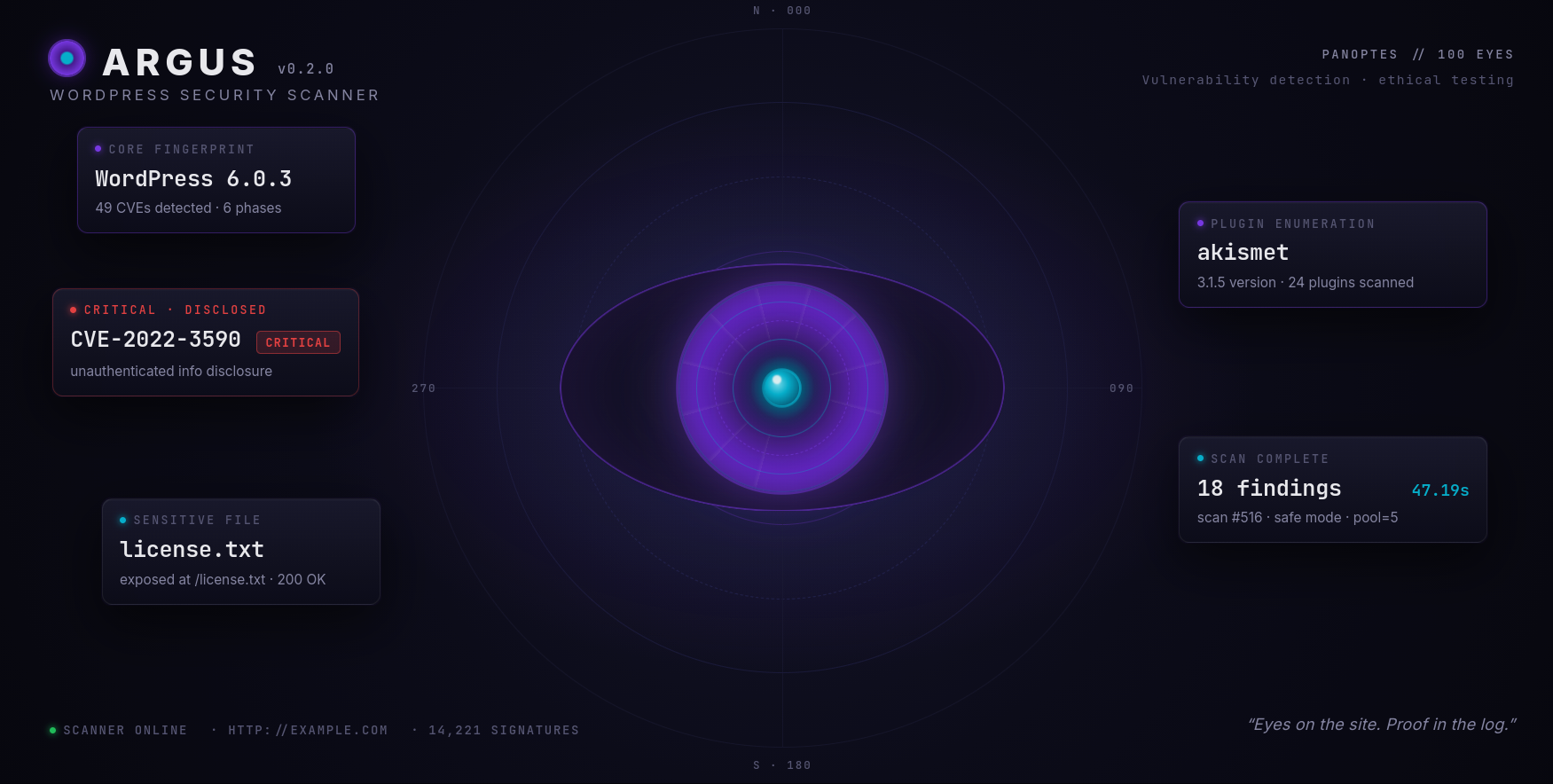
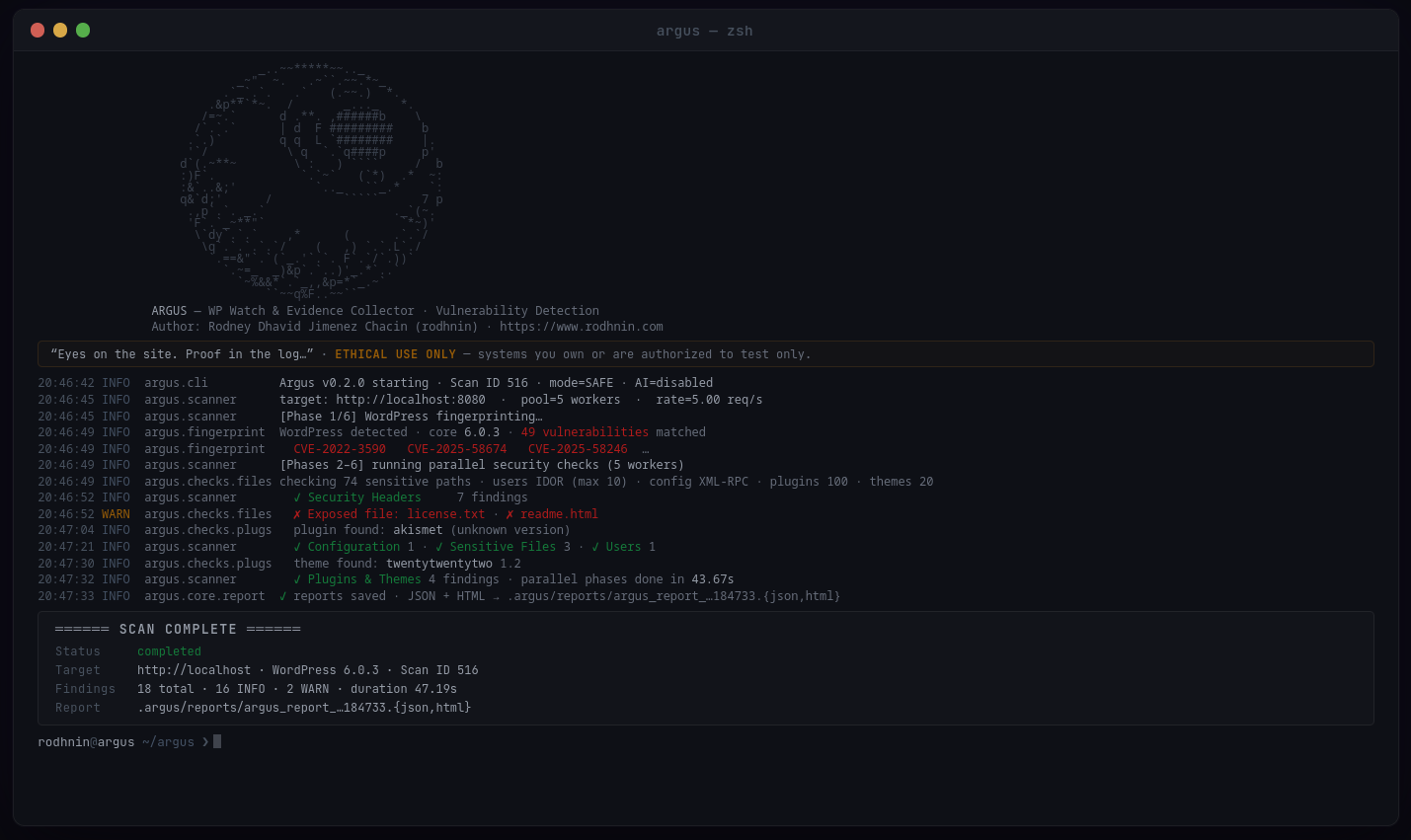
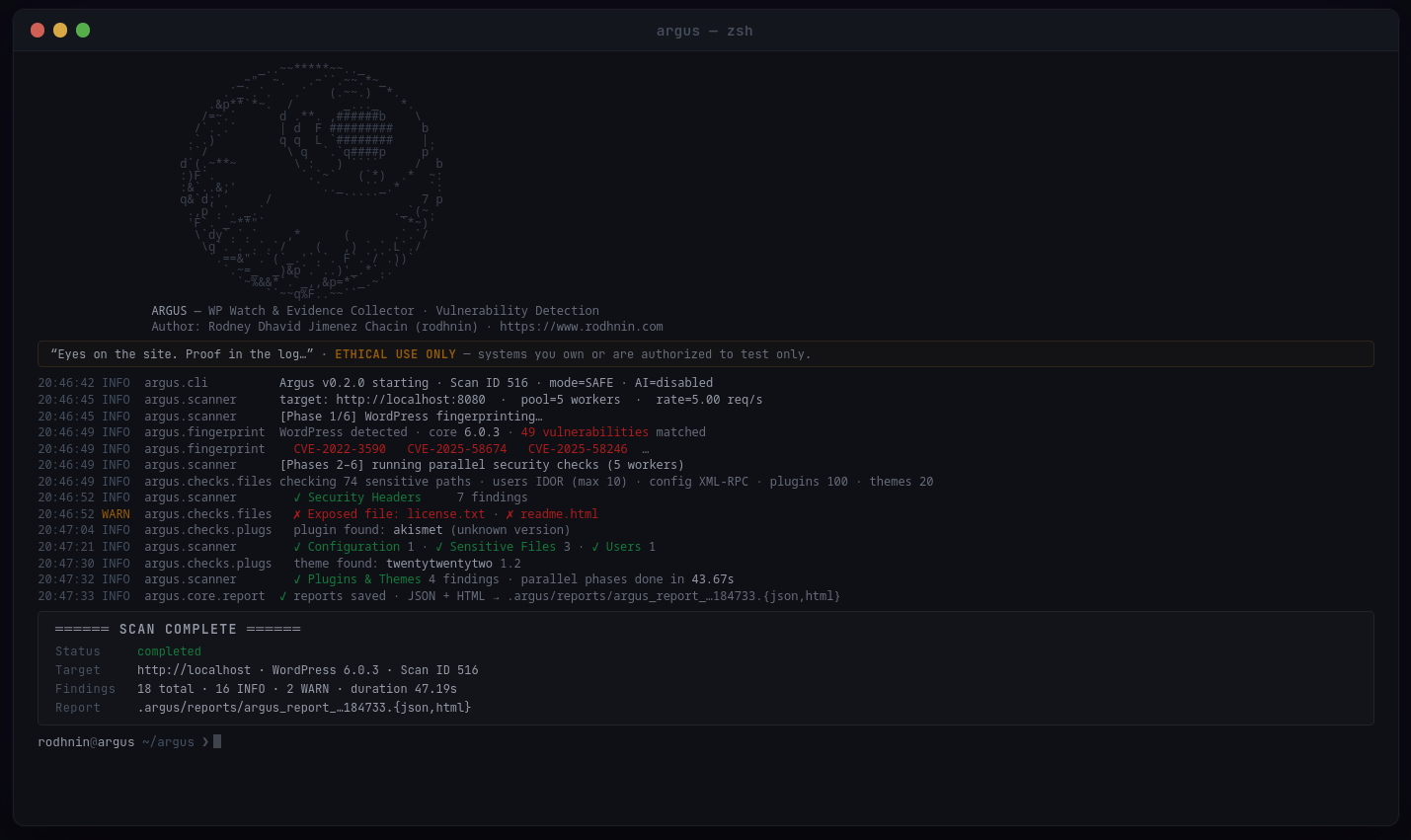
스캔 개요 · 심각도 분류 |
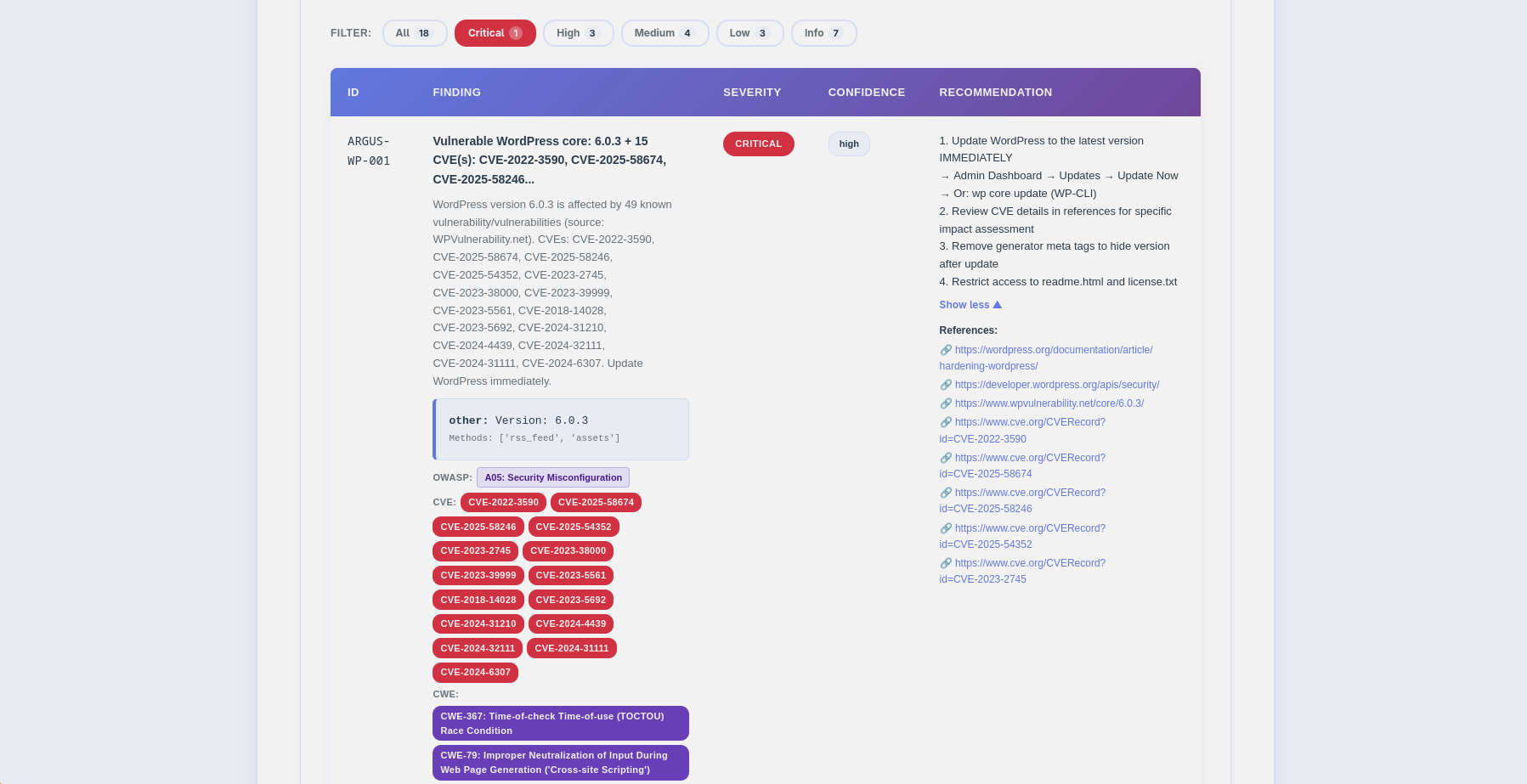
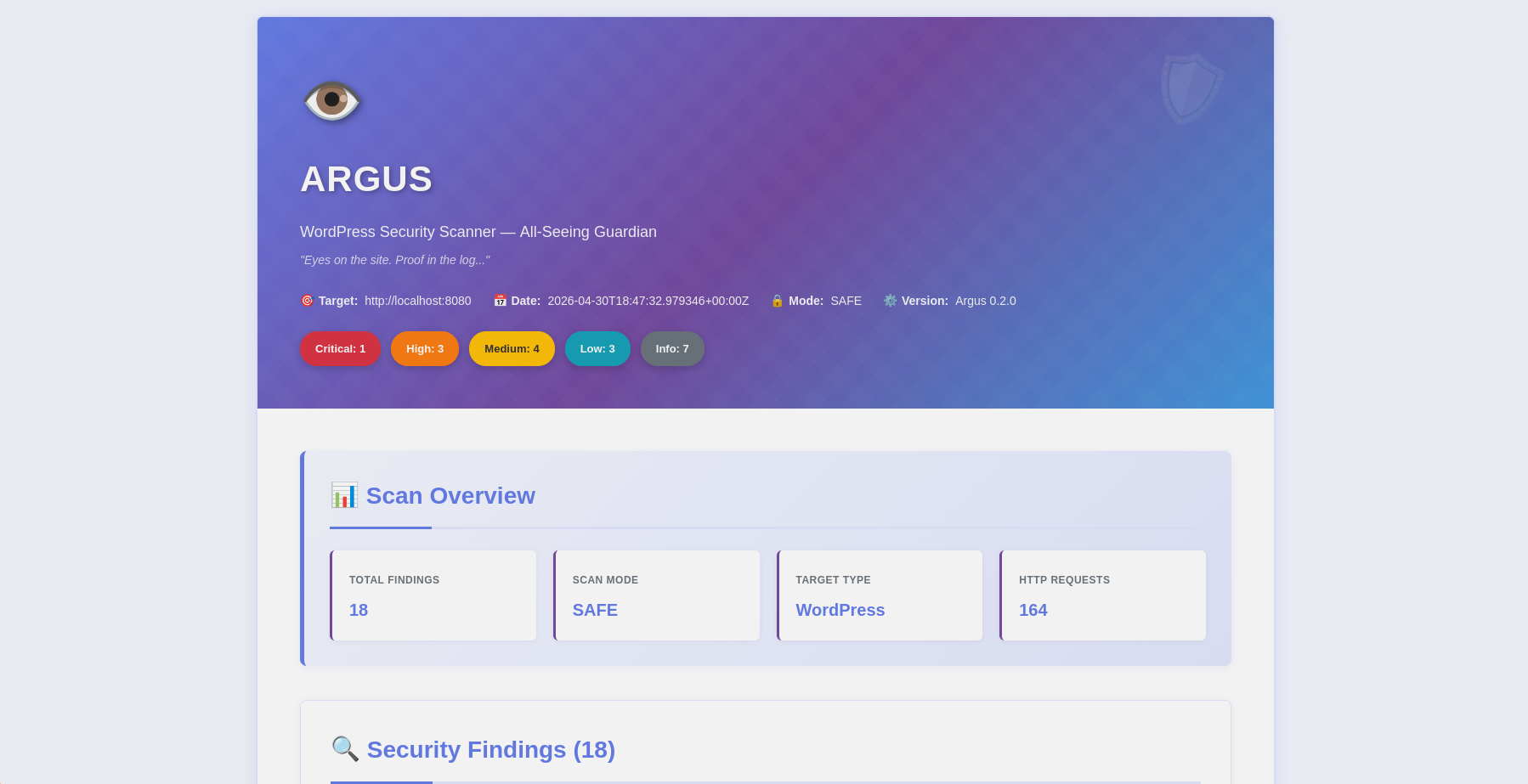
발견 항목 · CVE/OWASP 배지 · 필터 바 |
Argus는 윤리를 최우선으로 하는 프로덕션 환경에 적합한 WordPress 보안 스캐너입니다. 침투 테스터, 보안 연구원, WordPress 관리자를 위해 설계되었으며, 기존 취약점 스캐닝과 최첨단 AI 분석을 결합하여 실행 가능한 인사이트를 제공합니다.
--diff last로 스캔 결과를 비교하여 수정 진행 상황 추적python -m argus --target https://example.com --html
- **다중 방식 핑거프린팅**: 오탐(false positive) 없이 WordPress 4.x-6.x를 탐지합니다
- **실시간 CVE 연관 분석**: 탐지된 모든 플러그인, 테마 및 코어 버전을 WPVulnerability.net과 대조합니다 (무료, API 키 불필요)
- **CVSS 점수 산정**: 각 CVE에 대해 NVD에서 점수를 가져옵니다 (치명적 ≥9.0, 높음 ≥7.0, 중간 ≥4.0)
- **최신 버전 탐지**: WordPress.org API가 탐지된 버전과 함께 현재 안정 버전을 표시합니다
- **OWASP Top 10 2021**: 모든 발견 항목을 OWASP 카테고리(A01–A10)에 매핑합니다
- **동시 스캔**: 빠르고 부담 없는 스캔을 위한 스레드 풀 + 요청 속도 제한
- **스마트 탐지**: WordPress가 아닌 사이트 조기 중단(99% 더 빠른 거부)
- **증거 수집**: HTTP 응답, 헤더 및 파일 내용을 보존합니다
### 📈 스캔 차이 보고서 (v0.2.0)
스캔 간 수정 진행 상황을 추적합니다:```bash
# Compare this scan against the previous one
python -m argus --target https://example.com --html --diff last
# Or reference a specific scan ID
python -m argus --target https://example.com --html --diff 42
diff 섹션에는 다음이 표시됩니다:
필요에 맞는 AI 공급자를 선택하세요:
분석 모드:
--ai-agent): 실시간 NVD CVE 데이터 및 WPVulnerability.net 조회로 강화됨 (무료 API)--ai-compare): 여러 공급자의 분석을 병렬로 나란히 비교--ai-stream): AI가 생성할 때 실시간 토큰 출력--ai-budget): 구성 가능한 중단 임계값으로 비용 상한 적용JSON 보고서 (기계 판독 가능)```json { "tool": "argus", "version": "0.2.0", "target": "https://example.com", "summary": {"critical": 3, "high": 5, "medium": 8, "low": 6, "info": 5}, "findings": [ { "id": "ARGUS-WP-012", "title": "Vulnerable plugin: elementor v3.5.0 (31 CVEs)", "severity": "critical", "owasp": {"id": "A06", "name": "Vulnerable and Outdated Components"}, "latest_version": "3.28.1", "cve": ["CVE-2022-1329", "CVE-2022-29455"], "vulnerabilities": [ {"title": "Elementor < 3.4.8 — Authenticated RCE", "cvss": 8.8, "cve_id": "CVE-2022-1329"} ] } ], "diff": {"ref_scan_id": 41, "new": [...], "fixed": [...], "persisting": [...]} }
**HTML 보고서** (Human-Friendly, v0.2.0)
- 🎨 인라인 CSS를 사용한 반응형 디자인(외부 종속성 없음)
- 🏷️ 색상으로 구분된 심각도 배지 + 대화형 필터 바
- 🔴 NVD로 연결되는 CVE 배지, 보라색 CWE 배지(중복 제거됨)
- 🟣 각 발견 항목별 OWASP Top 10 2021 배지
- 🟢 취약한 구성 요소에 대한 최신 안정 버전 배지
- 📊 CVE별 색상으로 구분된 CVSS 점수 배지(빨강/주황/노랑/초록)
- 📝 펼칠 수 있는 CVE 세부 패널, 펼칠 수 있는 권장 사항
- 🔧 보안 헤더 구성 스니펫(Apache / Nginx / WordPress)
- 📈 차이(diff) 섹션(신규/수정/지속) 및 모드 불일치 경고 포함
- 🤖 탭이 포함된 AI 분석(임원 / 기술 / 에이전트)
- 📱 모바일 지원
### 🔐 동의 토큰 시스템
Argus는 기술을 통해 윤리적 해킹을 시행합니다. 적극적인 스캔 및 AI 분석에는 **소유권 증명**이 필요합니다:```bash
# 1. Generate token
python -m argus --gen-consent example.com
# 2. Place token on your server
echo "verify-abc123..." > .well-known/verify-abc123.txt
# 3. Verify ownership
python -m argus --verify-consent http --domain example.com --token verify-abc123
# 4. Now you can use aggressive mode
python -m argus --target https://example.com --aggressive --use-ai
SQLite 데이터베이스가 모든 것을 추적합니다:
finding_code 인덱스를 사용한 검색 가능한 취약점 데이터베이스ai_costs 테이블(v0.2.0+)을 사용한 분석별 비용 추적--diff 비교가 가능합니다```bashsqlite3 ~/.argos/argos.db "SELECT * FROM v_recent_scans LIMIT 10"
sqlite3 ~/.argos/argos.db "SELECT * FROM v_critical_findings"
---
## 🚀 빠른 시작
### 사전 요구 사항
- **Python 3.11+** (3.12 권장)
- **pip** (Python 패키지 관리자)
- **Docker** (선택 사항, 컨테이너화된 스캔용)
### 설치
**1. 저장소 클론하기**```bash
git clone https://github.com/rodhnin/argus-wp-watcher.git
cd argus-wp-watcher
2. (선택 사항) venv가 아직 설치되어 있지 않은 경우 설치```bash
sudo apt update && sudo apt install -y python3-venv
sudo dnf install python3-virtualenv
brew install [email protected]
**3. 가상 환경 생성 및 활성화**```bash
python3 -m venv .venv
source .venv/bin/activate
# You should see (.venv) in your terminal prompt
4. pip 업그레이드```bash python -m pip install --upgrade pip
**5. 의존성 설치**```bash
python -m pip install -r requirements.txt
6. API 키 구성 (클라우드 AI 사용 시)```bash
export OPENAI_API_KEY="sk-..."
export ANTHROPIC_API_KEY="sk-ant-..."
**7. 설치 확인**```bash
python -m argus --version
# Output: Argus v0.2.0
python -m argus --target https://example.com
python -m argus --target https://example.com --html
python -m argus --target https://example.com --use-ai --html
**🎉 성공!** 보고서는 `~/.argos/reports/`에서 확인하세요.
---
## 📘 사용 가이드
### 기본 스캔```bash
# Safe mode (default) - Non-intrusive checks
python -m argus --target https://example.com
# Generate HTML report
python -m argus --target https://example.com --html
# Increase verbosity for debugging
python -m argus --target https://example.com -vv
python -m argus --target https://example.com --rate 10
python -m argus --target https://example.com --threads 8
python -m argus --target https://example.com --timeout 60
python -m argus --target https://example.com --report-dir ./my-reports
### AI 기반 분석
**1단계: API 키 설정**```bash
export OPENAI_API_KEY="sk-..."
2단계: 설정 테스트```bash
python -m argus.core.ai openai
**3단계: AI 기반 스캔 실행**```bash
# Both analyses in one scan (~$0.006 with default model)
python -m argus --target https://example.com --use-ai --html
# Technical only (for security teams)
python -m argus --target https://example.com --use-ai --ai-tone technical --html
# Executive only (for management)
python -m argus --target https://example.com --use-ai --ai-tone non_technical --html
# Override model or provider at runtime
python -m argus --target https://example.com --use-ai --ai-model gpt-4o --html
python -m argus --target https://example.com --use-ai --ai-provider anthropic --html
# Stream output in real time
python -m argus --target https://example.com --use-ai --ai-stream
# Agent mode with NVD CVE lookup (free)
python -m argus --target https://example.com --use-ai --ai-agent --html
# Compare two providers side by side
python -m argus --target https://example.com \
--use-ai --ai-compare openai,anthropic --html
# Budget cap ($0.05 max)
python -m argus --target https://example.com --use-ai --ai-budget 0.05
python -m argus --gen-consent example.com
python -m argus --verify-consent http
--domain example.com
--token verify-a3f9b2c1d8e4
python -m argus --target https://example.com --aggressive
---
## 🤖 AI 기반 분석
Argus는 **LangChain 1.0.0**을 사용하며 여러 AI 제공업체를 지원하여 보안, 개인정보 보호, 예산 요구 사항에 따라 유연성을 제공합니다.
### 지원 제공업체
#### OpenAI GPT-4 Turbo
**최적: 프로덕션 사용**
- ⭐ 품질: 우수 (5/5)
- ⚡ 속도: 약 35초
- 💰 비용: 스캔당 약 $0.25
- 🔒 개인정보 보호: 표준 (전송 중 데이터 암호화)```bash
export OPENAI_API_KEY="sk-..."
python -m pip install langchain-openai==1.0.0
최적: 강화된 프라이버시
#### Ollama (로컬 모델)
**최적: 완전한 프라이버시**
- ⭐ 품질: 좋음 (3/5)
- 🐢 속도: ~28분 (CPU) 또는 ~75초 (GPU)
- 💰 비용: 무료
- 🔐 프라이버시: 100% 오프라인 (데이터는 기기를 벗어나지 않음)```bash
# Install Ollama: https://ollama.ai
ollama pull llama3.2
python -m pip install "langchain-ollama>=0.3.0,<0.4.0"
자동 정화 Argus는 AI 제공업체로 데이터를 보내기 전에 다음 항목을 자동으로 제거합니다:
옵트인 전용
--use-ai 플래그가 필요합니다최대 개인정보 보호를 위해 Ollama를 로컬에서 사용하세요. 더 느리고 정확도가 낮을 수 있지만, 스캔 데이터가 절대 기기를 벗어나지 않습니다.
옵션 A — CLI 플래그 (런타임 재정의, 파일 편집 불필요)```bash
python -m argus --target https://example.com --use-ai --ai-provider anthropic --ai-model claude-3-5-haiku-20241022
python -m argus --target https://example.com --use-ai --ai-provider ollama --ai-model llama3.2
**옵션 B — `config/defaults.yaml` (영구 기본값 변경)**```yaml
ai:
langchain:
provider: "ollama" # Changed from "openai"
model: "llama3.2" # Ollama model
ollama_base_url: "http://localhost:11434"
v0.3.0에서 제공 예정: 대화형 구성 메뉴(Metasploit 스타일)```bash
argus --show-options argus --set ai.provider=anthropic argus --save-profile privacy-mode
---
## 🧪 안전한 테스트 랩
**⚠️ 서면 허가 없이 프로덕션 사이트를 스캔하지 마세요!**
안전하게 연습하려면 당사의 Docker 랩을 사용하세요:
### 테스트 환경 설정```bash
# Navigate to docker directory
cd docker
# Option 1: Use interactive script
./deploy.sh
# Select option 2 (Testing Lab)
# Option 2: Manual deployment
docker compose -f compose.testing.yml up -d
# Wait for services to start (~60-90 seconds)
docker compose -f compose.testing.yml logs -f wordpress
# Setup WordPress
# Open http://localhost:8080 in your browser
# Complete WordPress installation
# Username: admin
# Password: (choose a strong password)
# Create vulnerable conditions for testing
docker compose -f compose.testing.yml exec wordpress bash -c \
"cp /var/www/html/wp-config.php /var/www/html/wp-config.php.bak"
cd ..
python -m argus --target http://localhost:8080 --html
python -m argus --target http://localhost:8080 --use-ai --html
### 정리```bash
cd docker
docker compose -f compose.testing.yml down -v # -v removes all data
자세한 테스트 시나리오는 docs/TESTING_GUIDE.md를 참조하세요.
직접 소유했거나 명시적인 서면 허가를 받은 시스템만 스캔하세요.
Argus는 오용을 방지하기 위해 기술적 통제를 구현합니다:
대부분의 관할권에서 컴퓨터 시스템에 대한 무단 접근은 불법입니다:
전체 윤리 지침은 docs/ETHICS.md를 참조하세요.
Argus는 대화형 스크립트를 통해 세 가지 배포 모드를 제공합니다:
대화형 배포 스크립트를 사용하세요:```bash cd docker ./deploy.sh
**메뉴 옵션:**
- `1` → 프로덕션 스캐너만
- `2` → 테스트 랩 (WordPress + MariaDB)만
- `3` → 두 환경 모두
- `4` → 모든 서비스 중지
- `5` → 모든 컨테이너와 데이터 제거 (초기화)
---
### 옵션 1: 프로덕션 스캐너
외부 WordPress 사이트를 스캔하기 위해 Argus 스캐너만 배포합니다:```bash
cd docker
./deploy.sh
# Select option 1
또는 수동으로:```bash docker compose up -d
**대상 스캔:**```bash
docker compose exec argus python -m argus --target https://example.com
AI 분석 포함:```bash docker compose exec argus python -m argus --target https://example.com --use-ai
**중지:**```bash
docker compose down
⚠️ 경고: 이 환경은 테스트 목적으로 의도적으로 취약합니다. 공개 인터넷에 노출하지 마십시오!
테스트 랩 배포:```bash cd docker ./deploy.sh
**또는 수동으로:**```bash
docker compose -f compose.testing.yml up -d
배포되는 것:
접속:
테스트 환경 스캔:```bash
python -m argus --target http://localhost:8080
**중지 및 제거:**```bash
docker compose -f compose.testing.yml down -v
프로덕션 스캐너 + 테스트 랩을 함께 배포:```bash cd docker ./deploy.sh
**배포되는 항목:**
- ✅ 프로덕션 Argus 스캐너
- ✅ MariaDB 데이터베이스
- ✅ WordPress 6.0 (취약 버전)
- ✅ 프로덕션 스캐너와 테스트 네트워크 간 연결
**프로덕션 스캐너에서 외부 사이트 스캔:**```bash
docker compose exec argus python -m argus --target https://example.com
프로덕션 스캐너에서 테스트 랩 스캔:```bash docker compose exec argus python -m argus --target http://wordpress
**모두 중지:**```bash
cd docker
./deploy.sh
# Select option 4
~/.argos/ ├── reports/ │ ├── argus_report_example_20251020_143022.json # Machine-readable │ └── argus_report_example_20251020_143022.html # Human-friendly ├── argos.db # SQLite database └── logs/ └── argus.log # Scan logs
### JSON 보고서 스키마```json
{
"tool": "argus",
"version": "0.2.0",
"target": "https://example-wp-site.com",
"date": "2026-04-15T18:45:30Z",
"mode": "safe",
"summary": {
"critical": 1,
"high": 2,
"medium": 4,
"low": 3,
"info": 5
},
"findings": [
{
"id": "ARGUS-WP-012",
"title": "Vulnerable plugin: contact-form-7 v5.3.1 (6 CVEs)",
"severity": "critical",
"confidence": "high",
"owasp": { "id": "A06", "name": "Vulnerable and Outdated Components" },
"latest_version": "5.9.8",
"cve": ["CVE-2021-39346", "CVE-2020-35489"],
"vulnerabilities": [
{
"title": "Contact Form 7 < 5.3.2 — Unrestricted File Upload",
"cvss": 9.8,
"cve_id": "CVE-2020-35489",
"cwe": ["CWE-434"]
}
],
"description": "Plugin 'contact-form-7' v5.3.1 has 6 known CVEs. Highest CVSS: 9.8 (Critical).",
"evidence": {
"type": "path",
"value": "https://example-wp-site.com/wp-content/plugins/contact-form-7/readme.txt",
"context": "Version detected via readme.txt"
},
"recommendation": "Update contact-form-7 to 5.9.8 (latest stable). Immediate action required.",
"affected_component": "contact-form-7 5.3.1"
},
{
"id": "ARGUS-WP-030",
"title": "wp-config.php backup exposed",
"severity": "critical",
"confidence": "high",
"owasp": { "id": "A05", "name": "Security Misconfiguration" },
"description": "WordPress configuration file backup is publicly accessible.",
"evidence": {
"type": "url",
"value": "https://example-wp-site.com/wp-config.php.bak",
"context": "HTTP 200, Size: 2847 bytes"
},
"recommendation": "Remove immediately and rotate all credentials.",
"affected_component": "wp-config.php.bak"
},
{
"id": "ARGUS-WP-050",
"title": "Missing security header: HSTS",
"severity": "medium",
"confidence": "high",
"owasp": { "id": "A02", "name": "Cryptographic Failures" },
"description": "HSTS header is not set.",
"evidence": {
"type": "header",
"value": "Strict-Transport-Security: [not set]",
"context": "Header missing in HTTP response"
},
"recommendation": "Add: Strict-Transport-Security: max-age=31536000; includeSubDomains; preload"
}
],
"diff": {
"ref_scan_id": 41,
"ref_date": "2026-04-10T10:00:00Z",
"ref_mode": "safe",
"current_mode": "safe",
"mode_mismatch": false,
"new": [{ "id": "ARGUS-WP-012", "title": "Vulnerable plugin: contact-form-7...", "severity": "critical" }],
"fixed": [],
"persisting": [{ "id": "ARGUS-WP-050", "title": "Missing security header: HSTS", "severity": "medium" }]
},
"notes": {
"scan_duration_seconds": 26.4,
"requests_sent": 312,
"rate_limit_applied": true,
"scope_limitations": "Scan limited to publicly accessible pages.",
"false_positive_disclaimer": "Manual verification recommended before remediation."
}
}
전체 스키마 참조는 docs/REPORT_FORMAT.md 및
schema/report.schema.json을(를) 참조하세요.
argus-wp-watcher/ │ ├── argus/ # Main application package │ ├── checks/ # Security check modules │ │ ├── config.py # Configuration auditing (XML-RPC, debug, editor) │ │ ├── crawl.py # Web crawl checks (robots, sitemap, comments) [v0.2.0] │ │ ├── files.py # Sensitive file detection (74 safe / 437 aggressive paths) │ │ ├── fingerprint.py # WordPress detection + CVE check for core │ │ ├── headers.py # Security headers analysis │ │ ├── login.py # Login security checks (2FA, CAPTCHA, brute-force) [v0.2.0] │ │ ├── plugins.py # Plugin/theme enumeration + CVE correlation [v0.2.0] │ │ └── users.py # User enumeration │ │ │ ├── core/ # Core infrastructure │ │ ├── ai.py # AI integration (LangChain, streaming, agent, compare) │ │ ├── config.py # Configuration management │ │ ├── consent.py # Consent token system │ │ ├── db.py # SQLite database interface │ │ ├── diff.py # Scan diff computation (new/fixed/persisting) [v0.2.0] │ │ ├── http_client.py # Rate-limited HTTP client │ │ ├── logging.py # Structured logging │ │ ├── owasp.py # OWASP Top 10 2021 mapping for all finding IDs [v0.2.0] │ │ ├── report.py # Report generation (JSON + HTML) │ │ └── vuln_db.py # CVE lookup (WPVulnerability.net + NVD) [v0.2.0] │ │ │ ├── main.py # Entry point │ ├── cli.py # CLI argument parser │ └── scanner.py # Main scan orchestrator │ ├── config/ # Configuration files │ ├── defaults.yaml # Default settings │ └── prompts/ # AI prompt templates │ ├── technical.txt # Technical analysis prompt │ └── non_technical.txt # Executive summary prompt │ ├── db/ │ └── migrate.sql # Database schema │ ├── assets/ │ └── ascii.txt # ASCII art branding │ ├── docker/ # Docker deployment │ ├── compose.yml # Production scanner compose │ ├── compose.testing.yml # Vulnerable WordPress lab │ ├── deploy.sh # Interactive deployment script │ ├── setup-lab.sh # Automated vulnerable lab setup [v0.2.0] │ └── Dockerfile # Production image │ ├── docs/ # Documentation │ ├── AI_INTEGRATION.md # AI setup guide │ ├── CONSENT.md # Consent system details │ ├── DATABASE_GUIDE.md # Database reference │ ├── ETHICS.md # Ethical guidelines │ ├── REPORT_FORMAT.md # Report specification │ ├── ROADMAP.md # Development roadmap │ └── TESTING_GUIDE.md # Safe testing practices │ ├── schema/ │ └── report.schema.json # JSON report schema │ ├── scripts/ │ └── cli-examples.md # CLI usage examples │ ├── templates/ │ └── report.html.j2 # HTML report template │ ├── CHANGELOG.md # Version history ├── LICENSE # MIT License ├── README.md # This file ├── requirements.txt # Python dependencies └── setup.py # Package installer
---
## 🗺️ 로드맵
### v0.1.0 — 초기 릴리스 ✅ (2025년 11월)
**상태:** 🎉 **릴리스됨**
- ✅ 완전한 WordPress 보안 스캐너 (130개 이상 검사)
- ✅ AI 기반 분석 (OpenAI, Anthropic, Ollama)
- ✅ 동의 토큰 시스템 (HTTP + DNS 검증)
- ✅ 전문 보고서 생성 (JSON + HTML)
- ✅ SQLite 영속성 및 스캔 기록
- ✅ 취약한 실습 환경을 포함한 Docker 지원
- ✅ 포괄적인 오류 처리 및 복원력
### v0.2.0 — 향상된 탐지 및 AI ✅ (2026년 5월)
**상태:** 🎉 **릴리스됨**
- ✅ **플러그인 버전 탐지**: 4-메서드 캐스케이드 (HTML ?ver=, readme.txt, changelog, PHP 헤더)
- ✅ **실시간 CVE 연관 분석**: 플러그인, 테마, WP 코어용 WPVulnerability.net (무료, 키 불필요)
- ✅ **CVSS 점수**: NVD API — CVE별 색상으로 구분된 Critical/High/Medium/Low 배지
- ✅ **최신 버전**: WordPress.org API가 감지된 버전과 함께 현재 안정 버전을 표시
- ✅ **OWASP Top 10 2021 매핑**: 모든 발견 사항이 HTML 보고서에서 배지와 함께 A01–A10에 매핑
- ✅ **향상된 HTML 보고서**: CVE/CWE/OWASP/CVSS 배지, 필터 바, 구성 스니펫, 확장 가능한 패널
- ✅ **스캔 차이 보고서**: `--diff last` / `--diff ID` — 신규/수정/지속 및 모드 불일치 경고 포함
- ✅ **공격 모드**: 447개 플러그인, 437개 경로, 로그인 보안 (2FA/CAPTCHA/무차별 대입), 웹 크롤링
- ✅ **AI 비용 추적**: 예산 강제, `~/.argos/costs.json`, DB 비용 레코드 (`ai_costs` 테이블)
- ✅ **AI 스트리밍**: 실시간 토큰 출력을 위한 `--ai-stream`
- ✅ **Multi-LLM 비교**: `--ai-compare openai,anthropic` — 병렬 나란히 비교 분석
- ✅ **AI 에이전트**: 실시간 NVD + WPVulnerability.net 도구 호출을 포함한 `--ai-agent`
### v0.3.0 — 엔터프라이즈 기능 (2026년 3분기)
**초점:** 사용성, 확장성, 대화형 AI
- 🔜 **대화형 구성 관리**: Metasploit 스타일 인터페이스 (`--show-options`, `--set`)
- 🔜 **데이터베이스 CLI**: SQL 불필요 (`argus db scans list`, `argus db findings search`)
- 🔜 **다중 사이트 스캔**: 파일에서 일괄 처리
- 🔜 **AI 채팅 인터페이스**: 대화형 취약점 분석
- 🔜 **CI/CD 통합**: GitHub Actions, Jenkins, GitLab 템플릿
- 🔜 **REST API 서버**: 자동화를 위한 FastAPI 기반 API
**계획된 개선 사항:**
- 동적 공급자 전환을 위한 대화형 구성 (`--set`, `--show-options`)
- 단계 완료 추적 및 진행률 표시
- 데이터베이스 CLI 관리 (SQL 불필요)
### v0.4.0 — 인텔리전스 및 자동화 (2027년 1분기)
**초점:** 머신러닝, 자동화, 고급 AI
- 🔜 **자동 수정**: 자동 교정을 위한 WP-CLI 통합
- 🔜 **ML 기반 탐지**: 이상 탐지, 오탐 감소
- 🔜 **분산 스캔**: 대규모 작업을 위한 워커 노드
- 🔜 **고급 AI 에이전트**: 자율 스캔 계획, 익스플로잇 생성
### Pro 트랙
**기업용 상용 제품**
**진행 중**
자세한 기능 설명은 [ROADMAP.md](https://github.com/rodhnin/argus-wp-watcher/blob/HEAD/ROADMAP.md)를 참조하세요.
---
## 🤝 기여하기
기여를 환영합니다! 어떤 형태든:
- 🐛 버그 리포트
- 💡 기능 요청
- 📝 문서 개선
- 🔧 코드 기여
### 기여 방법
1. **저장소를 포크하세요**
2. **기능 브랜치를 생성하세요** (`git checkout -b feature/amazing-feature`)
3. **변경 사항을 만드세요**
4. **테스트 작성/업데이트** (해당되는 경우)
5. **변경 사항을 커밋하세요** (`git commit -m 'Add amazing feature'`)
6. **브랜치에 푸시하세요** (`git push origin feature/amazing-feature`)
7. **Pull Request를 여세요**
### 개발 환경 설정```bash
# Clone your fork
git clone https://github.com/YOUR-USERNAME/argus-wp-watcher.git
cd argus-wp-watcher
# Install development dependencies
python -m pip install -r requirements.txt
python -m pip install pytest black flake8 mypy
# Run code formatting
black argus/
# Run linting
flake8 argus/
mypy argus/
# Run tests (when available)
pytest tests/
버그를 발견하셨나요? 기능 요청이 있으신가요?
이슈 열기: https://github.com/rodhnin/argus-wp-watcher/issues
다음을 포함해 주세요:
python -m argus --version)python --version)docs/ 디렉토리에서 포괄적인 문서를 확인할 수 있습니다:
이 프로젝트는 MIT 라이선스에 따라 라이선스가 부여됩니다. 자세한 내용은 LICENSE 파일을 참조하세요.``` MIT License
Copyright (c) 2025 Rodney Dhavid Jimenez Chacin
Permission is hereby granted, free of charge, to any person obtaining a copy of this software and associated documentation files (the "Software"), to deal in the Software without restriction, including without limitation the rights to use, copy, modify, merge, publish, distribute, sublicense, and/or sell copies of the Software, and to permit persons to whom the Software is furnished to do so, subject to the following conditions:
The above copyright notice and this permission notice shall be included in all copies or substantial portions of the Software.
THE SOFTWARE IS PROVIDED "AS IS", WITHOUT WARRANTY OF ANY KIND, EXPRESS OR IMPLIED, INCLUDING BUT NOT LIMITED TO THE WARRANTIES OF MERCHANTABILITY, FITNESS FOR A PARTICULAR PURPOSE AND NONINFRINGEMENT.
---
## ⚠️ 면책 고지
**중요:** 이 도구는 **승인된 보안 테스트 전용**입니다.
### 법적 고지
Argus를 사용함으로써 귀하는 다음 사항을 인정하고 동의합니다:
1. ✅ 귀하는 **소유한 시스템** 또는 **명시적 서면 허가**를 받은 시스템만 스캔합니다
2. ✅ 귀하는 **모든 관련 법률** 및 규정을 준수합니다
3. ✅ 귀하는 **무단 접근이 불법**임을 이해합니다 (CFAA, Computer Misuse Act 등)
4. ✅ 저자와 기여자는 오용에 대해 **책임을 지지 않습니다**
5. ✅ 이 소프트웨어는 **"있는 그대로(as-is)" 제공되며 어떠한 종류의 보증도 없습니다**
### 책임 있는 공개
Argus를 사용하여 취약점을 발견한 경우:
- 📧 먼저 사이트 소유자에게 비공개로 연락하세요
- ⏰ 수정할 합리적인 시간을 제공하세요 (일반적으로 90일)
- 🤝 공개 일정을 조율하세요
- 📝 발견 사항을 전문적으로 문서화하세요
### 확실하지 않다면
**스캔하지 마세요.** 권한이 있는지 확실하지 않다면, 아마 권한이 없는 것입니다.
---
## 🙏 감사의 말
Argus는 거인의 어깨 위에 서 있습니다:
- **WordPress.org** — 문서화와 모범 사례를 위한 보안 팀
- **WPScan** — 취약점 연구 및 데이터베이스
- **OWASP** — 보안 표준 (Top 10, 테스팅 가이드)
- **LangChain** — 지능형 분석을 지원하는 AI 프레임워크
- **Anthropic & OpenAI** — 취약점 분석을 위한 AI 모델
- **Ollama** — 개인정보 보호 중심 스캐닝을 위한 로컬 AI 추론
- **Python Community** — 놀라운 라이브러리와 도구
윤리적 해킹을 실천하고 장려하는 모든 보안 연구자분들께 특별히 감사드립니다.
---
## 👤 저자
**Rodney Dhavid Jimenez Chacin (rodhnin)**
- 🌐 웹사이트 및 연락처: [rodhnin.com](https://rodhnin.com)
- 💼 GitHub: [@rodhnin](https://github.com/rodhnin)
- 🔗 프로젝트: [argus-wp-watcher](https://github.com/rodhnin/argus-wp-watcher)
질문, 피드백 또는 협업 문의가 있으시면 [rodhnin.com](https://rodhnin.com)을 방문하여 연락해 주세요.
---
## 💬 커뮤니티
- **Discussions**: [GitHub Discussions](https://github.com/rodhnin/argus-wp-watcher/discussions)
- **Issues**: [GitHub Issues](https://github.com/rodhnin/argus-wp-watcher/issues)
- **Releases**: [GitHub Releases](https://github.com/rodhnin/argus-wp-watcher/releases)
---
<div align="center">
**전 세계 윤리적 해커와 WordPress 관리자를 위해 ❤️로 제작되었습니다**
⭐ **유용하게 사용하셨다면 이 저장소에 Star를 남겨주세요!** ⭐
[버그 신고](https://github.com/rodhnin/argus-wp-watcher/issues) • [기능 요청](https://github.com/rodhnin/argus-wp-watcher/issues) • [문서](https://github.com/rodhnin/argus-wp-watcher/blob/HEAD/docs/)
---
_Argus v0.2.0 — 2026년 5월_
</div>
| 검사 항목 | 안전 모드 | 공격 모드 | 설명 |
|---|
| WordPress 탐지 | ✅ | ✅ | 메타 태그, readme, RSS, 에셋을 통한 버전 핑거프린팅 |
| 플러그인 및 테마 | 100개 플러그인 | 447개 플러그인 | 버전 탐지(4가지 방법) + 실시간 CVE/CVSS 연동 |
| 민감한 파일 | 74개 경로 | 437개 경로 | wp-config 백업, .env, SQL 덤프, .git, 디버그 로그, PHP 도구 |
| 사용자 열거 | 3가지 방법 | 6가지 방법 | 작성자 IDOR, REST API, HTML 파싱 + oEmbed, 로그인 오류, XML-RPC |
| 보안 헤더 | ✅ | ✅ | HSTS, CSP, X-Frame-Options, Referrer-Policy, Permissions-Policy |
| 잘못된 구성 | ✅ | ✅ | XML-RPC, 디버그 모드, 디렉터리 목록 노출, 파일 편집기 |
| 로그인 보안 | ❌ | ✅ | 2FA, CAPTCHA, 무차별 대입 공격 방어, 공개 가입, 비밀번호 정책 |
| 웹 크롤링 | ❌ | ✅ | robots.txt, sitemap.xml, HTML 주석, 링크 발견(깊이 1) |
| 공급자 | 최적 용도 | 속도 | 스캔당 비용 | 개인정보 |
|---|
| OpenAI gpt-4o-mini (기본값) | 최고의 가성비 | ⚡ ~40s | 💰 ~$0.006 | 🔒 표준 |
| OpenAI gpt-4o | 프로덕션 품질 | ⚡ ~40s | 💰 ~$0.05 | 🔒 표준 |
| Anthropic claude-3-5-haiku | 개인정보 보호 중점 | ⚡ ~55s | 💰 ~$0.02 | 🔒 강화 |
| Ollama (로컬) | 완전한 개인정보 보호 | 🐢 ~28min | 💰 무료 | 🔐 100% 오프라인 |
| 모드 | 점검 | 동의 필요 | 속도 제한 |
|---|
| 안전 | 비침습적 | ❌ 아니요 | 5 req/s |
| 공격적 | 심층 스캔 | ✅ 예 | 10 req/s |
| AI 분석 | 취약점 분석 | ✅ 예 | N/A |
| Document | Description |
|---|
| AI_INTEGRATION.md | 완전한 AI 설정 가이드 (3개 제공업체 모두) |
| CONSENT.md | 동의 토큰 시스템 기술 세부사항 |
| DATABASE_GUIDE.md | SQLite 스키마, 쿼리, 관리 |
| ETHICS.md | 법적 프레임워크 및 윤리 지침 |
| REPORT_FORMAT.md | JSON 스키마 및 HTML 사양 |
| TESTING_GUIDE.md | Docker 랩을 이용한 안전한 테스트 |
| ROADMAP.md | 향후 기능 및 개발 계획 |