 redrays-io/ws_racecondition_poc
웹소켓에서의 경쟁 조건(Race Condition)을 시연하기 위한 간단한 PoC

정보 기술 분야에서 데이터 신뢰성과 무결성을 보장하는 것은 매우 중요하며, 특히 수백만 명의 사용자와 테라바이트 단위의 데이터가 얽혀 있는 경우에는 더욱 그렇습니다. 그러나 소프트웨어 시스템이 복잡해짐에 따라 경쟁 조건과 같은 문제가 발생할 수 있으며, 이는 시스템 운영에 중대한 영향을 미치고 예측할 수 없는 결과를 초래할 수 있습니다.
경쟁 조건은 멀티태스킹 프로그램에서 둘 이상의 스레드나 프로세스가 동기화 없이 공유 데이터나 리소스를 동시에 수정하려고 할 때 발생하는 오류입니다. 이는 작업 실행 순서가 어떤 스레드나 프로세스가 먼저 완료되는지에 따라 달라지기 때문에 예상치 못하고 예측 불가능한 결과를 초래할 수 있습니다. 경쟁 조건을 탐지하는 것은 그 예측 불가능한 특성 때문에 소프트웨어 시스템에서 어려운 문제입니다.
인터넷에는 고전적인 경쟁 조건에 관한 수많은 자료가 있지만, 이 글에서는 웹소켓에서도 경쟁 조건이 발생할 수 있는지 살펴봅니다.
웹소켓은 사용자의 웹 브라우저와 웹 서버 사이에 열린 양방향 연결을 제공함으로써 웹 애플리케이션의 상호작용을 크게 향상시키는 최첨단 기술입니다. 이 원활한 연결은 끊임없이 새로운 HTTP 요청을 시작할 필요 없이 데이터 교환을 가능하게 하여 대화형 애플리케이션을 만드는 데 이상적입니다.
개념을 설명하기 위해 이 글에는 PostgreSQL 데이터베이스와 상호작용하는 웹소켓 서버를 나타내는 Java 코드가 포함되어 있습니다. 이 서버는 Java-WebSocket 라이브러리를 사용하여 웹소켓 연결을 처리하며 다음과 같은 작업을 수행합니다:
프로그램을 실행한 후 Java 코드는 데이터베이스에 연결하고 "example" 테이블이 존재하는지 확인합니다. 존재하지 않으면 테이블을 생성하고 임의의 데이터를 삽입합니다:
가장 흥미로운 코드는 "onMessage" 함수에서 찾을 수 있습니다.
public static int a = 0;

@Override
public void onMessage(WebSocket conn, String message) {
    if (a == 0) {
        try {
            // some activity with db
            int rowCount = getCountFromExampleTable();

        } catch (SQLException e) {
            System.out.println("Error executing query: " + e.getMessage());
        }
        conn.send("Echo: " + message);
        a = a + 1;
        System.out.println(a);
    }
}
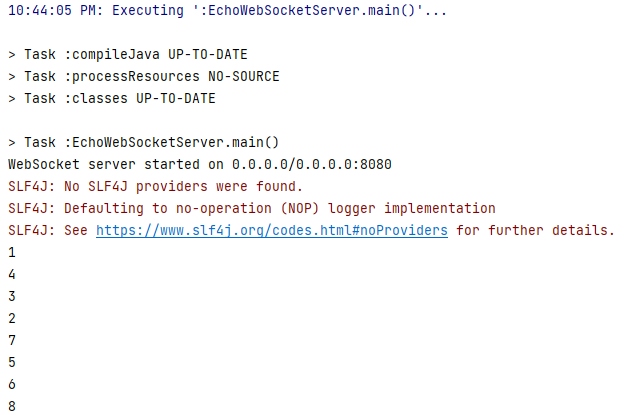
0으로 초기화된 전역 변수 "a"가 있습니다. 클라이언트가 서버에 연결하여 메시지를 보내면 "id == 0"인지 확인하여 이 함수가 이미 실행되었는지 판단합니다. 그렇지 않으면 "example" 테이블에서 행 수를 선택하는 간단한 SQL 명령이 실행됩니다. 그런 다음 "a"가 1 증가하고 그 값이 출력됩니다. 이론적으로 이 함수는 2번 실행되어서는 안 됩니다.
클라이언트와 관련하여 두 가지 유형의 클라이언트가 생성되었습니다: "WebSocketParallel_Success"
package io.redrays.ws.concept.client;

import org.java_websocket.client.WebSocketClient;
import org.java_websocket.handshake.ServerHandshake;

import java.net.URI;
import java.net.URISyntaxException;
import java.util.ArrayList;
import java.util.List;
import java.util.concurrent.ExecutorService;
import java.util.concurrent.Executors;
import java.util.concurrent.TimeUnit;

public class WebSocketParallel_Success {

    public static void main(String[] args) {
        // Define the WebSocket server URI
        String serverUri = "ws://127.0.0.1:8080";

        // Number of WebSocket clients to create
        int numClients = 100;

        // Create an ExecutorService to manage multiple WebSocket client threads
        ExecutorService executor = Executors.newFixedThreadPool(numClients);

        // Create a list to store WebSocket client instances
        List<WebSocketClient> clients = new ArrayList<>();

        // Loop to create and configure multiple WebSocket clients
        for (int i = 0; i < numClients; i++) {
            int clientId = i + 1;
            try {
                // Create a WebSocket client for each connection
                WebSocketClient webSocketClient = new WebSocketClient(new URI(serverUri)) {
                    @Override
                    public void onOpen(ServerHandshake handshakedata) {
                        // Handle WebSocket connection opened event
                        System.out.println("Client " + clientId + " connected to the WebSocket server");
                        this.send("Hello, WebSocket server! From client " + clientId);
                    }

                    @Override
                    public void onMessage(String message) {
                        // Handle incoming WebSocket messages
                        System.out.println("Client " + clientId + " received message: " + message);
                    }

                    @Override
                    public void onClose(int code, String reason, boolean remote) {
                        // Handle WebSocket connection closed event
                        System.out.println("Client " + clientId + " connection closed: " + reason);
                    }

                    @Override
                    public void onError(Exception ex) {
                        // Handle WebSocket error
                        System.out.println("Client " + clientId + " error occurred: " + ex.getMessage());
                    }
                };

                // Add the WebSocket client to the list
                clients.add(webSocketClient);

                // Connect the WebSocket client in a separate thread
                executor.submit(webSocketClient::connect);

            } catch (URISyntaxException e) {
                System.out.println("Invalid WebSocket server URI: " + e.getMessage());
            }
        }

        // Shutdown the executor after all tasks are submitted
        executor.shutdown();

        // Wait for all WebSocket client threads to complete
        try {
            executor.awaitTermination(Long.MAX_VALUE, TimeUnit.NANOSECONDS);
        } catch (InterruptedException e) {
            System.out.println("Interrupted while waiting for tasks to complete: " + e.getMessage());
        }
    }
}
그리고 "WebSocketParallel_Failed"입니다.
package io.redrays.ws.concept.client;

import org.java_websocket.client.WebSocketClient;
import org.java_websocket.handshake.ServerHandshake;

import java.net.URI;
import java.net.URISyntaxException;
import java.util.concurrent.ExecutorService;
import java.util.concurrent.Executors;
import java.util.concurrent.TimeUnit;

public class WebSocketParallel_Failed {

    public static void main(String[] args) {
        String serverUri = "ws://127.0.0.1:8080"; // WebSocket server URI
        int numParallelRequests = 285; // Number of parallel WebSocket requests

        try {
            WebSocketClient webSocketClient = new WebSocketClient(new URI(serverUri)) {

                // This method is called when the WebSocket connection is successfully opened.
                @Override
                public void onOpen(ServerHandshake handshakedata) {
                    System.out.println("Connected to the WebSocket server");

                    // Create a fixed thread pool to manage parallel requests
                    ExecutorService executor = Executors.newFixedThreadPool(numParallelRequests);

                    for (int i = 0; i < numParallelRequests; i++) {
                        int messageId = i + 1;
                        executor.submit(() -> {
                            this.send("Hello, WebSocket server! Message ID: " + messageId);
                            System.out.println("Sent message with ID: " + messageId);
                        });
                    }

                    // Shutdown the executor after all tasks are submitted
                    executor.shutdown();

                    // Wait for the tasks to complete
                    try {
                        executor.awaitTermination(Long.MAX_VALUE, TimeUnit.NANOSECONDS);
                    } catch (InterruptedException e) {
                        System.out.println("Interrupted while waiting for tasks to complete: " + e.getMessage());
                    }
                }

                // This method is called when a WebSocket message is received.
                @Override
                public void onMessage(String message) {
                    System.out.println("Received message: " + message);
                }
