 quahac/azure-ad-password-checker
Azure AD 비밀번호 검사기

Azure AD 환경에서 특별한 권한 없이도 사용자가 MFA(다단계 인증)를 비활성화했는지 확인할 수 있습니다. 이는 계정 생성 날짜와 마지막 비밀번호 변경 날짜를 분석하여 확인할 수 있습니다.
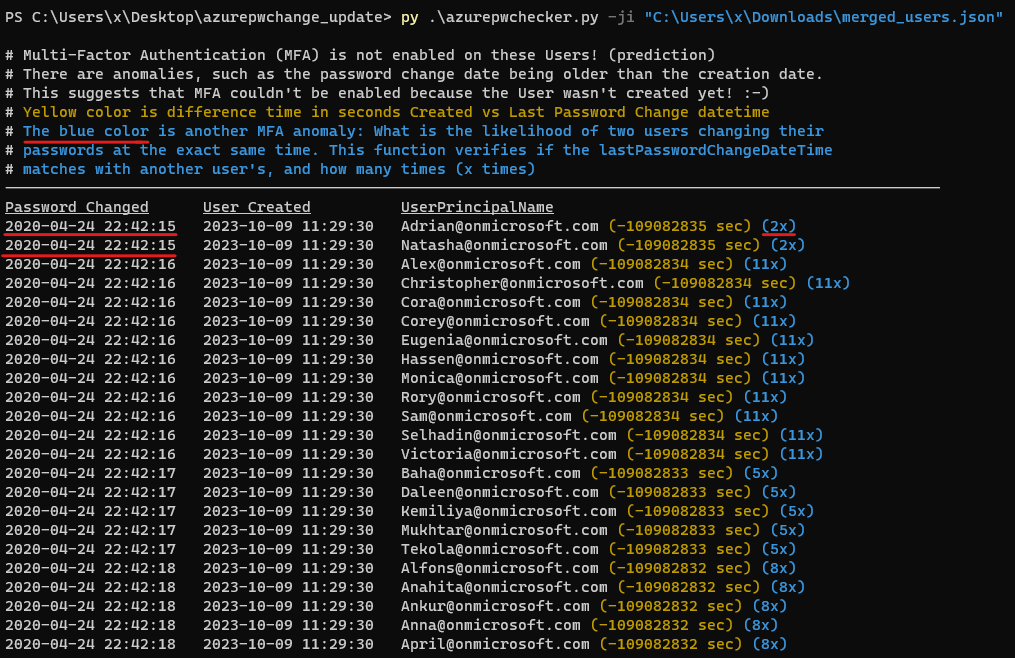
계정의 생성 날짜와 시간이 마지막 비밀번호 변경 날짜와 시간과 일치한다면, 계정 생성 이후 사람의 상호작용이 없었고 사용자가 MFA(다단계 인증)를 활성화하거나 비밀번호를 변경하지 못했음을 나타낼 수 있습니다. 또한 비밀번호 변경 날짜가 생성 날짜보다 이른 것과 같은 다른 '이상 징후'도 있습니다. 이는 사용자가 아직 생성되지 않았기 때문에 MFA(다단계 인증)를 활성화할 수 없었음을 시사합니다!
2023-10-16 업데이트:
2024-02-18 업데이트:
이 정보는 레드 팀과 블루 팀 모두를 위해 설계된 잠재적인 보안 위험을 식별하는 데 유용할 수 있습니다.
이 도구에는 --code-javascript 옵션을 사용하여 추출한 roadrecon 데이터베이스 파일 또는 JSON 파일이 필요합니다. Roadrecon 도구는 dirkjanm이 개발했으며 github https://github.com/dirkjanm/ROADtools 에서 다운로드하거나 pip install roadrecon 명령으로 설치할 수 있습니다.
사용 방법:
python3 azurepwchecker.py
usage: azurepwchecker.py [-h] [--roadrecon-dump] [--roadrecon-dump-mfa] [-d DB] [-m] [-l] [-ll] [-lll] [-la] [-lo]
                         [-ji JSON_INPUT] [-c]

Azure AD Password Checker - This is a parser for generated JSON file or the roadrecon database file designed for use by both red and blue teams.
Database can be created when using --code-javascript option to extract 'merged_users.json' file with be created to later input this file with --json-input argument.
And roadrecon generated roadrecon.db file can be used! roadrecon is developed by https://github.com/dirkjanm credits to him!

options:
  -h, --help            show this help message and exit
  -d DB, --db DB        Specify the path to the 'roadrecon.db' database file, default is this location
  -m, --mfa-list        User Accounts without MFA (No privileged user required)! This argument helps identify user
                        accounts that have not enabled Multi-Factor Authentication (MFA). If an account's creation
                        date and time match its last password change date and time, it may indicate that no human
                        interaction has occurred since the account was created, and the user has not been able to
                        enable MFA or change their password. And there are other 'anomalies' such as the password
                        change date being older than the creation date. This suggests also that Multi-Factor
                        Authentication (MFA) couldn't be enabled because the User wasn't created yet! :-]
  -mo OUTFILE, --outfile OUTFILE
                        Output users with MFA anomalies to file
  -l, --pw-month        User accounts that had their passwords changed last month
  -ll, --pw-year        User accounts that had their passwords changed last year
  -lll, --pw-older      User accounts that haven't changed their passwords in a long time, oldest first
  -la, --admin          User accounts that are members of 'Admin' named groups, including 'Global Reader'
  -lo, --out-of-hours   User password change that occurred outside of office hours, specifically between 5:00 PM
                        (17:00) and 8:00 AM (08:00) on weekdays, as well as on Saturdays and Sundays
  -ji JSON_INPUT, --json-input JSON_INPUT
                        Provide the JSON file imported from your web browser's console using JavaScript. For
                        'createdDateTime' and 'lastPasswordChange' details, ensure you download the JSON output using
                        the '--code-javascript' option.
  -c, --code-javascript
                        Perform extraction even if 'azurepwchecker.py' or 'roadrecon' is unavailable. This script
                        enables extraction through the JavaScript console of a web browser. To proceed, ensure you
                        have a valid account to log in at https://portal.azure.com/#view/Microsoft_AAD_UsersAndTenants
                        /UserManagementMenuBlade/~/AllUsers or an active session on a computer. Copy and paste the
                        provided JavaScript code into the browser's console. Once the session is validated and you
                        have the necessary permissions, a JSON file named 'merged_users.json' will be generated. You
                        can then import it using the following command as example: 'azurepwchecker.py --json-input
                        merged_users.json -m'
  -v, --version         show program's version number and exit

run roadrecon first:
  (Run the following command to install the tool "pip install roadrecon)"

  --roadrecon-dump      "roadrecon dump" command or do it with roadrecon
  --roadrecon-dump-mfa  "roadrecon dump --mfa" command (requires privileged access) or do it with roadrecon
azurepwchecker.py --code-javascript 명령을 실행하고 복사하거나 폴더에 js 파일을 생성하세요:제공된 스크립트를 사용하여 사용자 목록과 계정 정보를 검색하려면 다음 단계를 따르세요.
Azure Portal에 로그인
사용자 관리에 접근
개발자 도구 열기
F12를 눌러 개발자 도구를 엽니다.스크립트 실행
UsersList 및 UserInfo 검색
병합된 사용자 정보 다운로드
merged_users.json 파일이 생성됩니다.Azure AD 비밀번호 검사기에서 실행
azurepwchecker.py --json-input merged_users.json예시 보기:
소개 보기:
2023-10-16 업데이트:
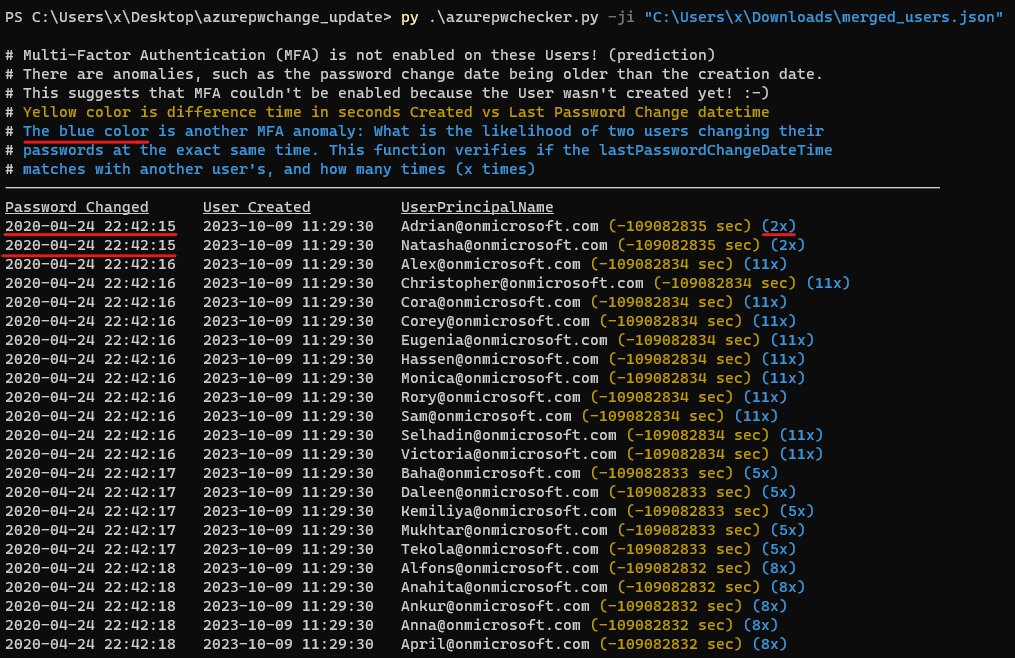
Azure Portal에서 사용자 목록을 생성한 다음 azurepwchecker.py --json-input merged_users.json 명령으로 가져오려면 --code-javascript 인수를 사용하는 방법:
2024-02-13 업데이트:
@dafthack가 개발한 GraphRunner의 수정 버전을 업로드했습니다. 이 수정된 버전에는 "피해자" 기기에서 HAR 파일을 직접 읽을 수 있는 새로운 기능이 추가되었습니다. 이 새로운 기능은 다양한 권한 또는 범위에 접근하기 위한 액세스 토큰을 확인하고 검사하는 데 도움이 됩니다. 또한 액세스 토큰이 만료된 경우 이 버전에서는 새 액세스 토큰을 생성하기 위해 리프레시 토큰을 사용할 수 있습니다. 이 과정은 시간에 민감하지만, 이미 Office365 환경에 로그인한 상태라면 HAR 파일에 있는 세션 토큰만 필요하므로 사용자 이름과 비밀번호가 필요 없어집니다.
코드가 다소 정리되지 않아 보일 수 있다는 점을 양해 부탁드립니다. 제 전문 분야가 주로 JavaScript는 아니기 때문에 코드를 정리하는 것보다 새로운 기능을 추가하는 데 중점을 두었습니다.
웹 브라우저에서 제공되는 개발자 도구를 사용하여 HAR 파일을 다운로드할 수 있습니다. 대부분의 브라우저에서는 F12를 눌러 개발자 도구를 연 다음 '네트워크' 탭으로 이동하여 웹페이지를 새로 고친 후 HAR 파일을 저장하면 됩니다: video
제공된 인터페이스를 통해 HAR 파일을 업로드하세요. 업로드가 완료되면 다양한 액세스 토큰을 탐색하여 범위를 포함한 세션 세부 정보를 분석할 수 있습니다. 빨간색으로 표시된 토큰은 만료되었음을 나타냅니다. GraphRunner는 필요할 때 리프레시 토큰을 사용하여 새롭고 유효한 액세스 토큰을 생성하는 기능도 지원합니다: video
전체 사용자 데이터를 JSON 파일로 다운로드하고, 계정의 MFA 이상 징후를 감지하며, 이러한 이상 징후 목록을 다운로드할 수 있는 기능이 추가되었습니다: video
